3. Accessing the Database
The lowest layer in EA is that of its database. When you first start with EA you will most likely deal with EAP files. A simple though not official fact is: EAP is MS Access. So if you want to play around just open one of those EAP files and see what MS Access is telling you. If you are using a Corporate license you will most likely use a more advanced SQL server. Be it MS SQL Server, Oracle, MySQL or whatever. In that case you need some client software to perform manipulations.
Before doing so you should get familiar with the database in a more simple way.
3.1 Inspecting EA’s Tables
The most simple way is to open the respective EA repository with EA itself.
Use the EAExample.EAP which comes with your EA installation. Now
press Ctrl-F to open the search window. Click the Builder button and
select the SQL tab. Type the text
1 SELECT * FROM t_and press Ctrl-Blank. You should now be presented with the following:
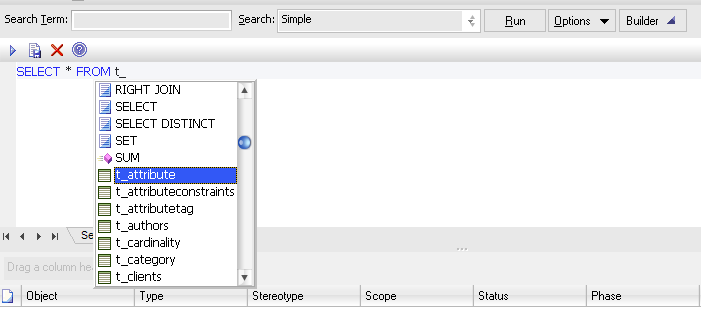
As you can see this is a list of tables which reside in EA’s
database. For a start let’s choose one of the important tables:
t_object. After pressing the Run button or the little triangle top
left you will get a list of all elements present in the repository.
Obviously the column Object_Type is the type of an element and Name its
name. Simple! You might go on with t_package to see details of all
packages in the repository.
3.2 Ways to Query Tables
The clean way to query the tables is the API. This is recommended for most cases. However, there’s also a demand to be able to access these data where the API is simply too slow. EA is kind of object oriented in how it queries its database. That means for a global change (like changing the status) it will issue single UPDATEs instead of a compound. Of course you can query the database much faster with an intelligent query than any iterative API calls.
Anticipating a simple structure element of the table containing the elements (t_object)
the best way to retrieve an element is by
1 elem = Repository.GetElementByID(4711);
which yields the ‘same’ element as
1 SELECT * FROM t_object WHERE Object_ID = 4711where just the API object data are cooked while those of the SQL are raw. So that’s no wizardry. But imagine you need all elements with a certain stereotype. While in the API this would need quite some programming effort, the SQL is simple:
1 SELECT * FROM t_object WHERE stereotype = "stereo"Now it’s upon your imagination what you can do by joining different tables in SQL. A few sample can be found in this chapter at the end of this book.
- Note:
- This window accepts only SELECT statements. Any other SQL (like e.g. UPDATE) is silently ignored!
3.3 A List of All Tables
| Name | Description |
|---|---|
| t_attribute | Attributes defined for elements |
| t_attributeconstraints | Constraints for attributes |
| t_attributetag | Tagged values for attributes |
| t_authors | List of authors defined with Settings/Project Types/People/Project Author(s)
|
| t_cardinality | List of cardinalities defined with Settings/UML Types/Cardinality Value
|
| t_category | Legacy ⁈ |
| t_clients | List of authors defined with Settings/Project Types/People/Project Clients
|
| t_complexitytypes | Legacy ⁈ |
| t_connector | Connectors between elements |
| t_connectorconstraint | Constraints for connectors |
| t_connectortag | Tagged values for connectors |
| t_connectortypes | This table is used for the connector metatypes shown in the profile dialog. Also t_connector.Connector_Type can contain just elements from this table. |
| t_constants | Various key/value pairs in misc. dialogues |
| t_constrainttypes | List of constraint types defined with Settings/Project Types/General/Constraint
|
| t_datatypes | Definitions from Settings/Code Datatypes
|
| t_diagram | Diagram properties |
| t_diagramlinks | Non-standrad links appearing in diagrams |
| t_diagramobjects | Diagram elements |
| t_diagramtypes | Legacy ⁈ |
| t_document | Contents of linked documents, baselines and more |
| t_ecf | List of complexity factors defined with Settings/Project Types/Estimation Factors/Environment...
|
| t_efforttypes | List of effort factors defined with Settings/Project Types/Project Indicators/Effort
|
| t_files | ⁈ |
| t_genopt | Various options |
| t_glossary | The system glossary |
| t_html | Some HTLM strings for the doc generation |
| t_image | The alternate pictures defined with Settings/Images...
|
| t_implement | Legacy ⁈ |
| t_issues | The system issues defined with View/More Project Tools/Project Information/Issues
|
| t_lists | Status Types defined with various Settings/Project Types/General Types/... tabs |
| t_mainttypes | ⁈ |
| t_method | Legacy ⁈ |
| t_metrictypes | List of metric factors defined with Settings/Project Types/Project Indicators/Metric
|
| t_object | Basic UML elements |
| t_objectconstraint | Constraints for elements |
| t_objecteffort | Something related to project estimation |
| t_objectfiles | The files linked in the properties/files for elements |
| t_objectmetrics | Something related to project estimation |
| t_objectproblems | ⁈ |
| t_objectproperties | Tagged values |
| t_objectrequires | The internal requirements defined for elements |
| t_objectresource | Something related to project estimation |
| t_objectrisks | Something related to project estimation |
| t_objectscenarios | The use case scenarios |
| t_objecttests | Tests defined for elements |
| t_objecttrx | ⁈ |
| t_objecttypes | EA internal rendering support |
| t_ocf | Something related to project estimation |
| t_operation | Operations for elements |
| t_operationparams | Parameters for operations |
| t_operationposts | Postconditions for operations |
| t_operationpres | Preconditions for operations |
| t_operationtag | Tagged values for operations |
| t_package | Package container |
| t_palette | Legacy ⁈ |
| t_paletteitem | Legacy ⁈ |
| t_phase | Legacy ⁈ |
| t_primitives | Code primitive types |
| t_problemtypes | Problem types defined with Settings/Project Types/Maintenance/Problem Types
|
| t_projectroles | Values from Settings/People/Project Roles
|
| t_propertytypes | Predefined tagged values |
| t_requiretypes | List of requirement types defined with Settings/Project Types/General/Requirements
|
| t_resources | List of resource defined with Settings/Project Types/People/Resources
|
| t_risktypes | List of risk factors defined with Settings/Project Types/Project Indicators/Risk
|
| t_roleconstraint | Legacy ⁈ |
| t_rtf | EA internal doc generation settings |
| t_rtfreport | Some doc generation settings |
| t_rules | Related to model validation ⁈ |
| t_scenariotypes | List of scenario types defined with Settings/Project Types/General/Scenario
|
| t_script | Local scripts |
| t_secgroup | Security groups |
| t_secgrouppermission | Security group permissions |
| t_seclocks | Security locks |
| t_secpermission | ⁈ |
| t_secpolicies | Security settings |
| t_secuser | Security users |
| t_secusergroup | Security user/group assignments |
| t_secuserpermission | Security user permissions |
| t_snapshot | Audit log |
| t_statustypes | List of status types defined with Settings/Project Types/General/Status
|
| t_stereotypes | Stereotypes |
| t_taggedvalue | Smorgasbord for WSDL model elements. These are NOT the tagged values. Instead use t_objectproperties |
| t_tasks | The system tasks |
| t_tcf | List of complexity factors defined with Settings/Project Types/Estimation Factors/Technical...
|
| t_template | RTF templates ⁈ |
| t_testclass | ⁈ |
| t_testplans | This table is not currently used by EA6 |
| t_testtypes | List of test factors defined with Settings/Project Types/Maintenance/Test Types
|
| t_trxtypes | Matrix Profile; Painter Settings; Auto counters defined with Setting/Auto Names and Counters... more ⁈ |
| t_umlpattern | UML patterns imported via View/More Project Tools/Project Resources/UML Patterns
|
| t_version | ⁈ |
| t_xref | This and that |
| t_xrefsystem | Various profiles |
| t_xrefuser | ⁈ |
| usys_system | Key-value pairs for repository wide settings |
| usystables | A list of all the tables above along with the version where they were introduced. This table is needed (only?) during a project transfer. |
| usysoldtables | I have not the faintest idea ⁈ |
| usysqueries | I have not the faintest idea ⁈ |