Miscellaneous
Indicate Class Under Test with Subject Annotation
If we write a specification for a specific class we can indicate that class with the @Subject annotation. This annotation is only for informational purposes, but can help in making sure we understand which class we are writing the specifications for. The annotation can either be used at class level or field level. If we use the annotation at class level we must specify the class or classes under test as argument for the annotation. If we apply the annotation to a field, the type of the field is used as the class under test. The field can be part of the class definition, but we can also apply the @Subject annotation to fields inside a feature method.
In the following example Spock specification we write a specification for the class Greet. The definition of the Greet class is also in the code listing. We use the @Subject annotation on the field greet to indicate this instance of the Greet class is the class we are testing here. The code also works without the @Subject annotation, but it adds more clarity to the specification.
package com.mrhaki.spock
@Grab('org.spockframework:spock-core:0.7-groovy-2.0')
import spock.lang.*
// The @Subject annotation can also be applied at class level.
// We must specify the class or classes as arguments:
// @Subject([Greet])
class GreetSpec extends Specification {
// The greet variable of type Greet is the
// class we are testing in this specification.
// We indicate this with the @Subject annotation.
@Subject
private Greet greet = new Greet(['Hi', 'Hello'])
// Simple specification to test the greeting method.
def "greeting should return a random salutation followed by name"() {
when:
final String greeting = greet.greeting('mrhaki')
then:
greeting == 'Hi, mrhaki' || greeting == 'Hello, mrhaki'
}
}
/**
* Class which is tested in the above specification.
*/
@groovy.transform.Immutable
class Greet {
final List<String> salutations
String greeting(final String name) {
final int numberOfSalutations = salutations.size()
final int selectedIndex = new Random().nextInt(numberOfSalutations)
final String salutation = salutations.get(selectedIndex)
"${salutation}, ${name}"
}
}
Code written with Spock 0.7-groovy-2.0 and Groovy 2.3.7.
Original post written on October 13, 2014
Indicate Specification As Pending Feature
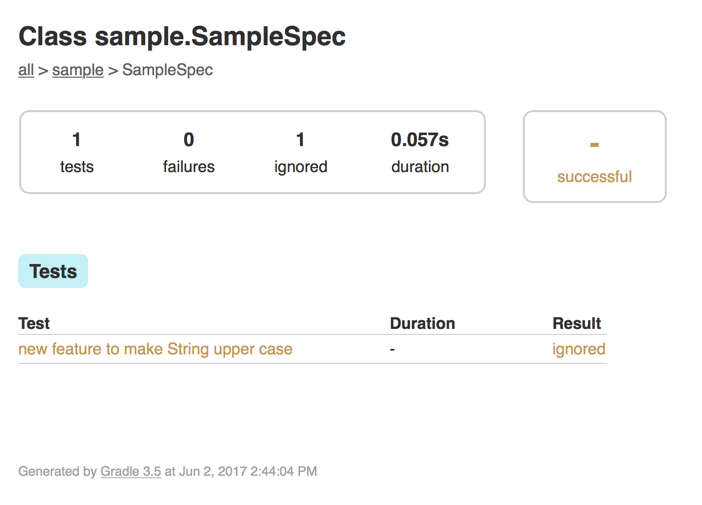
Sometimes we are working on a new feature in our code and we want to write a specification for it without yet really implementing the feature. To indicate we know the specification will fail while we are implementing the feature we can add the @PendingFeature annotation to our specification method. With this annotation Spock will still execute the test, but will set the status to ignored if the test fails. But if the test passes the status is set to failed. So when we have finished the feature we need to remove the annotation and Spock will kindly remind us to do so this way.
In the following example specification we use the @PendingFeature annotation:
package sample
import spock.lang.Specification
import spock.lang.PendingFeature
import spock.lang.Subject
class SampleSpec extends Specification {
@Subject
private final converter = new Converter()
@PendingFeature
void 'new feature to make String upper case'() {
given:
def value = 'Spock is awesome'
expect: // This will fail as expected
converter.upper(value) == 'SPOCK IS AWESOME'
}
}
class Converter {
String upper(String value) {
value
}
}
When we run our test in for example Gradle we get the following result:
Now let's implement the upper method:
package sample
import spock.lang.Specification
import spock.lang.PendingFeature
import spock.lang.Subject
class SampleSpec extends Specification {
@Subject
private final converter = new Converter()
@PendingFeature
void 'new feature to make String upper case'() {
given:
def value = 'Spock is awesome'
expect: // This will fail no more
converter.upper(value) == 'SPOCK IS AWESOME'
}
}
class Converter {
String upper(String value) {
value.toUpperCase()
}
}
We run the test again and now we get a failing result although our implementation of the upper method is correct:
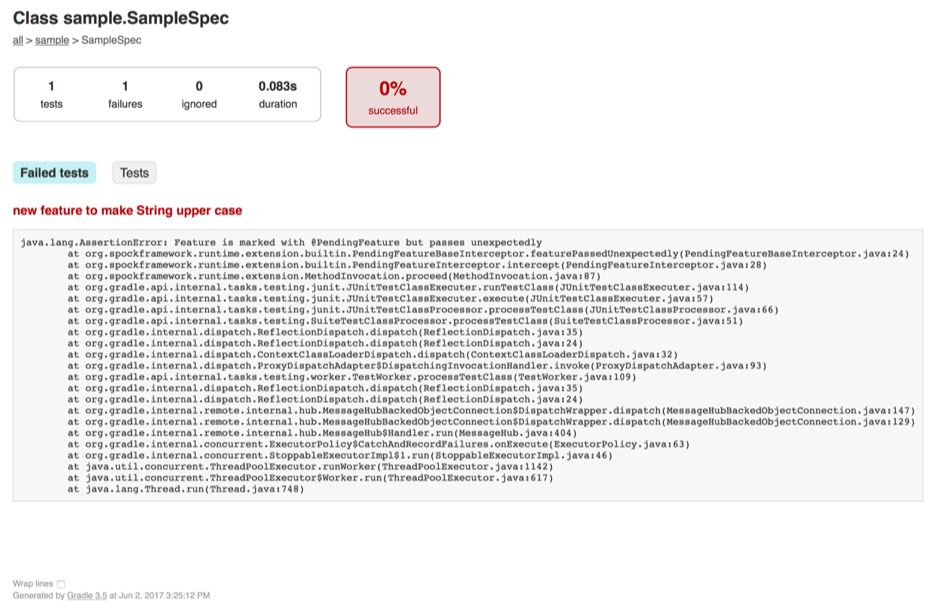
So this tells us the @PendingFeature is no longer needed. We can remove it and the specification will pass correctly.
Written with Spock 1.1.
Original post written on June 2, 2017
Using the Old Method
Spock has some great features to write specifications or tests that are short and compact. One of them is the old() method. The old() method can only be used in a then: block. With this method we get the value a statement had before the when: block is executed.
Let's see this with a simple example. In the following specification we create a StringBuilder with an initial value. In the then: block we use the same initial value for the assertion:
package com.mrhaki.spock
class SampleSpec extends spock.lang.Specification {
def "after addition of a new value the content is the initial value with the appended value"() {
given:
final StringBuilder builder = new StringBuilder('Spock ')
when:
builder << appendValue
then:
builder.toString() == 'Spock ' + appendValue
where:
appendValue << ['rocks!', 'is fun.', 'amazes.']
}
}
If we want to change the initial value when we create the StringBuilder we must also change the assertion. We can refactor the feature method and show our intention of the specification better. We add the variable oldToString right after we have created the StringBuilder. We use this in the assertion.
package com.mrhaki.spock
class SampleSpec extends spock.lang.Specification {
def "after addition of a new value the content is the initial value with the appended value"() {
given:
final StringBuilder builder = new StringBuilder('Spock ')
final String oldToString = builder.toString()
when:
builder << appendValue
then:
builder.toString() == oldToString + appendValue
where:
appendValue << ['rocks!', 'is fun.', 'amazes.']
}
}
But with Spock we can do one better. Instead of creating an extra variable we can use the old() method. In the assertion we replace the variable reference oldToString with old(builder.toString()). This actually means we want the value for builder.toString() BEFORE the when: block is executed. The assertion also is now very clear and readable and the intentions of the specification are very clear.
package com.mrhaki.spock
class SampleSpec extends spock.lang.Specification {
def "after addition of a new value the content is the initial value with the appended value"() {
given:
final StringBuilder builder = new StringBuilder('Spock ')
when:
builder << appendValue
then:
builder.toString() == old(builder.toString()) + appendValue
where:
appendValue << ['rocks!', 'is fun.', 'amazes.']
}
}
Let's change the specification a bit so we get some failures. Instead of adding the appendValue data variable unchanged to the StringBuilder we want to add a capitalized value.
package com.mrhaki.spock
class SampleSpec extends spock.lang.Specification {
def "after addition of a new value the content is the initial value with the appended value"() {
given:
final StringBuilder builder = new StringBuilder('Spock ')
when:
builder << appendValue.capitalize()
then:
builder.toString() == old(builder.toString()) + appendValue
where:
appendValue << ['rocks!', 'is fun.', 'amazes.']
}
}
If we run the specification we get assertion failures. In the following output we see such a failure and notice the value for the old() is shown correctly:
Condition not satisfied:
builder.toString() == old(builder.toString()) + appendValue
| | | | | |
| | | Spock | rocks!
| | | Spock rocks!
| | false
| | 1 difference (91% similarity)
| | Spock (R)ocks!
| | Spock (r)ocks!
| Spock Rocks!
Spock Rocks!
Note: If we use the old() method we might get an InternalSpockError exception when assertions fail. The error looks something like: org.spockframework.util.InternalSpockError: Missing value for expression "...". Re-ordering the assertion can help solve this. For example putting the old() method statement last. In Spock 1.0-SNAPSHOT this error doesn't occur.
For more information we can read Rob Fletcher's blog post about the old() method.
Code written with Spock 0.7-groovy-2.0.
Original post written on August 22, 2013
Auto Cleanup Resources
Spcok has a lot of nice extensions we can use in our specifications. The AutoCleanup extension makes sure the close() method of an object is called each time a feature method is finished. We could invoke the close() method also from the cleanup method in our specification, but with the @AutoCleanup annotation it is easier and immediately shows our intention. If the object we apply the annotation to doesn't have a close() method to invoke we can specify the method name as the value for the annotation. Finally we can set the attribute quiet to true if we don't want to see any exceptions that are raised when the close() method (or custom method name, that is specified) is invoked.
In the following example code we have a specification that is testing the WatchService implementation. The implementation also implements the Closeable interface, which means we can use the close() method to cleanup the object properly. We also have a custom class WorkDir with a delete() method that needs to be invoked.
package com.mrhaki.spock
import spock.lang.AutoCleanup
import spock.lang.Specification
import java.nio.file.FileSystems
import java.nio.file.Files
import java.nio.file.Path
import java.nio.file.Paths
import java.nio.file.WatchKey
import java.nio.file.WatchService
import java.util.concurrent.TimeUnit
import static java.nio.file.StandardWatchEventKinds.ENTRY_CREATE
class WatchSpec extends Specification {
// Use close() method of WatchService
// when feature method is done.
@AutoCleanup
private WatchService watchService
// Use delete() method of WorkDir class
// when feature method is done.
// If the quiet attribute is true, then
// exceptions from the delete() method are
// not shown, otherwise exceptions are reported.
@AutoCleanup(value = 'delete', quiet = true)
private WorkDir testPath = new WorkDir('test-dir')
def setup() {
// Get new watch service.
watchService = FileSystems.default.newWatchService()
// Register for events when a new file is created
// in the testPath directory.
testPath.path.register(watchService, ENTRY_CREATE)
}
def "get notification when file is created"() {
given:
final Path testFile = testPath.path.resolve('test-file')
testFile << 'sample'
and:
final WatchKey watchKey = watchService.poll(10, TimeUnit.SECONDS)
when:
final events = watchKey.pollEvents()
then:
events.size() == 1
events[0].kind() == ENTRY_CREATE
cleanup:
Files.delete(testFile)
}
}
class WorkDir {
private final Path path
WorkDir(final String dir) {
path = Paths.get(dir)
Files.createDirectories(path)
}
Path getPath() {
path
}
void delete() {
Files.deleteIfExists(path)
}
}
Written with Spock 1.0-groovy-2.4.
Original post written on September 1, 2015
Creating Temporary Files And Directories With FileSystemFixture
If we write specification where we need to use files and directories we can use the @TempDir annotation on a File or Path instance variable. By using this annotation we make sure the file is created in the directory defined by the Java system property java.io.tmpdir. We could overwrite the temporary root directory using Spock configuration if we want, but the default should be okay for most situations. The @TempDir annotation can actually be used on any class that has a constructor with a File or Path argument. Since Spock 2.2 we can use the FileSystemFixture class provided by Spock. With this class we have a nice DSL to create directory structures and files in a simple matter. We can use the Groovy extensions to File and Path to also immediately create contents for the files. If we want to use the extensions to Path we must make sure we include org.apache.groovy:groovy-nio as dependency to our test runtime classpath. The FileSystemFixture class also has the method copyFromClasspath that we can use to copy files and their content directory into our newly created directory structure.
In the following example specification we use FileSystemFixture to define a new directory structure in a temporary directory, but also in our project directory:
package mrhaki
import spock.lang.Specification
import spock.lang.Subject
import spock.lang.TempDir
import spock.util.io.FileSystemFixture
import java.nio.file.Path
import java.nio.file.Paths
class FileFixturesSpec extends Specification {
/**
* Class we want to test. The class has a method
* File renderDoc(File input, File outputDir) that takes
* an input file and stores a rendered file in the given
* output directory.
*/
@Subject
private DocumentBuilder documentBuilder = new DocumentBuilder()
/**
* With the TempDir annotation we make sure our directories and
* files created with FileSystemFixture are deleted after
* each feature method run.
*/
@TempDir
private FileSystemFixture fileSystemFixture
void "convert document"() {
given:
// Create a new directory structure in the temporary directory
// <root>
// +-- src
// | +-- docs
// | +-- input.adoc
// | +-- convert.adoc
// +-- output
fileSystemFixture.create {
dir("src") {
dir("docs") {
// file(String) returns a Path and with
// groovy-nio module on the classpath we can use
// extensions to add text to file. E.g. via the text property.
file("input.adoc").text = '''\
= Sample
Welcome to *AsciidoctorJ*.
'''.stripIndent()
// Copy file from classpath (src/test/resources)
// and rename it at the same time.
// Without rename it would be
// copyFromClasspath("/samples/sample.adoc")
copyFromClasspath("/samples/sample.adoc", "convert.adoc")
}
}
dir("output")
}
and:
// Using resolve we get the actual Path to the file
Path inputDoc = fileSystemFixture.resolve("src/docs/input.adoc")
Path convertDoc = fileSystemFixture.resolve("src/docs/convert.adoc")
// We can also use Paths to resolve the actual Path.
Path outputDir = fileSystemFixture.resolve(Paths.get("output"))
when:
File resultDoc = documentBuilder.renderDoc(inputDoc.toFile(), outputDir.toFile())
then:
resultDoc.text =~ "<p>Welcome to <strong>AsciidoctorJ</strong>.</p>"
when:
File resultConvert = documentBuilder.renderDoc(convertDoc.toFile(), outputDir.toFile())
then:
resultConvert.text =~ "<p>Testing <strong>AsciidoctorJ</strong> with Spock 🚀</p>"
}
void "convert document from non-temporary dir"() {
given:
// Create FileSystemFixture in our project build directory.
FileSystemFixture fileSystemFixture = new FileSystemFixture(Paths.get("build"))
fileSystemFixture.create {
dir("test-docs") {
dir("src") {
dir("docs") {
copyFromClasspath("/samples/sample.adoc")
}
}
dir("output")
}
}
and:
Path convertDoc = fileSystemFixture.resolve("test-docs/src/docs/sample.adoc")
Path outputDir = fileSystemFixture.resolve(Paths.get("test-docs/output"))
when:
File resultDoc = documentBuilder.renderDoc(convertDoc.toFile(), outputDir.toFile())
then:
resultDoc.text =~ "<p>Testing <strong>AsciidoctorJ</strong> with Spock 🚀</p>"
cleanup:
// We can delete the test-docs directory ourselves.
fileSystemFixture.resolve("test-docs").deleteDir()
}
}
In order to use the Groovy extensions for java.nio.Path we must add the groovy-nio module to the test classpath. For example we can do this if we use Gradle by using the JVM TestSuite plugin extension:
plugins {
java
groovy
}
...
repositories {
mavenCentral()
}
testing {
suites {
val test by getting(JvmTestSuite::class) {
// Define we want to use Spock.
useSpock("2.3-groovy-4.0")
dependencies {
// Add groovy-nio module.
implementation("org.apache.groovy:groovy-nio")
}
}
}
}
Written with Spock 2.3-groovy-4.0 and Gradle 8.0.2.
Original post written on March 30, 2023
Adjusting Time With MutableClock
Testing classes that work with date calculations based on the current date and time (now) can be difficult. First of all we must make sure our class under test accepts a java.time.Clock instance. This allows us to provide a specific Clock instance in our tests where we can define for example a fixed value, so our tests don't break when the actual date and time changes. But this can still not be enough for classes that will behave different based on the value returned for now. The Clock instances in Java are immutable, so it is not possible to change the date or time for a Clock instance.
In Spock 2.0 we can use the new MutableClock class in our specifications to have a Clock that can be used to go forward or backward in time on the same Clock instance. We can create a MutableClock and pass it to the class under test. We can test the class with the initial date and time of the Clock object, then change the date and time for the clock and test the class again without having to create a new instance of the class under test. This is handy in situations like a queue implementation, where a message delivery date could be used to see if messages need to be delivered or not. By changing the date and time of the clock that is passed to the queue implementation we can write specifications that can check the functionality of the queue instance.
The MutableClock class has some useful methods to change the time. We can for example use the instant property to assign a new Instant. Or we can add or subtract a duration from the initial date and time using the + and - operators. We can specify the temporal amount that must be applied when we use the ++ or -- operators. Finally, we can use the adjust method with a single argument closure to use a TemporalAdjuster to change the date or time. This last method is useful if we want to specify a date adjustment that is using months and years.
In the following example Java code we have the class WesternUnion that accepts letters with a delivery date and message. The letter is stored and when the deliver method is we remove the letter from our class if the delivery date is after the current date and time.
package mrhaki;
import java.time.Clock;
import java.time.Instant;
import java.util.ArrayList;
import java.util.List;
/**
* Class to mimic a letter delivery service,
* that should deliver letters after the letter
* delivery data has passed.
*/
public class WesternUnion {
private final Clock clock;
private final List<Letter> letters = new ArrayList<>();
/**
* Default constructor that uses a default Clock with UTC timezone.
*/
public WesternUnion() {
this(Clock.systemUTC());
}
/**
* Constructor that accepts a clock, very useful for testing.
*
* @param clock Clock to be used in this class for date calculations.
*/
WesternUnion(final Clock clock) {
this.clock = clock;
}
/**
* Store accepted letter.
*
* @param deliveryDate Date the letter should be deliverd.
* @param message Message for the letter.
*/
public int acceptLetter(Instant deliveryDate, String message) {
final Letter letter = new Letter(deliveryDate, message);
letters.add(letter);
return letters.size();
}
/**
* "Deliver" letters where the delivery date has passed.
*/
public int deliver() {
Instant now = Instant.now(clock);
letters.removeIf(letter -> letter.getDeliveryDate().isBefore(now));
return letters.size();
}
/**
* Simple record for a "letter" which a delivery date and message.
*/
private record Letter(Instant deliveryDate, String message) {
private Instant getDeliveryDate() {
return deliveryDate;
}
}
}
In order to test this class we want pass a Clock instance where we can mutate the clock, so we can test if the deliver method works if we invoke it multiple times. In the next specification we test this with different usages of MutableClock. Each specification method uses the MutableClock in a different way to test the WesternUnion class:
package mrhaki
import spock.lang.Specification
import spock.lang.Subject
import spock.util.time.MutableClock
import java.time.Duration
import java.time.Instant
import java.time.Period
import java.time.ZoneId
import java.time.ZonedDateTime
class WesternUnionSpec extends Specification {
// Default time zone used for letter dates.
private static final ZoneId TZ_HILL_VALLEY = ZoneId.of("America/Los_Angeles")
// Constants used for letter to be send.
private static final Instant DELIVERY_DATE =
ZonedDateTime
.of(1955, 11, 12, 0, 0, 0, 0, TZ_HILL_VALLEY)
.toInstant()
private static final String MESSAGE =
'Dear Marty, ... -Your friend in time, "Doc" Emmett L. Brown'
@Subject
private WesternUnion postOffice
void "deliver message after delivery date"() {
given: "Set mutable clock instant to Sept. 1 1885"
def clock = new MutableClock(
ZonedDateTime.of(1885, 9, 1, 0, 0, 0, 0, TZ_HILL_VALLEY))
and:
postOffice = new WesternUnion(clock)
expect:
postOffice.acceptLetter(DELIVERY_DATE, MESSAGE) == 1
when:
int numberOfLetters = postOffice.deliver()
then: "Delivery date has not passed so 1 letter"
numberOfLetters == 1
when: "Move to delivery date of letter + 1 day and try to deliver"
// We can change the clock's Instant property directly to
// change the date.
clock.instant =
ZonedDateTime
.of(1955, 11, 13, 0, 0, 0, 0, TZ_HILL_VALLEY)
.toInstant()
int newNumberOfLetters = postOffice.deliver()
then: "Delivery date has passed now so 0 letters left"
newNumberOfLetters == 0
}
void "deliver message after adjusting MutableClock using adjust"() {
given: "Set mutable clock instant to Sept. 1 1885"
def clock = new MutableClock(
ZonedDateTime.of(1885, 9, 1, 0, 0, 0, 0, TZ_HILL_VALLEY))
and:
postOffice = new WesternUnion(clock)
expect:
postOffice.acceptLetter(DELIVERY_DATE, MESSAGE) == 1
when:
int numberOfLetters = postOffice.deliver()
then: "Delivery date has not passed so 1 letter"
numberOfLetters == 1
when: "Move clock forward 70 years, 2 months and 12 days and try to deliver"
// To move the clock forward or backward by month or years we need
// the adjust method. The plus/minus/next/previous methods are applied
// to the Instant property of the MutableClock and with Instant
// we can not use months or years.
clock.adjust {t -> t + (Period.of(70, 2, 12)) }
int newNumberOfLetters = postOffice.deliver()
then: "Delivery date has passed now so 0 letters left"
newNumberOfLetters == 0
}
void "deliver message after adding amount to MutableClock"() {
given: "Set mutable clock instant to Oct. 26 1955"
def clock = new MutableClock(
ZonedDateTime.of(1955, 10, 26, 0, 0, 0, 0, TZ_HILL_VALLEY))
and:
postOffice = new WesternUnion(clock)
expect:
postOffice.acceptLetter(DELIVERY_DATE, MESSAGE) == 1
when:
int numberOfLetters = postOffice.deliver()
then: "Delivery date has not passed so 1 letter"
numberOfLetters == 1
and: "Move clock forward by given amount (18 days) and try to deliver"
// The +/- operators are mapped to plus/minus methods.
// Amount cannot be months or years, then we need the adjust method.
clock + Duration.ofDays(18)
when: "Try to deliver now"
int newNumberOfLetters = postOffice.deliver()
then: "Delivery date has passed now so 0 letters left"
newNumberOfLetters == 0
}
void "deliver message with fixed change amount"() {
given: "Set mutable clock instant to Oct. 26 1955"
def defaultTime =
ZonedDateTime.of(1955, 10, 26, 0, 0, 0, 0, TZ_HILL_VALLEY)
// We can set the changeAmount property of MutableClock
// in the constructor or by setting the changeAmount property.
// Now when we invoke next/previous (++/--)
// the clock moves by the specified amount.
def clock =
new MutableClock(
defaultTime.toInstant(),
defaultTime.zone,
Duration.ofDays(18))
and:
postOffice = new WesternUnion(clock)
expect:
postOffice.acceptLetter(DELIVERY_DATE, MESSAGE) == 1
when:
int numberOfLetters = postOffice.deliver()
then: "Delivery date has not passed so 1 letter"
numberOfLetters == 1
and: "Move clock forward by given amount (18 days) and try to deliver"
// The ++/-- operators are mapped to next/previous.
// Amount cannot be months or years, then we need the adjust method.
clock++
when: "Try to deliver now"
int newNumberOfLetters = postOffice.deliver()
then: "Delivery date has passed now so 0 letters left"
newNumberOfLetters == 0
}
}
Written with Spock 2.0.
Original post written on October 26, 2021
Set Timeout On Specification Methods
When we write a feature method in our Spock specification to test our class we might run into long running methods that are invoked. We can specify a maximum time we want to wait for a method. If the time spent by the method is more than the maximum time our feature method must fail. Spock has the @Timeout annotation to define this. We can apply the annotation to our specification or to feature methods in the specification. We specify the timeout value as argument for the @Timeout annotation. Seconds are the default time unit that is used. If we want to specify a different time unit we can use the annotation argument unit and use constants from java.util.concurrent.TimeUnit to set a value.
In the following example specification we set a general timeout of 1 second for the whole specification. For two methods we override this default timeout with their own value and unit:
package mrhaki.spock
@Grab('org.spockframework:spock-core:1.0-groovy-2.4')
import spock.lang.Specification
import spock.lang.Subject
import spock.lang.Timeout
import static java.util.concurrent.TimeUnit.MILLISECONDS
// Set a timeout for all feature methods.
// If a feature method doesn't return in 1 second
// the method fails.
@Timeout(1)
class SampleSpec extends Specification {
@Subject
private final Sample sample = new Sample()
// Check that method will return within 1 second.
void 'timeout will not happen'() {
expect:
sample.run(500) == 'Awake after 500 ms.'
}
// Method will fail, because it doesn't return in 1 second.
void 'method under test should return in 1 second'() {
expect:
sample.run(1500) == 'Awake after 1500 ms.'
}
// We can change the timeout value and
// the unit. The unit type is
// java.util.concurrent.TimeUnit.
@Timeout(value = 200, unit = MILLISECONDS)
void 'method under test should return in 200 ms'() {
expect:
sample.run(100) == 'Awake after 100 ms.'
}
// Method will fail.
@Timeout(value = 100, unit = MILLISECONDS)
void 'method under test should return in 100 ms'() {
expect:
sample.run(200) == 'Awake after 200 ms.'
}
}
// Simple class for testing.
class Sample {
/**
* Run method and sleep for specified timeout value.
*
* @param timeout Sleep number of milliseconds specified
* by the timeout argument.
* @return String value with simple message.
*/
String run(final Long timeout) {
sleep(timeout)
"Awake after $timeout ms."
}
}
Written with Spock 1.0-groovy-2.4.
Original post written on April 11, 2017
Undo MetaClass Changes
Spock has the extension ConfineMetaClassChanges that can be used to encapsulate meta class changes to a feature method or specification. We must apply the annotation @ConfineMetaClassChanges to a feature method or to a whole specification to use this extension. Spock replaces the original meta class with a new one before a feature method is executed. After execution of a feature method the original meta class is used again. We could this by hand using the setup, setupSpec and their counter parts cleanup and cleanupSpec, but using this extension is so much easier. We must specify the class or classes whose meta class changes need to be confined as the value for the annotation.\
In the following example we add a new method asPirate to the String class. We apply the @ConfineMetaClassChanges to a method. This means the new method is only available inside the feature method.\
package com.mrhaki.spock
import spock.lang.Specification
import spock.lang.Stepwise
import spock.util.mop.ConfineMetaClassChanges
// We use @Stepwise in this specification
// to show that changes in the metaClass
// done in the first feature method do not
// work in the second feature method.
@Stepwise
class PirateTalkSpec extends Specification {
// After this feature method is finished,
// the metaClass changes to the given
// class (String in our case) are reverted.
@ConfineMetaClassChanges([String])
def "talk like a pirate"() {
setup:
String.metaClass.asPirate = { ->
return "Yo-ho-ho, ${delegate}"
}
expect:
'mrhaki'.asPirate() == 'Yo-ho-ho, mrhaki'
}
// In this feature method we no longer
// can use the asPirate() method that was
// added to the metaClass.
def "keep on talking like a pirate"() {
when:
'hubert'.asPirate()
then:
thrown(MissingMethodException)
}
}
In the following example code we apply the @ConfineMetaClassChanges to the whole class. Now we see that the new method asPirate is still available in another feature method, than the one that defined it.
package com.mrhaki.spock
import spock.lang.Specification
import spock.lang.Stepwise
import spock.util.mop.ConfineMetaClassChanges
// We use @Stepwise in this specification
// to show that changes in the metaClass
// done in the first feature method still
// work in the second.
@Stepwise
// If set a class level then the
// changes done to the metaClass of
// the given class (String in our
// example) are reverted after the
// specification is finished.
@ConfineMetaClassChanges([String])
class PirateTalkSpec extends Specification {
def "talk like a pirate"() {
setup:
String.metaClass.asPirate = { ->
return "Yo-ho-ho, ${delegate}"
}
expect:
'mrhaki'.asPirate() == 'Yo-ho-ho, mrhaki'
}
def "keep on talking like a pirate"() {
expect:
'hubert'.asPirate() == 'Yo-ho-ho, hubert'
}
}
This post is very much inspired by this blog post of my colleague Albert van Veen.
Written with Spock 1.0-groovy-2.4.
Original post written on September 3, 2015
Undo Changes in Java System Properties
If we need to add a Java system property or change the value of a Java system property inside our specification, then the change is kept as long as the JVM is running. We can make sure that changes to Java system properties are restored after a feature method has run. Spock offers the RestoreSystemProperties extension that saves the current Java system properties before a method is run and restores the values after the method is finished. We use the extension with the @RestoreSystemProperties annotation. The annotation can be applied at specification level or per feature method.
In the following example we see that changes to the Java system properties in the first method are undone again in the second method:
package com.mrhaki.spock
import spock.lang.Specification
import spock.lang.Stepwise
import spock.util.environment.RestoreSystemProperties
// Use Stepwise extension so the order
// of method invocation is guaranteed.
@Stepwise
class SysSpec extends Specification {
// Changes to Java system properties in this
// method are undone once the method is done.
@RestoreSystemProperties
def "first method adds a Java system property"() {
setup:
System.properties['spockAdded'] = 'Spock is gr8'
expect:
System.properties['spockAdded'] == 'Spock is gr8'
}
def "second method has no access to the new property"() {
expect:
!System.getProperty('spockAdded')
}
}
Written with Spock 1.0-groovy-2.4.
Original post written on September 4, 2015