1. Introduction to Serverless
First, let’s have a quick look as to how software was traditionally built.
Web applications are deployed on web servers running on physical machines. As a software developer, you needed to to be aware of the intricacies of the server that runs your software.
To get your application running on the server, you had to spend hours downloading, compiling, installing, configuring, and connecting all sorts of components. The OS of your machines need to be constantly upgraded and patched for security vulnerabilities. In addition, servers need to be provisioned, load-balanced, configured, patched, and maintained.
In short, managing servers is a time-consuming task which often requires dedicated and experienced systems operations personnel.
What is the point of software engineering? Contrary to what some might think, the goal of software engineering isn’t to deliver software. A software engineer’s job is to deliver value - to get the usefulness of software into the hands of users.
At the end of the day, you do need servers to deliver software. However, the time spent managing servers is time you could have spent on developing new features and improving your application. When you have a great idea, the last thing you want to do is set up infrastructure. Instead of worrying about servers, you want to focus more on shipping value.
How can we minimize the time required to deliver impact?
1.1 Moving to the Cloud
Over the past few decades, improvements in both the network and the platform layer - technologies between the operating system and your application - have made cloud computing easier.
Back in the days of yore (the early 1990s) developers only had bare metal hardware available to run their code, and the process of obtaining a new compute unit can take from days to months. Scaling took a lot of detailed planning, a huge amount of time and, most importantly, money. A shift was inevitable. The invention of virtual machines and the hypervisor shrunk the time to provision a new compute unit down to minutes through virtualization. Today, containers gives us a new compute unit in seconds.
DevOps has evolved and matured over this period, leading to the proliferation of Infrastructure-as-a-Service (IaaS) and Platform-as-a-Service (PaaS) providers. These third-party platforms lets you delegate the task of maintaining the execution environment for their code to capable hands, freeing the software developer from server and deployment concerns.
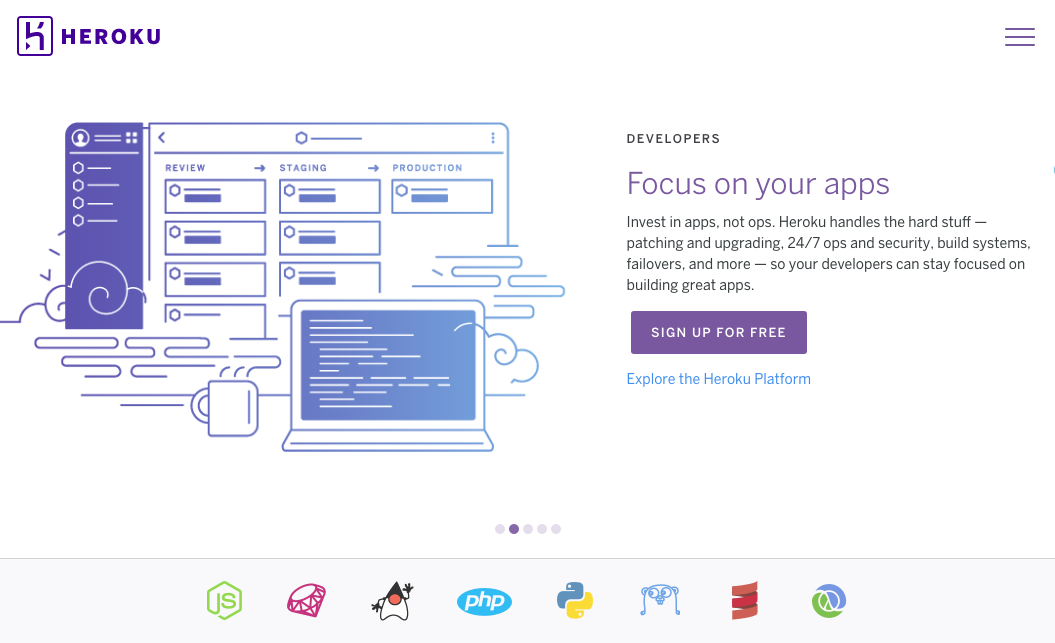
Today, developers have moved away from deploying software on physical computers sitting in their living room. Instead of manually downloading and building a bunch of platform-level technologies on each server instance (and later having to repeat the process when you scale) you can go to a simple web user interface on your PaaS provider of choice, click a few options, and have your application automatically deployed to a fully provisioned cluster.
When your application usage grows, you can add capacity by clicking a few buttons. When you require additional infrastructure components, set up deployment pipelines, or enable database backups, you can do this from the same web interface.
The state of Platform-as-a-Service (PaaS) and cloud computing today is convenient and powerful - but can we do better?
1.2 Enter Serverless
The next major shift in cloud computing is commonly known as “Serverless” or “Functions-as-a-Service” (FaaS.)
Keep in mind that the phrase “serverless” doesn’t mean servers are no longer involved. It simply means that developers no longer need to think that much about them. Computing resources get used as services without having to manage around physical capacities or limits.
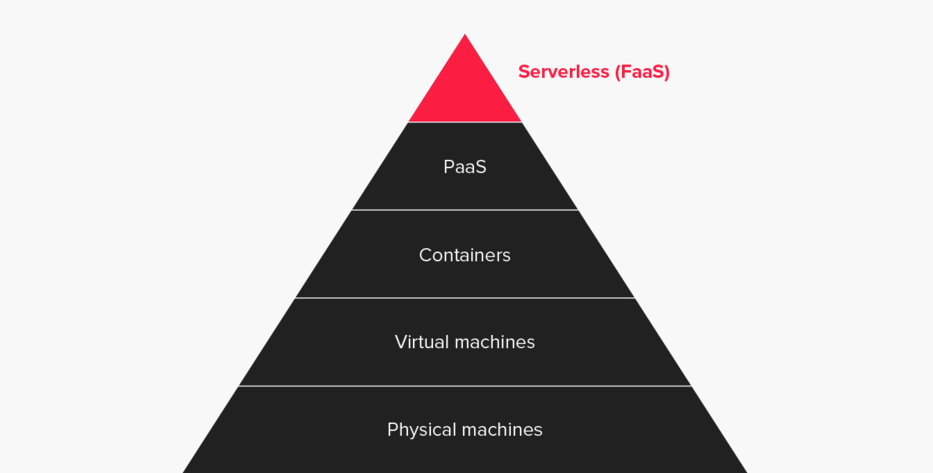
Serverless is a software development approach that aims to eliminate the need to manage infrastructure by:
- Using a managed compute service (Functions-as-a-Service) to execute your code, and
- Leveraging external services and APIs (third-party Software-as-a-Service products.)
There is now an abundance of third party services: APIs that handles online payments, transactional email, user analytics, code quality measurement, content management, continuous integration, and other secondary concerns. In our everyday work we also make use of external tools for project management, file sharing, office administration, and more.
Instead of spending valuable resources on building up secondary capabilities such as infrastructure and server maintenance, developers can focus on their core value proposition. Rather than building things from scratch, developers can connect prefabricated parts together and prune away secondary complexity from your application. By making use of third-party services, you can build loosely coupled, scalable, and efficient architectures quickly.
Serverless platforms are a major step towards delegating infrastructure problems to companies that are much better positioned to deal with them. No matter how good you become at DevOps, Amazon / Google / Microsoft will almost certainly have done it better. You can now get all the benefits of a modern container farm architecture without breaking the bank or spending years building it yourself.
1.3 From PaaS to FaaS
How is Functions-as-a-Service different from Platform-as-a-service?
1.3.1 PaaS
Platform-as-a-Service (PaaS) such as Heroku offer support for long running applications and services. When started, long running server processes (also known as daemons) wait for an input, execute some code when an input is received, and then continue waiting for another request. These server processes run 24 / 7 and you are billed every month or hour regardless of actual usage.
PaaS platforms provide a managed virtual server provisioning system that frees you from managing actual servers.
However, you still have to think about the servers. You often need to describe your runtime environment with a Dockerfile, specify how many instances to provision, enable autoscaling, and so on.
1.3.2 FaaS
Functions-as-a-Service (FaaS) lets you deploy and invoke short-lived (ephemeral) function processes to handle individual requests. Function processes are created when an input event is received, and disappears after the code finishes executing. The platform handles the provisioning of instances, termination, monitoring, logging, and so on. Function processes come into existence only in response to an incoming request and you are billed according to the number of function invocations and total execution time.
FaaS platforms goes a step further than PaaS so you don’t even need to think about how much capacity you need in advance. You just upload your code, select from a set of available languages and runtimes, and the platform deals with the infrastructure.
The table below highlights the differences between PaaS and Faas:
| Platform-as-a-Service (PaaS) | Function-as-a-Service (FaaS) | |
|---|---|---|
| Startup time | Starts in minutes | Starts in milliseconds |
| Running time | Runs 24 / 7 | Runs when processing an incoming request |
| Cost | Interval billing cycles | Pay for usage, in invocations and duration |
| Unit of code | Monolithic codebase | Single-purpose, self-contained functions |
In summary, Functions-as-a-Service (FaaS) platforms offers developers the ability to build services that react to events, that auto-scale, that you pay for per-execution, and that take advantage of a larger ecosystem of cloud services.
1.4 From Monolith to Microservices to Functions
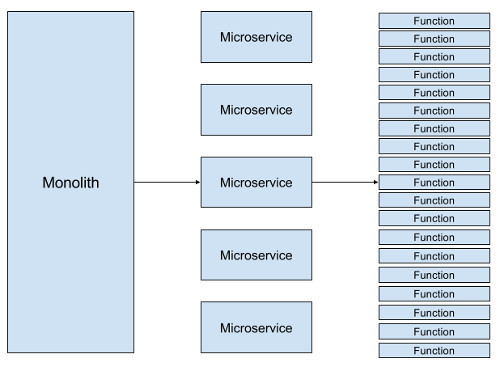
One of the modern paradigms in software development is the shift towards smaller, independently deployable units of code. Monolithic applications are out; microservices are in.
A monolithic application is built as a single unit, where the presentation, business logic, data access layers all exist within the same application. The server-side application will handle HTTP requests, execute domain logic, retrieve and update data from the database, and select and populate HTML views to be sent to the browser. A monolith a single logical executable. Any changes to the system involves building and deploying a new version of the application. Scaling requires scaling the entire application rather than individual parts of it that require greater resource.
In contrast, the idea behind microservices is you break down a monolithic application into smaller services by applying the single responsibility principle at the architectural level. You refactor existing modules within the monolith into standalone micro-services where each service is responsible for a distinct business domain. These microservices communicate with each other over the network (often via RESTful HTTP) to complete a larger goal. Benefits over a traditional monolithic architecture include independent deployability, scalability, language, platform and technology independence for different components, and increased architectural flexibility.
For example, we could create a Users microservice to be in charge of user registration, onboarding, and other concerns within the User Domain.
Microservices allow teams to work in parallel, build resilient distributed architectures, and create decoupled systems that can be changed faster and scaled more effectively.
1.4.1 Where Functions fit in
Functions-as-a-Service (FaaS) utilizes smaller unit of application logic in the form of single-purpose functions.
Instead of a monolithic application that you’d run on a PaaS provider, your system is composed of multiple functions working together.
For example, each HTTP endpoint of a RESTful API can be handled by a separate function.
The POST /users endpoint would trigger a createUser function, the PATCH /users endpoint would trigger an updateUser function, and so on.
A complex processing pipeline can be decomposed to multiple steps, each handled by a function.
Each function is independently deployable and scales automatically. Changes to the system can be localized to just the functions that are affected. In some cases, you can change your application’s workflow by ordering the same functions in a different way.
Functions-as-a-Service goes beyond beyond microservices, enabling developers to create new software applications composed of tiny building blocks.
1.5 FaaS Concepts
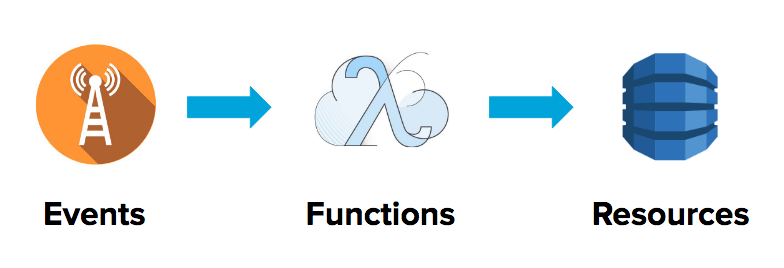
Let’s look at the basic building blocks of applications built on FaaS: Events trigger Functions which communicate with Resources.
1.5.1 Functions
A Function is a piece of code deployed in the cloud, which performs a single task such as:
- Processing an image.
- Saving a blog post to a database.
- Retrieving a file.
When deciding what should go in a Function, think of the Single Responsibility Principle and the Unix philosophy:
- Make each program do one thing well.
- Expect the output of every program to become the input to another, as yet unknown, program.
Following these principles lets us maintain high cohesion and maximize code reuse. A Function is meant to be small and self-contained. Let’s look at an example AWS Lambda (Go) Function:
 1 // myFunction.go
 2
 3 package main
 4
 5 import (
 6         "context"
 7         "fmt"
 8         "github.com/aws/aws-lambda-go/lambda"
 9 )
10
11 func HandleRequest(ctx context.Context, name string) (string, error) {
12         return fmt.Sprintf("Hello %s!", name), nil
13 }
14
15 func main() {
16         lambda.Start(HandleRequest)
17 }
The lambda function above takes
nameas input and returns a greeting based on a name.
FaaS providers have a distinct set of supported languages and runtimes. You are limited to the environments supported by the FaaS provider; one provider may offer an execution environment that is not supported by another. For example, Azure Functions supports C# but AWS Lambda does not support C#. On AWS Lambda, you can write your Functions in the following runtimes (January 2018):
- Node.js – v4.3.2 and 6.10
- Java – Java 8
- Python – Python 3.6 and 2.7
- .NET Core – .NET Core 1.0.1 (C#)
- Go - Go 1.x
With tooling, you can support compiled languages such as Rust which are not natively supported. This works by including executable binaries within your deployment package and having a supported language (such as Node.js) call the binaries.
1.5.1.1 AWS Lambda Function Environment
Each AWS Lambda function also has a 500MB ‘scratch space’ of non-persistent disk space in its own /tmp directory. The directory content remains when the container is frozen, providing transient cache that can be used for multiple invocations.
Files written to the /tmp folder may still exist from previous invocations.
However, when you write your Lambda function code, do not assume that AWS Lambda always reuses the container. Lambda may or may not re-use the same container across different invocations. You have no control over if and when containers are created or reused.
1.5.2 Events
One way to think of Events is as signals traveling across the neurons in your brain.

You can invoke your Function manually or you can set up Events to reactively trigger your Function. Events are produced by an event source. On AWS, events can come from:
- An AWS API Gateway HTTP endpoint request (useful for HTTP APIs)
- An AWS S3 bucket upload (useful for file uploads)
- A CloudWatch timer (useful for running tasks every N minutes)
- An AWS SNS topic (useful for triggering other lambdas)
- A CloudWatch Alert (useful for log processing)
The execution of a Function may emit an Event that subsequently triggers another Function, and so on ad infinitum - creating a network of functions entirely driven by events. We will explore this pattern in Chapter 4.
1.5.3 Resources
Most applications require more than a pure functional transformation of inputs. We often need to capture some stateful information such as user data and user generated content (images, documents, and so on.)
However, a Function by itself is stateless. After a Function is executed none of the in-process state within will be available to subsequent invocations. Because of that, we need to provision Resources in the form of an external database or network file storage to store state.
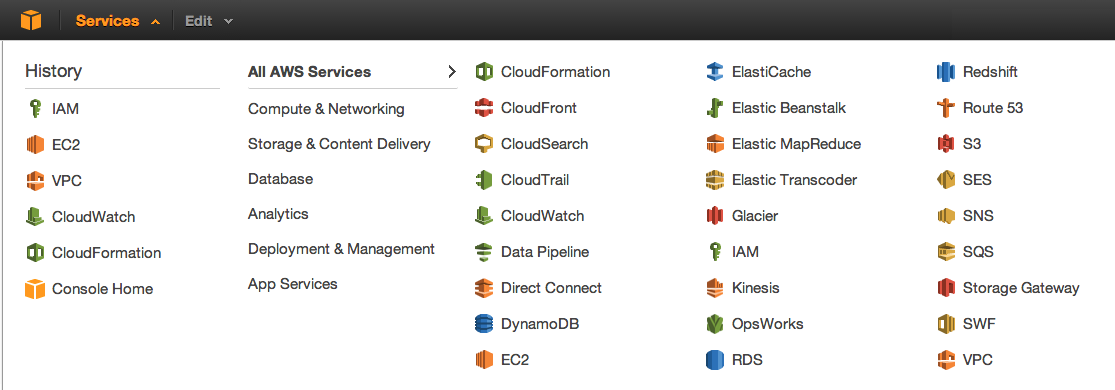
Resources are infrastructure components which your Functions depend on, such as:
- An AWS DynamoDB Table (for saving user and application data)
- An AWS S3 Bucket (for saving images and files)
1.6 FaaS Execution Model
AWS Lambda executes functions in an isolated container with resources specified in the function’s configuration (which defines the function container’s memory size, maximum timeout, and so on.) The FaaS platform takes care of provisioning and managing any resources needed to run your function.
The first time a Function is invoked after being created or updated, a new container with the appropriate resources will be created to execute it, and the code for the function will be loaded into the container. Because it takes time to set up a container and do the necessary bootstrapping, AWS Lambda has an initial cold start latency. You typically see this latency when a Lambda function is invoked for the first time or after it has been updated.

After a Function is invoked, AWS Lambda keeps the container warm for some time in anticipation of another function invocation. AWS Lambda tries to reuse the container for subsequent invocations.
1.7 Traditional Scaling vs. Serverless
One of the challenges in managing servers is allocating compute capacity.
Web servers need to be provisioned and scaled with enough compute capacity to match the amount of inbound traffic in order to run smoothly. With traditional deployments, you can find yourself over-provisioning or under-provisioning compute capacity. This is especially true when your traffic load is unpredictable. You can never know when your traffic will peak and to what level.
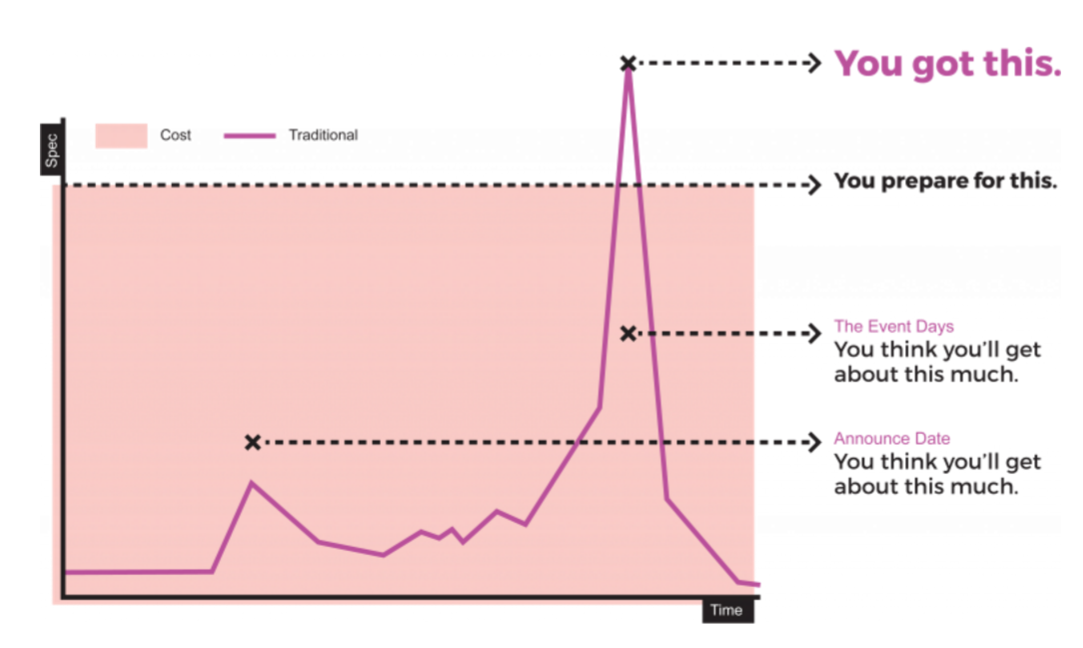
When you over-provision compute capacity, you’re wasting money on idle compute time. Your servers are just sitting there waiting for a request that doesn’t come. Even with autoscaling the problems of paying of idle time still persists, albeit at a lesser degree. When you under-provision, you’re struggling to serve incoming requests (and have to contend with dissatisfied users.) Your servers are overwhelmed with too many requests. Compute capacity is usually over-provisioned, and for good reason. When there’s not enough capacity, bad things can happen.
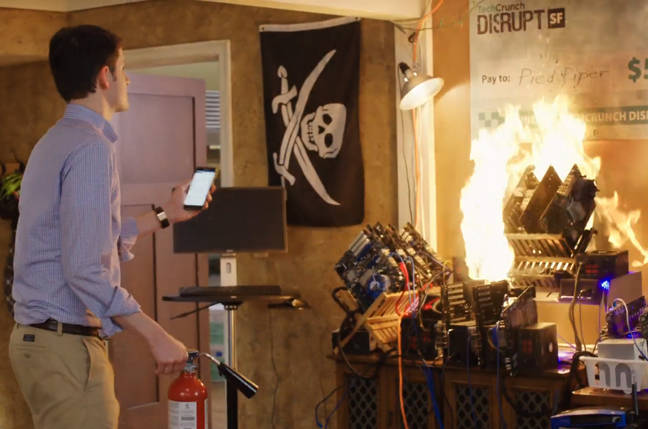
When you under-provision and the queue of incoming requests grows too large, some of your users’ requests will time out. This phenomena is commonly known as the ‘Reddit Hug of Death’ or the Slashdot effect. Depending on the nature of your application, users will find this occurrence unacceptable.
With Functions-as-a-Service, you get autoscaling out of the box. Each incoming request spawns a short-lived function process that executes your function. If your system needs to be processing 100 requests at a specific time, the provider will spawn that many function processes without any extra configuration on your part. The provisioned server capacity will be equal to the number of incoming requests. As such, there is no under or over-provisioning in FaaS. You get instant, massive parallelism when you need it.
1.7.1 AWS Lambda Costs
With Serverless, you only pay for the number of executions and total execution duration. Since you don’t have to pay for idle compute time, this can lead to significant cost savings.
1.7.1.1 Requests
You are charged for the total number of execution requests across all your functions. Serverless platforms such as AWS Lambda counts a request each time it starts executing in response to an event notification or invoke call, including test invokes from the console.
- First 1 million requests per month are free
- $0.20 per 1 million requests thereafter ($0.0000002 per request)
1.7.1.2 Duration
Duration is calculated from the time your code begins executing until it returns or otherwise terminates, rounded up to the nearest 100ms. The price depends on the amount of memory you allocate to your function. You are charged $0.00001667 for every GB-second used.
1.7.1.3 Pricing Example
If you allocated 128MB of memory to your function, executed it 30 million times in one month, and it ran for 200ms each time, your charges would be calculated as follows:
1.7.1.3.1 Monthly compute charges
The monthly compute price is $0.00001667 per GB-s and the free tier provides 400,000 GB-s.
- Total compute (seconds) = 30M * (0.2sec) = 6,000,000 seconds
- Total compute (GB-s) = 6,000,000 * 128MB/1024 = 750,000 GB-s
- Total Compute – Free tier compute = Monthly billable compute seconds
- 750,000 GB-s – 400,000 free tier GB-s = 350,000 GB-s
- Monthly compute charges = 350,000 * $0.00001667 = $5.83
1.7.1.3.2 Monthly request charges
The monthly request price is $0.20 per 1 million requests and the free tier provides 1M requests per month.
- Total requests – Free tier request = Monthly billable requests
- 30M requests – 1M free tier requests = 29M Monthly billable requests
- Monthly request charges = 29M * $0.2/M = $5.80
1.7.1.3.3 Total charges
Total charges = Compute charges + Request charges = $5.83 + $5.80 = $11.63 per month
For more details, check out the official AWS Lambda pricing docs.
1.7.1.3.4 Additional charges
In a typical web-connected application that needs HTTP access, you’ll also incur API Gateway costs at $3.50 per 1M executions.
1.8 AWS Lambda Limits
The execution environment AWS Lambda gives you has some hard and soft limits. For example, the size of your deployment package or the amount of memory your Lambda function is allocated per invocation.
1.8.1 Invocation Limits
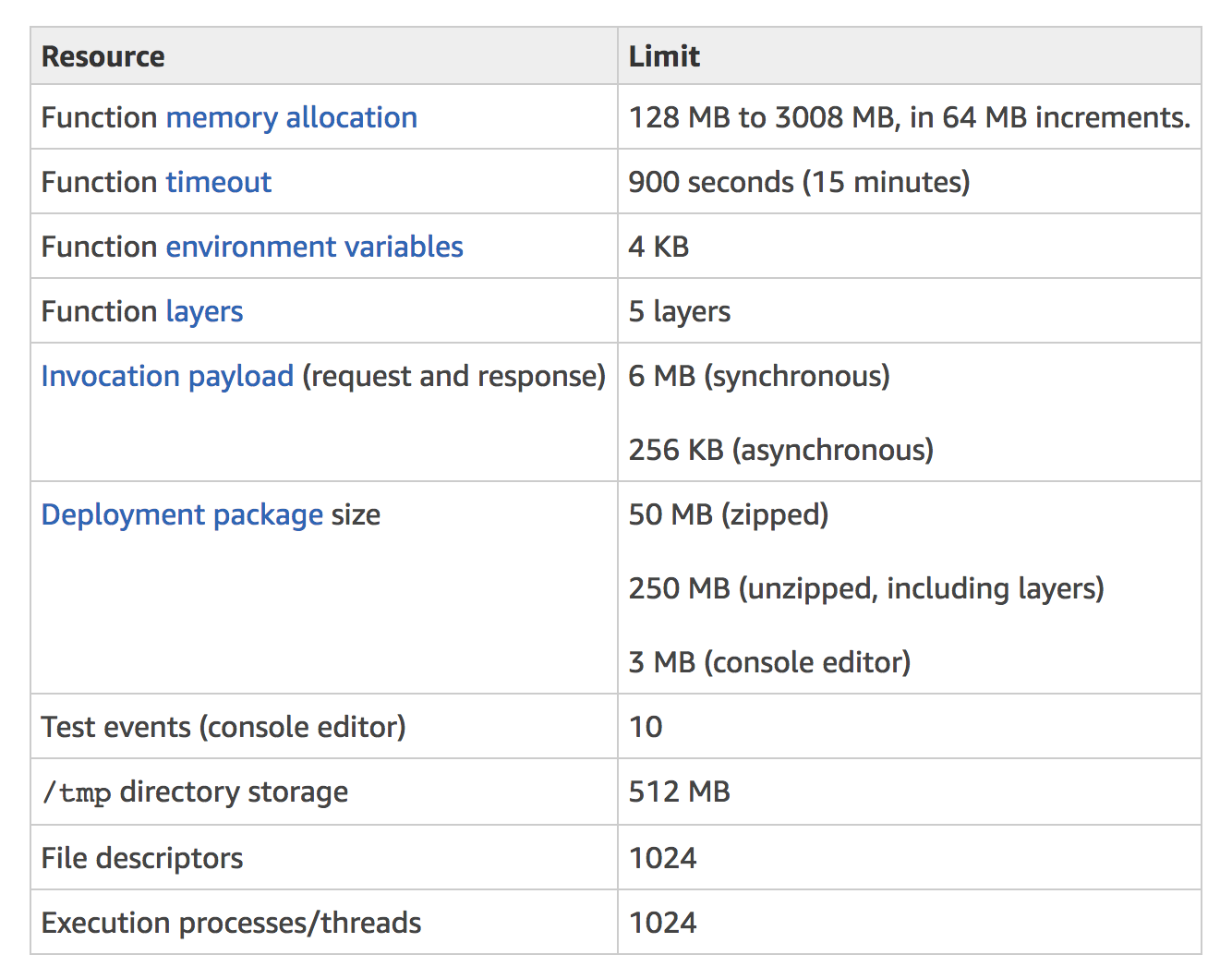
Some things of note:
- Memory: Each Function can have an allocated memory (defaults to 128MB.) Doubling a function’s allocated memory will also double the amount you are billed per 100ms. If you’re performing some memory-intensive tasks, increasing the memory allocation can lead to increased performance.
-
Space: Your Functions have a 512MB ‘scratch’ space that’s useful for writing temporary files to disk. Note that there is no guarantee that files written to the
/tmpspace will be available in subsequent invocations. - Execution Time: Fifteen minutes is the longest time a function can execute. Exceeding this duration will immediately terminate the execution.
- Deployment Package Size: Your zipped software package cannot exceed 50MB. You can configure your Lambda function to pull in additional code and content in the form of layers up to 250MB.
1.8.2 Concurrency Limits

Concurrent executions refers to the number of executions of your function code that are happening at any given time. You can use the following formula to estimate your concurrent Lambda function invocations:
1 events (or requests) per second * function duration
For example, consider a Lambda function that processes Amazon S3 events. Suppose that the Lambda function takes on average three seconds and Amazon S3 publishes 10 events per second. Then, you will have 30 concurrent executions of your Lambda function.
By default, AWS Lambda limits the total concurrent executions across all functions within a given region to 1000. Any invocation that causes your function’s concurrent execution to exceed the safety limit is throttled. In this case, the invocation doesn’t execute your function.
1.8.3 AWS Lambda Limit Errors
Functions that exceed any of the limits listed in the previous limits tables will fail with an exceeded limits exception. These limits are fixed and cannot be changed at this time. For example, if you receive the exception CodeStorageExceededException or an error message similar to “Code storage limit exceeded” from AWS Lambda, you need to reduce the size of your code storage.
Each throttled invocation increases the Amazon CloudWatch Throttles metric for the function, so you can monitor the number of throttled requests. The throttled invocation is handled differently based on how your function is invoked:
1.8.3.1 Synchronous Invocation
If the function is invoked synchronously and is throttled, the invoking application receives a 429 error and the invoking application is responsible for retries.
1.8.3.2 Asynchronous Invocation
If your Lambda function is invoked asynchronously and is throttled, AWS Lambda automatically retries the throttled event for up to six hours, with delays between retries.
1.8.3.3 Stream-based Invocation
For stream-based event sources (Amazon Kinesis Streams and Amazon DynamoDB streams), AWS Lambda polls your stream and invokes your Lambda function. When your Lambda function is throttled, AWS Lambda attempts to process the throttled batch of records until the time the data expires. This time period can be up to seven days for Amazon Kinesis Streams. The throttled request is treated as blocking per shard, and Lambda doesn’t read any new records from the shard until the throttled batch of records either expires or succeeds.
1.8.4 Increasing your concurrency limit
To request a concurrent executions limit increase:
- Open the AWS Support Center page, sign in if necessary, and then choose Create case.
- For Regarding, select Service Limit Increase.
- For Limit Type, choose Lambda, fill in the necessary fields in the form, and then choose the button at the bottom of the page for your preferred method of contact.
1.9 Use Cases
FaaS can be applied to a variety of use cases. Here are some examples.
1.9.1 Event-driven File Processing
You can create functions to thumbnail images, transcode videos, index files, process logs, validate content, aggregate and filter data, and more, in response to real-time events.
Multiple lambda functions could be invoked in response to an event. For example, to create differently sized thumbnails of an image (small, medium, large) you can trigger three lambda function in parallel, each with different dimension inputs.
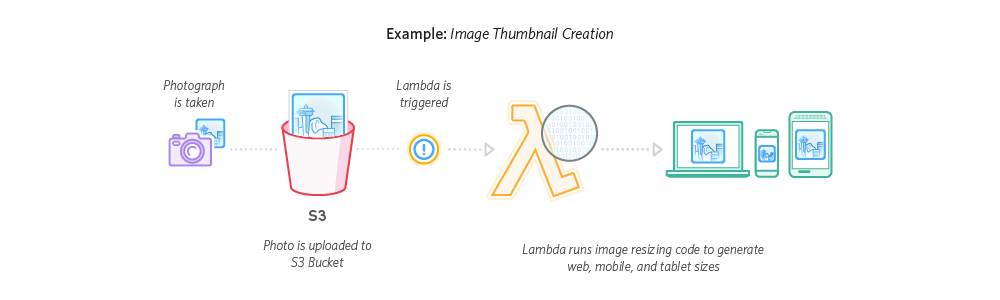
Here’s an example architecture of a serverless asset processing pipeline:
- Whenever a file is uploaded to an S3 bucket,
- A lambda function is triggered with details about the uploaded file.
- The lambda function is executed, performing whatever processing we want it to do.
A major benefit of using FaaS for this use case is you don’t need to reserve large server instances to handle the occasional traffic peaks. Since your instances will be idle for most of the day, going the FaaS route can lead to major cost savings.
With FaaS, if your system needs to process 100 requests at a specific time, your provider will spawn that many function processes without any extra configuration on your part. You get instant compute capacity when you need it and avoid paying for idle compute time.
In Chapter 4, we will explore this pattern by building an event-driven image processing backend.
1.9.2 Web Applications
You can use FaaS together with other cloud services to build scalable web applications and APIs. These backends automatically scale up and down and can run in a highly available configuration across multiple data centers – with zero administrative effort required for scalability, back-ups, or multi-data center redundancy.
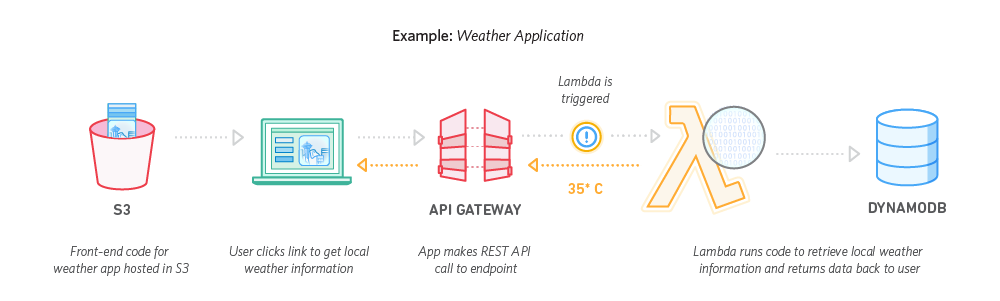
Here’s an example architecture of a serverless backend:
- Frontend clients communicate to the backend via HTTP.
- An API gateway routes HTTP requests to different lambda functions.
- Each lambda function has a single responsibility, and may communicate with other services behind the scenes.
Serverless web applications and APIs are highly available and can handle sudden traffic spikes, eliminating the Slashdot Effect. Going FaaS solves a common startup growing pain in which teams would rewrite their MVP in a different stack in order to scale. With Serverless, you can write code that scales from day 1.
In Chapters 5 and 6, we will explore this use case by building a parallelized web scraping backend and a CRUD commenting backend.
1.9.3 Webhooks
Webhooks (also known as ‘Reverse APIs’) lets developers create an HTTP endpoint that will be called when a certain event occurs in a third-party platform. Instead of polling endlessly for an update, the third-party platform can notify you of new changes.
For example, Slack uses incoming webhooks to post messages from external sources into Slack and outgoing webhooks to provide automated responses to messages your team members post.
Webhooks are powerful and flexible: they allow customers to implement arbitrary logic to extend your core product. However, webhooks are an additional deployable component your clients need to worry about. With FaaS, developers can write webhooks as Functions and not have to worry about provisioning, availability, nor scaling.
FaaS also helps platforms that use webhooks to offer a smoother developer experience. Instead of having your customers provide a webhook URL to a service they need to host elsewhere, serverless webhooks lets users implement their extension logic directly within your product. Developers would write their webhook code directly on your platform. Behind the scenes, the platform depploys the code to a FaaS provider.
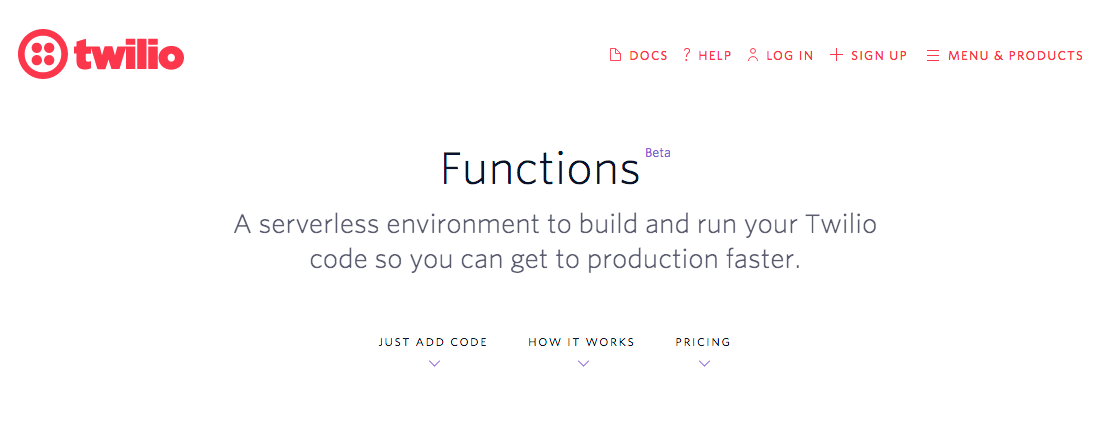
The advantages of going serverless for webhooks are similar to those for APIs: low overhead, minimal maintenance, and automatic scaling. An example use case is setting up a Node.js webhook to process SMS requests with Twilio.
1.9.4 Scheduled Tasks
You can schedule functions to be executed at intervals, similar to a cron job. You can perform health checks, regular backups, report generation, performance testing, and more without needing to run an always-on server.
1.10 Benefits
1.10.1 High Availability and Scalability
A FaaS provider handles horizontal scaling automatically for you, spawning as many function processes as necessary to handle all incoming requests. FaaS providers also guarantees high availability, making sure your functions are always up.
As a developer, you are freed from having to think about provisioning multiple instances, load balancing, circuit breaking, and other aspects of deployment concerns. You can focus on developing and improving your core application.
1.10.2 Less Ops
There’s no infrastructure for you to worry about. Tasks such as server configuration and management, patching, and maintenance are taken care of by the vendor. You’re responsible only for your own code, leaving operational and administrative tasks to capable hands.
However, operational concerns are not completely eliminated; they just take on new forms. From an operational perspective, serverless architectures introduces different considerations such as the loss of control over the execution environment and the complexity of managing many smaller deployment units, resulting in the need for much more sophisticated insights and observability solutions. Monitoring, logging, and distributed tracing are of paramount importance in Serverless architectures.
1.10.3 Granular Billing
With traditional PaaS, you are billed in interval (monthly / daily / hourly) cycles because your long-running server processes are running 24 / 7. Most of the time, this means you are paying for idle compute time.
FaaS billing are more granular and cost effective, especially when traffic loads are uneven or unexpected. With AWS Lambda you only pay for what you use in terms of number of invocations and execution time in 100 millisecond increments. This leads to lower costs overall, because you’re not paying for idle compute resources.
1.11 Drawbacks
1.11.1 Vendor lock-in
When you use a cloud provider, you delegate much of the server control to a third-party. You are tightly coupled to any cloud services that you depend on. Porting your code from one platform or cloud service to another will require moving large chunks of your infrastructure.
On the other hand, big vendors aren’t going anywhere. The only time this really matters is if your organization itself has a business requirement to have multi-cloud vendors. Note that building a cross-cloud solution is a time-consuming process: you would need to build abstractions above the cloud to essentially standardise the event creation and ingestion as well as the services that you need.
1.11.2 Lack of control
FaaS platforms are a black box.
Since the provider controls server configuration and provisioning, developers have limited control of the execution environment.
AWS Lambda lets you pick a runtime, configure memory size (from 128MB to 3GB), and configure timeouts (up to 300 seconds or 5 minutes) but not much else.
The 5 minute maximum timeout makes plain AWS Lambda unsuitable for long-running tasks. AWS Lambda’s /tmp disk space is limited to 512MB also makes is unsuitable for certain tasks such as processing large videos.
Over time, expect these limits to increase. For example, AWS announced a memory size limit increase from 1.5GB to 3GB during in November 2017.
1.11.3 Integration Testing is hard
The characteristics of serverless present challenges for integration testing:
- A serverless application is dependent on internet/cloud services, which are hard to emulate locally.
- A serverless application is an integration of separate, distributed services, which must be tested both independently, and together.
- A serverless application can feature event-driven, asynchronous workflows, which are hard to emulate entirely.
Fortunately, there are now open source projects such as localstack which lets you run a fully functional local AWS cloud stack. Develop and test offline!
1.12 FaaS Providers
There are a number of FaaS providers currently on the market, such as:
- AWS Lambda
- Google Cloud Functions
- Azure Functions
- IBM OpenWhisk
When choosing which FaaS provider to use, keep in mind that each provider has a different set of available runtimes and event triggers. See the table below for a comparison of event triggers available on different FaaS providers (not an exhaustive list):
| Amazon Web Services (AWS) | Google Cloud Platform (GCP) | Microsoft Azure | IBM | |
|---|---|---|---|---|
| Realtime messaging | Simple Notification Service (SNS) | Cloud Pub/Sub | Azure Service Bus | IBM Message Hub |
| File storage | Simple Storage Service (S3) | Cloud Storage | Azure Storage | ? |
| NoSQL database | DynamoDB | Firebase | ? | IBM Cloudant |
| Logs | Cloudwatch | Stackdriver | ? | ? |
| HTTP | Yes (API Gateway) | Yes | Yes | Yes (API Gateway) |
| Timer / Schedule | Yes | Yes | Yes | Yes |
For the rest of this book, we will be using AWS Lambda.
1.13 Chapter Summary
In serverless, a combination of smaller deployment units and higher abstraction levels provides compelling benefits such as increased velocity, greater scalability, lower cost, and the ability to focus on product features. In this chapter, you learned about:
- How serverless came to be and how it compares to PaaS.
- The basic building blocks of serverless. In serverless applications, Events trigger Functions. Functions communicate with cloud Resources to store state.
- Serverless benefits, drawbacks, and use cases.
In the next chapter, you will look at the Serverless framework and set up your development environment.