4. Building a CRUD API
In this chapter, you will build as simple CRUD (Create-Read-Update-Delete) API using Go and AWS Lambda. Each CRUD action will be handled by a serverless function. The final application has some compelling qualities:
- Less Ops: No servers to provision. Faster development.
- Infinitely Scalable: AWS Lambda will invoke your Functions for each incoming request.
- Zero Downtime: AWS Lambda will ensure your service is always up.
- Cheap: You don’t need to provision a large server instance 24 / 7 to handle traffic peaks. You only pay for real usage.
4.1 Prerequisites
Before we continue, make sure that you have:
- Go and
serverlessinstalled on your machine. - Your AWS account set up.
Follow the steps in Chapter 2 to set up your development environment, if you haven’t already.
4.2 Background Information
Web applications often requires more than a pure functional transformation of inputs. You need to capture stateful information such as user or application data and user generated content (images, documents, and so on.)
However, serverless Functions are stateless. After a Function is executed none of the in-process state will be available to subsequent invocations. To store state, you need to provision Resources that communicate with our Functions.
On top of AWS Lambda, you will need to use the following AWS services to capture state:
- AWS DynamoDB: Managed NoSQL database to store image data.
- AWS API Gateway: HTTP API Interface to our functions.
The subsections that follow briefly explain what each AWS service does.
4.2.1 Amazon DynamoDB
Amazon DynamoDB is a fully managed NoSQL cloud database and supports both document and key-value store models.
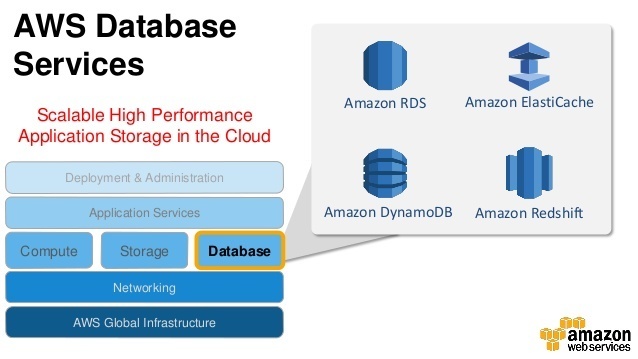
With DynamoDB, you can create database tables that can store and retrieve any amount of data, and serve any level of request traffic. You can scale up or scale down your tables’ throughput capacity without downtime or performance degradation, and use the AWS Management Console to monitor resource utilization and performance metrics.
Our CRUD API uses DynamoDB as to store all user-generated data in our application.
4.2.2 Amazon API Gateway
Amazon API Gateway is a fully managed service that makes it easy for developers to create, publish, maintain, monitor, and secure APIs at any scale.
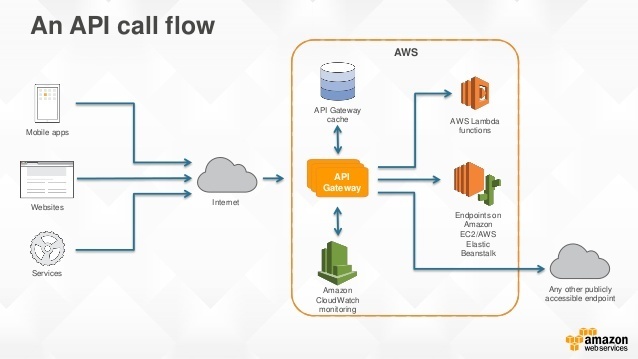
With a few clicks in the AWS Management Console, you can create an API that acts as a “front door” for applications to access data, business logic, or functionality from your back-end services, such as workloads running on Amazon Elastic Compute Cloud (Amazon EC2), code running on AWS Lambda, or any Web application.
Our CRUD API uses API Gateway to allow our Functions to be triggered via HTTP.
4.3 Design
4.3.1 Problem Decomposition
For each endpoint in our backend’s HTTP API, you can create a Function that corresponds to an action. For example:
1 `GET /todos`          ->      `listTodos`
2
3 `POST /todos`         ->      `addTodo`
4
5 `PATCH /todos/{id}`   ->      `completeTodo`
6
7 `DELETE /todos/{id}`  ->      `deleteTodo`
The listTodos Function returns all of our todos, addTodo adds a new row to our todos table, and so on.
When designing Functions, keep the Single Responsibility Principle in mind.
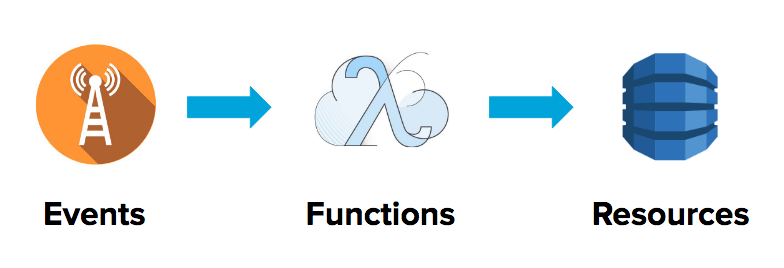
Remember: Events trigger Functions which communicate with Resources. In this project, our Functions will be triggered by HTTP and communicate with a DynamoDB table.
4.4 Development
4.4.1 Example Application Setup
Check out the serverless-crud-go sample application included as part of this book. This example application will serve as a handy reference as you build your own.
In your terminal, do:
1 cd serverless-crud-go
2 ./scripts/build.sh
3 serverless deploy
Running the build.sh script will call the go build command to create statically-linked binaries in the bin/ sub-directory of your project.
Here is the build script in detail:
 1 #!/usr/bin/env bash
 2
 3 echo "Compiling functions to bin/handlers/ ..."
 4
 5 rm -rf bin/
 6
 7 cd src/handlers/
 8 for f in *.go; do
 9   filename="${f%.go}"
10   if GOOS=linux go build -o "../../bin/handlers/$filename" ${f}; then
11     echo "✓ Compiled $filename"
12   else
13     echo "✕ Failed to compile $filename!"
14     exit 1
15   fi
16 done
17
18 echo "Done."
4.4.1.1 Step 0: Set up boilerplate
As part of the sample code included in this book, you have a serverless-boilerplate-go template project you can copy to quickly get started.
Copy the entire project folder to your $GOPATH/src and rename the directory and to your own project name.
Remember to update the project’s name in serverless.yml to your own project name!
The serverless-boilerplate-go project has this structure:
1 .
2 +-- scripts/
3 +-- src/
4       +-- handlers/
5 +-- .gitignore
6 +-- README.md
7 +-- Gopkg.toml
8 +-- serverless.yml
Within this boilerplate, we have the following:
-
scriptscontains abuild.shscript that you can use to compile binaries for the lambda deployment package. -
src/handlers/is where your handler functions will live. -
Gokpkg.tomlis used for Go dependency management with thedeptool. -
serverless.ymlis a Serverless project configuration file. -
README.mdcontains step-by-step setup instructions.
In your terminal, navigate to your project’s root directory and install the dependencies defined in the boilerplate:
1 cd <your-project-name>
2 dep ensure
With that set up, let’s get started with building our CRUD API!
4.4.1.2 Step 1: Create the POST /todos endpoint
4.4.1.2.1 Event
First, define the addTodo Function’s HTTP Event trigger in serverless.yml:
 1 // serverless.yml
 2
 3 package:
 4  individually: true
 5  exclude:
 6    - ./**
 7
 8 functions:
 9   addTodo:
10     handler: bin/handlers/addTodo
11     package:
12       include:
13         - ./bin/handlers/addTodo
14     events:
15       - http:
16           path: todos
17           method: post
18           cors: true
In the above configuration, notice two things:
- Within the
packageblock, we tell the Serverless framework to only package the compiled binaries inbin/handlersand exclude everything else. - The
addTodofunction has an HTTP event trigger set to thePOST /todosendpoint.
4.4.1.2.2 Function
Create a new file within the src/handlers/ directory called addTodo.go:
1 // src/handlers/addTodo.go
2
3 package main
4
5 import (
6 "context"
7 "fmt"
8 "os"
9 "time"
10 "encoding/json"
11
12 "github.com/aws/aws-lambda-go/lambda"
13 "github.com/aws/aws-lambda-go/events"
14 "github.com/aws/aws-sdk-go/aws"
15 "github.com/aws/aws-sdk-go/aws/session"
16 "github.com/aws/aws-sdk-go/service/dynamodb"
17 "github.com/aws/aws-sdk-go/service/dynamodb/dynamodbattribute"
18
19 "github.com/satori/go.uuid"
20 )
21
22 type Todo struct {
23 ID string `json:"id"`
24 Description string `json:"description"`
25 Done bool `json:"done"`
26 CreatedAt string `json:"created_at"`
27 }
28
29 var ddb *dynamodb.DynamoDB
30 func init() {
31 region := os.Getenv("AWS_REGION")
32 if session, err := session.NewSession(&aws.Config{ // Use aws sdk to connect to \
33 dynamoDB
34 Region: ®ion,
35 }); err != nil {
36 fmt.Println(fmt.Sprintf("Failed to connect to AWS: %s", err.Error()))
37 } else {
38 ddb = dynamodb.New(session) // Create DynamoDB client
39 }
40 }
41
42 func AddTodo(ctx context.Context, request events.APIGatewayProxyRequest) (events.\
43 APIGatewayProxyResponse, error) {
44 fmt.Println("AddTodo")
45
46 var (
47 id = uuid.Must(uuid.NewV4(), nil).String()
48 tableName = aws.String(os.Getenv("TODOS_TABLE_NAME"))
49 )
50
51 // Initialize todo
52 todo := &Todo{
53 ID: id,
54 Done: false,
55 CreatedAt: time.Now().String(),
56 }
57
58 // Parse request body
59 json.Unmarshal([]byte(request.Body), todo)
60
61 // Write to DynamoDB
62 item, _ := dynamodbattribute.MarshalMap(todo)
63 input := &dynamodb.PutItemInput{
64 Item: item,
65 TableName: tableName,
66 }
67 if _, err := ddb.PutItem(input); err != nil {
68 return events.APIGatewayProxyResponse{ // Error HTTP response
69 Body: err.Error(),
70 StatusCode: 500,
71 }, nil
72 } else {
73 body, _ := json.Marshal(todo)
74 return events.APIGatewayProxyResponse{ // Success HTTP response
75 Body: string(body),
76 StatusCode: 200,
77 }, nil
78 }
79 }
80
81 func main() {
82 lambda.Start(AddTodo)
83 }
In the above handler function:
- In the
init()function, we perform some initialization logic: making a database connection to DynamoDB.init()is automatically called beforemain(). - The
addTodohandler function parses the request body for astringdescription. - Then, it calls
ddb.PutItemwith an environment variableTODOS_TABLE_NAMEto insert a new row to our DynamoDB table. - Finally, it returns an HTTP success or error response back to the client.
4.4.1.2.3 Resource
Our handler function stores data in a DynamoDB table. Let’s define this table resource in the serverless.yml:
 1 # serverless.yml
 2
 3 custom:
 4   todosTableName: ${self:service}-${self:provider.stage}-todos
 5   todosTableArn: # ARNs are addresses of deployed services in AWS space
 6     Fn::Join:
 7     - ":"
 8     - - arn
 9       - aws
10       - dynamodb
11       - Ref: AWS::Region
12       - Ref: AWS::AccountId
13       - table/${self:custom.todosTableName}
14
15 provider:
16   ...
17   environment:
18     TODOS_TABLE_NAME: ${self:custom.todosTableName}
19   iamRoleStatements: # Defines what other AWS services our lambda functions can a\
20 ccess
21     - Effect: Allow # Allow access to DynamoDB tables
22       Action:
23         - dynamodb:Scan
24         - dynamodb:GetItem
25         - dynamodb:PutItem
26         - dynamodb:UpdateItem
27         - dynamodb:DeleteItem
28       Resource:
29         - ${self:custom.todosTableArn}
30
31 resources:
32   Resources: # Supporting AWS services
33     TodosTable: # Define a new DynamoDB Table resource to store todo items
34       Type: AWS::DynamoDB::Table
35       Properties:
36         TableName: ${self:custom.todosTableName}
37         ProvisionedThroughput:
38           ReadCapacityUnits: 1
39           WriteCapacityUnits: 1
40         AttributeDefinitions:
41           - AttributeName: id
42             AttributeType: S
43         KeySchema:
44           - AttributeName: id
45             KeyType: HASH
In the resources block, we define a new AWS::DynamoDB::Table resource using AWS CloudFormation.
We then make the provisioned table’s name available to our handler function by exposing it as an environment variable in the
provider.environment block.
To give our functions access to AWS resources, we also define some IAM role statements that allow our functions to perform certain actions such as dynamodb:PutItem to our table resource.
4.4.1.2.4 Summary
Run ./scripts/build.sh and serverless deploy. If everything goes well, you will receive an HTTP endpoint url that you can use to trigger your Lambda function.
Verify your function by making an HTTP POST request to the URL with the following body:
1 {
2   "description": "Hello world"
3 }
If everything goes well, you will receive a success 201 HTTP response and be able to see a new row in your AWS DynamoDB table via the AWS console.
4.4.1.3 Step 2: Create the GET /todos endpoint
4.4.1.3.1 Event
First, define the listTodos Function’s HTTP Event trigger in serverless.yml:
 1 // serverless.yml
 2
 3 functions:
 4   listTodos:
 5     handler: bin/handlers/listTodos
 6     package:
 7      include:
 8        - ./bin/handlers/listTodos
 9     events:
10       - http:
11           path: todos
12           method: get
13           cors: true
4.4.1.3.2 Function
Create a new file within the src/handlers/ directory called listTodos.go:
1 // src/handlers/listTodos.go
2
3 package main
4
5 import (
6 "context"
7 "fmt"
8 "encoding/json"
9 "os"
10
11 "github.com/aws/aws-lambda-go/lambda"
12 "github.com/aws/aws-lambda-go/events"
13 "github.com/aws/aws-sdk-go/aws"
14 "github.com/aws/aws-sdk-go/aws/session"
15 "github.com/aws/aws-sdk-go/service/dynamodb"
16 "github.com/aws/aws-sdk-go/service/dynamodb/dynamodbattribute"
17 )
18
19 type Todo struct {
20 ID string `json:"id"`
21 Description string `json:"description"`
22 Done bool `json:"done"`
23 CreatedAt string `json:"created_at"`
24 }
25
26 type ListTodosResponse struct {
27 Todos []Todo `json:"todos"`
28 }
29
30 var ddb *dynamodb.DynamoDB
31 func init() {
32 region := os.Getenv("AWS_REGION")
33 if session, err := session.NewSession(&aws.Config{ // Use aws sdk to connect to \
34 dynamoDB
35 Region: ®ion,
36 }); err != nil {
37 fmt.Println(fmt.Sprintf("Failed to connect to AWS: %s", err.Error()))
38 } else {
39 ddb = dynamodb.New(session) // Create DynamoDB client
40 }
41 }
42
43 func ListTodos(ctx context.Context, request events.APIGatewayProxyRequest) (event\
44 s.APIGatewayProxyResponse, error) {
45 fmt.Println("ListTodos")
46
47 var (
48 tableName = aws.String(os.Getenv("TODOS_TABLE_NAME"))
49 )
50
51 // Read from DynamoDB
52 input := &dynamodb.ScanInput{
53 TableName: tableName,
54 }
55 result, _ := ddb.Scan(input)
56
57 // Construct todos from response
58 var todos []Todo
59 for _, i := range result.Items {
60 todo := Todo{}
61 if err := dynamodbattribute.UnmarshalMap(i, &todo); err != nil {
62 fmt.Println("Failed to unmarshal")
63 fmt.Println(err)
64 }
65 todos = append(todos, todo)
66 }
67
68 // Success HTTP response
69 body, _ := json.Marshal(&ListTodosResponse{
70 Todos: todos,
71 })
72 return events.APIGatewayProxyResponse{
73 Body: string(body),
74 StatusCode: 200,
75 }, nil
76 }
77
78 func main() {
79 lambda.Start(ListTodos)
80 }
In the above handler function:
- First, you retrieve the
tableNamefrom environment variables. - Then, you call
ddb.Scanto retrieve rows from the todos DB table. - Finally, you return a success or error HTTP response depending on the outcome.
4.4.1.3.3 Summary
Run ./scripts/build.sh and serverless deploy. You will receive an HTTP endpoint url that you can use to trigger your Lambda function.
Verify your function by making an HTTP GET request to the URL.
If everything goes well, you will receive a success 200 HTTP response and see a list of todo JSON objects:
 1 > curl https://<hash>.execute-api.<region>.amazonaws.com/dev/todos
 2 {
 3     "todos": [
 4         {
 5             "id": "d3e38e20-5e73-4e24-9390-2747cf5d19b5",
 6             "description": "buy fruits",
 7             "done": false,
 8             "created_at": "2018-01-23 08:48:21.211887436 +0000 UTC m=+0.045616262"
 9         },
10         {
11             "id": "1b580cc9-a5fa-4d29-b122-d20274537707",
12             "description": "go for a run",
13             "done": false,
14             "created_at": "2018-01-23 10:30:25.230758674 +0000 UTC m=+0.050585237"
15         }
16     ]
17 }
4.4.1.4 Step 3: Create the PATCH /todos/{id} endpoint
4.4.1.4.1 Event
First, define the completeTodo Function’s HTTP Event trigger in serverless.yml:
 1 // serverless.yml
 2
 3 functions:
 4   completeTodo:
 5     handler: bin/handlers/completeTodo
 6     package:
 7      include:
 8        - ./bin/handlers/completeTodo
 9     events:
10       - http:
11           path: todos
12           method: patch
13           cors: true
4.4.1.4.2 Function
Create a new file within the src/handlers/ directory called completeTodo.go:
1 package main
2
3 import (
4 "fmt"
5 "context"
6 "os"
7 "github.com/aws/aws-lambda-go/lambda"
8 "github.com/aws/aws-lambda-go/events"
9 "github.com/aws/aws-sdk-go/aws/session"
10 "github.com/aws/aws-sdk-go/service/dynamodb"
11 "github.com/aws/aws-sdk-go/aws"
12 )
13
14 var ddb *dynamodb.DynamoDB
15 func init() {
16 region := os.Getenv("AWS_REGION")
17 if session, err := session.NewSession(&aws.Config{ // Use aws sdk to connect to \
18 dynamoDB
19 Region: ®ion,
20 }); err != nil {
21 fmt.Println(fmt.Sprintf("Failed to connect to AWS: %s", err.Error()))
22 } else {
23 ddb = dynamodb.New(session) // Create DynamoDB client
24 }
25 }
26
27
28 func CompleteTodo(ctx context.Context, request events.APIGatewayProxyRequest) (ev\
29 ents.APIGatewayProxyResponse, error) {
30 fmt.Println("CompleteTodo")
31
32 // Parse id from request body
33 var (
34 id = request.PathParameters["id"]
35 tableName = aws.String(os.Getenv("TODOS_TABLE_NAME"))
36 done = "done"
37 )
38
39 // Update row
40 input := &dynamodb.UpdateItemInput{
41 Key: map[string]*dynamodb.AttributeValue{
42 "id": {
43 S: aws.String(id),
44 },
45 },
46 UpdateExpression: aws.String("set #d = :d"),
47 ExpressionAttributeNames: map[string]*string{
48 "#d": &done,
49 },
50 ExpressionAttributeValues: map[string]*dynamodb.AttributeValue{
51 ":d": {
52 BOOL: aws.Bool(true),
53 },
54 },
55 ReturnValues: aws.String("UPDATED_NEW"),
56 TableName: tableName,
57 }
58 _, err := ddb.UpdateItem(input)
59
60 if err != nil {
61 return events.APIGatewayProxyResponse{ // Error HTTP response
62 Body: err.Error(),
63 StatusCode: 500,
64 }, nil
65 } else {
66 return events.APIGatewayProxyResponse{ // Success HTTP response
67 Body: request.Body,
68 StatusCode: 200,
69 }, nil
70 }
71 }
72
73 func main() {
74 lambda.Start(CompleteTodo)
75 }
In the above handler function:
- First, you retrieve
idfrom the request’s path parameters, andtableNamefrom environment variables. - Then, you call
ddb.UpdateItemwith bothid,tableName, andUpdateExpressionthat sets the todo’sdonecolumn totrue. - Finally, you return a success or error HTTP response depending on the outcome.
4.4.1.4.3 Summary
Run ./scripts/build.sh and serverless deploy. You will receive an HTTP PATCH endpoint url that you can use to trigger the completeTodo Lambda function.
Verify your function by making an HTTP PATCH request to the /todos/{id} url, passing in a todo ID.
You should see that the todo item’s done status is updated from false to true.
4.4.1.5 Step 4: Create the DELETE /todos/{id} endpoint
4.4.1.5.1 Event
First, define the deleteTodo Function’s HTTP Event trigger in serverless.yml:
 1 // serverless.yml
 2
 3 functions:
 4   deleteTodo:
 5     handler: bin/handlers/deleteTodo
 6     package:
 7      include:
 8        - ./bin/handlers/deleteTodo
 9     events:
10       - http:
11           path: todos
12           method: delete
13           cors: true
4.4.1.5.2 Function
Create a new file within the src/handlers/ directory called deleteTodo.go:
1 package main
2
3 import (
4 "fmt"
5 "context"
6 "os"
7 "github.com/aws/aws-lambda-go/lambda"
8 "github.com/aws/aws-lambda-go/events"
9 "github.com/aws/aws-sdk-go/aws/session"
10 "github.com/aws/aws-sdk-go/service/dynamodb"
11 "github.com/aws/aws-sdk-go/aws"
12 )
13
14 var ddb *dynamodb.DynamoDB
15 func init() {
16 region := os.Getenv("AWS_REGION")
17 if session, err := session.NewSession(&aws.Config{ // Use aws sdk to connect to \
18 dynamoDB
19 Region: ®ion,
20 }); err != nil {
21 fmt.Println(fmt.Sprintf("Failed to connect to AWS: %s", err.Error()))
22 } else {
23 ddb = dynamodb.New(session) // Create DynamoDB client
24 }
25 }
26
27
28 func DeleteTodo(ctx context.Context, request events.APIGatewayProxyRequest) (even\
29 ts.APIGatewayProxyResponse, error) {
30 fmt.Println("DeleteTodo")
31
32 // Parse id from request body
33 var (
34 id = request.PathParameters["id"]
35 tableName = aws.String(os.Getenv("TODOS_TABLE_NAME"))
36 )
37
38 // Delete todo
39 input := &dynamodb.DeleteItemInput{
40 Key: map[string]*dynamodb.AttributeValue{
41 "id": {
42 S: aws.String(id),
43 },
44 },
45 TableName: tableName,
46 }
47 _, err := ddb.DeleteItem(input)
48
49 if err != nil {
50 return events.APIGatewayProxyResponse{ // Error HTTP response
51 Body: err.Error(),
52 StatusCode: 500,
53 }, nil
54 } else {
55 return events.APIGatewayProxyResponse{ // Success HTTP response
56 StatusCode: 204,
57 }, nil
58 }
59 }
60
61 func main() {
62 lambda.Start(DeleteTodo)
63 }
In the above handler function:
- First, you retrieve
idfrom the request’s path parameters, andtableNamefrom environment variables. - Then, you call
ddb.DeleteItemwith bothidandtableName. - Finally, you return a success or error HTTP response depending on the outcome.
4.4.1.5.3 Summary
Run ./scripts/build.sh and serverless deploy. You will receive an HTTP DELETE endpoint url that you can use to trigger the completeTodo Lambda function.
Verify your function by making an HTTP DELETE request to the /todos/{id} url, passing in a todo ID.
You should see that the todo item is deleted from your DB table.
4.4.1.6 Writing Unit Tests
Going Serverless makes your infrastructure more resilient, decreasing the likelihood that your servers fail. However, your application can still fail due to bugs and errors in business logic. Having unit tests gives you the confidence that both your infrastructure and code is behaving as expected.
Most of your Functions makes external API calls to AWS cloud services such as DynamoDB. In our unit tests we want to avoid making any network calls - they should be able to run locally. Unit tests should not be dependent on live infrastructure where possible.
In Go, we use the testify package to write unit tests. For example:
 1 package main_test
 2
 3 import (
 4  "testing"
 5  main "github.com/aws-samples/lambda-go-samples"
 6  "github.com/aws/aws-lambda-go/events"
 7  "github.com/stretchr/testify/assert"
 8 )
 9
10 func TestHandler(t *testing.T) {
11  tests := []struct {
12   request events.APIGatewayProxyRequest
13   expect  string
14   err     error
15  }{
16    {
17     // Test that the handler responds with the correct response
18     // when a valid name is provided in the HTTP body
19     request: events.APIGatewayProxyRequest{Body: "Paul"},
20     expect:  "Hello Paul",
21     err:     nil,
22    },
23    {
24     // Test that the handler responds ErrNameNotProvided
25     // when no name is provided in the HTTP body
26     request: events.APIGatewayProxyRequest{Body: ""},
27     expect:  "",
28     err:     main.ErrNameNotProvided,
29    },
30   }
31
32   for _, test := range tests {
33    response, err := main.Handler(test.request)
34    assert.IsType(t, test.err, err)
35    assert.Equal(t, test.expect, response.Body)
36   }
37 }
4.5 Summary
Congratulations! In this chapter, you learned how to design and develop an API as a set of single-purpose functions, events, and resources.