3. Hyperlink
Hyperlinks (or links) are fundamental elements of web pages. As a matter of fact, it is hyperlinks that make the World Wide Web possible. A sample link is provided below, along with the HTML source.

HTML Source
<a href="index.html" id="recommend_selenium_link" class="nav" data-id="123"
   style="font-size: 14px;">Recommend Selenium</a>
3.1 Click a link by text
driver.get(site_url + "/link.html")  # see Chapter 2 for site_url

driver.find_element(:link_text, "Recommend Selenium").click
3.2 Click a link by ID
driver.find_element(:id, "recommend_selenium_link").click
If you are testing a website with multiple languages, using IDs is probably the only feasible option. You do not want to write test scripts like below:
if is_italian?
  driver.find_element(:link_text, "Accedi").click
elsif is_chinese?  # a helper function determines the locale
  driver.find_element(:link_text, "登录").click
else
  driver.find_element(:link_text, "Sign in").click
end
3.3 Click a link by partial text
driver.find_element(:partial_link_text, "partial").click
expect(driver.text).to include("This is partial link page")
3.4 Click a link by XPath
The example below is finding a link with the text ‘Recommend Selenium’ under a <p> tag.
driver.find_element(:xpath, "//p/a[text()='Recommend Selenium']").click()
You might say the example before (find by :link_text) is simpler and more intuitive, that’s correct. but let’s examine another example:
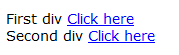
On this page, there are two ‘Click here’ links.
HTML Source
  <div>
    First div
    <a href="link-url.html">Click here</a>
  </div>
  <div>
    Second div
    <a href="link-partial.html">Click here</a>
  </div>
If a test case requires you to click the second ‘Click here’ link, the simple find_element(:link_text, 'Click here') won’t work (as it clicks the first one). Here is a way to accomplish using XPath:
xpath_str = '//div[contains(text(), "Second")]/a[text()="Click here"]'
driver.find_element(:xpath, xpath_str).click()
3.5 Click Nth link with exact same label
It is not uncommon that there is more than one link with exactly the same text. By default, Selenium will choose the first one. What if you want to click the second or Nth one?
The web page below contains three ‘Show Answer” links,

To click the second one,
driver.find_elements(:link_text => "Show Answer")[1].click # second link
find_elements return a list (also called array) of web controls matching the criteria in appearing order. Selenium (in fact Ruby) uses 0-based indexing, i.e., the first one is 0.
3.6 Verify a link is present or not?
assert driver.find_element(:link_text, "Recommend Selenium").displayed?
assert !driver.find_element(:id, "recommend_selenium_link").displayed?
Verification in RSpec (known as RSpec Expectations):
# RSpec's expect-based syntax
expect(driver.find_element(:link_text, "Recommend Selenium").displayed?).to be_truthy
expect(driver.find_element(:link_text, "Recommend Selenium").displayed?).not_to be_falsey

# RSpec's should-based syntax
driver.find_element(:link_text, "Recommend Selenium").displayed?.should be_truthy
driver.find_element(:id, "recommend_selenium_link").displayed?.should_not be_falsey
The expect, should, should_not, be_truthy and be_falsey are defined in RSpec.
For more information, check out RSpec documentation.
3.7 Getting link data attributes
Once a web control is identified, we can get the other attributes of the element. This is generally applicable to most of the controls.
expect(driver.find_element(:link_text, "Recommend Selenium")["href"]).to
  eq(site_url + "/index.html")
expect(driver.find_element(:link_text, "Recommend Selenium")["id"]).to
  eq("recommend_selenium_link")
expect(driver.find_element(:id, "recommend_selenium_link").text).to
  eq("Recommend Selenium")
expect(driver.find_element(:id, "recommend_selenium_link").tag_name).to eq("a")
Also, you can get the value of custom attributes of this element and its inline CSS style.
elem_id = "recommend_selenium_link"
expect(driver.find_element(:id, elem_id).attribute("data-id")).to eq("123")
expect(driver.find_element(:id, elem_id)["style"]).to eq("font-size: 14px;")
3.8 Test links open a new browser window
Clicking the link below will open the linked URL in a new browser window or tab.
<a href="https://agileway.com.au/demo" target="_blank">Open new window</a>
While we could use switch_to method (see chapter 10) to find the new browser window, it will be easier to perform all testing within one browser window. Here is how:
current_url = driver.current_url
new_window_url = driver.find_element(:link_text, "Open new window")["href"]
driver.navigate.to(new_window_url)
# ... testing on new site
driver.find_element(:name, "name").send_keys "sometext"
driver.navigate.to(current_url) # back
In this test script, we use a local variable (a programming term) ‘current_url’ to store the current URL.