Suitable Linux distributions
In this chapter I will look at Linux distributions that are, in my opinion, particularly suitable for the X86 embedded platform. Of course this view is completely subjective since my experience extends to a relatively few number of distributions. In the end, nearly every distribution is probably suitable: one makes it easier, the other harder to adapt to this platform. One hint when choosing your distribution is to look at the minimum requirements needed to install it. If anything, the minimum RAM and hard disk space requirements are usually specified. These, along with a certain reserve for extra software should match the specs of the machine.
If you do have some experience with a distribution - and it is basically suitable - it might be a good idea to use this as a starting point. Sometimes there are projects, that prepare a distribution for an intended use.
Debian GNU/Linux
In the past few years I have gained experience with Debian GNU/Linux and some distributions derived from this. On my first ALIX machine I installed Debian 6 Squeeze with the installer which came with the distribution. I had mounted the file system completely read-only and used AUFS to allow processes to write things on the disk. This is one possibility, though perhaps not the smartest when it comes to administration and updates. A better solution would be to put the directories with write access on a tmpfs. This can be achieved with the software package flashybrid.
Voyage Linux
A little bit later I discovered Voyage Linux. This distribution is derived from Debian and works best on platforms like PC Engines ALIX or WRAP, Soekris 45xx/48xx and boards with an ATOM processor. Most of the software is directly from Debian so that I can use the Debian servers as the source for software packages. Only a few additional packages are needed which provide support for the devices and the organization of the file systems.
Currently Voyage Linux has two editions:
- Voyage Linux - the basic version
- Voyage MPD - Music Player Daemon
All of the editions come as a distribution tarball and as a Live CD in i386 architecture. They also offer an SDK to make it easier to customize Voyage Linux.
iMedia Embedded Linux
This is a hybrid between a small embedded Linux distribution and a mature distribution geared for X86 systems. While it doesn’t have the restrictions of an embedded distribution, it is more lightweight in terms of hard disk space, processor and memory requirements.
It is library-compatible with major distributions like Fedora Core, Gentoo, Suse or Mandriva and therefore makes it easy for the user to expand their installation. For computers based on AMD Geode LX and Geode GX processors there is iMedia ALIX Linux.
iMedia Linux Appliances are particularly interesting. These are pre-built Linux systems made for certain purposes like multimedia systems, kiosk systems, LAMP stacks, router appliances, MythTV and iMedia ALIX.
This distribution is normally installed via CD-ROM. One method is outlined in the iMedia Linux forums which explains how to use a USB CD-ROM to install iMedia Linux on ALIX machines that can’t boot from a USB drive. I’ll go into detail about this in the next chapter.
Personally I have not worked with iMedia Linux but I mention it here in case someone finds an appropriate appliance there.
OpenWrt
OpenWrt is a Linux distribution for embedded devices. Instead of creating a single static firmware, OpenWrt delivers a fully writable system with software package management. This allows you to use software packages to customize the machine for any situation. OpenWrt is a system which allows developers to combine applications without having to create a complete firmware. For users it means being able to totallly adapt the machine in unforeseeable ways.
The Unified Configuration Interface (UCI) is particularly interesting. This offers a consistent configuration interface from the command line (the program uci) as well as in the web browser (luci with webserver).
Since the release of Kamikaze, OpenWrt has been usable on ALIX2 and ALIX3 as well as on WRAP machines from PC Engines.
The first boot takes a little longer, then the console is ready and can be
activated by pressing <Enter>.
Once it is installed, all of the network devices found are combined in a network bridge that is accessible at the address 192.168.1.1. The computer can be configured via serial console, telnet or a webbrowser. After you have set a password for root, telnet access is disabled and SSH is enabled. To use the web interface with SSL, you’ll need to install the package luci-ssl:
# opkg update
# opkg install luci-ssl
# /etc/init.d/uhttpd restart
Read-only root with ext2 file system
There is one slight annoyance if you use OpenWrt with an ext2 file system.
The file system is mounted read-write per default.
This is one of the things I wanted to avoid.
Luckily is an easy remedy: I insert the following line into the file
/etc/rc.local before exit 0 in the last line:
mount -o remount,ro /
Because I am lazy, I create two scripts named /sbin/remountrw and /sbin/remountro which contain the command above with the respective option to remount the file system read-write or read-only. To configure the system I have to unblock write access first:
# remountrw
# opkg update
# opkg install ...
# remountro
And the most important thing is to call up remountro at the end. That way the file system is mounted read-only and it doesn’t matter if the power fails or the machine is switched off.
I can work well from the command line with these scripts. If I want to remount the file system read-write or read-only from the web interface LuCI I can use a small extension.
All extensions for LuCI go into the directories below /usr/lib/lua/luci/. Control files go into the directory controller/ while templates go under view/. The control file /usr/lib/lua/luci/controler/remount.lua is short:
remount.lua
 1 module("luci.controller.remount", package.seeall)
 2 function index()
 3   local page = node("remount")
 4   page.sysauth = "root"
 5   page.sysauth_authenticator = "htmlauth"
 6   entry({"remount"}, template("remount"), "Remount")
 7   entry({"remount", "readonly"}, call("readonly"))
 8   entry({"remount", "readwrite"}, call("readwrite"))
 9 end
10 function readwrite()
11   luci.sys.exec("mount -o remount,rw,noatime /")
12   luci.http.redirect(
13     luci.dispatcher.build_url("remount")
14   )
15 end
16 function readonly()
17   luci.sys.exec("mount -o remount,ro /")
18   luci.http.redirect(
19     luci.dispatcher.build_url("remount")
20   )
21 end
22 function mounted()
23   local data = ""
24   local partitions = luci.util.execi("mount")
25
26   if not partitions then
27     return "failure with mount command"
28   end
29   for line in partitions do
30     if string.match(line,"^/.+%s/%s.+") then
31       data = data .. line .. "\n"
32     end
33   end
34   return data
35 end
This file registers a URL with the dispatcher in the function index(). Furthermore it provides the functions readonly(), readwrite() and mounted(). The first two remount the file system. The third extracts the line containing the root file system from the output of the mount command to show the current state.
remount.htm
1 <%+header%>
2 <h1><%:Remount%></h1>
3 <p> </p><br />
4 <% mounted = luci.controller.remount.mounted() %>
5 <pre>
6 <%=mounted%>
7 </pre>
8 <form name="readwrite" id="readwrite"
9 action="<%=controller%>/remount/readwrite"
10 target ="_self" style="display:inline">
11 <input type="submit" value="read-write" />
12 </form>
13 <form name="readonly" id="readonly"
14 action="<%=controller%>/remount/readonly"
15 target ="_self" style="display:inline">
16 <input type="submit" value="read-only" />
17 </form>
18 <%+footer%>
The template /usr/lib/lua/luci/view/remount.htm is short too. It shows the return value of the function mounted(), mentioned above, and provides two buttons so you can select the functions readwrite() or readonly().
Thus the extension to LuCI looks like this:
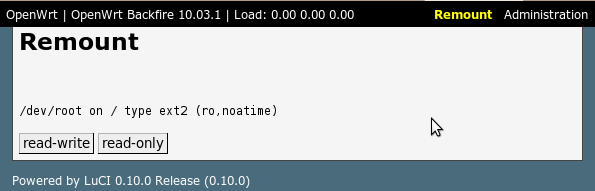
LuCI extension to remount the root partition
Here I must also remember to remount the root file system read-only when I’m done with configuring.
Using the LEDs
To use the LEDs on OpenWrt I need the software package kmods-leds-alix. I can install this package in the command line with opkg or with LuCI. I can comfortably configure the LEDs using the web interface. Alternatively I can use uci in the command line. A sample configuration that lights LED1 constantly and shows the network traffic of eth0 at LED2 looks like this in the file /etc/config/system:
 1 config 'led'
 2        option 'sysfs' 'alix:1'
 3    option 'default' '1'
 4    option 'trigger' 'default-on'
 5
 6 config 'led'
 7    option 'default' '0'
 8    option 'sysfs' 'alix:2'
 9    option 'trigger' 'netdev'
10    option 'dev' 'eth0'
11    option 'mode' 'tx rx'
I can import this configuration in the command line like this:
# uci import system
Slax
Slax is a Linux distribution specializing in small packed systems. It contains X windows, the KDE desktop with K-Office, a web browser, chat programs, audio, video and a number of other things. There are official editions in more than 20 languages.
Even though Slax is started from a compressed file system, all files are changeable, since the read-only file system is overlayed with a read-write AUFS file system.
This makes it a possible option for thin clients on ALIX machines with a graphics card.
Linux From Scratch
The Linux From Scratch project is worth mentioning. It relays basic information about Linux in its own special way, which - together with tips from this book - can lead to a successful project on an ALIX machine.
Buildroot
Buildroot is likewise not a Linux distribution but instead a project that assists the developer of a Linux system in choosing packages and configuring and building the root file system. It is designed for more experienced people who want or need to do and control things all be themselves.
It has a simple structure and basically relies on Makefile, which should be familiar to most developers. It can generate the necessary tools for cross compilation with uClibc or use available tools. The development and debugging tools can also be build for the target platform to make it easier to debug. Central components are busybox and uClibc. Buildroot supports various file system types for the root file system and more than a hundred software packages.
Homemade applications can be integrated into the system and are then built together with the rest of the system.