2. Why WPF ?
If you’re in a hurry, you can safely skip this chapter and head straight to the Creating a WPF application chapter. This Why WPF chapter is there for those that want to know why WPF should be used.
WPF is a .NET development framework for desktop applications that solves several problems encountered with previous development frameworks.
Applications were counter-intuitive
Do you remember Windows XP? In order to turn off the computer, you had to press a button titled Start. Not really intuitive, is it? While this is a mainstream example, most software suffered from bad user experience: it was simply too complicated for a user to find her way around.
Some programs were even so complicated to use that a wizard was run when launched in order to guide users through the process of using the application. Wait: “process”? Using an application shouldn’t be a process. It shouldn’t be complicated to use an application, in fact the application should adapt to the user. While that debate would be nice for UX experts, my point is: why were applications so complicated to use?
The answer to that question is rooted within that simple fact: developers were asked to design the user-experience using code. Why? Because in many technology stacks, the user experience is coded by a developer, not drawn by a UX expert. Now, how can we expect someone to work correctly using inappropriate tools and lacking the necessary knowledge? A developer has little knowledge of user experience, and a programming language is not an appropriate way to create a user interface.
It all comes down to this: user-experience shouldn’t be created using code, and it should be designed by a UX expert.
Applications were dull
Here is an application I used for accounting:
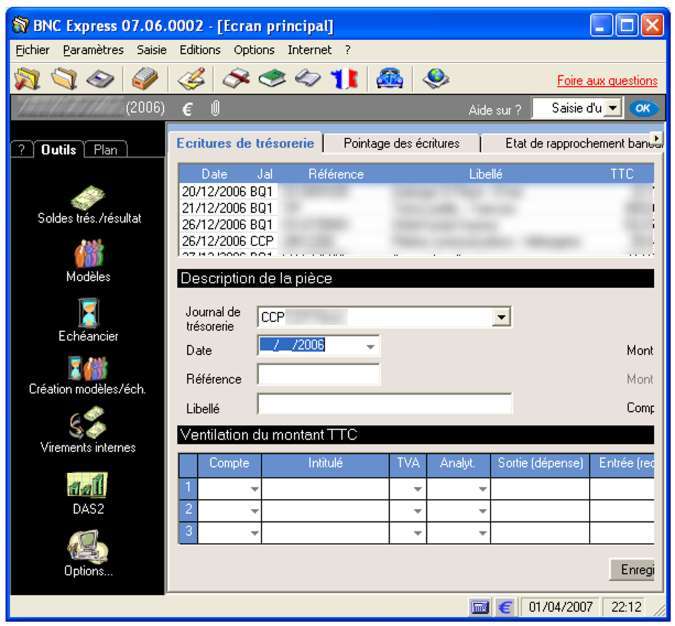
Alright, the program did the job it was supposed to do. But oh my, what a dull interface. Plus it’s not appealing at all. It doesn’t handle resizes correctly, doesn’t fill the available screen estate, and it looks like the icons were randomly picked. No need to tell you that I wasn’t eager to use that program as often as I needed to.
But it would be too easy to blame the developer for that application’s dullness. Coding a nice UI could easily double development time when using frameworks like Windows Forms, because you have to code in order to handle:
- Resizing
- Homogeneity
- Styling
- Elements positioning
Another source for that dullness is the fact that few developers have design skills. And vice-versa.
Nice GUIs could be dreamed of but not implemented
When you watch a movie or your favorite series, look at the user interface when people use computers. Did you notice how well designed, fluid and attractive they are? When some evil hacker tries to enter a system, he just has to press a big shiny “Hack” button. And when the hero shows the President some exceptional event live, she just slides through the information, zooms in and out in a fluid manner.
Same goes with Tom Cruise in Minority Report: in order to browse through files, he just moves around the pictures and movies using gestures:

What does it mean? That people who can create attractive, intuitive, user-friendly IHMs exist. However they work for movies, not for the computer industry. Why, you ask? Well, they were fed up with us developers.
Just think about the latest time some designer (or any creative people for that matter) came in and asked “hey, it would be great if there was a floating unicorn and when you pulled the hair it would float around and [add whatever you need here]”. What did you answer? Probably something that goes along those lines: “it’s not possible”. But what you really meant was: “it’s not possible to do so in a time that is reasonable, since it would take more time to code than the business logic itself”. And you were right, because your framework didn’t allow you to do so.
So do you know what happened? Those creative people got tired of seeing their ideas teared down and they went to work somewhere else. At some place where they wouldn’t hear “no” as the only answer to their ideas. Movies, series, you name it.
Appearance and logic separation
When Windows Forms, MFC C++, Java Swing or other client application frameworks were designed, the developers did what seemed natural to them: use the coding language in order to describe the user interface. For instance, a UI in Windows Forms is described using C# or VB.NET:
public class Form1 : Form
{
  public Form1()
  {
    Button b = new Button();
    b.Text = "Buy stocks";
    b.Left = 20;
    b.Top = 40;
    b.Click += new EventHandler(b_Click);
  }
  void b_Click(object sender, EventArgs e)
  {
      // ...
  }
}
In the example above the button creation, position and appearance are set using C#. Which brings two problems:
- A designer cannot edit this code. Even if she had the knowledge to do so, would you allow a designer to edit C# code?
- A quick look at that code doesn’t give a clue about the button appearance. Which makes any design work harder.
In fact, we all know that presentation code and logical code should not be mixed. But Windows Forms made the mistake. And many other frameworks did.
The WPF solution
In the HTML world, problems aren’t so tough: designers work on the appearance while coders work on the business logic. Why is it so? Simply because things are separated: designers work in HTML and CSS files that describe the appearance, while developers work in JavaScript files. Plus HTML and CSS are quite adequate for describing an appearance.
Microsoft took the same approach with WPF. But HTML would have been too limited for desktop applications so they simply created XAML. XAML (XML application markup language) is XML, and you can think of it as HTML on steroids.
Since mixing presentation code and logical code was an error, WPF separates them. For each screen we have two files:
- a XAML file, describing the appearance, including any animation;
- a C# file, describing the functional logic of the screen. That file is called code-behind.
Practically, when you create a screen named MyScreen, it will be made of two files: MyScreen.xaml (appearance) and MyScreen.xaml.cs (code-behind).
Using separate files makes everything better: designers and developers can work on the same project, each on their own files.
Apart from this separation, WPF also introduced the following features:
- Controls composition: most controls can host other controls. For instance you can have buttons inside a ListBox control , or any shape and even video inside a Button control.
- Adaptation to any screen resolution: when working with pixels as in Windows Forms, programs get smaller as the resolution rises. WPF uses device-independent pixels, that state the real size independently of the screen resolution.
What does it all mean?
WPF simply allows for gorgeous user interfaces, which can be created before, during, or after the business logic is written. This allows for instance for a prototype to be turned into an application just by adding the business logic in C#.
XAML being very flexible, most of the design work that would have taken weeks using previous frameworks is done in hours. For instance, adding close buttons to tabs in Windows Forms takes 5 days, but doing so in WPF is a matter of minutes even though the TabControl didn’t include them.
XAML
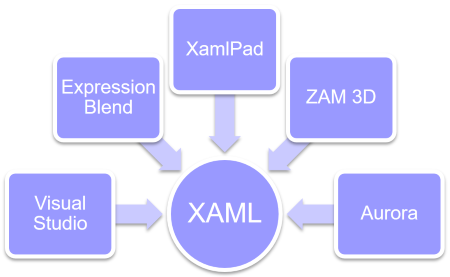
Though it can easily be used by a designer, XAML is an extremely powerful tool. Being XML-based, it can cope with several XAML-specific or XML tools:
One feature that makes XAML so powerful is that it is a very easy way to instantiate .NET classes. More about that in the Understanding XAML chapter.