Chapter 8. Streaming and complex event processing
Probably you often heard the terms: Data-at-Rest and Data-in-Motion whenever talking about BigData management. Data-at-rest refers mostly at static data collected from one and many data sources and followed by analysis. The Data-in-motion refers to a mode where all the similar data collection method is applied, and data get analyzed at the same time as it is generated. For instance, sensor data processing for the self-driving car from Google. Sometimes, this type of data is also called stream data. Analysis of a Data-in-motion is often called Stream processing, Real-time analysis or Complex event processing.
Most often, Streaming data is generated continuously by thousands of data sources, which typically send in the data records simultaneously and in small sizes. Streaming data includes a wide variety and velocities of data such as log files generated by mobile devices, user activities from e-commerce sites, financial trading floors or tracking information from car/bike sharing devices, etc.
This data needs to be processed sequentially and incrementally, and used for a wide variety of analytics including aggregation, filtering or business intelligence for taking any business decision with latencies measured in microseconds rather than seconds of response time. Apache Ignite allows loading and processing of continuous never-ending streams of data in a scalable and fault-tolerant fashion, rather than analyzing data after it has reached the database. This enables you to correlate relationships and detect meaningful patterns from significantly more data that you can process it faster and much more efficiently.
Apache Ignite streaming and CEP can be employed in a wealth of industries area; the following are some first-class use cases:
- Financial services: the ability to perform real-time risk analysis, monitoring ,and reporting of financial trading and fraud detection.
- Telecommunication: the ability to perform real-time call detail record, SMS monitoring ,and DDoS attack.
- IT systems and infrastructure: the ability to detect failed or unavailable applications or servers in real-time.
- Logistics: the ability to track shipments and order processing in real-time and reports on potential delays on arrival.
- In-game player activities: the ability to collects streaming data about player-game interactions, and feeds the data into its gaming platform. It then analyzes the data in real-time, offers incentives and dynamic experiences to engage its players.
Basically, Apache Ignite Streaming technics works as follows:
- Clients inject streams of data into Ignite cluster.
- Data is automatically partitioned between Ignite data nodes.
- Data is concurrently processed across all cluster nodes, such as enrichment, filter extra.
- Clients perform concurrent SQL queries on the streamed data.
- Clients subscribe to continuous queries as data changes.
These above activities can be illustrated as shown in figure 8.1.
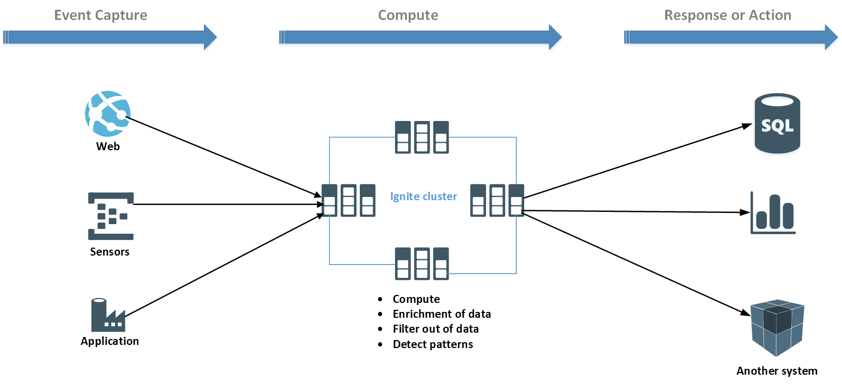
Data are ingesting from difference sources. Sources can be any sensors (IoT), web applications or industrial applications. Stream data can be concurrently processed directly on the Ignite cluster in a distributed fashion. Also, data can be computed on third-party CEP application like confluent, Apache Storm and then aggregated data can be loaded into the Ignite cluster for visualization or for taking some actions.
Apache Ignite provides native data streamers for loading and streaming large amounts of data into Ignite cluster. Data streamers are defined by IgniteDataStreamer API and are built to ingest large amounts of endless stream data into Ignite caches. IgniteDataStreamer can ingest data from various sources such as files, FTP, queues, etc., but the users must develop the adapter for connecting to the sources. Also, Ignite integrates with major streaming technologies such as Kafka, Camel, Storm or Flume to bring even more advanced streaming capabilities to Ignite-based architectures. At the moment of writing this book, Ignite provides the following data streamers for streaming a large amount of data into Ignite cluster:
- IgniteDataStreamer
- JMS Streamer
- Flume sink
- MQTT Streamer
- Camel Streamer
- Kafka Streamer
- Storm Streamer
- Flink Streamer
- ZeroMQ Streamer
- RocketMQ Streamer
In practice, most developers use the 3rd party framework such as Kafka, Camel, etc. for initial loading and streaming data into Ignite cluster, because they are well known multi-purpose technologies for complex event processing. So, in this chapter, first of all, we will introduce the Kafka streamer and then goes through the rest of the favorite data streamers, and provides some real-world running example for each streamer.
Kafka Streamer
Apache Ignite out-of-the-box provides Ignite-Kafka module with three different solutions (API) to achieve a robust data processing pipeline for streaming data from/to Kafka topics into Apache Ignite.
| Name | Description |
|---|---|
| IgniteSinkConnector | Consumes messages from Kafka topics and ingests them into an Ignite node. |
| KafkaStreamer | Fetching data from Kafka topics and injecting them into Ignite node. |
| IgniteSourceConnector | Manages source tasks that listens to registered Ignite grid events and forward them to Kafka topics. |

IgniteSourceConnector
The Apache IgniteSourceConnector is used to subscribe to Ignite cache events and stream them to Kafka topic. In other words, it can be used to export data (changed datasets) from an Ignite cache into a Kafka topic. Ignite source connector listens to registered Ignite grid events such as PUT and forward them to Kafka topic. This enables data that has been saved into the Ignite cache to be easily turned into an event stream. Each event stream contains key and two values: old and new.
The IgniteSourceConnector can be used to support the following use cases:
- To automatically notify any clients when a cache event occurs, for instance whenever there is a new entry into the cache.
- To use an asynchronous event streaming from an Ignite cache to 1-N destinations. The destination can be any database or another Ignite cluster. These enable you to data replication between two Ignite cluster through Kafka.
The Apache IgniteSourceConnector ships together with the IgniteSinkConnector, and available in ignite-kafka-x.x.x.jar distribution. IgniteSourceConnector requires the following configuration parameters:
| Name | Description | Mandatory/optional |
|---|---|---|
| igniteCfg | Ignite configuration file path. | Mandatory |
| cacheName | Name of the Cache. | Mandatory |
| topicNames | Kafka topics name where event will be streamed. | Mandatory |
| cacheEvts | Ignite cache events to be listened to, for example PUT. | Mandatory |
| evtBufferSize | Internal buffer size. | Optional |
| evtBatchSize | Size of one chunk drained from the internal buffer. | Optional |
| cacheFilterCls | User-defined filter class. | Optional |
A high-level architecture of the IgniteSinkConnector is shown in figure 8.6.
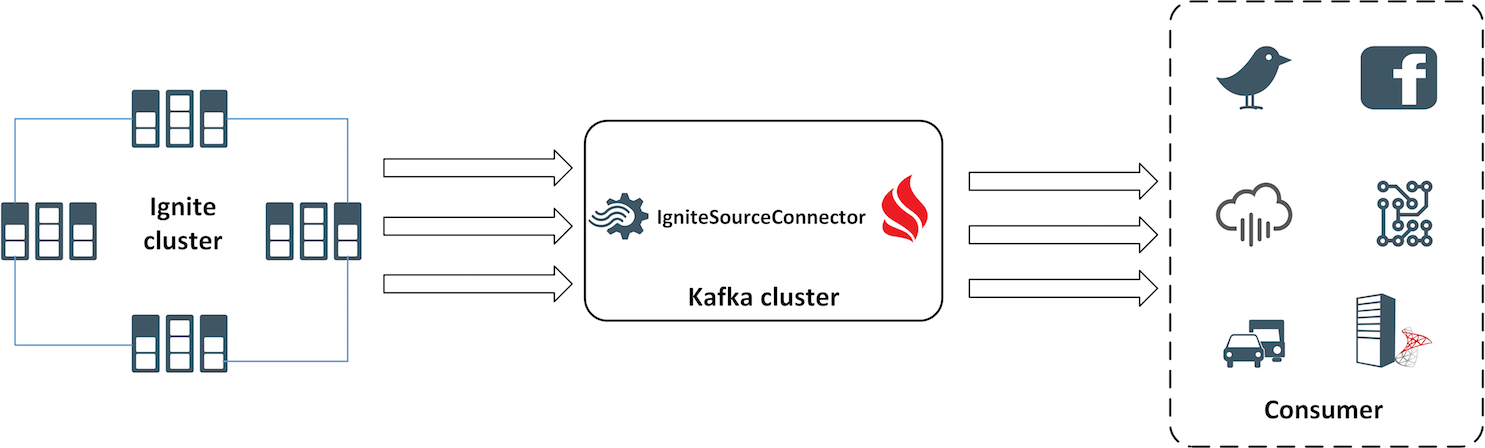
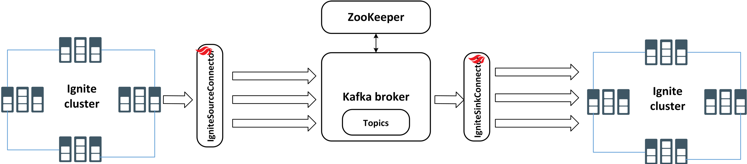
In this section, we are going to use both IgniteSourceConnector and IgniteSinkConnector for streaming event from one Ignite cluster to another. IgniteSourceConnector will stream the event from one Ignite cluster (source cluster) to Kafka topic, and the IgniteSinkConnector will stream the changes from the topic to the another Ignite cluster (target cluster). We will demonstrate the step by step instructions to configure and run both the Source and Sink connectors. To accomplish the data replication between Ignite clusters, we are going do the following:
- Execute two isolated Ignite cluster in a single machine.
- Develop a Stream extractor to parse the incoming data before sending to the Ignite target cluster.
- Configure and start Ignite Source and Sink connectors in different standalone Kafka workers.
- Add or modify some data into the Ignite source cluster.
After completing all the configurations, you should have a typical pipeline that is streaming data from one Ignite cluster to another as shown in figure 8.7.
We will use the knowledge of Zookeeper and Kafka from the previous section to achieve the task. Let’s start from the Ignite cluster configuration.
Step 1. We are going to start two isolated clusters on a single machine. To accomplish this, we have to use a different set of TcpDiscoverySpi and TcpConfigurationSpi to separate the two clusters on a single host. So, for the nodes from the first cluster we proceed to use the following TcpDiscoverySpi and TcpConfigurationSpi configurations: