3. Why jOOQ matters
When working with a relational database, it all boils down to SQL statements.
As previously explained, Hibernate entity queries are suitable for read-write logical transactions. For reporting, analytics or ETL (Extract, Transform, Load) native SQL queries are the best choice since they can take advantage of database-specific features like window functions or Common Table Expressions. Even for CRUD operations, there might be times when a database-specific syntax is more suitable like it’s the case for the upsert SQL operation.
While Hibernate does a very good job to automate the vast majority of statements, it is unlikely that you can rely on Hibernate alone for every business use case. Therefore, native queries are a necessity for most enterprise applications.
As demonstrated in the Native query DTO projection section, both JPA and Hibernate provide a way to execute native SQL statements. Being able to execute any SQL statement is great, but, unfortunately, the JPA approach is limited to static statements only. To build native SQL statement dynamically, JPA and Hibernate are no longer enough.
3.1 How jOOQ works
JOOQ is a query builder framework that allows you generate a great variety of database-specific statements using a Java API.
The DSLContext is the starting point to building any SQL statement, and it requires two things:
- a reference to a JDBC
Connection - a database dialect so that it can translate the Java API query representation into a database-specific SQL query
For instance, when using PostgreSQL 9.5, the DSLContext can be constructed as follows:
DSLContext sql = DSL.using(connection, SQLDialect.POSTGRES_9_5);
3.2 DML statements
With the DSLContext in place, it’s time to show some simple DML statements like insert, update, delete, as well as a trivial select query.
What’s worth noticing is that the Java API syntax is almost identical to its SQL counterpart, so most jOOQ queries are self-describing.
To delete all records for the post table, the following jOOQ statement must be used:
sql
.deleteFrom(table("post"))
.execute();
Which translates to the following SQL statement:
DELETE FROM post
To insert a new post table row, the following jOOQ statement can be used:
assertEquals(1, sql
    .insertInto(table("post")).columns(field("id"), field("title"))
    .values(1L, "High-Performance Java Persistence")
    .execute()
);
Just like in JDBC, the execute method return the affected row count for the current insert, update, or delete SQL statement.
When running the previous jOOQ query, the following SQL statement is being executed:
INSERT INTO post (id, title)
VALUES (1, 'High-Performance Java Persistence')
When updating the previously inserted record:
sql
.update(table("post"))
.set(field("title"), "High-Performance Java Persistence Book")
.where(field("id").eq(1))
.execute();
JOOQ generates the following SQL statement:
UPDATE post
SET title = 'High-Performance Java Persistence Book'
WHERE id = 1
Selecting the previously updated record is just as easy:
assertEquals("High-Performance Java Persistence Book", sql
    .select(field("title"))
    .from(table("post"))
    .where(field("id").eq(1))
    .fetch().getValue(0, "title")
);
To execute the statement and return the SQL query result set, the fetch method must be used.
As expected, the previous jOOQ query generates the following SQL statement:
SELECT title FROM post WHERE id = 1
3.3 Java-based schema
All the previous queries were referencing the database schema explicitly, like the table name or the table columns. However, just like JPA defines a Metamodel API for Criteria queries, jOOQ allows generating a Java-based schema that mirrors the one in the database.
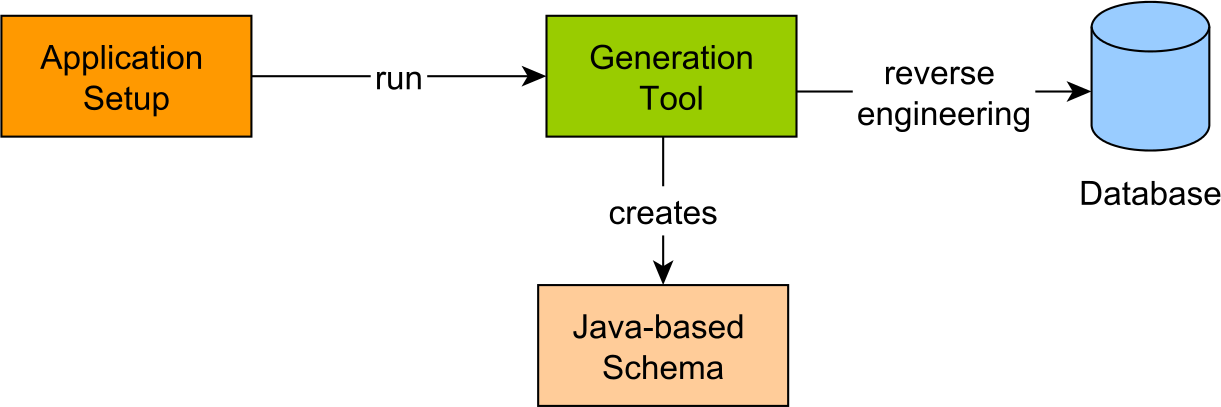
There are many advantages to having access to the underlying database schema right from the Java data access layer. For instance, when executing a database stored procedure, the argument types can be bound at compile-time. The same argument holds for query parameters or the result set obtained from running a particular query.
When a column name needs to be modified, there is no risk of forgetting to update a given jOOQ statement because a Java-based schema violation will prevent the application from compiling properly. From a development perspective, the Java-based schema enables the IDE to autocomplete jOOQ queries, therefore increasing productivity and reducing the likelihood of typos.
After generating the Java-based schema, the application developer can use it to build any type-safe jOOQ query.
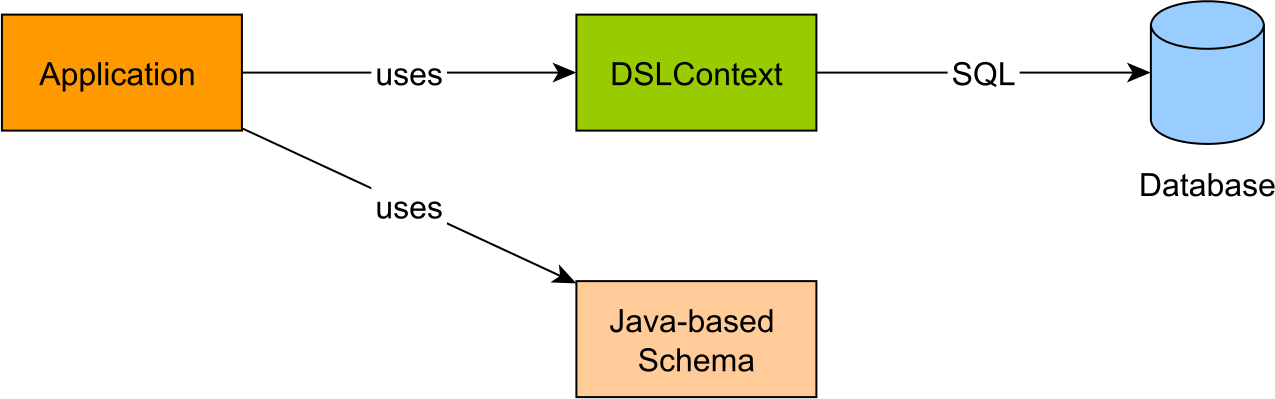
To rewrite the previous DML statements to use the Java-based schema, the generated schema classes need to be imported first:
import static com.vladmihalcea.book.hpjp.jooq.pgsql.schema.Tables.POST;
With the Java-based schema in place, the previous DML statements become even more descriptive:
sql.deleteFrom(POST).execute();

assertEquals(1, sql
    .insertInto(POST).columns(POST.ID, POST.TITLE)
    .values(1L, "High-Performance Java Persistence")
    .execute()
);

sql
.update(POST)
.set(POST.TITLE, "High-Performance Java Persistence Book")
.where(POST.ID.eq(1L))
.execute();

assertEquals("High-Performance Java Persistence Book", sql
    .select(POST.TITLE)
    .from(POST)
    .where(POST.ID.eq(1L))
    .fetch().getValue(0, POST.TITLE)
);
3.4 Upsert
In database terminology, an upsert statement is a mix between an insert and an update statement.
First, the insert statement is executed and if it succeeds, the operation return successfully.
If the insert fails, it means that there is already a database row matching the same unique constraints with the insert statement.
In this case, an update is issued against the database row that matches the given filtering criteria.
The SQL:2003 and SQL:2008 standards define the MERGE statement, which among other scenarios, it can be used to emulate the upsert operation.
However, MERGE acts more like an if-then-else statement, therefore being possible to combine insert, update, and delete statements.
While upsert implies the same database table, MERGE can also be used to synchronize the content of two different tables.
Oracle and SQL Server implement the MERGE operation according to the standard specification, whereas
MySQL and PostgreSQL provide only an implementation for the upsert operation.
JOOQ implements the upsert operation, therefore, managing to translate the Java-based query to the underlying database-specific SQL syntax.
To visualize how upsert works, consider the following method which aims to insert a post_details record if there is none,
or to update the existing record if there is already a row with the same primary key:
public void upsertPostDetails(
    DSLContext sql, BigInteger id, String owner, Timestamp timestamp) {
    sql
    .insertInto(POST_DETAILS)
    .columns(POST_DETAILS.ID, POST_DETAILS.CREATED_BY, POST_DETAILS.CREATED_ON)
    .values(id, owner, timestamp)
    .onDuplicateKeyUpdate()
    .set(POST_DETAILS.UPDATED_BY, owner)
    .set(POST_DETAILS.UPDATED_ON, timestamp)
    .execute();
}
Two users, Alice and Bob, are going to execute the upsertPostDetails method concomitantly,
and, because of the upsert logic, the first user is going to insert the record while the second one is going to update it, without throwing any exception:
executeAsync(() -> {
    upsertPostDetails(sql, BigInteger.valueOf(1), "Alice",
            Timestamp.from(LocalDateTime.now().toInstant(ZoneOffset.UTC)));
});
executeAsync(() -> {
    upsertPostDetails(sql, BigInteger.valueOf(1), "Bob",
            Timestamp.from(LocalDateTime.now().toInstant(ZoneOffset.UTC)));
});
JOOQ is going to translate the upsert Java-based operation to the specific syntax employed by the underlying relational database.
3.4.1 Oracle
On Oracle, jOOQ uses the MERGE statement to implement the upsert logic:
MERGE INTO "POST_DETAILS" USING
    (SELECT 1 "one" FROM dual) ON ("POST_DETAILS"."ID" = 1)
WHEN MATCHED THEN
    UPDATE SET
        "POST_DETAILS"."UPDATED_BY" = 'Alice',
        "POST_DETAILS"."UPDATED_ON" = '2016-08-11 12:19:48.22'
WHEN NOT MATCHED THEN
    INSERT ("ID", "CREATED_BY", "CREATED_ON")
    VALUES (1, 'Alice', '2016-08-11 12:19:48.22')
MERGE INTO "POST_DETAILS" USING
    (SELECT 1 "one" FROM dual) ON ("POST_DETAILS"."ID" = 1)
WHEN MATCHED THEN
    UPDATE SET
        "POST_DETAILS"."UPDATED_BY" = 'Bob',
        "POST_DETAILS"."UPDATED_ON" = '2016-08-11 12:19:48.442'
WHEN NOT MATCHED THEN
    INSERT ("ID", "CREATED_BY", "CREATED_ON")
    VALUES (1, 'Bob', '2016-08-11 12:19:48.442')
3.4.2 SQL Server
Just like with Oracle, jOOQ uses MERGE to implement the upsert operation on SQL Server:
MERGE INTO [post_details] USING
    (SELECT 1 [one]) AS dummy_82901439([one]) ON [post_details].[id] = 1
WHEN MATCHED THEN
    UPDATE SET
        [post_details].[updated_by] = 'Alice',
        [post_details].[updated_on] = '2016-08-11 12:36:33.458'
WHEN NOT MATCHED THEN
    INSERT ([id], [created_by], [created_on])
    VALUES (1, 'Alice', '2016-08-11 12:36:33.458')

MERGE INTO [post_details] USING
    (SELECT 1 [one]) AS dummy_82901439([one]) ON [post_details].[id] = 1
WHEN MATCHED THEN
    UPDATE SET
        [post_details].[updated_by] = 'Bob',
        [post_details].[updated_on] = '2016-08-11 12:36:33.786'
WHEN NOT MATCHED THEN
    INSERT ([id], [created_by], [created_on])
    VALUES (1, 'Bob', '2016-08-11 12:36:33.786')
3.4.3 PostgreSQL
As opposed to Oracle and SQL Server, PostgreSQL offers the ON CONFLICT clause, which jOOQ uses for implementing upsert:
INSERT INTO "post_details" ("id", "created_by", "created_on")
VALUES (1, 'Alice',  CAST('2016-08-11 12:56:01.831' AS timestamp))
ON CONFLICT ("id") DO
UPDATE SET
    "updated_by" = 'Alice',
    "updated_on" = CAST('2016-08-11 12:56:01.831' AS timestamp)

INSERT INTO "post_details" ("id", "created_by", "created_on")
VALUES (1, 'Bob', CAST('2016-08-11 12:56:01.865' AS timestamp))
ON CONFLICT ("id") DO
UPDATE SET
    "updated_by" = 'Bob',
    "updated_on" = CAST('2016-08-11 12:56:01.865' AS timestamp)
3.4.4 MySQL
Almost identical to PostgreSQL, MySQL uses the ON DUPLICATE KEY for upsert:
INSERT INTO `post_details` (`id`, `created_by`, `created_on`)
VALUES (1, 'Alice', '2016-08-11 13:27:53.898')
ON DUPLICATE KEY
UPDATE
    `post_details`.`updated_by` = 'Alice',
    `post_details`.`updated_on` = '2016-08-11 13:27:53.898'

INSERT INTO `post_details` (`id`, `created_by`, `created_on`)
VALUES (1, 'Bob', '2016-08-11 13:27:53.905')
ON DUPLICATE KEY
UPDATE
    `post_details`.`updated_by` = 'Bob',
    `post_details`.`updated_on` = '2016-08-11 13:27:53.905'
3.5 Batch updates
As previously explained, JDBC batching plays a very important role in tuning the data access layer write operation performance. While Hibernate offers automated JDBC batching, for entities using identity columns, insert statements do not benefit from this feature. This is because Hibernate requires the entity identifier upon persisting the entity, and the only way to know the identity column value is to execute the insert statement.
Instead of implementing an automatic entity state management mechanism like Hibernate, jOOQ takes a WYSIWYG (what you see is what you get) approach to persistence.
Even if nowadays many relational database systems offer sequences (Oracle, SQL Server 2012, PostgreSQL, MariaDB), the identity generator is still the only viable option for MySQL (e.g. AUTO_INCREMENT).
However, since MySQL has a very significant market share, it is important to know that, with jOOQ, JDBC batching works just fine with insert statements.
To batch the insert statements associated to three Post entries, jOOQ offers the following API:
BatchBindStep batch = sql.batch(sql.insertInto(POST, POST.TITLE).values("?"));

for (int i = 0; i < 3; i++) {
    batch.bind(String.format("Post no. %d", i));
}
int[] insertCounts = batch.execute();
Running this test case on MySQL, jOOQ generates the following output:
INSERT INTO `post` (`title`) VALUES (Post no. 0), (Post no. 1), (Post no. 2)
As illustrated, jOOQ manages to batch all inserts in a single database roundtrip.
3.6 Inlining bind parameters
By default, just like Hibernate, jOOQ uses PreparedStatement(s) and bind parameter values.
This is a very good default strategy since prepared statements can benefit from statement caching, as previously explained.
However, every rule has an exception. Because the bind parameter values might influence the execution plan, reusing a cached plan might be suboptimal in certain scenarios. Some database systems use statistics to monitor the efficiency of a cached execution plan, but the automatic adjustment process might take time.
For this reason, it is not uncommon to want to bypass the execution plan cache for certain queries that take skewed bind parameter values. Because the query string forms the cache key, by inlining the bind parameter values into the SQL statement, it is for sure that the database will either generate a new plan or pick the cached execution plan that was generated for the very same SQL statement.
This workaround can address the issue when bind parameter values are skewed, but it requires building the SQL statement dynamically. The worst thing to do would be to start concatenating string fragments and risk SQL injection attacks. Fortunately, jOOQ offers a way to inline the bind parameters right into the SQL statements without exposing the data access layer to SQL injection vulnerabilities. The jOOQ API ensures the bind parameter values match the expected bind parameter types.
Because by default jOOQ relies on PreparedStatement(s), to switch to using an inlined Statement, it is required to provide the following setting upon creating the DSLContext:
DSLContext sql = DSL.using(connection, sqlDialect(),
    new Settings().withStatementType(StatementType.STATIC_STATEMENT));
Afterward, when executing a parameterized query:
List<String> titles = sql
.select(POST.TITLE)
.from(POST)
.where(POST.ID.eq(1L))
.fetch(POST.TITLE);
JOOQ is going to inline all bind parameter values into the SQL statement String:
SELECT `post`.`title`
FROM   `post`
WHERE  `post`.`id` = 1
Without supplying the StatementType.STATIC_STATEMENT setting, when using datasource-proxy to intercept the executed SQL statement,
the actual executed statement looks as follows:
["select `post`.`title` from `post` where `post`.`id` = ?"],
Params:[(1)]
3.7 Complex queries
In the Native query DTO projection section, there was an SQL query using Window Functions, Derived Tables, and Recursive CTE (Common Table Expressions). Not only that it’s possible to rewrite the whole query in Java, but that can be done programmatically.
The postCommentScores method shows how Derived Tables and Window Functions work with jOOQ.
In fact, the jOOQ API resembles almost identically the actual SQL statement.
public List<PostCommentScore> postCommentScores(Long postId, int rank) {
    return doInJOOQ(sql -> {
        return sql
        .select(field(name(TSG, "id"), Long.class),
            field(name(TSG, "parent_id"), Long.class),
            field(name(TSG, "review"), String.class),
            field(name(TSG, "created_on"), Timestamp.class),
            field(name(TSG, "score"), Integer.class)
        )
        .from(sql
            .select(field(name(ST, "id")), field(name(ST, "parent_id")),
                field(name(ST, "review")), field(name(ST, "created_on")),
                field(name(ST, "score")),
                denseRank().over(orderBy(field(name(ST, "total_score")).desc()))
                .as("rank"))
            .from(sql
                .select(field(name(SBC, "id")),
                    field(name(SBC, "parent_id")), field(name(SBC, "review")),
                    field(name(SBC, "created_on")), field(name(SBC, "score")),
                    sum(field(name(SBC, "score"), Integer.class))
                        .over(partitionBy(field(name(SBC, "root_id"))))
                        .as("total_score")
                )
                .from(sql
                    .withRecursive(withRecursiveExpression(sql, postId))
                    .select(field(name(PCS, "id")),
                        field(name(PCS, "parent_id")),
                        field(name(PCS, "root_id")), field(name(PCS, "review")),
                        field(name(PCS, "created_on")),
                        field(name(PCS, "score")))
                    .from(table(PCS)).asTable(SBC)
                ).asTable(ST)
            )
            .orderBy(
                field(name(ST, "total_score")).desc(),
                field(name(ST, "id")).asc()
            ).asTable(TSG)
        )
        .where(field(name(TSG, "rank"), Integer.class).le(rank))
        .fetchInto(PostCommentScore.class);
    });
}
Because following a very large query is sometimes difficult, with jOOQ, it’s fairly easy to break a query into multiple building blocks.
In this particular example, the WITH RECURSIVE query is encapsulated in its own method.
Aside from readability, it is possible to reuse the withRecursiveExpression query method for other use cases, therefore reducing the likelihood of code duplication.
private CommonTableExpression<Record7<Long, Long, Long, Long, String, Timestamp,
    Integer>> withRecursiveExpression(DSLContext sql, Long postId) {
    return name(POST_COMMENT_SCORE).fields("id", "root_id", "post_id",
        "parent_id", "review", "created_on", "score")
        .as(sql.select(
            POST_COMMENT.ID, POST_COMMENT.ID, POST_COMMENT.POST_ID,
            POST_COMMENT.PARENT_ID, POST_COMMENT.REVIEW,
            POST_COMMENT.CREATED_ON, POST_COMMENT.SCORE)
        .from(POST_COMMENT)
        .where(POST_COMMENT.POST_ID.eq(postId)
            .and(POST_COMMENT.PARENT_ID.isNull()))
        .unionAll(
            sql.select(
                POST_COMMENT.ID,
                field(name("post_comment_score", "root_id"), Long.class),
                POST_COMMENT.POST_ID, POST_COMMENT.PARENT_ID,
                POST_COMMENT.REVIEW, POST_COMMENT.CREATED_ON,
                POST_COMMENT.SCORE)
            .from(POST_COMMENT)
            .innerJoin(table(name(POST_COMMENT_SCORE)))
            .on(POST_COMMENT.PARENT_ID.eq(
                field(name(POST_COMMENT_SCORE, "id"), Long.class)))
        )
    );
}
To fetch the list of PostCommentScore entries, the application developer just has to call the postCommentScores method.
However, the application requires the PostCommentScore entries to be arranged in a tree-like structure based on the parentId attribute.
This was also the case with Hibernate, and that was the reason for providing a custom ResultTransformer.
Therefore, a PostCommentScoreRootTransformer is added for the jOOQ query as well.
List<PostCommentScore> postCommentScores = PostCommentScoreRootTransformer.
     INSTANCE.transform(postCommentScores(postId, rank));
The PostCommentScoreRootTransformer class is almost identical to the PostCommentScoreResultTransformer used in the Hibernate Fetching chapter.
public class PostCommentScoreRootTransformer {

    public static final PostCommentScoreRootTransformer INSTANCE =
        new PostCommentScoreRootTransformer();

    public List<PostCommentScore> transform(
        List<PostCommentScore> postCommentScores) {
        Map<Long, PostCommentScore> postCommentScoreMap = new HashMap<>();
        List<PostCommentScore> roots = new ArrayList<>();

        for (PostCommentScore postCommentScore : postCommentScores) {
            Long parentId = postCommentScore.getParentId();
            if (parentId == null) {
                roots.add(postCommentScore);
            } else {
                PostCommentScore parent = postCommentScoreMap.get(parentId);
                if (parent != null) {
                    parent.addChild(postCommentScore);
                }
            }
            postCommentScoreMap.putIfAbsent(
                postCommentScore.getId(), postCommentScore);
        }
        return roots;
    }
}
3.8 Stored procedures and functions
When it comes to calling stored procedures or user-defined database functions, jOOQ is probably the best tool for this job. Just like it scans the database metadata and builds a Java-based schema, jOOQ is capable of generating Java-based stored procedures as well.
For example, the previous query can be encapsulated in a stored procedure which takes the postId and the rankId and returns a REFCURSOR which can be used to fetch the list of PostCommentScore entries.
CREATE OR REPLACE FUNCTION post_comment_scores(postId BIGINT, rankId INT)
   RETURNS REFCURSOR AS
$BODY$
    DECLARE
        postComments REFCURSOR;
    BEGIN
        OPEN postComments FOR
            SELECT id, parent_id, review, created_on, score
            FROM (
                SELECT
                    id, parent_id, review, created_on, score,
                    dense_rank() OVER (ORDER BY total_score DESC) rank
                FROM (
                   SELECT
                       id, parent_id, review, created_on, score,
                       SUM(score) OVER (PARTITION BY root_id) total_score
                   FROM (
                      WITH RECURSIVE post_comment_score(id, root_id, post_id,
                          parent_id, review, created_on, score) AS (
                          SELECT
                              id, id, post_id, parent_id, review, created_on,
                              score
                          FROM post_comment
                          WHERE post_id = postId AND parent_id IS NULL
                          UNION ALL
                          SELECT pc.id, pcs.root_id, pc.post_id, pc.parent_id,
                              pc.review, pc.created_on, pc.score
                          FROM post_comment pc
                          INNER JOIN post_comment_score pcs
                          ON pc.parent_id = pcs.id
                      )
                      SELECT id, parent_id, root_id, review, created_on, score
                      FROM post_comment_score
                   ) score_by_comment
                ) score_total
                ORDER BY total_score DESC, id ASC
            ) total_score_group
            WHERE rank <= rankId;
        RETURN postComments;
    END;
$BODY$ LANGUAGE plpgsql
When the Java-based schema was generated, jOOQ has created a PostCommentScore class for the post_comment_scores PostgreSQL function.
The PostCommentScore jOOQ utility offers a very trivial API, so calling the post_comment_scores function is done like this:
public List<PostCommentScore> postCommentScores(Long postId, int rank) {
    return doInJOOQ(sql -> {
        PostCommentScores postCommentScores = new PostCommentScores();
        postCommentScores.setPostid(postId);
        postCommentScores.setRankid(rank);
        postCommentScores.execute(sql.configuration());
        return postCommentScores.getReturnValue().into(PostCommentScore.class);
    });
}
3.9 Streaming
When processing large result sets, it’s a good idea to split the whole data set into multiple subsets that can be processed in batches. This way, the memory is better allocated among multiple running threads of execution.
One way to accomplish this task is to split the data set at the SQL level, as explained in the DTO projection pagination section. Streaming is another way of controlling the fetched result set size, and jOOQ makes it very easy to operate on database cursors.
To demonstrate how streaming works, let’s consider a forum application which allows only one account for every given user. A fraud detection mechanism must be implemented to uncover users operating on multiple accounts.
To identify a user logins, the IP address must be stored in the database. However, the IP alone is not sufficient since multiple users belonging to the same private network might share the same public IP. For this reason, the application requires additional information to identify each particular user. Luckily, the browser sends all sorts of HTTP headers which can be combined and hashed into a user fingerprint. To make the fingerprint as effective as possible, the application must use the following HTTP headers: User Agent, Content Encoding, Platform, Timezone, Screen Resolution, Language, List of Fonts, etc.
The user_id, the ip and the fingerprint are going to be stored in a post_comment_details table.
Every time a post_comment is being added, a new post_comment_details is going to be inserted as well.
Because of the one-to-one relationship, the post_comment and the ``post_comment_details` tables can share the same Primary Key.
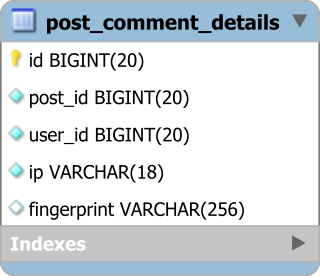
The fraud detection batch process runs periodically and validates the latest added post_comment_details.
Because there can be many records to be scanned, a database cursor is used.
JOOQ offers a Java 8 stream API for navigating the underlying database cursor, therefore, the batch process job can be implemented as follows:
try (Stream<PostCommentDetailsRecord> stream = sql
    .selectFrom(POST_COMMENT_DETAILS)
    .where(POST_COMMENT_DETAILS.ID.gt(lastProcessedId))
    .stream()) {
    processStream(stream);
}
Because there can be thousands of posts added in a day, when processing the stream, a fixed-size HashMap is used to prevent the application from running out of memory.
To solve this issue, a custom-made MaxSizeHashMap can be used so that it provides a FIFO (first-in, first-out) data structure to hold the current processing data window.
Implementing a MaxSizeHashMap is pretty straight forward since java.util.LinkedHashMap offers a removeEldestEntry extension callback which gets called whenever a new element is being added to the Map.
public class MaxSizeHashMap<K, V> extends LinkedHashMap<K, V> {
    private final int maxSize;

    public MaxSizeHashMap(int maxSize) {
        this.maxSize = maxSize;
    }

    @Override
    protected boolean removeEldestEntry(Map.Entry<K, V> eldest) {
        return size() > maxSize;
    }
}
The IpFingerprint class is used for associating multiple user ids to a specific IP and fingerprint.
Because the IpFingerprint object is used as a Map key, the equals and hashCode methods must be implemented so that they use the associated IP and fingerprint.
public class IpFingerprint {
    private final String ip;
    private final String fingerprint;

    public IpFingerprint(String ip, String fingerprint) {
        this.ip = ip;
        this.fingerprint = fingerprint;
    }

    @Override
    public boolean equals(Object o) {
        if (this == o) return true;
        if (o == null || getClass() != o.getClass()) return false;
        IpFingerprint that = (IpFingerprint) o;
        return Objects.equals(ip, that.ip) &&
                Objects.equals(fingerprint, that.fingerprint);
    }

    @Override
    public int hashCode() {
        return Objects.hash(ip, fingerprint);
    }
}
With these utilities in place, the processStream must create a tree structure that can be navigated as follows: post_id -> IpFingerprint -> list of user_id.
The processStream method iterates the underlying database cursor and builds a Map where the key is the post_id and the value is a
Map of fingerprints and user ids.
private void processStream(Stream<PostCommentDetailsRecord> stream) {
    Map<Long, Map<IpFingerprint, List<Long>>> registryMap =
        new MaxSizeHashMap<>(25);

    stream.forEach(postCommentDetails -> {
        Long postId = postCommentDetails
            .get(POST_COMMENT_DETAILS.POST_ID);
        String ip = postCommentDetails
            .get(POST_COMMENT_DETAILS.IP);
        String fingerprint = postCommentDetails
            .get(POST_COMMENT_DETAILS.FINGERPRINT);
        Long userId = postCommentDetails
            .get(POST_COMMENT_DETAILS.USER_ID);

        Map<IpFingerprint, List<Long>> fingerprintsToPostMap =
            registryMap.get(postId);
        if(fingerprintsToPostMap == null) {
            fingerprintsToPostMap = new HashMap<>();
            registryMap.put(postId, fingerprintsToPostMap);
        }

        IpFingerprint ipFingerprint = new IpFingerprint(ip, fingerprint);

        List<Long> userIds = fingerprintsToPostMap.get(ipFingerprint);
        if(userIds == null) {
            userIds = new ArrayList<>();
            fingerprintsToPostMap.put(ipFingerprint, userIds);
        }

        if(!userIds.contains(userId)) {
            userIds.add(userId);
            if(userIds.size() > 1) {
                notifyMultipleAccountFraud(postId, userIds);
            }
        }
    });
}
If the user_id list contains more than one entry, it means there have been multiple users identified by the same fingerprint, therefore, a notification must be sent to the system administrator.
3.10 Keyset pagination
As explained in the DTO projection pagination section, pagination can improve performance since the application only fetches as much data as it’s required to be rendered by the current view. The default pagination technique supported by JPA and Hibernate is called the offset method, and it is efficient only for small result sets or when navigating the first pages of a large result set. The further the page, the more work is going to be done by the database to fetch the current subset of data. To overcome the offset pagination limitation, the application developer has two alternatives.
The first choice is to narrow down the result set as much as possible using multiple filtering criteria. From a user experience perspective, this is probably the best option as well since the user can select the exact subset of data that she is interested in operating. If the filtered subset is rather small, the offset pagination limitation is not going to be a big issue.
However, if the filtered subset is still large and there is no more filtering that can be further applied, then keyset pagination becomes a better alternative to using the SQL-level offset support. Keyset pagination uses the database table primary key to mark the position of the current fetching data subset.
If JPA 2.1 and Hibernate 5.2 do not offer support for keyset pagination, jOOQ provides a seek() method which translates to a database-specific keyset pagination query syntax.
Considering the front page of a forum application which displays all the posts in the descending order of their creation,
the application requires a paginated view over the following PostSummary records:
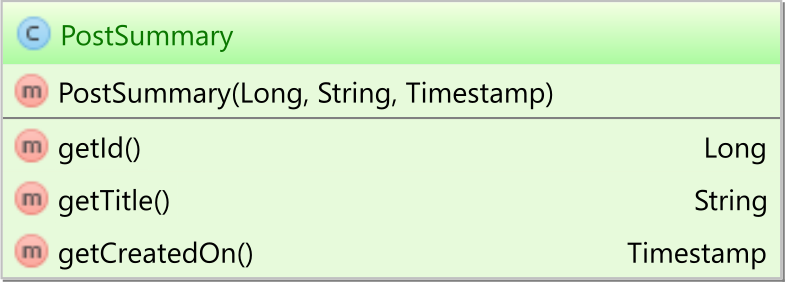
The keyset pagination query is rather trivial as illustrated by the following code snippet:
public List<PostSummary> nextPage(String user, int pageSize,
    PostSummary offsetPostSummary) {
    return doInJOOQ(sql -> {
        SelectSeekStep2<Record3<Long, String, Timestamp>, Timestamp, Long>
        selectStep = sql
        .select(POST.ID, POST.TITLE, POST_DETAILS.CREATED_ON)
        .from(POST)
        .join(POST_DETAILS).on(POST.ID.eq(POST_DETAILS.ID))
        .where(POST_DETAILS.CREATED_BY.eq(user))
        .orderBy(POST_DETAILS.CREATED_ON.desc(), POST.ID.desc());
        return (offsetPostSummary != null)
            ? selectStep
            .seek(offsetPostSummary.getCreatedOn(), offsetPostSummary.getId())
            .limit(pageSize)
            .fetchInto(PostSummary.class)
            : selectStep
            .limit(pageSize)
            .fetchInto(PostSummary.class);
    });
}
To fetch the first page, the offset PostSummary is null:
List<PostSummary> results = nextPage(pageSize, null);
When fetching the first page on PostgreSQL, jOOQ executes the following SQL query:
SELECT "post"."id", "post"."title", "post_details"."created_on"
FROM "post"
JOIN "post_details" on "post"."id" = "post_details"."id"
ORDER BY "post_details"."created_on" DESC, "post"."id" DESC
LIMIT 5
After fetching a page of results, the last entry becomes the offset PostSummary for the next page:
PostSummary offsetPostSummary = results.get(results.size() - 1);
results = nextPage(pageSize, offsetPostSummary);
When fetching the second page on PostgreSQL, jOOQ executes the following query:
SELECT "post"."id", "post"."title", "post_details"."created_on"
FROM "post"
JOIN "post_details" on "post"."id" = "post_details"."id"
WHERE (
    1 = 1 AND
    ("post_details"."created_on", "post"."id") <
    (CAST('2016-08-24 18:29:49.112' AS timestamp), 95)
)
ORDER BY "post_details"."created_on" desc, "post"."id" desc
LIMIT 5
On Oracle 11g, jOOQ uses the following SQL query:
SELECT "v0" "ID", "v1" "TITLE", "v2" "CREATED_ON"
FROM (
    SELECT "x"."v0", "x"."v1", "x"."v2", rownum "rn"
    FROM (
        SELECT
            "POST"."ID" "v0", "POST"."TITLE" "v1",
            "POST_DETAILS"."CREATED_ON" "v2"
        FROM "POST"
        JOIN "POST_DETAILS" on "POST"."ID" = "POST_DETAILS"."ID"
        WHERE (
            1 = 1 and (
                "POST_DETAILS"."CREATED_ON" <= '2016-08-25 03:04:57.72' and (
                    "POST_DETAILS"."CREATED_ON" < '2016-08-25 03:04:57.72' or (
                        "POST_DETAILS"."CREATED_ON" =
                        '2016-08-25 03:04:57.72' and
                        "POST"."ID" < 95
                    )
                )
            )
        )
        ORDER BY "v2" desc, "v0" desc
    ) "x"
    WHERE rownum <= (0 + 5)
)
WHERE "rn" > 0
ORDER BY "rn"
Because Oracle 11g does not support comparison with row value expressions as well a dedicated SQL operator for limiting the result set, jOOQ must emulate the same behavior, hence the SQL query is more complex than the one executed on PostgreSQL.