1. Batch Updates
JDBC 2.0 introduced batch updates so that multiple DML statements can be grouped into a single database request.
Sending multiple statements in a single request reduces the number of database roundtrips, therefore decreasing transaction response time.
Even if the reference specification uses the term updates, any insert, update or delete statement can be batched, and
JDBC supports batching for java.sql.Statement, java.sql.PreparedStatement and java.sql.CallableStatement too.
Not only each database driver is distinct, but even different versions of the same driver might require implementation-specific configurations.
1.1 Batching Statements
For executing static SQL statements, JDBC defines the Statement interface, which comes with a batching API as well.
Other than for test sake, using a Statement for CRUD (Create, Read, Update, Delete), as in the example below, should be avoided for it’s prone to SQL injection attacks.
statement.addBatch(
    "INSERT INTO post (title, version, id) " +
    "VALUES ('Post no. 1', 0, default)");

statement.addBatch(
    "INSERT INTO post_comment (post_id, review, version, id) " +
    "VALUES (1, 'Post comment 1.1', 0, default)");

int[] updateCounts = statement.executeBatch();
The numbers of database rows affected by each statement is included in the return value of the executeBatch() method.
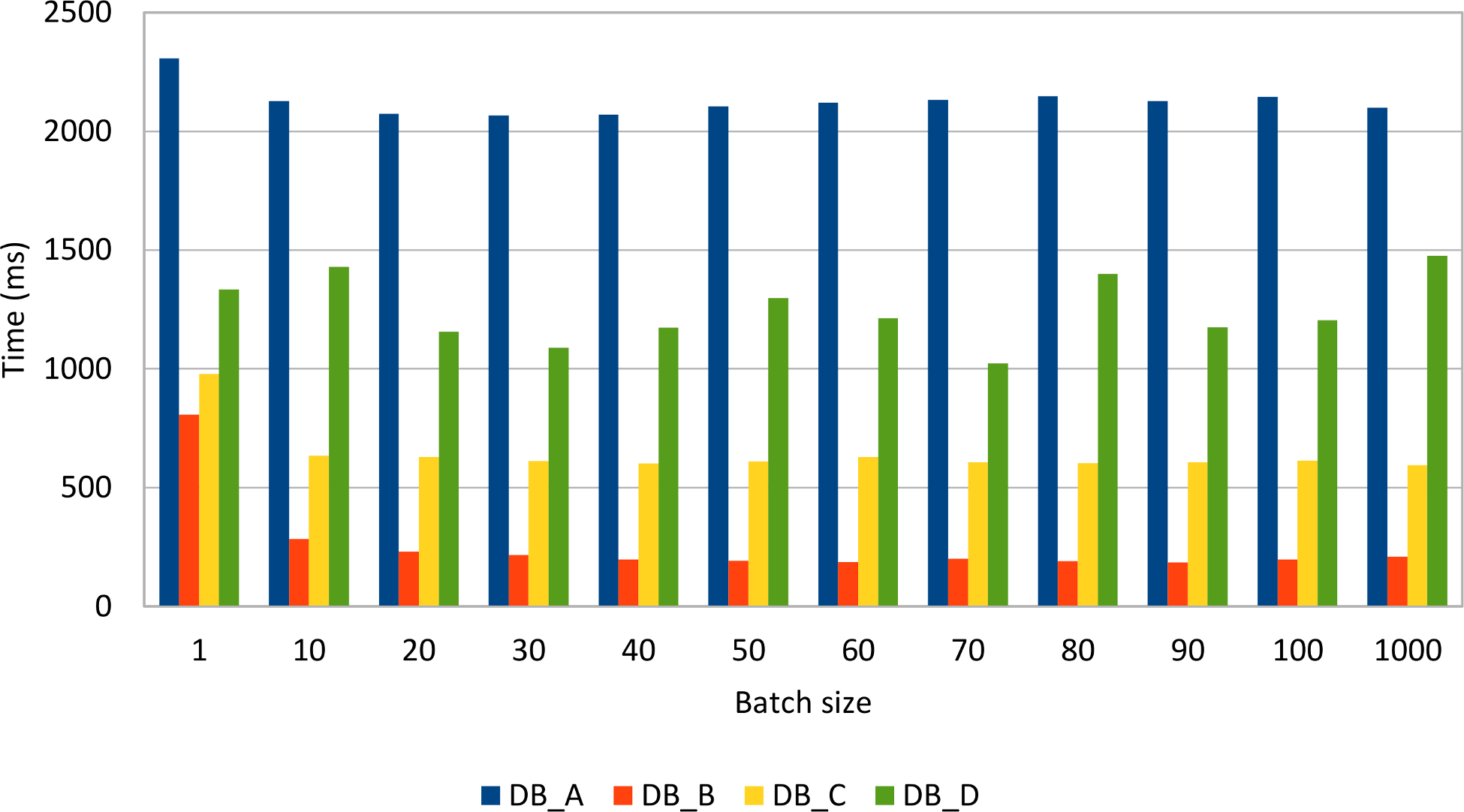
The following graph depicts how different JDBC drivers behave when varying batch size, the test measuring the time it takes to insert 1000 post rows with 4 comments each:
Reordering inserts, so that all posts are inserted before the comment rows, gives the following results:
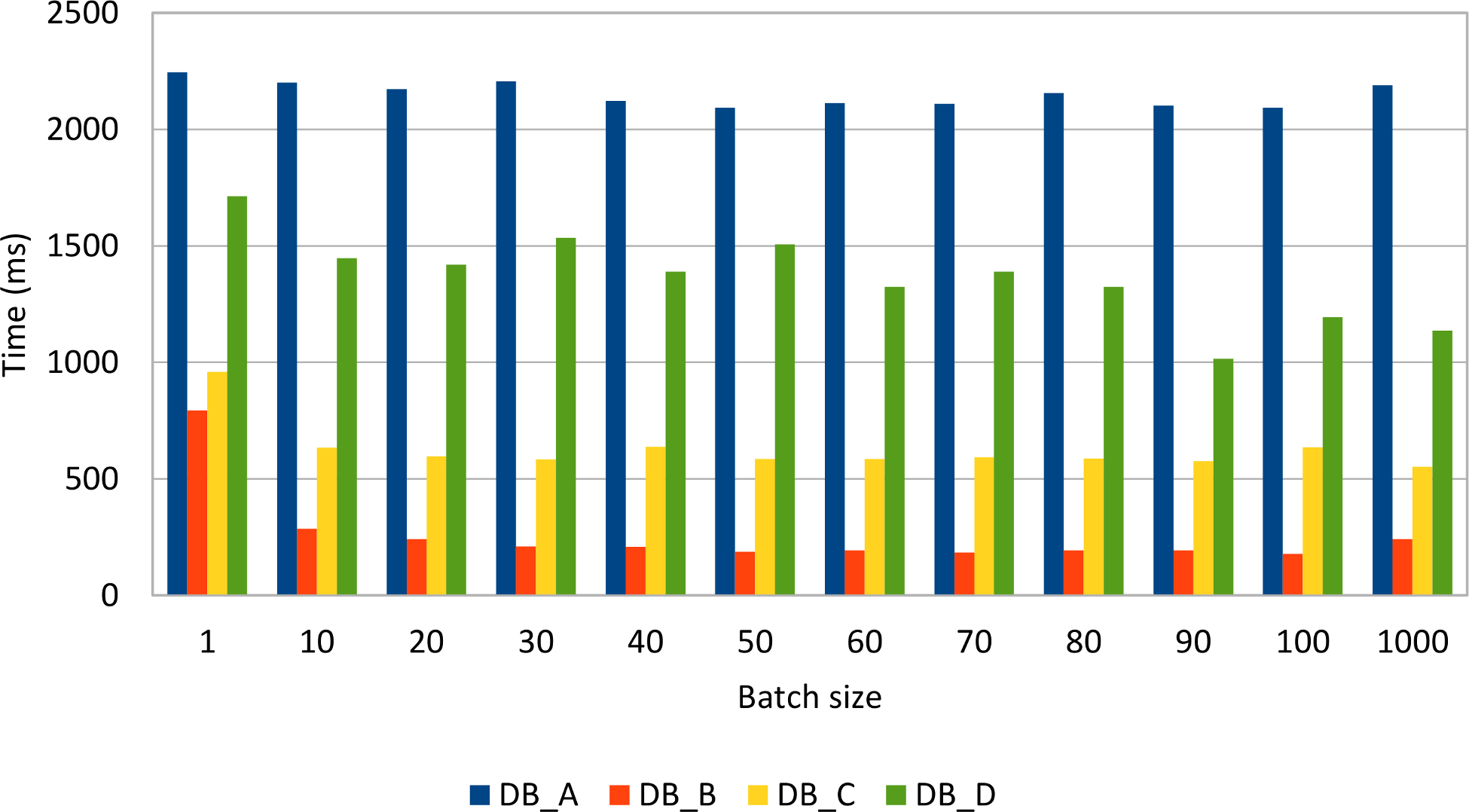
Reordering statements does not seem to improve performance noticeably, although some drivers (e.g. MySQL) might take advantage of this optimization.
The following graph demonstrates how statement rewriting performs against the default behavior of the MySQL JDBC driver:
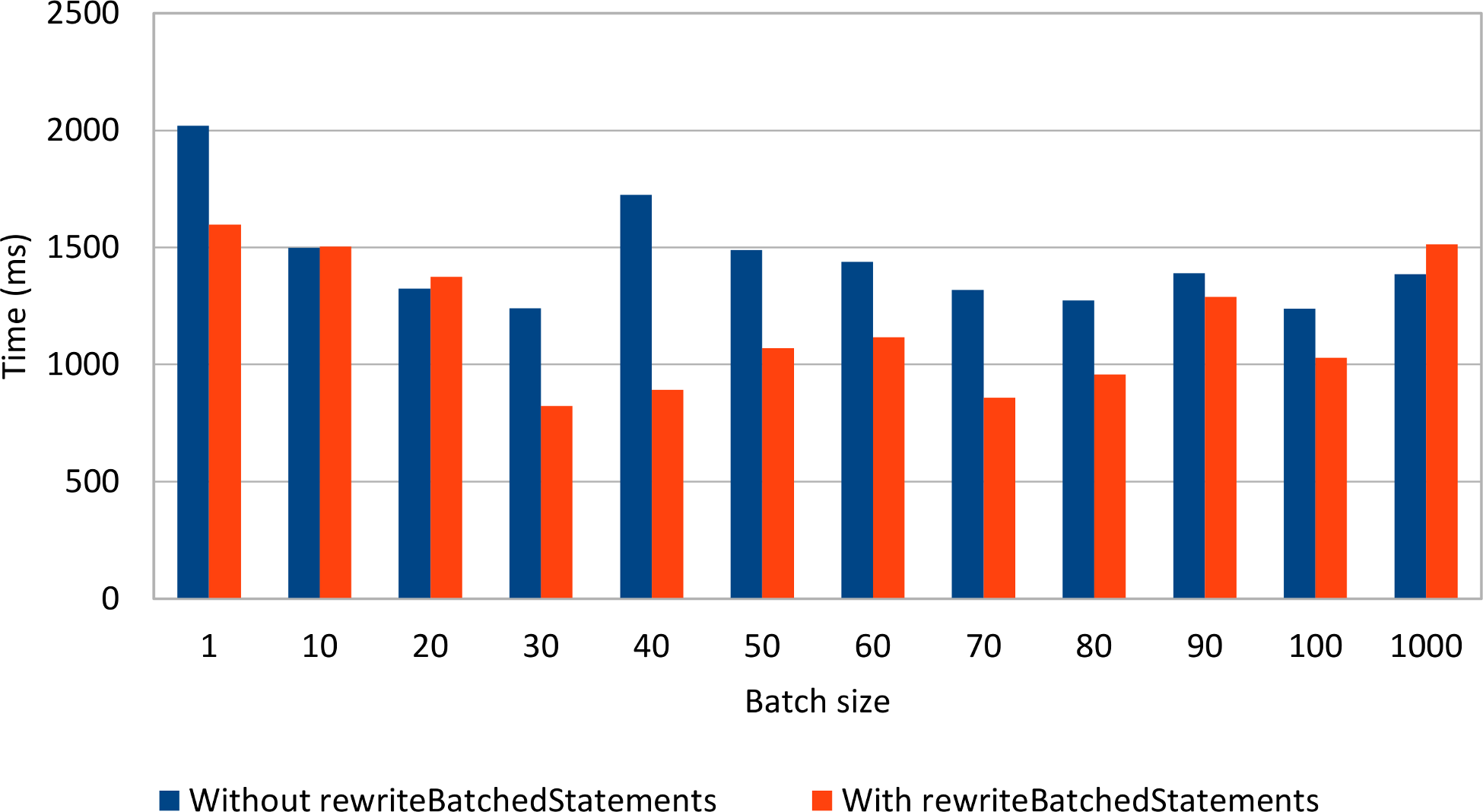
Rewriting non-parameterized statements seems to make a difference, as long as the batch size is not too large. In practice, it is common to use a relatively small batch size, to reduce both the client-side memory footprint and to avoid congesting the server from suddenly processing a huge batch load.
1.2 Batching PreparedStatements
For parameterized statements (a very common enterprise application requirement), the JDBC Statement is a poor fit because the only option for varying the executing SQL statement is through String manipulation.
Using a String template or concatenating String tokens is risky as it makes the data access logic vulnerable to SQL injection attacks.
To address this shortcoming, JDBC offers the PreparedStatement interface for binding parameters in a safe manner.
The driver must validate the provided parameter at runtime, therefore discarding unexpected input values.
Because a PreparedStatement is associated with a single DML statement, the batch update can group multiple parameter values belonging to the same prepared statement.
PreparedStatement postStatement = connection.prepareStatement(
    "INSERT INTO post (title, version, id) " +
    "VALUES (?, ?, ?)");

postStatement.setString(1, String.format("Post no. %1$d", 1));
postStatement.setInt(2, 0);
postStatement.setLong(3, 1);
postStatement.addBatch();

postStatement.setString(1, String.format("Post no. %1$d", 2));
postStatement.setInt(2, 0);
postStatement.setLong(3, 2);
postStatement.addBatch();

int[] updateCounts = postStatement.executeBatch();
All DML statements can benefit from batching as the following tests demonstrate. Just like for the JDBC Statement test case,
the same amount of data (1000 post and 4000 comments) is inserted, updated, and deleted while varying the batch size.
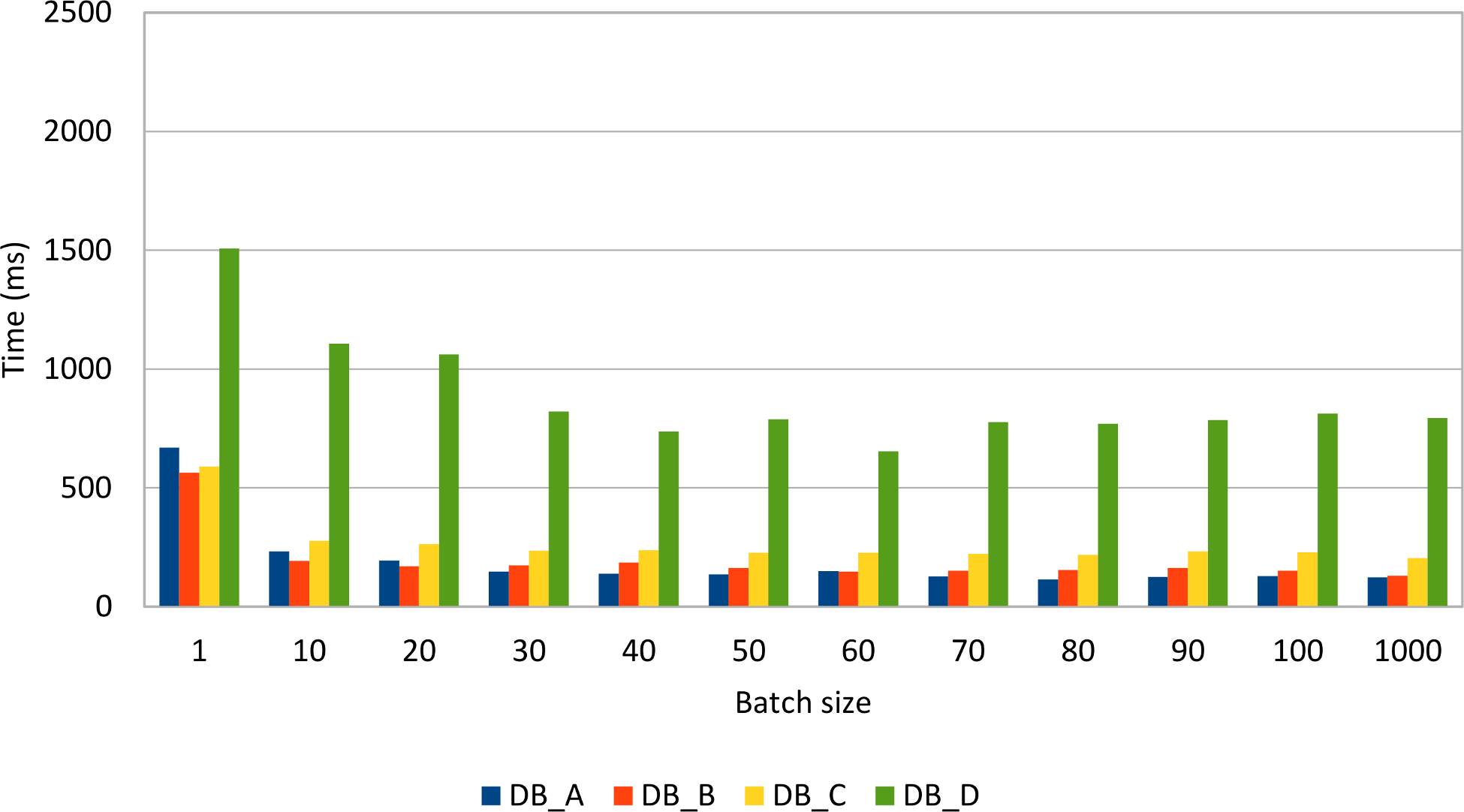
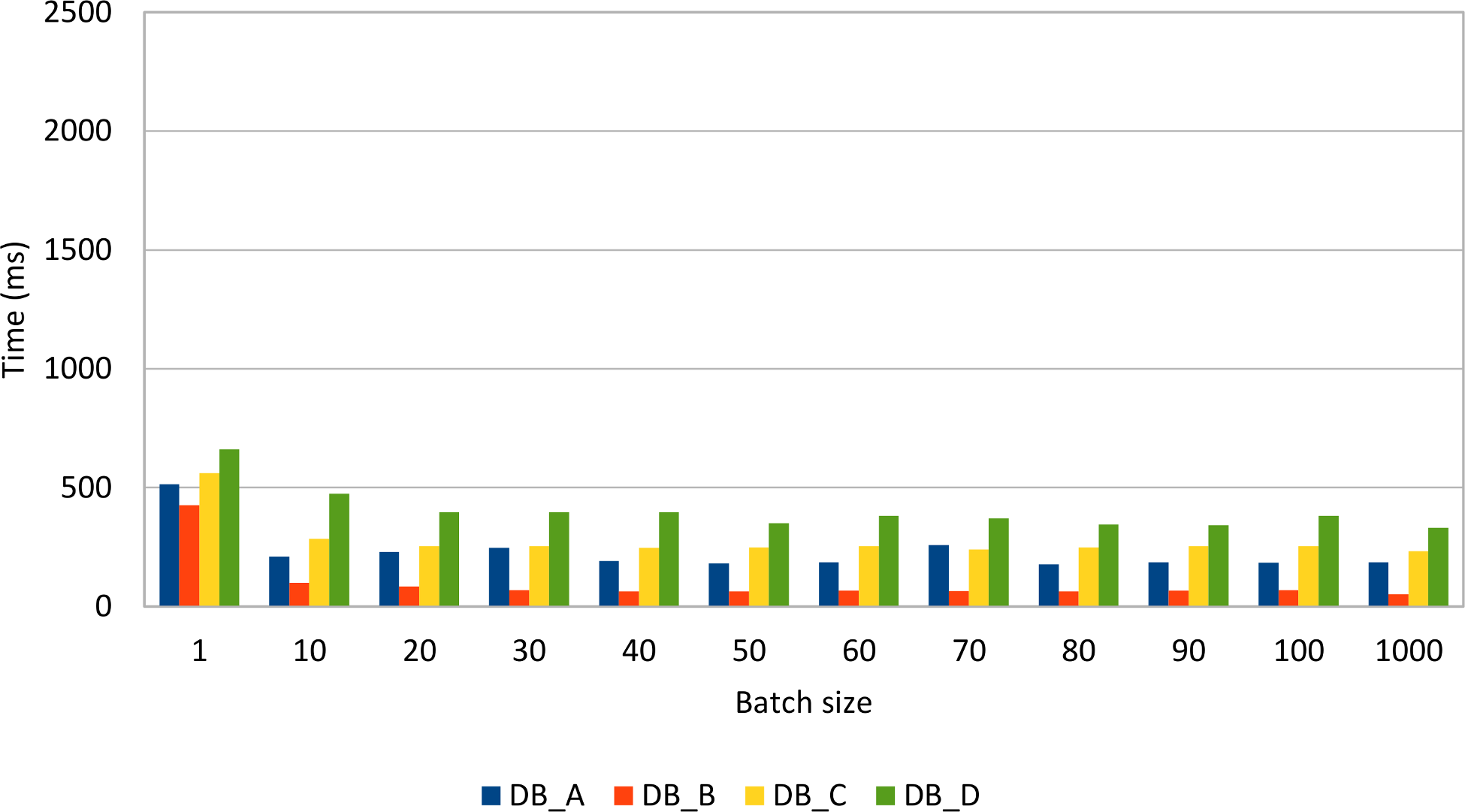
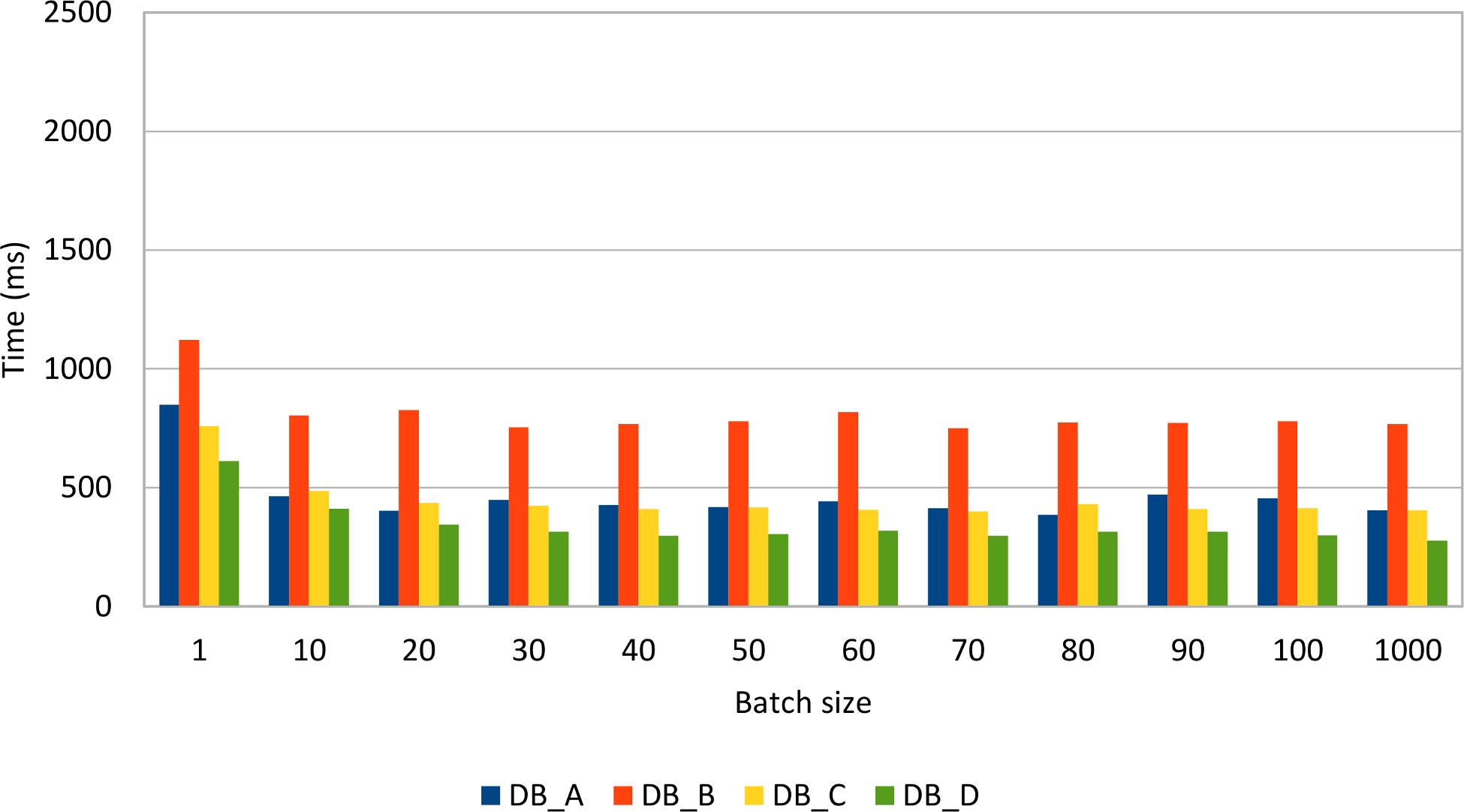
All database systems show a significant performance improvement when batching prepared statements. Some database systems are very fast when inserting or updating rows while others perform very well when deleting data.
Compared to the previous Statement batch insert results, it is clear that, for the same data load, the PreparedStatement use case performs just better.
In fact, Statement(s) should not be used for batching CRUD operations, being more suitable for bulk processing:
DELETE from post
WHERE spam = true AND created_on < current_timestamp - INTERVAL '30' day;
1.2.1 Choosing the right batch size
Finding the right batch size is not a trivial thing to do as there is no mathematical equation to solve the appropriate batch size for any enterprise application.
Like any other performance optimization technique, measuring the application performance gain in response to a certain batch size value remains the most reliable tuning option.
The astute reader has already figured out that even a low batch size can reduce the transaction response time, and the performance gain does not grow linearly with batch size. Although a larger batch value can save more database roundtrips, the overall performance gain does not necessarily increase linearly. In fact, a very large batch size can hurt application performance if the transaction takes too long to be executed.
As a rule of thumb, you should always measure the performance improvement for various batch sizes. In practice, a relatively low value (between 10 and 30) is usually a good choice.
1.2.2 Bulk processing
Apart from batching, SQL offers bulk operations to modify all rows that satisfy a given filtering criteria. Bulk update or delete statements can also benefit from indexing, just like select statements.
To update all records from the previous example, one would have to execute the following statements:
UPDATE post SET version = version + 1;
UPDATE post_comment SET version = version + 1;
| DB_A time (ms) | DB_B time (ms) | DB_C time (ms) | DB_D time (ms) |
|---|---|---|---|
| 26 | 13 | 58 | 9 |
The bulk alternative is one order of magnitude faster than batch updates. However, batch updates can benefit from application-level optimistic locking mechanisms, which are suitable for preventing lost updates when data is loaded in a read-only database transaction and written back in a successive transaction.
Like with updates, bulk deleting is also much faster than deleting in batches.
DELETE FROM post_comment WHERE version > 0;
DELETE FROM post WHERE version > 0;
| DB_A time (ms) | DB_B time (ms) | DB_C time (ms) | DB_D time (ms) |
|---|---|---|---|
| 3 | 12 | 1 | 2 |
1.3 Retrieving auto-generated keys
It is common practice to delegate the row identifier generation to the database system. This way, the developer does not have to provide a monotonically incrementing primary key since the database takes care of this upon inserting a new record.
As convenient as this practice may be, it is important to know that auto-generated database identifiers might conflict with the batch insert process.
Like many other database features, setting the auto incremented identifier strategy is database-specific so the choice goes between an identity column or a database sequence generator.
Many database developers like this approach since the client does not have to care about supplying a database identifier upon inserting a new row.
INSERT INTO post (title, version) VALUES (?, ?);
To retrieve the newly created row identifier, the JDBC PreparedStatement must be instructed to return the auto-generated keys.
PreparedStatement postStatement = connection.prepareStatement(
    "INSERT INTO post (title, version) VALUES (?, ?)",
    Statement.RETURN_GENERATED_KEYS
);
One alternative is to hint the driver about the column index holding the auto-generated key column.
PreparedStatement postStatement = connection.prepareStatement(
    "INSERT INTO post (title, version) VALUES (?, ?)",
    new int[] {1}
);
The column name can also be used to instruct the driver about the auto-generated key column.
PreparedStatement postStatement = connection.prepareStatement(
    "INSERT INTO post (title, version) VALUES (?, ?)",
    new String[] {"id"}
);
It is better to know all these three alternatives because they are not interchangeable on all database systems.
According to the JDBC 4.2 specification, every driver must implement the supportsGetGeneratedKeys() method and specify whether it supports auto-generated key retrieval.
Unfortunately, this only applies to single statement updates as the specification does not make it mandatory for drivers to support generated key retrieval for batch statements.
That being said, not all database systems support fetching auto-generated keys from a batch of statements.
| Returns generated keys after calling | Oracle JDBC driver (11.2.0.4) | Oracle JDBC driver (12.1.0.1) | SQL Server JDBC driver (4.2) | PostgreSQL JDBC driver (9.4-1201-jdbc41) | MySQL JDBC driver (5.1.36) |
|---|---|---|---|---|---|
executeUpdate() |
Yes | Yes | Yes | Yes | Yes |
executeBatch() |
No | Yes | No | Yes | Yes |
If the Oracle JDBC driver 11.2.0.4 cannot retrieve auto-generated batch keys, the 12.1.0.1 version works just fine. When trying to get the auto-generated batch keys, the SQL Server JDBC driver throws this exception: The statement must be executed before any results can be obtained.
1.3.1 Sequences to the rescue
As opposed to identity columns, database sequences offer the advantage of decoupling the identifier generation from the actual row insert. To make use of batch inserts, the identifier must be fetched prior to setting the insert statement parameter values.
private long getNextSequenceValue(Connection connection)
    throws SQLException {
    try(Statement statement = connection.createStatement()) {
        try(ResultSet resultSet = statement.executeQuery(
            callSequenceSyntax())) {
            resultSet.next();
            return resultSet.getLong(1);
        }
    }
}
For calling a sequence, every database offers a specific syntax:
Because the primary key is generated up-front, there is no need to call the getGeneratedKeys() method, and so batch inserts are not driver dependent anymore.
try(PreparedStatement postStatement = connection.prepareStatement(
    "INSERT INTO post (id, title, version) VALUES (?, ?, ?)")) {
    for (int i = 0; i < postCount; i++) {
        if(i > 0 && i % batchSize == 0) {
            postStatement.executeBatch();
        }
        postStatement.setLong(1, getNextSequenceValue(connection));
        postStatement.setString(2, String.format("Post no. %1$d", i));
        postStatement.setInt(3, 0);
        postStatement.addBatch();
    }
    postStatement.executeBatch();
}
Many database engines use sequence number generation optimizations to lower the sequence call execution as much as possible. If the number of inserted records is relatively low, then the sequence call overhead (extra database roundtrips) will be insignificant. However, for batch processors inserting large amounts of data, the extra sequence calls can add up.