Technologies
Another important technologies to know.
Books
I love books, the ‘real world’ physical ones, the BookBook(s). Not the digital alternatives who are a shadow of a book and are not good technologies to consume knowledge.
I love books, and for a while I too had the a guilty feeling of ‘holding on to legacy technology’, as the world moved into consuming more and more digital content (including digital books).
For reference I buy hundreds of books per year and spend far too much money than I should on books. Have I read them all, no of course not! Have I found amazing books to read every year that improved my skills and knowledge, absolutely yes!!! The reason I buy so many books (multiple per topic) is because until I start reading them, I don’t know which one is perfect (at that moment in time)
After looking closely at why I liked books so much, I had the epiphany that “Books are actually the best technology to consume and process information”.
There is also a growing body of research that shows that the use of digital technologies are also affecting kid’s learning capabilities (see “students find it easier to read and learn from printed materials”)
Basically, if you don’t use books or printed materials to read and review the information you are consuming (and creating), you are missing a massive trick.
The digital world is really good at promoting group think and to present the previous technologies as ‘legacy’ and old-fashioned.
My experience is that books (and printed materials) are much better technologies for the consumption of information. One area where the advantages of the digital books can be significant are novels and fictional stories (namely the convenience of access and the weight difference), in this case the books are just a transient medium that is being used to tell a story, just like in a movie (in most cases, what the reader is getting are emotional connections with the characters/story, and not really learning from the text)
The reality is if you want to learn, you are better of using a book or printed materials.
The same happens with reviewing materials. It not coincidence that we all have experiences of writing content in a digital medium (i.e. the computer) and while reading it on a screen it kinda looks ok. Then once we print it, and enjoy the unidirectional, offline and 100% focused activity experience that is ‘reading a piece of paper’, we find tons of errors and ‘WTF was I thinking when I wrote that!’ moments. In fact making notes on printed versions of digital content, is exactly how I am writing and reviewing this book’s content.
Yes, the fact that books are offline is one of the book’s main competitive advantages!
The book’s ‘features’ of not being interrupted by a constant stream of apps/websites notifications and not having a browser at hand, does wonders for your ability to focus and to consume information.
Another powerful feature of books (in addition of rendering contentin HD with real-time refresh rate), is that they allow your brain to consume information in a 3D format and with more senses. For example, notice how when you flick back pages looking for a particular passage or diagram, your eyes will be looking at a particular section of the page. This means that your brain not only is capturing the content that it is reading, it is also capturing (and storing) the location of that content, and how it relates to the rest of the page. One of the reasons that lead me to the epiphany of the value of books was how I noticed that it was bothering me the fact that the kindle reorders paragraphs and pages when you flick back (and how it was affecting my ability to find content I’ve already read)
Environmental impact of books
My understanding (and please correct me if I’m wrong) is that most books these are are printed from either recycled paper or from sustainable forests (i.e. forests where they plant at least as many new trees as they cut).
This mean that these days, the impact of books on the environment is minimal.
Pen and Paper
Another powerful technology that seems to be going out of fashion is the pen and paper (pencil is also a great option).
As covered in the ‘Book’ chapter, analogue techniques like the pen and paper are actually better technologies for creating and capturing ideas.
The fact that a piece of paper (or notebook) is not ‘online’ and one cannot easily change its contents, are actually some of its best features.
What is really important is to capture the ideas and thoughts that you have. There are also studies that shows that just the fact that you write something, will make it easier for you to remember and to process that information.
I have so many examples of situations when I started writing just some ideas, and after a couple pages, the real interesting ideas come out (due to the hyperlinked nature of how ideas are generated in the brain). What is important is the realisation that those 2nd or 3rd generation of ideas would had not been captured without the first batch of ideas and notes. I’ve also found that my brain retains the location of where I made some notes, and I’m able to go back to those notebooks and remember what where those ideas (even after a couple years).
These days, to keep track of what I have reviewed and processed, I have the workflow/habit or crossing-over the ideas or texts that I moved to a digital format or delegated.
The reality is that you will forget the ideas you are having today!
The only way to make sure that your future self has access to those ideas, is to capture them now!
It is great when you review your older notebooks (could be from last week or year) and not only remember an idea you had since forgotten, but you are able to expand that idea and take it to the next level.
My favourite are the Moleskin books plain A5 notebooks, since they represent a nice balance of white space and portability ( I use them everyday)
A nice side effect of having mobile phones with cameras, is that it’s easy to share a picture of one of the notebook’s pages.
Assembly and Bytecode
Assembly code is a representation of what the machine code that the CPUs actually execute. It is the lowest level of abstraction that you can program.
The moment I fell in love with programming was when (as a teenager) I executed the POKE assembly command in my ZX Spectrum, which changed a pixel on my TV screen. That was such a magical moment because I had direct control over what was happening inside the computer and screen.
PEEK and POKE were BASIC commands that allow direct memory access and manipulation (PEEK reads and POKE writes). What I was doing was to write directly to the memory location that was used to control the screen (i.e. each byte in that memory address represented a small section of the screen).
A while later I started learning how to go deeper and explored writing assembly code. In those ‘pre internet’ days there was very little information around and with only one book available, I actually remember manually translating assembly code into binary by hand (I didn’t started with an assembler compiler). Eventually I got an assembler and did many experiments in the ZX Spectrum, the Amiga 500 and the x86 PCs (which when compared with the Amiga’s Motorola 68000 microprocessor had a much more complex memory layout).
In fact my first ‘security hacks’ were based around memory and disk manipulations written in assembly. They were designed to manipulate and change the behavior of the games I was playing (I think there was some cool way to get more money in SimCity)
Looking back, what I can see is that when I was writing assembly language, what I was doing was learning (in a very efficient way) about: computer architecture, memory layout, systems design, programming and much more. For example learning about hardware interrupts, TSR (Terminate and Stay Resident), and Kernel vs User-land memory, did wonders for my understanding of computer science.
These days you are more likely to code in Python, Java or .Net than assembly. But if you look under the hood, these languages are compiled into bytecode which is a normalized version of assembly.
For example here is what print("Hello, World!") looks like in python’s bytecode
1 0 LOAD_NAME                0 (print)
2 2 LOAD_CONST               0 ('Hello, World!')
3 4 CALL_FUNCTION            1
Python (as with .Net and Java) is a stack-based virtual machine which is provides a translation layer between the language and the CPU specific machine code
Decompiling code
Bytecode is the reason why .Net and Java can be easily decompiled from an .dll or .class file.
In .Net this can be quite spectacular since tools like ILSpy allow the easy decompilation of non-obfuscated .Net assembly (including the ones from the Microsoft .Net Framework).
For viewing C++ and other compiled code, two great tools on windows are ollydbg and Ida Pro
Brain
How well do you know your brain? Do you know how it works? What areas it is really strong at, what areas it is weak and how to maximise its capabilities?
The human brain is one of the world’s great wonders and we live in a age where we now know a tremendous amount of details on how it works.
You need understand how your brain work, so that you understand it’s blind spots and why we behave in the way we do.
How do you think? How do you remember? How do you see? How rational are your decisions? Who is actually making the decisions in your head?
If you have not looked at this topic before, you will be very surprised with the answers to these questions.
As a developer your brain is your tool. What makes you special and different from other developers is your ability to create mental models, process information, codify your intentions and execute your ideas.
This is where you need to apply your logical and computing side of the brain and reverse engineer how your own brain works.
I’ve always found the brain fascinating and the more I learned about it, the better I become at understanding how I and others think.
A good place to start is the Freakonomics: A Rogue Economist Explores the Hidden Side of Everything book, which uses economic techniques to answer a number of very interesting questions.
The Predictably Irrational: The Hidden Forces That Shape Our Decisions takes that to another level, where it shows example after example how we are not rational at all in a number of decisions we make everyday
The best one I’ve read is Incognito - The Secret lives of the brain which not only explains really well how the brain works, it really challenges our understanding of how the brain works.
How I think
When self analysing how I think (from an engineering point of view), I found that I have two types of thinking techniques.
- A slow(ish) type of thinking - where I’m basically talking to myself in my head. This is also how I tend to read (I heard the text I’m reading in my head)
- A fast type of thinking - where I ‘somehow’ am making a large number of analysis and decisions, and ‘know’ what I’m thinking without really needing to articulate in my head all the explanations of what I’m doing. This is the kind of thinking that one tends to get when in ‘the Zone’ (which is that magical place where ideas ‘just flow’ and we are hyper productive)
The more time you can spend on the 2nd type the more productive you will be.
I’ve also found that although my brain is able to hold a large amount of hyperlinked information (creating a graph of linked data that I’m working on), it is not good at all at multi-tasking (i.e. working on multiple domain problems at the same time or performing a manual activity).
This is why is so important to be able to spend concentrated time on a particular topic, since it takes a while to upload all relevant data to the parts of the brain focused on the task at hand.
Switching context and interruptions
A reason why even a 1 second interruption can be massively disruptive (for example a text message, or slack/snapchat/instragram/facebook/twitter notification) is because it breaks the mojo of your brain and destroys a number of those hyperlinked graphs you had created in your head.
It is even worse when the interruption actually requires some extra activity (for example a question from somebody at the office).
One area that these interruptions happen a lot in the normal developer’s coding workflow is Testing. The simple fact of having to manually run a test (either via the command line, or by clinking on a web browser), will break your mental models and make you ‘switch context’
I can’t explain (you need to experience it yourself) how productive is it to code in an environment where the context switching is minimal (which is what happens when coding using tools like wallbyjs or NCrunch)
IDE
We need to talk about your IDE! (Integrated development environment)
How much time have you spent: choosing it, customizing it, making it suit your development workflow, making it automate actions that you do as a developer, making it automatically execute tests
Your IDE is one of the most important tools in your arsenal and the more time you spend looking after it, the better a programmer you will be:
The IDE is like a car in a race that you are the driver. You really need to spend time caring about it, since your performance as a developer will be affected by how effective your IDE is for the task at hand
Note that this doesn’t mean that the most feature rich IDE will be better. You need to pick the best tool for the job: - for example Visual Studio has tons of features but that made it quite slow (and Windows specific), which is why other editors (like Atom) started to gain traction. Microsoft then released VS Code which is much more lightweight and effective. - Sometimes Notepad or Vim are the best IDES - I quite like the JetBrains suite of tools (WebStorm for Node , PyCharm for Python and IntelliJ for Java) - Eclipse can also be a great editor (specially if you customize it) - Cloud IDEs (like Cloud9) can be amazing in some cases (in one project I had a special docker instance that added Cloud9 to a node application)
One of the key requirements for me in the IDE is the ability to:
- run tests quickly (once you stopped typing)
- run tests affected by the latest code changes
- show code coverage in the IDE
At the moment the only place where I have seen those features happening is in NCrunch (for .NET) and WallabyJS (for node/javascript). The auto test execution capability that some IDEs have, are a decent compromise, but not as effective (and productive as those two tools)
The key point is that you need to take the time and care to chose your IDE, since it has the power to dramatically increase your productivity
Machine Learning and AI
One of the most important areas that you need to gain a strong understanding in the next 5 years is Machine Learning and Artificial Intelligence (AI).
This is not about an Skynet kinda scenario where an super-intelligence singularity is going to take over the world and destroy humanity.
This is about the next major revolution in technology and whether you are going to be a player or a pawn in what is happening next.
I highly recommend that you read Kevin Kelly’s The Inevitable: Understanding the 12 Technological Forces That Will Shape Our Future book where he provides a really clean mapping of what (most likely) will happen next.
One area that Kevin talks in detail and you can already see it happening around us is the introduction of AI capabilities in all sort of devices and business activities.
This is where you need to take a proactive approach and start learning about how all this works and how to program it.
The great news is that in the last couple years the major cloud providers have been investing really hard on these technologies and are now providing environments where you can easily play around and learn how machine learning and AI works
See for example all the different tools and technolgies that AWS is already offering in the machine learning space (Microsoft is also providing some really cool capabilities on Azure)
As a developer, you will be soon be asked to write code that integrates with Machine Learning technology to process large amounts of data or to integrate an app with AI services like voice, image recognition or domain-specific analysis (for example in medicine)
Where are we going
For a nice view of what could be happening next see:
- Life 3.0: Being Human in the Age of Artificial Intelligence
- Homo Deus: A Brief History of Tomorrow
- What Technology Wants
AST (Abstract Syntax Tree)
AST (Abstract Syntax Tree) is a graph representation of source code primarily used by compilers to read code and generate the target binaries.
For example, the AST of this code sample:
while b ≠ 0
    if a > b
       a := a − b
    else
        b := b − a
    return a
Will look like this:
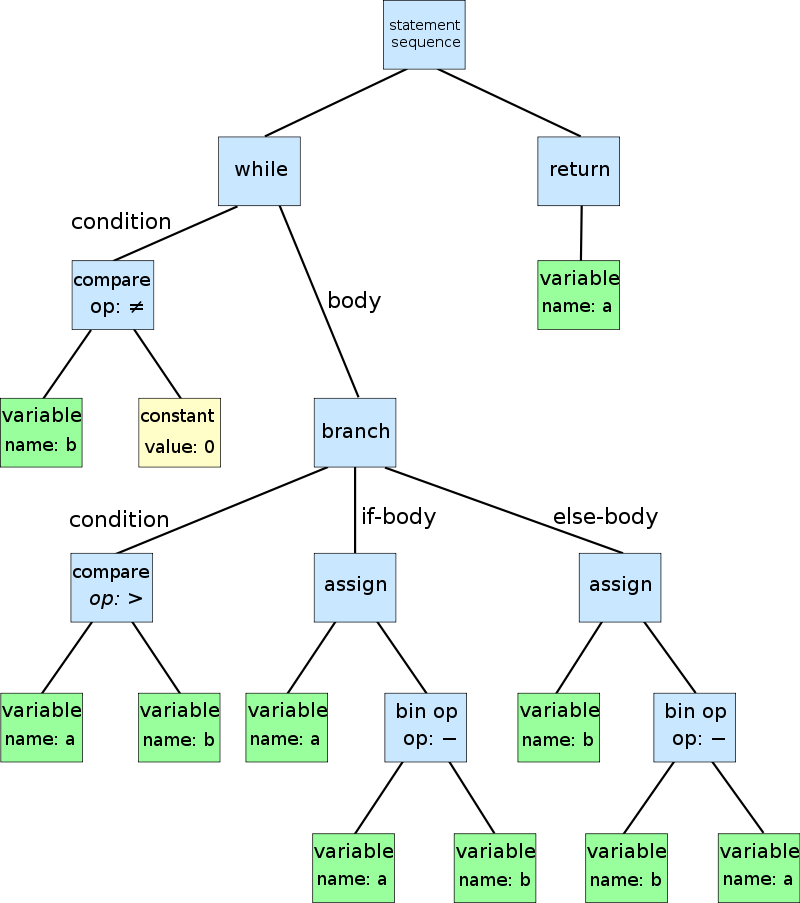
The transformation from source code to an AST, is a very common pattern when processing any type of structured data. The typical workflow is based on “Creating a parser that converts raw data into an graph-based format, that can then be consumed by an rendering engine”.
This is basically the process of converting raw data into in strongly typed in-memory objects that can be manipulated programmatically.
Here is a another example from the really cool online tool astexplorer.net:
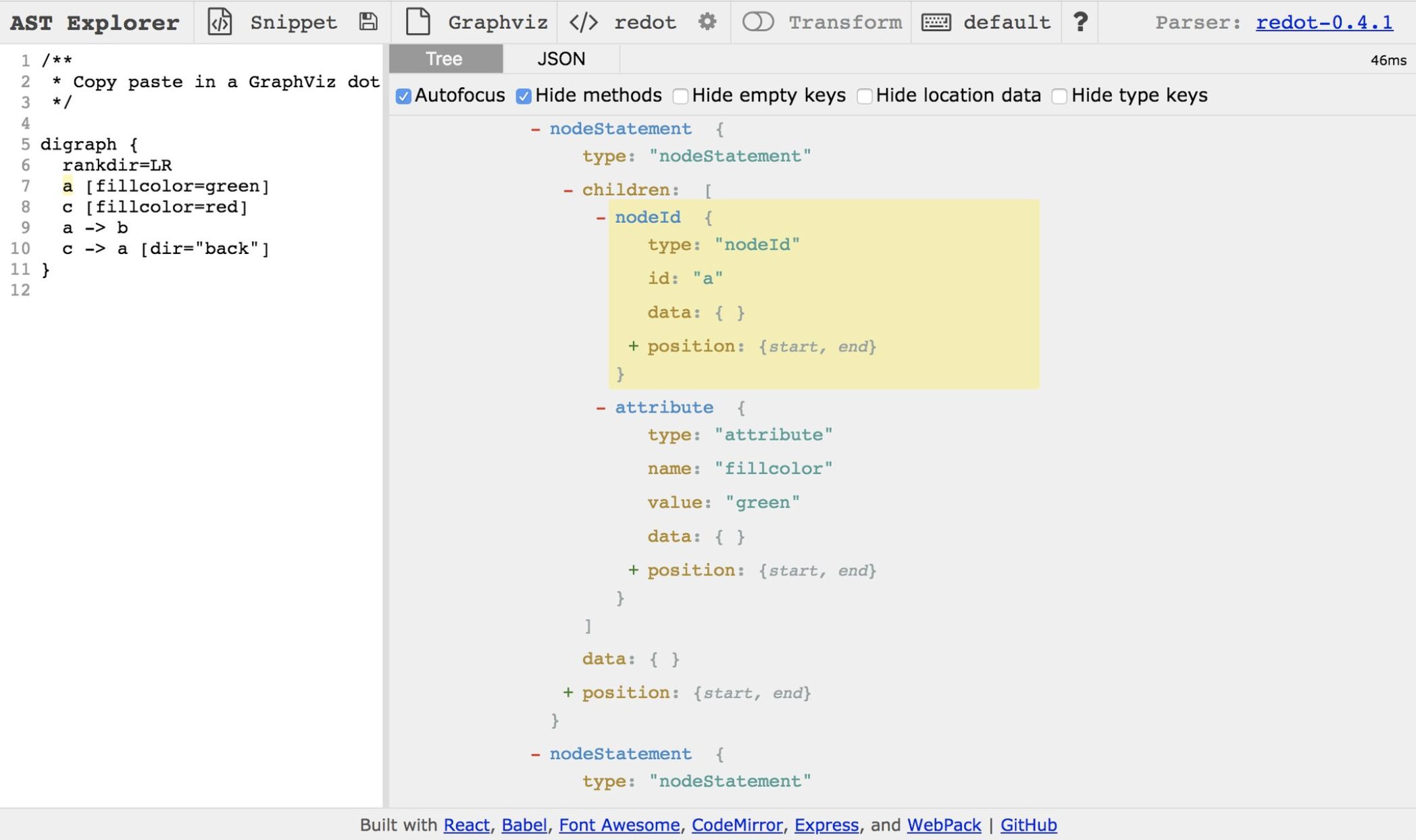
Note how in the image above the DOT language raw text was converted into a object tree (which can also be consumed/saved as a json file).
As a developer if you are able to ‘see code or raw data as a graph’, you will have made an amazing paradigm shift which will help you tremendously across your carer.
For example I have used ASTs and custom parsers to:
- write tests that check for what is actually happening in the code (easy when you have access to an object model of the code)
- consume log data which normal ‘regex’ based parsers struggled to understand
- perform static analysis on code written in custom languages
- transform data dumps into in-memory objects (than can then be easily transformed and filtered)
- create transformed files with slices of multiple source code files (which I called MethodStreams and CodeStreams) - See example below for what this looks like in practice
- perform custom code refactoring (for example to automatically fix security issues in code) - See example below for what this looks like in practice
### Refactoring and write code from AST
When building a parser for a particular data source, a key milestone is the round-trip capability, of being able to go from the AST, back to the original text (with no data loss).
This is exactly how code refactoring in IDEs works (for example when you rename a variable and all instances of that variable are renamed).
Here is how this round-trip works:
- start with file A (i.e. the source code)
- create the AST of file A
- create file B as transformation from the AST
- file A is equal to file B (byte by byte)
When this is possible, it becomes easy to change code programmatically, since we will be manipulating strongly typed objects without worrying about the creation of syntactic correct source code (which is now a transformation from the AST).
Writing tests using ASTs objects
Once you start to see your source code (or data that you consume) as ‘only an AST parser away from being objects you can manipulate’, a whole word of opportunities and capabilities will open up for you.
A good example is how to detect a particular pattern in the source code that you want to make sure occurs in a large number of files, lets say for example that you want to: “make sure that a particular Authorization (or data validation) method is called on every exposed web services method”?
This is not a trivial problem, since unless you are able to programmatically write a test that checks for this call, your only options are:
- write a ‘standard document/wiki-page’ that defines that requirement, and make sure that all developers read it, understand it, and more importantly, follow it
- manually check if that standard/requirement was correctly implemented (on Pull Requests code reviews)
- try to use automation with ‘regex’ based tools (commercial or open source), and realise that it is really hard to get good results from it
- fallback on manual QA tests (and Security reviews) to pick up any blind-spots
But, when you have the capability to write tests that check for this requirement, here is what happens:
- write tests that consume the code’s AST to be able to very explicitly check if the standard/requirement was correctly implemented/coded
- via comments in the test file, the documentation can be generated from the test code (i.e. no extra step required to create documentation for this standard/requirement)
- run those tests as part of the local build and as part of the main CI pipeline
- by having a failed test, the developers will know ASAP once an issue has been discovered, and can fix it very quickly
This is a perfect example of how to scale architecture and security requirements, in a way that is embedded within the Software Development Lifecycle.
We need ASTs for legacy and cloud environments
The more your get into ASTs, the more you realise that they are abstractions layers between different layers or dimensions. More importantly they allow the manipulation of a particular layer’s data in a programmatic way.
But when you look at the current legacy and cloud environments (the part that we call ‘Infrastructure as code’), what you will see are large parts of that ecosystems that today don’t have AST parsers to convert their reality into programable objects.
This is a great area of research, where you would focus on creating DSLs (Domain Specific Languages) for either legacy systems or for cloud applications (pick one since each will have complete different sets of source materials). One example of the kind DSL we need is an language to describe and codify the behaviour of Lambda functions (namely the resources they need to execute, and what is the expected behaviour of the Lambda function)
MethodStreams
One of the most powerful examples of AST manipulation I’ve seen, is the MethodStreams feature that I added to the O2 Platform.
With this feature I was able to programmatically create a file based on the call tree of a particular method. This file contained all the source code relevant to that original method (generated from multiple files), and made a massive difference when doing code reviews.
To understand why I did this, let’s start with the problem I had.
Back in 2010 I was doing a code review of an .Net application that had a million lines of code. But I was only looking at the WebServices methods, which only covered a small part of that codebase (which made sense since those were the methods exposed to the internet). I knew how to find those internet exposed methods, but in order to understand how they worked, I had to look at hundreds of files, which were the files that contained code in the execution path of those methods.
Since in the O2 Platform I already had a very strong C# parser and code refactoring support (implemented for the REPL feature), I was able to quickly write a new module that:
- starting on web service method X
- calculated all methods called from that method X
- calculated all methods called by 2. (recursively)
- capture the AST objects from all the methods identified by the previous steps
- created a new file with all the objects from 4.
This new file was amazing, since it contained ONLY the code that I need to read during my security review.
But it got event better, since in this situation, I was able to add the validation RegExs (applied to all WebServices methods) to the top of the file, and add the source code of the relevant Stored Procedures at the bottom of the file.
Some of the generated files had 3k+ lines of code, which was a massive simplification of the 20+ files that contained them (which had probably 50k+ lines of code).
Here is a good example of me being able to do a better job, by having access to a wide set of capabilities and techniques (in this case the ability to programmatically manipulate source code)
This type of AST manipulation is an area of research that I highly recommend for you to focus on (which will also give you a massive toolkit for your day to day coding activities). Btw, If you go down this path, also check out the O2 Platform’s CodeStreams which are an evolution of the MethodStreams technology. CodeStreams will give you a stream of all all variables that are touched by a particular source variable (what in static analysis is called Taint flow analysis and Taint Checking)
Fixing code in real time (or at compilation time)
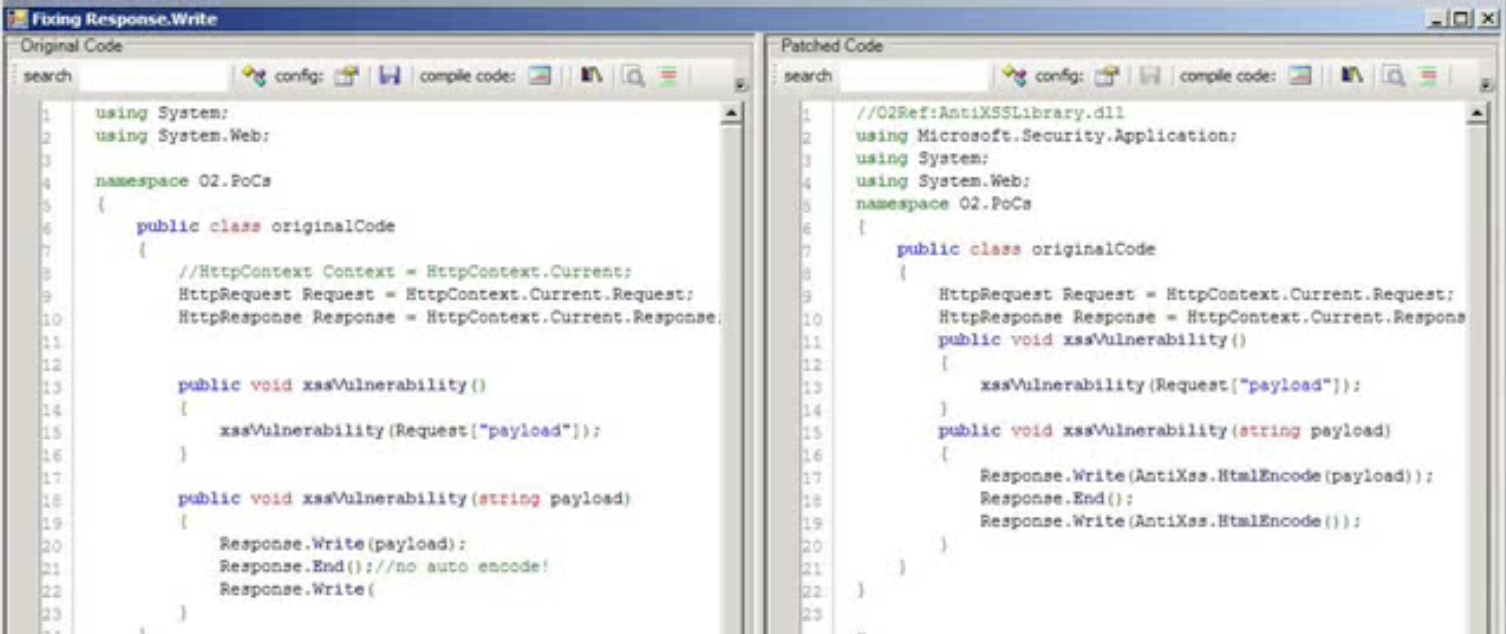
Another really cool example of the power of AST manipulation is the PoC I wrote in 2011 on Fixing/Encoding .NET code in real time (in this case Response.Write), where I show how to programmatically add a security fix to a vulnerable by design method.
Here is what the UI looked like, where the code on the left, was transformed programmatically to the code on the right (by adding the extra AntiXSS.HtmlEncode wrapper method)
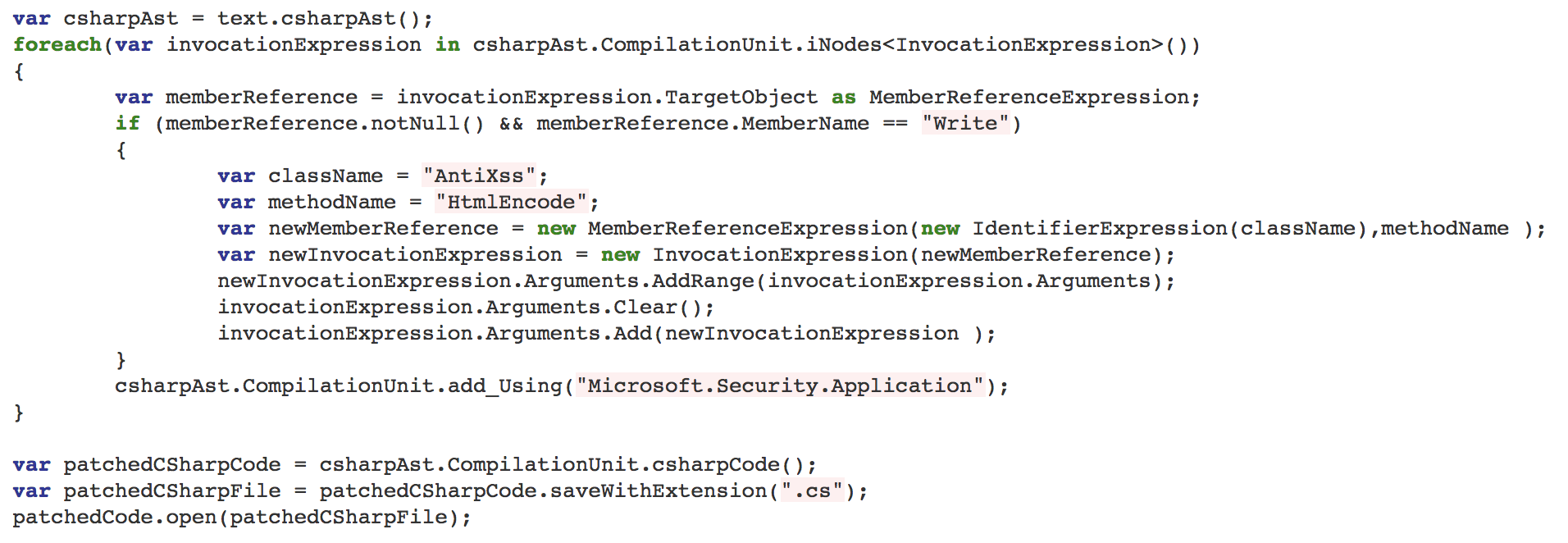
Here is the source code that does the transformation and code fix (note the round-trip of code):
In 2018, the way to implement this workflow in a developer friendly way, is to automatically create a Pull Request with those extra changes.