Chapter 4 - Build Script
Gaia did many tricks in build time. Build scripts are originally written in bash (Makefile), python, and javascript. After Firefox OS 1.4, build scripts are mostly written in Javascript and executed by xpcshell. xpcshell is similar to node.js but its possible to run some mozilla flavored javascript. It even allows core Gaia build script runs in a Firefox extension.
Gaia Building Script contains many helper tools to help install, test, localization, and package webapp into real device. It also allows developer to customize gaia for different markets such as change default wallpaper, ringtone, apps, settings.
4.1 The build process
Gaia build process is constructed by multiple steps While you run make command in gaia folder.
Firstly the shell will download xpcshell and extract it into your environment. The xpcshell api are wrapped to commonjs-like API via build/xpcshell-common.js so developer could pick it up easier. Check build/utils-xpc.js and build/test for the mapping details.
The general build process looks like below.
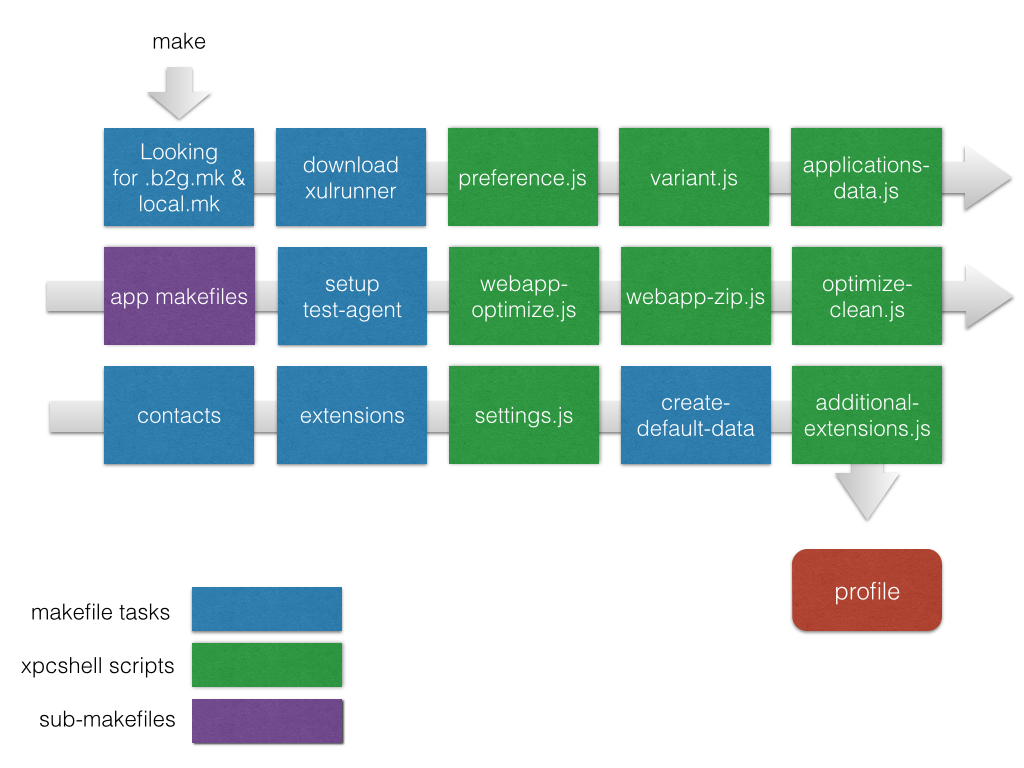

For old days the build script handle each gaia app’s custom build process. Build script will process the gaia app from their source folder to profile folder, and leave intermediate files into source folder.
From 2.1, app specific build process are moved to each apps/<app>/build/build.js files.
The build process now simplified to three processes: pre-app, in-app, and post-app processes.
And now intermediate files will be processed from source folder to stage folder, then copy the final results into profile folder.

New build process
preference.js
Generate the default settings for FirefoxOS. It will generate file user.js and put into the device, where is read by Gecko.
settings.js
Generate the default settings for FirefoxOS. It will be read by Gaia.
webapp-shared.js
Files in shared/ folder that declared in build-in webapp’s html will be included in this step.
webapp-optimize.js
minify app javascripts and l10n files.
webapp-zip.js
zip apps and put them under profile/.
From 2.1, per app build script are introduced. If build.js is found in per app’s build/ folder, it will take responsibility of build this app instead of center app.js.
And there are several parts that handled by build script. You can refer to Build System Primer for more information.
4.2 Per commit Coding style check
Gaia project follows Google javascript coding style.
To ensure the style are the same, Gaia will use gjslint and jshint to check JS coding styles before each commit (done by git pre-commit hook). Once you submit a Pull Request to Gaia repository, the TBPL server (Mozilla’s continue integration server) will run these linters to double check all styles are correct.
The precommit hook script is in tools/pre-commit and will be copied to project .git/hooks folder once some make command is executed.
Install gjslint and jshint separately to check coding styles by your own.
jshint code quality check has been introduced in gaia from 1.4 to complement with gjslint, the code style check tool. gjslint is planned to be replaced by jscs.
You can install it via npm:
$ npm install -g jshint
You could check build/jshint for more detail about jshint in gaia.
But gaia also provide the build script for you. You could run
$ make lint
to automatically run gjslint and jshint style check.
Or run
$ make hint
to run jshint style check.
4.3 Test
Buildscript provide tools to setup variety of test. including unit test, integration test, performance test, and UI test.
4.3.1 Unit Test
Gaia use mocha as test framework, chai as assert library, sinon.js as mock&stub library, blanket.js as test coverage tool.
You could run following command to host a unittest server:
$ make test-agent-server
Then open the test-agent app in nightly
$ make DEBUG=1 $ [FirefoxNightly path]/firefox –profile [absolute path]/gaia/profile-debug http://test-agent.gaiamobile.org:8080
or use pwd shortcut in *nix system:
$ firefox -profile pwd/profile-debug http://test-agent.gaiamobile.org:8080
Then run all tests with following command
$ make test-agent-test
You are able to append APP=<app folder name> to test single app, such as APP=settings.
4.3.2 Integration test with marionette js
Gaia Integration tests are driven by marionette script written by javascript and python. It can communicate with gecko so it’s possible to control both browser and Firefox OS device and interact with each other.
You could run following command to trigger the integration test:
1 $ make test-integration
You are able to append APP=<app folder name> to test single app, such as APP=calendar.
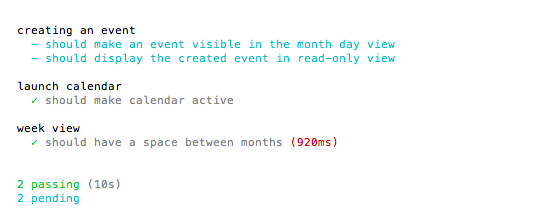
integration test result for calendar app
After test-integration command, you could load profile to b2g via command:
1 $ b2g/Contents/MacOS/b2g-bin -profile <absolute path>/gaia/profile-test
With VERBOSE=1 option
1 $ make test-integration VERBOSE=1
developer could see the log on console.
If you’ve runned test-integration once, you could use test-integration-test command in next time since test-integration-test command won’t build the profile everytime.
You could use real device (like flame) to run marionette test.
1 $ adb forward tcp:2828 tcp:2828
2 $ MARIONETTE_RUNNER_HOST=marionette-device-host make test-integration
4.3.3 performance test
For Gaia performance test, it only meaningful if you run the test on real device.
You’ll need an engineer build with Marionette enabled and remote debugging disabled.
The performance test will trigger the device and launch app several times to get average app load time. After running a test, the performance also collect the memory usage of both the app and the system process (b2g).
1 $ MARIONETTE_RUNNER_HOST=marionette-device-host make test-perf
You are able to append APP=<app folder name> to test single app, such as APP=settings.
1 "mozPerfDurationsAverage": 225.5
mozPerfDurationsAverage is the average app load time, which should be less than 1 second to get better user experience.
 1 {
 2           "app": {
 3             "name": "Settings",
 4             "uss": 16.6,
 5             "pss": 19.5,
 6             "rss": 32.9,
 7             "vsize": 73.3
 8           },
 9           "system": {
10             "name": "b2g",
11             "uss": 50.1,
12             "pss": 53.2,
13             "rss": 67,
14             "vsize": 148.1
15           }
16 },
The golden rule for test-perf is the lower number is better. We won’t mention too much about the detail of what these memory usage indicates. but just come with a simple note here:
- uss = unique set size
- pss = proportional set size
- rss = resident set size
- vsize = virtual set size
Generally vsize >= rss >= pss >= uss . vsize and rss don’t accurately reflect a process’s usage of pages shared with other processes. So the two numbers you want to watch are the pss and uss. You could google it for more detail.
uss is the memory that is completely unique to that process. This is the amount of memory that would be freed if the application was terminated right now. It’s a key value for evaluation.
pss reports the proportional size of its shared libraries. This is memory that would not be released if the process was terminated.
Besides make test-perf. Another option is b2g-perf.
First flash gaia to device with production configuration:
1 $ GAIA_OPTIMIZE=1 make production
After the device bootup, run the b2g-perf command:
1 $ pip install b2gperf
2 $ adb forward tcp:2828 tcp:2828
3 $ b2gperf --delay=10 Settings
The result will be something like this
1 2014-03-28 17:51:27,349 B2GPerfRunner INFO    | Results for Settings, cold_load_\
2 time: median:1658, mean:1664, std: 58, max:1931, min:1578, all:1665,1624,1687,16\
3 47,1628,1622,1654,1648,1663,1629,1619,1641,1664,1669,1578,1632,1705,1658,1725,16\
4 61,1623,1699,1653,1621,1682,1693,1680,1659,1668,1931
The mean:1664 denotes in this device the current average load time of settings app is 1664ms.
More details underneath Firefox OS App launch performance could be find in this talk
4.4 API document
Gaia doc adopt jsdoc3 format.
You could run following command to generate docs:
$ make docs
4.5 Customization
Gaia can do customization for you need. Such as change default wallpaper, ringtone, apps, settings.
You can specify the location with the GAIA_DISTRIBUTION_DIR environment variable, like this:
GAIA_DISTRIBUTION_DIR=<distribution_path> make production</distribution_path>
Read Customization Guide for more reference.
4.6 Device type
Gaia contains some build-in device type distribution such as phone, tablet, or TV. Run command:
1 GAIA_DEVICE_TYPE=tablet
To load default tablet related settings and configurations.
The real operation is done by per app build script, which is located in apps/<app name>/build folder.
4.7 Keyboard IME
To get keyboard IME layout and dictionary enabled, use following command:
$ GAIA_KEYBOARD_LAYOUTS=en,zh-Hant-Zhuyin,el,de,fr,zh-Hans-Pinyin make
4.8 Localization
You have to download locale files separately. Take traditional chinese for example, you can get the locale file via mercurial(hg):
$ hg clone https://hg.mozilla.org/gaia-l10n/zh-TW/ B2G/gaia/locales/zh-TW
Run command:
$ LOCALE_BASEDIR=locales/ LOCALES_FILE=locales/languages_mine.json make
Locale files should be listed in the languages_mine.json file.
The file could be as simple as
1 {
2 "en-US" : "English (US)",
3 "zh-TW" : "正體中文 (繁體)"
4 }
Referring to this gist for locale build automation script.
4.8.1 test localization via pseudolocales
You could enable Pseudo-localization in your device’s developer panel. , and then choose one of them in Settings->Languages (they’relocated at the very beginning of the list). Then test your patch. Every element that have l10n will be looks like mixed code.
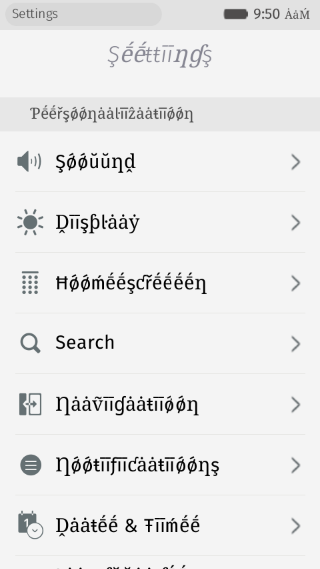
pseudo locale
There are some best practices about how to do localizations.
4.9 Beyond Build Script
4.9.1 Tools
There are helpful tools located in gaia/tools/ folder . Let’s take png_recompress.sh for example.
Pick an image named ‘bg.png’ and run command:
1 $ ./tools/png_recompress.sh -v bg.png
It will remove unnecessary metadata and further compress the png, so it could save up to 99.5% of size, which has a very measurable impact on ZIP file size and memory footprint.
4.9.2 Travis tests
Gaia project is hosted in github, and it use Travis CI to do per-commit continue integration and Pull request test.
You can browse over 32000 builds are runned via Travis. Besides lint, unit-test, marionette js test. gaia also runs buildscript test and gaia_ui_tests(marionette python version) in Travis.
To explore what exactly gaia tests runs in travis, check .travis.yml, which defined all travis tasks. The details of running scripts are defined in tests/travis_ci.
If you see the gaia_ui_tests error on Travis and want to reproduce it locally. You could refer to tests/travis_ci/gaia_ui_tests/.
Follow tests/travis_ci/gaia_ui_tests/install to setup test environment:
1 $ virtualenv --no-site-packages ENV
2 $ source ENV/bin/activate
3 $ ROOT=$PWD
4 $ cd tests/python/gaia-ui-tests/
5 $ python setup.py develop
6 $ cd $ROOT
7 $ make b2g
8 $ DESKTOP_SHIMS=1 NOFTU=1 make
The script enable standalone python virtual environment virtualenv to run the tests so the related configurations won’t affect the entire host system. It fetched new b2g desktop version and build a desktop gaia version.
Then run tests/travis_ci/gaia_ui_tests/script
 1 $ export GAIATEST_ACKNOWLEDGED_RISKS=true
 2 $ export GAIATEST_SKIP_WARNING=true
 3 $ root=tests/python/gaia-ui-tests/gaiatest
 4 $ b2g=`find b2g -follow -name "b2g-bin" | tail -n 1`
 5 $ python $root/cli.py --app=b2gdesktop \
 6   --binary=$b2g \
 7   --profile=profile \
 8   --type=b2g \
 9   --timeout=10000 \
10   tests/python/gaia-ui-tests/gaiatest/tests/accessibility/lockscreen/test_a11y_u\
11 nlock_to_homescreen.py
You could enter following command to exit to normal console:
1 $ deactivate
You could refer MDN for gaia ui test.
Reference
- https://developer.mozilla.org/en-US/Firefox_OS/Platform/Gaia/Build_System_Primer
- https://speakerdeck.com/yurenju/gaia-build-system-introduction