Chapter 1 - Overview
1.1 Firefox OS architecture
The main Firefox OS architecture is
- Application Layer : known as Gaia
- Platform Layer : known as Gecko
- Infrastructure Layer : known as Gonk
You may want to know the Firefox OS architecture better before you start developing Gaia. Here are introductory slides of of the Firefox OS and Gaia development flow: Developing Firefox OS and FirefoxOS for developers. Also there’s an Overview and High Level Architecture that elaborates the Firefox OS Architecture more concisely.
Boot2Gecko (B2G)
Boot2Gecko (B2G) is the project name of Firefox OS. You can see it anywhere through Firefox OS related projects. Firefox OS and Firefox are brand names from Mozilla Foundation. Consult Mozilla before making a production device with such names. In unofficial version of Firefox OS, you will see B2G OS instead of Firefox OS on the settings app device section if you are using simulator or the development build.
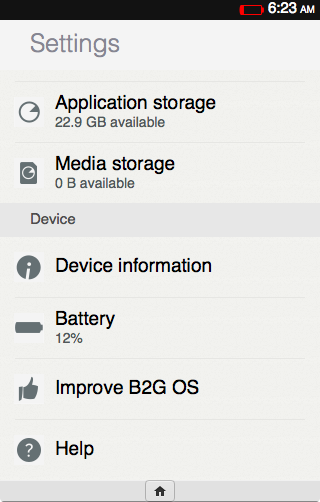
Simulator shows b2g os in Device section
1.2 Gecko Overview
Gecko is the core engine powering all Firefox and FirefoxOS versions. You may not know the fact that every browser is like gecko. Since the sentence like gecko is a build-in keyword in every internet connection messages. Search [user-agent](http://en.wikipedia.org/wiki/User_agent#Format_for_human-operated_web_browsers) of any browser, you will find:
1 Mozilla/5.0 (Windows NT 6.2; Win64; x64) AppleWebKit/537.36 (KHTML, like Gecko) \
2 Chrome/32.0.1667.0 Safari/537.36
Since Gecko is the browser engine from the very first popular Netscape navigator. Internet Explorer and other browsers put this keyword in their user-agent messages. Now it’s in the W3C standard.
Gecko supports web open standards: HTML, CSS, and JavaScript, and some experimental APIs to push web to the new frontier. Gecko also includes a networking stack, graphics stack, layout engine, a JavaScript virtual machine, and porting layers to makes sure those APIs work well on every operating system Gecko supports.
You can download Gecko source by following the guide. (Note: To build full Firefox OS you don’t have to download gecko separately)
Gecko is ported to several platforms via port layer. For example, the Firefox Windows version adapts the gecko port for Windows to build the browser with native look and feel.
In Gecko source there’s a b2g/ folder that contains the adapter to gonk (gonk port) that unleashes mobile hardware capabilities to the web. Mozilla and the community will keep extending it to push the capability of Firefox OS and web standards.
1.3 Gonk Overview
Gonk is the device porting layer, which is an adapter between hardware and gecko. Gonk is a relatively simple Linux distribution that can be treated as a Gecko Port paired with Gecko porting layers.
Gonk includes the Linux kernel, userspace hardware abstraction layer (HAL), and other OEM specific libraries. Since different devices may have their specific chipsets and varied hardware specs, the Gonk layer may look pretty different for devices.
https://github.com/mozilla-b2g/B2G contains official support gonk ports for a variety of devices. You can treat it as a gonk repository. The list of supported devices is available in B2G/config.sh.
General gonk work includes porting to the specific board and make sure Gecko can work well on the device.
1.4 Gaia Overview
Gaia is the front-end of Firefox OS, which contains system administration and build-in apps shipped with a Firefox OS device. All gaia source, including the system, keyboard IMEs, and everything you can see are implemented with HTML5 (HTML+CSS+Javascript) & Open WebAPIs.
The functionality of Gaia can be roughly categorized into the following groups:
Platform
Including System, Settings, Lockscreen, Build script, Keyboard and IME, and Bluetooth apps.
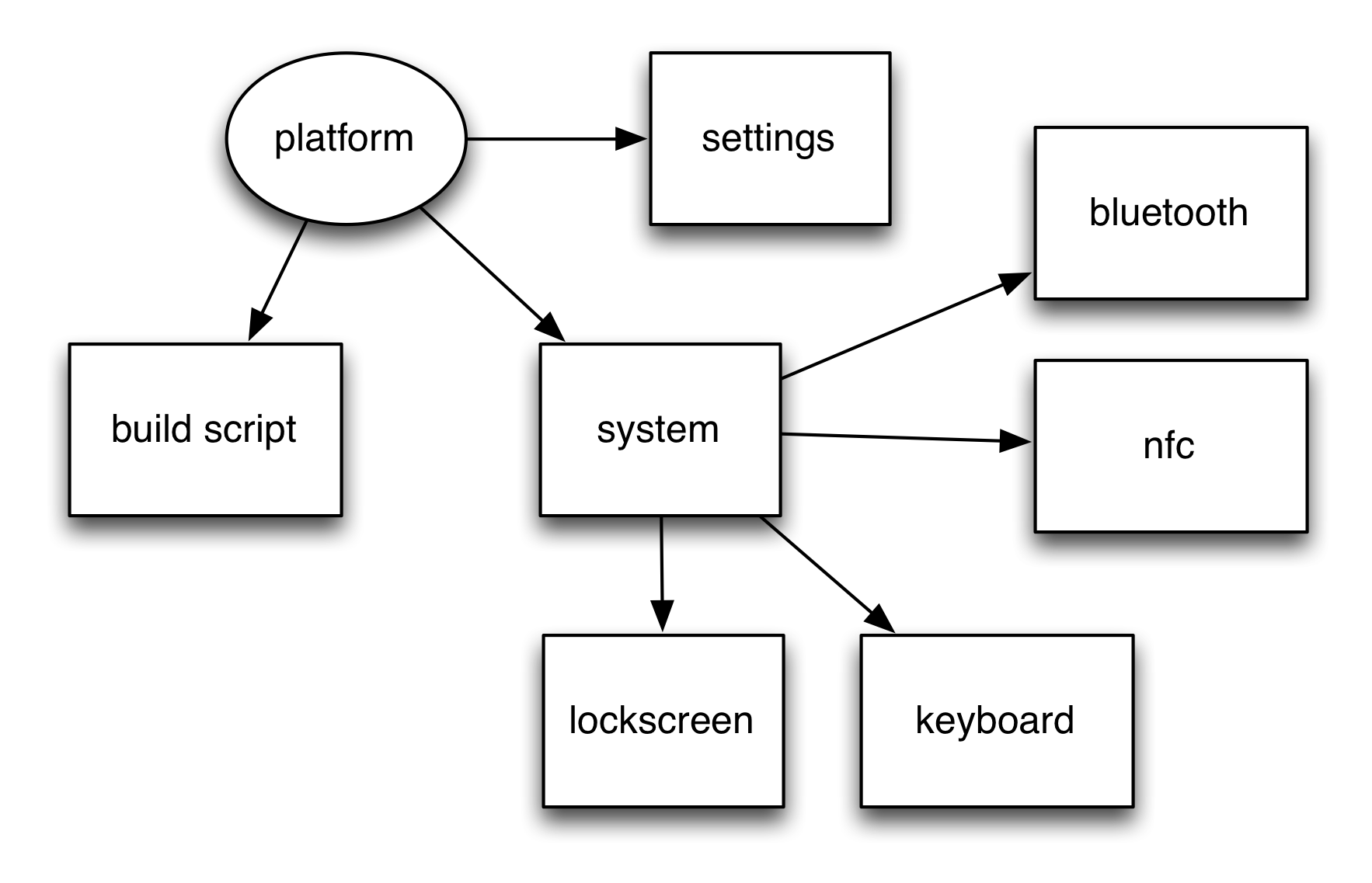
platform
System
The System app is the first web app loaded by Gecko during the Firefox OS bootup procedure. It bears numerous responsibilities that are essential for running the system, and are therefore out of scope of individual web apps.
Window Management
Firefox OS’s window management functionality — including app life cycle and interaction, notifications, animations and much more — is handled by a specific part of the System app. This article looks at Firefox OS Window Management in detail.
Settings
The Settings app allows Firefox OS users to configure device settings, and responds to incoming activities (Web activities named configure), which allows other apps to jump to different panels inside the Settings app to handle configuration as required (such as showing the wifi settings panel if no data connection is available.)
Keyboard
Keyboard is a special app which works closely with system. It handles layout and multiple input-method editors (IME).
FrontEnd
Homescreen
Like other mobile platforms, Homescreen shows currently installed webapps and bookmarks.
Browser
The System Browser provides browser-like functionality where it is needed — including page navigation, search and bookmarks.
Gaia Elements
Gaia element are reusable UI components that presents Firefox OS look and feel.
BuildingBlock
BuildingBlock is the reusable UI components set that presents Firefox OS look and feel. It’s being replaced by Gaia elements.
WebIDE (was App Manager)
The WebIDE and App Manager is the development tool in Firefox for Desktop to help you test, deploy and debug HTML5 web apps on Firefox OS phones and the Firefox OS Simulator, directly from your browser.
Communications
The communications apps include Dialer, Contact, SMS, Emergency Call, Cost Control and FTU. Some telephony related functionality such as Cell Broadcast, Voice Mail are also in this scope.
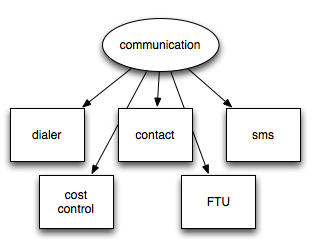
communications
Productivity
Email, Calendar, Clock apps are in the productivity category.
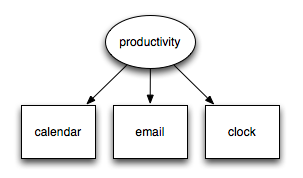
productivity
Media
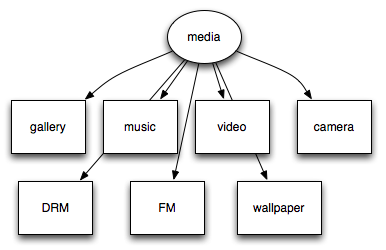
The media apps consist of Camera, Gallery, Music, Video, FM apps, Ringtones, and some media related functions such as forward lock DRM(fl) and wallpapers.
media
In addition to these functions, there are several major features such as Marketplace, test framework, pdf.js, which are developed closely internally or externally from Gaia.
1.5 WebAPI
Mozilla has been working actively to expose web capability to mobile devices. It’s done by defining web native APIs that make use of mobile sensors, telephony, wifi, batteries and so on.
The public APIs are documented on the MDN WebAPI page. Some APIs in progress are tracked in WebAPI proposed to W3C wiki page.
Note that these APIs not only are designed make Firefox OS work, but also are proposed to become standards for all web browsers. When implemented on a conforming browser, these APIs can be used immediately and Web developers don’t need to ‘port’ their webapp to other platform or browser.
1.6 Permission and security model
Some WebAPIs are ready for use in FirefoxOS and Firefox for Android. Since some are essential to provide a full ‘smartphone’ experience, such as telephony, but the the development of the APIs is not finalized yet, some of those APIs can only be used by gaia and build-in apps. Those are called ‘certified’ API. Some APIs, such as TCP socket, are useful in some circumstances but may have security concerns. Webapp using those APIs need to be reviewed and signed by Firefox Marketplace or some other trusted organization to make sure the user won’t be offended. These APIs are called ‘privileged’ APIs.
In MDN WebAPI page shows ‘certified’ and ‘privileged’ tags after each WebAPI. Generally if you are a webapp developer, you can’t access to ‘certified’ APIs at this moment.
Here is the list of permissions that available.
1.7 Release Cycle
Since Firefox OS 1.2, Mozilla tries to align the Firefox OS release cycles with that of the Firefox desktop version (that is, 6 weeks). Firefox OS releases a new version every 3 months. So every Firefox OS release will bypass a Gecko (Firefox browser core) release.
For example. Firefox 1.4 is bundled with Gecko 30 and Firefox 2.0 is bundled with Gecko 32, which skips Gecko 31.
Check https://wiki.mozilla.org/RapidRelease/Calendar for the Firefox OS versions and the correspondent gecko versions.
1.8 Where to discuss and get reference
The main resource of Gaia is available on Mozilla Developer Network and Mozilla Wiki. The secondary source is in Mozilla Wiki. Or you can find some cutting edge features from Bugzilla.
You can use irc://irc.mozilla.org #gaia to discuss with other gaia developers instantly. And feel free to find answers and ask/reply questions on StackOverflow with the tag ‘firefox-os’.
dev-gaia is the official mailing list of Gaia Development. Once you act as a gaia developer, you can learn a lot and participate in to change the world of web.
Please keep the article How To Ask Questions The Smart Way in mind before you start asking any question there.
1.9 Build the entire Firefox OS from source code
This book is about Firefox OS application layer: Gaia. We’ll just sketch the process of building the entire Firefox OS from source code.
Follow the instructions from build prerequisites, fetch code in Mozilla Developer Network to download the full Firefox OS source code.
Here’s a good evaluation choice called foxbox that helps you create a configured VM environment without affecting your desktop environment (disclosure: this tool is developed by the author). Your desktop should have hardware virtualization(VT-x or AMD-V) support. It’s available on Mac/Windows 8. Prepare to have on your workstation at least 4GB RAM and about 40GB disk space (for full OS, 5~10GB for gaia).
Remember to backup the phone system partition before the first time you try to flash your device. Then you are ready to follow build instructions to configure and flash the device or B2G simulator.
Generally you can config the target device with the following command:
1 ANDROIDFS_DIR=<absolute path to parent dir of system dir> ./config.sh <target>
Once your environment is settled down, command config.sh <target> can help you config your build environment for the target device. build.sh helps you build the device image, and flash.sh flashes the ROM on to the device.
Firefox OS reuses the AOSP(Android Open Source Project) build system but does not build the java related parts. Instead of build/envsetup.sh and lunch in android, Firefox OS wrap them in config.sh.
The java related parts are build with fake-jdk-tools folder. So Firefox OS developer do not have to modify much of AOSP build process.
You can read gonk-misc, build Firefox OS through AOSP build system (written in Chinese, you may use web translation tool to read it if you don’t read Chinese) to gain more detail about the Firefox OS build process.
1.10 Get a reference phone
FirefoxOS Reference Phone (Flame) is available with global free shipping for $170. It has 4 inch screen, and the RAM is configurable from 256MB to 1GB in the bootloader. This enables you to use same device to check your webapp with limited or rich memory.
I’d recommand you to get one for FirefoxOS development.
1.10.1 Flash the device
There’s a tool that help developers grab nightly builds and flash to the reference phone
You can check B2G-flash-tool for more detail.
1.11 Reference
- Public UI Spec https://mozilla.app.box.com/s/44utizl9oz4eupyu3fuu