Introduction
Since the end of 2014 the ESP8266 chip by Chinese manufacturer Espressif has gained a lot of popularity in the DIY community, due to its rich set of features but also due to the very attractive price. First it was only available as a WiFi extension to existing development boards, cutting the price of comparable products from USD $60 to a mere $6! Suddenly all the Arduino developers had an affordable way to connect their devices to the internet. Not long after, clever hackers and engineers realized that the ESP8266 could be used beyond the rather simple AT firmware. A software development kit (SDK) was available but badly documented, so they reverse-engineered the SDK and used Google Translate to understand the Chinese manual.
At first the process to set up a development environment was complicated and cumbersome. Files had to be downloaded from different sources and copied to various locations. But then several groups started to provide simplifications to this process. One of the first simplifications was the NodeMCU Lua firmware which could interpret scripts written in the language Lua at runtime. The firmware also provided bindings into Espressif’s API from the Lua language so that the pins of the ESP8266 could be easily controlled with just a few lines of code.
A few months later another huge simplification became available: the integration of the C/C++ API into the Arduino IDE! Suddenly it was possible to profit from the simplicity of the Arduino ecosystem, which not only provided a vast number of libraries but also made the C programming start of your project a lot easier. Since code developed in the Arduino IDE compiled into a very efficient binary the often scarce resources of the ESP8266 were also used more efficiently. For instance, the interpreter (the program that reads and executes scripts) of the Lua firmware needed a lot of memory just for itself and did not leave much for your script code.
After having used the Lua firmware for a while I got frustrated by its instability and lack of peripheral support. So I just jumped on the possibility to program the ESP8266 from the Arduino IDE - and I loved it from the beginning. I didn’t have to worry about a complicated tool installation: it was as simple as copying a URL into the right spot in the Arduino IDE. And also many libraries programmed for the standard Arduino ATmega chips worked out of the box for the ESP8266 as well! So I went to work and ported some of the projects I had written for the Lua firmware to the Arduino/ESP8266 platform.
However, I was struggling in Lua with one peripheral module I already had successfully working: a wonderfully crisp OLED display. There were several libraries available for the Arduino using that display but I just couldn’t get them to run: the extremely versatile and rich u8glib used a lot of ATmega specific code and just wouldn’t compile. The Adafruit library on the other hand was made for slightly different displays and wouldn’t work for me either. So I set out and started to write my own (and very first) library for the Arduino/ESP8266 platform.
To verify the library I implemented a few ideas which involved the OLED display. One of them was the ESP8266 WeatherStation. After getting the code to work I wrote a blog post about it and had it running somewhere in my apartment - and I forgot about it until I saw that suddenly the visits on that blog post spiked and that many visitors came from Thingiverse. From a 3D printing project built around my WeatherStation code, that was the moment when I realized that I had something interesting and people had found the WeatherStation appealing.
I decided to provide the right components needed for building the WeatherStation and to sell it as a kit for the ESP8266 WeatherStation. Quickly I had set up a simple PayPal shop on my blog. A supplier in China would ship the kit directly to buyers all over the world and after a few months WeatherStations were being programmed in more than 20 countries.
You are now holding a guide to the WeatherStation in your hands. Thank you for your interest! You might have just found this guide on Amazon and you don’t have the hardware yet. Or you have already acquired the components on your own and are now looking for a guide to use them. Or you have bought the kit from my shop or my listing on Amazon. In all of these cases you quickly want to get started with the ESP8266 and I’ve tried very hard to make this as easy as possible for you. Please let me know if you see mistakes. You can reach out to me through dani.eichhorn@squix.ch or on Twitter: https://twitter.com/squix78
Also make sure that you subscribe to my newsletter to stay updated with latest news around the ESP8266. You will get a maximum of 1-2 emails per month, I promise! https://blog.squix.org/subscribe
One more thing! If you like this project please have a look at my shop. I recently created a hardware kit containing a beautiful color display with touch screen. There are are several projects you can build with it.
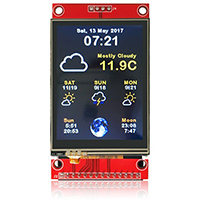
https://thingpulse.com/product/esp8266-wifi-color-display-kit-2-4/