6. Data Structures in Detail
In this chapter we will discuss every facet of data structures.
Frequently Asked Questions about Data Structures
We show the outline of Frequently Asked Questions about Data Structures in the following way:
1 Step 1. Data Structures
2 Step 2. Linear Data Structures
3 Step 3. LinkedList
4 Step 4. Stack
5 Step 5. Queue
6 Step 5. Hierarchical Data Structures
While we broadly categorize the above data structures we have kept Java in our mind. It changes with the programming languages. Of course for C it is quite different. However, once you understand the basic concepts,you can transplant the Java code into C++ or vice versa.
Earlier we have seen that any data structure is a way of storing and organizing the data so that it can be used efficiently. It provides a large amount of data efficiently. Efficient algorithm can only be designed with efficient data structures.
Abstract Data Type (ADT)
The first step of designing an efficient data structure is to develop an efficient mathematical model for the data to be stored. After that, we need to choose the methods to access and modify the data. This model with the methods is called Abstract Data Type or ADT.
Through the ADT, we address all the functionalities of the data structures. It tells us what we want to do with the data structures. However, ADT does not tell us anything about the implementation process, memory management, or the algorithm we implement for the data structures.
As we have said earlier, efficient algorithm depends on efficient data structures, we will definitely be interested on which algorithm we should implement; however,in the ADT stage, it is not necessary.
As an example, if we are implementing a dictionary ADT, we may want to implement a “search(word)” method. At the very beginning of the project, we have to specify that; and, what we are doing in that stage is nothing but ADT.
Now, in case of Java, a data structure for implementing an ADT is a structured set of variables for storing data. On the implementation level, an ADT corresponds to a Java Interface, and the data structure implementing the ADT corresponds to a class implementing that interface. We will see to this part in the later section of the book, where we will discuss ‘Collection’.
Linear Data Structures
In Linear Data Structures we can arrange elements sequentially so that one element may have next element and the next element may have next elements, and we can extend the sequential order as long as we could extend it.
In this section, our mathematical model of the data is a linear sequence of elements; this sequence has well-defined ‘first’ and ‘last’ elements. Every element of a sequence except the first has a unique predecessor while every element except the last has a unique successor. As an example, consider a String ‘good’; here, the characters are ordered sequentially. The character ‘g’ is the first element and has no predecessor. The character ‘d’ is the last element and has no successor.
The next figure (Figure 6.1) shows the three layers deep linear data structure samples.
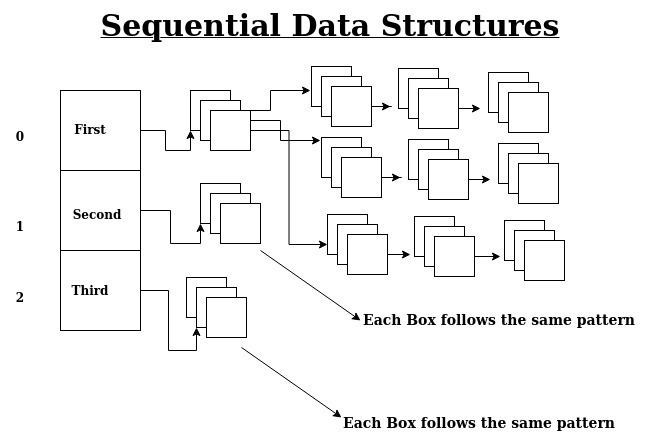
We can show this linear and sequential data structures using the following code snippets in Java.
 1 // code 6.1
 2 // Java
 3 package fun.sanjibsinha;
 4
 5 public class ArrayExamples {
 6
 7     /**
 8     * each box will contain two boxes
 9     */
10     static String[] singleBox = {"First Box", "Second Box", "Third Box"};
11     /**
12     * first box will have white and black box
13     */
14     static String[][] doubleBox = {
15             {"White", "Black", "Empty"},
16             {"Red", "Blue", "Empty"},
17             {"Yellow", "Green", "Empty"}
18     };
19     /**
20     * white box will have three boxes apple, cabbage and mutton
21     */
22     static String[][][] tripleBox = {
23             {
24                 {"Apple", "Banana", "Guava"}, {"Cabbage", "Potato", "Brinjal"}, {"Mu\
25 tton", "Lamb", "Chicken"}
26             },
27             {
28                     {"Mutton", "Lamb", "Chicken"}, {"Apple", "Banana", "Guava"}, {"C\
29 abbage", "Potato", "Brinjal"}
30             },
31             {
32                     {"Cabbage", "Potato", "Brinjal"}, {"Apple", "Banana", "Guava"}, \
33 {"Mutton", "Lamb", "Chicken"}
34             }
35     };
36
37
38     /**
39     * this is main statement
40     * @param args
41     */
42     public static void main(String[] args) {
43         for (int i = 0; i < singleBox.length; i++){
44             System.out.println(singleBox[i]);
45             for (int j = 0; j < doubleBox.length; j++){
46                 System.out.println(" * " + doubleBox[j][i] + " * ");
47                 /**
48                 * enhanced for loop
49                 */
50                 for (String[][] box : tripleBox) {
51                     System.out.println(" ** " + box[j][0] + " ** ");
52                 }
53             }
54         }
55     }
56 }
As the topmost layer or the outermost layer has three boxes, we can arrange the output in three different ways as follows. The first output goes this way:
 1 // output of code 6.1
 2 First Box
 3     * White *
 4             ** Apple **
 5             ** Mutton **
 6             ** Cabbage **
 7     * Red *
 8             ** Cabbage **
 9             ** Apple **
10             ** Apple **
11     * Yellow *
12             ** Mutton **
13             ** Cabbage **
14             ** Mutton **
15 Second Box
16     * Black *
17             ** Apple **
18             ** Mutton **
19             ** Cabbage **
20     * Blue *
21             ** Cabbage **
22             ** Apple **
23             ** Apple **
24     * Green *
25             ** Mutton **
26             ** Cabbage **
27             ** Mutton **
28 Third Box
29     * Empty *
30             ** Apple **
31             ** Mutton **
32             ** Cabbage **
33     * Empty *
34             ** Cabbage **
35             ** Apple **
36             ** Apple **
37     * Empty *
38             ** Mutton **
39             ** Cabbage **
40             ** Mutton **
41
42 Process finished with exit code 0
The sequential order is rearranged if we change the index of the outermost layer from 0 to 1. Watch this part of the above code snippet:
1 /**
2                 * enhanced for loop
3                 */
4                 for (String[][] box : tripleBox) {
5                     System.out.println(" ** " + box[j][0] + " ** ");
6                 }
And the rearranged output is like this:
 1 // output of code 6.1
 2 // rearranging the sequence
 3 First Box
 4     * White *
 5             ** Banana **
 6             ** Lamb **
 7             ** Potato **
 8     * Red *
 9             ** Potato **
10             ** Banana **
11             ** Banana **
12     * Yellow *
13             ** Lamb **
14             ** Potato **
15             ** Lamb **
16 Second Box
17     * Black *
18             ** Banana **
19             ** Lamb **
20             ** Potato **
21     * Blue *
22             ** Potato **
23             ** Banana **
24             ** Banana **
25     * Green *
26             ** Lamb **
27             ** Potato **
28             ** Lamb **
29 Third Box
30     * Empty *
31             ** Banana **
32             ** Lamb **
33             ** Potato **
34     * Empty *
35             ** Potato **
36             ** Banana **
37             ** Banana **
38     * Empty *
39             ** Lamb **
40             ** Potato **
41             ** Lamb **
42
43 Process finished with exit code 0
We can change this order three times as the outermost layer has three indices or we can imagine it as boxes. The last sequence looks like this:
 1 // output of code 6.1
 2 // rearranging the sequence
 3 First Box
 4     * White *
 5             ** Guava **
 6             ** Chicken **
 7             ** Brinjal **
 8     * Red *
 9             ** Brinjal **
10             ** Guava **
11             ** Guava **
12     * Yellow *
13             ** Chicken **
14             ** Brinjal **
15             ** Chicken **
16 Second Box
17     * Black *
18             ** Guava **
19             ** Chicken **
20             ** Brinjal **
21     * Blue *
22             ** Brinjal **
23             ** Guava **
24             ** Guava **
25     * Green *
26             ** Chicken **
27             ** Brinjal **
28             ** Chicken **
29 Third Box
30     * Empty *
31             ** Guava **
32             ** Chicken **
33             ** Brinjal **
34     * Empty *
35             ** Brinjal **
36             ** Guava **
37             ** Guava **
38     * Empty *
39             ** Chicken **
40             ** Brinjal **
41             ** Chicken **
42
43 Process finished with exit code 0
Modeling of a Structure
In the Abstract Data Type part, correct modeling of a structure is extremely important. We need to understand why it is important.
In any programming language when we write a code, we actually write some instructions for the computers. Here, human communication through programming language also plays a crucial part. Here when we say humans, we mean programmers. Another programmer will also read the code, and programmers are not computers.
Just because a compiler can understand a given construct there is no guarantee that a programmer can also understand that construct. Therefore, the ADT should be clear and concise. Moreover, it should be human readable and understandable.
Because a human mind has many limitations, any code should be elaborately documented so that the purpose of using any particular algorithm is clear and graspable. Consider a stack algorithm, which handles nested constructs for a compiler. If it is very complicated, human mind cannot follow the structure. It is especially true for the data structures. Deeply nested constructs in a data structure can be incomprehensible; the limitations of human mind cannot comprehend it.
While a construct is ambiguous to a human, at the same time it is clear and comprehensible to a compiler. Consider a simple division algorithm.
 1 //code 6.2
 2 package fun.sanjibsinha;
 3
 4 public class TestingDemo {
 5 //badly written code for humans, although the construct is clear to any compiler
 6     public static void main(String[] args) {
 7         double a, b, c;
 8         a=20;
 9         b=10;
10         c=5;
11         System.out.println(a/b/c);
12     }
13 }
14
15 The output is quite obvious: 0.4
Although humans cannot follow the construct of division without parentheses, nevertheless the compiler does not complain. It gives us the correct output.
If we wrote this line this way adding the parentheses :
1 System.out.println((a / b) / c);
The limitations of human mind would not deter it from comprehending correctly.
ArrayList to overcome limitations of Array
Working with array is difficult because they have a fixed size and it is not very easy to add or remove data, always. Arrays are sequentially ordered; for that reason, adding or removing elements from any position between two elements will also involve shifting other values. The whole operation makes the processor overwork, forcing it to overwork to solve the problem.
While the ArrayList is also sequentially ordered, and processor takes the same steps as it does in case of Arrays, nevertheless it is easy to handle because of the ADT.
ArrayList is an ADT that provides a generic class, which has many useful methods to deal with a collection of data. It also supports different data types. Using the ArrayList methods we could easily add, remove, modify any element. Moreover, we could count the size of the list and based on which we could use the looping construct.
An ArrayList is declared as follows:
1 ArrayList<T> arrayList = new ArrayList<T>();
Here T is the data type, not the primitive data type, but the Wrapper Class. Let us take a look at some implementations.
 1 //code 6.3
 2 //Java
 3 package fun.sanjibsinha;
 4
 5 import java.util.ArrayList;
 6
 7 public class ArrayListExamples {
 8
 9     public static void main(String[] args) {
10
11         /**
12         * ArrayList examples
13         * ArrayList is an ADT that provides a generic class, which has many useful m\
14 ethods to deal
15         * with a collection of data. It also supports different data types.
16         * An ArrayList is declared as follows:
17         * ArrayList<T> arrayList = new ArrayList<T>();
18         * Here T is the data type.
19         */
20         ArrayList<String> arrayList = new ArrayList<String>();
21         arrayList.add("index");
22         arrayList.add("about");
23         arrayList.add("contact");
24         arrayList.add("products");
25         arrayList.add("sellers");
26
27         for (int i = 0; i < arrayList.size(); i++){
28             System.out.println(arrayList.get(i));
29         }
30     }
31 }
We have added a few elements and the output is quite simple.
1 //output of code 6.3
2 index
3 about
4 contact
5 products
6 sellers
Next, we want to remove some elements and give the output to see how it works.
 1 //code 6.4
 2 package fun.sanjibsinha;
 3
 4 import java.util.ArrayList;
 5
 6 public class ArrayListExamples {
 7
 8     public static void main(String[] args) {
 9
10         /**
11         * ArrayList examples
12         * ArrayList is an ADT that provides a generic class, which has many useful m\
13 ethods to deal
14         * with a collection of data. It also supports different data types.
15         * An ArrayList is declared as follows:
16         * ArrayList<T> arrayList = new ArrayList<T>();
17         * Here T is the data type.
18         */
19         ArrayList<String> arrayList = new ArrayList<String>();
20
21         //we have added 5 items
22         arrayList.add("index");
23         arrayList.add("about");
24         arrayList.add("contact");
25         arrayList.add("products");
26         arrayList.add("sellers");
27
28         //we have removed 2 items
29         arrayList.remove("products");
30         arrayList.remove("sellers");
31
32         for (int i = 0; i < arrayList.size(); i++){
33             System.out.println(arrayList.get(i));
34         }
35     }
36 }
Here goes the output:
1 //output of code 6.4
2 index
3 about
4 contact
Next, we are going to modify the first element of the list; we will modify it changing ‘index’ to ‘home’.
 1 //code 6.5
 2 package fun.sanjibsinha;
 3
 4 import java.util.ArrayList;
 5
 6 public class ArrayListExamples {
 7
 8     public static void main(String[] args) {
 9
10         /**
11         * ArrayList examples
12         * ArrayList is an ADT that provides a generic class, which has many useful m\
13 ethods to deal
14         * with a collection of data. It also supports different data types.
15         * An ArrayList is declared as follows:
16         * ArrayList<T> arrayList = new ArrayList<T>();
17         * Here T is the data type.
18         */
19         ArrayList<String> arrayList = new ArrayList<String>();
20         //we have added 5 items
21         arrayList.add("index");
22         arrayList.add("about");
23         arrayList.add("contact");
24         arrayList.add("products");
25         arrayList.add("sellers");
26         //we have removed 2 items
27         arrayList.remove("products");
28         arrayList.remove("sellers");
29
30         //we will modify the first index page to home
31         arrayList.set(0, "home");
32
33         for (int i = 0; i < arrayList.size(); i++){
34             System.out.println(arrayList.get(i));
35         }
36     }
37 }
We have successfully modified the value. Running the program gives is this output:
1 //output of code 6.5
2 home
3 about
4 contact
After storing the data, the need to sort them is extremely important. In the final ArrayList code snippet, we will sort our data structures.
 1 //code 6.6
 2 package fun.sanjibsinha;
 3
 4 import java.util.ArrayList;
 5 import java.util.Collections;
 6
 7 public class ArrayListExamples {
 8
 9     public static void main(String[] args) {
10
11         /**
12         * ArrayList examples
13         * ArrayList is an ADT that provides a generic class, which has many useful m\
14 ethods to deal
15         * with a collection of data. It also supports different data types.
16         * An ArrayList is declared as follows:
17         * ArrayList<T> arrayList = new ArrayList<T>();
18         * Here T is the data type.
19         */
20         ArrayList<String> arrayList = new ArrayList<String>();
21         //we have added 5 items
22         arrayList.add("index");
23         arrayList.add("about");
24         arrayList.add("contact");
25         arrayList.add("products");
26         arrayList.add("sellers");
27         //we have removed 2 items
28         arrayList.remove("products");
29         arrayList.remove("sellers");
30
31         //we will change the first index page to home
32         arrayList.set(0, "home");
33
34         System.out.println("Unsorted list: ");
35         for (int i = 0; i < arrayList.size(); i++){
36             System.out.println(arrayList.get(i));
37         }
38         System.out.println("Now we are going to sort the list: ");
39         Collections.sort(arrayList);
40
41         for (int i = 0; i < arrayList.size(); i++){
42             System.out.println(arrayList.get(i));
43         }
44         System.out.println();
45
46         /**
47         * we should use the Wrapper class instead of primitive data type
48         */
49         ArrayList<Double> doubleList = new ArrayList<Double>();
50         doubleList.add(456.45);
51         doubleList.add(12.123);
52         doubleList.add(78945.0258);
53         System.out.println("Unsorted list: ");
54         for (int i = 0; i < doubleList.size(); i++){
55             System.out.println(doubleList.get(i));
56         }
57         System.out.println("Now we are going to sort the list: ");
58         Collections.sort(doubleList);
59         for (int i = 0; i < doubleList.size(); i++){
60             System.out.println(doubleList.get(i));
61         }
62     }
63 }
In the above code, we have displayed the unsorted output first, after that, we have given the output of the sorted list.
 1 //output of code 6.6
 2 Unsorted list:
 3 home
 4 about
 5 contact
 6 Now we are going to sort the list:
 7 about
 8 contact
 9 home
10
11 Unsorted list:
12 456.45
13 12.123
14 78945.0258
15 Now we are going to sort the list:
16 12.123
17 456.45
18 78945.0258
We have seen some examples of ArrayList. In the next section, we will see how LinkedList works. We will also learn why LinkedList consumes less memory than ArrayList.
ArrayList or LinkedList, which is faster?
As we have seen that the two most natural ways of storing sequences in computer memory are arrays and linked lists. ArrayList is an ADT that uses all concepts of handling Arrays with more flexibility. That is why, the time complexity is same for the both.
In LinkedList, it does not work that way. We usually model the memory as a sequence of memory cells, each of which has a unique address. An array or ArrayList is a contiguous piece of memory. Each cell of the memory stores one object, which is a part of the sequence stored in an Array or an ArrayList.
In a singly LinkedList two successive memory cells are allocated for each object of the sequence. Two memory cells form a node of a sequence. The first cell stores the object and the second cell stores a reference to the next node of the list.
In the next node there is two memory cells, and the previous node points to the first memory cell of the next node.
In a doubly linked list, the mechanism changes. Then we not only store a reference to the successor of each element, but we need to have a reference to its predecessor. It means each node should have three successive memory cells. We will discuss it in detail later.
At present, we will see how a singly LinkedList works.
 1 //code 6.7
 2 package fun.sanjibsinha.nodepackage;
 3
 4 public class NodeClass {
 5
 6     private int dataElement;
 7     private NodeClass next;
 8
 9     public NodeClass(){
10         dataElement = 0;
11         next = null;
12     }
13
14     public NodeClass(int dataInt){
15         this.dataElement = dataInt;
16         this.next = null;
17     }
18
19     public NodeClass(int dataElement, NodeClass node){
20         this.dataElement = dataElement;
21         this.next = node;
22     }
23
24     public void insertAfter(NodeClass node){
25         NodeClass temporaryNode = this.next;
26         this.next = node;
27         node.next = temporaryNode;
28     }
29
30     public NodeClass nextNode(){
31         return this.next;
32     }
33
34     public void displayDataElement(){
35         System.out.println(this.dataElement);
36     }
37
38 }
39
40
41 package fun.sanjibsinha.nodepackage;
42
43 public class DisplayLinkedList {
44
45     public static void main(String[] args) {
46
47         NodeClass headNode;
48         NodeClass nextNodeOne;
49         NodeClass nextNodeTwo;
50         NodeClass nextNodeThree;
51         NodeClass currentNode;
52
53         headNode = new NodeClass(10);
54
55         nextNodeOne = new NodeClass(120);
56         headNode.insertAfter(nextNodeOne);
57
58         nextNodeTwo = new NodeClass(1200);
59         nextNodeOne.insertAfter(nextNodeTwo);
60
61         nextNodeThree = new NodeClass(12000);
62         nextNodeTwo.insertAfter(nextNodeThree);
63
64         currentNode = headNode;
65         while (currentNode != null){
66             currentNode.displayDataElement();
67             currentNode = currentNode.nextNode();
68         }
69     }
70 }
In the above code we have implemented the ADT of a singly LinkedList, where we have only added or inserted next node until it reaches the NULL value.
1 //output of code 6.7
2 10
3 120
4 1200
5 12000
Now, we have an introduction to Data Structures; we will dig into this matter more in the coming sections.
Collection Framework in programming languages
Every programming language has its own Collection framework. For brevity, in this chapter, we will use two programming languages in particular; they are Java and C++. However, the core ideas are same and implemented widely in every language; we will see to it later.
First of all, we need to understand one thing first. In this book, we are going to learn data structures and algorithm, because they are inter-dependent; and, they are also related to discrete mathematical conceptions.
All together, it is a burden of huge responsibility to organize the data structures and arrange the necessary algorithm to do every kind of operations possible to make an application run successfully. Now, if we get busy in low-level plumbing to organize the data structures using necessary algorithm from the scratch, we cannot concentrate on the other important parts of our programs. Collection framework helps us to get rid of that heavy load of low-level plumbing.
Therefore, every popular high level programming language has its own Collection framework.
As far as Java is concerned, the Collection framework, as an unified structure, consists three core parts; they are interfaces, implementations and algorithm.
Interfaces, as always, represent abstract data types; in object-oriented languages, interfaces generally form a hierarchy and its implementations depend heavily on the data structures and algorithm. When an object implements Collection interface, it uses some methods to perform useful computations, such as searching and sorting. These methods are called algorithm.
We need to understand another core conceptions regarding algorithm; it is polymorphic. It means, we can use the same method on many different data structures. In a moment we will find how it works.
Before going to see the polymorphic implementations of algorithms on different data structures, we must be aware of the benefits of Collection interfaces. In a nutshell, they reduce programming efforts, as we have discussed it earlier, you do not have to do the low-level plumbing. This framework gives you enough freedom to work on other important parts of program, because it supplies high-performance and high-quality implementations of useful data structure and algorithm.
Enough talking, let us see some code snippets to buttress our theory.
Stack and Queue in Java
Stack and Queue are abstract data types or interfaces that extend Collection interface in Java. They have more or less similarities; except the core concept where we remove the elements.
Stack uses ‘last in first out’ or LIFO method. It means, when we use the remove method, the last element. that has just been inserted, will be popped out first. In Queue, the opposite happens. It works on ‘first in first out’, or FIFO algorithm.
In this section we will mainly concentrate on Stack and Queue interfaces and on their implementations. In the coming section, we will learn about Deque; it is a double-ended-queue, a linear collection of elements that supports the insertion and removal of elements at both end points. It is the main advantage of Deque. For that reason,the Deque interface is considered to be a richer abstract data type than both Stack and Queue; quite naturally, it implements both stacks and queues at the same time.
Let us start with some Stack algorithms first. In the following program, we will see all the necessary algorithm of stacks.
 1 //code 6.8
 2
 3 package fun.sanjibsinha.datastructures;
 4
 5 import java.util.Stack;
 6
 7 public class StackExamples {
 8
 9     public static void main(String[] args) {
10
11         Stack<Integer> lists = new Stack<>();
12         lists.push(10);
13         lists.push(11);
14         lists.push(12);
15         lists.push(13);
16         lists.push(14);
17
18         System.out.println("Here goes all the elements after pushing them.");
19
20         for (int i = 0; i < 5; i++){
21             System.out.println(lists.get(i));
22         }
23
24         System.out.println("The last element of the stack: " + lists.lastElement());
25
26         System.out.println("Now we are going to remove one element.");
27
28         lists.pop();
29
30         System.out.println("Here goes all the elements after popping one.");
31
32         for (int i = 0; i < 4; i++){
33             System.out.println(lists.get(i));
34         }
35
36         System.out.println("The last element is gone! The last one will always be ou\
37 t first.");
38         System.out.println("For this reason it is called Last in First out (LIFO)");
39
40     }
41 }
In the output, we will see how stacks work.
 1 //output of 6.8
 2
 3 Here goes all the elements after pushing them.
 4 10
 5 11
 6 12
 7 13
 8 14
 9 The last element of the stack: 14
10 Now we are going to remove one element.
11 Here goes all the elements after popping one.
12 10
13 11
14 12
15 13
16 The last element is gone! The last one will always be out first.
17 For this reason it is called Last in First out (LIFO)
Although we do not have to build the Stack algorithms from the scratch, we can have a try to understand the inherent mechanism.
 1 //code of 6.9
 2 package fun.sanjibsinha.datastructures;
 3
 4 /**
 5 * In this example we are going to create our own
 6 * Stack class to simulate the Java's in-built methods
 7 */
 8
 9 public class StackExampleOne {
10
11
12         final int MAX = 1000;
13         int overTheTop;
14         //creating an array object with the
15         //maximum size of Stack
16         int[] max = new int[MAX];
17
18         StackExampleOne(){
19             overTheTop = -1;
20         }
21
22         boolean pushTheStack(int num){
23             if(overTheTop >= (MAX - 1)){
24                 System.out.println("The Stack has overflowed.");
25                 return false;
26             } else {
27                 max[++overTheTop] = num;
28                 System.out.println(num + " pushed into the Stack.");
29                 return true;
30             }
31         }
32
33         int popTheStack(){
34             if(overTheTop < 0){
35                 System.out.println("The Stack is underflowed.");
36                 return 0;
37             } else {
38                 int x = max[overTheTop--];
39                 return x;
40             }
41         }
42
43         int peekTheStack(){
44             if(overTheTop < 0){
45                 System.out.println("The Stack is underflowed.");
46                 return 0;
47             } else {
48                 int x = max[overTheTop];
49                 return x;
50             }
51         }
52
53     public static void main(String[] args) {
54
55         StackExampleOne stacks = new StackExampleOne();
56         stacks.pushTheStack(10);
57         stacks.pushTheStack(100);
58         stacks.pushTheStack(500);
59         stacks.pushTheStack(600);
60         stacks.pushTheStack(700);
61         System.out.println("Now we are going to use the pop method.");
62         System.out.println(stacks.popTheStack() + " popped from the StackClass.");
63
64     }
65 }
Watch the output; we have succeeded to create our own stack class.
1 //output of 6.9
2
3 10 pushed into the Stack.
4 100 pushed into the Stack.
5 500 pushed into the Stack.
6 600 pushed into the Stack.
7 700 pushed into the Stack.
8 Now we are going to use the pop method.
9 700 popped from the StackClass.
Now we can add more functionalities to our Stack class. Watch the following code snippets.
 1 //code 6.10
 2 package fun.sanjibsinha.datastructures;
 3
 4 /**
 5 * In this example we are going to create our own
 6 * Stack class to simulate the Java's in-built methods
 7 */
 8
 9 public class StackExampleOne {
10     //we cannot add more than 3 elements
11         final int MAX = 3;
12         int overTheTop;
13         //creating an array object with the
14         //maximum size of Stack
15         int[] max = new int[MAX];
16
17         StackExampleOne(){
18             overTheTop = -1;
19         }
20
21         boolean pushTheStack(int num){
22             if(overTheTop >= (MAX - 1)){
23                 System.out.println("The Stack has overflowed.");
24                 return false;
25             } else {
26                 max[++overTheTop] = num;
27                 System.out.println(num + " pushed into the Stack.");
28                 return true;
29             }
30         }
31
32         int popTheStack(){
33             if(overTheTop < 0){
34                 System.out.println("The Stack is underflowed.");
35                 return 0;
36             } else {
37                 int x = max[overTheTop--];
38                 return x;
39             }
40         }
41
42         int peekTheStack(){
43             if(overTheTop < 0){
44                 System.out.println("The Stack is underflowed.");
45                 return 0;
46             } else {
47                 int x = max[overTheTop];
48                 return x;
49             }
50         }
51
52     public static void main(String[] args) {
53
54         StackExampleOne stacks = new StackExampleOne();
55         stacks.pushTheStack(10);
56         stacks.pushTheStack(100);
57         stacks.pushTheStack(500);
58         System.out.println("Now we are going to use the pop method.");
59         System.out.println(stacks.popTheStack() + " popped from the StackClass.");
60         System.out.println(stacks.popTheStack() + " popped from the StackClass.");
61         System.out.println(stacks.popTheStack() + " popped from the StackClass.");
62         stacks.pushTheStack(10);
63         stacks.pushTheStack(100);
64         stacks.pushTheStack(500);
65         System.out.println("Now we are going to cross the limit. The Stack" +
66                 " is bound to be overflowed.");
67         stacks.pushTheStack(10);
68
69     }
70 }
We have added new elements and also set the limit of the stacks. We have also tested whether the stack has been overflowed or not.
 1 //output of 6.10
 2 10 pushed into the Stack.
 3 100 pushed into the Stack.
 4 500 pushed into the Stack.
 5 Now we are going to use the pop method.
 6 500 popped from the StackClass.
 7 100 popped from the StackClass.
 8 10 popped from the StackClass.
 9 10 pushed into the Stack.
10 100 pushed into the Stack.
11 500 pushed into the Stack.
12 Now we are going to cross the limit. The Stack is bound to be overflowed.
13 The Stack has overflowed.
We have found that simulating Java’s core algorithms is not difficult, we can add more functionalities to our Stack class. We verify the limit to check that no new element can be added.
 1 //code 6.11
 2 package fun.sanjibsinha.datastructures;
 3
 4 /**
 5 * In this example we are going to create our own
 6 * Stack class to simulate the Java's in-built methods
 7 */
 8
 9 public class StackExampleOne {
10     //we cannot add more than 3 elements
11         final int MAX = 3;
12         int overTheTop;
13         //creating an array object with the
14         //maximum size of Stack
15         int[] max = new int[MAX];
16
17         StackExampleOne(){
18             overTheTop = -1;
19         }
20
21         boolean pushTheStack(int num){
22             if(overTheTop >= (MAX - 1)){
23                 System.out.println("The Stack has overflowed.");
24                 return false;
25             } else {
26                 max[++overTheTop] = num;
27                 System.out.println(num + " pushed into the Stack.");
28                 return true;
29             }
30         }
31
32         int popTheStack(){
33             if(overTheTop < 0){
34                 System.out.println("The Stack is underflowed.");
35                 return 0;
36             } else {
37                 int x = max[overTheTop--];
38                 return x;
39             }
40         }
41
42         int peekTheStack(){
43             if(overTheTop < 0){
44                 System.out.println("The Stack is under-flowed.");
45                 return 0;
46             } else {
47                 int x = max[overTheTop];
48                 return x;
49             }
50         }
51
52     public static void main(String[] args) {
53
54         StackExampleOne stacks = new StackExampleOne();
55         stacks.pushTheStack(10);
56         stacks.pushTheStack(100);
57         stacks.pushTheStack(500);
58         System.out.println("Now we are going to use the pop method.");
59         System.out.println(stacks.popTheStack() + " popped from the StackClass.");
60         System.out.println(stacks.popTheStack() + " popped from the StackClass.");
61         System.out.println(stacks.popTheStack() + " popped from the StackClass.");
62         stacks.pushTheStack(10);
63         stacks.pushTheStack(100);
64         stacks.pushTheStack(500);
65         System.out.println("Now we are going to cross the limit. The Stack" +
66                 " is bound to be overflowed.");
67         stacks.pushTheStack(1000);
68         System.out.println(stacks.peekTheStack() + " is the last element." +
69                 " The last element 1000 has not been added.");
70
71     }
72 }
Here goes the output:
 1 //output of 6.11
 2 10 pushed into the Stack.
 3 100 pushed into the Stack.
 4 500 pushed into the Stack.
 5 Now we are going to use the pop method.
 6 500 popped from the StackClass.
 7 100 popped from the StackClass.
 8 10 popped from the StackClass.
 9 10 pushed into the Stack.
10 100 pushed into the Stack.
11 500 pushed into the Stack.
12 Now we are going to cross the limit. The Stack is bound to be overflowed.
13 The Stack has overflowed.
14 500 is the last element. The last element 1000 has not been added.
The Queue interface and its implementations are different, although the algorithm we use have the similarities with the Stack interface.
Let us see one simple Queue implementation, where we have added a few elements. We have kept the code and the output at the same place.
 1 //code 6.12
 2 package fun.sanjibsinha.datastructures;
 3
 4 import java.util.LinkedList;
 5 import java.util.Queue;
 6
 7 public class QueueExampleOne {
 8
 9     public static void main(String[] args) {
10
11         Queue<String> letters = new LinkedList<String>();
12         letters.add("A");
13         letters.add("B");
14         letters.add("C");
15         letters.add("D");
16         letters.add("E");
17         letters.add("F");
18         System.out.println(letters);
19     }
20 }
21
22 //ouput of 6.12
23 [A, B, C, D, E, F]
We can check whether a Queue has any element or not using this algorithm.
 1 //code 6.13
 2 package fun.sanjibsinha.datastructures;
 3
 4 import java.util.LinkedList;
 5 import java.util.Queue;
 6
 7 public class QueueExampleOne {
 8
 9     public static void main(String[] args) {
10
11         Queue<String> letters = new LinkedList<String>();
12         letters.add("A");
13         letters.add("B");
14         letters.add("C");
15         letters.add("D");
16         letters.add("E");
17         letters.add("F");
18         System.out.println(letters);
19         letters.remove();
20         System.out.println(letters);
21         if(letters.contains("A")){
22             System.out.println("The queue contain A.");
23         } else {
24             System.out.println("The queue does not contain A.");
25         }
26     }
27 }
28
29
30 //output 6.13
31 [A, B, C, D, E, F]
32 [B, C, D, E, F]
33 The queue does not contain A.
We can convert an array to a queue and use all the queue methods to manipulate that array. This is a big advantage of any Collection framework; because, we can always do this type of conversions.
 1 //code 6.14
 2 package fun.sanjibsinha.datastructures;
 3
 4 import java.util.*;
 5
 6 public class QueueEXampleTwo {
 7
 8     public static void main(String[] args) {
 9
10         //we can convert an array to queue and add more functionality
11         String[] arrayNames = {"John", "Json", "Sanjib"};
12         Queue<String> queueNames = new LinkedList<>();
13         //we are converting array to queue
14         Collections.addAll(queueNames, arrayNames);
15         System.out.println(queueNames);
16         //now we can implement all queue functionality
17         queueNames.remove("Sanjib");
18         System.out.println(queueNames);
19
20     }
21 }
22
23
24 //output 6.14
25 [John, Json, Sanjib]
26 [John, Json]
As always, there are same types of algorithms with the different types of algorithms.
 1 //code 6.15
 2 package fun.sanjibsinha.datastructures;
 3
 4 import java.util.LinkedList;
 5 import java.util.Queue;
 6
 7 public class QueueExampleThree {
 8
 9     public static void main(String[] args) {
10
11         Queue<String> letters = new LinkedList<String>();
12         letters.add("A");
13         letters.add("B");
14         letters.add("C");
15         letters.add("D");
16         letters.add("E");
17         letters.add("F");
18         System.out.println(letters);
19         //another method of removing
20         letters.poll();
21         System.out.println(letters);
22         //another method of adding
23         letters.offer("G");
24         System.out.println(letters);
25
26     }
27 }
28
29
30 //output 6.15
31 [A, B, C, D, E, F]
32 [B, C, D, E, F]
33 [B, C, D, E, F, G]
Just like Stack, we can also set the limit of a Queue. Crossing that will give you an exception.
 1 //code 6.16
 2 package fun.sanjibsinha.datastructures;
 3
 4 import java.util.concurrent.*;
 5
 6 public class QueueExampleFour {
 7
 8     public static void main(String[] args) {
 9
10         BlockingQueue<String> names = new ArrayBlockingQueue<>(2);
11         names.add("John");
12         System.out.println(names);
13         names.add("Json");
14         System.out.println(names);
15         names.add("Sanjib");
16         System.out.println(names);
17     }
18 }
19
20
21 //output 6.16
22
23 [John]
24 [John, Json]
25 Exception in thread "main" java.lang.IllegalStateException: Queue full
26     at java.base/java.util.AbstractQueue.add(AbstractQueue.java:98)
27     at java.base/java.util.concurrent.ArrayBlockingQueue.add(ArrayBlockingQueue.java\
28 :326)
29     at fun.sanjibsinha.datastructures.QueueExampleFour.main(QueueExampleFour.java:14)
We can create our own Queue class by implementing the Java Queue interface; however, in this section we are not going to do that. In the coming section, we will check the Deque Abstract data type and see how it uses Stack and Queue at the same time.
Deque, a high-performance Abstract Data Type
We have seen the implementation of the Deque interface before; the Deque is pronounced as ‘deck’. In Java, one of the general purpose implementations include LinkedList. Another is ArrayDeque classes. In terms of efficient operations and flexibility, they can be compared. We will see to them in a minute.
Before that, we will quickly go through a Python code where we will create a double-ended queue or a deque. We have seen an examples of queue, the ordered collection of items. In deque, we have the ordered collection, which has two ends – a front and a rear. One characteristic has made this interface unique in nature – there is no restriction in adding and removing items. New items can be added, either at the front or at the rear.
The same way, we can either remove any item from the front or from the end. In a sense, this hybrid linear data structure provides all the capabilities of stacks and queues under one roof.
Although, it has combination of stacks and queues, it never assumes the LIFO or FIFO orderings that stacks and queues usually posses.
In the following Python code, we have created the Deque class that follows the guideline provided by the interface used in Java.
 1 //code 6.17
 2 //Python
 3 # deque example
 4
 5 class DequeClass:
 6
 7     def __init__(self):
 8         self.elements = []
 9
10     def addingToFront(self, element):
11         self.elements.append(element)
12
13     def addingToBack(self, element):
14         self.elements.insert(0, element)
15
16     def removeFromFront(self):
17         self.elements.pop()
18
19     def removeFromBack(self):
20         self.elements.pop(0)
21
22     def isEmptyDeque(self):
23         return self.elements == []
24
25     def sizeOfDequeClass(self):
26         return len(self.elements)
27
28
29 dequeObject = DequeClass()
30 print(dequeObject.isEmptyDeque())
31 dequeObject.addingToFront("John")
32 dequeObject.addingToFront("Json")
33 dequeObject.addingToBack(4)
34 print(dequeObject.isEmptyDeque())
35 print(dequeObject.sizeOfDequeClass())
36
37 for element in range(0, 1):
38     print(dequeObject.elements)
39
40 dequeObject.addingToFront("Smith")
41 dequeObject.addingToFront(55)
42 dequeObject.addingToBack(40)
43 dequeObject.addingToBack("Web")
44
45 for elements in range(0, 1):
46     print(dequeObject.elements)
47
48 dequeObject.removeFromBack()
49 dequeObject.removeFromFront()
50
51 for elements in range(0, 1):
52     print(dequeObject.elements)
The output will tell the story in detail, how we have tested whether the Deque collection is empty or not. We have also added and removed elements at the either ends and shown the output.
1 //output 6.17
2 True
3 False
4 3
5 [4, 'John', 'Json']
6 ['Web', 40, 4, 'John', 'Json', 'Smith', 55]
7 [40, 4, 'John', 'Json', 'Smith']
In Java, we have performed the same operations, using the ArrayDeque class.
 1 //code 6.18
 2 package fun.sanjibsinha.datastructures;
 3
 4 import java.util.ArrayDeque;
 5
 6 public class DequeExampleOne {
 7
 8     public static void main(String[] args) {
 9
10         // ArrayDeque class implements Deque interface
11         ArrayDeque<String> deques = new ArrayDeque<String>();
12         deques.addFirst("John");
13         deques.addLast("Json");
14
15         for (String names : deques){
16             System.out.println(deques);
17         }
18
19         deques.addFirst("Smith");
20         deques.addLast("Web");
21
22         for(int i = 4; i >= deques.size(); i--){
23             System.out.println(deques);
24         }
25
26         deques.removeFirst();
27
28         for(int i = 3; i >= deques.size(); i--){
29             System.out.println(deques);
30         }
31
32         deques.removeLast();
33
34         for(int i = 2; i >= deques.size(); i--){
35             System.out.println(deques);
36         }
37     }
38 }
The output is almost same as the Python code we have seen before.
1 //output 6.18
2 [John, Json]
3 [John, Json]
4 [Smith, John, Json, Web]
5 [John, Json, Web]
6 [John, Json]
The next example in Java implementing ArrayDeque class has not done anything new, except that we have given the output in a different way.
 1 //code 6.19
 2 package fun.sanjibsinha.datastructures;
 3
 4 import java.util.ArrayDeque;
 5 import java.util.Iterator;
 6
 7 public class DequeExampleTwo {
 8
 9     public static void main(String[] args) {
10
11         // ArrayDeque class implements Deque interface
12         ArrayDeque<String> deques = new ArrayDeque<String>();
13         deques.addFirst("John");
14         deques.addLast("Json");
15         deques.addFirst("Smith");
16         deques.addLast("Web");
17
18
19         for (Iterator<String> iter = deques.iterator(); iter.hasNext();  ) {
20             System.out.println(iter.next());
21         }
22
23         System.out.println("After adding two more elements at the end.");
24
25         deques.add("Sanjib");
26         deques.add("Sinha");
27
28         for (Iterator<String> iter = deques.iterator(); iter.hasNext();  ) {
29             System.out.println(iter.next());
30         }
31     }
32 }
It is evident in the output.
 1 //output 6.19
 2 Smith
 3 John
 4 Json
 5 Web
 6 After adding two more elements at the end.
 7 Smith
 8 John
 9 Json
10 Web
11 Sanjib
12 Sinha
As we have said earlier, the ArrayDeque and the LinkedList classes implement Deque interface in different manner. The LinkedList class is the ‘list’ implementation of the Deque interface; whereas, the ArrayDeque class is the resizable implementation of the same interface.
The basic insertion, removal and retrieval algorithms consist of ‘addFirst, addLast, removeFirst, removeLast, getFirst and getLast’ methods. As the name suggests, the ‘addFirst’ method adds an element at the head whereas the ‘addLast’ method adds an element at the rear.
The ‘null’ elements are allowed in the LinkedList, but in ArrayDeque, it is not allowed. LinkedList implements all ‘list’ operations, which adds more flexibility to it.
However, if we compare the efficiency, ArrayDeque is more efficient than LinkedList; because using ArrayDeque, we can add and remove at both ends. Moreover, LinkedList is not a good candidate for iteration.
Again, the advantage of LinkedList is during the iteration,we can remove the current element. According to the size complexity, the LinkedList implementation consumes more memory than ArrayDeque.
As long as data structures are concerned, these implementations are data structures and they always come with their own algorithm.
Here context plays a great role and according to the contexts you should choose the data structures. Comparisons are always there, in every programming language, based on the context, one data structure is preferable than the other.
In C++, the ‘std::deque’ is considered to be a container that allows fast insertion and deletion at the both ends. The advantage in C++ is, when we add or remove any element at the beginning or the end, it does not make pointers and references invalid to the rest of elements.
Let us first see an example of deque in C++.
 1 //code 6.20
 2 #include <iostream>
 3 #include <string>
 4 #include <deque>
 5 using namespace std;
 6
 7 int main()
 8 {
 9     // Creating a deque container that contains only integers
10     std::deque<int> dequeData = {7, 5, 16, 8};
11
12     // let us add an integer to the beginning and rear of the deque
13     dequeData.push_front(13);
14     dequeData.push_back(25);
15
16     // Iterate and print values of deque
17     for(int n : dequeData) {
18         std::cout << n << '\n';
19     }
20 }
We have created a deque container that contains integers and after that, we have pushed on integer at the beginning and one element at the end.
Therefore we have got this output:
1 //output 6.20
2 13
3 7
4 5
5 16
6 8
7 25
Now, we can look at this C++ code more closely. We can automatically expand and contract the storage place as needed. In C++ ‘std::deque’ is compared with ‘std::vector’,because expansion of deque is cheaper than the expansion of ‘std::vector’. The advantage of ‘std::deque’ is it does not copy the existing elements to a new memory location. The following example shows how it happens.
 1 //code 6.21
 2 #include <iostream>
 3 #include <string>
 4 #include <deque>
 5 using namespace std;
 6
 7 int main(int argc, char const *argv[]) {
 8 /* code of indexed sequence containers */
 9 // Creating a deque container that contains only integers
10 std::deque<int> dequeData = {7, 5, 16};
11
12 // Iterating and printing values of deque
13 for(auto& n : dequeData) {
14     std::cout << n << '\n';
15 }
16
17 std::cout << '\n';
18
19 dequeData.resize(6);
20
21 std::cout << "After we have resized up to 6: ";
22
23 // Iterating and printing values of deque
24 for(auto& n : dequeData) {
25     std::cout << n << '\n';
26 }
27
28 std::cout << '\n';
29 dequeData.resize(2);
30
31 std::cout << "After we have resized down to 2: ";
32
33 // Iterating and printing values of deque
34 for(auto& n : dequeData) {
35     std::cout << n << '\n';
36 }
37
38 return 0;
39 }
Depending on the resizable nature of expansion and contraction, the above C++ program gives us the following output:
 1 //output 6.21
 2 7
 3 5
 4 16
 5 After we have resized up to 6:
 6 7
 7 5
 8 16
 9 0
10 0
11 0
12 After we have resized down to 2:
13 7
14 5
Because the ‘std::deque’ is an indexed sequence container, it is extremely fast in insertion and deletion process.
Moreover, the above example shows us one key aspect of deque in C++, the resizing process, or the insertion and deletion processes does not have any effect on pointers and references to the rest of the elements.
In the mext chapter, we will discuss algorithm and data structure in more detail; stable object-oriented programming languages like Java or C++ always provide reusable functionalities that are known as polymorphic algorithm.
I write regularly on Algorithm and Data Structure in
QUIZZ and Challenge on Chapter Six
Question 1: The ArrayList is also sequentially ordered, and processor takes the same steps as it does in case of Arrays.
Option 1: True
Option 2: False
Answer: Option 1
========================
Question 2: What is Abstract Data Type (ADT)? Is it related to Data Structure?
Option 1: The ADT is an abstraction of data structure.
Option 2: There is no relation between ADT and Data Structure.
Option 3: The model with the methods to access and modify the data is known as ADT. It is related to Data Structure.
Option 4: None of the above statement is true.
Answer: Option 3
=======================
Question 3: Every programming language has its own Collection framework.
Option 1: True
Option 2: False
Answer: Option 1
========================
Question 4: Working with array is difficult because they have a fixed size and it is not very easy to add or remove data.
Option 1: The above statement is correct.
Option 2: The above statement is true and ArrayList helps us to overcome this limitaions.
Option 3: The above statement is partly true.
Option 4: The above statement is completely false.
Answer: Option 1 and 2. Both statements are true here.
=======================
Question 5: LIFO is the exact opposite algorithm of FIFO.
Option 1: True
Option 2: False
Answer: Option 1
Challenge 1 : Can we test in a program whether the Stack has been overflowed or not?
Solution to Challenge 1:
Language used: Java
 1 //code
 2
 3
 4 package fun.sanjibsinha.datastructures;
 5
 6 /**
 7 * In this example we are going to create our own
 8 * Stack class to simulate the Java's in-built methods
 9 */
10
11 public class StackExampleOne {
12     //we cannot add more than 3 elements
13         final int MAX = 3;
14         int overTheTop;
15         //creating an array object with the
16         //maximum size of Stack
17         int[] max = new int[MAX];
18
19         StackExampleOne(){
20             overTheTop = -1;
21         }
22
23         boolean pushTheStack(int num){
24             if(overTheTop >= (MAX - 1)){
25                 System.out.println("The Stack has overflowed.");
26                 return false;
27             } else {
28                 max[++overTheTop] = num;
29                 System.out.println(num + " pushed into the Stack.");
30                 return true;
31             }
32         }
33
34         int popTheStack(){
35             if(overTheTop < 0){
36                 System.out.println("The Stack is underflowed.");
37                 return 0;
38             } else {
39                 int x = max[overTheTop--];
40                 return x;
41             }
42         }
43
44         int peekTheStack(){
45             if(overTheTop < 0){
46                 System.out.println("The Stack is underflowed.");
47                 return 0;
48             } else {
49                 int x = max[overTheTop];
50                 return x;
51             }
52         }
53
54     public static void main(String[] args) {
55
56         StackExampleOne stacks = new StackExampleOne();
57         stacks.pushTheStack(10);
58         stacks.pushTheStack(100);
59         stacks.pushTheStack(500);
60         System.out.println("Now we are going to use the pop method.");
61         System.out.println(stacks.popTheStack() + " popped from the StackClass.");
62         System.out.println(stacks.popTheStack() + " popped from the StackClass.");
63         System.out.println(stacks.popTheStack() + " popped from the StackClass.");
64         stacks.pushTheStack(10);
65         stacks.pushTheStack(100);
66         stacks.pushTheStack(500);
67         System.out.println("Now we are going to cross the limit. The Stack" +
68                 " is bound to be overflowed.");
69         stacks.pushTheStack(10);
70
71     }
72 }
73
74
75 //output
76
77
78 10 pushed into the Stack.
79 100 pushed into the Stack.
80 500 pushed into the Stack.
81 Now we are going to use the pop method.
82 500 popped from the StackClass.
83 100 popped from the StackClass.
84 10 popped from the StackClass.
85 10 pushed into the Stack.
86 100 pushed into the Stack.
87 500 pushed into the Stack.
88 Now we are going to cross the limit. The Stack is bound to be overflowed.
89 The Stack has overflowed.
Challenge 2 : Can you convert an array to a queue and use all the queue methods to manipulate that array?
Solution to Challenge 2:
Language used: Java
 1 //code
 2
 3 package fun.sanjibsinha.datastructures;
 4
 5 import java.util.*;
 6
 7 public class QueueEXampleTwo {
 8
 9     public static void main(String[] args) {
10
11         //we can convert an array to queue and add more functionality
12         String[] arrayNames = {"John", "Json", "Sanjib"};
13         Queue<String> queueNames = new LinkedList<>();
14         //we are converting array to queue
15         Collections.addAll(queueNames, arrayNames);
16         System.out.println(queueNames);
17         //now we can implement all queue functionality
18         queueNames.remove("Sanjib");
19         System.out.println(queueNames);
20
21     }
22 }
23
24
25 //output
26
27 [John, Json, Sanjib]
28 [John, Json]
Challenge 3 : Why LinkedList consumes less memory than ArrayList. Write a program and explain why it happens.
Solution to Challenge 3:
Language used: Java
 1 //code
 2
 3 package fun.sanjibsinha.nodepackage;
 4
 5 public class NodeClass {
 6
 7     private int dataElement;
 8     private NodeClass next;
 9
10     public NodeClass(){
11         dataElement = 0;
12         next = null;
13     }
14
15     public NodeClass(int dataInt){
16         this.dataElement = dataInt;
17         this.next = null;
18     }
19
20     public NodeClass(int dataElement, NodeClass node){
21         this.dataElement = dataElement;
22         this.next = node;
23     }
24
25     public void insertAfter(NodeClass node){
26         NodeClass temporaryNode = this.next;
27         this.next = node;
28         node.next = temporaryNode;
29     }
30
31     public NodeClass nextNode(){
32         return this.next;
33     }
34
35     public void displayDataElement(){
36         System.out.println(this.dataElement);
37     }
38
39 }
40
41 public class DisplayLinkedList {
42
43     public static void main(String[] args) {
44
45         NodeClass headNode;
46         NodeClass nextNodeOne;
47         NodeClass nextNodeTwo;
48         NodeClass nextNodeThree;
49         NodeClass currentNode;
50
51         headNode = new NodeClass(10);
52
53         nextNodeOne = new NodeClass(120);
54         headNode.insertAfter(nextNodeOne);
55
56         nextNodeTwo = new NodeClass(1200);
57         nextNodeOne.insertAfter(nextNodeTwo);
58
59         nextNodeThree = new NodeClass(12000);
60         nextNodeTwo.insertAfter(nextNodeThree);
61
62         currentNode = headNode;
63         while (currentNode != null){
64             currentNode.displayDataElement();
65             currentNode = currentNode.nextNode();
66         }
67     }
68 }
69
70 // We have only added or inserted next node until it reaches the NULL value.
71
72 //output
73
74 10
75 120
76 1200
77 12000
’’’’’’’’’’’’’'’Explanation’’’’’’’’’’’’’’’
In a singly LinkedList which we’re watching above, two successive memory cells are allocated for each object of the sequence. Two memory cells form a node of a sequence. The first cell stores the object and the second cell stores a reference to the next node of the list.
In a LinkedList, we usually model the memory as a sequence of memory cells, each of which has a unique address. On the cntrary, an array or ArrayList is a contiguous piece of memory.
For that reason, the time complexity is higher for the both, an array and an ArrayList.
Challenge 4 : Can you give examples of hybrid linear data structure that provides all the capabilities of stacks and queues under one roof?
Solution to Challenge 4:
Language used: Python 3.10
 1 //code
 2
 3
 4 # deque example
 5
 6 class DequeClass:
 7
 8     def __init__(self):
 9         self.elements = []
10
11     def addingToFront(self, element):
12         self.elements.append(element)
13
14     def addingToBack(self, element):
15         self.elements.insert(0, element)
16
17     def removeFromFront(self):
18         self.elements.pop()
19
20     def removeFromBack(self):
21         self.elements.pop(0)
22
23     def isEmptyDeque(self):
24         return self.elements == []
25
26     def sizeOfDequeClass(self):
27         return len(self.elements)
28
29
30 dequeObject = DequeClass()
31 print(dequeObject.isEmptyDeque())
32 dequeObject.addingToFront("John")
33 dequeObject.addingToFront("Json")
34 dequeObject.addingToBack(4)
35 print(dequeObject.isEmptyDeque())
36 print(dequeObject.sizeOfDequeClass())
37
38 for element in range(0, 1):
39     print(dequeObject.elements)
40
41 dequeObject.addingToFront("Smith")
42 dequeObject.addingToFront(55)
43 dequeObject.addingToBack(40)
44 dequeObject.addingToBack("Web")
45
46 for elements in range(0, 1):
47     print(dequeObject.elements)
48
49 dequeObject.removeFromBack()
50 dequeObject.removeFromFront()
51
52 for elements in range(0, 1):
53     print(dequeObject.elements)
54
55
56 // Firstly, we have tested whether the Deque collection is empty or not. Secondly, W\
57 e have also added and removed elements at the either ends and shown the output.
58
59
60 //output
61
62 True
63 False
64 3
65 [4, 'John', 'Json']
66 ['Web', 40, 4, 'John', 'Json', 'Smith', 55]
67 [40, 4, 'John', 'Json', 'Smith']
’’’’’’’’’’’’’'’We can convert the same code to Java, that implements Deque interface’’’’’’’’’’’’
 1 //code
 2
 3 package fun.sanjibsinha.datastructures;
 4
 5 import java.util.ArrayDeque;
 6
 7 public class DequeExampleOne {
 8
 9     public static void main(String[] args) {
10
11         // ArrayDeque class implements Deque interface
12         ArrayDeque<String> deques = new ArrayDeque<String>();
13         deques.addFirst("John");
14         deques.addLast("Json");
15
16         for (String names : deques){
17             System.out.println(deques);
18         }
19
20         deques.addFirst("Smith");
21         deques.addLast("Web");
22
23         for(int i = 4; i >= deques.size(); i--){
24             System.out.println(deques);
25         }
26
27         deques.removeFirst();
28
29         for(int i = 3; i >= deques.size(); i--){
30             System.out.println(deques);
31         }
32
33         deques.removeLast();
34
35         for(int i = 2; i >= deques.size(); i--){
36             System.out.println(deques);
37         }
38     }
39 }
// The above code has not done anything new, except that we have given the output in a different way.
1 //output
2
3 [John, Json]
4 [John, Json]
5 [Smith, John, Json, Web]
6 [John, Json, Web]
7 [John, Json]