5. Data Structures: Abstractions and Implementation
As we have said in the beginning of the book, Data Structures are the one of the most fundamental and essential building blocks of Computer Science. Any Data Structure can be divided in two distinct parts – Abstract Data Types (ADT) and Implementation. As we progress, we will have elaborate discussion on these features; so, you need not worry at the beginning of this chapter.
We have seen many examples of Array, which is the first step to understand Data Structure. Therefore, we already know that Data Structures are basically different types of manners through which we sort, organize, insert, update, remove or display our data.
Sorting and organizing data in an efficient manner plays a very big role in constructing our data structure. Besides, we need to remember one key aspect of computation; that is,how much time the program takes, and how much memory or space it acquires.
In this part Algorithm plays a vital role. Efficient Algorithm to handle Data Structure is always needed. In this chapter, we also look at that part – time complexity, and memory allocation.
Data Structure, as a whole, is a very big topic and, moreover, every programming language has their own way to use the basic concepts of Data Structure. We will limit our main discussion to C, C++ and Java; although, in many occasions we will talk about Python, Dart, PHP and C#, as well.
To give you an idea about how the whole concepts of the complex entity like Data Structures are constructed, we should look into the Collection Interface first. In Java, the Collection Interface is divided into many branches of sub-interfaces, they are – BeanContext, BeanContextServices, BlockingDeque, BlockingQueue, Deque, List, NavigableSet, Queue, Set, SortedSet, TransferQueue. Let us first talk about the List Interface. AbstractList class implements the List Interface. Next, three more classes – ArrayList, Vector, and AbstractSequentialList classes extends the AbstractList class. Finally the LinkedList class extends the properties and methods of AbstractSequentialList class. However, this list is incomplete.
Actually, there are many implementing classes; they are - AbstractCollection, AbstractList, AbstractQueue, AbstractSequentialList, AbstractSet, ArrayBlockingQueue, ArrayDeque, ArrayList, AttributeList, BeanContextServicesSupport, BeanContextSupport, ConcurrentLinkedDeque, ConcurrentLinkedQueue, ConcurrentSkipListSet, CopyOnWriteArrayList, CopyOnWriteArraySet, DelayQueue, EnumSet, HashSet, JobStateReasons, LinkedBlockingDeque, LinkedBlockingQueue, LinkedHashSet, LinkedList, LinkedTransferQueue, PriorityBlockingQueue, PriorityQueue, RoleList, RoleUnresolvedList, Stack, SynchronousQueue, TreeSet, and Vector.
And this ‘Collection’ interface has a super-interface – Iterable.
As you see, the list is quite long; understandably, we are not going to cover all these things in a chapter. Maybe, in a different book we can take a more detail look at those interfaces and implementing classes.
In this chapter we will look into the core Collection interface and its implementations that include Set, SortedSet, List, Queue, Deque, Map and SortedMap. Core collection interfaces are the foundation of the Java Collections Framework.
In C or C++, it is thought differently. Other languages have their own constructs.
Before discussing Data Structures, we must have some basic knowledge about how objects act upon one another. How different objects pass messages between themselves. We will also try to manually insert data into a Linked List. This is a List that is linked to each other.
How objects work with each other
We are going to use four, easy-to-understand sample Dart program to see how one object works with other objects. Let us talk about the first program. Suppose each person acquires a mobile application that helps them to enter their tasks. They can categorize the tasks and according to the necessity, they finish their tasks.
To accomplish such simple task, we need to have two classes – Person and the Mobile Application class. Because,one person object acquires one application object, we need an application object inside the Person class. The application object has a blueprint or class that defines what it can do and what it cannot do.
Once a person acquires an application object, she can start doing everything with that object that has been defined in the Mobile Application class.
 1 //cdoe 5.1
 2 //Dart
 3
 4 void main(){
 5
 6 var appOne = AppToDo("AppToDo One");
 7 var appTwo = AppToDo("AppToDo Two");
 8 var john = Person("John");
 9 var mac = Person("Mac");
10 john.taskToDo = appOne;
11 mac.taskToDo = appTwo;
12 print("${john.name} gets ${john.taskToDo.name}.");
13 print("${mac.name} gets ${mac.taskToDo.name}");
14 /*
15 John gets AppToDo One.
16 Mac gets AppToDo Two
17 */
18 print("${john.name} is entering tasks.");
19 john.taskToDo.task = "Going to market to get some vegetables";
20 john.taskToDo.type = "Marketing";
21 john.taskToDo.enterTask();
22 // we presume that every task is important
23 john.getTaskFinished(appOne);
24 print("${mac.name} is entering tasks.");
25 mac.taskToDo.task = "Going out with friends";
26 mac.taskToDo.type = "Outing";
27 mac.taskToDo.enterTask();
28 // in some cases, the task may not be so important
29 appTwo.isImportant = false;
30 mac.getTaskFinished(appTwo);
31 }
32
33 class AppToDo{
34
35 String name;
36 String task;
37 String type;
38 bool isImportant = true;
39
40 AppToDo(String name){
41     this.name = name;
42 }
43
44 void enterTask(){
45     print("I want to finish this task - ${task}. It belongs to this type - ${type}."\
46 );
47 }
48 }
49
50 class Person{
51 String name;
52 AppToDo taskToDo;
53
54 Person(String name){
55     this.name = name;
56 }
57
58 void getTaskFinished(AppToDo taskToDo){
59     this.taskToDo = taskToDo;
60     if(taskToDo.isImportant){
61     print("This task - ${taskToDo.task} is important, and need to be finished.");
62     } else {
63     print("It can be avoided, it is not so important");
64     }
65 }
66 }
I hope the explanation makes sense. Each person object is a separate entity, and each application object is also separate entity. However, every separate object has some commonness, and that commonness has been defined in the class.
We can expect the output, now.
 1 //output of code 5.1
 2 John gets AppToDo One.
 3 Mac gets AppToDo Two
 4 John is entering tasks.
 5 I want to finish this task - Going to market to get some vegetables. It belongs to t\
 6 his type - Marketing.
 7 This task - Going to market to get some vegetables is important, and need to be fini\
 8 shed.
 9 Mac is entering tasks.
10 I want to finish this task - Going out with friends. It belongs to this type - Outin\
11 g.
12 It can be avoided, it is not so important
The same principle can be adopted for two separate persons. The next code snippet manifests that principle.
 1 //code 5.2
 2 //Dart
 3
 4 void main(){
 5 var alisa = Person("Alica");
 6 var john = Person("John");
 7
 8 alisa.isFollowing(john);
 9 john.isNotFollowing(alisa);
10 }
11
12 class Person{
13 String name;
14 Person friend;
15 Person(String name){
16     this.name = name;
17 }
18 void isFollowing(Person friend){
19     this.friend = friend;
20     print("${name} is following ${friend.name}");
21 }
22 void isNotFollowing(Person friend){
23     this.friend = friend;
24     print("${name} is not following back ${friend.name}");
25 }
26 }
Here goes the output:
1 //output of code 5.2
2 Alica is following John
3 John is not following back Alica
We can make the above code more robust and complex. However, we are trying to understand how objects work, just like other primitive data types. There is no doubt that an object is always more powerful than any single primitive data type. If you have some idea about object-oriented-programming, you know that an object encapsulates many dynamic features. An object’s power depends solely on the principle that how we have defined that object in its class.
Now, we are more curious about how we can implement this newly acquired knowledge to manipulate a simple Data Structure.
Suppose, we want to insert data into a list, and show them also at the same time. Without taking any help from array, can we do that? Can we write classes that will define such objects that will work with each other to manipulate data in a data structure?
Let us see the next code.
 1 //code 5.3
 2 //Dart
 3
 4 void main(){
 5
 6 int countNodes(NodeClass start){
 7     int count = 0;
 8     NodeClass currentPosiion = start;
 9     while(currentPosiion.next != null){
10     currentPosiion = currentPosiion.next;
11     count = count + 1;
12     }
13     return count;
14 }
15
16 var nodeOne = NodeClass(10);
17 print("The value of node 1 is - ${nodeOne.data} and the count is ${countNodes(nodeOn\
18 e)}");
19 var nodeTwo = NodeClass(12);
20 nodeOne.next = nodeTwo;
21 print("The value of node 2 is - ${nodeTwo.data} and the count is ${countNodes(nodeOn\
22 e)}");
23 var nodeThree = NodeClass(122);
24 nodeTwo.next = nodeThree;
25 print("The value of node 3 is - ${nodeThree.data} and the count is ${countNodes(node\
26 One)}");
27 var nodeFour = NodeClass(1122);
28 nodeThree.next = nodeFour;
29 print("The value of node 4 is - ${nodeFour.data} and the count is ${countNodes(nodeO\
30 ne)}");
31 var nodeFive = NodeClass(1226);
32 nodeFour.next = nodeFive;
33 print("The value of node 5 is - ${nodeFive.data} and the count is ${countNodes(nodeO\
34 ne)}");
35 }
36
37 class NodeClass{
38 int data;
39 NodeClass next;
40 NodeClass(int data){
41     this.data = data;
42 }
43 }
We have created a Node Class and with the help of node object we have successfully inserted data into that structure.
1 //output of code 5.3
2 The value of node 1 is - 10 and the count is 0
3 The value of node 2 is - 12 and the count is 1
4 The value of node 3 is - 122 and the count is 2
5 The value of node 4 is - 1122 and the count is 3
6 The value of node 5 is - 1226 and the count is 4
In the above code, we have inserted data manually. Can we create two separate objects that will manage and show the data?
Yes, we can try to do that in the next program.
 1 //code 5.4
 2 //Dart
 3
 4 void main(){
 5
 6 var list = LinkingList();
 7 list.insertData(10);
 8 list.showData();
 9 list.insertData(100);
10 list.insertData(1000);
11 list.insertData(10000);
12 list.insertData(100000);
13 list.insertData(1000000);
14 list.insertData(10000000);
15 list.insertData(100000000);
16 }
17
18 class NodeClass{
19 int data;
20 NodeClass next;
21 }
22
23 class LinkingList{
24 /*
25 this class will insert data into the lists
26 and show the data as well
27 */
28 /*
29 if our list is empty, the starting point of node, we will call it head, is null
30 however, if the list has at least one value the head is not null
31 */
32 NodeClass head;
33
34 void insertData(int data){
35     var node = NodeClass();
36     node.data = data;
37     // at the beginning
38     node.next = head;
39     if(head == null){
40     head = node;
41     } else {
42     NodeClass currentPosition = head;
43     while(currentPosition.next != null){
44         currentPosition.next = node;
45     }
46     // we take the last value added and print it out
47     print("One value is added to the list. ${node.data}");
48     }
49 }
50 void showData(){
51     NodeClass node = head;
52     // this method will work when the first value is added
53     if(head == null){
54     print("No value has been added in the list. It is empty.");
55     } else {
56     print("One value is added to the list: ${node.data}");
57     }
58 }
59 }
Here goes the output, where the node object ‘list’ has successfully inserted data, and finally, gives us a display of the inserted data.
1 //output of code 5.4
2 One value is added to the list: 10
3 One value is added to the list. 100
4 One value is added to the list. 1000
5 One value is added to the list. 10000
6 One value is added to the list. 100000
7 One value is added to the list. 1000000
8 One value is added to the list. 10000000
9 One value is added to the list. 100000000
We have tried to understand how in object-oriented-programming languages like C++, Java, or Dart, these Collection interface is being implemented by the implementing classes. Now, we will understand how the core libraries and functions of the Data Structure classes and objects work together.
More Algorithm and Time Complexity
This section will be short. We won’t take much time to study a few code snippets, after that we will try to understand how much time it takes to run the program.
At the same time, we will also try to understand the underlying logic, and algorithm.
By this time we are quite familiar with the terms like algorithm and time complexity. We know that our algorithm should be efficient enough to reduce the time to run the code.
We should also remember that, any problem can have many solutions; we need to find the best algorithm.
Okay, let us try to some code in Dart. In the first case, we will try to find the factors of a positive integer. As we know, a positive integer, like 4, has three factors – 1,2 and 4. Factors are the integers that can divide the number. It always starts with 1 and ends with that number.
A prime number is a number that can be divided only by the 1 and the number itself, such as 2, 3, 5, or 7. The list goes on. To find whether a number is prime or not is very easy.
We can start the examination with a prime number like 5. All we need to check that whether all the numbers starting from 2 to 4, can divide 5 or not. If any number can divide 5, then 5 is not prime. Else, 5 is prime. Now, we can easily check whether a number is prime or not.
We will come to that point in a minute. Before that, we will find factors of a number.
 1 //code 5.5
 2 // Dart
 3 import 'dart:math';
 4 void main(){
 5
 6 // we will find factors of 36
 7 // we can add two factors 1 and 36 itself
 8 // time complexity is O(n)
 9 List<int> numbers = List();
10 for(int i = 1; i <= 36; i++){
11     if(36 % i == 0){
12     numbers.add(i);
13     }
14 }
15 print("${List.from(numbers)}");
16
17 List<int> moreNumbers = List();
18 moreNumbers.add(1);
19 for(int i = 1; i <= 18; i++){
20     if(36 % i == 0){
21     moreNumbers.add(i);
22     }
23 }
24 moreNumbers.add(36);
25 print("${List.from(numbers)}");
26
27
28 // in both cases, below, time complexity is O(square root of n)
29 // which is far better than before
30 List<double> nums = List();
31 for(double j = 1; j <= sqrt(36); j ++ ){
32     if(36 % j == 0){
33     nums.add(j);
34     if(j != sqrt(36)){
35         nums.add(36/j);
36     }
37     }
38 }
39 nums..sort();
40 print("${List.from(nums)}");
41
42
43 List<int> moreNums = List();
44 for(int j = 1; j <= sqrt(36); j ++ ){
45     if(36 % j == 0){
46     moreNums.add(j);
47     if(j != sqrt(36)){
48         moreNums.add((36/j).round());
49     }
50     }
51 }
52 moreNums.sort();
53 print("${List.from(moreNums)}");
54
55 List<int> numsMore = List();
56 for(int j = 1; j <= sqrt(35); j++ ){
57     if(35 % j == 0){
58     numsMore.add(j);
59     if(j != sqrt(35)){
60         print("true");
61         numsMore.add((35/j).round());
62     }
63     }
64 }
65 numsMore.sort();
66 print("${List.from(numsMore)}");
67
68
69 }
Let us see the output first.
1 // output of code 5.5
2 [1, 2, 3, 4, 6, 9, 12, 18, 36]
3 [1, 2, 3, 4, 6, 9, 12, 18, 36]
4 [1.0, 2.0, 3.0, 4.0, 6.0, 9.0, 12.0, 18.0, 36.0]
5 [1, 2, 3, 4, 6, 9, 12, 18, 36]
6 true
7 true
8 [1, 5, 7, 35]
In the first part of code, we will loop through the number itself.
1 List<int> numbers = List();
2 for(int i = 1; i <= 36; i++){
3     if(36 % i == 0){
4     numbers.add(i);
5     }
6 }
7 print("${List.from(numbers)}");
However, in the next code, we loop to the half of the number.
1 List<int> moreNumbers = List();
2 moreNumbers.add(1);
3 for(int i = 1; i <= 18; i++){
4     if(36 % i == 0){
5     moreNumbers.add(i);
6     }
7 }
8 moreNumbers.add(36);
9 print("${List.from(numbers)}");
But, the problem, in both cases, we need to the number itself. So the time complexity is big O(n).
Can we reduce the time, to run the program?
Okay, we can check them with the next sample.
 1 List<double> nums = List();
 2 for(double j = 1; j <= sqrt(36); j ++ ){
 3     if(36 % j == 0){
 4     nums.add(j);
 5     if(j != sqrt(36)){
 6         nums.add(36/j);
 7     }
 8     }
 9 }
10 nums..sort();
11 print("${List.from(nums)}");
This time, we have succeeded to reduce the time complexity to big O(square root of n). For a big amount of integer, this algorithm fits fine.
In the next code snippets, we will find the prime factors of a positive integer. Factors of any integer can be divided to get the prime factors easily. The factors of 4 is 1, 2 and 4. We cannot divide 1 and 2. The integer 2 is prime. But, we can divide 4 and get 2 multiplied by 2.
Finally, it looks like: 1, 222. We can say the prime factors of 4 is 1 and 222, or we can also say that the prime factors are – 1 and 2 to the power of 3.
Let us check the next code snippets to find out the prime factors of any positive integer by passing the integer as parameter to a function.
 1 // code 5.6
 2 // Dart
 3
 4 import 'dart:math';
 5
 6 void main(){
 7 getPrimeFactors(444);
 8 print("++++++++");
 9 findPrimeFactors(444);
10 }
11
12 void getPrimeFactors(int anyInteger){
13
14 /*
15 this is one way where time complexity is close to O(n)
16 for i <- 2 to n
17 for loop starts
18 if n%i == 0
19 if construct starts
20 counter = 0
21 while(n%i == 0)
22 n = n/i
23 count++
24 come out from the while loop
25 print (i, counter)
26 if construct ends
27 for construct ends
28 */
29
30 for(int i = 2; i <= anyInteger; i++){
31     if(anyInteger % i == 0){
32     int counter = 0;
33     while(anyInteger % i == 0){
34         anyInteger = (anyInteger / i).round();
35         counter++;
36     }
37     // we can say it like this
38     print("${i} to the power ${counter}");
39     }
40 }
41 // we can say it also like this after watching the output
42 print("The prime factors of 444 are 2*2, 3, 37");
43
44 }
45
46 void findPrimeFactors(int anyInteger){
47
48 /*
49 this is one way where time complexity is close to O(square root of n)
50 which is better than the previous solution
51 for i <- 2 to square root of n
52 for loop starts
53 if n%i == 0
54 if construct starts
55 counter = 0
56 while(n%i == 0)
57 n = n/i
58 count++
59 come out from the while loop
60 print (i, counter)
61 if construct ends
62 for construct ends
63 */
64
65 for(int i = 2; i <= sqrt(anyInteger); i++){
66     if(anyInteger % i == 0){
67     int counter = 0;
68     while(anyInteger % i == 0){
69         anyInteger = (anyInteger / i).round();
70         counter++;
71     }
72     // we can say it like this
73     print("${i} to the power ${counter}");
74     }
75 }
76 if(anyInteger != 1){
77     print("${anyInteger} and 1");
78 }
79 // we can say it also like this after watching the output
80 print("The prime factors of 444 are 2*2, 3, 37");
81
82 }
As you see, in the first function, due to our algorithm, the time complexity is more. However, we have succeeded to reduce that in the second function.
 1 // output of code 5.6
 2 /home/ss/flutter/bin/cache/dart-sdk/bin/dart --enable-asserts --enable-vm-service:38\
 3 103 /home/ss/IdeaProjects/bin/PrimeFactorization.dart
 4 Observatory listening on http://127.0.0.1:38103/
 5
 6 2 to the power 2
 7 3 to the power 1
 8 37 to the power 1
 9 The prime factors of 444 are 2*2, 3, 37
10 ++++++++
11 2 to the power 2
12 3 to the power 1
13 37 and 1
14 The prime factors of 444 are 2*2, 3, 37
15
16 Process finished with exit code 0
In the next program, we will try to find whether a positive integer is prime or not.
 1 // code 5.7
 2 // Dart
 3
 4 void main(){
 5 primeOrNot(71);
 6 }
 7
 8 void primeOrNot(int anyPositiveInteger){
 9
10 for(int i = 2; i <= (anyPositiveInteger - 1); i++){
11     if(anyPositiveInteger % i == 0){
12     print("${anyPositiveInteger} is not prime");
13     break;
14     } else {
15     print("${anyPositiveInteger} is prime.");
16     break;
17     }
18 }
19
20 }
We have passed two positive integers to test whether they are prime or not.
 1 // output of code 5.7
 2 /home/ss/flutter/bin/cache/dart-sdk/bin/dart --enable-asserts --enable-vm-service:37\
 3 903 /home/ss/IdeaProjects/bin/PrimeOrNot.dart
 4 Observatory listening on http://127.0.0.1:37903/
 5
 6 72 is not prime
 7
 8 Process finished with exit code 0
 9
10 /home/ss/flutter/bin/cache/dart-sdk/bin/dart --enable-asserts --enable-vm-service:32\
11 885 /home/ss/IdeaProjects/bin/PrimeOrNot.dart
12 Observatory listening on http://127.0.0.1:32885/
13
14 71 is prime.
15
16 Process finished with exit code 0
In the next section we will start discussing data structures. However, before moving into the data structures, we will see a couple of geometry algorithm, which is important to understand one key feature of data structures in C and C++.
At the same time, we will cut into discrete mathematical concepts of vector space. In Computer Science, Vectors represent a couple of things, such as lists of rows and columns, only rows; sometimes, we can place a vector point with two co-ordinates X and Y and find the direction of the point with respect to a line segment.
This algorithm is used in producing maps, directions, finding area of polygons, and many more things using Vector cross products.
In a map, how do we get the direction of a point? Should we turn right or left? We can move forward also, if that point lies on the same line.
In Geometry, three concepts play vital roles – point, line and plane.
You have probably noticed that, we are talking about these three features, in particular. To understand our points, let us see a figure (Figure 5.1) first.
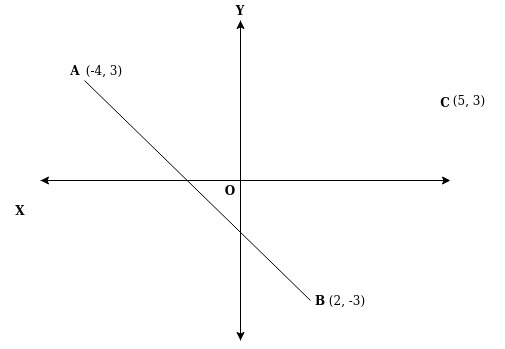
Taking a look at the figure, we can say that the point C is on the left side of the line segment AB. But, is there any formula, to find that in Vector space?
Yes, there are; we can use the Vector cross products. We always calculate the position of any point placing them on the Cartesian plane. We have X and Y co-ordinates. Having the values of two co-ordinates helps us to find the direction of C from the line segment AB.
Suppose we are moving from A to B. Now we want to take turn and reach C. Should we take the left turn, or right turn? Well, the above figure tells us to take the left turn. But, how will we calculate that using co-ordinate system?
In any two-dimensional problem, like this, using Cartesian plane is the best choice, and we have adopted that for the sake of our algorithm.
According to the above figure, co-ordinate values of A is (-4, 3), and the co-ordinate values of B and C are respectively (2, -3) and (5,3).
For the sake of simplicity, if we consider that A lies on the origin O, that is, the co-ordinate values of A changes to (0, 0), then the cross products of B and C help us to determine the exact position of C with respect to B.
If the value of the cross products is greater than 0, or positive, or counter clockwise, then C is on the left side of B. If it is negative, then it is on the right hand side. Finally, if it is 0, then C is on the same line.
The Vector cross products formula is pretty simple. It is just as follows:
1 The X co-ordinate value of B * The Y co-ordinate value of C -  The Y co-ordinate val\
2 ue of B * The X co-ordinate value of C
According to the figure (assuming A has co-ordinate values (0,0) ), the value is 15, which is positive. It proves that C is on the left side of point B. However, we have assumed that the co-ordinate values of A is (0, 0), to look it simple; which is actually not.
To do the real calculation, we need to shift A from its original position to the origin O. The co-ordinate values of A will change from (-4, 3) to (0, 0).
That will also change the co-ordinate values of B and C. The new X co-ordinate value of B will be (X co-ordinate value of B – X co-ordinate value of A), and the new Y co-ordinate value of B will be (Y co-ordinate value of B – Y co-ordinate value of A). The same rule will be applied to the co-ordinate values of C.
In our next Java program, we have calculated that find the direction of C from line segment AB.
 1 // code 5.8
 2 // Java
 3
 4 package fun.sanjibsinha.classesandobjects;
 5
 6 class PointClass{
 7     double x, y;
 8 }
 9 public class GetDirection {
10
11     public static void main(String[] args) {
12         PointClass a = new PointClass();
13         a.x = -30;
14         a.y = 25;
15         PointClass b = new PointClass();
16         b.x = 15;
17         b.y = -18;
18         PointClass c = new PointClass();
19         c.x = 13;
20         c.y = 18;
21         // if point a comes to the origin having x and y co-ordinates
22         // both change to 0 and 0
23         // the x and y co-ordinates of b will change
24         b.x = b.x - a.x;
25         b.y = b.y - a.y;
26         // the x and y co-ordinates of c will also change
27         c.x = c.x - a.x;
28         c.y = c.y - a.y;
29         // to get direction of point c with respect to the
30         // line segment ab, joining points a and b becomes easier
31         // we will use cross products of points b and c
32         double crossProductsOfBAndC = (b.x * c.y) - (b.y * c.x);
33         // the value is 1180.0, which denotes c is on the left
34         if(crossProductsOfBAndC > 0){
35             System.out.println("The point c is on the left of line ab.");
36         } else if(crossProductsOfBAndC < 0){
37             System.out.println("The point c is on the right of line ab.");
38         } else {
39             System.out.println("The point c is on the same line of ab.");
40         }
41         /*
42
43         */
44
45     }
46 }
Take a look at the output:
 1 // output of code 5.8
 2 the output is:
 3 The point c is on the left of line ab.
 4
 5 next, let us change all the co-ordinates of c to negative value
 6 the output is:
 7 The point c is on the right of line ab.
 8
 9 next, let us change the value of c equal to b
10 the output is:
11 The point c is on the same line of ab.
We have already learned how the Vector cross products work to find the direction of the point. So, we are not discussing the algorithm, anymore. We can write our code, in a different way to accomplish a different type of task, considering that we need not shift A.
In the next code snippet, the point A is the origin, having the co-ordinate values (0, 0).
 1 // code 5.9
 2 // Java
 3
 4 package fun.sanjibsinha.classesandobjects;
 5 /*
 6 formula = difference between two cross products of two points
 7 if it is counter clockwise it is +ve else -ve
 8
 9 */
10 class PointA{
11     // for the sake of simplicity we assume that
12     // point A is on the origin
13     double xCoordinate = 0;
14     double yCoordinate = 0;
15 }
16 class PointB{
17     double xCoordinate;
18     double yCoordinate;
19     PointA a;
20     double getNewXCoordinate(PointA a, double xCoordinate){
21         this.xCoordinate = xCoordinate;
22         xCoordinate = xCoordinate * a.yCoordinate - yCoordinate * a.xCoordinate;
23         return xCoordinate;
24     }
25     double getNewYCoordinate(PointA a, double yCoordinate){
26         this.yCoordinate = yCoordinate;
27         yCoordinate = xCoordinate * a.yCoordinate - yCoordinate * a.xCoordinate;
28         return this.yCoordinate;
29     }
30 }
31 class PointC{
32     PointB b;
33     double leftToB = 1.0;
34     double rightToB = -1.0;
35     double onSameLine = 0.0;
36     /*
37     double getNewXCoordinate(){}
38     double getNewYCoordinate(){}
39
40     */
41     double findPosition(PointB b, double xCoordinate, double yCoordinate){
42         this.b = b;
43         double difference;
44         difference = b.xCoordinate * yCoordinate - b.yCoordinate * xCoordinate;
45         if(difference > 0.0){
46             return leftToB;
47         } else if(difference < 0.0){
48             return rightToB;
49         } else {
50             return onSameLine;
51         }
52     }
53 }
54
55 public class FindPosition {
56     public static void main(String[] args) {
57         PointB b = new PointB();
58         b.xCoordinate = 5;
59         b.yCoordinate = -6;
60         PointC c = new PointC();
61         System.out.println("On the same line, as c has the same value as b: "
62                 + c.findPosition(b, 5, -6));
63     }
64 }
For the sake of simplicity, we have not only kept the co-ordinate values of A as (0, 0); at the same time we make the value of C same as B.
Here is the output:
1 // output of code 5.9
2 On the same line, as c has the same value as b: 0.0
We are again going to experiment with our code. However, this time we have three different co-ordinate values of A, B and C.
 1 // code 5.10
 2 // Java
 3
 4 package fun.sanjibsinha.classesandobjects;
 5 /*
 6 formula = difference between two cross products of two points
 7 if it is counter clockwise it is +ve else -ve
 8 */
 9 class PointNameA{
10     double xCoordinate;
11     double yCoordinate;
12 }
13 class PointNameB{
14     double xCoordinate;
15     double yCoordinate;
16     PointNameA a;
17     double getNewXCoordinate(PointNameA a, double xCoordinate){
18         this.xCoordinate = xCoordinate;
19         this.a = a;
20         xCoordinate = xCoordinate - a.xCoordinate;
21         return xCoordinate;
22     }
23     double getNewYCoordinate(PointNameA a, double yCoordinate){
24         this.a = a;
25         this.yCoordinate = yCoordinate;
26         yCoordinate = yCoordinate - a.yCoordinate;
27         return yCoordinate;
28     }
29 }
30 class PointNameC{
31     double xCoordinate;
32     double yCoordinate;
33     PointNameB b;
34     PointNameA a;
35     PointNameC c;
36     double leftToB = 1.0;
37     double rightToB = -1.0;
38     double onSameLine = 0.0;
39
40     double getNewXCoordinate(PointNameA a, double xCoordinate){
41         this.a = a;
42         this.xCoordinate = xCoordinate;
43         xCoordinate = xCoordinate - a.xCoordinate;
44         return xCoordinate;
45     }
46     double getNewYCoordinate(PointNameA a, double yCoordinate) {
47         this.a = a;
48         this.yCoordinate = yCoordinate;
49         yCoordinate = yCoordinate - a.yCoordinate;
50         return yCoordinate;
51     }
52     double findPosition(PointNameB b, PointNameC c){
53         this.b = b;
54         this.c = c;
55         double difference;
56         difference = b.xCoordinate * c.yCoordinate - b.yCoordinate * c.xCoordinate;
57         if(difference > 0.0){
58             return leftToB;
59         } else if(difference < 0.0){
60             return rightToB;
61         } else {
62             return onSameLine;
63         }
64     }
65 }
66 public class FindPositionMOre {
67     public static void main(String[] args) {
68         PointNameA a = new PointNameA();
69         a.xCoordinate = -3;
70         a.yCoordinate = 6;
71         PointNameB b = new PointNameB();
72         b.getNewXCoordinate(a, 5);
73         b.getNewYCoordinate(a, -8);
74         PointNameC c = new PointNameC();
75         double xOfC = c.getNewXCoordinate(a, 15);
76         double yOfC = c.getNewYCoordinate(a, 18);
77         System.out.println("The point C is on the left of line segment AB, as the va\
78 lue is positive : "
79                 + c.findPosition(b, c));
80     }
81 }
If you run the program, you will get the outcome as follows:
1 // output of code 5.10
2 The point C is on the left of line segment AB, as the value is positive : 1.0
You can change the co-ordinate values of A, B and C to see how your output changes.
In the next section, we will start with the same problem to understand how data structures in C and C++ works. After that, we will start digging deep into Data Structures and Algorithm in chapter 6.
In the next section, we will have a brief introduction to the Data Structures using the same Vector cross products and finding direction.
Introducing Data Structures
We have already been introduced to data structures before. Of course, we have learned a few operations using Array in various languages, so we can say that the concept of data structures is not completely alien to us.
We need a good way to store, organize and use our data. As times passes by, the nature of data is becoming not only more and more complex, but also it’s getting bigger in quantity. More and more people are getting hooked to the Internet, exchanging huge amount of data every day, in various forms; scientific data are getting larger, we need weather data to be processed to get more accurate weather prediction, medical data are becoming humongous; this list is endless.
Therefore, we need more efficient way to sort, organize, and use that data.
Data Structures are all about this. It has a very close relation with Algorithm, because managing such huge amount of data is less tedious if we have more efficient Algorithm, ready at our hand.
While managing such huge humongous data, by sorting, organizing, or using them, one is not only prone to error, but also fail to satisfy one of the most important requirements – time and space. Yes, time complexity really matters, so the space.
In this section we have a short introduction to the Data Structures, but we will actually start the topic in the next chapter. First of all let us have a look at a figure (Figure 5.2) first.
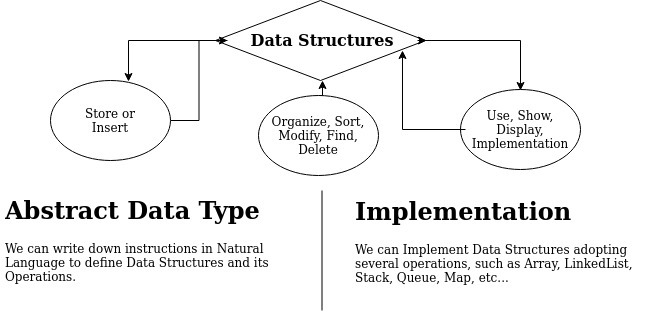
We have clearly stated what Data Structures are, in the above figure. We can describe our data structures in our natural language; that is a part of any data structures. It is always good to write it down what we are going to do with our data structures.
Consider a static List or a fixed length List; that is, an array. It is a collection of similar type of data, either integer, double, or string. Moreover, it should have a fixed length while we declare it. Within that range of length, we can insert data, modify data at a specific position, even we can remove a data and make the memory space empty.
Whenever we declare a fixed length List, the memory manager fixes an amount of memory for that list or array. When we write, “int array[4]”, it means, memory manager allocates 4 bytes each for individual address, altogether 16 bytes are allocated.
In language like C or C++, if we want to insert one more data, in whatever position we can imagine; the task becomes tedious. First of all, the memory manager has already fixed a space. So we need to create a larger array. Copy the whole array to the new memory space and at the same time empty the old space.
To make an array dynamic, we might think an array with maximum size that particular data type allows us to use. Since the array is a contiguous block of memory, a large space remains unused. Suppose we declare an array of ‘n’ length. We start with 10 data. Next, as per our need we start adding data to the array. If we add one single data at the very beginning, we need to shift all other data by one space. If the data type is integer, we need not add 4 bytes more at the end in this case particularly because we have kept that space beforehand, after that we need to shift the other data accordingly.
Whatever we do, a large space still remains unused. In terms of memory allocation, this process does not seem friendly.
Since the length of an array is fixed, it works on a constant time.
Now, new languages come up to solve the limitations of older language. Consider the Dart. In Dart, we get two types of List. One is of traditional type – fixed length. Another is growable or dynamic List.
Enough talking, let us see the first code – fixed length List.
 1 // code 5.11
 2 // Dart
 3
 4 /*
 5 The list is a simple ordered group of objects. Creating
 6 a List seems easy because Dart core libraries have the necessary support
 7 and a List class. There are two types of Lists.
 8 */
 9 void main(){
10 listFunction();
11 }
12
13 int listFunction(){
14 List<int> nameOfTest = List(3);
15 nameOfTest[0] = 1;
16 nameOfTest[1] = 2;
17 nameOfTest[2] = 3;
18 //there are three methods to capture the list
19 //1. method
20 for(int element in nameOfTest){
21     print(element);
22 }
23 print("-----------");
24 //2. method
25 nameOfTest.forEach((v) => print('${v}'));
26 print("-----------");
27 //3. method
28 for(int i = 0; i < nameOfTest.length; i++){
29     print(nameOfTest[i]);
30 }
31 }
The output is quite expected.
 1 // output of code 5.11
 2 1
 3 2
 4 3
 5 -----------
 6 1
 7 2
 8 3
 9 -----------
10 1
11 2
12 3
In Dart, everything is object. Therefore, it is a collection of similar objects. Here it is integer. Next, we will make this list dynamic, and see how it works.
 1 // code 5.12
 2 // Dart
 3
 4 void main(){
 5 growableList();
 6 }
 7
 8 Function growableList(){
 9 //1. method
10 List<String> names = List();
11 names.add("Mana");
12 names.add("Babu");
13 names.add("Gopal");
14 names.add("Pota");
15 //there are two methods to capture the list
16 print("-----------");
17 //1. method
18 names.forEach((v) => print('${v}'));
19 print("-----------");
20 //2. method
21 for(int i = 0; i < names.length; i++){
22     print(names[i]);
23 }
24 }
Growable Lists are dynamic in nature. We can dynamically add any number of elements and we can also remove it by a simple method: ‘names.remove(“any name”)’. We can also use the key; as this ordered list starts from 0. So we can remove the first name just by passing this key value: ‘names.removeAt(0)’. We use the ‘removeAt(key)’ method for that operation. We can also clear the whole List just by typing: ‘names.clear()’. Let us see the output, now.
 1 // output of code 5.12
 2 -----------
 3 Mana
 4 Babu
 5 Gopal
 6 Pota
 7 -----------
 8 Mana
 9 Babu
10 Gopal
11 Pota
We have a very short introduction to Data Structures. Hopefully, now we understand what are the limitations and advantages of an array. We will discuss them in detail in the first section of the next chapter 6. Comparing array with other Data Structures will help us gain more insights into this complex topic, which is the most fundamental block of Computer Science.
How Calculus and Linear Algebra are Related to this Discourse
Calculus is the branch of mathematics that describes changes in functions. Now, linear algebraic operations start with functions; moreover, computer programming cannot move a step forward without the implementation of functions.
Mathematically, we can define polynomial, rational, trigonometric, exponential, and logarithmic functions, and at the same time, we can review how to evaluate these functions, and we show the properties of their graphs. Is the concept of function used in computer programming same as mathematical functions?
Before finding the answer, let us formally define what is mathematical function. In Mathematics, before defining a function, we need two sets A and B, where where x is an element of A and y is an element of B, is a relation from A to B.
Now, a relation from the set A to the set B defines a relationship between those two sets.
Mathematically, a function is a special type of relation in which each element of the first set is related to exactly one element of the second set.
We call the element of the first set as the input; and, the element of the second set is called the output. Functions are used all the time in mathematics to describe relationships between two sets.
Actually, when we know the input, the output is determined in a function.
We can write a function like this:
1 y = f(x)
Now, the f(x) can be of any value, such as ‘x + 1’, or ‘x - 1’; in fact, with the addition, subtraction, multiplication or division of any constant value, as we change the value of x, the value of y will change.
The same thing happens in computer programming; a function returns a value. Not always; but it is a general rule that is followed by any programming language.
We may argue that not every function returns a value; there is something called ‘void’, but that also gives us what? An output.
We can find the area of a square if we know the value of one side. We can find the area of a circle, if we know the value of radius.
Mathematically, when we write y = f(x); it can also be said as ‘y equals f of x’. While writing a function like this we refer to x as the independent variable, and y as the dependent variable.
Quite understandably the value of y depends on the value of x.
Now, a function consists of three things, in particular. A set of inputs, a set of outputs and a rule for assigning each input to exactly one output. Mathematically, the set of inputs is called the domain of the function and the set of outputs is called the range of the function.
If the assigning rule of a function is f(x) = 3 – x; and the domain is {1, 2, 3}, then the value of y or the range will be {0, 1, 2}.
Not only we can visualize the function by plotting points (x, y) on coordinate planes, we can write something like this in any programming language.
The code is as follows:
 1 // code 5.13
 2 // Java
 3
 4 package fun.sanjibsinha.functions;
 5
 6 /**
 7 * a function will take inputs but always return one output
 8 * mathematically we can write it as y = f(x)
 9 * here y is output, and f(x) is function
10 * the output can be expressed as range and input as domain
11 * domain may have multiple values that points to one or more than one range
12 */
13
14 public class FunctionDemo {
15     static int x = 0;
16     static int y = 0;
17
18     static int domainOne(int x){
19         y = x + 0;
20         return y;
21     }
22     static int domainTwo(int x){
23         y = x + 1;
24         return y;
25     }
26     static int domainThree(int x){
27         y = x + 2;
28         return y;
29     }
30     static int domainFour(int x){
31         y = x + 3;
32         return y;
33     }
34     static double domainFive(double x){
35         double y;
36         y = Math.pow(x, 2);
37         return y;
38     }
39     static double domainSix(double x){
40         double y;
41         y = Math.sqrt(x);
42         return y;
43     }
44
45     static double[] xValue = {4, 3, 2, 1};
46
47     static double returnRange(int index){
48         double y = 0;
49         if(xValue[x] == 4){
50             y = xValue[x] + 0;
51             return y;
52         } else if (xValue[x] == 3){
53             y = xValue[x] + 1;
54             return y;
55         } else if (xValue[x] == 2){
56             y = xValue[x] + 2;
57             return y;
58         } else if (xValue[x] == 1){
59             y = xValue[x] + 3;
60             return y;
61         } else if (xValue[x] == 2){
62             y = Math.pow(xValue[x], 2);
63             return y;
64         } else {
65             return y;
66         }
67     }
68
69     public static void main(String[] args) {
70
71         System.out.println("The value of y : " + domainOne(4) + " when x = 4");
72         System.out.println("The value of y : " + domainTwo(3) + " when x = 3");
73         System.out.println("The value of y : " + domainThree(2) + " when x = 2");
74         System.out.println("The value of y : " + domainFour(1) + " when x = 1");
75         System.out.println("The value of y : " + domainFive(2) + " when x = 2");
76         System.out.println("The value of y : " + domainSix(16) + " when x = 16");
77         System.out.println("*****************");
78         for (int x = 0; x <= 3; x++){
79             System.out.println("The index : " + x + " and the value of set xValue : "
80                     + xValue[x]);
81         }
82         System.out.println();
83         System.out.println("The value of y : " + returnRange(0)
84                 + " when index of xValue = 0");
85         System.out.println("The value of y : " + returnRange(1)
86                 + " when index of xValue = 1");
87         System.out.println("The value of y : " + returnRange(2)
88                 + " when index of xValue = 2");
89         System.out.println("The value of y : " + returnRange(3)
90                 + " when index of xValue = 3");
91         System.out.println("The value of y : " + returnRange(2)
92                 + " when index of xValue = 2");
93
94     }
95 }
Let us check the output:
 1 // output of code 5.13
 2 The value of y : 4 when x = 4
 3 The value of y : 4 when x = 3
 4 The value of y : 4 when x = 2
 5 The value of y : 4 when x = 1
 6 The value of y : 4.0 when x = 2
 7 The value of y : 4.0 when x = 16
 8 *****************
 9 The index : 0 and the value of set xValue : 4.0
10 The index : 1 and the value of set xValue : 3.0
11 The index : 2 and the value of set xValue : 2.0
12 The index : 3 and the value of set xValue : 1.0
13
14 The value of y : 4.0 when index of xValue = 0
15 The value of y : 4.0 when index of xValue = 1
16 The value of y : 4.0 when index of xValue = 2
17 The value of y : 4.0 when index of xValue = 3
18 The value of y : 4.0 when index of xValue = 2
We can see in the above code that the range remains at 4; however, the domain consists more than one values that point to the one output, which is 4. And yes, the domain could have infinite values depending on the permutation and combination of the value of the coefficient.
In some cases, we also need to know how calculus works in computer programming. Consider a car that should have the history of both – velocity and distance. If one is missing,we can calculate the value of the other by using calculus. Therefore, we need to know how to find the velocity from a record of the distance. This part of calculus belongs to differentiation or differential calculus. On the contrary, we also want to compute the distance from a history of the velocity. That is called integration, and it is the goal of integral calculus. We can conclude, differentiation goes from distance to velocity; integration goes from velocity to distance.
However, there is another important factor that we should consider – time. You cannot calculate velocity without time, the rate of speed, etc. At the same time, we also want to know how much time it takes to travel a certain distance. Now, we can guess that from velocity and distance, we can also calculate time.
Let us consider the following code snippet, where we have calculated these factors.
  1 // code 5.14
  2 // Java
  3
  4 package fun.sanjibsinha.calculusone;
  5
  6 public class VelocityClass {
  7
  8     private float velocity;
  9
 10     public void setVelocity(int velocity) {
 11         this.velocity = velocity;
 12     }
 13
 14     public float getVelocity() {
 15         return velocity;
 16     }
 17
 18     public float calculateVelocity(float time, float dis){
 19         velocity = dis / time;
 20         if((time > 0) && (time < 3)){
 21             return velocity;
 22         } else if ((time > 3) && (time < 6)){
 23             return velocity;
 24         } else {
 25             return velocity;
 26         }
 27     }
 28 }
 29
 30
 31 package fun.sanjibsinha.calculusone;
 32
 33 public class DistanceClass {
 34
 35     private float distance;
 36
 37     public void setDistance(int distance) {
 38         this.distance = distance;
 39     }
 40
 41     public float getDistance() {
 42         return distance;
 43     }
 44
 45     public float calculateDistance(float time, float velocity){
 46         distance = velocity * time;
 47         if((time >= 0) && (time <= 3)){
 48             return distance;
 49         } else if ((time >= 3) && (time <= 6)){
 50             return distance;
 51         } else {
 52             return distance;
 53         }
 54     }
 55
 56
 57 }
 58
 59
 60 package fun.sanjibsinha.calculusone;
 61
 62 public class TimeClass {
 63
 64     private float time;
 65
 66     public void setTime(int time) {
 67         this.time = time;
 68     }
 69
 70     public float getTime() {
 71         return time;
 72     }
 73
 74     public float calculateTime(float distance, float velocity){
 75         time = distance / velocity;
 76         if((velocity > 0) && (velocity < 10)){
 77             return time;
 78         } else if ((velocity > 20) && (velocity < 60)){
 79             return time;
 80         } else {
 81             return time;
 82         }
 83     }
 84 }
 85
 86 package fun.sanjibsinha.calculusone;
 87
 88 public class DemoClass {
 89
 90     public static void main(String[] args) {
 91         VelocityClass vel = new VelocityClass();
 92         TimeClass time = new TimeClass();
 93         DistanceClass dis = new DistanceClass();
 94         /**
 95         * find the velocity from a record of a distance
 96         * differentiation
 97         * differential calculus
 98         */
 99         time.setTime(5);
100         dis.setDistance(80);
101         System.out.println("If a car travels " + dis.getDistance() + " kms in "
102                 + time.getTime() + " hours, its velocity is "
103                 + vel.calculateVelocity(time.getTime(), dis.getDistance()) + " km pe\
104 r hour.");
105
106         System.out.println();
107         /**
108         *compute distance from a history of velocity
109         * integration
110         * integral calculus
111         */
112         time.setTime(10);
113         vel.setVelocity(40);
114         System.out.println("A car with a velocity " + vel.getVelocity() +
115                 " kms per hour, in " + time.getTime() + " hours travels "
116                 + dis.calculateDistance(time.getTime(), vel.getVelocity()) + " kms."\
117 );
118         /**
119         * we can also time from a history of velocity
120         */
121         dis.setDistance(100);
122         vel.setVelocity(60);
123         System.out.println("A car with a velocity of " + vel.getVelocity() + " kms p\
124 er per hrs, travels" +
125                 " distance of " + dis.getDistance() + " kms, hence it will reach the\
126  " +
127                 " destination after "
128                 + time.calculateTime(dis.getDistance(), vel.getVelocity()) + " hours\
129 .");
130
131     }
132 }
Here is the output:
1 // output of code 5.14
2 If a car travels 80.0 kms in 5.0 hours, its velocity is 16.0 km per hour.
3
4 A car with a velocity 40.0 kms per hour, in 10.0 hours travels 400.0 kms.
5 A car with a velocity of 60.0 kms per per hrs, travels distance of 100.0 kms, hence \
6 it will reach the  destination after 1.6666666 hours
Now we are ready to discuss data structures in detail in the next chapter.
I write regularly on Algorithm and Data Structure in
QUIZZ and Challenge on Chapter Five
Question 1: The ‘Collection’ interface has a super-interface – Iterable.
Option 1: True
Option 2: False
Answer: Option 1
========================
Question 2: The object is always more powerful than any single primitive data type.
Option 1: False
Option 2: True
Answer: Option 2
========================
Question 3: In Geometry, which concept plays the most vital roles – point,line or plane?
Option 1: Point
Option 2: Line
Option 3: Plane
Option 4: All three described above.
Answer: Option 4
=======================
Question 4: Whenever we declare a fixed length List, the memory manager fixes an amount of memory for that list or array.
Option 1: It is true for a specific programming language.
Option 2: It is true for all programming languages.
Option 3: A few programming languages follow this rule.
Option 4: None of above statement is true.
Answer: Option 2
=======================
Question 5: Growable Lists are dynamic in nature. We can dynamically add any number of elements.
Option 1: True
Option 2: False
Answer: Option 1
=======================
Challenge 1 : How can we reduce the time complexity to big O(square root of n)from big O(n)? Write down different programs to test it.
Solution to Challenge 1:
Language used: Dart
 1 //code
 2
 3 import 'dart:math';
 4 void main(){
 5
 6 // we will find factors of 36
 7 // we can add two factors 1 and 36 itself
 8 // time complexity is O(n)
 9 List<int> numbers = List();
10 for(int i = 1; i <= 36; i++){
11     if(36 % i == 0){
12     numbers.add(i);
13     }
14 }
15 print("${List.from(numbers)}");
16
17 List<int> moreNumbers = List();
18 moreNumbers.add(1);
19 for(int i = 1; i <= 18; i++){
20     if(36 % i == 0){
21     moreNumbers.add(i);
22     }
23 }
24 moreNumbers.add(36);
25 print("${List.from(numbers)}");
26
27
28 // in both cases, below, time complexity is O(square root of n)
29 // which is far better than before
30 List<double> nums = List();
31 for(double j = 1; j <= sqrt(36); j ++ ){
32     if(36 % j == 0){
33     nums.add(j);
34     if(j != sqrt(36)){
35         nums.add(36/j);
36     }
37     }
38 }
39 nums..sort();
40 print("${List.from(nums)}");
41
42
43 List<int> moreNums = List();
44 for(int j = 1; j <= sqrt(36); j ++ ){
45     if(36 % j == 0){
46     moreNums.add(j);
47     if(j != sqrt(36)){
48         moreNums.add((36/j).round());
49     }
50     }
51 }
52 moreNums.sort();
53 print("${List.from(moreNums)}");
54
55 List<int> numsMore = List();
56 for(int j = 1; j <= sqrt(35); j++ ){
57     if(35 % j == 0){
58     numsMore.add(j);
59     if(j != sqrt(35)){
60         print("true");
61         numsMore.add((35/j).round());
62     }
63     }
64 }
65 numsMore.sort();
66 print("${List.from(numsMore)}");
67
68
69 }
’’’’’’’’’’’’’’’’’’’’’’’’’’’’’’’’’
 1 // output
 2
 3
 4 [1, 2, 3, 4, 6, 9, 12, 18, 36]
 5 [1, 2, 3, 4, 6, 9, 12, 18, 36]
 6 [1.0, 2.0, 3.0, 4.0, 6.0, 9.0, 12.0, 18.0, 36.0]
 7 [1, 2, 3, 4, 6, 9, 12, 18, 36]
 8 true
 9 true
10 [1, 5, 7, 35]
’’’’’’’’'’EXPLANATION’’’’’’’’’’’’’’’’’’’’’’’’’’’’’’’’’’’’’’’’’’’
In the first part of code, we will loop through the number itself. ‘’’’’’’’’’’’’’’’’’’’’’’’’’’’’’’’’’’’’’’’’’’’’’’’’’’’’’’’’’’’’’’’’’
1 List<int> numbers = List();
2 for(int i = 1; i <= 36; i++){
3     if(36 % i == 0){
4     numbers.add(i);
5     }
6 }
7 print("${List.from(numbers)}");
However, in the next code, we loop to the half of the number. So the time complexity is big O(n). ‘’’’’’’’’’’’’’’’’’’’’’’’’’’’’’’’’’’’’’’’’’’’’’’’’’’’’’’’’’’’’’’’’’’’’’’’’’’’’’’’’’’’’’’’’’’’’’’’’
1 List<int> moreNumbers = List();
2 moreNumbers.add(1);
3 for(int i = 1; i <= 18; i++){
4     if(36 % i == 0){
5     moreNumbers.add(i);
6     }
7 }
8 moreNumbers.add(36);
9 print("${List.from(numbers)}");
However, in the next code snippet, we have succeeded to reduce the time complexity to big O(square root of n). ‘’’’’’’’’’’’’’’’’’’’’’’’’’’’’’’’’’’’’’’’’’’’’’’’’’’’’’’’’’’’’’’’’’’’’’’’’’’’’’’’’’’’’’’’’’’’’’’’’’’’’’’’’’’’’’
 1 List<double> nums = List();
 2 for(double j = 1; j <= sqrt(36); j ++ ){
 3     if(36 % j == 0){
 4     nums.add(j);
 5     if(j != sqrt(36)){
 6         nums.add(36/j);
 7     }
 8     }
 9 }
10 nums..sort();
11 print("${List.from(nums)}");
Therefore, for a very big integer, the above program will take less system resource. ‘’’’’’’’’’’’’’’’’’’’’’’’’’’’’’’’’’’’’’’’’’’’’’’’’’’’’’’’’’’’’’’’’’’’’’’’’’’’’’’’’’’’
Challenge 2 : Write a program where from velocity and distance, we can also calculate time. Write down how different fields of Calculus works together.
Solution to Challenge 2:
Language used: Java
  1 // code
  2
  3 package fun.sanjibsinha.calculusone;
  4
  5 public class VelocityClass {
  6
  7     private float velocity;
  8
  9     public void setVelocity(int velocity) {
 10         this.velocity = velocity;
 11     }
 12
 13     public float getVelocity() {
 14         return velocity;
 15     }
 16
 17     public float calculateVelocity(float time, float dis){
 18         velocity = dis / time;
 19         if((time > 0) && (time < 3)){
 20             return velocity;
 21         } else if ((time > 3) && (time < 6)){
 22             return velocity;
 23         } else {
 24             return velocity;
 25         }
 26     }
 27 }
 28
 29
 30
 31
 32 public class DistanceClass {
 33
 34     private float distance;
 35
 36     public void setDistance(int distance) {
 37         this.distance = distance;
 38     }
 39
 40     public float getDistance() {
 41         return distance;
 42     }
 43
 44     public float calculateDistance(float time, float velocity){
 45         distance = velocity * time;
 46         if((time >= 0) && (time <= 3)){
 47             return distance;
 48         } else if ((time >= 3) && (time <= 6)){
 49             return distance;
 50         } else {
 51             return distance;
 52         }
 53     }
 54
 55
 56 }
 57
 58
 59
 60
 61 public class TimeClass {
 62
 63     private float time;
 64
 65     public void setTime(int time) {
 66         this.time = time;
 67     }
 68
 69     public float getTime() {
 70         return time;
 71     }
 72
 73     public float calculateTime(float distance, float velocity){
 74         time = distance / velocity;
 75         if((velocity > 0) && (velocity < 10)){
 76             return time;
 77         } else if ((velocity > 20) && (velocity < 60)){
 78             return time;
 79         } else {
 80             return time;
 81         }
 82     }
 83 }
 84
 85
 86
 87 public class DemoClass {
 88
 89     public static void main(String[] args) {
 90         VelocityClass vel = new VelocityClass();
 91         TimeClass time = new TimeClass();
 92         DistanceClass dis = new DistanceClass();
 93         /**
 94         * find the velocity from a record of a distance
 95         * differentiation
 96         * differential calculus
 97         */
 98         time.setTime(5);
 99         dis.setDistance(80);
100         System.out.println("If a car travels " + dis.getDistance() + " kms in "
101                 + time.getTime() + " hours, its velocity is "
102                 + vel.calculateVelocity(time.getTime(), dis.getDistance()) + " km pe\
103 r hour.");
104
105         System.out.println();
106         /**
107         *compute distance from a history of velocity
108         * integration
109         * integral calculus
110         */
111         time.setTime(10);
112         vel.setVelocity(40);
113         System.out.println("A car with a velocity " + vel.getVelocity() +
114                 " kms per hour, in " + time.getTime() + " hours travels "
115                 + dis.calculateDistance(time.getTime(), vel.getVelocity()) + " kms."\
116 );
117         /**
118         * we can also time from a history of velocity
119         */
120         dis.setDistance(100);
121         vel.setVelocity(60);
122         System.out.println("A car with a velocity of " + vel.getVelocity() + " kms p\
123 er per hrs, travels" +
124                 " distance of " + dis.getDistance() + " kms, hence it will reach the\
125  " +
126                 " destination after "
127                 + time.calculateTime(dis.getDistance(), vel.getVelocity()) + " hours\
128 .");
129
130     }
131 }
’’’’’’’’’’’’’’'’output’’’’’’’’’’’’’’’’
1 // output
2
3 If a car travels 80.0 kms in 5.0 hours, its velocity is 16.0 km per hour.
4
5 A car with a velocity 40.0 kms per hour, in 10.0 hours travels 400.0 kms.
6 A car with a velocity of 60.0 kms per per hrs, travels distance of 100.0 kms, hence \
7 it will reach the  destination after 1.6666666 hours
’’’’’’’’’’’’’’’’’’’'’Explanation’’’’’’’’’’’’’’’’’’’’’’
We have learned how to find the velocity from a record of the distance. This part of calculus belongs to differentiation or differential calculus. On the contrary, we also want to compute the distance from a history of the velocity. That is called integration, and it is the goal of integral calculus. We can conclude, differentiation goes from distance to velocity; integration goes from velocity to distance.
Challenge 3 : Handling Data Structures in high-level language beomes easier as mew language comes up. Can you prove this theory with an example?
Solution to Challenge 3:
Language used: Dart
 1 // code
 2
 3 void main(){
 4 growableList();
 5 }
 6
 7 Function growableList(){
 8 //1. method
 9 List<String> names = List();
10 names.add("Mana");
11 names.add("Babu");
12 names.add("Gopal");
13 names.add("Pota");
14 //there are two methods to capture the list
15 print("-----------");
16 //1. method
17 names.forEach((v) => print('${v}'));
18 print("-----------");
19 //2. method
20 for(int i = 0; i < names.length; i++){
21     print(names[i]);
22 }
23 }
The output is quite expected.
 1 // output
 2
 3 -----------
 4 Mana
 5 Babu
 6 Gopal
 7 Pota
 8 -----------
 9 Mana
10 Babu
11 Gopal
12 Pota
’’’’’’’’’’’’’’’’’’’’’'’Explanation’’’’’’’’’’’’’’’’’’’’’’’’’’’’’’
Whenever we declare a fixed length List, the memory manager fixes an amount of memory for that list or array. When we write, “int array[4]”, it means, memory manager allocates 4 bytes each for individual address, altogether 16 bytes are allocated.
In language like C or C++, if we want to insert one more data, in whatever position we can imagine; the task becomes tedious. First of all, the memory manager has already fixed a space. So we need to create a larger array. Copy the whole array to the new memory space and at the same time empty the old space.
However, in Dart, Growable Lists are dynamic in nature. We can dynamically add any number of elements and we can also remove it by a simple method: ‘names.remove(“any name”)’. We can also use the key; as this ordered list starts from 0. So we can remove the first name just by passing this key value: ‘names.removeAt(0)’. We use the ‘removeAt(key)’ method for that operation. We can also clear the whole List just by typing: ‘names.clear()’.