8. Non-Static Data Member Initialization
You’ve learned a lot of techniques related to constructors! You can initialize data members in various constructors, delegate them to reuse code, and inherit them from base classes. Yet, we can still improve on assigning default values for data members. I mentioned this feature in the first chapter, where we gave default values for aggregates. We can do the same for classes. And in this chapter, we’ll look at the full syntax and options related to this feature.
Please have a look at the example below:
class DataPacket {
    std::string data_;
    size_t checkSum_ { 0 };
    size_t serverId_ { 0 };

public:
    DataPacket() = default;

    DataPacket(const std::string& data, size_t serverId)
    : data_{data}
    , checkSum_{calcCheckSum(data)}
    , serverId_{serverId}
    { }

    // getters and setters...
};
As you can see, the variables are assigned their default values individually in their place of declaration. There’s no need to set values inside a constructor. It’s much better than using a default constructor because it combines declaration and initialization code. This way, it’s harder to leave data members uninitialized!
Let’s explore this handy feature of Modern C++ in detail.
How it works
This section shows how the compiler “expands” the code to initialize data members.
For a simple declaration:
struct SimpleType {
    int field { 0 };
};
The code has to behave similarly as you’d define a constructor 5:
struct SimpleType {
    SimpleType() : field(0) { }

    int field;
};
Experiment with the basic code below:
#include <iostream>struct SimpleType {
int field { 0 };
};
int main() {
SimpleType st;
std::cout << "st.field is " << st.field << '\n';
}
As a small exercise, you can experiment with the above sample and assign different values to the field data member.
Investigation
With some “machinery,” we can see when the compiler performs the initialization.
Let’s consider the following type:
struct SimpleType {
    int a { initA() };
    std::string b { initB() };

    // ...
};
The implementation of initA() and initB() functions have side effects, and they log extra messages:
int initA() {
    std::cout << "initA() called\n";
    return 1;
}

std::string initB() {
    std::cout << "initB() called\n";
    return "Hello";
}
This allows us to see when the code is called.
Experiments
Now, we can experiment and write some additional constructors:
struct SimpleType {
    int a { initA() };
    std::string b { initB() };

    SimpleType() { }
    SimpleType(int x) : a(x) { }
};
Next, we can run our test and see the results.
#include <iostream>#include <string>int initA() {
std::cout << "initA() called\n";
return 1;
}
std::string initB() {
std::cout << "initB() called\n";
return "Hello";
}
struct SimpleType {
    int a { initA() };
    std::string b { initB() };

    SimpleType() { }
    SimpleType(int x) : a(x) { }
};
int main() {
std::cout << "SimpleType t0\n";
SimpleType t0;
std::cout << "SimpleType t1(10)\n";
SimpleType t1(10);
}
After running the code, we can see the following output:
You can observe the following:
t0 is default-initialized; therefore, both fields are initialized with their default values. In other words, the compiler calls {initA()} and {initB{}}. Please notice that they are initialized in the order they appear in the class/struct declaration.
In the second case, for t1, only one value is default initialized, and the other comes from the constructor parameter.
As you might already guess, the compiler initializes the fields as if the fields were initialized in a “member initialization list”. Therefore, they get the default values before the constructor’s body is invoked.
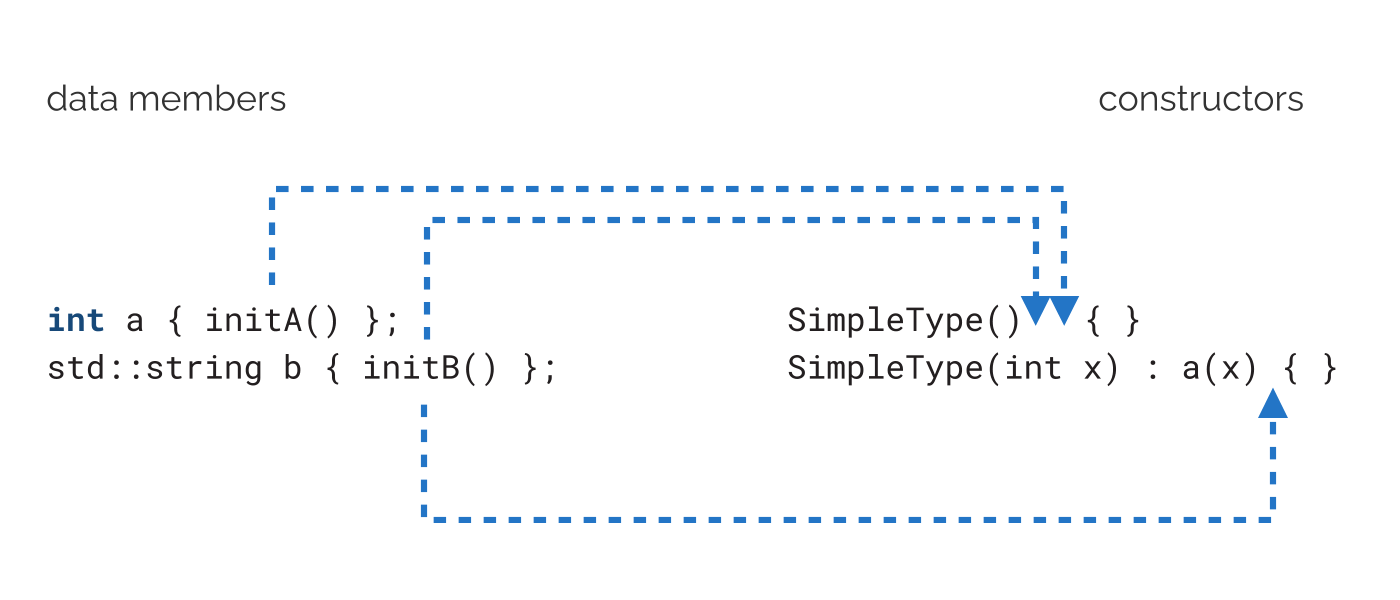
In other words, the compiler “conceptually” expands the code:
struct SimpleType {
int a { initA() };
std::string b { initB() };
SimpleType() { }
SimpleType(int x) : a(x) { }
};
Into:
struct SimpleType {
    int a;
    std::string b;

    SimpleType() : a(initA()), b(initB()) { }
    SimpleType(int x) : a(x), b(initB())  { }
};
We can also visualize it using the following diagram:
Other forms of NSDMI
Content available in the full version of the book.
Copy constructor and NSDMI
Content available in the full version of the book.
Move constructor and NSDMI
Content available in the full version of the book.
C++14 changes
Originally, in C++11, if you used default member initialization, your class couldn’t be an aggregate type:
struct Point { float x = 1.0f; float y = 2.0f; };

// won't compile in C++11
Point myPt { 10.0f, 11.0f };
The above code won’t work when compiling with the C++11 flag because you cannot aggregate-initialize our Point structure. It’s not an aggregate.
Fortunately, C++14 provides a solution to this problem, and that’s this line:
Point myPt { 10.0f, 11.0f};
The code works as expected now. You can see and play with the full code below:
#include <iostream>struct Point { float x = 1.0f; float y = 2.0f; };
int main()
{
Point myPt { 10.0f };
std::cout << myPt.x << ", " << myPt.y << '\n';
}
C++20 changes
Content available in the full version of the book.
Limitations of NSDMI
Content available in the full version of the book.
NSDMI: Advantages and Disadvantages
Let’s summarize non-static data member initialization.
Advantages of NSDMI
Content available in the full version of the book.
Any negative sides of NSDMI?
Content available in the full version of the book.
NSDMI summary
Before C++11, the best way to initialize data members was through a member initialization list inside a constructor. Thanks to C++11, we can now initialize data members in the place where we declare them, and the initialization happens just before the constructor body kicks in.
In the chapter, we covered the syntax, how it works with various types of constructors and the limitations. You also saw changes made in C++14 (aggregate classes) and missing bitfield initialization fixed in C++20.
The C++ Core Guidelines advise using NSDMI in at least two sections.
And in C++ Core Guidelines - C.45
NSDMI: Exercises
Check your skills with two coding exercises.
The first exercise
Content available in the full version of the book.
The second exercise
Content available in the full version of the book.