2. Classes and Initialization With Constructors
In the previous chapter, you’ve seen that C++ might treat simple structures with all public data members as an aggregate class. Still, aggregates might not be enough if we want better data encapsulation and a more complex class API. For full flexibility in C++, we can leverage constructors that are special member functions invoked when an object is created.
A simple class type
As a background example, let’s create a type that will hold some elementary network data. To complicate things, we’d like to compute a basic checksum for the data part. Such a checksum might be handy for checking if the data was transferred correctly across the Internet (read more @Wikipedia).
DataPacket class. Run @Compiler Explorer#include <iostream>#include <numeric>size_t calcCheckSum(const std::string& s) {
return std::accumulate(s.begin(), s.end(), static_cast<size_t>(0));
}
class DataPacket {
private:
std::string data_;
size_t checkSum_;
size_t serverId_;
public:
const std::string& getData() const { return data_; }
void setData(const std::string& data) {
data_ = data;
checkSum_ = calcCheckSum(data);
}
size_t getCheckSum() const { return checkSum_; }
size_t getServerId() const { return serverId_; }
void setServerId(size_t serverId) { serverId_ = serverId; }
};
The class above contains three non-static data members: data_, checkSum_ and serverID_. I’m using the underscore suffix to indicate private data members, a common practice in many codebases. See Google C++ Style Guide.
To keep things simple, I implemented the calcCheckSum function in terms of std::accumulate(), which is an algorithm from the C++ Standard Library. This code starts from 0 (we can use 0UZ since C++23 instead of explicit static_cast) and adds numerical values of letters from the input std::string. For example, for "HELLO", we’ll get the following computations:
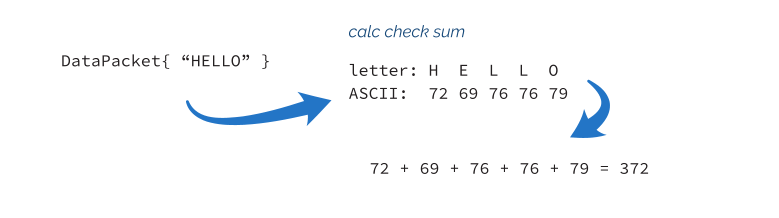
DataPacket has so-called getters and setters - functions that return or change a particular data member. For example getData() returns the data_ data member, while setData(...) allows to change it.
One important topic is that getters usually have const applied at the end. This means that a given member function is constant and cannot change the value of the members (unless they are mutable). If you have a const object, you can only call its const member functions. Applying const might improve program design as it’s usually easier to reason about the state of const instances. For more information, see this C++ core guideline: Con.2: By default, make member functions const.
Here’s the continuation of the example where we create and use the object of the DataPacket class:
DataPacket class, continuation. Run @Compiler Explorerint main() {
DataPacket packet;
packet.setData("Programming World");
std::cout << packet.getCheckSum() << '\n';
}
The code doesn’t access data members directly but calls member functions to operate on the object and change its properties.
You can notice public and private parts in the class declaration. The order of those sections is just a coding convention and they group elements together based on their access modifier. In short, a member under the public keyword can be accessed from the outside (like calling a member function or accessing a data member). On the other hand, members under the private section cannot be accessed from 3. In C++, you can also add protected to your class declaration, which means that member functions or fields are not accessible outside. Still, they are accessible to all inherited classes (assuming public inheritance, members become private outside, but public to derived types, see more about different inheritance options @C++Reference).
For example, in the main() function above, I cannot write:
DataPacket packet;
packet.serverId = 10; // error: 'size_t DataPacket::serverId'
                    // is private within this context
Since our class doesn’t have any user-defined constructors (more on them in the next section), we can also use value initialization syntax to set values to zero or default values:
DataPacket class. Run @Compiler Explorerint main() {
DataPacket packet{};
std::cout << "data: " << packet.getData() << '\n';
std::cout << "checkSum: " << packet.getCheckSum() << '\n';
std::cout << "serverId: " << packet.getServerId() << '\n';
}
This will generate the following output:
However, the main difference now is that because we moved the data members to the private section, the class is not an aggregate. That’s why we cannot use aggregate initialization to set all values at once. To fix this, we need to look at constructors. And that is the plan for further sections.
Basics of constructors
A constructor is a special member function without a name, but we declare it using the enclosing class name. You cannot invoke a constructor like other member functions. Instead, the compiler calls it when an object of its class is being initialized. It has the following basic syntax:
A constructor has the following parts:
- constructor has no name, but we define it using the name of the class,
- optional
explicit- keyword to block implicit conversions on a given class type, -
ClassName- the name of the given class type (they have to match), -
parameter-list- a list of parameters, as in a regular function, might be empty - optional
= default/=deletespecifies if a constructor should bedeleted(not present) or defaulted by the compiler, -
:- indicates the start of the member/base initialization list, required whenbase-class-initializerormember-initlists are present, - optional
base-class-initializer- a list of base classes’ constructors that we explicitly want to call, - optional
member-init- a list of data members where we can directly initialize them, -
{/*body*/}- a function body.
Let’s have a look at one snippet:
class Product {
public:
    Product() : id_{-1}, name_{"none"} { } // a default constructor
    explicit Product(int id, const std::string& name)
        : id_{id}, name_{name} { }

private:
    int id_;
    std::string name_;
};
The above example shows a class Product with two constructors. The first one is called a default constructor; it has no arguments. The second one takes two arguments. As you can notice, C++ allows multiple constructors that look like overloaded functions (they differ by the number or types of arguments). Each constructor also has a regular function body where you can execute some code; in our case, they are both empty for now. I also applied the explicit keyword on the second constructor; we’ll talk about it later.
The primary function of constructors is to perform some actions at the start of a lifetime of an object. Usually, it means data member initialization, resource allocation (opening a file, a socket, memory allocation), or even doing some special logic (like logging).
In our case, constructors touch only data members inside a special section of constructors called member initializer list: like, id_{-1}, name_{"none"}. Inside this initializer list, we can also call constructors of base classes (if any). Later, we’ll address inheritance in the Inheritance section.
The member initializer list is more efficient than using the body of a constructor. Sometimes it’s even the only option to initialize the value, as with types that are not assignable. See the following alternative:
class Product {
public:
    Product() { id_ = 0; name_ = "none"; }

private:
    int id_;
    std::string name_;
};
The code will yield the same values for data members as in the previous example, but the data members are set in two steps rather than one. With the member initializer list data members are set directly, same as calling: int id_ { 0 } or std::string name_ {"none"}. On the other hand, if we use assignment in the constructor body, it requires two steps:
// step 1: default init:
int id_; // indeterminate value!
std::string name_; // default ctor called
// step 2: assignment:
id_ = 0;
name_ = "none";
While this might not be a big issue for built-in simple types like int , you’ll need some more CPU cycles for larger objects like strings.
There’s also one important aspect about the initializer list: the order of initialization. This is covered in The C++ Specification: 11.10.3 Classes:
When I write:
class Product {
public:
    Product() : name_{"none"}, id_{-1} { }

private:
    int id_;
    std::string name_;
};
The values will be set correctly, but the order will differ from what we think. A compiler might show us a warning in this case. Here’s the warning from GCC compiled with -Wall option (experiment @Compiler Explorer):
The initialization order might be critical when you imply some dependency on the values. For example, we can write the following artificial sample:
struct S {
    int x;
    int y;
    int z;

    S(): x{0}, y{1}, z{x+y} { }
    // S(): y{0}, z{0}, x{z+y}, { }
};
In the above example, the first constructor initializes x and y and then uses those values to initialize z. This is complicated and might be hard to read, but it works correctly. On the other hand, in the second (commented out) constructor, the order of initialization will create an undefined behavior for initializing x, as z and y won’t be initialized yet. It’s best to avoid such dependencies to minimize the risk of bugs.
Let’s see how a constructor works by creating some objects of the Product class:
Product none;
In the first example, we created the none object, which is default constructed. The compiler will call our default constructor; thus, the data members will be initialized to id_ = -1 and name_ = "none".
Product car(10, "car");
The example uses the form of direct initialization which calls the constructor with two arguments. After the call data members will be: id_ = 10 and name_ = "car".
And the last example:
Product tvSet{100, "tv set" };
This time we also called a constructor with two arguments, but the syntax is called * direct list initialization* - "{}". Please notice that I also used this form of initialization inside the initializer list in constructors.
Here’s the complete example:
#include <iostream>#include <string>class Product {
public:
Product() : id_{-1}, name_{"none"} { } // a default constructor
explicit Product(int id, const std::string& name)
: id_{id}, name_{name} { }
int Id() const { return id_; }
std::string Name() const { return name_; }
private:
int id_;
std::string name_;
};
int main() {
Product none;
std::cout << none.Id() << ", " << none.Name() << '\n';
Product car(10, "super car");
std::cout << car.Id() << ", " << car.Name() << '\n';
Product tvSet{77, "tv set" };
std::cout << tvSet.Id() << ", " << tvSet.Name() << '\n';
}
You might also scratch your head and ask why I declared the name parameter as const std::string& rather than just std::string&. First, we don’t want to modify this parameter in the constructor’s body. What’s more, const T& - const references can bind to “temporary” objects like a string literal "super car". Without a const reference, we would have to pass some named string object. Alternatively, we can pass the name by value and perform a “move operation” on that argument. Further in the book, I’ll address this topic in detail, see chapter: A Use Case - Best Way to
Initialize string Data Members.
More on uniform initialization
Content available in the full version of the book.
Body of a constructor
After the member initializer list, each constructor has a regular function body, { ... }, where you can perform additional steps to modify variables or call other functions. The only difference between a regular function and a constructor is that a constructor cannot return any values. Typically, a constructor throws an exception to report an error.
Here’s a small example that shows how to add some logging into a constructor body and throw an exception on error:
#include <iostream>#include <stdexcept> // for std::invalid_argumentconstexpr int LOWEST_ID_VALUE = -100;
class Product {
public:
explicit Product(int id, const std::string& name)
: id_{id}, name_{name}
{
std::cout << "Product(): " << id_ << ", " << name_ << '\n';
if (id_ < LOWEST_ID_VALUE)
throw std::invalid_argument{"id lower than LOWEST_ID_VALUE!"\
};
}
std::string Name() const { return name_; }
private:
int id_;
std::string name_;
};
int main() {
try {
Product car(10, "car");
std::cout << car.Name() << " created\n";
Product box(-101, "box");
std::cout << box.Name() << " created\n";
}
catch (const std::exception& ex) {
std::cout << "Error - " << ex.what() << '\n';
}
}
The above example shows a constructor that performs logging and basic parameter checking. It uses a LOWEST_ID_VALUE, a global constant marked with the constexpr keyword (the second time we used this keyword).
If you run this program, you can see the following output:
Please notice that while two constructors were called, we can see that only the first one succeeded. Since the constructor for box threw an exception, this object is not treated as fully created. More on that later, when we’ll talk about destructors.
Adding constructors to DataPacket
After the introduction, we can start adding constructors to our DataPacket class.
class DataPacket {
    std::string data_;
    size_t checkSum_;
    size_t serverId_;

public:
    DataPacket()
    : data_{}
    , checkSum_{0}
    , serverId_{0}
    { }

    explicit DataPacket(const std::string& data, size_t serverId)
    : data_{data}
    , checkSum_{calcCheckSum(data)}
    , serverId_{serverId}
    { }

    const std::string& getData() const { return data_; }
    void setData(const std::string& data) {
        data_ = data;
        checkSum_ = calcCheckSum(data);
    }
    size_t getCheckSum() const { return checkSum_; }

    void setServerId(size_t id) { serverId_ = id; }
    size_t getServerId() const { return serverId_; }
};
And here’s the demo code that creates some objects:
void printInfo(const DataPacket& packet) {
    std::cout << "data: " << packet.getData() << '\n';
    std::cout << "checkSum: " << packet.getCheckSum() << '\n';
    std::cout << "serverId: " << packet.getServerId() << '\n';
}

int main() {
    DataPacket empty;
    printInfo(empty);
    DataPacket zeroed{};
    printInfo(zeroed);
    DataPacket packet{"Hello World", 101};
    printInfo(packet);
    DataPacket reply{"Hi, how are you?", 404};
    printInfo(reply);
}
The output:
In the above example, we used two constructors:
- The first one is a default constructor and initializes data members to default values. It will be called for default and value initialization.
- The second constructor takes several arguments and matches them with data members. This constructor makes it easy to pass parameters all at once (previously, we needed to call setters). This one takes two parameters, but we can initialize as many data members as we need. For example, the constructors ensure the
checkSum_variable matchesdata_. Since those two members are related, thanks to constructors and thesetDatamember function, we keep the relation safe.
We can also use default member initializers inside a class, but we’ll address that in detail in a separate chapter.
Compiler-generated default constructors
While C++ allows you to implement various constructors, it can make your life easier by automatically declaring and defining an implicit default constructor.
In other words, if you write a class type with no default constructor:
class Example {
public:
    std::string Name() const { return name_; }

private:
    std::string name_;
};
Then the compiler will create an implicit empty constructor:
inline Example() noexcept { }
A simple rule is that if a class has no user-declared constructors, the compiler will create a default one if possible.
Have a look:
struct Value {
    int x;
};

struct CtorValue {
    CtorValue(int v): x{v} { }
    int x;
};

int main() {
    Value v;         // fine, default constructor available
    // CtorValue y;     // error! no default ctor available
    CtorValue z{10}; // using custom ctor
}
As you can see above, the compiler will create an implicit default constructor for the Value class (since it has no other constructors), but it won’t generate a default constructor for the CtorValue class. Also, notice that Value::x will have an indeterminate value as a default constructor is empty and won’t set any value for x.
You can control the creation of such a default constructor using two keywords, default and delete. In short, default tells the compiler to use the default implementation, while delete blocks the implementation.
struct Value {
    Value() = default;

    int x;
};

struct CtorValue {
    CtorValue() = default;
    CtorValue(int v): x{v} { }
    int x;
};

struct DeletedValue {
    DeletedValue() = delete;
    DeletedValue(int v): x{v} { }
    int x;
};

int main() {
    Value v;         // fine, default constructor available
    CtorValue y;     // ok now, default ctor available
    CtorValue z{10}; // using custom ctor
    // DeletedValue w;   // err, deleted ctor!
    DeletedValue u{10}; // using custom ctor
}
In the above example, you can see that we declare Value() = default; this tells the compiler to create an empty (doing nothing) implementation. Also, in the CtorValue class, we also use the same technique, and, as you can notice, the default construction works now. The third class has = delete as its default constructor, and you’ll get an error if you want to create an object of this class using its default constructor.
The implicit default constructor won’t be created if your type has data members that are not default-constructible or inherits from a type that is not default-constructible. That includes references, const data members, unions, and others. See the complete list here @C++Reference.
Explicit constructors
Content available in the full version of the book.
Difference between direct and copy initialization
Content available in the full version of the book.
Even more
Content available in the full version of the book.
Constructor summary
This chapter was probably the longest, as we had to prepare the background for the rest of the book. Once you know the basics of how data members can be initialized through constructors, we can move further and explore various new C++ features and examples.
Now, it’s essential to summarize two other types of constructors: copy and move. Read on to the next chapter.