Cloud Firestore
Firestore was introduced into the Firebase platform on October 3rd, 2017. It is a superior alternative (in most situations) to the Realtime Database that is covered in Chapter 3.
What is Firestore?
Firestore is a NoSQL document-oriented database, similar to MongoDB, CouchDB, and AWS DynamoDB.
It works by storing JSON-like data into documents, then organizes them into collections that can be queried. All data is contained on the document, while a collection just serves as a container. Documents can contain their own nested subcollections of documents, leading to a hierarchical structure. The end result is a database that can model complex relationships and make multi-property compound queries.
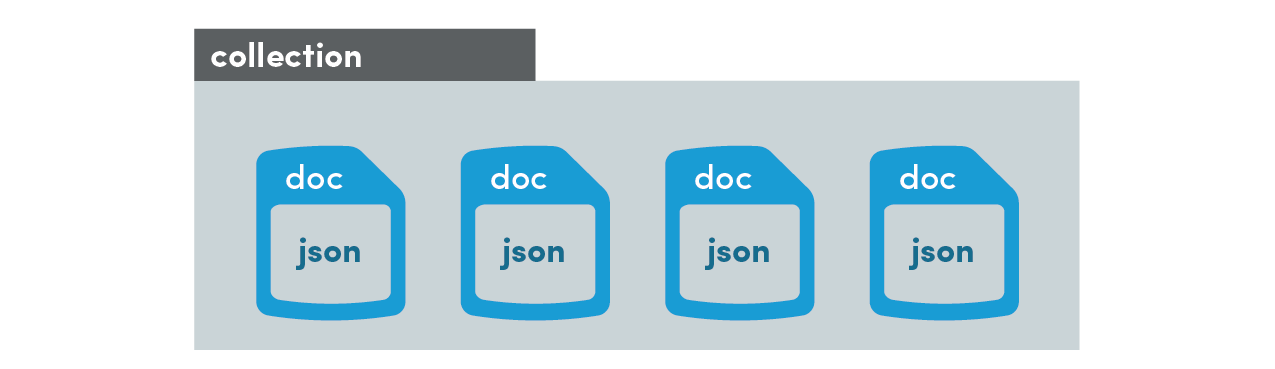
Unlike a table in a SQL database, a Firestore document does not adhere to a data schema. In other words, document-ABC can look completely different from document-XYZ in the same collection. However, it is a good practice to keep data structures as consistent as possible across collections. Firestore automatically indexes documents by their properties, so your ability to query a collection is optimized by a consistent document structure.
The goal of this chapter is to introduce data modeling best practices and teach you how perform common tasks with Firestore in Angular.
2.0 Cloud Firestore versus Realtime Database
Problem
You’re not sure if you should use Firestore or the Realtime Database.
Solution
I follow a simple rule - use Firestore, unless you have a good reason not to.
However, if you can answer TRUE to ALL statements below, the Realtime Database might worth exploring.
- You make frequent queries to a small dataset.
- You do not require complex querying, filtering, sorting.
- You do not need to model data relationships.
If you responded FALSE to any of these statements, use Firestore.
Realtime Database billing is weighted heavily on data storage, while Cloud Firestore is weighted on bandwidth. Cost savings could make Realtime Database a compelling option when you have high-bandwidth demands on a lightweight dataset.
Why are there two databases in Firebase?
Firebase won’t tell you this outright, but the Realtime Database has its share of frustrating caveats. Exhibit A: querying/filtering data is very limited. Exhibit B: nesting data is impossible on large datasets, requiring you to denormalize at the global level. Lucky for you, Firestore addresses these issues head on, which means you’re in great shape if you’re just starting a new app. Realtime Database is still around because it would be risky/impossible to migrate the gazillions of bytes of data from Realtime Database to Firestore. So Google decided to add a second database to the platform and not deal with the data migration problem.
2.1 Data Structuring
Problem
You want to know how to structure your data in Firestore.
Solution
You already know JavaScript, so think of a collection as an Array and a document as an Object.
What’s Inside a Document?
A document contains JSON-like data that includes all of the expected primitive datatypes like strings, numbers, dates, booleans, and null - as well as objects and arrays.
Documents also have several custom datatypes. A GeoPoint will automatically validate latitude and longitude coordinates, while a DocumentReference can point to another document in your database. We will see these special datatypes in action later in the chapter.
Best Practices
Firestore pushes you to form a hierarchy of data relationships. You start with (1) a collection in the root of the database, then (2) add a document inside of it, then (3) add another collection inside that document, then (4) repeat steps 2 and 3 as many times as you need.
- Always think about HOW the data will be queried. Your goal is to make data retrieval fast and efficient.
- Collections can be large, but documents should be small.
- If a document becomes too large, consider nesting data in a deeper collection.
Let’s take a look at some common examples.
Example: Blog Posts and Comments
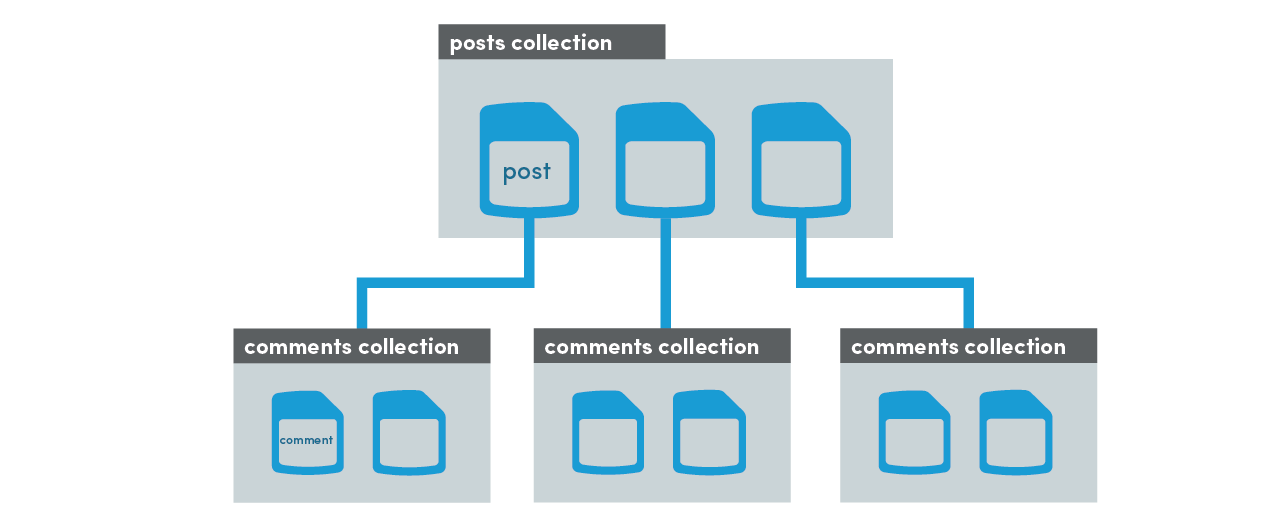
In this example, we have a collection of posts with some basic content data, but posts can also receive comments from users. We could save new comments directly on the document, but would that scale well if we had 10,000 comments? No, the memory in the app would blow up trying to retrieve this data. In fact, Firestore will throw an error for violating the 1 Mb document size limit well before reaching this point. A better approach is to nest a comments subcollection under each document and query it separately from the post data. Document retrieval is shallow - only the top level data is returned, while nested collections can be retrieved separately.
 1 ++postsCollection
 2     postDoc
 3       - author
 4       - title
 5       - content
 6       ++commentsCollection
 7           commentDocFoo
 8             - text
 9           commentDocBar
10             - text
Example: Group Chat
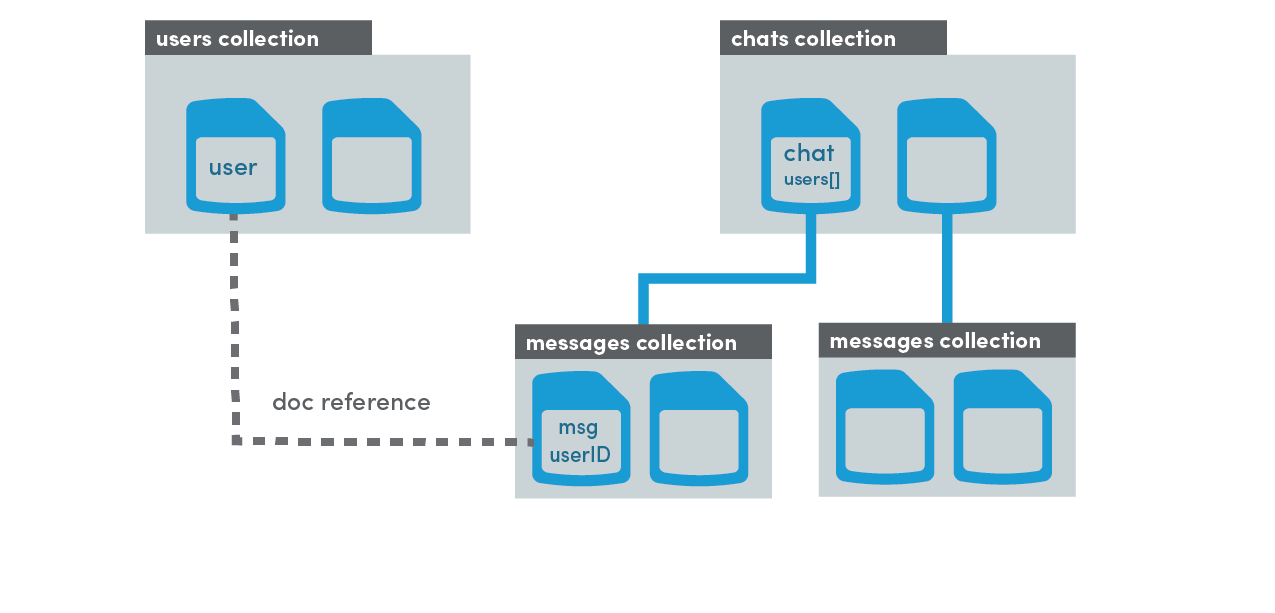
For group chat, we can use two root level collections called users and chats. The user document is simple - just a place to keep basic user data like email, username, etc.
A chat document stores basic data about a chat room, such as the participating users. Each room has a nested collection of messages (just like the previous example). However, the message makes a reference to the associated user document, allowing us to query additional data about the user if we so choose.
A document reference is very similar to a foreign key in a SQL database. It is just a pointer to a document that exists at some other location in the database.
 1 ++usersCollection
 2     userDoc
 3       - username
 4       - email
 5
 6 ++chatsCollection
 7     chatDoc
 8       - users[]
 9     ++messagesCollection
10         messageDocFoo
11           - text
12           - userDocReference
13         messageDocBar
14           - userDocReference
Example: Stars, Hearts, Likes, Votes, Etc.
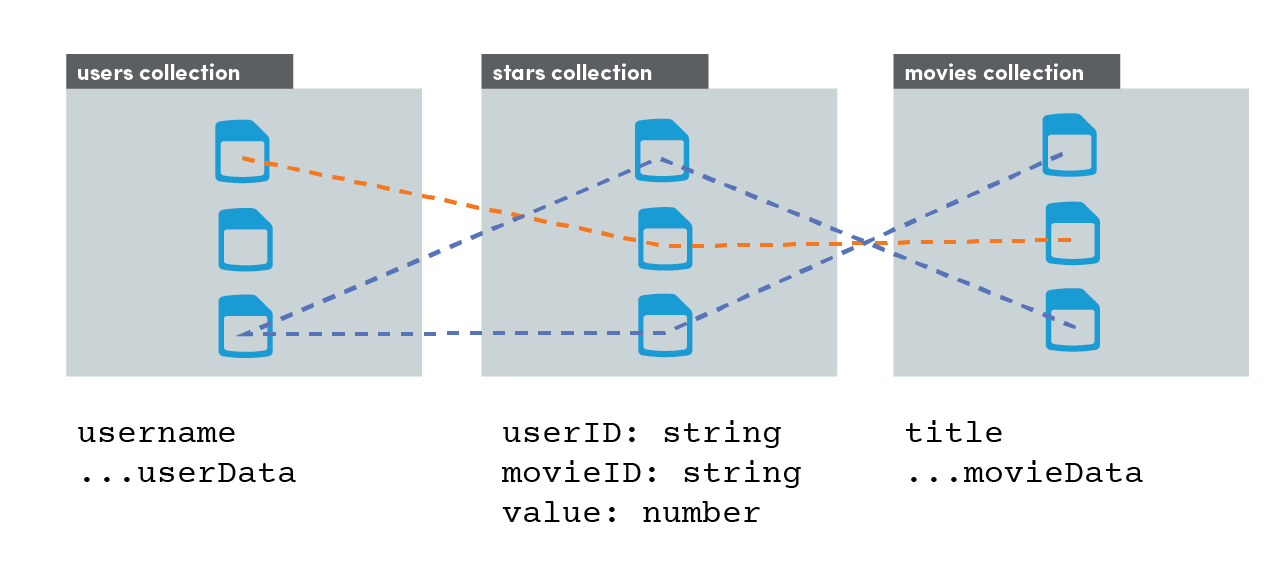
In the graphic above, we can see how the movies collection and users collection have a two-way connection through the middle-man stars collection. All data about a relationship is kept in the star document - data never needs to change on the connected user/movie documents directly.
Having a root collection structure allows us to query both “Movie reviews” and “User reviews” independently. This would not be possible if stars were nested as a sub collection. This is similar to a many-to-many-through relationship in a SQL database.
 1 ++usersCollection
 2     userDoc
 3       - username
 4       - email
 5
 6 ++starsCollection
 7     starDoc
 8       - userId
 9       - movieId
10       - value
11
12 ++moviesCollection
13     movieDoc
14       - title
15       - plot
2.2 Collection Retrieval
Problem
You want to retrieve a collection of documents.
Solution
A collection of documents in Firestore is like a table of rows in a SQL database, or a list of objects in the Realtime Database. When we retrieve a collection in Angular, the endgame is to generate an Observable array of objects [{...data}, {...data}, {...data}] that we can show the end user.
The examples in this chapter will use the TypeScript Book interface below. AngularFire requires a type to be specified, but you can opt out with the any type, for example AngularFirestoreCollection<any>.
1 export interface Book {
2   author: string;
3   title: string:
4   content: string;
5 }
I am setting up the code in an Angular component, but you can also extract this logic into a service to make it available (injectable) to multiple components.
Reading data in AngularFire is accomplished by (1) making a reference to its location in Firestore, (2) requesting an Observable with valueChanges(), and (3) subscribing to the Observable.
Steps 1 and 2: book-info.component.ts
 1 import { Component, OnInit } from '@angular/core';
 2 import { Observable }        from 'rxjs';
 3 import {
 4   AngularFirestore,
 5   AngularFirestoreCollection,
 6   AngularFirestoreDocument
 7 } from 'angularfire2/firestore';
 8
 9 @Component({
10   selector: 'book-info',
11   templateUrl: './book-info.component.html',
12   styleUrls: ['./book-info.component.scss']
13 })
14 export class BookInfoComponent implements OnInit {
15
16   constructor(private afs: AngularFirestore) {}
17
18   booksCollection: AngularFireCollection<Book>;
19   booksObservable: Observable<Book[]>;
20
21     ngOnInit() {
22         // Step 1: Make a reference
23         this.booksCollection = this.afs.collection('books');
24
25         // Step 2: Get an observable of the data
26         this.booksObservable = this.booksCollection.valueChanges();
27     }
28
29 }
Step 3: book-info.component.html
The ideal way to handle an Observable subscription is with the async pipe in the HTML. Angular will subscribe (and unsubscribe) automatically, making your code concise and maintainable.
1 <!-- Step 3: Subscribe to the data -->
2 <ul>
3   <li *ngFor="let book of booksObservable | async">
4     {{ book.title }} by {{ book.author }}
5   </li>
6 </ul>
Step 3 (alternative): book-info.component.ts
It is also possible to subscribe directly in the Typescript. You just need to remember to unsubscribe to avoid memory leaks. Modify the component code with the following changes to handle the subscription manually.
 1 import { Subscription }      from 'rxjs';
 2
 3 /// ...omitted
 4
 5     sub: Subscription;
 6
 7     ngOnInit() {
 8
 9         /// ...omitted
10
11         // Step 3: Subscribe
12         this.sub = this.booksObservable.subscribe(books => console.log(books))
13     }
14
15     ngOnDestroy() {
16         this.sub.unsubscribe()
17     }
18
19 }
End Preview