4. EA’s Object Model
EA’s object model is quite complex. This book will not9 cover all the gory details of EA’s API but it will just give you the point from where to start. You should consult the offline help inside EA via
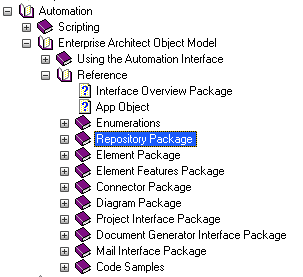
There is also an online help page with almost the same contents. But why use network capacity if you already have it on your machine? The structure is simple if you follow the Interface Overview directory or you skip the Enumerations directory. Inside the Repository directory you find the Repository class some way down. We will start with this one in the next section. The Package class is found in the same directory in the middle. Likewise you find the Element Class in the Element directory below the Repository directory. More about that later. All the class descriptions are in tabular format with the attributes listed first. Operations are found further down in a similar table. Most of this tabular documentation you can find in the Object Details chapter with additional comments. You will likely need to reference the EA help only for rarely used areas which are not detailed in this book.
This section will not go into details of the operations provided by the single classes unless needed. Instead we concentrate on the attributes to get a grip of EA’s repository structure.
In the following examples I simply assume you have the Example EA Model open. Probably you should have a copy of that as we might clobber it with our experiments.
But let’s start with the basics. The EA runtime object represents a single repository. Once you got hold of this you can create, read, update and delete everything inside the repository. Furthermore you can access a couple of complex operations (like exporting packages as XML) from the repository object.
Now, how can you access this magic object? If you are using the build-in scripting engine then EA offers the predefined object Repository.
You can use that without any declaration in any context. That’s really simple and lets jump start you scripting immediately.
Just skip the next chapter if that’s what you want to do.
4.1 Accessing EA from the Outside
So you need to develop your scripts outside EA. This means you need to get hold of the running EA application or you need to create one. Note that accessing a running EA instance will only get hold of the first one launched. I will not discuss the various possibilities including creating an instance here. You will likely be able to find that out later when it is getting important.
Here are some samples how to get the currently running EA instance from outside EA. The code snippets do not contain any validity checks. That means, when you run it without an active EA instance, it will loudly crash.
Eventually you need to link EA’s TLB to your IDE. This is to let it know about EA’s API classes, unless you deal with EA’s API objects as anonymous.
The examples in this book do the latter as the declaration varies between the different languages.
If you require object declaration it will generally be something like EA.Repository to declare the repository object or EA.Package for a package object and so on.
Since the EA help has improved in that respect you can also have a look at Sparx’ help page (version 12).
C++
1 	CLSID clsid;
2 	CLSIDFromProgID(L"EA.App", &clsid);
3 	IUnknown *pUnk = NULL;
4 	IDispatch *pDisp = NULL;
5 	HRESULT hr = GetActiveObject(clsid, NULL, (IUnknown**)&pUnk);
6 	if(SUCCEEDED(hr)) {
7 	  hr = pUnk->QueryInterface(IID_IDispatch, (void **)&pDisp);
8 	}
These lines were borrowed from a Microsoft page. So I hope it will not be too misleading as I never have written a single line in C++.
Perl
1 	$App = Win32::OLE->GetActiveObject ("EA.App");
2 	$Repository = $App->Repository;
Python
1  	eaApp = win32com.client.Dispatch("EA.App")
2  	eaRep = eaApp.Repository
Visual Basic
1 	Dim Repository As EA.repository
2 	Set EAapp = GetObject(, "EA.App")
3 	Set Repository = EAapp.repository
Java
Support for Java has recently10 been added. You need to first copy two files from the Java API subdirectory of your EA program directory:
-
SSJavaCOM.dll->%SystemRoot%\system32directory. -
eaapi.jar-> a location in the JavaCLASSPATHor where the Java class loader can find it at run time.
Now you should be able to access an EA repository.
1     public void OpenRepository() {
2       org.sparx.Repository repository = new org.sparx.Repository();
3       repository.OpenFile("<path to repository>.eap");
4     }
4.2 Repository
Now as you got hold of the repository object you can start exploring it a bit.
Let’s print the name of the repository.
print Repository.ConnectionString;
This will output either the file path and name of the EAP
e.g.
C:\Documents and Settings\<user>\Desktop\EAExample.eap
or the ODBC connection string depending on the type of repository you are actually using. Now let’s take a first look into the repository.
On top level of a repository there is at least a single root node. It is possible to have multiple roots so this is a Collection.
The visible part of the repository we are going to explore first looks like:
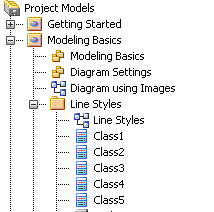
Lets simply retrieve and print the name of the (first and currently only) root package:
1 	root = Repository.Models.GetAt (0);
2 	print root.Name;
This will print the name of the root package Project Models which was created at first11 in the repository.
You can iterate through all root nodes and print their names.
For the example model there’s only a single root node. So create a second root on your own and try the iteration.
That’s all you need to know for the beginning. From here the fun begins!
4.3 Package – and View – and Model
Okay, that sounds confusing. But it’s only history. Packages, views and models are almost the same. They are all packages. Almost.
And to make it a bit more confusing: packages are a tuple of package and element.
… omitted …