Manipulating the repository via automation is the real reason for using the API. A main application is the import of mass data. But again, lets start from the top.
Everything that is added to the repository is created via
where the name is always the name of the new element and type has different meaning depending on the thing we want to add.
Although some AddNew operations do not use the type parameter you must supply it (with an empty string).
Common to all AddNew is that they return either the successfully created new element or a null pointer.
You already know about different EaCollection attributes (e.g. Models, Packages, Elements, etc.). These determine what is added and what the type parameter means. Further these objects contain a unique number ObjectType (according to above examples 6 for Models, 5 for Packages, 4 for Elements, etc.) so you can find out from what class they were created.
For the following code samples I assume that variables contain the value they were once initialized with.
Unlike in the previous section I can not refer to any GUID as they will be arbitrary for the model you are using.
5.1 Adding a Root
Assuming you have the EAExample.eap as a copy we can simply go on adding a new root here. You are also free to create an empty .EAP.
Just run the following code on your model:
1 root2=Repository.Models.AddNew("A New Root","");2 root2.Update();
You will find a new root with the name A New Root in your repository. The second parameter for the AddNew is not used, so an empty string is passed.
Now run the script the with the name a new root (the first lower case character is important).
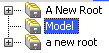
As you will notice the first root is added at the very top while the second is below the previously existing root12. It should look like the following picture.
Two New Roots
The reason is simply that EA sorts these elements alphabetically unless a TreePos attribute is supplied.
If you need to order the new root elements differently you have to supply the right TreePos attributes. Delete the two newly created roots and run the following code snippet:
1 root1=Repository.Models.GetAt(0);2 root1.TreePos=1;3 root1.Update();4 root2=Repository.Models.AddNew("a new root","");5 root2.TreePos=0;6 root2.Update();7 Repository.RefreshModelView(0);
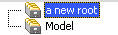
The final RefreshModelView will update the browser view so that you should see the picture below.
This is necessary as the sort order is changed which is not directly reflected by EA. If you don’t invoke that you will not see the correct ordering of the root packages.
Unless you care for the correct ordering to take immediate effect you usually can simply omit this call.
Ordered New Roots
A funny thing is when you try to add a root package with an empty name string. This is passed to the database where you get a message from the underlying database. Well…