Section II: Introduction to Objects
Objects are the foundation for numerous modern languages, including Kotlin.
In an object-oriented (OO) programming language, you discover “nouns” in the problem you’re solving, and translate those nouns to objects. Objects hold data and perform actions. An object-oriented language creates and uses objects.
Kotlin isn’t just object-oriented; it’s also functional. Functional languages focus on the actions you perform (“verbs”). Kotlin is a hybrid object-functional language.
- This section explains the basics of object-oriented programming.
- Section IV: Functional Programming introduces functional programming.
- Section V: Object-Oriented Programming covers object-oriented programming in detail.
Objects Everywhere
Objects store data using properties (
vals andvars) and perform operations with this data using functions.
Some definitions:
- Class: Defines properties and functions for what is essentially a new data type. Classes are also called user-defined types.
- Member: Either a property or a function of a class.
- Member function: A function that works only with a specific class of object.
-
Creating an object: Making a
valorvarof a class. Also called creating an instance of that class.
Because classes define state and behavior, we can even refer to instances
of built-in types like Double or Boolean as objects.
Consider Kotlin’s IntRange class:
// ObjectsEverywhere/IntRanges.kt

fun main() {
  val r1 = IntRange(0, 10)
  val r2 = IntRange(5, 7)
  println(r1)
  println(r2)
}
/* Output:
0..10
5..7
*/
We create two objects (instances) of the IntRange class. Each object has
its own piece of storage in memory. IntRange is a class, but a particular
range r1 from 0 to 10 is an object that is distinct from range r2.
Numerous operations are available for an IntRange object. Some are
straightforward, like sum(), and others require more understanding before you
can use them. If you try calling one that needs arguments, the IDE will ask for
those arguments.
To learn about a particular member function, look it up in the Kotlin
documentation. Notice
the magnifying glass icon in the top right area of the page. Click on that and
type IntRange into the search box. Click on kotlin.ranges > IntRange from
the resulting search. You’ll see the documentation for the IntRange class. You
can study all the member functions—the Application Programming Interface
(API)—of the class. Although you won’t understand most of it at this time,
it’s helpful to become comfortable looking things up in the Kotlin
documentation.
An IntRange is a kind of object, and a defining characteristic of an object
is that you perform operations on it. Instead of “performing an operation,” we
say calling a member function. To call a member function for an object,
start with the object identifier, then a dot, then the name of the operation:
// ObjectsEverywhere/RangeSum.kt

fun main() {
  val r = IntRange(0, 10)
  println(r.sum())
}
/* Output:
55
*/
Because sum() is a member function defined for IntRange, you call it by
saying r.sum(). This adds up all the numbers in that IntRange.
Earlier object-oriented languages used the phrase “sending a message” to describe calling a member function for an object. Sometimes you’ll still see that terminology.
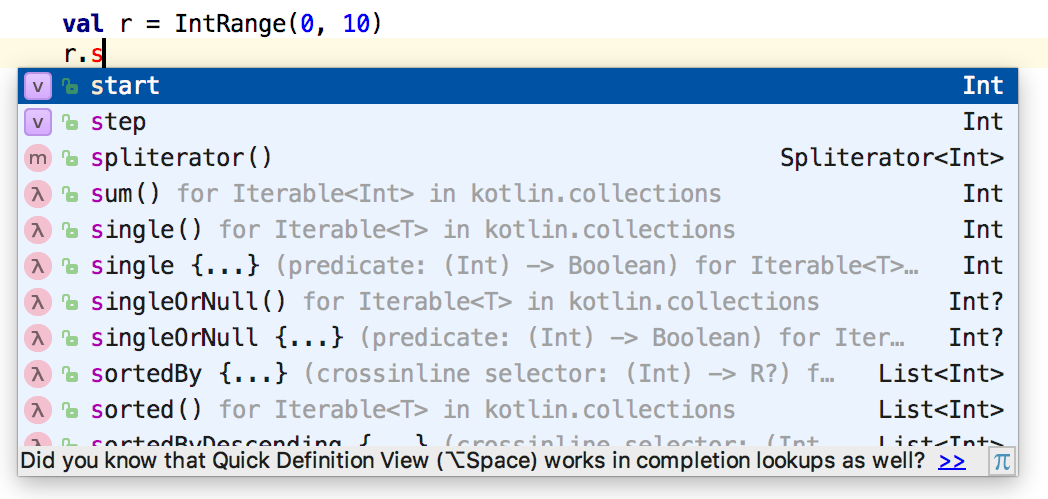
Classes can have many operations (member functions). It’s easy to explore
classes using an IDE (integrated development environment) that includes a
feature called code completion. For example, if you type .s after an object
identifier within IntelliJ IDEA, it shows all the members of that object that
begin with s:
Try using code completion on other objects. For example, you can reverse a
String or convert all the characters to lower case:
// ObjectsEverywhere/Strings.kt

fun main() {
  val s = "AbcD"
  println(s.reversed())
  println(s.lowercase())
}
/* Output:
DcbA
abcd
*/
You can easily convert a String to an integer and back:
// ObjectsEverywhere/Conversion.kt

fun main() {
  val s = "123"
  println(s.toInt())
  val i = 123
  println(i.toString())
}
/* Output:
123
123
*/
Later in the book we discuss strategies to handle situations when the String
you want to convert doesn’t represent a correct integer value.
You can also convert from one numerical type to another. To avoid confusion,
conversions between number types are explicit. For example, you convert an Int
i to a Long by calling i.toLong(), or to a Double with i.toDouble():
// ObjectsEverywhere/NumberConversions.kt

fun fraction(numerator: Long, denom: Long) =
  numerator.toDouble() / denom

fun main() {
  val num = 1
  val den = 2
  val f = fraction(num.toLong(), den.toLong())
  println(f)
}
/* Output:
0.5
*/
Well-defined classes are easy for a programmer to understand, and produce code that’s easy to read.
Exercises and solutions can be found at www.AtomicKotlin.com.
Creating Classes
Not only can you use predefined types like
IntRangeandString, you can also create your own types of objects.
Indeed, creating new types comprises much of the activity in object-oriented programming. You create new types by defining classes.
An object is a piece of the solution for a problem you’re trying to solve. Start by thinking of objects as expressing concepts. As a first approximation, if you discover a “thing” in your problem, represent that thing as an object in your solution.
Suppose you want to create a program to manage animals in a zoo. It makes sense
to categorize the different types of animals based on how they behave, their
needs, animals they get along with and those they fight with. Everything
different about a species of animal is captured in the classification of that
animal’s object. Kotlin uses the class keyword to create a new type of
object:
// CreatingClasses/Animals.kt

// Create some classes:
class Giraffe
class Bear
class Hippo

fun main() {
  // Create some objects:
  val g1 = Giraffe()
  val g2 = Giraffe()
  val b = Bear()
  val h = Hippo()

  // Each object() is unique:
  println(g1)
  println(g2)
  println(h)
  println(b)
}
/* Sample output:
Giraffe@28d93b30
Giraffe@1b6d3586
Hippo@4554617c
Bear@74a14482
*/
To define a class, start with the class keyword, followed by an identifier
for your new class. The class name must begin with a letter (A-Z, upper or
lower case), but can include things like numbers and underscores. Following
convention, we capitalize the first letter of a class name, and lowercase the
first letter of all vals and vars.
Animals.kt starts by defining three new classes, then creates four objects
(also called instances) of those classes.
Giraffe is a class, but a particular five-year-old male giraffe that lives in
Botswana is an object. Each object is different from all others, so we give
them names like g1 and g2.
Notice the rather cryptic output of the last four lines. The part before the
@ is the class name, and the number after the @ is the address where the
object is located in your computer’s memory. Yes, that’s a number even though
it includes some letters—it’s called “hexadecimal
notation”. Every object in your
program has its own unique address.
The classes defined here (Giraffe, Bear, and Hippo) are as simple as
possible: the entire class definition is a single line. More complex classes
use curly braces ({ and }) to create a class body containing the
characteristics and behaviors for that class.
A function defined within a class belongs to that class. In Kotlin, we call these member functions of the class. Some object-oriented languages like Java choose to call them methods, a term that came from early object-oriented languages like Smalltalk. To emphasize the functional nature of Kotlin, the designers chose to drop the term method, as some beginners found the distinction confusing. Instead, the term function is used throughout the language.
If it is unambiguous, we will just say “function.” If we must make the distinction:
- Member functions belong to a class.
- Top-level functions exist by themselves and are not part of a class.
Here, bark() belongs to the Dog class:
// CreatingClasses/Dog.kt

class Dog {
  fun bark() = "yip!"
}

fun main() {
  val dog = Dog()
}
In main(), we create a Dog object and assign it to val dog. Kotlin
emits a warning because we never use dog.
Member functions are called (invoked) with the object name, followed by a .
(dot/period), followed by the function name and parameter list. Here we call the
meow() function and display the result:
// CreatingClasses/Cat.kt

class Cat {
  fun meow() = "mrrrow!"
}

fun main() {
  val cat = Cat()
  // Call 'meow()' for 'cat':
  val m1 = cat.meow()
  println(m1)
}
/* Output:
mrrrow!
*/
A member function acts on a particular instance of a class. When you call
meow(), you must call it with an object. During the call, meow() can access
other members of that object.
When calling a member function, Kotlin keeps track of the object of interest by
silently passing a reference to that object. That reference is available inside
the member function by using the keyword this.
Member functions have special access to other elements within a class, simply
by naming those elements. You can also explicitly qualify access to those
elements using this. Here, exercise() calls speak() with and without
qualification:
// CreatingClasses/Hamster.kt

class Hamster {
  fun speak() = "Squeak! "
  fun exercise() =
    this.speak() +   // Qualified with 'this'
      speak() +      // Without 'this'
      "Running on wheel"
}

fun main() {
  val hamster = Hamster()
  println(hamster.exercise())
}
/* Output:
Squeak! Squeak! Running on wheel
*/
In exercise(), we call speak() first with an explicit this and then omit
the qualification.
Sometimes you’ll see code containing an unnecessary explicit this. That kind
of code often comes from programmers who know a different language where this
is either required, or part of its style. Using a feature unnecessarily is
confusing for the reader, who spends time trying to figure out why you’re doing
it. We recommend avoiding the unnecessary use of this.
Outside the class, you must say hamster.exercise() and hamster.speak().
Exercises and solutions can be found at www.AtomicKotlin.com.
Properties
A property is a
varorvalthat’s part of a class.
Defining a property maintains state within a class. Maintaining state is the primary motivating reason for creating a class rather than just writing one or more standalone functions.
A var property can be reassigned, while a val property can’t. Each object
gets its own storage for properties:
// Properties/Cup.kt

class Cup {
  var percentFull = 0
}

fun main() {
  val c1 = Cup()
  c1.percentFull = 50
  val c2 = Cup()
  c2.percentFull = 100

  println(c1.percentFull)
  println(c2.percentFull)
}
/* Output:
50
100
*/
Defining a var or val inside a class looks just like defining it within a
function. However, the var or val becomes part of that class, and you
must refer to it by specifying its object using dot notation, placing a dot
between the object and the name of the property. You can see dot notation used
for each reference to percentFull.
The percentFull property represents the state of the corresponding Cup
object. c1.percentFull and c2.percentFull contain different values, showing
that each object has its own storage.
A member function can refer to a property within its object without using dot notation (that is, without qualifying it):
// Properties/Cup2.kt

class Cup2 {
  var percentFull = 0
  val max = 100
  fun add(increase: Int): Int {
    percentFull += increase
    if (percentFull > max)
      percentFull = max
    return percentFull
  }
}

fun main() {
  val cup = Cup2()
  cup.add(50)
  println(cup.percentFull)
  cup.add(70)
  println(cup.percentFull)
}
/* Output:
50
100
*/
The add() member function tries to add increase to percentFull but
ensures that it doesn’t go past 100%.
You must qualify both properties and member functions from outside a class.
You can define top-level properties:
// Properties/TopLevelProperty.kt

val constant = 42

var counter = 0

fun inc() {
  counter++
}
Defining a top-level val is safe because it cannot be modified. However,
defining a mutable (var) top-level property is considered an anti-pattern.
As your program becomes more complicated, it becomes harder to reason correctly
about shared mutable state. If everyone in your code base can access the var
counter, you can’t guarantee it will change correctly: while inc() increases
counter by one, some other part of the program might decrease counter by
ten, producing obscure bugs. It’s best to guard mutable state within a class.
In Constraining Visibility you’ll see how to make it truly hidden.
To say that vars can be changed while vals cannot is an oversimplification.
As an analogy, consider a house as a val, and a sofa inside the house
as a var. You can modify sofa because it’s a var. You can’t reassign
house, though, because it’s a val:
// Properties/ChangingAVal.kt

class House {
  var sofa: String = ""
}

fun main() {
  val house = House()
  house.sofa = "Simple sleeper sofa: $89.00"
  println(house.sofa)
  house.sofa = "New leather sofa: $3,099.00"
  println(house.sofa)
  // Cannot reassign the val to a new House:
  // house = House()
}
/* Output:
Simple sleeper sofa: $89.00
New leather sofa: $3,099.00
*/
Although house is a val, its object can be modified because sofa in
class House is a var. Defining house as a val only prevents it from
being reassigned to a new object.
If we make a property a val, it cannot be reassigned:
// Properties/AnUnchangingVar.kt

class Sofa {
  val cover: String = "Loveseat cover"
}

fun main() {
  var sofa = Sofa()
  // Not allowed:
  // sofa.cover = "New cover"
  // Reassigning a var:
  sofa = Sofa()
}
Even though sofa is a var, its object cannot be modified because cover in
class Sofa is a val. However, sofa can be reassigned to a new object.
We’ve talked about identifiers like house and sofa as if they were objects.
They are actually references to objects. One way to see this is to observe
that two identifiers can refer to the same object:
// Properties/References.kt

class Kitchen {
  var table: String = "Round table"
}

fun main() {
  val kitchen1 = Kitchen()
  val kitchen2 = kitchen1
  println("kitchen1: ${kitchen1.table}")
  println("kitchen2: ${kitchen2.table}")
  kitchen1.table = "Square table"
  println("kitchen1: ${kitchen1.table}")
  println("kitchen2: ${kitchen2.table}")
}
/* Output:
kitchen1: Round table
kitchen2: Round table
kitchen1: Square table
kitchen2: Square table
*/
When kitchen1 modifies table, kitchen2 sees the modification.
kitchen1.table and kitchen2.table display the same output.
Remember that var and val control references rather than objects. A var
allows you to rebind a reference to a different object, and a val prevents
you from doing so.
Mutability means an object can change its state. In the examples above,
class House and class Kitchen define mutable objects while class Sofa
defines immutable objects.
Exercises and solutions can be found at www.AtomicKotlin.com.
Constructors
You initialize a new object by passing information to a constructor.
Each object is an isolated world. A program is a collection of objects, so correct initialization of each individual object solves a large part of the initialization problem. Kotlin includes mechanisms to guarantee proper object initialization.
A constructor is like a special member function that initializes a new object. The simplest form of a constructor is a single-line class definition:
// Constructors/Wombat.kt

class Wombat

fun main() {
  val wombat = Wombat()
}
In main(), calling Wombat() creates a Wombat object. If you are coming
from another object-oriented language you might expect to see a new keyword
used here, but new would be redundant in Kotlin so it was omitted.
You pass information to a constructor using a parameter list, just like a
function. Here, the Alien constructor takes a single argument:
// Constructors/Arg.kt

class Alien(name: String) {
  val greeting = "Poor $name!"
}

fun main() {
  val alien = Alien("Mr. Meeseeks")
  println(alien.greeting)
  // alien.name // Error     // [1]
}
/* Output:
Poor Mr. Meeseeks!
*/
Creating an Alien object requires the argument (try it without one). name
initializes the greeting property within the constructor, but it is not
accessible outside the constructor—try uncommenting line [1].
If you want the constructor parameter to be accessible outside the class body,
define it as a var or val in the parameter list:
// Constructors/VisibleArgs.kt

class MutableNameAlien(var name: String)

class FixedNameAlien(val name: String)

fun main() {
  val alien1 =
    MutableNameAlien("Reverse Giraffe")
  val alien2 =
    FixedNameAlien("Krombopulos Michael")

  alien1.name = "Parasite"
  // Can't do this:
  // alien2.name = "Parasite"
}
These class definitions have no explicit class bodies—the bodies are implied.
When name is defined as a var or val, it becomes a property and is
thus accessible outside the constructor. val constructor parameters cannot be
changed, while var constructor parameters are mutable.
Your class can have numerous constructor parameters:
// Constructors/MultipleArgs.kt

class AlienSpecies(
  val name: String,
  val eyes: Int,
  val hands: Int,
  val legs: Int
) {
  fun describe() =
    "$name with $eyes eyes, " +
      "$hands hands and $legs legs"
}

fun main() {
  val kevin =
    AlienSpecies("Zigerion", 2, 2, 2)
  val mortyJr =
    AlienSpecies("Gazorpian", 2, 6, 2)
  println(kevin.describe())
  println(mortyJr.describe())
}
/* Output:
Zigerion with 2 eyes, 2 hands and 2 legs
Gazorpian with 2 eyes, 6 hands and 2 legs
*/
In Complex Constructors, you’ll see that constructors can also contain complex initialization logic.
If an object is used when a String is expected, Kotlin calls the object’s
toString() member function. If you don’t write one, you still get a default
toString():
// Constructors/DisplayAlienSpecies.kt

fun main() {
  val krombopulosMichael =
    AlienSpecies("Gromflomite", 2, 2, 2)
  println(krombopulosMichael)
}
/* Sample output:
AlienSpecies@4d7e1886
*/
The default toString() isn’t very useful—it produces the class name and the
physical address of the object (this varies from one program execution to the
next). You can define your own toString():
// Constructors/Scientist.kt

class Scientist(val name: String) {
  override fun toString() =
    "Scientist('$name')"
}

fun main() {
  val zeep = Scientist("Zeep Xanflorp")
  println(zeep)
}
/* Output:
Scientist('Zeep Xanflorp')
*/
override is a new keyword for us. It is required here because toString()
already has a definition, the one producing the primitive result. override
tells Kotlin that yes, we do actually want to replace the default toString()
with our own definition. The explicitness of override clarifies the code and
prevents mistakes.
A toString() that displays the contents of an object in a convenient form is
useful for finding and fixing programming errors. To simplify the process of
debugging, IDEs provide
debuggers that
allow you to observe each step in the execution of a program and to see inside
your objects.
Exercises and solutions can be found at www.AtomicKotlin.com.
Constraining Visibility
If you leave a piece of code for a few days or weeks, then come back to it, you might see a much better way to write it.
This is one of the prime motivations for refactoring, which rewrites working code to make it more readable, understandable, and thus maintainable.
There is a tension in this desire to change and improve your code. Consumers (client programmers) require aspects of your code to be stable. You want to change it, and they want it to stay the same.
This is particularly important for libraries. Consumers of a library don’t want to rewrite code for a new version of that library. However, the library creator must be free to make modifications and improvements, with the certainty that the client code won’t be affected by those changes.
Therefore, a primary consideration in software design is:
Separate things that change from things that stay the same.
To control visibility, Kotlin and some other languages provide access
modifiers. Library creators decide what is and is not accessible by the client
programmer using the modifiers public, private, protected, and internal.
This atom covers public and private, with a brief introduction to
internal. We explain protected later in the book.
An access modifier such as private appears before the definition for a class,
function, or property. An access modifier only controls access for that
particular definition.
A public definition is accessible by client programmers, so changes to that
definition impact client code directly. If you don’t provide a modifier, your
definition is automatically public, so public is technically redundant. You
will sometimes still specify public for the sake of clarity.
A private definition is hidden and only accessible from other members of the
same class. Changing, or even removing, a private definition doesn’t directly
impact client programmers.
private classes, top-level functions, and top-level properties are accessible
only inside that file:
// Visibility/RecordAnimals.kt

private var index = 0                  // [1]

private class Animal(val name: String) // [2]

private fun recordAnimal(              // [3]
  animal: Animal
) {
  println("Animal #$index: ${animal.name}")
  index++
}

fun recordAnimals() {
  recordAnimal(Animal("Tiger"))
  recordAnimal(Animal("Antelope"))
}

fun recordAnimalsCount() {
  println("$index animals are here!")
}
You can access private top-level properties ([1]), classes ([2]), and
functions ([3]) from other functions and classes within RecordAnimals.kt.
Kotlin prevents you from accessing a private top-level element from within
another file, telling you it’s private in the file:
// Visibility/ObserveAnimals.kt

fun main() {
  // Can't access private members
  // declared in another file.
  // Class is private:
  // val rabbit = Animal("Rabbit")
  // Function is private:
  // recordAnimal(rabbit)
  // Property is private:
  // index++

  recordAnimals()
  recordAnimalsCount()
}
/* Output:
Animal #0: Tiger
Animal #1: Antelope
2 animals are here!
*/
Privacy is most commonly used for members of a class:
// Visibility/Cookie.kt

class Cookie(
  private var isReady: Boolean  // [1]
) {
  private fun crumble() =       // [2]
    println("crumble")

  public fun bite() =           // [3]
    println("bite")

  fun eat() {                   // [4]
    isReady = true              // [5]
    crumble()
    bite()
  }
}

fun main() {
  val x = Cookie(false)
  x.bite()
  // Can't access private members:
  // x.isReady
  // x.crumble()
  x.eat()
}
/* Output:
bite
crumble
bite
*/
-
[1] A
privateproperty, not accessible outside the containing class. -
[2] A
privatemember function. -
[3] A
publicmember function, accessible to anyone. -
[4] No access modifier means
public. -
[5] Only members of the same class can access
privatemembers.
The private keyword means no one can access that member except other members
of that class. Other classes cannot access private members, so it’s as if
you’re also insulating the class against yourself and your collaborators. With
private, you can freely change that member without worrying whether it
affects another class in the same package. As a library designer you’ll
typically keep things as private as possible, and expose only functions and
classes to client programmers.
Any member function that is a helper function for a class can be made
private to ensure you don’t accidentally use it elsewhere in the package and
thus prohibit yourself from changing or removing that function.
The same is true for a private property inside a class. Unless you must
expose the underlying implementation (which is less likely than you might
think), make properties private. However, just because a reference to an
object is private inside a class doesn’t mean some other object can’t have a
public reference to the same object:
// Visibility/MultipleRef.kt

class Counter(var start: Int) {
  fun increment() {
    start += 1
  }
  override fun toString() = start.toString()
}

class CounterHolder(counter: Counter) {
  private val ctr = counter
  override fun toString() =
    "CounterHolder: " + ctr
}

fun main() {
  val c = Counter(11)                 // [1]
  val ch = CounterHolder(c)           // [2]
  println(ch)
  c.increment()                       // [3]
  println(ch)
  val ch2 = CounterHolder(Counter(9)) // [4]
  println(ch2)
}
/* Output:
CounterHolder: 11
CounterHolder: 12
CounterHolder: 9
*/
-
[1]
cis now defined in the scope surrounding the creation of theCounterHolderobject on the following line. -
[2] Passing
cas the argument to theCounterHolderconstructor means that the newCounterHoldernow refers to the sameCounterobject thatcrefers to. -
[3] The
Counterthat is supposedlyprivateinsidechcan still be manipulated viac. -
[4]
Counter(9)has no other references except withinCounterHolder, so it cannot be accessed or modified by anything exceptch2.
Maintaining multiple references to a single object is called aliasing and can produce surprising behavior.
Modules
Unlike the small examples in this book, real programs are often large. It can be helpful to divide such programs into one or more modules. A module is a logically independent part of a codebase. The way you divide a project into modules depends on the build system (such as Gradle or Maven) and is beyond the scope of this book.
An internal definition is accessible only inside the module where it is
defined. internal lands somewhere between private and public—use it
when private is too restrictive but you don’t want an element to be a part of
the public API. We do not use internal in the book’s examples or exercises.
Modules are a higher-level concept. The following atom introduces packages,
which enable finer-grained structuring. A library is often a single module
consisting of multiple packages, so internal elements are available within
the library but are not accessible by consumers of that library.
Exercises and solutions can be found at www.AtomicKotlin.com.
Packages
A fundamental principle in programming is the acronym DRY: Don’t Repeat Yourself.
Multiple identical pieces of code require maintenance whenever you make fixes or improvements. So duplicating code is not just extra work—every duplication creates opportunities for mistakes.
The import keyword reuses code from other files. One way to use import is
to specify a class, function or property name:
import packagename.ClassName
import packagename.functionName
import packagename.propertyName
A package is an associated collection of code. Each package is usually
designed to solve a particular problem, and often contains multiple functions
and classes. For example, we can import mathematical constants and functions
from the kotlin.math library:
// Packages/ImportClass.kt
import kotlin.math.PI
import kotlin.math.cos  // Cosine

fun main() {
  println(PI)
  println(cos(PI))
  println(cos(2 * PI))
}
/* Output:
3.141592653589793
-1.0
1.0
*/
Sometimes you want to use multiple third-party libraries containing classes or
functions with the same name. The as keyword allows you to change names while
importing:
// Packages/ImportNameChange.kt
import kotlin.math.PI as circleRatio
import kotlin.math.cos as cosine

fun main() {
  println(circleRatio)
  println(cosine(circleRatio))
  println(cosine(2 * circleRatio))
}
/* Output:
3.141592653589793
-1.0
1.0
*/
as is useful if a library name is poorly chosen or excessively long.
You can fully qualify an import in the body of your code. In the following example, the code might be less readable due to the explicit package names, but the origin of each element is absolutely clear:
// Packages/FullyQualify.kt

fun main() {
  println(kotlin.math.PI)
  println(kotlin.math.cos(kotlin.math.PI))
  println(kotlin.math.cos(2 * kotlin.math.PI))
}
/* Output:
3.141592653589793
-1.0
1.0
*/
To import everything from a package, use a star:
// Packages/ImportEverything.kt
import kotlin.math.*

fun main() {
  println(E)
  println(E.roundToInt())
  println(E.toInt())
}
/* Output:
2.718281828459045
3
2
*/
The kotlin.math package contains a convenient roundToInt() that rounds the
Double value to the nearest integer, unlike toInt() which simply truncates
anything after a decimal point.
To reuse your code, create a package using the package keyword. The package
statement must be the first non-comment statement in the file. package is
followed by the name of your package, which by convention is all lowercase:
// Packages/PythagoreanTheorem.kt
package pythagorean
import kotlin.math.sqrt

class RightTriangle(
  val a: Double,
  val b: Double
) {
  fun hypotenuse() = sqrt(a * a + b * b)
  fun area() = a * b / 2
}
You can name the source-code file anything you like, unlike Java which requires the file name to be the same as the class name.
Kotlin allows you to choose any name for your package, but it’s considered good style for the package name to be identical to the directory name where the package files are located (this will not always be the case for the examples in this book).
The elements in the pythagorean package are now available using import:
// Packages/ImportPythagorean.kt
import pythagorean.RightTriangle

fun main() {
  val rt = RightTriangle(3.0, 4.0)
  println(rt.hypotenuse())
  println(rt.area())
}
/* Output:
5.0
6.0
*/
In the remainder of this book we use package statements for any file that
defines functions, classes, etc., outside of main(), to prevent name clashes
with other files in the book, but we usually won’t put a package statement in
a file that only contains a main().
Exercises and solutions can be found at www.AtomicKotlin.com.
Testing
Constant testing is essential for rapid program development.
If changing one part of your code breaks other code, your tests reveal the problem right away. If you don’t find out immediately, changes accumulate and you can no longer tell which change caused the problem. You’ll spend a lot longer tracking it down.
Testing is a crucial practice, so we introduce it early and use it throughout the rest of the book. This way, you become accustomed to testing as a standard part of the programming process.
Using println() to verify code correctness is a weak approach—you must
scrutinize the output every time and consciously ensure that it’s correct.
To simplify your experience while using this book, we created our own tiny testing system. The goal is a minimal approach that:
- Shows the expected result of expressions.
- Provides output so you know the program is running, even when all tests succeed.
- Ingrains the concept of testing early in your practice.
Although useful for this book, ours is not a testing system for the workplace. Others have toiled long and hard to create such test systems. For example:
- JUnit is one of the most popular Java test frameworks, and is easily used from within Kotlin.
- Kotest is designed specifically for Kotlin, and takes advantage of Kotlin language features.
- The Spek Framework produces a different form of testing, called Specification Testing.
To use our testing framework, we must first import it. The basic elements
of the framework are eq (equals) and neq (not equals):
// Testing/TestingExample.kt
import atomictest.*

fun main() {
  val v1 = 11
  val v2 = "Ontology"

  // 'eq' means "equals":
  v1 eq 11
  v2 eq "Ontology"

  // 'neq' means "not equal"
  v2 neq "Epistemology"

  // [Error] Epistemology != Ontology
  // v2 eq "Epistemology"
}
/* Output:
11
Ontology
Ontology
*/
The code for the atomictest package is in
Appendix A: AtomicTest. We don’t intend that you
understand everything in AtomicTest.kt right now, because it uses some
features that won’t appear until later in the book.
To produce a clean, comfortable appearance, AtomicTest uses a Kotlin feature
you haven’t seen yet: the ability to write a function call a.function(b) in
the text-like form a function b. This is called infix notation. Only
functions defined using the infix keyword can be called this way.
AtomicTest.kt defines the infix eq and neq used in TestingExample.kt:
eq and neq are flexible—almost anything works as a test expression.
If expected is a String, then expression is converted to a String and the
two Strings are compared. Otherwise, expression and expected are compared
directly (without converting them first). In either case, the result of
expression appears on the console so you see something when the program runs.
Even when the tests succeed, you still see the result on the left of eq or
neq. If expression and expected are not equivalent, AtomicTest shows an
error when the program runs.
The last test in TestingExample.kt intentionally fails so you see an example
of failure output. If the two values are not equal, Kotlin displays the
corresponding message starting with [Error]. If you uncomment the last line
and run the example above, you will see, after all the successful tests:
The actual value stored in v2 is not what it is claimed to be in the
“expected” expression. AtomicTest displays the String representations for
both expected and actual values.
eq and neq are the basic (infix) functions defined for AtomicTest—it
truly is a minimal testing system. When you put eq and neq expressions in
your examples, you’ll create both a test and some console output. You verify
the correctness of the program by running it.
There’s a second tool in AtomicTest. The trace object captures output for
later comparison:
// Testing/Trace1.kt
import atomictest.*

fun main() {
  trace("line 1")
  trace(47)
  trace("line 2")
  trace eq """
    line 1
    47
    line 2
  """
}
Adding results to trace looks like a function call, so you can effectively
replace println() with trace().
In previous atoms, we displayed output and relied on human visual inspection to
catch any discrepancies. That’s unreliable; even in a book where we scrutinize
the code over and over, we’ve learned that visual inspection can’t be trusted
to find errors. From now on we rarely use commented output blocks because
AtomicTest will do everything for us. However, sometimes we still include
commented output blocks when that produces a more useful effect.
Seeing the benefits of using testing throughout the rest of the book should help you incorporate testing into your programming process. You’ll probably start feeling uncomfortable when you see code that doesn’t have tests. You might even decide that code without tests is broken by definition.
Testing as Part of Programming
Testing is most effective when it’s built into your software development process. Writing tests ensures you get the results you expect. Many people advocate writing tests before writing the implementation code—you first make the test fail before you write the code to make it pass. This technique, called Test Driven Development (TDD), is a way to ensure that you’re really testing what you think you are. You’ll find a more complete description of TDD on Wikipedia (search for “Test Driven Development”).
There’s another benefit to writing testably—it changes the way you craft your code. You could just display the results on the console. But in the test mindset you wonder, “How will I test this?” When you create a function, you decide you should return something from the function, if for no other reason than to test that result. Functions that do nothing but take input and produce output tend to generate better designs, as well.
Here’s a simplified example using TDD to implement the BMI calculation from Number Types. First, we write the tests, along with an initial implementation that fails (because we haven’t yet implemented the functionality):
// Testing/TDDFail.kt
package testing1
import atomictest.eq

fun main() {
  calculateBMI(160, 68) eq "Normal weight"
//  calculateBMI(100, 68) eq "Underweight"
//  calculateBMI(200, 68) eq "Overweight"
}

fun calculateBMI(lbs: Int, height: Int) =
  "Normal weight"
Only the first test passes. The other tests fail and are commented. Next, we add code to determine which weights are in which categories. Now all the tests fail:
// Testing/TDDStillFails.kt
package testing2
import atomictest.eq

fun main() {
  // Everything fails:
  // calculateBMI(160, 68) eq "Normal weight"
  // calculateBMI(100, 68) eq "Underweight"
  // calculateBMI(200, 68) eq "Overweight"
}

fun calculateBMI(
  lbs: Int,
  height: Int
): String {
  val bmi = lbs / (height * height) * 703.07
  return if (bmi < 18.5) "Underweight"
  else if (bmi < 25) "Normal weight"
  else "Overweight"
}
We’re using Ints instead of Doubles, producing a zero result. The tests
guide us to the fix:
// Testing/TDDWorks.kt
package testing3
import atomictest.eq

fun main() {
  calculateBMI(160.0, 68.0) eq "Normal weight"
  calculateBMI(100.0, 68.0) eq "Underweight"
  calculateBMI(200.0, 68.0) eq "Overweight"
}

fun calculateBMI(
  lbs: Double,
  height: Double
): String {
  val bmi = lbs / (height * height) * 703.07
  return if (bmi < 18.5) "Underweight"
  else if (bmi < 25) "Normal weight"
  else "Overweight"
}
You may choose to add additional tests for the boundary conditions.
In the exercises for this book, we include tests that your code must pass.
Exercises and solutions can be found at www.AtomicKotlin.com.
Exceptions
The word “exception” is used in the same sense as the phrase “I take exception to that.”
An exceptional condition prevents the continuation of the current function or scope. At the point the problem occurs, you might not know what to do with it, but you cannot continue within the current context. You don’t have enough information to fix the problem. So you must stop and hand the problem to another context that’s able to take appropriate action.
This atom covers the basics of exceptions as an error-reporting mechanism. In Section VI: Preventing Failure, we look at other ways to deal with problems.
It’s important to distinguish an exceptional condition from a normal problem. A normal problem has enough information in the current context to cope with the issue. With an exceptional condition, you cannot continue processing. All you can do is leave, relegating the problem to an external context. This is what happens when you throw an exception. The exception is the object that is “thrown” from the site of the error.
Consider toInt(), which converts a String to an Int. What happens if you
call this function for a String that doesn’t contain an integer value?
// Exceptions/ToIntException.kt
package exceptions

fun erroneousCode() {
  // Uncomment this line to get an exception:
  // val i = "1$".toInt()        // [1]
}

fun main() {
  erroneousCode()
}
Uncommenting line [1] produces an exception. Here, the failing line is commented so we don’t stop the book’s build, which checks whether each example compiles and runs as expected.
When an exception is thrown, the path of execution—the one that can’t be
continued—stops, and the exception object ejects from the current
context. Here, it exits the context of erroneousCode() and goes out to the
context of main(). In this case, Kotlin only reports the error; the
programmer has presumably made a mistake and must fix the code.
When an exception isn’t caught, the program aborts and displays a stack trace
containing detailed information. Uncommenting line [1] in
ToIntException.kt, produces the following output:
The stack trace gives details such as the file and line where the exception
occurred, so you can quickly discover the issue. The last two lines show the
problem: in line 10 of main() we call erroneousCode(). Then, more precisely,
in line 6 of erroneousCode() we call toInt().
To avoid commenting and uncommenting code to display exceptions, we use the
capture() function from the AtomicTest package:
// Exceptions/IntroducingCapture.kt
import atomictest.*

fun main() {
  capture {
    "1$".toInt()
  } eq "NumberFormatException: " +
    """For input string: "1$""""
}
Using capture(), we compare the generated exception to the expected error
message. capture() isn’t very helpful for normal programming—it’s designed
specifically for this book, so you can see the exception and know that the
output has been checked by the book’s build system.
Another strategy when you can’t successfully produce the expected result is to
return null, which is a special constant denoting “no value.” You can return
null instead of a value of any type. Later in
Nullable Types we discuss the way null affects the type of
the resulting expression.
The Kotlin standard library contains String.toIntOrNull() which performs the
conversion if the String contains an integer number, or produces null if
the conversion is impossible—null is a simple way to indicate failure:
// Exceptions/IntroducingNull.kt
import atomictest.eq

fun main() {
  "1$".toIntOrNull() eq null
}
Suppose we calculate average income over a period of months:
// Exceptions/AverageIncome.kt
package firstversion
import atomictest.*

fun averageIncome(income: Int, months: Int) =
  income / months

fun main() {
  averageIncome(3300, 3) eq 1100
  capture {
    averageIncome(5000, 0)
  } eq "ArithmeticException: / by zero"
}
If months is zero, the division in averageIncome() throws an
ArithmeticException. Unfortunately, this doesn’t tell us anything about why
the error occurred, what the denominator means and whether it can legally be
zero in the first place. This is clearly a bug in the code—averageIncome()
should cope with a months of 0 in a way that prevents a divide-by-zero
error.
Let’s modify averageIncome() to produce more information about the source of
the problem. If months is zero, we can’t return a regular integer value as a
result. One strategy is to return null:
// Exceptions/AverageIncomeWithNull.kt
package withnull
import atomictest.eq

fun averageIncome(income: Int, months: Int) =
  if (months == 0)
    null
  else
    income / months

fun main() {
  averageIncome(3300, 3) eq 1100
  averageIncome(5000, 0) eq null
}
If a function can return null, Kotlin requires that you check the result
before using it (this is covered in Nullable Types). Even if
you only want to display output to the user, it’s better to say “No full month
periods have passed,” rather than “Your average income for the period is:
null.”
Instead of executing averageIncome() with the wrong arguments, you can throw
an exception—escape and force some other part of the program to manage the
issue. You could just allow the default ArithmeticException, but it’s often
more useful to throw a specific exception with a detailed error message. When,
after a couple of years in production, your application suddenly throws an
exception because a new feature calls averageIncome() without properly
checking the arguments, you’ll be grateful for that message:
// Exceptions/AverageIncomeWithException.kt
package properexception
import atomictest.*

fun averageIncome(income: Int, months: Int) =
  if (months == 0)
    throw IllegalArgumentException(    // [1]
      "Months can't be zero")
  else
    income / months

fun main() {
  averageIncome(3300, 3) eq 1100
  capture {
    averageIncome(5000, 0)
  } eq "IllegalArgumentException: " +
    "Months can't be zero"
}
-
[1] When throwing an exception, the
throwkeyword is followed by the exception to be thrown, along with any arguments it might need. Here we use the standard exception classIllegalArgumentException.
Your goal is to generate the most useful messages possible to simplify the support of your application in the future. Later you’ll learn to define your own exception types and make them specific to your circumstances.
Exercises and solutions can be found at www.AtomicKotlin.com.
Lists
A
Listis a container, which is an object that holds other objects.
Containers are also called collections. When we need a basic container for
the examples in this book, we normally use a List.
Lists are part of the standard Kotlin package so they don’t require an
import.
The following example creates a List populated with Ints by calling the
standard library function listOf() with initialization values:
// Lists/Lists.kt
import atomictest.eq

fun main() {
  val ints = listOf(99, 3, 5, 7, 11, 13)
  ints eq "[99, 3, 5, 7, 11, 13]"   // [1]

  // Select each element in the List:
  var result = ""
  for (i in ints) {                 // [2]
    result += "$i "
  }
  result eq "99 3 5 7 11 13"

  // "Indexing" into the List:
  ints[4] eq 11                     // [3]
}
-
[1] A
Listuses square brackets when displaying itself. -
[2]
forloops work well withLists:for(i in ints)meansireceives each value inints. You don’t declareval ior give its type; Kotlin knows from the context thatiis aforloop identifier. -
[3] Square brackets index into a
List. AListkeeps its elements in initialization order, and you select them individually by number. Like most programming languages, Kotlin starts indexing at element zero, which in this case produces the value99. Thus an index of4produces the value11.
Forgetting that indexing starts at zero produces the so-called off-by-one
error. In a language like Kotlin we often don’t select elements one at a time,
but instead iterate through an entire container using in. This eliminates
off-by-one errors.
If you use an index beyond the last element in a List, Kotlin throws an
ArrayIndexOutOfBoundsException:
// Lists/OutOfBounds.kt
import atomictest.*

fun main() {
  val ints = listOf(1, 2, 3)
  capture {
    ints[3]
  } contains
    listOf("ArrayIndexOutOfBoundsException")
}
A List can hold all different types. Here’s a List of Doubles and a
List of Strings:
// Lists/ListUsefulFunction.kt
import atomictest.eq

fun main() {
  val doubles =
    listOf(1.1, 2.2, 3.3, 4.4)
  doubles.sum() eq 11.0

  val strings = listOf("Twas", "Brillig",
    "And", "Slithy", "Toves")
  strings eq listOf("Twas", "Brillig",
    "And", "Slithy", "Toves")
  strings.sorted() eq listOf("And",
    "Brillig", "Slithy", "Toves", "Twas")
  strings.reversed() eq listOf("Toves",
    "Slithy", "And", "Brillig", "Twas")
  strings.first() eq "Twas"
  strings.takeLast(2) eq
    listOf("Slithy", "Toves")
}
This shows some of List’s operations. Note the name “sorted” instead of
“sort.” When you call sorted() it produces a new List containing the same
elements as the old, in sorted order—but it leaves the original List
alone. Calling it “sort” implies that the original List is changed directly
(a.k.a. sorted in place). Throughout Kotlin, you see this tendency of
“leaving the original object alone and producing a new object.” reversed()
also produces a new List.
Parameterized Types
We consider it good practice to use type inference—it tends to make the
code cleaner and easier to read. Sometimes, however, Kotlin complains that it
can’t figure out what type to use, and in other cases explicitness makes the
code more understandable. Here’s how we tell Kotlin the type contained by a
List:
// Lists/ParameterizedTypes.kt
import atomictest.eq

fun main() {
  // Type is inferred:
  val numbers = listOf(1, 2, 3)
  val strings =
    listOf("one", "two", "three")
  // Exactly the same, but explicitly typed:
  val numbers2: List<Int> = listOf(1, 2, 3)
  val strings2: List<String> =
    listOf("one", "two", "three")
  numbers eq numbers2
  strings eq strings2
}
Kotlin uses the initialization values to infer that numbers contains a List
of Ints, while strings contains a List of Strings.
numbers2 and strings2 are explicitly-typed versions of numbers and
strings, created by adding the type declarations List<Int> and
List<String>. You haven’t seen angle brackets before—they denote a type
parameter, allowing you to say, “this container holds ‘parameter’ objects.” We
pronounce List<Int> as “List of Int.”
Type parameters are useful for components other than containers, but you often see them with container-like objects.
Return values can also have type parameters:
// Lists/ParameterizedReturn.kt
package lists
import atomictest.eq

// Return type is inferred:
fun inferred(p: Char, q: Char) =
  listOf(p, q)

// Explicit return type:
fun explicit(p: Char, q: Char): List<Char> =
  listOf(p, q)

fun main() {
  inferred('a', 'b') eq "[a, b]"
  explicit('y', 'z') eq "[y, z]"
}
Kotlin infers the return type for inferred(), while explicit() specifies
the function return type. You can’t just say it returns a List; Kotlin will
complain, so you must give the type parameter as well. When you specify the
return type of a function, Kotlin enforces your intention.
Read-Only and Mutable Lists
If you don’t explicitly say you want a mutable List, you won’t get one.
listOf() produces a read-only List that has no mutating functions.
If you’re creating a List gradually (that is, you don’t have all the elements
at creation time), use mutableListOf(). This produces a MutableList that
can be modified:
// Lists/MutableList.kt
import atomictest.eq

fun main() {
  val list = mutableListOf<Int>()

  list.add(1)
  list.addAll(listOf(2, 3))

  list += 4
  list += listOf(5, 6)

  list eq listOf(1, 2, 3, 4, 5, 6)
}
Because list has no initial elements, we must tell Kotlin what type it is by
providing the <Int> specification in the call to mutableListOf(). You can
add elements to a MutableList using add() and addAll(), or the operator
+= which adds either a single element or another collection.
A MutableList can be treated as a List, in which case it cannot be changed.
You can’t, however, treat a read-only List as a MutableList:
// Lists/MutListIsList.kt
package lists
import atomictest.eq

fun makeList(): List<Int> =
  mutableListOf(1, 2, 3)

fun main() {
  // makeList() produces a read-only List:
  val list = makeList()
  // list.add(3) // Unresolved reference: add
  list eq listOf(1, 2, 3)
}
list lacks mutation functions despite being originally created using
mutableListOf() inside makeList(). Notice that the result type of
makeList() is List<Int>. The original object is still a MutableList, but
it is viewed through the lens of a List.
A List is read-only—you can read its contents but not write to it. If the
underlying implementation is a MutableList and you retain a mutable reference
to that implementation, you can still modify it via that mutable reference, and
any read-only references will see those changes. This is another example of
aliasing, introduced in Constraining Visibility:
// Lists/MultipleListRefs.kt
import atomictest.eq

fun main() {
  val first = mutableListOf(1)
  val second: List<Int> = first
  second eq listOf(1)
  first.add(2)
  // second sees the change:
  second eq listOf(1, 2)
}
first is an immutable reference (val) to the mutable object produced by
mutableListOf(1). When second is aliased to first it becomes a view of
that same object. second is read-only because List<Int> does not include
modification functions. Without the explicit List<Int> type declaration,
Kotlin would infer that second was also a reference to a mutable object.
We’re able to add an element (2) to the object because first is a reference
to a mutable List. Note that second observes these changes—it cannot
change the List although the List changes via first.
The += Puzzle
The += operator can give the appearance that an immutable List is actually
mutable:
// Lists/ApparentlyMutableList.kt
import atomictest.eq

fun main() {
  var list = listOf('X') // Immutable
  list += 'Y' // Appears to be mutable
  list eq "[X, Y]"
}
listOf() produces an immutable List, but list += 'Y' seems to be modifying that List. Does += somehow violate immutability?
This only happens because list is a var. Here’s a more detailed example that
shows the different combinations of mutable/immutable Lists with val/var:
// Lists/PlusAssignPuzzle.kt
import atomictest.eq

fun main() {
    // Mutable List assigned to a 'val'/'var':
    val list1 = mutableListOf('A') // or 'var'
    list1 += 'A' // Is the same as:
    list1.plusAssign('A')               // [1]

    // Immutable List assigned to a 'val':
    val list2 = listOf('B')
    // list2 += 'B' // Is the same as:
    // list2 = list2 + 'B'              // [2]

    // Immutable List assigned to a 'var':
    var list3 = listOf('C')
    list3 += 'C' // Is the same as:
    val newList = list3 + 'C'           // [3]
    list3 = newList                     // [4]

    list1 eq "[A, A, A]"
    list2 eq "[B]"
    list3 eq "[C, C, C]"
}
-
[1]
list1refers to a mutable object, which can therefore be modified in place. The compiler translates+=to theplusAssign()call. It doesn’t matter iflist1is avalor avarbecause nothing is ever reassigned tolist1after creation—it always refers to the same mutable list. Make it avarand IntelliJ points out that it never changes and suggests that it be aval. -
[2] This tries to create a new
Listby combininglist2and'B', but it can’t reassign that newListtolist2becauselist2is aval. Without the ability to perform that reassignment, the+=cannot compile. -
[3] Creates
newListwithout modifying the existing immutableListreferred to bylist3. -
[4] Because
list3is avar, the compiler assignsnewListback intolist3. The previous contents oflist3are then forgotten, and it appears thatlist3has been mutated. Actually, the oldlist3has been discarded and replaced by the newly-creatednewList, giving the illusion thatlist3is mutable.
This behavior of += happens with other collections, as well. The resulting
confusion is another reason to choose val over var for your identifiers.
Exercises and solutions can be found at www.AtomicKotlin.com.
Variable Argument Lists
The
varargkeyword produces a flexibly-sized argument list.
In Lists we introduced listOf(), which takes any number of parameters and
produces a List:
// Varargs/ListOf.kt
import atomictest.eq

fun main() {
  listOf(1) eq "[1]"
  listOf("a", "b") eq "[a, b]"
}
Using the vararg keyword, you can define a function that takes any number of
arguments, just like listOf() does. vararg is short for variable argument
list:
// Varargs/VariableArgList.kt
package varargs

fun v(s: String, vararg d: Double) {}

fun main() {
  v("abc", 1.0, 2.0)
  v("def", 1.0, 2.0, 3.0, 4.0)
  v("ghi", 1.0, 2.0, 3.0, 4.0, 5.0, 6.0)
}
A function definition may specify only one parameter as vararg. Although it’s
possible to specify any item in the parameter list as vararg, it’s usually
simplest to do it for the last one.
vararg allows you to pass any number (including zero) of arguments. All
arguments must be of the specified type. vararg arguments are accessed using
the parameter name, which becomes an Array:
// Varargs/VarargSum.kt
package varargs
import atomictest.eq

fun sum(vararg numbers: Int): Int {
  var total = 0
  for (n in numbers) {
    total += n
  }
  return total
}

fun main() {
  sum(13, 27, 44) eq 84
  sum(1, 3, 5, 7, 9, 11) eq 36
  sum() eq 0
}
Although Arrays and Lists look similar, they are implemented
differently—List is a regular library class while Array has special
low-level support. Array comes from Kotlin’s requirement for compatibility
with other languages, especially Java.
In day-to-day programming, use a List when you need a simple sequence. Use
Arrays only when a third-party API requires an Array, or when you’re
dealing with varargs.
In most cases you can just ignore the fact that vararg produces an Array
and treat it as if it were a List:
// Varargs/VarargLikeList.kt
package varargs
import atomictest.eq

fun evaluate(vararg ints: Int) =
  "Size: ${ints.size}\n" +
  "Sum: ${ints.sum()}\n" +
  "Average: ${ints.average()}"

fun main() {
  evaluate(10, -3, 8, 1, 9) eq """
    Size: 5
    Sum: 25
    Average: 5.0
  """
}
You can pass an Array of elements wherever a vararg is accepted. To create
an Array, use arrayOf() in the same way you use listOf(). An
Array is always mutable. To convert an Array into a sequence of arguments
(not just a single element of type Array), use the spread operator, *:
// Varargs/SpreadOperator.kt
import varargs.sum
import atomictest.eq

fun main() {
  val array = intArrayOf(4, 5)
  sum(1, 2, 3, *array, 6) eq 21  // [1]
  // Doesn't compile:
  // sum(1, 2, 3, array, 6)

  val list = listOf(9, 10, 11)
  sum(*list.toIntArray()) eq 30  // [2]
}
If you pass an Array of primitive types (like Int, Double or Boolean)
as in the example above, the Array creation function must be specifically
typed. If you use arrayOf(4, 5) instead of intArrayOf(4, 5), line [1]
will produce an error complaining that inferred type is Array<Int> but
IntArray was expected.
The spread operator only works with arrays. If you have a List that you want
to pass as a sequence of arguments, first convert it to an Array and then
apply the spread operator, as in [2]. Because the result is an Array of
a primitive type, we must again use the specific conversion function
toIntArray().
The spread operator is especially helpful when you must pass vararg arguments
to another function that also expects varargs:
// Varargs/TwoFunctionsWithVarargs.kt
package varargs
import atomictest.eq

fun first(vararg numbers: Int): String {
  var result = ""
  for (i in numbers) {
    result += "[$i]"
  }
  return result
}

fun second(vararg numbers: Int) =
  first(*numbers)

fun main() {
  second(7, 9, 32) eq "[7][9][32]"
}
Command-Line Arguments
When invoking a program on the command line, you can pass it a variable number
of arguments. To capture command-line arguments, you must provide a particular
parameter to main():
// Varargs/MainArgs.kt

fun main(args: Array<String>) {
  for (a in args) {
    println(a)
  }
}
The parameter is traditionally called args (although you can call it
anything), and the type for args can only be Array<String> (Array of
String).
If you are using IntelliJ IDEA, you can pass program arguments by editing the corresponding “Run configuration,” as shown in the last exercise for this atom.
You can also use the kotlinc compiler to produce a command-line program. If
kotlinc isn’t on your computer, follow the instructions on the Kotlin main
site. Once you’ve entered and saved the code for
MainArgs.kt, type the following at a command prompt:
You provide the command-line arguments following the program invocation, like this:
You’ll see this output:
If you want to turn a String parameter into a specific type, Kotlin provides
conversion functions, such as a toInt() for converting to an Int, and
toFloat() for converting to a Float. Using these assumes that the
command-line arguments appear in a particular order. Here, the program expects
a String, followed by something convertible to an Int, followed by
something convertible to a Float:
// Varargs/MainArgConversion.kt
fun main(args: Array<String>) {
if (args.size < 3) return
val first = args[0]
val second = args[1].toInt()
val third = args[2].toFloat()
println("$first $second $third")
}
The first line in main() quits the program if there aren’t enough arguments.
If you don’t provide something convertible to an Int and a Float as the
second and third command-line arguments, you will see runtime errors (try it to
see the errors).
Compile and run MainArgConversion.kt with the same command-line arguments we
used before, and you’ll see:
hamster
42
3.14159
Exercises and solutions can be found at www.AtomicKotlin.com.
Sets
A
Setis a collection that allows only one element of each value.
The most common Set activity is to test for membership using in or
contains():
// Sets/Sets.kt
import atomictest.eq

fun main() {
  val intSet = setOf(1, 1, 2, 3, 9, 9, 4)
  // No duplicates:
  intSet eq setOf(1, 2, 3, 4, 9)

  // Element order is unimportant:
  setOf(1, 2) eq setOf(2, 1)

  // Set membership:
  (9 in intSet) eq true
  (99 in intSet) eq false

  intSet.contains(9) eq true
  intSet.contains(99) eq false

  // Does this set contain another set?
  intSet.containsAll(setOf(1, 9, 2)) eq true

  // Set union:
  intSet.union(setOf(3, 4, 5, 6)) eq
    setOf(1, 2, 3, 4, 5, 6, 9)

  // Set intersection:
  intSet intersect setOf(0, 1, 2, 7, 8) eq
    setOf(1, 2)

  // Set difference:
  intSet subtract setOf(0, 1, 9, 10) eq
    setOf(2, 3, 4)
  intSet - setOf(0, 1, 9, 10) eq
    setOf(2, 3, 4)
}
This example shows:
- Placing duplicate items into a
Setautomatically removes those duplicates. - Element order is not important for sets. Two sets are equal if they contain the same elements.
- Both
inandcontains()test for membership. - You can perform the usual Venn-diagram operations like checking for subset,
union, intersection and difference, using either dot notation
(
set.union(other)) or infix notation (set intersect other). The functionsunion,intersectandsubtractcan be used with infix notation. - Set difference can be expressed with either
subtract()or the minus operator.
To remove duplicates from a List, convert it to a Set:
// Sets/RemoveDuplicates.kt
import atomictest.eq

fun main() {
  val list = listOf(3, 3, 2, 1, 2)
  list.toSet() eq setOf(1, 2, 3)
  list.distinct() eq listOf(3, 2, 1)
  "abbcc".toSet() eq setOf('a', 'b', 'c')
}
You can also use distinct(), which returns a List. You may call toSet()
on a String to convert it into a set of unique characters.
As with List, Kotlin provides two creation functions for Set. The result of
setOf() is read-only. To create a mutable Set, use mutableSetOf():
// Sets/MutableSet.kt
import atomictest.eq

fun main() {
  val mutableSet = mutableSetOf<Int>()
  mutableSet += 42
  mutableSet += 42
  mutableSet eq setOf(42)
  mutableSet -= 42
  mutableSet eq setOf<Int>()
}
The operators += and -= add and remove elements to Sets, just as with
Lists.
Exercises and solutions can be found at www.AtomicKotlin.com.
Maps
A
Mapconnects keys to values and looks up a value when given a key.
You create a Map by providing key-value pairs to mapOf(). Using to, we
separate each key from its associated value:
// Maps/Maps.kt
import atomictest.eq

fun main() {
  val constants = mapOf(
    "Pi" to 3.141,
    "e" to 2.718,
    "phi" to 1.618
  )
  constants eq
    "{Pi=3.141, e=2.718, phi=1.618}"

  // Look up a value from a key:
  constants["e"] eq 2.718              // [1]
  constants.keys eq setOf("Pi", "e", "phi")
  constants.values eq "[3.141, 2.718, 1.618]"

  var s = ""
  // Iterate through key-value pairs:
  for (entry in constants) {           // [2]
    s += "${entry.key}=${entry.value}, "
  }
  s eq "Pi=3.141, e=2.718, phi=1.618,"

  s = ""
  // Unpack during iteration:
  for ((key, value) in constants)      // [3]
    s += "$key=$value, "
  s eq "Pi=3.141, e=2.718, phi=1.618,"
}
-
[1] The
[]operator looks up a value using a key. You can produce all the keys usingkeysand all the values usingvalues. Callingkeysproduces aSetbecause all keys in aMapmust be unique, otherwise you’d have ambiguity during a lookup. -
[2] Iterating through a
Mapproduces key-value pairs as map entries. - [3] You can unpack keys and values as you iterate.
A plain Map is read-only. Here’s a MutableMap:
// Maps/MutableMaps.kt
import atomictest.eq

fun main() {
  val m =
    mutableMapOf(5 to "five", 6 to "six")
  m[5] eq "five"
  m[5] = "5ive"
  m[5] eq "5ive"
  m += 4 to "four"
  m eq mapOf(5 to "5ive",
    4 to "four", 6 to "six")
}
map[key] = value adds or changes the value associated with key.
You can also explicitly add a pair by saying map += key to value.
mapOf() and mutableMapOf() preserve the order in which the elements are
put into the Map. This is not guaranteed for other types of Map.
A read-only Map doesn’t allow mutations:
// Maps/ReadOnlyMaps.kt
import atomictest.eq

fun main() {
  val m = mapOf(5 to "five", 6 to "six")
  m[5] eq "five"
  // m[5] = "5ive" // Fails
  // m += (4 to "four") // Fails
  m + (4 to "four") // Doesn't change m
  m eq mapOf(5 to "five", 6 to "six")
  val m2 = m + (4 to "four")
  m2 eq mapOf(
    5 to "five", 6 to "six", 4 to "four")
}
The definition of m creates a Map associating Ints with Strings. If we
try to replace a String, Kotlin emits an error.
An expression with + creates a new Map that includes both the old elements
and the new one, but doesn’t affect the original Map. The only way to “add”
an element to a read-only Map is by creating a new Map.
A Map returns null if it doesn’t contain an entry for a given key. If you
need a result that can’t be null, use getValue() and catch
NoSuchElementException if the key is missing:
// Maps/GetValue.kt
import atomictest.*

fun main() {
  val map = mapOf('a' to "attempt")
  map['b'] eq null
  capture {
    map.getValue('b')
  } eq "NoSuchElementException: " +
    "Key b is missing in the map."
  map.getOrDefault('a', "??") eq "attempt"
  map.getOrDefault('b', "??") eq "??"
}
getOrDefault() is usually a nicer alternative to null or an exception.
You can store class instances as values in a Map. Here’s a map that retrieves
a Contact using a number String:
// Maps/ContactMap.kt
package maps
import atomictest.eq

class Contact(
  val name: String,
  val phone: String
) {
  override fun toString() =
    "Contact('$name', '$phone')"
}

fun main() {
  val miffy = Contact("Miffy", "1-234-567890")
  val cleo = Contact("Cleo", "098-765-4321")
  val contacts = mapOf(
    miffy.phone to miffy,
    cleo.phone to cleo)
  contacts["1-234-567890"] eq miffy
  contacts["1-111-111111"] eq null
}
It’s possible to use class instances as keys in a Map, but that’s trickier so
we discuss it later in the book.
- -
Maps look like simple little databases. They are sometimes called
associative arrays, because they associate keys with values. Although they
are quite limited compared to a full-featured database, they are nonetheless
remarkably useful (and far more efficient than a database).
Exercises and solutions can be found at www.AtomicKotlin.com.
Property Accessors
To read a property, use its name. To assign a value to a mutable property, use the assignment operator
=.
This reads and writes the property i:
// PropertyAccessors/Data.kt
package propertyaccessors
import atomictest.eq

class Data(var i: Int)

fun main() {
  val data = Data(10)
  data.i eq 10 // Read the 'i' property
  data.i = 20  // Write to the 'i' property
}
This appears to be straightforward access to the piece of storage named i.
However, Kotlin calls functions to perform the read and write operations. As
you expect, the default behavior of those functions reads and writes the data
stored in i. In this atom you’ll learn to write your own property accessors
to customize the reading and writing actions.
The accessor used to get the value of a property is called a getter. You
create a getter by defining get() immediately after the property definition.
The accessor used to modify a mutable property is called a setter. You create
a setter by defining set() immediately after the property definition.
The property accessors defined in the following example imitate the default
implementations generated by Kotlin. We display additional information so you
can see that the property accessors are indeed called during reads and writes.
We indent get() and set() to visually associate them with the property, but
the actual association happens because get() and set() are defined
immediately after that property (Kotlin doesn’t care about the indentation):
// PropertyAccessors/Default.kt
package propertyaccessors
import atomictest.*

class Default {
  var i: Int = 0
    get() {
      trace("get()")
      return field       // [1]
    }
    set(value) {
      trace("set($value)")
      field = value      // [2]
    }
}

fun main() {
  val d = Default()
  d.i = 2
  trace(d.i)
  trace eq """
    set(2)
    get()
    2
  """
}
The definition order for get() and set() is unimportant. You can define
get() without defining set(), and vice-versa.
The default behavior for a property returns its stored value from a getter and
modifies it with a setter—the actions of [1] and [2]. Inside the
getter and setter, the stored value is manipulated indirectly using the field
keyword, which is only accessible within these two functions.
This next example uses the default implementation of the getter and adds a
setter to trace changes to the property n:
// PropertyAccessors/LogChanges.kt
package propertyaccessors
import atomictest.*

class LogChanges {
  var n: Int = 0
    set(value) {
      trace("$field becomes $value")
      field = value
    }
}

fun main() {
  val lc = LogChanges()
  lc.n eq 0
  lc.n = 2
  lc.n eq 2
  trace eq "0 becomes 2"
}
If you define a property as private, both accessors become private. You can
also make the setter private and the getter public. Then you can read the
property outside the class, but only change its value inside the class:
// PropertyAccessors/Counter.kt
package propertyaccessors
import atomictest.eq

class Counter {
  var value: Int = 0
    private set
  fun inc() = value++
}

fun main() {
  val counter = Counter()
  repeat(10) {
    counter.inc()
  }
  counter.value eq 10
}
Using private set, we control the value property so it can only be
incremented by one.
Normal properties store their data in a field. You can also create a property that doesn’t have a field:
// PropertyAccessors/Hamsters.kt
package propertyaccessors
import atomictest.eq

class Hamster(val name: String)

class Cage(private val maxCapacity: Int) {
  private val hamsters =
    mutableListOf<Hamster>()
  val capacity: Int
    get() = maxCapacity - hamsters.size
  val full: Boolean
    get() = hamsters.size == maxCapacity
  fun put(hamster: Hamster): Boolean =
    if (full)
      false
    else {
      hamsters += hamster
      true
    }
  fun take(): Hamster =
    hamsters.removeAt(0)
}

fun main() {
  val cage = Cage(2)
  cage.full eq false
  cage.capacity eq 2
  cage.put(Hamster("Alice")) eq true
  cage.put(Hamster("Bob")) eq true
  cage.full eq true
  cage.capacity eq 0
  cage.put(Hamster("Charlie")) eq false
  cage.take()
  cage.capacity eq 1
}
The properties capacity and full contain no underlying state—they are
computed at the time of each access. Both capacity and full are similar
to functions, and you can define them as such:
// PropertyAccessors/Hamsters2.kt
package propertyaccessors

class Cage2(private val maxCapacity: Int) {
  private val hamsters =
    mutableListOf<Hamster>()
  fun capacity(): Int =
    maxCapacity - hamsters.size
  fun isFull(): Boolean =
    hamsters.size == maxCapacity
}
In this case, using properties improves readability because capacity and fullness are properties of the cage. However, don’t just convert all your functions to properties—first, see how they read.
- -
The Kotlin style guide prefers properties over functions when the value is cheap to calculate and the property returns the same result for each invocation as long as the object state hasn’t changed.
Property accessors provide a kind of protection for properties. Many
object-oriented languages rely on making a physical field private to control
access to that property. With property accessors you can add code to control or
modify that access, while allowing anyone to use a property.
Exercises and solutions can be found at www.AtomicKotlin.com.
Summary 2
This atom summarizes and reviews the atoms in Section II, from Objects Everywhere through Property Accessors.
If you’re an experienced programmer, this is your next atom after Summary 1, and you will go through the atoms sequentially after this.
New programmers should read this atom and perform the exercises as review. If any information here isn’t clear to you, go back and study the atom for that topic.
The topics appear in appropriate order for experienced programmers, which is not the same as the order of the atoms in the book. For example, we start by introducing packages and imports so we can use our minimal test framework for the rest of the atom.
Packages & Testing
Any number of reusable library components can be bundled under a single library
name using the package keyword:
// Summary2/ALibrary.kt
package com.yoururl.libraryname

// Components to reuse ...
fun f() = "result"
You can put multiple components in a single file, or spread components out
among multiple files under the same package name. Here we’ve defined f() as
the sole component.
To make it unique, the package name conventionally begins with your reversed
domain name. In this example, the domain name is yoururl.com.
In Kotlin, the package name can be independent from the directory where its
contents are located. Java requires that the directory structure correspond to
the fully-qualified package name, so the package com.yoururl.libraryname
should be located under the com/yoururl/libraryname directory. For mixed
Kotlin and Java projects, Kotlin’s style guide recommends the same practice.
For pure Kotlin projects, put the directory libraryname at the top level of
your project’s directory structure.
An import statement brings one or more names into the current namespace:
// Summary2/UseALibrary.kt
import com.yoururl.libraryname.*

fun main() {
  val x = f()
}
The star after libraryname tells Kotlin to import all the components of a
library. You can also select components individually; details are in
Packages.
In the remainder of this book we use package statements for any file that
defines functions, classes, etc., outside of main(). This prevents name
clashes with other files in the book. We usually won’t put a package
statement in a file that only contains a main().
An important library for this book is atomictest, our simple testing
framework. atomictest is defined in Appendix A:
AtomicTest, although it uses language features you
will not understand at this point in the book.
After importing atomictest, you use eq (equals) and neq (not equals)
almost as if they were language keywords:
// Summary2/UsingAtomicTest.kt
import atomictest.*

fun main() {
  val pi = 3.14
  val pie = "A round dessert"
  pi eq 3.14
  pie eq "A round dessert"
  pi neq pie
}
/* Output:
3.14
A round dessert
3.14
*/
The ability to use eq/neq without any dots or parentheses is called infix
notation. You can call infix functions either in the regular way:
pi.eq(3.14), or using infix notation: pi eq 3.14. Both eq and neq are
assertions of truth that also display the result from the left side of the
eq/neq statement, and an error message if the expression on the right of
the eq isn’t equivalent to the left (or is equivalent, in the case of
neq). This way you see verified results in the source code.
atomictest.trace uses function-call syntax for adding results, which can then
be validated using eq:
// Testing/UsingTrace.kt
import atomictest.*

fun main() {
  trace("Hello,")
  trace(47)
  trace("World!")
  trace eq """
    Hello,
    47
    World!
  """
}
You can effectively replace println() with trace().
Objects Everywhere
Kotlin is a hybrid object-functional language: it supports both object-oriented and functional programming paradigms.
Objects contain vals and vars to store data (these are called properties)
and perform operations using functions defined within a class, called member
functions (when it’s unambiguous, we just say “functions”). A class defines
properties and member functions for what is essentially a new, user-defined
data type. When you create a val or var of a class, it’s called creating
an object or creating an instance.
An especially useful type of object is the container, also called
collection. A container is an object that holds other objects. In this book,
we often use the List because it’s the most general-purpose sequence. Here we
perform several operations on a List that holds Doubles. listOf() creates
a new List from its arguments:
// Summary2/ListCollection.kt
import atomictest.eq

fun main() {
  val lst = listOf(19.2, 88.3, 22.1)
  lst[1] eq 88.3  // Indexing
  lst.reversed() eq listOf(22.1, 88.3, 19.2)
  lst.sorted() eq listOf(19.2, 22.1, 88.3)
  lst.sum() eq 129.6
}
No import statement is required to use a List.
Kotlin uses square brackets for indexing into sequences. Indexing is zero-based.
This example also shows a few of the many standard library functions available
for Lists: sorted(), reversed(), and sum(). To understand these
functions, consult the online Kotlin
documentation.
When you call sorted() or reversed(), lst is not modified. Instead, a new
List is created and returned, containing the desired result. This approach of
never modifying the original object is consistent throughout Kotlin libraries
and you should endeavor to follow this pattern when writing your own code.
Creating Classes
A class definition consists of the class keyword, a name for the class, and
an optional body. The body contains property definitions (vals and vars)
and function definitions.
This example defines a NoBody class without a body, and classes with val
properties:
// Summary2/ClassBodies.kt
package summary2

class NoBody

class SomeBody {
  val name = "Janet Doe"
}

class EveryBody {
  val all = listOf(SomeBody(),
    SomeBody(), SomeBody())
}

fun main() {
  val nb = NoBody()
  val sb = SomeBody()
  val eb = EveryBody()
}
To create an instance of a class, put parentheses after its name, along with arguments if those are required.
Properties within class bodies can be any type. SomeBody contains a property
of type String, and EveryBody’s property is a List holding SomeBody
objects.
Here’s a class with member functions:
// Summary2/Temperature.kt
package summary2
import atomictest.eq

class Temperature {
  var current = 0.0
  var scale = "f"
  fun setFahrenheit(now: Double) {
    current = now
    scale = "f"
  }
  fun setCelsius(now: Double) {
    current = now
    scale = "c"
  }
  fun getFahrenheit(): Double =
    if (scale == "f")
      current
    else
      current * 9.0 / 5.0 + 32.0
  fun getCelsius(): Double =
    if (scale == "c")
      current
    else
      (current - 32.0) * 5.0 / 9.0
}

fun main() {
  val temp = Temperature()   // [1]
  temp.setFahrenheit(98.6)
  temp.getFahrenheit() eq 98.6
  temp.getCelsius() eq 37.0
  temp.setCelsius(100.0)
  temp.getFahrenheit() eq 212.0
}
These member functions are just like the top-level functions we’ve defined
outside of classes, except they belong to the class and have unqualified
access to the other members of the class, such as current and scale. Member
functions can also call other member functions in the same class without
qualification.
-
[1] Although
tempis aval, we later modify theTemperatureobject. Thevaldefinition prevents the referencetempfrom being reassigned to a new object, but it does not restrict the behavior of the object itself.
The following two classes are the foundation of a tic-tac-toe game:
// Summary2/TicTacToe.kt
package summary2
import atomictest.eq

class Cell {
  var entry = ' '                   // [1]
  fun setValue(e: Char): String =   // [2]
    if (entry == ' ' &&
      (e == 'X' || e == 'O')) {
      entry = e
      "Successful move"
    } else
      "Invalid move"
}

class Grid {
  val cells = listOf(
    listOf(Cell(), Cell(), Cell()),
    listOf(Cell(), Cell(), Cell()),
    listOf(Cell(), Cell(), Cell())
  )
  fun play(e: Char, x: Int, y: Int): String =
    if (x !in 0..2 || y !in 0..2)
      "Invalid move"
    else
      cells[x][y].setValue(e)       // [3]
}

fun main() {
  val grid = Grid()
  grid.play('X', 1, 1) eq "Successful move"
  grid.play('X', 1, 1) eq "Invalid move"
  grid.play('O', 1, 3) eq "Invalid move"
}
The Grid class holds a List containing three Lists, each containing three
Cells—a matrix.
-
[1] The
entryproperty inCellis avarso it can be modified. The single quotes in the initialization produce aChartype, so all assignments toentrymust also beChars. -
[2]
setValue()tests that theCellis available and that you’ve passed the correct character. It returns aStringresult to indicate success or failure. -
[3]
play()checks to see if thexandyarguments are within range, then indexes into the matrix, relying on the tests performed bysetValue().
Constructors
Constructors create new objects. You pass information to a constructor using its parameter list, placed in parentheses directly after the class name. A constructor call thus looks like a function call, except that the initial letter of the name is capitalized (following the Kotlin style guide). The constructor returns an object of the class:
// Summary2/WildAnimals.kt
package summary2
import atomictest.eq

class Badger(id: String, years: Int) {
  val name = id
  val age = years
  override fun toString() =
    "Badger: $name, age: $age"
}

class Snake(
  var type: String,
  var length: Double
) {
  override fun toString() =
    "Snake: $type, length: $length"
}

class Moose(
  val age: Int,
  val height: Double
) {
  override fun toString() =
    "Moose, age: $age, height: $height"
}

fun main() {
  Badger("Bob", 11) eq "Badger: Bob, age: 11"
  Snake("Garden", 2.4) eq
    "Snake: Garden, length: 2.4"
  Moose(16, 7.2) eq
    "Moose, age: 16, height: 7.2"
}
The parameters id and years in Badger are only available in the
constructor body. The constructor body consists of the lines of code other
than function definitions; in this case, the definitions for name and age.
Often you want the constructor parameters to be available in parts of the class
other than the constructor body, but without the trouble of explicitly defining
new identifiers as we did with name and age. If you define your parameters
as vars or vals, they becomes properties and are accessible everywhere in
the class. Both Snake and Moose use this approach, and you can see that the
constructor parameters are now available inside their respective toString()
functions.
Constructor parameters declared with val cannot be changed, but those declared
with var can.
Whenever you use an object in a situation that expects a String, Kotlin
produces a String representation of that object by calling its toString()
member function. To define a toString(), you must understand a new keyword:
override. This is necessary (Kotlin insists on it) because toString() is
already defined. override tells Kotlin that we do actually want to replace
the default toString() with our own definition. The explicitness of
override makes this clear to the reader and helps prevent mistakes.
Notice the formatting of the multiline parameter list for Snake and
Moose—this is the recommended standard when you have too many parameters
to fit on one line, for both constructors and functions.
Constraining Visibility
Kotlin provides access modifiers similar to those available in other
languages like C++ or Java. These allow component creators to decide what is
available to the client programmer. Kotlin’s access modifiers include the
public, private, protected, and internal keywords. protected is
explained later.
An access modifier like public or private appears before the definition for
a class, function or property. Each access modifier only controls the access
for that particular definition.
A public definition is available to everyone, in particular to the client
programmer who uses that component. Thus, any changes to a public definition
will impact client code.
If you don’t provide a modifier, your definition is automatically public. For
clarity in certain cases, programmers still sometimes redundantly specify
public.
If you define a class, top-level function, or property as private, it is
available only within that file:
// Summary2/Boxes.kt
package summary2
import atomictest.*

private var count = 0                   // [1]

private class Box(val dimension: Int) { // [2]
  fun volume() =
    dimension * dimension * dimension
  override fun toString() =
    "Box volume: ${volume()}"
}

private fun countBox(box: Box) {        // [3]
  trace("$box")
  count++
}

fun countBoxes() {
  countBox(Box(4))
  countBox(Box(5))
}

fun main() {
  countBoxes()
  trace("$count boxes")
  trace eq """
    Box volume: 64
    Box volume: 125
    2 boxes
  """
}
You can access private properties ([1]), classes ([2]), and functions
([3]) only from other functions and classes in the Boxes.kt file. Kotlin
prevents you from accessing private top-level elements from another file.
Class members can be private:
// Summary2/JetPack.kt
package summary2
import atomictest.eq

class JetPack(
  private var fuel: Double   // [1]
) {
  private var warning = false
  private fun burn() =       // [2]
    if (fuel - 1 <= 0) {
      fuel = 0.0
      warning = true
    } else
      fuel -= 1
  public fun fly() = burn()  // [3]
  fun check() =              // [4]
    if (warning)             // [5]
      "Warning"
    else
      "OK"
}

fun main() {
  val jetPack = JetPack(3.0)
  while (jetPack.check() != "Warning") {
    jetPack.check() eq "OK"
    jetPack.fly()
  }
  jetPack.check() eq "Warning"
}
-
[1]
fuelandwarningare bothprivateproperties and can’t be used by non-members ofJetPack. -
[2]
burn()isprivate, and thus only accessible insideJetPack. -
[3]
fly()andcheck()arepublicand can be used everywhere. -
[4] No access modifier means
publicvisibility. -
[5] Only members of the same class can access
privatemembers.
Because a private definition is not available to everyone, you can
generally change it without concern for the client programmer. As a library
designer, you’ll typically keep everything as private as possible, and expose
only functions and classes you want client programmers to use. To limit the
size and complexity of example listings in this book, we only use private in
special cases.
Any function you’re certain is only a helper function can be made private,
to ensure you don’t accidentally use it elsewhere and thus prohibit yourself
from changing or removing the function.
It can be useful to divide large programs into modules. A module is a
logically independent part of a codebase. An internal definition is accessible
only inside the module where it is defined. The way you divide a project into
modules depends on the build system (such as Gradle or
Maven) and is beyond the scope of this book.
Modules are a higher-level concept, while packages enable finer-grained structuring.
Exceptions
Consider toDouble(), which converts a String to a Double. What happens if
you call it for a String that doesn’t translate into a Double?
// Summary2/ToDoubleException.kt

fun main() {
  // val i = "$1.9".toDouble()
}
Uncommenting the line in main() produces an exception. Here, the failing line
is commented so we don’t stop the book’s build (which checks whether each
example compiles and runs as expected).
When an exception is thrown, the current path of execution stops, and the exception object ejects from the current context. When an exception isn’t caught, the program aborts and displays a stack trace containing detailed information.
To avoid displaying exceptions by commenting and uncommenting code,
atomictest.capture() stores the exception and compares it to what we expect:
// Summary2/AtomicTestCapture.kt
import atomictest.*

fun main() {
  capture {
    "$1.9".toDouble()
  } eq "NumberFormatException: " +
    """For input string: "$1.9""""
}
capture() is designed specifically for this book, so you can see the
exception and know that the output has been checked by the book’s build system.
Another strategy when your function can’t successfully produce the expected
result is to return null. Later in Nullable Types we
discuss how null affects the type of the resulting expression.
To throw an exception, use the throw keyword followed by the exception you
want to throw, along with any arguments it might need. quadraticZeroes() in
the following example solves the quadratic
equation that defines a
parabola:
ax2 + bx + c = 0
The solution is the quadratic formula:

The example finds the zeroes of the parabola, where the lines cross the x-axis. We throw exceptions for two limitations:
-
acannot be zero. - For zeroes to exist, b2 - 4ac cannot be negative.
If zeroes exist, there are two of them, so we create the Roots class to hold
the return values:
// Summary2/Quadratic.kt
package summary2
import kotlin.math.sqrt
import atomictest.*

class Roots(
  val root1: Double,
  val root2: Double
)

fun quadraticZeroes(
  a: Double,
  b: Double,
  c: Double
): Roots {
  if (a == 0.0)
    throw IllegalArgumentException(
      "a is zero")
  val underRadical = b * b - 4 * a * c
  if (underRadical < 0)
    throw IllegalArgumentException(
      "Negative underRadical: $underRadical")
  val squareRoot = sqrt(underRadical)
  val root1 = (-b - squareRoot) / (2 * a)
  val root2 = (-b + squareRoot) / (2 * a)
  return Roots(root1, root2)
}

fun main() {
  capture {
    quadraticZeroes(0.0, 4.0, 5.0)
  } eq "IllegalArgumentException: " +
    "a is zero"
  capture {
    quadraticZeroes(3.0, 4.0, 5.0)
  } eq "IllegalArgumentException: " +
    "Negative underRadical: -44.0"
  val roots = quadraticZeroes(1.0, 2.0, -8.0)
  roots.root1 eq -4.0
  roots.root2 eq 2.0
}
Here we use the standard exception class IllegalArgumentException. Later
you’ll learn to define your own exception types and to make them specific to
your circumstances. Your goal is to generate the most useful messages possible,
to simplify the support of your application in the future.
Lists
Lists are Kotlin’s basic sequential container type. You create a read-only
list using listOf() and a mutable list using mutableListOf():
// Summary2/ReadonlyVsMutableList.kt
import atomictest.*

fun main() {
  val ints = listOf(5, 13, 9)
  // ints.add(11) // 'add()' not available
  for (i in ints) {
    if (i > 10) {
      trace(i)
    }
  }
  val chars = mutableListOf('a', 'b', 'c')
  chars.add('d') // 'add()' available
  chars += 'e'
  trace(chars)
  trace eq """
    13
    [a, b, c, d, e]
  """
}
A basic List is read-only, and does not include modification functions. Thus,
the modification function add() doesn’t work with ints.
for loops work well with Lists: for(i in ints) means i gets each value
in ints.
chars is created as a MutableList; it can be modified using functions like
add() or remove(). You can also use += and -= to add or remove
elements.
A read-only List is not the same as an immutable List, which can’t be
modified at all. Here, we assign first, a mutable List, to second, a
read-only List reference. The read-only characteristic of second doesn’t
prevent the List from changing via first:
// Summary2/MultipleListReferences.kt
import atomictest.eq

fun main() {
  val first = mutableListOf(1)
  val second: List<Int> = first
  second eq listOf(1)
  first += 2
  // second sees the change:
  second eq listOf(1, 2)
}
first and second refer to the same object in memory. We mutate the List
via the first reference, and then observe this change in the second
reference.
Here’s a List of Strings created by breaking up a triple-quoted paragraph.
This shows the power of some of the standard library functions. Notice how
those functions can be chained:
// Summary2/ListOfStrings.kt
import atomictest.*

fun main() {
  val wocky = """
    Twas brillig, and the slithy toves
      Did gyre and gimble in the wabe:
    All mimsy were the borogoves,
      And the mome raths outgrabe.
  """.trim().split(Regex("\\W+"))
  trace(wocky.take(5))
  trace(wocky.slice(6..12))
  trace(wocky.slice(6..18 step 2))
  trace(wocky.sorted().takeLast(5))
  trace(wocky.sorted().distinct().takeLast(5))
  trace eq """
    [Twas, brillig, and, the, slithy]
    [Did, gyre, and, gimble, in, the, wabe]
    [Did, and, in, wabe, mimsy, the, And]
    [the, the, toves, wabe, were]
    [slithy, the, toves, wabe, were]
  """
}
trim() produces a new String with the leading and trailing whitespace
characters (including newlines) removed. split() divides the String
according to its argument. In this case we use a Regex object, which creates
a regular expression—a pattern that matches the parts to split. \W is
a special pattern that means “not a word character,” and + means “one or more
of the preceding.” Thus split() will break at one or more non-word
characters, and so divides the block of text into its component words.
In a String literal, \ precedes a special character and produces, for
example, a newline character (\n), or a tab (\t). To produce an actual \
in the resulting String you need two backslashes: "\\". Thus all regular
expressions require an extra \ to insert a backslash, unless you use a
triple-quoted String: """\W+""".
take(n) produces a new List containing the first n elements. slice()
produces a new List containing the elements selected by its Range argument,
and this Range can include a step.
Note the name sorted() instead of sort(). When you call sorted() it
produces a sorted List, leaving the original List alone. sort() only
works with a MutableList, and that list is sorted in place—the
original List is modified.
As the name implies, takeLast(n) produces a new List of the last n
elements. You can see from the output that “the” is duplicated. This is
eliminated by adding the distinct() function to the call chain.
Parameterized Types
Type parameters allow us to describe compound types, most commonly containers.
In particular, type parameters specify what a container holds. Here, we tell
Kotlin that numbers contain a List of Int, while strings contain a
List of String:
// Summary2/ExplicitTyping.kt
package summary2
import atomictest.eq

fun main() {
  val numbers: List<Int> = listOf(1, 2, 3)
  val strings: List<String> =
    listOf("one", "two", "three")
  numbers eq "[1, 2, 3]"
  strings eq "[one, two, three]"
  toCharList("seven") eq "[s, e, v, e, n]"
}

fun toCharList(s: String): List<Char> =
  s.toList()
For both the numbers and strings definitions, we add colons and the type
declarations List<Int> and List<String>. The angle brackets denote a type
parameter, allowing us to say, “the container holds ‘parameter’ objects.” You
typically pronounce List<Int> as “List of Int.”
A return value can also have a type parameter, as seen in toCharList(). You
can’t just say it returns a List—Kotlin complains, so you must give the
type parameter as well.
Variable Argument Lists
The vararg keyword is short for variable argument list, and allows a
function to accept any number of arguments (including zero) of the specified
type. The vararg becomes an Array, which is similar to a List:
// Summary2/VarArgs.kt
package summary2
import atomictest.*

fun varargs(s: String, vararg ints: Int) {
  for (i in ints) {
    trace("$i")
  }
  trace(s)
}

fun main() {
  varargs("primes", 5, 7, 11, 13, 17, 19, 23)
  trace eq "5 7 11 13 17 19 23 primes"
}
A function definition may specify only one parameter as vararg. Any parameter
in the list can be the vararg, but the final one is generally simplest.
You can pass an Array of elements wherever a vararg is accepted. To create
an Array, use arrayOf() in the same way you use listOf(). An
Array is always mutable. To convert an Array into a sequence of arguments
(not just a single element of type Array), use the spread operator *:
// Summary2/ArraySpread.kt
import summary2.varargs
import atomictest.trace

fun main() {
  val array = intArrayOf(4, 5)      // [1]
  varargs("x", 1, 2, 3, *array, 6)  // [2]
  val list = listOf(9, 10, 11)
  varargs(
    "y", 7, 8, *list.toIntArray())  // [3]
  trace eq "1 2 3 4 5 6 x 7 8 9 10 11 y"
}
If you pass an Array of primitive types as in the example above, the Array
creation function must be specifically typed. If [1] uses arrayOf(4, 5)
instead of intArrayOf(4, 5), [2] produces an error: inferred type is
Array<Int> but IntArray was expected.
The spread operator only works with arrays. If you have a List to pass as a
sequence of arguments, first convert it to an Array and then apply the spread
operator, as in [3]. Because the result is an Array of a primitive type,
we must use the specific conversion function toIntArray().
Sets
Sets are collections that allow only one element of each value. A Set
automatically prevents duplicates.
// Summary2/ColorSet.kt
package summary2
import atomictest.eq

val colors =
  "Yellow Green Green Blue"
    .split(Regex("""\W+""")).sorted()  // [1]

fun main() {
  colors eq
    listOf("Blue", "Green", "Green", "Yellow")
  val colorSet = colors.toSet()        // [2]
  colorSet eq
    setOf("Yellow", "Green", "Blue")
  (colorSet + colorSet) eq colorSet    // [3]
  val mSet = colorSet.toMutableSet()   // [4]
  mSet -= "Blue"
  mSet += "Red"                        // [5]
  mSet eq
    setOf("Yellow", "Green", "Red")
  // Set membership:
  ("Green" in colorSet) eq true        // [6]
  colorSet.contains("Red") eq false
}
-
[1] The
Stringissplit()using a regular expression as described earlier forListOfStrings.kt. -
[2] When
colorsis copied into the read-onlySet colorSet, one of the two"Green"Strings is removed, because it is a duplicate. -
[3] Here we create and display a new
Setusing the+operator. Placing duplicate items into aSetautomatically removes those duplicates. -
[4]
toMutableSet()produces a newMutableSetfrom a read-onlySet. -
[5] For a
MutableSet, the operators+=and-=add and remove elements, as they do withMutableLists. -
[6] Test for
Setmembership usinginorcontains()
The normal mathematical set operations such as union, intersection, difference, etc., are all available.
Maps
A Map connects keys to values and looks up a value when given a key. You
create a Map by providing key-value pairs to mapOf(). Using to, we
separate each key from its associated value:
// Summary2/ASCIIMap.kt
import atomictest.eq

fun main() {
  val ascii = mapOf(
    "A" to 65,
    "B" to 66,
    "C" to 67,
    "I" to 73,
    "J" to 74,
    "K" to 75
  )
  ascii eq
    "{A=65, B=66, C=67, I=73, J=74, K=75}"
  ascii["B"] eq 66                   // [1]
  ascii.keys eq "[A, B, C, I, J, K]"
  ascii.values eq
    "[65, 66, 67, 73, 74, 75]"
  var kv = ""
  for (entry in ascii) {             // [2]
    kv += "${entry.key}:${entry.value},"
  }
  kv eq "A:65,B:66,C:67,I:73,J:74,K:75,"
  kv = ""
  for ((key, value) in ascii)        // [3]
    kv += "$key:$value,"
  kv eq "A:65,B:66,C:67,I:73,J:74,K:75,"
  val mutable = ascii.toMutableMap() // [4]
  mutable.remove("I")
  mutable eq
    "{A=65, B=66, C=67, J=74, K=75}"
  mutable.put("Z", 90)
  mutable eq
    "{A=65, B=66, C=67, J=74, K=75, Z=90}"
  mutable.clear()
  mutable["A"] = 100
  mutable eq "{A=100}"
}
-
[1] A key (
"B") is used to look up a value with the[]operator. You can produce all the keys usingkeysand all the values usingvalues. Accessingkeysproduces aSetbecause all keys in aMapmust already be unique (otherwise you’d have ambiguity during a lookup). -
[2] Iterating through a
Mapproduces key-value pairs as map entries. - [3] You can unpack key-value pairs as you iterate.
-
[4] You can create a
MutableMapfrom a read-onlyMapusingtoMutableMap(). Now we can perform operations that modifymutable, such asremove(),put(), andclear(). Square brackets can assign a new key-value pair intomutable. You can also add a pair by sayingmap += key to value.
Property Accessors
Accessing the property i appears straightforward:
// Summary2/PropertyReadWrite.kt
package summary2
import atomictest.eq

class Holder(var i: Int)

fun main() {
  val holder = Holder(10)
  holder.i eq 10 // Read the 'i' property
  holder.i = 20  // Write to the 'i' property
}
However, Kotlin calls functions to perform the read and write operations. The
default behavior of those functions is to read and write the data stored
in i. By creating property accessors, you change the actions that occur
during reading and writing.
The accessor used to fetch the value of a property is called a getter. To
create your own getter, define get() immediately after the property
declaration. The accessor used to modify a mutable property is called a
setter. To create your own setter, define set() immediately after the
property declaration. The order of definition of getters and setters is
unimportant, and you can define one without the other.
The property accessors in the following example imitate the default
implementations while displaying additional information so you can see that the
property accessors are indeed called during reads and writes. We indent the
get() and set() functions to visually associate them with the property, but
the actual association happens because they are defined immediately after that
property:
// Summary2/GetterAndSetter.kt
package summary2
import atomictest.*

class GetterAndSetter {
  var i: Int = 0
    get() {
      trace("get()")
      return field
    }
    set(value) {
      trace("set($value)")
      field = value
    }
}

fun main() {
  val gs = GetterAndSetter()
  gs.i = 2
  trace(gs.i)
  trace eq """
    set(2)
    get()
    2
  """
}
Inside the getter and setter, the stored value is manipulated indirectly using
the field keyword, which is only accessible within these two functions. You
can also create a property that doesn’t have a field, but simply calls the
getter to produce a result.
If you declare a private property, both accessors become private. You can
make the setter private and the getter public. This means you can read the
property outside the class, but only change its value inside the class.
Exercises and solutions can be found at www.AtomicKotlin.com.