Objects Everywhere
Objects store data using properties (
vals andvars) and perform operations with this data using functions.
Some definitions:
- Class: Defines properties and functions for what is essentially a new data type. Classes are also called user-defined types.
- Member: Either a property or a function of a class.
- Member function: A function that works only with a specific class of object.
-
Creating an object: Making a
valorvarof a class. Also called creating an instance of that class.
Because classes define state and behavior, we can even refer to instances
of built-in types like Double or Boolean as objects.
Consider Kotlin’s IntRange class:
// ObjectsEverywhere/IntRanges.kt

fun main() {
  val r1 = IntRange(0, 10)
  val r2 = IntRange(5, 7)
  println(r1)
  println(r2)
}
/* Output:
0..10
5..7
*/
We create two objects (instances) of the IntRange class. Each object has
its own piece of storage in memory. IntRange is a class, but a particular
range r1 from 0 to 10 is an object that is distinct from range r2.
Numerous operations are available for an IntRange object. Some are
straightforward, like sum(), and others require more understanding before you
can use them. If you try calling one that needs arguments, the IDE will ask for
those arguments.
To learn about a particular member function, look it up in the Kotlin
documentation. Notice
the magnifying glass icon in the top right area of the page. Click on that and
type IntRange into the search box. Click on kotlin.ranges > IntRange from
the resulting search. You’ll see the documentation for the IntRange class. You
can study all the member functions—the Application Programming Interface
(API)—of the class. Although you won’t understand most of it at this time,
it’s helpful to become comfortable looking things up in the Kotlin
documentation.
An IntRange is a kind of object, and a defining characteristic of an object
is that you perform operations on it. Instead of “performing an operation,” we
say calling a member function. To call a member function for an object,
start with the object identifier, then a dot, then the name of the operation:
// ObjectsEverywhere/RangeSum.kt

fun main() {
  val r = IntRange(0, 10)
  println(r.sum())
}
/* Output:
55
*/
Because sum() is a member function defined for IntRange, you call it by
saying r.sum(). This adds up all the numbers in that IntRange.
Earlier object-oriented languages used the phrase “sending a message” to describe calling a member function for an object. Sometimes you’ll still see that terminology.
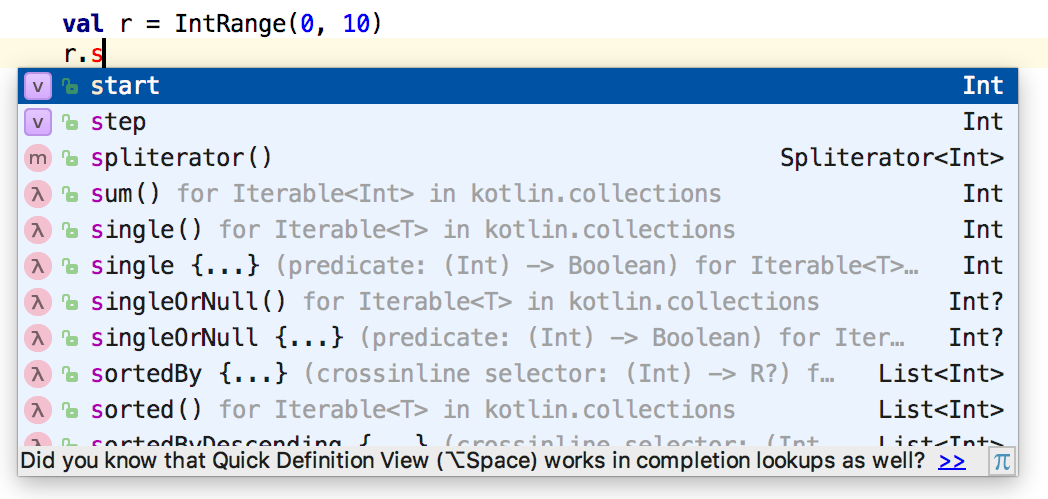
Classes can have many operations (member functions). It’s easy to explore
classes using an IDE (integrated development environment) that includes a
feature called code completion. For example, if you type .s after an object
identifier within IntelliJ IDEA, it shows all the members of that object that
begin with s:
Try using code completion on other objects. For example, you can reverse a
String or convert all the characters to lower case:
// ObjectsEverywhere/Strings.kt

fun main() {
  val s = "AbcD"
  println(s.reversed())
  println(s.lowercase())
}
/* Output:
DcbA
abcd
*/
You can easily convert a String to an integer and back:
// ObjectsEverywhere/Conversion.kt

fun main() {
  val s = "123"
  println(s.toInt())
  val i = 123
  println(i.toString())
}
/* Output:
123
123
*/
Later in the book we discuss strategies to handle situations when the String
you want to convert doesn’t represent a correct integer value.
You can also convert from one numerical type to another. To avoid confusion,
conversions between number types are explicit. For example, you convert an Int
i to a Long by calling i.toLong(), or to a Double with i.toDouble():
// ObjectsEverywhere/NumberConversions.kt

fun fraction(numerator: Long, denom: Long) =
  numerator.toDouble() / denom

fun main() {
  val num = 1
  val den = 2
  val f = fraction(num.toLong(), den.toLong())
  println(f)
}
/* Output:
0.5
*/
Well-defined classes are easy for a programmer to understand, and produce code that’s easy to read.
Exercises and solutions can be found at www.AtomicKotlin.com.