2. Board 1
In Xanpan all work is represented on a physical board, usually a magnetic white board, sometimes called a ‘Kanban board’. You might decide to use an electronic equivalent, but I always strongly advise teams to start with a physical one until they are familiar working in this way. Working physically is magical - the learning experience is so much stronger and faster. Even if an electronic system is adopted, the team should keep the electronic board publicly visible at all times.
There are many different board designs. Indeed, each team is encouraged to design their own board. Think of this like the light sabres used by Jedi Knights in the ‘Star Wars’ films: every Jedi must build their own light sabre, and every Xanpan team must design their own board.
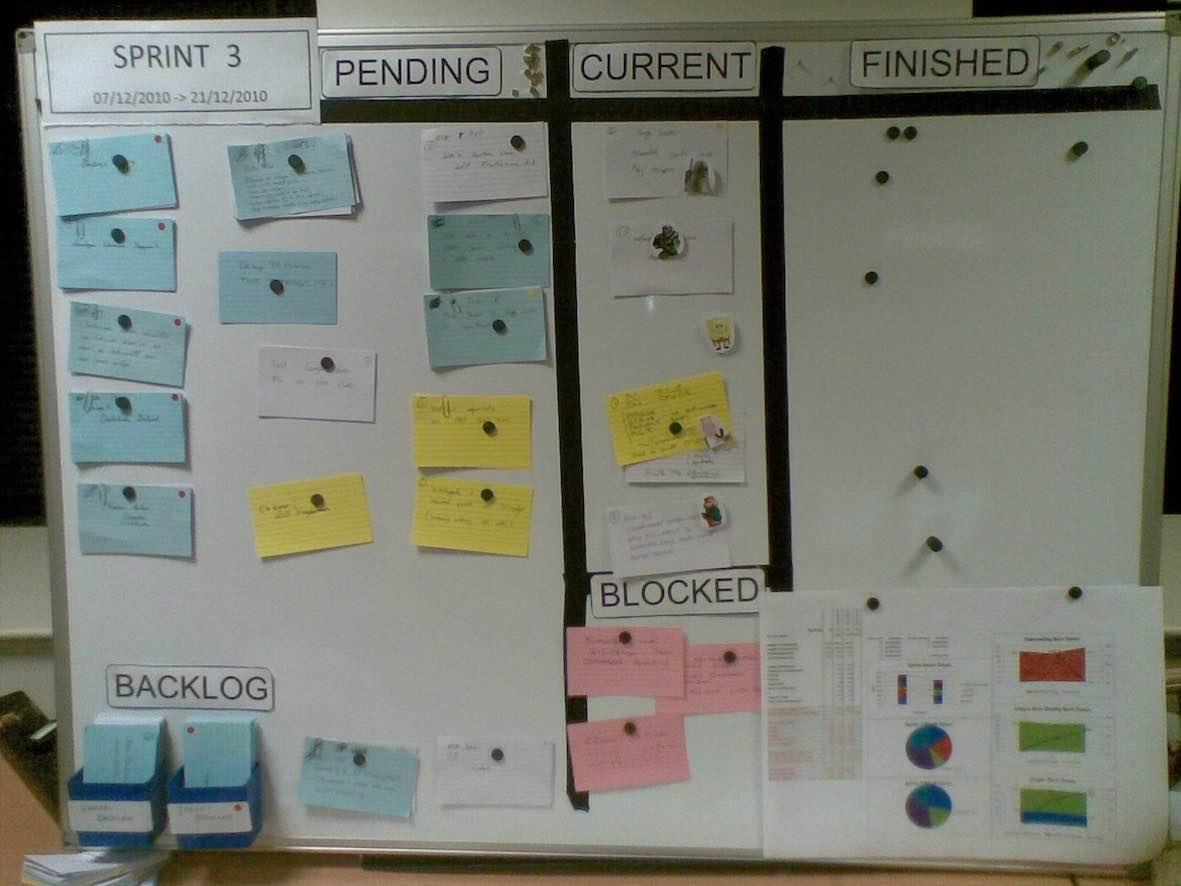
Figure 1 shows perhaps the most basic board design, and will probably look familiar to many readers. This board is at a laboratory equipment maker in Falmouth (UK). The small - five person - development team creates desktop and embedded software used in products for IVF treatment. In addition they create some embedded software used in the company’s own product line facilities.
On the left of the board is the work to be done (the pending column), in the centre is the work in progress (current on this board, commonly known as ‘work in progress’ or WIP in Kanban), while on the right is the work completed. This photo was taken the day after the team reset the board in the planning meeting, so it is quite clear. Over the course of a sprint, cards move from left to right. The objective is to get as many cards as possible from the left-hand side to the right.
At the bottom left is the ‘product backlog’. As with Scrum, the product backlog contains all the work that might be done. In this case the product backlog is physical, and is attached to the board. Personally I like working with a physical backlog, but even I accept it has its limitations. Rows in an Excel spreadsheet can be used, while a GoogleDocs spreadsheet is even better for sharing. Plenty of electronic Agile and ‘requirements management’ tools are available, but there is value in simplicity.
From the product backlog a subset is selected to do in each sprint. In keeping with Scrum terminology, this is the ‘sprint backlog’, but may equally be called the ‘iteration backlog’. This team has two product backlogs for two ‘projects’: one embedded, one desktop. In the right-hand corner are graphs showing status. There are actually three burn-down charts here, so the team has three projects in flight. (The third backlog is not visible here for other reasons.)
Each sprint/iteration is two weeks long. They run back-to-back: the end of one sprint is the start of the next. Each sprint begins with an iteration planning meeting and ends with the next such meeting.
In each planning meeting the board is cleared of work done: cards counted, graphs updated, remaining work reviewed and removed if no longer needed, or left if still important. Then the team refill the left-hand side of the board to slightly more than its expected capacity.
This board also shows a blocked column. Whenever the team want to work on a card but cannot - they are blocked - the card is put in the blocked column. This is a signal that escalation may be needed. Or, as in this case, the team is waiting on the customer for additional information before work can continue.
The colour coding of cards is significant. While teams are free to follow their own colour convention, most follow the one laid out in ‘blue-white-red’:
- Blue cards are development stories - often in user story format, but not always. Blue cards mean something to the business; each card should represent some item of functionality that is valuable to the business/customers.
- White cards are tasks - developer tasks are the most common, but there may be test tasks, analysis tasks or any other type.
- Red cards are bugs - if a problem is found in work done on a white or blue card before the end of the sprint, the card simply moves back to pending or current. If a bug escapes the sprint and a formal bug report is raised, it re-enters the board as a red card.
- Yellow cards are unplanned work. Xanpan allows for both planned and unplanned work. More about these cards in a moment. Bugs requiring an urgent fix may well be unplanned work and should be on the board. Arguably they could be yellow, but red is more commonly used.
Xanpan teams generally follow the Scrum/XP iteration cycle: work is planned in a ‘planning meeting’ and the team accepts a reasonable amount of work. Unlike Scrum, the team is not asked to commit to performing all the work, neither is the cycle locked; work may continue to enter the sprint.
(The words ‘sprint’ and ‘iteration’ are taken to mean exactly the same thing, namely a fixed period of development activity. Scrum introduced the word ‘sprint’ for this, and Extreme Programming, ‘iteration’. In the Xanpan context there is no difference.)
Ideally the team would be able to plan all work up front: no work would be added or removed. However in many environments this is not possible. Bug reports - reds - are one way work may enter. In the case of this team yellows are largely IT support tasks the group needs to look at.
In this picture three IT support yellows are in pending. They have occurred since the start of the sprint, or perhaps they occurred in the last sprint and have been carried over into this one. (Also, unlike Scrum, work can be carried from sprint to sprint: more of this later.) One yellow is in the pending column: someone is actively working on this issue.
While every effort is made to limit work in progress - a default of one task per person - such limits are sometimes broken, and team members need to suspend one task to deal with something more urgent.
Close examination of this picture shows that the yellow in the pending column is on top of a white. One of the developers was working on the white, but has suspended work to deal with an urgent yellow. When this is complete the yellow will be moved to the ‘finished’ column and work will restart on the white.
Unlike whites, the yellows have no effort estimates. Unlike Kanban, tasks - and perhaps stories - are estimated, most probably using the standard planning poker technique. Yellows are retrospectively estimated by the person who completes the tasks when they move to the finished column.
Red, bugs, may or may not be estimated. They may be estimated in advance - as part of the planning meeting - or retrospectively by the person who undertakes the work. Whether and how they are estimated depends on the team’s approach to bugs. The aim is to have no reds - no bugs.
On this board the team has chosen to use Avatars to indicate who is working on which card. Many teams don’t bother indicating who is working on what - they remember or don’t need to know. Other teams use colour-coded magnets (usually the colour of the magnet is meaningless); one team used coloured star stickers, and another coloured shapes.
Regardless of how or whether the team indicates who is working on what, it is best to avoid allocating work until the last possible moment. This moment is when someone becomes available to work on a task. Ideally the tasks to be done are prioritised. The next time someone finishes a task and becomes available, they simply take the highest-priority task and work on it.
This is the ideal, and it is easy to imagine why this doesn’t always happen: someone may lack the skills to work on the next highest task, someone may be working on a related task and it would conflict for two to work on the same thing, and many more reasons.
Allocating tasks as late as possible ensures that priorities are worked on, and reduces bottlenecks around individuals. For this to work, team members need to have similar skill sets.
Most teams - and certainly the team illustrated here - frequently fail to work in strict priority order: however, it should be an aspiration for every team. The first step in this aspiration is to avoid deciding in the planning meeting who will work on each story or task. Instead, wait until at least the daily stand-up meeting, when it becomes clear which stories and tasks will be worked on during the day.
Finally, on this board no attempt is made to indicate how much effort is remaining on a card. The cards have their initial estimates, which are not reduced. It is possible to get an idea of how done a blue is by looking at how many of the associated whites are done, but even this is not very useful. Cards are either done or not done: in programming it is usually impossible to accurately tell how much work is remaining, you don’t know when you are about to hit a problem. Therefore we only consider ‘done’ and ‘not-done’.
Similarly there is no attempt to capture ‘actual effort’ or measure the difference between ‘actuals’ and estimates. For reasons discussed elsewhere, actuals are only retrospective estimates. When a yellow or red is undertaken without an initial estimate, then a retrospective estimate is put on the card; this is not perfect, but is good enough.
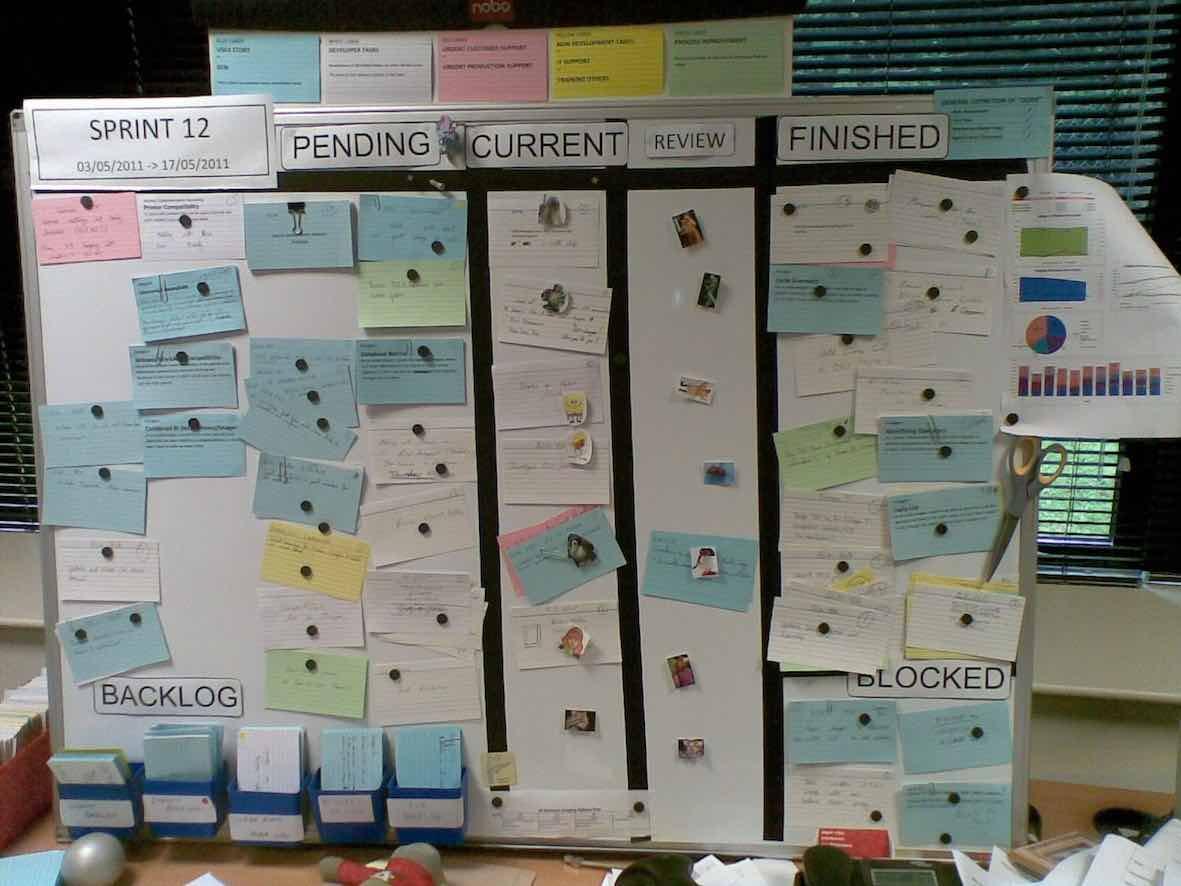
Figure 2 shows the same board five months later. There are fewer yellows in play because the team has hired an IT support engineer to handle most of these tasks. A few support issues or other unplanned work still persist. On the whole support tasks are managed on another board dedicated to the work of the support engineer.
The team has expanded in this picture by joining with a related team that has more engineers and projects (five backlogs now). The merging of the two teams was not entirely successful and was later reversed. The team has added another colour card to the convention: green cards represent process-improvement tasks, perhaps originating in a retrospective, or perhaps from general conversations.
The board has also acquired a new ‘review’ column. When a card is complete it is first moved here before progressing to the finished column. This serves two purposes: first, to demonstrate what items were completed yesterday when the stand-up meeting is held. Second, it allows the developer to ask for someone else to review the work before it is moved to the finished column, although this is not always necessary.
Key points:
- Cards are colour coded: blue, white, red, yellow and green.
- Iterations/sprints are two weeks in length, and start and end with a planning meeting.
- Xanpan iterations contain both planned and unplanned work.
- The board represent the state of the team and their work, not the state of a particular project.
- The product backlog contains all the work that has been requested for a particular product.
- The sprint backlog contains a subset of the product backlog that is currently in play.
- Xanpan is team-centric, so the team may be working on more than one product or project at a time.
- Estimates are made for work planned in the planning meeting; unplanned work is estimated in retrospect.