1. Introduction
1.1 Watir gems
Watir consists of three gems (or projects):
- Watir - This gem is just a loader. Based on the browser that you want to run and your operating system, the Watir gem will load either Watir-Classic or Watir-Webdriver.
- Watir-Classic - This is the original Watir gem that drives Internet Explorer.
- Watir-Webdriver - This gem allows the driving of additional browsers - eg Chrome and Firefox. It is an API wrapper around the Selenium-Webdriver gem (ie translates the Watir commands to Selenium-Webdriver commands).
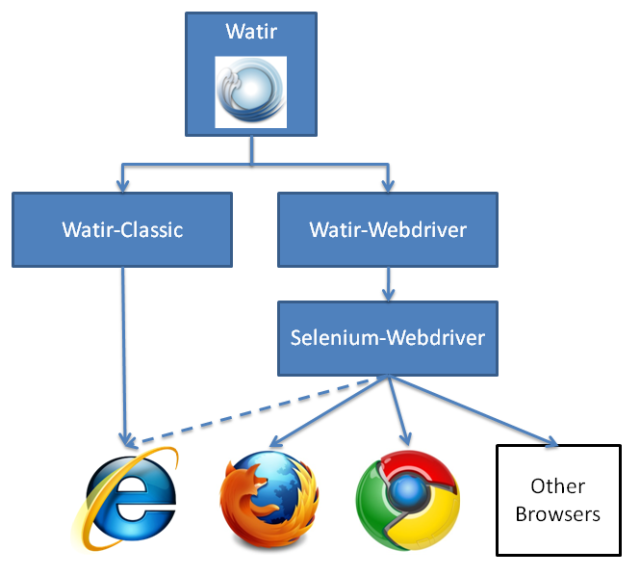
For most users, the structure of the framework will have no significance or impact. Scripts only need to require Watir; making the use of Watir-Classic versus Watir-Webdriver transparent.
However, there are occasions where understanding the gem relationship is crucial:
- API differences - The Watir-Classic and Watir-Webdriver projects strive to be API compatible though a common specification called Watirspec. Unfortunately, due to historical reasons, implementation details, etc., there are still some API differences. The code found in this book can be assumed to work in both projects unless otherwise specified.
- Monkey patching - When adding functionality to Watir, the code may need to consider which browser/gem is being used.
- Getting help - Specifying the gem being used helps ensure that solutions are applicable.
1.2 Building a script
Say we want to explain to someone how to do a Google search for Watir. We might tell them to:
- Open a browser
- Enter the url to go the Google search page
- Input ‘watir’ into the search field
- Click the search button
- Wait for the search results to load
- Click the link for the main Watir page
If you look carefully, you will notice that each step consists of two parts:
- Target - Something to interact with (eg browser, element)
- Action - Something to do with the target (eg click, type, inspect)
We can make these two parts more clear in a table:
| Step | Target | Action |
|---|---|---|
| 1 | browser | open |
| 2 | browser | goto url |
| 3 | search field | type ‘watir’ |
| 4 | search button | click |
| 5 | result link | wait for it to load |
| 6 | result link | click |
Watir is designed to mimic a user’s actions, which means that these same directions can be used when creating an automated script. The only complication is the language barrier. Watir understands Ruby, not English. In essence, building a Watir script is translation exercise.
A translation of the previous table into Watir code would be:
| Step | Target | Action |
|---|---|---|
| 1 | browser | Watir::Browser.new |
| 2 | browser | goto(‘http://www.google.com’) |
| 3 | text_field(:name ⇒ ‘q’) | set(‘watir’) |
| 4 | button(:name ⇒ ‘btnG’) | click |
| 5 | link(:text ⇒ /Watir.com/) | wait_until_present |
| 6 | link(:text ⇒ /Watir.com/) | click |
To make an executable script, the target and action need to be combined back into sentences (or lines of code):
browser = Watir::Browser.new
browser.goto('http://www.google.com')
browser.text_field(:name => 'q').set('watir')
browser.button(:name => 'btnG').click
browser.link(:text => /Watir\.com/).wait_until_present
browser.link(:text => /Watir\.com/).click
The following chapters will discuss how to translate the targets and actions.