S3 Recipes
Signing up for Amazon S3
Signing up for any of the Amazon Web Services is a two step process. First, sign up for an Amazon Web Service Account. Second, sign up for that specific service.
Signing up for Amazon Web Services
Note: If you have already signed up for Amazon Elastic Compute Cloud or any other Amazon Web Services, you can skip this step.
Go to http://aws.amazon.com. On the right sidebars, there’s a link that says ‘sign up today’. Click on that.

You can use an already existing Amazon account, or sign up for a new account. If you use an existing account, you won’t have to enter your address or credit card information. Once you have signed up, Amazon will send you an e-mail, which you can safely ignore for now. You will also be taken to a page with a set of links to all of the different Amazon Web Services. Click on the ‘Amazon Simple Storage Service’ link.
Signing up for Amazon Simple Storage Service
If you have just followed the directions above, you will be looking at the correct web page. If not, go to http://s3.amazonaws.com.
On the right hand side of the page, you will see a button labeled ‘Sign up for this web service’. Click on it, scroll to the bottom, and enter your credit card information. On the next page, enter your billing address. (if you are using an already existing Amazon account, you won’t have to enter this information). Once you are done, click on ‘complete sign up’.

Your access id and secret
You will get a second e-mail from Amazon with directions on getting your account information and your access key. Click on the second link in the e-mail or go to http://aws-portal.amazon.com/gp/aws/developer/account/index.html?action=access-key.
On the right-hand side of the page, you will see your access key and secret access key. You will need to click on ‘show’ to see your secret access key.
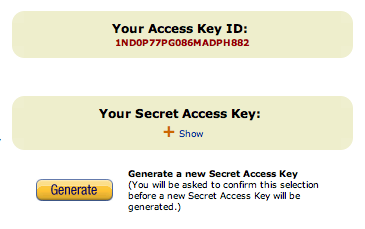
Your access key is
Next Steps
Once you have signed up, you will want to install Ruby and the AWS/S3 gem (“Installing Ruby and the AWS/S3 Gem”) and set up s3sh (“Setting up the S3SH command line tool”) and s3lib (“Installing the S3Lib library”). These tools are used in almost all of the rest of the recipes.
Installing Ruby and the AWS/S3 Gem
The Problem
You want to use the AWS/S3 library to use the examples in this book. You will need to install Ruby first as well.
The Solution
The AWS/S3 Gem is a Ruby library for talking to Amazon S3 written by Marcel Molina. It wraps the S3 Rest interface into an elegant Ruby library. Full documentation for the library can be found at amazon.rubyforge.org. It also comes with a command line tool to interact with S3, s3sh. We will be using s3sh and the AWS/S3 library in many of the S3 Recipes, so it will be worth your while to install it.
There are three steps to this process:
- Install Ruby
- Install RubyGems
- Install the AWS/S3 Gem
Installing Ruby
First, check to make sure that you don’t already have Ruby installed. Try typing
1 $> ruby
at the command prompt. If it’s not installed, read the section specific to your Operating System for installation directions. If none of those options work for you, then you can download the source code or pre-compiled packages at http://www.ruby-lang.org/en/downloads/.
On Windows
On Windows, the easiest way to install Ruby and RubyGems is via the ‘One-click Ruby Installer’. Go to http://rubyinstaller.rubyforge.org/wiki/wiki.pl, download the latest version and run the executable. This will install Ruby and RubyGems.
On OS X
If you are using OS X 10.5 (Leopard) or greater, Ruby and RubyGems will be installed when you install the XCode developer tools that came with your computer. On earlier versions of OS X, Ruby will be installed by you will have to install RubyGems yourself.
On Unix
You most likely have Ruby installed on your Unix machine. If not, use your package manager to get it.
On Redhat, yum install ruby
On Debian, apt-get install ruby
If you want to roll your own or are using a more esoteric version of Unix, download the source code or pre-compiled packages at http://www.ruby-lang.org/en/downloads/.
Installing RubyGems
RubyGems is the package manager for Ruby. It allows you to easily install, uninstall and upgrade packages of Ruby code. Before trying to install it, check to make sure that you don’t already have rubygems installed. Try typing
1 $> gem
at the command prompt. If it’s not installed, then do the following:
- Download the latest version of RubyGems from RubyForge at http://rubyforge.org/frs/?group_id=126
- Uncompress the package you downloaded in to a directory
- CD in to the directory and then run the setup program
$> ruby setup.rb
Installing the AWS/S3 gem
Once you have Ruby and RubyGems installed, installing the Amazon Web Services S3 Gem is simple. Just type
1 $> gem install aws-s3
or
1 $> sudo gem install aws-s3
at the command prompt. You should see something similiar to this:
1 $> sudo gem install aws-s3
2 Successfully installed aws-s3-0.4.0
3 1 gem installed
4 Installing ri documentation for aws-s3-0.4.0...
5 Installing RDoc documentation for aws-s3-0.4.0...
Setting up the S3SH command line tool
One of the great tools that comes with the AWS/S3 gem is the s3sh command line tool. You need to have Ruby and the AWS/S3 gem installed (“Installing Ruby and the AWS/S3 Gem”) before going any farther with this recipe.
Once you have installed the AWS/S3 gem, you should be able to start up s3sh by typing s3sh at the command prompt. After a few seconds, you will see a new prompt that looks like ‘>>’. You can use the Base.connected? command from the AWS/S3 library to see if you are connected to S3.
1 $> s3sh
2 >> Base.connected?
3 => false
4 >>
The Base.connected? command is returning false, telling us that you are not connected to S3. To connect to S3, you need to provide your authentication information: your AWS ID and your AWS secret. There are two ways to do this: the hard way and the easy way. Let’s do the hard way first.
The hard way isn’t all that hard. You use the Base.establish_connection! command from AWS/S3 library to connect to S3.
1 >> Base.establish_connection!(:access_key_id => 'your AWS ID',
2      :secret_access_key => 'your AWS secret')
3 >> Base.connected?
4 => true
5 >>
The hard part is that you’ll have to do that every time you start up s3sh. If you’re lazy like me, you can avoid this by setting two environment variables. AMAZON_ACCESS_KEY_ID should be set to your AWS ID, and AMAZON_SECRET_ACCESS_KEY should be set to your AWS secret. I’m not going to go in to the gory details of how you do this. If you have them set correctly, you will automatically be authenticated with S3 when you start up s3sh.
1 $> env | grep AMAZON
2 AMAZON_ACCESS_KEY_ID=my_aws_id
3 AMAZON_SECRET_ACCESS_KEY=my_aws_secret
4 $> s3sh
5 >> Base.connected?
6 => true
7 >>
Now that you are connected, you can play around a little. Try the following recipes for some inspiration:
Installing the S3Lib library
The Problem
You want to use S3Lib to follow along with the recipes or to fool around with S3 requests.
The Solution
Install the S3Lib gem with one of the following commands. Use the sudo version if you’re on a Unix or OS X system, the non-sudo version if you’re on Windows or using rvm or rbenv.
1 $> sudo gem install s3lib
2
3 C:\> gem install s3lib
Once you have the gem installed, follow the directions in “Setting up the S3SH command line tool” to set up your environment variables.
Discussion
Test out your setup by opening up an s3lib session and trying the following:
1 $> s3lib
2 >> S3Lib.request(:get, '').read
3 => "<?xml version=\"1.0\" encoding=\"UTF-8\"?>
4 <ListAllMyBucketsResult xmlns=\"http://s3.amazonaws.com/doc/2006-03-01/\">
5    ...
6 </ListAllMyBucketsResult>"
If you get a nice XML response showing a list of all of your buckets, everything is working properly.
If you get something that looks like this, then you haven’t set up the environment variables correctly:
1 $> s3lib
2 >> S3Lib.request(:get, '')
3 S3Lib::S3ResponseError: 403 Forbidden
4 amazon error type: SignatureDoesNotMatch
5         from /Library/Ruby/Gems/1.8/gems/s3-lib-0.1.3/lib/s3_authenticator.rb:39\
6 :in `request'
7         from (irb):1
Make sure you’ve followed the directions in “Setting up the S3SH command line tool”, then try again.
Making a request using s3Lib
The Problem
You want to make requests to S3 and receive back unprocessed XML results. You might just be experimenting, or you might be using S3Lib as the basis for an S3 Library
The Solution
Make sure you’ve installed S3Lib as described in “Installing the S3Lib library”. Then, require the S3Lib library and use S3Lib.request to make your request.
Here’s an example script:
1 #!/usr/bin/env ruby
2
3 require 'rubygems'
4 require 's3lib'
5
6 puts S3Lib.request(:get, '').read
To use S3Lib in an interactive shell, use irb, requiring s3lib when you invoke it:
1 $> irb -r s3lib
2 >> puts S3Lib.request(:get, '').read
3   <?xml version="1.0" encoding="UTF-8"?>
4   <ListAllMyBucketsResult xmlns="http://s3.amazonaws.com/doc/2006-03-01/">
5     ...
6   </ListAllMyBucketsResult>
Discussion
The S3Lib::request method takes three arguments, two of them required. The first is the HTML verb that will be used to make the request. It can be :get, :put, :post, :delete or :head. The second is the URL that you will be making the request to. The final argument is the params hash. This is used to add headers or a body to the request.
If you want to create an object on S3, you make a PUT request to the object’s URL. You will need to use the params hash to add a body (the content of the object you are creating) to the request. You will also need to add a content-type header to the request. Here’s a request that creates an object with a key of new.txt in the bucket spatten_test_bucket with a body of ‘this is a new text file’ and a content type of ‘text/plain’.
1 S3Lib.request(:put, 'spatten_test_bucket/new.txt',
2               :body => "this is a new text file",
3               'content-type' => 'text/plain')
The response you get back from an S3Lib.request is a Ruby IO object. If you want to see the actual response, use .read on the response. If you want to read it more than once, you’ll need to rewind between reads:
 1 $> irb -r s3lib
 2 >> response = S3Lib.request(:get, '')
 3 => #<StringIO:0x11c7edc>
 4 >> puts response.read
 5 <?xml version="1.0" encoding="UTF-8"?>
 6 <ListAllMyBucketsResult xmlns="http://s3.amazonaws.com/doc/2006-03-01/">
 7   ...
 8 </ListAllMyBucketsResult>
 9 >> puts response.read
10
11 >> response.rewind
12 >> puts response.read
13 <?xml version="1.0" encoding="UTF-8"?>
14 <ListAllMyBucketsResult xmlns="http://s3.amazonaws.com/doc/2006-03-01/">
15   ...
16 </ListAllMyBucketsResult>
Getting the response with AWS/S3
The Problem
You have made a request to S3 using the AWS/S3, and you want to see the response status and/or the raw XML response.
The Solution
Use Service.response to get both
1 $> s3sh
2 >> Bucket.find('spattentemp')
3 >> Service.response
4 => #<AWS::S3::Bucket::Response:0x9759530 200 OK>
5 >> Service.response.code
6 => 200
7 >> Service.response.body
8 => "<?xml version=\"1.0\" encoding=\"UTF-8\"?>
9 <ListBucketResult xmlns=\"http://s3.amazonaws.com/doc/2006-03-01/\">
10 <Name>spattentemp</Name>
11 <Prefix></Prefix>
12 <Marker></Marker>
13 <MaxKeys>1000</MaxKeys>
14 <IsTruncated>false</IsTruncated>
15 <Contents>
16 <Key>acl.rb</Key>
17 <LastModified>2008-09-12T18:45:27.000Z</LastModified>
18 <ETag>"87e54e8253f2be98ec8f65111f16980d"</ETag>
19 <Size>4141</Size>
20 <Owner>
21 <ID>9d92623ba6dd9d7cc06a7b8bcc46381e7c646f72d769214012f7e91b50c0de0f</ID>
22 <DisplayName>scottpatten</DisplayName>
23 </Owner>
24 <StorageClass>STANDARD</StorageClass>
25 </Contents>
26
27 ....
28
29 <Contents>
30 <Key>service.rb</Key>
31 <LastModified>2008-09-12T18:45:22.000Z</LastModified>
32 <ETag>"98b9dce82771bbfec960711235c2d445"</ETag>
33 <Size>455</Size>
34 <Owner>
35 <ID>9d92623ba6dd9d7cc06a7b8bcc46381e7c646f72d769214012f7e91b50c0de0f</ID>
36 <DisplayName>scottpatten</DisplayName>
37 </Owner>
38 <StorageClass>STANDARD</StorageClass>
39 </Contents>
40 </ListBucketResult>"
Discussion
There are a lot of other useful methods that Service.response responds to. Two you might use are Service.response.parsed, which returns a hash obtained from parsing the XML, and Service.response.server_error?, which returns true if the response was an error and false otherwise.
1 >> Service.response.parsed
2 => {"prefix"=>nil, "name"=>"spattentemp", "marker"=>nil, "max_keys"=>1000,
3     "is_truncated"=>false}
4 >> Service.response.server_error?
5 => false
Installing The FireFox S3 Organizer
The Problem
You want a GUI for your S3 account, and you’ve heard the S3 FireFox organizer is pretty good.
The Solution
In FireFox, go to http://addons.mozilla.org and search for ‘amazon s3 organizer’. Click on the ‘Add to FireFox’ button for the ‘Amazon S3 FireFox Organizer (S3Fox)’. Follow the installation instructions, and then restart FireFox.
There will now be a ‘S3 Organizer’ entry in the Tools menu. Click on that, and you’ll see something like this:
Figure 3.1. S3Fox alert box
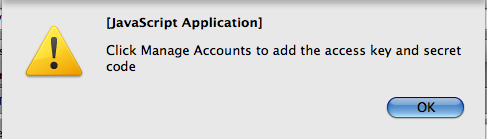
Click on the ‘Manage Accounts’ button and then enter a name for your account along with your Access Key and Secret Key. After clicking on ‘Close’, you should see a list of your buckets.
Discussion
For a list of tools that work with S3, including some other GUI applications, see this blog post at elasti8.com: http://www.elastic8.com/blog/tools_for_accessing_using_to_backup_your_data_to_and_from_s3.html
Working with multiple s3 accounts
The Problem
If you’re like me, you have a number of clients all with different S3 accounts. Using your command line tools to work with their accounts can be annoying as you have to copy and paste their access_key and amazon_secret_key in to the correct environment variables every time you change accounts. This recipe provides a quick way of switching accounts.
The Solution
The first thing you need to do is create a file called .s3_keys.yml in your home directory. This is a file in the YAML format (YAML stands for “YAML Ain’t Markup Language”. The official web-site for YAML is at http://www.yaml.org/). Make an entry in the file for each S3 account you have. It should look something like this:
Example 3.4. .s3_keys.yml <<(code/working_with_multiple_s3_accounts_recipe/.s3_keys.yml)
The s3sh_as program
Now we need a program that will read the .s3_keys.yml file, grab the correct set of keys, set them in the environment and then open up a s3sh shell. Here’s something that does the trick:
Example 3.5. s3sh_as <<(code/working_with_multiple_s3_accounts_recipe/s3sh_as)
Discussion
To use s3sh_as, put s3sh_as somewhere in your path, and then call it like this:
1 $> s3sh_as <name of your S3 account>
For example, if I wanted to use my personal account, I would type
1 $> s3sh_as personal
If I wanted to do some work on client_1’s account, I would type
1 $> s3sh_as client_1
If you don’t want to type the code in yourself, then just install the S3Lib gem.
1 sudo gem install s3lib
When you install the S3Lib gem, a version of s3sh_as is automatically installed. The s3lib program is also installed when you install the S3Lib gem. This program, which provides a shell to play around with the S3Lib library, will read the .s3keys.yml file just like s3sh_as, so you can use it to access multiple accounts as well.
Accessing your buckets through virtual hosting
The Problem
You want to access your buckets as either bucketname.s3.amazonaws.com or as
some.other.hostname.com.
The Solution
If you make a request with the hostname as s3.amazonaws.com, the bucket is taken as everything before the first slash in the path of the URI you pass in. The object is everything after the first slash. For example, take a GET request to
http://s3.amazonaws.com/somebucket/object/name/goes/here.
The host is s3.amazonaws.com and the path is
somebucket/object/name/goes/here. Since the host is s3.amazonaws.com, S3 parses the path and finds that the bucket is somebucket and the object key isobject/name/goes/here.
If the hostname is not s3.amazonaws.com, then S3 will parse the hostname to find the bucket and use the full path as the object key. This is called virtual hosting. There are two ways to use virtual hosting. The first is to use a sub-domain of s3.amazonaws.com. If I make a request to http://somebucket.s3.amazonaws.com, the bucket name will be set to somebucket. If you include a path in the URL, this will be the object key. http://somebucket.s3.amazonaws.com/some.key is the URL for the object with a key of some.key in the bucket somebucket.
The second method of doing virtual hosting uses DNS aliases. You name a bucket some domain or sub-domain that you own, and then point the DNS for that domain or subdomain to the proper subdomain of s3.amazonaws.com. For example, I have a bucket called assets0.plotomatic.com, which has its DNS aliased to assets0.plotomatic.com.s3.amazonaws.com. Any requests to http://assets0.plotomatic.com will automagically be pointed at my bucket on S3.
Discussion
The ability to do virtual hosting is really useful in a lot of cases. It’s used for hosting static assets for a website (see “Using S3 as an asset host”) or whenever you want to obscure the fact that you are using S3.
One other benefit is that it allows you to put things in the root directory of a site you are serving. Things like robots.txt and crossdomain.xml are expected to be in the root, and there’s no way to do that without using virtual hosting.
There’s not room here to explain how to set up DNS aliasing for every Domain Registrar out there. Look for help on setting up DNS Aliases or C Name settings. This blog post from Blogger.com gives instructions for a few common registrars: http://help.blogger.com/bin/answer.py?hl=en-ca&answer=58317
Creating a bucket
The Problem
You want to create a new bucket
The Solution
To create a bucket, you make a PUT request to the bucket’s name, like this:
1 PUT /my_new_bucket
2 Host: s3.amazonaws.com
3 Content-Length: 0
4 Date: Wed, 13 Feb  2008 12:00:00 GMT
5 Authorization: AWS some_id:some_authentication_string
To make the authenticated request using the s3lib library
1 #!/usr/bin/env ruby
2 require 'rubygems'
3 require 's3lib'
4
5 response = S3Lib.request(:put,'/my_new_bucket')
To create a bucket in S3SH, you use the Bucket.create command:
1 $> s3sh
2 >> Bucket.create('my_new_bucket')
3 => true
Creating buckets virtual hosted style
You can also make the request using a virtual hosted bucket by setting the Host parameter to the virtual hosted bucket’s url:
1 PUT /
2 Host: mynewbucket.s3.amazonaws.com
3 Content-Length: 0
4 Date: Wed, 13 Feb  2008 12:00:00 GMT
5 Authorization: AWS some_id:some_authentication_string
There’s no way to do this using s3sh, but there’s no real reason why you need to create a bucket using virtual hosting. Here’s how you make the PUT request to a virtual hosted bucket using the s3lib library:
1 #!/usr/bin/env ruby
2 require 's3lib'
3
4 response = S3Lib.request(:put,'/',
5                          {'host' => 'newbucket.s3.amazonaws.com'})
Remember that URLs cannot contain underscores (‘_’), so you won’t be able to create or use a bucket named ‘my_new_bucket’ using virtual hosting.
Errors
If you try to create a bucket that is already owned by someone else, Amazon will return a 409 Conflict error. Is s3sh, a AWS::S3::BucketAlreadyExists error will be raised.
 1 $> s3sh
 2 >> Bucket.create('not_my_bucket')
 3 AWS::S3::BucketAlreadyExists: The requested bucket name is not available.
 4 The bucket namespace is shared by all users of the system. Please select a diffe\
 5 rent name and try again.
 6         from /opt/local/lib/ruby/gems/1.8/gems/aws-s3-0.4.0/bin/../lib/aws/s3/er\
 7 ror.rb:38:in `raise'
 8         from /opt/local/lib/ruby/gems/1.8/gems/aws-s3-0.4.0/bin/../lib/aws/s3/ba\
 9 se.rb:72:in `request'
10         from /opt/local/lib/ruby/gems/1.8/gems/aws-s3-0.4.0/bin/../lib/aws/s3/ba\
11 se.rb:83:in `put'
12         from /opt/local/lib/ruby/gems/1.8/gems/aws-s3-0.4.0/bin/../lib/aws/s3/bu\
13 cket.rb:79:in `create'
14         from (irb):1
Discussion
Since a bucket is created by a PUT command, the request is idempotent: you can issue the same PUT request multiple times and have the same effect each time. In other words, Bucket.create won’t complain if you try to create one of your buckets again
1 >> Bucket.create('some_bucket_that_does_not_exist')
2 => true
3 >> Bucket.create('some_bucket_that_does_not_exist') # It exists now, but that's \
4 okay
5 => true
This is useful if you are not sure that a bucket exists. There’s no need to write something like this
1 def function_that_requires_a_bucket
2   begin
3     Bucket.find('some_bucket_that_may_or_may_not_exist')
4   rescue AWS::S3::NoSuchBucket
5     Bucket.create('some_bucket_that_may_or_may_not_exist')
6   end
7   ... rest of method ...
8 end
You can just use Bucket.create
1 def function_that_requires_a_bucket
2   Bucket.create('some_bucket_that_may_or_may_not_exist')
3   ... rest of method ...
4 end
One last thing to note is that Bucket.create returns true if it is successful and raises an error otherwise. Bucket.create does not return the newly created bucket. If you want to create a bucket and then assign it to a variable, you need to use Bucket.find to do the assignation
1 def function_that_requires_a_bucket
2   Bucket.create('my_bucket')
3   my_bucket = Bucket.find('my_bucket')
4   ... rest of method ...
5 end
Creating a European bucket
The Problem
For either throughput or legal reasons, you want to create a bucket that is physically located in Europe.
The Solution
To create a bucket that is located in Europe rather than North America, you add some XML to the body of the PUT request when creating the bucket. The XML looks like this:
1 <CreateBucketConfiguration>
2   <LocationConstraint>EU</LocationConstraint>
3 </CreateBucketConfiguration>
The following code will create a European bucket named spatteneurobucket:
1 $>s3lib
2 >> euro_xml = <<XML
3 <CreateBucketConfiguration>
4   <LocationConstraint>EU</LocationConstraint>
5 </CreateBucketConfiguration>
6 XML
7 >> S3Lib.request(:put, 'spatteneurobucket', :body => euro_xml, 'content-type' =>\
8  'text/xml')
9 => #<StringIO:0x1675858>
Discussion
There are a few things worth noting here. First, as usual, I had to add the content-type to the PUT request. Second, European buckets must be read using virtual hosting. The GET request using virtual hosting will look like this:
1 >> S3Lib.request(:get, '', 'host' => 'spatteneurobucket.s3.amazonaws.com').read
2 => "<?xml version=\"1.0\" encoding=\"UTF-8\"?>
3 <ListBucketResult xmlns=\"http://s3.amazonaws.com/doc/2006-03-01/\">
4 	<Name>spatteneurobucket</Name>
5 	<Prefix></Prefix>
6 	<Marker></Marker>
7 	<MaxKeys>1000</MaxKeys>
8 	<IsTruncated>false</IsTruncated>
9 </ListBucketResult>"
There are not objects in this bucket, so there are no content tags.
If I try to do a standard GET request, I will raise an error
1 >> S3Lib.request(:get, 'spatteneurobucket')
2 URI::InvalidURIError: bad URI(is not URI?):
3   from /opt/local/lib/ruby/1.8/uri/common.rb:436:in `split'
4   from /opt/local/lib/ruby/1.8/uri/common.rb:485:in `parse'
5 ...
6   from (irb):27
The requirement to use virtual hosting also means that there are extra constraints on the bucket name, as discussed in “Bucket Names”. Because this constraint is required, Amazon enforces them. If you try to create, for example, a bucket with underscores in its name, Amazon will complain:
1 >> S3Lib.request(:put, 'spatten_euro_bucket', :body => euro_xml, 'content-type' \
2 => 'text/xml')
3 S3Lib::S3ResponseError: 400 Bad Request
4 amazon error type: InvalidBucketName
5         from /Users/Scott/versioned/s3_and_ec2_cookbook/code/s3_code/library/s3_\
6 authenticator.rb:39:in `request'
7         from (irb):17
Finally, if you try to create a European bucket multiple times, an error is raised by Amazon:
1 >> S3Lib.request(:put, 'spatteneurobucket', :body => euro_xml, 'content-type' =>\
2  'text/xml').read
3 S3Lib::S3ResponseError: 409 Conflict
4 amazon error type: BucketAlreadyOwnedByYou
5         from /Users/Scott/versioned/s3_and_ec2_cookbook/code/s3_code/library/s3_\
6 authenticator.rb:39:in `request'
7         from (irb):22
This is different behavior from standard buckets, where you are able to create a bucket again and again with no problems (or affects, either).
Finding a bucket’s location
The Problem
You have a bucket, and you aren’t sure if it is located in Europe or North America.
The Solution
Make an authenticated GET request to the bucket’s location URL, which is the bucket’s URL with ?location appended to it. If your bucket is located in North America, then the response will look like this:
1 <?xml version=\"1.0\" encoding=\"UTF-8\"?>
2 <LocationConstraint xmlns=\"http://s3.amazonaws.com/doc/2006-03-01/\"/>
If the bucket is located in Europe, then the response will look like this:
1 <?xml version=\"1.0\" encoding=\"UTF-8\"?>
2 <LocationConstraint xmlns=\"http://s3.amazonaws.com/doc/2006-03-01/\">EU</Locati\
3 onConstraint>
Both requests return a LocationConstraint element. If it’s a North American bucket, the element will be empty. If it’s a European bucket, then it will contain EU. Presumably, if and when further locations become available they will follow the same pattern.
Discussion
At the time of writing, the AWS/S3 library didn’t have support for location creation or reading. You can make the request yourself, however, using the S3Lib library. Here’s an example:
Example 3.6. getting the bucket location using S3Lib
1 $> irb -r s3lib
2 >> S3Lib.request(:get, 'spatteneurobucket?location').read
3 => "<?xml version=\"1.0\" encoding=\"UTF-8\"?>
4 <LocationConstraint xmlns=\"http://s3.amazonaws.com/doc/2006-03-01/\">EU</Locati\
5 onConstraint>"
Deleting a bucket
The Problem
You have a bucket that you want to delete.
The Solution
Using the AWS/S3 library, use Bucket.delete:
1 $> s3sh
2 >> Bucket.delete('spatten_test_bucket')
If the bucket is not empty, you will get an AWS::S3::BucketNotEmpty error. You can force the deletion of the bucket by adding a :force => true parameter:
 1 $> s3sh
 2 >> Bucket.delete('spatten_test_bucket')
 3 AWS::S3::BucketNotEmpty: The bucket you tried to delete is not empty
 4         from /Library/Ruby/Gems/1.8/gems/aws-s3-0.5.1/bin/../lib/aws/s3/error.rb\
 5 :38:in `raise'
 6         from /Library/Ruby/Gems/1.8/gems/aws-s3-0.5.1/bin/../lib/aws/s3/base.rb:\
 7 72:in `request'
 8         from /Library/Ruby/Gems/1.8/gems/aws-s3-0.5.1/bin/../lib/aws/s3/base.rb:\
 9 83:in `delete'
10         from /Library/Ruby/Gems/1.8/gems/aws-s3-0.5.1/bin/../lib/aws/s3/bucket.r\
11 b:163:in `delete'
12         from (irb):1
13 >> Bucket.delete('spatten_test_bucket', :force => true)
This will delete all objects in the bucket before deleting the bucket, so it may take a while.
To delete a bucket by hand, first delete all objects in the bucket (see “Deleting an object”) and then make a DELETE request to the bucket’s URL:
1 $> s3lib
2 >> S3Lib.request(:delete, 'spatten_test_bucket')
Discussion
If you try to delete a bucket that doesn’t exist, you will get a 404 Not Found response:
1 >> S3Lib.request(:delete, 'nonexistent_bucket')
2 S3Lib::S3ResponseError: 404 Not Found
3 amazon error type: NoSuchBucket
4         from /Library/Ruby/Gems/1.8/gems/s3-lib-0.1.6/lib/s3_authenticator.rb:38\
5 :in `request'
6         from (irb):4
Synchronizing two buckets
The Problem
You have two buckets that you want to keep exactly the same (you are probably using them for hosting assets, as in “Using S3 as an asset host”).
The Solution
Use conditional object copying to copy all files from one bucket to another. The following code goes through every object in the source bucket and copies it to the target bucket if either the object doesn’t exist in the target bucket or if the target bucket’s version of the object is different than the source bucket’s version.
Example 3.7. synchronize_buckets
 1 #!/usr/bin/env ruby
 2 require 'rubygems'
 3 require 'aws/s3'
 4 include AWS::S3
 5
 6
 7 module AWS
 8   module S3
 9
10     class Bucket
11
12       # copies all files from current bucket to the target bucket.
13       # target_bucket can be either a bucket instance or a string
14       # containing the name of the bucket.
15       def synchronize_to(target_bucket)
16         objects.each do |object|
17           object.copy_to_bucket_if_etags_dont_match(target_bucket)
18         end
19       end
20
21     end
22
23     class S3Object
24
25       # Copies the current object to the target bucket.
26       # target_bucket can be a bucket instance or a string containing
27       # the name of the bucket.
28       def copy_to_bucket(target_bucket, params = {})
29         if target_bucket.is_a?(AWS::S3::Bucket)
30           target_bucket = target_bucket.name
31         end
32         puts "#{key} => #{target_bucket}"
33         begin
34           S3Object.store(key, nil, target_bucket,
35                          params.merge('x-amz-copy-source' => path))
36         rescue AWS::S3::PreconditionFailed
37         end
38       end
39
40       # Copies the current object to the target bucket
41       # unless the object already exists in the target bucket
42       # and they are identical.
43       # target_bucket can be a bucket instance or a string containing
44       # the name of the bucket.
45       def copy_to_bucket_if_etags_dont_match(target_bucket, params = {})
46         unless target_bucket.is_a?(AWS::S3::Bucket)
47           target_bucket = AWS::S3::Bucket.find(target_bucket)
48         end
49         if target_bucket[key]
50           params.merge!(
51             'x-amz-copy-source-if-none-match' => target_bucket[key].etag)
52         end
53         copy_to_bucket(target_bucket, params)
54       end
55
56     end
57
58   end
59 end
60
61 USAGE = "Usage: synchronize_buckets <source_bucket> <target_bucket>"
62 (puts USAGE;exit(0)) unless ARGV.length == 2
63 source_bucket_name, target_bucket_name = ARGV
64
65 AWS::S3::Base.establish_connection!(
66     :access_key_id     => ENV['AMAZON_ACCESS_KEY_ID'],
67     :secret_access_key => ENV['AMAZON_SECRET_ACCESS_KEY']
68 )
69
70 Bucket.create(target_bucket_name)
71 Bucket.find(source_bucket_name).synchronize_to(target_bucket_name)
You run the script like this:
1 $> ./synchronize_buckets spatten_s3demo spatten_s3demo_clone
2 eventbrite_com_errors.jpg => spatten_s3demo_clone
3 test.txt => spatten_s3demo_clone
4 vampire.jpg => spatten_s3demo_clone
Discussion
This script just screamed out for the addition of methods to the Bucket and S3Object classes. I borrowed the copy_to_bucket and copy_to_bucket_if_etags_dont_match methods from “Copying an object”, and added the Bucket.synchronize_to method.
If you want to maintain the permissions on the newly created objects, you’ll have to add functionality to copy grants or to add an :access parameter to the params hash passed to S3Object.store.
This script will never delete objects from the target bucket. I’ll leave it as an exercise for the reader to add this functionality.
Using REXML and XPath to parse an XML response from S3
The Problem
You have received an XML response from S3, and you want to extract some information from it.
The Solution
There are many ways to do this, but the one that I have used throughout the book for parsing responses from S3 is the Ruby REXML library. REXML has a few ways of finding nodes in an XML document. I’ll be using XPath throughout the book.
Finding XML nodes with XML
Let’s start with a sample document, and figure out how we can get the information we want from it. Here’s a purely imaginary example of a book written in XML format:
 1 <?xml version=\"1.0\" encoding=\"UTF-8\"?>
 2 <book>
 3   <chapter title="S3's Architecture">
 4     <section href="s3_architecture/intro.xml"/>
 5     <section href="s3_architecture/buckets.xml"/>
 6     <section href="s3_architecture/objects.xml"/>
 7   	<section href="s3_architecture/acls.xml"/>
 8   </chapter>
 9   <chapter title="S3 Recipes">
10     <section href="s3_recipes/signing_up_for_s3.xml"/>
11     <section href="s3_recipes/installing_ruby_and_awss3gem.xml"/>
12     <section href="s3_recipes/setting_up_s3sh.xml"/>
13     <section href="s3_recipes/installing_the_firefox_s3_organizer.xml"/>
14     <section href="s3_recipes/dealing_with_multiple_s3_accounts.xml"/>
15     <section href="s3_recipes/creating_a_bucket.xml"/>
16   </chapter>
17   <chapter title="Authenticating S3 Requests">
18     <section href="s3_authentication/authenticating_s3_requests.xml"/>
19     <section href="s3_authentication/s3_authentication_intro.xml"/>
20     <section href="s3_authentication/the_http_verb.xml"/>
21     <section
22       href="s3_authentication/the_canonicalized_positional_headers.xml"/>
23   </chapter>
24 </book>
First, let’s use XPath to find all of the chapters in the response. XPath is a language that allows you to select nodes from an XML document. I’m not going to fully explain how XPath works. That’s a good chunk of a book in and of itself. See O’Reilly’s XPath and XPointer for an example (http://oreilly.com/catalog/9780596002916/).
Here are some quick, cookbook style examples that show you how it works:
An XPath of //chapter will find all chapter nodes, no matter where they are in the document. The following code finds all of the chapter elements in the sample XML and prints them out
Example 3.8. xpath_example.rb <<(code/using_rexml_and_xpath_to_parse_an_xml_response_from_s3_recipe/xpath_example.rb)
Let’s look at the code and figure out what’s going on. First, we take a string representing an XML document and load it into the xml variable. Next, we make a new instance of REXML::Document with that string. Next, and most interestingly, we find all of the chapter elements of the XML document using the XPath expression //chapter. We then print the chapter elements out for posterity.
Okay, so that let’s us find all chapter elements. What if you wanted all of the chapters that weren’t in the appendix? You can do this using a nested XPath expression that looks like this //book/chapter. This means ‘find me all of the chapter elements that are children of a book element’. If you wanted to make sure that the book element you were referring to was the root element of the document, you would use a single forward slash at the beginning of your XPath expression: /book/chapter. If you wanted all of the chapters in the appendix, you could use an XPath expression like //book/appendix/chapter or //appendix/chapter. In this example, they will find exactly the same thing. If you had an XML document with appendix elements that were not children of book elements, then //appendix/chapter would find those appendix elements, while //book/appendix/chapter would not.
If you wanted to get only the chapter with a title of ‘Authenticating S3 Requests’, then you could use an XPath expression like //chapter[@title="Authenticating S3 Requests"]. If you wanted a list of all sections in that chapter, then your XPath expression would be //chapter[@title="Authenticating S3 Requests"]/section.
Extracting information from an XML tree
One other thing we’ll be doing a lot is extracting a single element from another XML element. For example, if I ask S3 for a listing of all my buckets, I’ll get an XML response back that looks like this:
 1 <ListAllMyBucketsResult xmlns=\"http://s3.amazonaws.com/doc/2006-03-01/\">
 2   <Owner>
 3     <ID>9d92623ba6dd9d7cc06a7b8bcc46381e7c646f72d769214012f7e91b50c0de0f</ID>
 4     <DisplayName>scottpatten</DisplayName>
 5   </Owner>
 6   <Buckets>
 7     <Bucket>
 8       <Name>amazon_s3_and_ec2_cookbook</Name>
 9       <CreationDate>2008-08-03T22:41:56.000Z</CreationDate>
10     </Bucket>
11     <Bucket>
12       <Name>spatten_music</Name>
13       <CreationDate>2008-02-19T22:07:24.000Z</CreationDate>
14     </Bucket>
15     <Bucket>
16       <Name>assets.plotomatic.com</Name>
17       <CreationDate>2007-11-05T23:34:56.000Z</CreationDate>
18     </Bucket>
19   </Buckets>
20 </ListAllMyBucketsResult>
I can get all of the Bucket elements from this XML by using an XPath expression like //Buckets or /ListAllMyBucketsResult/Buckets/Bucket. What if I now want to get the name and creation date for each bucket? Here’s some example code that does just that:
Example 3.9. get_bucket_info.rb <<(code/using_rexml_and_xpath_to_parse_an_xml_response_from_s3_recipe/get_bucket_info.rb)
The XPath::match method returns an Array of REXML::Element objects. For each element of the array, call elements['element_name'].text to get the value of the sub-element called element_name.
Discussion
If you want to read more about XPath, there is a freely available chapter from O’Reilly’s XML in a Nutshell available at http://oreilly.com/catalog/xmlnut/chapter/ch09.html.
The REXML library is part of Ruby Core, so no installation should be required if you have Ruby installed. The documentation for the library is at http://www.germane-software.com/software/rexml/. I highly recommend the tutorial rather than diving into the documentation. It is found at http://www.germane-software.com/software/rexml/docs/tutorial.html.
If you’re not using Ruby, almost any language will have an XPath implementation. For a list of them, see http://en.wikipedia.org/wiki/XPath#Implementations
Listing All Of Your Buckets
The Problem
You want to know the names of all of your buckets.
The Solution
Use the Service::buckets method from the AWS/S3 library. This will return an array of Bucket objects, sorted by creation date. If you want just the names of the buckets, then you can use collect on the array
 1 $> s3sh
 2 >> Service.buckets
 3 => [#<AWS::S3::Bucket:0x11baf84 @object_cache=[], @attributes={"name"=>"assets0.\
 4 plotomatic.com", "creation_date"=>Thu Sep 06 16:25:25 UTC 2007}>,
 5 #<AWS::S3::Bucket:0x11bada4 @object_cache=[], @attributes={"name"=>"assets1.plot\
 6 omatic.com", "creation_date"=>Thu Sep 06 16:53:18 UTC 2007}>,
 7 #<AWS::S3::Bucket:0x11babc4 @object_cache=[], @attributes={"name"=>"assets2.plot\
 8 omatic.com", "creation_date"=>Thu Sep 06 17:18:47 UTC 2007}>,
 9
10 ....
11
12 #<AWS::S3::Bucket:0x11b8018 @object_cache=[], @attributes={"name"=>"zunior_bucke\
13 t", "creation_date"=>Sun Jul 27 18:31:07 UTC 2008}>]
14 >> Service.buckets.collect {|bucket| bucket.name}
15 => ["assets0.plotomatic.com", "assets1.plotomatic.com", "assets2.plotomatic.com"\
16 , ..., "zunior_bucket"]
Discussion
You get the listing of all of the buckets you own by making an authenticated GET request to the root URL of the Amazon S3 service: http://s3.amazonaws.com. See “Listing All of Your Buckets” in the API section for more information.
Listing All Objects in a Bucket
The Problem
You have a bucket on S3, and you want to know what objects are in it.
The Solution
If you’re using the AWS::S3 library, you can use the objects method of the Bucket class.
Example 3.10. listing all of the objects in a bucket
 1 $> s3sh
 2 >> Bucket.find('spatten_test_bucket').objects
 3 => [#<AWS::S3::S3Object:0x2650740 '/spatten_test_bucket/book.xml'>,
 4     #<AWS::S3::S3Object:0x2650430 '/spatten_test_bucket/cantreadme.txt'>,
 5     #<AWS::S3::S3Object:0x2650130 '/spatten_test_bucket/delete_by_index'>,
 6     #<AWS::S3::S3Object:0x2649860 '/spatten_test_bucket/execer'>,
 7     #<AWS::S3::S3Object:0x2649470 '/spatten_test_bucket/kill_firefox'>,
 8     #<AWS::S3::S3Object:0x2649080 '/spatten_test_bucket/mounting_commands'>,
 9 	#<AWS::S3::S3Object:0x2648580 '/spatten_test_bucket/new.txt'>,
10 	#<AWS::S3::S3Object:0x2648060 '/spatten_test_bucket/s3_backup'>,
11 	#<AWS::S3::S3Object:0x2647740 '/spatten_test_bucket/s3lib'>,
12 	#<AWS::S3::S3Object:0x2647460 '/spatten_test_bucket/shoes'>,
13 	#<AWS::S3::S3Object:0x2647190 '/spatten_test_bucket/t'>,
14 	#<AWS::S3::S3Object:0x2646880 '/spatten_test_bucket/test1.txt'>,
15 	#<AWS::S3::S3Object:0x2646530 '/spatten_test_bucket/viral_marketing.txt'>]
If you just want the keys of the objects, then you can collect them all in to an array like this:
1 >> Bucket.find('spatten_test_bucket').objects.collect {|object| object.key}
2 => ["book.xml", "cantreadme.txt", "delete_by_index", "execer",
3     "kill_firefox", "mounting_commands", "new.txt", "s3_backup",
4     "s3lib", "shoes", "t", "test1.txt", "viral_marketing.txt"]
If you want to get a list of the objects in a bucket by hand, you need to make an authenticated GET request to the bucket’s URL and then parse the XML. Each object will be represented by a Contents element in the XML, which will look something like this:
1 <Contents>
2 <Key>shoes</Key>
3 <LastModified>2008-05-26T06:01:11.000Z</LastModified>
4 <ETag>"4e949f634e17e26cbdeed0db686fb276"</ETag>
5 <Size>46</Size>
6 <Owner>
7 <ID>9d92623ba6dd9d7cc06a7b8bcc46381e7c646f72d769214012f7e91b50c0de0f</ID>
8 <DisplayName>scottpatten</DisplayName>
9 </Owner>
10 <StorageClass>STANDARD</StorageClass>
11 </Contents>
If you want the name of the object, then extract the Key element. For the Object’s size, extract the Size element. Here’s a script that will output the size and key of all the objects in a bucket.
Example 3.11. list_objects_s3lib.rb <<(code/listing_all_objects_in_a_bucket_recipe/list_objects_s3lib.rb)
Here it is in action
 1 $> ruby list_objects.rb spatten_test_bucket
 2 1347            book.xml
 3 7               cantreadme.txt
 4 42              delete_by_index
 5 68              execer
 6 216             kill_firefox
 7 113             mounting_commands
 8 11              new.txt
 9 7601            s3_backup
10 640             s3lib
11 46              shoes
12 45              t
13 6               test1.txt
14 30              viral_marketing.txt
Discussion
The max-keys parameter limits the number of objects that are returned when you get information about a bucket. By default, max-keys is 1000. If you set max-keys to more than 1000, S3 will ignore you and return a maximum of 1000 objects.
The following script will get around this limitation using the max-keys and marker parameters to get all of the objects in the bucket 1000 objects at a time:
Example 3.12. list_objects_s3sh.rb <<(code/listing_all_objects_in_a_bucket_recipe/list_objects_s3sh.rb)
1 $> ./code/s3_code/list_all_objects assets0.plotomatic.com
2 [".htaccess", "404.html", "500.html", "FILES_TO_UPLOAD", "REVISION",
3
4 ....
5
6 "stylesheets/themes/spread/right-top.gif",
7 "stylesheets/themes/spread/top-middle.gif"]
8 # files: 3490
For more information on paginating the list of objects in a bucket, see “Paginating the list of objects in a bucket”
Finding the Total Size of a Bucket
The Problem
You have a bucket on S3, and you want to know the total amount of data it has in it.
The Solution
The Bucket::size method returns the number of objects in a bucket, so that doesn’t work. To find the total amount of data stored in a bucket, you will need to find the size of each of the objects and then add it up. The size of an object can be found by the S3Object#size method, which will return the size of an object in Bytes. Unfortunately, the size method will return a string "0" if the file is empty. Like this:
 1 $> s3sh
 2 >> Bucket.find('spatten_test_bucket').objects.collect {|object| object.size}
 3 => [1347, 7, 42, 68, 216, 113, 11, 7601, 640, 46, 45, 6, 30]
 4 >> Bucket.find('spatten_music').objects.collect {|object| object.size}
 5 => [8135932, 10074218, "0", 2393173, 12264324, 11153597, 11073140, 8315654, 1011\
 6 8103, 2355557, 10031378, 9780602, 11787851, 8974986, 12412700, 1063019, "0", "0"\
 7 , 7148472, 11761697, 8960325, 11837974, 12031280, 8468178, 12970644, 10159868, 9\
 8 854758, 8622823, 8581027, 14487835, 28388113, 10117027, 8728359, 8785828, 839399\
 9 2, 8925845, 9552783, 9488000, 5872653, 9099298, 9428441, 9226775, 8500571, 11085\
10 649]
In this case, the objects with a length of zero are directories inserted by the FireFox S3 Organizer plugin (see “Installing The FireFox S3 Organizer”). Perhaps the best way to work around this is to filter out all of the strings before summing the sizes. Let’s give that a shot:
1 >> Bucket.find('spatten_music').objects.reject {|object| object.size == "0"}.col\
2 lect {|object| object.size}
3 => [8135932, 10074218, 2393173, 12264324, 11153597, 11073140, 8315654, 10118103,\
4  2355557, 10031378, 9780602, 11787851, 8974986, 12412700, 1063019, 7148472, 1176\
5 1697, 8960325, 11837974, 12031280, 8468178, 12970644, 10159868, 9854758, 8622823\
6 , 8581027, 14487835, 28388113, 10117027, 8728359, 8785828, 8393992, 8925845, 955\
7 2783, 9488000, 5872653, 9099298, 9428441, 9226775, 8500571, 11085649]
Now that the data is cleaned up, we can sum it.
1 >> sum = 0
2 >> Bucket.find('spatten_music').objects.reject {|object| object.size == "0"}.eac\
3 h {|object| sum += object.size}
4 >> sum
5 => 400412449
Note
If you’re a Ruby purist, the above summation code probably made you cringe. Here’s how you’d do that in idiomatic Ruby:
1 >> Bucket.find('spatten_music').objects.reject {|object| object.size == "0"}.inj\
2 ect(0) {|sum, object| sum += object.size}
3 => 400412449
Discussion
Listing only objects with keys starting with some prefix
The Problem
You have a bucket with a large number of files in it, and you only want to list files starting with a given string.
The Solution
Use the prefix parameter when you are requesting the list of objects in the bucket. This will limit the objects to those with keys starting with the given prefix. If you are doing this by hand, then you add the prefix by including it as a query param on the bucket’s URL
1 /bucket_name?prefix=<some_prefix>
If you are using the AWS-S3 library, then you set the prefix command like this:
1 $> s3sh
2 >> b = Bucket.find('spatten_test_bucket', :prefix => 'test')
3 >> b.objects.collect {|object| object.key}
4 => ["test.mp3", "test1.txt"]
The interface for S3Lib.request is the same: add a :prefix key to the params hash
1 $> s3lib
2 >> S3Lib.request(:get, 'spatten_test_bucket', :prefix => 'test').read
3 <?xml version=\"1.0\" encoding=\"UTF-8\"?>
4 <ListBucketResult xmlns=\"http://s3.amazonaws.com/doc/2006-03-01/\">
5 <Name>spatten_test_bucket</Name>
6 <Prefix>test</Prefix>
7 <Marker></Marker>
8 <MaxKeys>1000</MaxKeys>
9 <IsTruncated>false</IsTruncated>
10 <Contents>
11 <Key>test.mp3</Key>
12 <LastModified>2008-08-14T22:24:58.000Z</LastModified>
13 <ETag>"80a03d7ed8658fe3869d70d10999e4ff"</ETag>
14 <Size>7182955</Size>
15 <Owner>
16 <ID>9
17 d92623ba6dd9d7cc06a7b8bcc46381e7c646f72d769214012f7e91b50c0de0f
18 </ID>
19 <DisplayName>scottpatten</DisplayName>
20 </Owner>
21 <StorageClass>STANDARD</StorageClass>
22 </Contents>
23 <Contents>
24 <Key>test1.txt</Key>
25 <LastModified>2008-04-29T04:47:03.000Z</LastModified>
26 <ETag>"fd2f80fc0ef8c6cc6378d260182229be"</ETag>
27 <Size>6</Size>
28 <Owner>
29 <ID>
30 9d92623ba6dd9d7cc06a7b8bcc46381e7c646f72d769214012f7e91b50c0de0f
31 </ID>
32 <DisplayName>scottpatten</DisplayName>
33 </Owner>
34 <StorageClass>STANDARD</StorageClass>
35 </Contents>
36 </ListBucketResult>
In both cases, only the two files starting with test are returned in the object list.
Discussion
In the example above, the URL for the GET request that is actually made to S3 is http://s3.amazonaws.com/spatten_test_bucket?prefix=test. If you try doing this directly, you’ll get an error:
1 >> S3Lib.request(:get, 'spatten_test_bucket?prefix=test')
2 S3Lib::S3ResponseError: 403 Forbidden
3 amazon error type: SignatureDoesNotMatch
4         from /Library/Ruby/Gems/1.8/gems/s3-lib-0.1.3/lib/s3_authenticator.rb:39\
5 :in `request'
6         from (irb):6
The ?prefix=test has to be omitted from the URL when it is being used to sign the request. Both the AWS-S3 and the S3Lib libraries opt to add the prefix in after the URL has been calculated rather than allowing you to add it directly and stripping it out during the signature calculation.
Paginating the list of objects in a bucket
The Problem
You want to get the list of objects in a bucket, N objects at a time.
The Solution
Use the max-keys and marker parameters to page through the list of objects. The following code will go through all of the objects in a bucket and place them in to a list of lists.
Example 3.13. paginate_bucket.rb <<(code/paginating_the_list_of_objects_in_a_bucket_recipe/paginate_bucket.rb)
A call like this:
1 ruby paginate_bucket.rb assets0.plotomatic.com 10
Will return an array of arrays containing the keys of all of the objects in a bucket, 10 objects per array.
1 [[".htaccess", "404.html", "500.html",
2  "FILES_TO_UPLOAD", "REVISION", "blank.gif", "dispatch.cgi",
3  "dispatch.fcgi", "dispatch.rb", "favicon.ico"],
4 ["fit_logs", "gnuplot.log", "google0fbc3439960e8dee.html", "graphs",
5  "iepngfix.htc", "images", "images/ScottFlorenciaTrail_4web.jpg",
6   "images/black_2x1.png", "images/blank.gif", "images/graphs"], ... ]
Discussion
The marker parameter means “return all objects with keys that are lexicographically greater than this”.
The default value for max-keys is 1000. You cannot set max-keys to larger than 1000. If you try to do this, it will ignore you and return 1000 objects. So, if you do this:
1 ruby paginate_bucket.rb assets0.plotomatic.com 2000
It’s equivalent to doing this:
1 ruby paginate_bucket.rb assets0.plotomatic.com 1000
The discussion section in “Listing All Objects in a Bucket” tells you how to make sure you have listed all of the files in a bucket, even if there are more than 1000 objects in the bucket.
Listing objects in folders
The Problem
You have your objects stored in a hierarchical, directory-like structure and you want to see only a single level of that structure.
The Solution
Use the prefix and delimiter parameters to roll up ‘directories’ into a single listing.
Let’s say that I have a bucket containing my music. Each song has a key of the form “artist/album/song_name”. Here’s an example listing of the keys in the bucket:
 1 Arcade Fire/Funeral/Crown Of Love.mp3
 2 Arcade Fire/Funeral/Haiti.mp3
 3 Arcade Fire/Funeral/In The Backseat.mp3
 4
 5  ...
 6
 7 Arcade Fire/Neon Bible/The Well and the Lighthouse.mp3
 8 Arcade Fire/Neon Bible/Windowsill.mp3
 9 The Besnard Lakes/The Besnard Lakes Are The Dark Horse/And You Lied To Me.mp3
10 The Besnard Lakes/The Besnard Lakes Are The Dark Horse/Because Tonight.mp3
11
12  ...
13
14 The Besnard Lakes/Volume I/Thomasina.mp3
15 The Besnard Lakes/Volume I/You've Got To Want To Be A Star.mp3
To get a list of all of the artists in my collection, I would do a Bucket.find with a prefix of "" and a delimiter of /
1 >> b = Bucket.find('spatten_music_test', :delimiter => '/', :prefix => '')
2 >> b.common_prefixes
3 => [{"prefix"=>"Arcade Fire/"}, {"prefix"=>"The Besnard Lakes/"}]
To find all of the albums by the Arcade Fire, I would do a Bucket.find with a prefix of Arcade Fire/ and a delimiter of /. Note that the trailing slash on the prefix is necessary. Without it, you won’t see the albums.
1 >> b = Bucket.find('spatten_music_test', :delimiter => '/', :prefix => 'Arcade F\
2 ire/')
3 >> b.common_prefixes
4 => [{"prefix"=>"Arcade Fire/Funeral/"},
5     {"prefix"=>"Arcade Fire/Neon Bible/"}]
Finally, to get all of the songs in Arcade Fire’s Funeral, I would do a Bucket.find with a prefix of Arcade Fire/Funeral/ and a delimiter of /
 1 >> b = Bucket.find('spatten_music_test',
 2                    :delimiter => '/',
 3                    :prefix => 'Arcade Fire/Funeral/')
 4 >> b.common_prefixes
 5 >> b.objects.collect {|obj| obj.key}
 6 => ["Arcade Fire/Funeral/Crown Of Love.mp3",
 7     "Arcade Fire/Funeral/Haiti.mp3",
 8     "Arcade Fire/Funeral/In The Backseat.mp3",
 9     "Arcade Fire/Funeral/Neighborhood 1 - Tunnels.mp3",
10     "Arcade Fire/Funeral/Neighborhood 2 - Laika.mp3",
11     "Arcade Fire/Funeral/Neighborhood 3 - Power Out.mp3",
12     "Arcade Fire/Funeral/Neighborhood 4 - 7 Kettles.mp3",
13     "Arcade Fire/Funeral/Rebellion (Lies).mp3",
14     "Arcade Fire/Funeral/Une Annee Sans Lumiere.mp3",
15     "Arcade Fire/Funeral/Wake Up.mp3"]
Note that in this case, there are no common prefixes, so you just need to get the objects instead.
Discussion
Uploading a file to s3
The Problem
You want to upload a file to S3.
The Solution
To upload a file to S3, you make an authenticated PUT request to an object’s URL, with the file’s contents as the request body. Here’s a script using S3Lib.request that will upload a file:
Example 3.14. s3lib_upload_file <<(code/uploading_a_file_to_s3_recipe/s3lib_upload_file.rb)
Here’s the same thing using S3SH:
Example 3.15. s3sh_upload_file <<(code/uploading_a_file_to_s3_recipe/s3sh_upload_file.rb)
Discussion
Neither of these examples will work unless the bucket that you are uploading to already exists. This is easily rectified by creating the bucket before uploading, but I decided to keep the examples as simple as possible. Here’s a fix for the S3SH version that works whether or not the bucket already exists:
Example 3.16. s3sh_upload_file_v2 <<(code/uploading_a_file_to_s3_recipe/s3sh_upload_file_v2.rb)
The S3Lib example defaults to a content-type of text/plain unless you set it by hand. The AWS-S3 library will make a guess at the content type.
1 $> ruby s3sh_upload_file recipe_list.txt spatten_test_bucket recipe_list.jpg
2 /Users/spatten/book
3 $> s3sh
4 >> S3Object.find('recipe_list.jpg', 'spatten_test_bucket').content_type
5 => "image/jpeg"
Note that the file I actually uploaded was a text file: S3SH just looks at the extension of the key of the object you are creating. In this case, it saw .jpg and assumed it was of type image/jpeg.
Also note that this PUT request is idempotent: it has no state. This means that if the object already existed, any meta-data or ACLs would be over-written with default values. If you want to preserve the meta-data, see “Copying an object”. If you want to preserve the permissions on the file given in the ACL, see “Keeping the Current ACL When You Change an Object”
Doing a streaming upload to S3
The Problem
You’re uploading a file to S3, and it’s big enough that you don’t want to load it all in to memory before uploading it to S3. In other words, you want to stream it up to S3.
The Solution
If you give an IO object as the data argument of AWS::S3::S3Object::store, it will stream the data up to S3. This is most easily done using File::open. Here’s an example
 1 #!/usr/bin/env ruby
 2
 3 require 'rubygems'
 4 require 'aws/s3'
 5 include AWS::S3
 6
 7 # Usage: streaming_upload.rb <filename> <bucket> [<key>]
 8
 9 file = ARGV[0]
10 bucket = ARGV[1]
11 key = ARGV[2] || file
12
13 AWS::S3::Base.establish_connection!(
14     :access_key_id     => ENV['AMAZON_ACCESS_KEY_ID'],
15     :secret_access_key => ENV['AMAZON_SECRET_ACCESS_KEY']
16 )
17
18 puts "uploading #{file} to #{File.join(bucket, key)}"
19 S3Object.store(key, File.open(file), bucket)
Discussion
The only difference between doing a streaming and non-streaming upload is that you provide an IO object rather than the data you are uploading. In many cases, this just means replacing File.read with File.open in your code. Yet another example of the elegance of Marcel Molina’s AWS-S3 library.
Making streaming uploads work with S3Lib is left as an exercise for the reader. If you seriously want to do this, take a look at the AWS::S3::Connection#request method in the AWS-S3 library for inspiration. Also, let me know if you get it working and I’ll put it in the next version of the book.
Deleting an object
The Problem
You have an object that you want to delete.
The Solution
If you are using the AWS/S3 library, use S3Object.delete(object_key, bucket_name)
1 $> s3sh
2 >> S3Object.delete('object.rb', 'spattentemp')
To do this by hand, make a DELETE request to the object’s URL
1 $> s3lib
2 >> S3Lib.request(:delete, 'spattentemp/object.rb')
Discussion
A delete request should be idempotent, so you can delete an object over and over without raising an error. This also means that S3 will not tell you that the object you tried to delete does not exist. This is not true for buckets.
Copying an object
The Problem
You have an object in one bucket, and you want to copy it, either to another object in the same bucket or to another bucket. You don’t want to spend the time and/or money downloading the object and uploading it again.
The Solution
Use the object copy functionality of S3. This allows you to copy an object without downloading the original file and re-uploading it to S3. To make a copy of an object, you make a PUT request to the new object, just as if you were creating it normally. Instead of uploading the contents of the object in the body of the request, you add a x-amz-copy-source header to the request, with the URL of the object you want to copy.
The following command will copy the code/sync_directory.rb object in the amazon_s3_and_ec2_cookbook bucket to the sync_directory_copy.rb object in the spatten_test_bucket bucket.
1 $> s3lib
2 >> S3Lib.request(:put, 'spatten_test_bucket/sync_directory_copy.rb',
3   'x-amz-copy-source' => 'amazon_s3_and_ec2_cookbook/code/sync_directory.rb')
When you copy an object, the object’s metadata is copied by default (see below for information on changing that). The grants on the object, however, are not. They are set to private unless you include a canned ACL along with the PUT request:
1 >> S3Lib.request(:put, 'spatten_test_bucket/sync_directory_copy.rb',
2   'x-amz-copy-source' => 'amazon_s3_and_ec2_cookbook/code/sync_directory.rb',
3   'x-amz-acl' => 'public-read')
The x-amz-metadata-directive header determines whether or not meta data is copied to the new object. The two legal values are COPY and REPLACE. The default is COPY.
Conditional Copying
There are four additional headers that can be used to copy an object conditionally.
x-amz-copy-source-if-match
You provide an etag, and the copy will only happen if the etag matches the etag of the source object.
x-amz-copy-source-if-none-match
You provide an etag, and the copy will only happen if the etag does not match the etag of the source object.
x-amz-copy-source-if-unmodified-since
You provide a date in the correct format (see below) and the copy will only happen if the object has not been modified since the given date.
x-amz-copy-source-if-modified-since
You provide a date in the correct format (see below) and the copy will only happen if the object has been modified since the given date.
Some of the conditional copy headers can be used in pairs. The valid pairs are x-amz-copy-source-if-match and x-amz-copy-source-if-unmodified-since or x-amz-copy-source-if-none-match and x-amz-copy-source-if-modified-since.
If any of the conditional copy headers fail, S3 will return an 412 precondition failed response code.
Note
The date format for the x-amz-copy-source-if-unmodified-since and x-amz-copy-source-if-modified-since headers must be in the format specified in http://www.w3.org/TR/xmlschema-2/#dateTime.
If you keep things simple and use universal standard time, then the format is of the form yyyy-mm-ddThh:mm:ssZ. For example, October 9th, 2002 at 7:00 PM UTC is represented as 2002-10-09T19:00:00Z
Discussion
If you are using the AWS/S3 library, then you might have noticed the S3Object.copy method. This, at the time of writing, doesn’t use the copy functionality, but does a full download and upload instead (the copy object functionality is pretty new, so this may change by the time you read this). Here are two methods that you can add to the S3Object class to take care of copying to another bucket:
Example 3.17. s3object.rb - additions to AWS::S3::S3Object <<(code/copying_an_object_recipe/s3object.rb)
These two methods are used to synchronize two buckets in “Synchronizing two buckets”.
You can also use the copy functionality to rename objects. Just copy the object to another object in the same bucket, and then delete the original bucket.
Downloading a File From S3
The Problem
You have a file stored on S3. You want it on your hard drive. Stat!
The Solution
To get the value of an object on S3, you make an authenticated GET request to that object’s URL. Using the AWS::S3 library, you can use S3Object::value class method to get the value of an object. The S3Object::value method takes as its arguments the key and bucket of the object:
1 S3Object.value(key, bucket)
Once you have read an object’s value, you can write the value to disk. Here’s a script to download an object and write its value to a file:
Example 3.18. download_object <<(code/downloading_a_file_from_s3_recipe/download_object.rb)
Here it is in action
1 $> ./code/s3_code/download_object spatten_test_bucket viral_marketing.txt ~/vira\
2 l_marketing.txt
3 $> more ~/viral_marketing.txt
4 Feel free to pass this around!
Here’s the same thing, making the GET request by hand using S3Lib
Example 3.19. download_object_by_hand <<(code/downloading_a_file_from_s3_recipe/download_object_by_hand.rb)
Discussion
A more ‘Unixy’ way of doing this would be to have the download_object script output the value of the object to STDOUT. You could then redirect the output to wherever you want. This makes the script simpler, too, so it’s all good.
Example 3.20. download_object_unixy
 1 #!/usr/bin/env ruby
 2
 3 require 'rubygems'
 4 require 'aws/s3'
 5 include AWS::S3
 6
 7 # Usage: download_object <bucket> <key> <file>
 8 # Downloads the object with a key of key in the bucket named bucket and
 9 # writes it to a file named filename.
10 bucket, key = ARGV
11
12 AWS::S3::Base.establish_connection!(
13     :access_key_id     => ENV['AMAZON_ACCESS_KEY_ID'],
14     :secret_access_key => ENV['AMAZON_SECRET_ACCESS_KEY']
15 )
16
17 puts S3Object.value(key, bucket)
Without redirection, it will just output the contents of the object
1 $> download_object spatten_test_bucket viral_marketing.txt
2 Feel free to pass this around!
3 /Users/spatten/book
You can also redirect the output to a file
1 $> download_object spatten_test_bucket viral_marketing.txt > ~/viral_marketing.t\
2 xt
3 $> more ~/viral_marketing.txt
4 Feel free to pass this around!
The solutions in this recipe will fail for large files, as you’re loading the whole file in to memory before doing anything with it. This is solved in the next recipe, “Streaming a File From S3”
Streaming a File From S3
The Problem
You have a large file stored on S3, and you need to get it on your hard drive. The file is too large to just download in one big chunk.
The Solution
If you are using the AWS-S3 library, use the S3Object::stream method to stream the file down to your computer in chunks. Output each chunk to STDOUT, and then redirect the output to a file.
Example 3.21. stream_object <<(code/streaming_a_file_from_s3_recipe/stream_object.rb)
Here it is in action:
1 $> ./stream_object spatten_music
2     'children of the CPU/firefly.mp3' > ~/firefly.mp3
3 $> open ~/firefly.mp3
4 $> commence_grooving
(The last two commands will only work if you are on a Mac)
Discussion
Note that the Ruby print command is used here, rather than puts. print doesn’t append a new line at the end of its output, which would wreak havoc on your binary files that you were streaming down.
Firefly, by Children of the CPU, is available online for free, and well worth the download if you like mellow, poppy, electronica: http://www.childrenofthecpu.com/music/firefly-rm.mp3
If you are not using the AWS/S3 library, you can download a file in chunks using a Ranged Get, as explained in “Streaming a file from S3 by hand”
Streaming a file from S3 by hand
The Problem
You have a large file stored on S3, and you need to get it on your hard drive. The file is too large to just download in one big chunk. You aren’t using the AWS/S3 library, so you’ll have to do it the hard way.
The Solution
If you are not using the AWS-S3 library, then you can do it by hand by making a Ranged GET request. This allows you to download only part of a file. To use it, make a normal GET request to download a file, and add a Range header to it of the form
1 Range: bytes=<lower_byte>-<upper_byte>
For example, the following command will download bytes 1024 to 2048 of the object with a key of clapyourhandssayyeah/underwater.mp3 in the spatten_music bucket:
1 $> irb -r s3lib
2 >> S3Lib.request(:get, "/spatten_music/clapyourhandssayyeah/underwater.mp3",
3                  "Range" => "bytes=1024-2048")
The response will contain a content-range header that gives information about what bytes have been downloaded and what the total size of the file is
1 $> irb -r s3lib
2 >> request = S3Lib.request(:get, "/spatten_music/clapyourhandssayyeah/underwater\
3 .mp3", "Range" => "bytes=1024-2048")
4 => #<StringIO:0x11be0d0>
5 >> puts request.meta['content-range']
6 bytes 1024-2048/5099633
7 >> puts request.meta['content-length']
8 1025
If you make a request where the upper_byte is larger than the file size, then the response will be truncated to the actual file size.
1 >> request = S3Lib.request(:get,
2       "/spatten_music/clapyourhandssayyeah/underwater.mp3",
3       "Range" => "bytes=0-10000000")
4 => #<File:/var/folders/MQ/MQLzTKxvF0S+-qIlPJ4yxE+++TM/-Tmp-/open-uri.2861.0>
5 >> puts request.meta['content-range']
6 bytes 0-5099632/5099633
7 => nil
8 >> puts request.meta['content-length']
9 5099633
If the lower_byte is larger than the file size, then you will get an InvalidRange error
1 >> request = S3Lib.request(:get,
2      "/spatten_music/clapyourhandssayyeah/underwater.mp3",
3      "Range" => "bytes=10000000-10000001")
4 S3Lib::S3ResponseError: 416 Requested Range Not Satisfiable
5 amazon error type: InvalidRange
Let’s put that together into a script that will stream a file down in Megabyte sized chunks
Example 3.22. streaming_download_by_hand
 1 #!/usr/bin/env ruby
 2
 3 require 'rubygems'
 4 require 's3lib'
 5
 6 CHUNK_SIZE = 1024 * 1024 # size of a chunk in bytes
 7
 8 # Usage: streaming_download_by_hand bucket key [file]
 9 # If file is omitted, it will be the same as key
10
11 bucket, key, file = ARGV
12 file ||= key
13 url = File.join(bucket, key)
14
15 file_size = S3Lib.request(:head, url).meta['content-length'].to_i
16
17 File.open(file, 'w') do |file|
18   chunk_start = chunk_end = 0
19   while chunk_start <= file_size
20     chunk_end = chunk_start + CHUNK_SIZE
21     chunk_end = file_size if chunk_end > file_size
22     puts "Getting bytes #{chunk_start} - #{chunk_end} of #{file_size} " +
23          "(#{"%.0f" % (100.0 * chunk_end / file_size) }%)"
24     request = S3Lib.request(:get, url,
25                             'Range' => "bytes=#{chunk_start}-#{chunk_end}")
26     file.write request.read
27     chunk_start = chunk_end + 1
28   end
29 end
Here it is downloading a file
1 $> ruby streaming_download_by_hand spatten_music clapyourhandssayyeah/underwater\
2 .mp3 underwater.mp3
3 Getting bytes 0 - 1048576 of 5099633 (21%)
4 Getting bytes 1048577 - 2097153 of 5099633 (41%)
5 Getting bytes 2097154 - 3145730 of 5099633 (62%)
6 Getting bytes 3145731 - 4194307 of 5099633 (82%)
7 Getting bytes 4194308 - 5099633 of 5099633 (100%)
Discussion
I thought it would be easier to get the file size from the file’s meta data, rather than grabbing it from the content-range header in the response. If you want to avoid the extra call to S3, you could parse the content-range header to get the file size instead.
I wrote directly to a file in this example, but you could just as easily write to STDOUT and redirect the results to a file. If you do this, make sure to print the diagnostic output to STDERR.
Note that the streaming download not only allows you to download large files without loading them into memory, it also allows for the resuming and pausing of downloads.
Adding metadata to an object
The Problem
You have an object that you want to add metadata to.
The Solution
Let’s say you have a picture and you want to add meta-data telling you who took the picture and who is in the picture. You can do this by adding meta-data to the object.
Using AWS/S3, you do this with the S3Object.metadata method.
1 >> b = Bucket.find('spatten_s3demo')
2 >> vamp = b['vampire.jpg']
3 >> vamp.metadata
4 => {}
5 >> vamp.metadata['subject'] = 'Claire'
6 => "Claire"
7 >> vamp.metadata['photographer'] = 'Nadine Inkster'
8 => "Nadine Inkster"
9 >> vamp.store
To do it by hand, you add some x-amz-meta headers to the PUT request when are creating (or re-creating) the object. To add a ‘photographer’ meta-data, add a x-amz-meta-photographer header.
1 $> s3lib
2 >> S3Lib.request(:put, 'spatten_s3demo/vampire.jpg',
3                  'x-amz-meta-photographer' => 'Nadine Inkster',
4                  'x-amz-meta-subject' => 'Claire',
5                  :body => File.read('vampire.jpg'),
6                  'x-amz-acl' => 'public-read',
7                  'content-type' => 'image/png')
Warning
Note that you are actually re-creating the object on S3. In the AWS/S3 example, you have to actually store the object after adding the metadata. When doing it by hand, you have to make sure to maintain any permissions and the content type while PUTting it. This can be quite annoying if it’s a large file, but there’s no way around it.
This is not a limitation of a RESTful architecture, it’s a limitation of how S3’s REST interface is designed. One way to fix this would be to add a metadata sub-resource that you could make PUT requests to without having to upload the whole darn object again.
Discussion
To learn how to read the metadata of an object, see “Reading an object’s metadata”
Reading an object’s metadata
The Problem
You want to read an object’s metadata.
The Solution
Using AWS/S3, you get the object and then use S3Object.metadata:
1 >> vamp = S3Object.find('vampire.jpg', 'spatten_s3demo')
2 >> vamp.metadata
3 => {"x-amz-meta-subject"=>"Claire", "x-amz-meta-photographer"=>"Nadine Inkster"}
This will return the user-defined metadata. If you are interested in other headers like the content-type or last-modified, then you can either use S3Object.about or request those parameters directly:
 1 >> vamp.about
 2 => {"last-modified"=>"Sat, 13 Sep 2008 19:23:14 GMT",
 3     "x-amz-id-2"=>"r4zDmi3tEfeKLPWGjFvHGp1fQAJaGrugBy+Drti9sOwyDcsCuCC/DRLExWtqK\
 4 4DC",
 5     "content-type"=>"image/png",
 6     "etag"=>"\"8e1644a01eb323d2c5d65f6749008dae\"",
 7     "date"=>"Sat, 13 Sep 2008 19:32:55 GMT",
 8     "x-amz-request-id"=>"B71878D7DF70FA7F",
 9     "server"=>"AmazonS3",
10     "content-length"=>"10817"}
11 >> vamp.last_modified
12 => Sat Sep 13 19:23:14 UTC 2008
13 >> vamp.content_type
14 => "image/png"
To get the meta-data by hand, make a HEAD request to the object’s URL, and then call .meta on the response:
 1 $> s3lib
 2 >> response = S3Lib.request(:head, 'spatten_s3demo/vampire.jpg')
 3 >> response.meta
 4 => {"last-modified"=>"Sat, 13 Sep 2008 19:23:14 GMT",
 5     "x-amz-id-2"=>"Kv8TJVXxkof6Wg7O6tiBSIRfgxnaX02oEBUVUhDGx3MUnKySewU4DdNXXJt3L\
 6 zIF",
 7     "date"=>"Sat, 13 Sep 2008 19:36:28 GMT",
 8     "etag"=>"\"8e1644a01eb323d2c5d65f6749008dae\"",
 9     "content-type"=>"image/png",
10     "x-amz-request-id"=>"9B2C2AC6D5F59F79",
11     "x-amz-meta-subject"=>"Claire",
12     "x-amz-meta-photographer"=>"Nadine Inkster",
13     "server"=>"AmazonS3",
14     "content-length"=>"10817"}
The user-defined metadata is all metadata with headers that start with x-amz-meta-.
Discussion
To find out how to set your own meta-data, see “Adding metadata to an object”.
Understanding access control policies
The Problem
You want to understand how giving and removing permissions to read and write your objects and buckets works.
The Solution
You need to learn all about the wonderful world of Access Control Policies (ACPs), Access Control Lists (ACLs) and Grants.
Both buckets and objects have Access Control Policies (ACP). An Access Control Policy defines who can do what to a given Bucket or Object. ACPs are built from a list of grants on that object or bucket. Each grant gives a specific user or group of users (the grantee) a permission on that bucket or object. Grants can only give access. An object or bucket without any grants on it is un-readable or writable.
Warning
The nomenclature is a bit confusing here. You’ll see references to both Access Control Policies (ACPs) and Access Control Lists (ACLs). They’re pretty much synonymous. If it helps, you can think of the Access Control Policy as being a more over-arching concept, and the Access Control List as the implementation of that concept. Really, though, they’re interchangeable.
To avoid writing ‘bucket or object’ over and over in this recipe, I’m going to use resource to refer to both buckets and objects.
Grants
An Access Control List is made up of one or more Grants. A grant gives a user or group of users a specific permission. It looks like this
1 <Grant>
2 	<Grantee xmlns:xsi='http://www.w3.org/2001/XMLSchema-instance'
3 		xsi:type='grant_type'>
4 		... info on the grantee ...
5 	</Grantee>
6 	<Permission>permission_type</Permission>
7 </Grant>
The permission_type, grant_type and the information on the grantee are explained in detail below.
Grant Permissions
A grant can give one of five different permissions to a resource. The permissions are READ, WRITE, READ_ACP, WRITE_ACP and FULL_CONTROL.
Table 3.1. Grant Permission Types
Type Bucket Object
READ List bucket contents Read an object’s value and metadata
WRITE Create, over-write or delete an object in the bucket Not supported for Objects
READ_ACP Read the ACL for a bucket or object. The owner of a resource has this permission without needing a grant.
WRITE_ACP Write the ACL for a bucket or object. The owner of a resource has this permission without needing a grant.
FULL_CONTROL Equivalent to giving READ, WRITE, READ_ACP and WRITE_ACP grants on this resource.
The XML for a permission looks like this:
1 <Permission>READ</Permission>
Where READ is replaced by whatever permission type you are granting.
Grantees
When you create a grant, you must specify who you are granting the permission to. There are currently six different types of Grantees.
Owner
The owner of a resource will always have READ_ACP and WRITE_ACP permissions on that resource. When a resource is created, the owner is given FULL_CONTROL access on the resource using a ‘User by Canonical Representation’ grant (see below). You will never actually create an ‘OWNER’ grant directly; to change the grant of the owner of a resource, create a grant by Canonical Representation.
User by Email
You can grant access to anyone with an Amazon S3 account using their e-mail address. Note that if you create a grant this way, it will be translated to a grant by Canonical Representation by Amazon S3. The Grantee XML for a grant by email will look like this:
1 <Grantee xmlns:xsi='http://www.w3.org/2001/XMLSchema-instance'
2 	 xsi:type='AmazonCustomerByEmail'>
3 	<EmailAddress>frank@spattendesign.com</EmailAddress>
4 </Grantee>
User by Canonical Representation
You can also grant access to anyone with an Amazon S3 account by using their Canonical Representation. See “Finding the canonical user ID” for information on finding a User’s Canonical ID. The Grantee XML for a grant by canonical user will look like the following example.
1 <Grantee xmlns:xsi="http://www.w3.org/2001/XMLSchema-instance"
2 	xsi:type="CanonicalUser">
3 <ID>9d92623ba6dd9d7cc06a7b8bcc46381e7c646f72d769214012f7e91b50c0de0f</ID>
4 </Grantee>
AWS User Group
This will give access to anyone with an Amazon S3 account. They will have to authenticate their request with standard Amazon S3 authentication. I really can’t think of a use case for this, but it’s here for completeness. The Grantee XML will look like this
1 <Grantee xmlns:xsi='http://www.w3.org/2001/XMLSchema-instance'
2 	xsi:type='Group'>
3 	<URI>http://acs.amazonaws.com/groups/global/AuthenticatedUsers</URI>
4 </Grantee>
All Users
This will give anonymous access to anyone. This is the access type I use the most. With it, anyone in the world can read an object that I put on S3. Note that signed requests for a resource with anonymous access will still be rejected unless the user doing the signing has access to the resource.
1 <Grantee xmlns:xsi='http://www.w3.org/2001/XMLSchema-instance'
2 	xsi:type='Group'>
3 	<URI>http://acs.amazonaws.com/groups/global/AllUsers</URI>
4 </Grantee>
Log Delivery Group
This will give access to the group that writes logs. You will need to give a WRITE and READ_ACP grant to this group on any buckets that you are sending logs to. For more information on logging, see “Enabling logging on a bucket”.
1 <Grantee xmlns:xsi=\"http://www.w3.org/2001/XMLSchema-instance\"
2   xsi:type=\"Group\">
3 	<URI>http://acs.amazonaws.com/groups/s3/LogDelivery</URI>
4 </Grantee>
Discussion
Here are a few things that will trip you up with ACLs. First, if you update an Object’s value by doing a PUT to it, the ACL will be reset to the default value, giving the owner FULL_CONTROL and no access to anyone else. This is kind of nasty, and if you are writing a library for S3, you might think about changing this behavior to something more expected.
A second thing to watch out for is that if you give someone else WRITE access to one of your Buckets, you will not own the Objects they create in it. This means that you won’t have READ access to those Objects or their ACLs unless it is explicitly given by the creator. WRITE access is defined by the Bucket, so you will be able to delete or over-write any Objects in a Bucket you own. Since you don’t have read access, you won’t be able to do things like find out how big Objects not owned by you are are and delete any that are too big. You will, however, have the pleasure of paying for any Objects contained in a Bucket you own.
Finally, you can’t give someone WRITE access to just one object. If you want someone to have WRITE access to an object, you have to give the WRITE access to the bucket it is contained in. This will also give them the ability to create new objects in the bucket and to delete or overwrite existing objects. You definitely never want to give WRITE access on a bucket to the AWS User Group or the All User Group.
Setting a canned access control policy
The Problem
You are creating a new object or bucket, and you want to make add one (and only one) of the following permissions to it. All of the canned access control policies (ACPs) give the owner a FULL_CONTROL grant: the owner can read and write the object or bucket and its ACL.
private
The owner has full access, and no-one else can read or write either the object or bucket or its ACL. This is useful if you want to reset a bucket or object’s ACP to private (see the discussion for a bit more on this).
public-read
Anyone can read the object or bucket
public-read-write
Anyone can read or write to the object or bucket
authenticated-read
Anyone who has an Amazon S3 account can make an authenticated request to read the object or bucket
log-delivery-write
The LogDelivery group is able to read the bucket and the bucket’s Access Control List (ACL). These permissions are required on buckets that you are sending logs to.
The Solution
When you create the object or bucket, send a x-amz-acl header with one of the canned ACL types as its value.
1 S3Lib.request(:put, 'spatten_new_bucket', 'x-amz-acl' => 'public-read')
If you are using the AWS-S3 library, then add an :access key to the parameters you send. The canned access type will be a symbol, with all dashes changed to underscores (You can do this with S3Lib as well).
1 Bucket.create('spatten_new_bucket', :access => :public_read)
Discussion
As I’m writing this, the AWS-S3 doesn’t support the log-delivery-write canned ACP. That’s usually okay, though, as you can use the Bucket#enable_log_delivery method instead, which sets the log-delivery-write permissions for you as while it’s turning on log delivery (see “Enabling logging on a bucket”)
If the canned access control policies don’t do what you need, or if you want to give access to only certain poeple, then see “Understanding access control policies” and “Giving another user access to an object or bucket using S3SH”.
If you have already created a bucket, you can re-set its access control policy to one of the canned ones by re-creating the bucket with a canned access control policy. You can do the same with objects, but you will need to upload the object’s contents and meta-data while you do it.
Reading a bucket or object’s ACL
The Problem
You want to see what grants have been given on an object or bucket.
The Solution
With the AWS-S3 library, find the bucket and then call bucket.acl.grants
1 $> s3sh
2 >> bucket = Bucket.find('spatten_new_bucket')
3 >> bucket.acl.grants
4 => [#<AWS::S3::ACL::Grant:0x2966210 FULL_CONTROL to scottpatten>,
5     #<AWS::S3::ACL::Grant:0x2964960 READ to AllUsers Group>]]
If you want something a bit more readable, then do something like this:
1 >> bucket.acl.grants.each {|grant| puts grant}
2 FULL_CONTROL to scottpatten
3 READ to AllUsers Group
or perhaps
1 >> puts bucket.acl.grants.collect {|grant| grant.to_s}.join("\n")
2 FULL_CONTROL to scottpatten
3 READ to AllUsers Group
To do this by hand, make an authenticated GET request to the object or bucket’s ACL sub-resource. The ACL sub-resource is the object or bucket’s URL with ?acl appended to it.
 1 $> s3lib
 2 >> S3Lib.request(:get, 'spatten_new_bucket?acl').read
 3 => "<?xml version=\"1.0\" encoding=\"UTF-8\"?>
 4 <AccessControlPolicy xmlns=\"http://s3.amazonaws.com/doc/2006-03-01/\">
 5   <Owner>
 6     <ID>
 7       9d92623ba6dd9d7cc06a7b8bcc46381e7c646f72d769214012f7e91b50c0de0f
 8     </ID>
 9     <DisplayName>scottpatten</DisplayName>
10   </Owner>
11   <AccessControlList>
12     <Grant>
13       <Grantee xmlns:xsi=\"http://www.w3.org/2001/XMLSchema-instance\"
14            xsi:type=\"CanonicalUser\">
15         <ID>
16           9d92623ba6dd9d7cc06a7b8bcc46381e7c646f72d769214012f7e91b50c0de0f
17         </ID>
18         <DisplayName>scottpatten</DisplayName>
19       </Grantee>
20       <Permission>FULL_CONTROL</Permission>
21     </Grant>
22     <Grant>
23       <Grantee xmlns:xsi=\"http://www.w3.org/2001/XMLSchema-instance\"
24            xsi:type=\"Group\">
25         <URI>http://acs.amazonaws.com/groups/global/AllUsers</URI>
26       </Grantee>
27       <Permission>READ</Permission>
28     </Grant>
29   </AccessControlList>
30 </AccessControlPolicy>"
Discussion
If you want to parse the XML returned by the GET request, see “Reading a Bucket or Object’s Access Control Policy”
Granting public read access to a bucket or object using S3SH
The Problem
You have a bucket or object that you want to allow everyone to read.
The Solution
If you are creating the object or bucket, then you can just add a :access => :public_read parameter when you create the object or bucket, like this:
1 $> s3sh
2 >> S3Object.store('mika_and_claire_jumping_on_the_couch.jpg', File.read('mika_an\
3 d_claire_jumping_on_the_couch.jpg'), 'spatten_photos', :access => :public_read)
If you have already created the object, then you need to create a new grant giving public read access to the object or bucket, and then add that grant to the object or bucket’s ACL (Access Control List).
1 >> acl = S3Object.acl('mika_and_claire_jumping_on_the_couch.jpg', 'spatten_photo\
2 s')
3 >> acl.grants << ACL::Grant.grant(:public_read)
4 => [#<AWS::S3::ACL::Grant:0x2627170 FULL_CONTROL to scottpatten>,
5     #<AWS::S3::ACL::Grant:0x1596560 READ to AllUsers Group>]
After you have added the grant, you need to upload the new ACL to S3
1 >> acl = S3Object.acl('mika_and_claire_jumping_on_the_couch.jpg',
2   'spatten_photos', acl)
Discussion
Granting read access on a bucket only allows people to list the objects in a bucket, it does not grant them access to read the objects. Similarly, you don’t need to give read access to a bucket to allow other people to read the objects in a bucket.
To test if an object or bucket has public read access, try opening it in your web browser. For example, to read the picture I used in the example above, go to http://s3.amazonaws.com/spatten_photos/mika_and_claire_jumping_on_the_couch.jpg

Giving another user access to an object or bucket using S3SH
The Problem
You want to let someone else access one of your objects or buckets. You don’t want to allow everyone in the world to read the object or bucket, you just want to give a friend or colleague write access to a bucket.
The Solution
To allow another user to access an object or bucket, you add a grant to the object or bucket’s ACL (Access Control List) giving them access. In this case, you won’t be able to use one of the canned grants that the AWS/S3 library provides. You will need to create a Grant giving access by either canonical id or email address.
This is best illustrated by an example. Let’s start with a bucket with the standard permissions (the creator can read and write, but no-one else can). I’m going to put some code from this book in it, so I want to give full permission to Mark. The code is in the ‘amazon_s3_and_ec2_cookbook’ bucket, with a key of ‘code/sync_directory.rb’.
The solution is similar to the one used in “Granting public read access to a bucket or object using S3SH”. You need to get the current ACL of the object
1 $> s3sh
2 >> acl = S3Object.acl('code/sync_directory.rb', 'amazon_s3_and_ec2_cookbook')
Create a new grant giving FULL_CONTROL via an e-mail address
1 >> grant = ACL::Grant.new('permission' => 'FULL_CONTROL')
2 => #<AWS::S3::ACL::Grant:0x9955230 FULL_CONTROL to (grantee)>
3 >> grant.grantee = ACL::Grantee.new('email_address' => 'some_email_address@gmail\
4 .com')
5 => #<AWS::S3::ACL::Grantee:0x9888000 xmlhacker@gmail.com>
Then, add the new grant to the current ACL and then upload the ACL back up to S3
1 >> acl.grants << grant
2 => [#<AWS::S3::ACL::Grant:0x2644620 FULL_CONTROL to scottpatten>, #<AWS::S3::ACL\
3 ::Grant:0x9955230 FULL_CONTROL to xmlhacker@gmail.com>]
4 >> S3Object.acl('code/sync_directory.rb', 'amazon_s3_and_ec2_cookbook', acl)
Discussion
Giving Mark FULL_CONTROL of the object means that he can read and write both the object itself and the permissions on it. Unfortunately, this won’t work as a collaboration tool without some further help. Every time Mark or I change the file, we’ll over-write the ACL of the object with the default values, giving access only to the owner of the object. Similar problems will occur if I give someone read access to a file and forget to renew the access after changing the file.
For a full discussion of how ACLs and grants work, see
Giving another user access to an object or bucket by hand
The Problem
You want to give another user access to one of your objects or buckets. You don’t want to use the AWS-S3 library, so you’re going to do it by hand.
The Solution
Setting a resource’s ACL is done by making a PUT request to the ACL sub-resource with the new ACL as the body of the request. This is an idempotent PUT request: you aren’t adding a new Grant to the ACL, you are over-writing the current ACL. So, unless you mean to over-write any existing Grants on the ACL, the way to add a new Grant is
- GET the current ACL from the resource.
- Append the new Grant to the ACL.
- PUT the edited ACL to the resource.
Let’s look at the same object used in “Giving another user access to an object or bucket using S3SH”. The object in the ‘amazon_s3_and_ec2_cookbook’ bucket, with a key of ‘code/sync_directory.rb’. This time, I’m going to give Mark WRITE permission to the object.
Note
If I want Mark to be able to write or change the object, then I need to give him a WRITE grant to the bucket it is contained in. WRITE grants are not supported for objects. This is also discussed (briefly) in the discussion section of “Understanding access control policies”.
The first thing I need to do is grab the current ACL from the Object. So, I make a HTTP GET request to the Object’s ACL URL
 1 $> s3lib
 2 >> S3Lib.request(:get, 'amazon_s3_and_ec2_cookbook', 'code/sync_directory.rb')
 3 <?xml version=\"1.0\" encoding=\"UTF-8\"?>
 4 <AccessControlPolicy xmlns=\"http://s3.amazonaws.com/doc/2006-03-01/\">
 5   <Owner>
 6     <ID>9d92623ba6dd9d7cc06a7b8bcc46381e7c646f72d769214012f7e91b50c0de0f</ID>
 7     <DisplayName>scottpatten</DisplayName>
 8   </Owner>
 9   <AccessControlList>
10     <Grant>
11       <Grantee xmlns:xsi=\"http://www.w3.org/2001/XMLSchema-instance\" xsi:type=\
12 \"CanonicalUser\">
13         <ID>9d92623ba6dd9d7cc06a7b8bcc46381e7c646f72d769214012f7e91b50c0de0f</ID>
14         <DisplayName>scottpatten</DisplayName>
15       </Grantee>
16       <Permission>FULL_CONTROL</Permission>
17     </Grant>
18   </AccessControlList>
19 </AccessControlPolicy>
As you can see, the owner of the Object (me) has FULL_CONTROL, but nobody else can do anything with it. Let’s give Mark permission to read the file. To do that, we’ll want to add a Grant that looks like this for the READ permission:
1 <Grant>
2   <Grantee xmlns:xsi=\"http://www.w3.org/2001/XMLSchema-instance\" xsi:type=\"Ca\
3 nonicalUser\">
4     <ID>8e54363ba6dd9d7cc06a7b8bcc46381e7c646f72d769214012f7e91b50c0dc0a</ID>
5     <DisplayName>mdavidpeterson</DisplayName>
6   </Grantee>
7   <Permission>READ</Permission>
8 </Grant>
To add the new permission, paste the new grant in to the Object’s ACL.
Example 3.23. The new ACL
 1 <?xml version="1.0" encoding="UTF-8"?>
 2 <AccessControlPolicy xmlns="http://s3.amazonaws.com/doc/2006-03-01/">
 3 	<Owner>
 4 		<ID>9d92623ba6dd9d7cc06a7b8bcc46381e7c646f72d769214012f7e91b50c0de0f</ID>
 5 		<DisplayName>scottpatten</DisplayName>
 6 	</Owner>
 7 	<AccessControlList>
 8 		<Grant>
 9 			<Grantee xmlns:xsi="http://www.w3.org/2001/XMLSchema-instance"
10 				xsi:type="CanonicalUser">
11 				<ID>9d92623ba6dd9d7cc06a7b8bcc46381e7c646f72d769214012f7e91b50c0de0f</ID>
12 				<DisplayName>scottpatten</DisplayName>
13 			</Grantee>
14 			<Permission>FULL_CONTROL</Permission>
15 		</Grant>
16     **<Grant>
17       <Grantee xmlns:xsi=\"http://www.w3.org/2001/XMLSchema-instance\" xsi:type=\
18 \"CanonicalUser\">
19         <ID>8e54363ba6dd9d7cc06a7b8bcc46381e7c646f72d769214012f7e91b50c0dc0a</ID>
20         <DisplayName>mdavidpeterson</DisplayName>
21       </Grantee>
22       <Permission>READ</Permission>
23     </Grant>**
24 	</AccessControlList>
25 </AccessControlPolicy>
The final step is to PUT the new ACL up to Amazon S3.
Example 3.24. Adding the public read permission to the Object
1 >> new_acl = "<?xml version="1.0" encoding="UTF-8"?>
2 <AccessControlPolicy>
3 ....
4 </AccessControlPolicy>"
5 >> S3Lib.request(:put,
6   'amazon_s3_and_ec2_cookbook/code/sync_directory.rb?acl',
7   :body => new_acl, 'content-type' => 'text/xml')
There we go. To test that it worked, you can do another authenticated GET to the objects ACL sub-resource.
 1 $> s3lib
 2 >> S3Lib.request(:get, 'amazon_s3_and_ec2_cookbook/code/sync_directory.rb?acl').\
 3 read
 4 <?xml version="1.0" encoding="UTF-8"?>
 5 <AccessControlPolicy xmlns="http://s3.amazonaws.com/doc/2006-03-01/">
 6 	<Owner>
 7 		<ID>9d92623ba6dd9d7cc06a7b8bcc46381e7c646f72d769214012f7e91b50c0de0f</ID>
 8 		<DisplayName>scottpatten</DisplayName>
 9 	</Owner>
10 	<AccessControlList>
11 		<Grant>
12 			<Grantee xmlns:xsi="http://www.w3.org/2001/XMLSchema-instance"
13 				xsi:type="CanonicalUser">
14 				<ID>9d92623ba6dd9d7cc06a7b8bcc46381e7c646f72d769214012f7e91b50c0de0f</ID>
15 				<DisplayName>scottpatten</DisplayName>
16 			</Grantee>
17 			<Permission>FULL_CONTROL</Permission>
18 		</Grant>
19     <Grant>
20       <Grantee xmlns:xsi=\"http://www.w3.org/2001/XMLSchema-instance\" xsi:type=\
21 \"CanonicalUser\">
22         <ID>8e54363ba6dd9d7cc06a7b8bcc46381e7c646f72d769214012f7e91b50c0dc0a</ID>
23         <DisplayName>mdavidpeterson</DisplayName>
24       </Grantee>
25       <Permission>READ</Permission>
26     </Grant>
27 	</AccessControlList>
28 </AccessControlPolicy>
Discussion
This obviously isn’t something you want to do by hand more than once (unless you’re much less lazy than I am). If you want to use the AWS-S3 library, see “Giving another user access to an object or bucket using S3SH”. If you want to write your own library to do this, see “Creating a New Grant”.
Giving access to a bucket or object with a special URL
The Problem
You want to allow someone to read an object. They might not have an Amazon AWS account, or you want to give this access out to hundreds of users so you can’t give them access via ACLs.
The Solution
S3 allows you to construct an authenticated URL that can be used to give read access to otherwise private objects. The URL must have an expiry date. Creating the URL is quite complicated, but luckily the AWS-S3 library gives us an easy method of getting it, the S3Object#url_for method, which takes the object key and bucket name as it’s arguments and returns the authenticated URL:
1 $> s3sh
2 >> S3Object.url_for('text.txt', 'spatten_test_bucket')
3 => "http://s3.amazonaws.com/spatten_test_bucket/text.txt
4 ?AWSAccessKeyId=195MGYF7J3AC7ZPSHVR2&Expires=1218930825
5 &Signature=FZ58Onw6YtIof2y0XXJyH6brV6c%3D"
You can then send the URL to someone and they will be able to read the object until the URL expires. By default, the URL expires five minutes after it is created. You can specify an absolute expiry time, or tell it to expire a given number of seconds from now:
 1 >> expiry_time = Time.mktime(2010, 02, 12)
 2 => Fri Feb 12 00:00:00 -0800 2010
 3 >> S3Object.url_for('test.txt', 'spatten_test_bucket', :expires => expiry_time)
 4 => "http://s3.amazonaws.com/spatten_test_bucket/test.txt
 5 ?AWSAccessKeyId=195MGYF7J3AC7ZPSHVR2
 6 &Expires=Fri Feb 12 00:00:00 -0800 2010
 7 &Signature=5KTvs69W9b1Qt4qsQqaqmagrzVs%3D"
 8 >> S3Object.url_for('test.txt', 'spatten_test_bucket', :expires_in => 60*60*24*7)
 9 => "http://s3.amazonaws.com/spatten_test_bucket/test.txt
10 ?AWSAccessKeyId=195MGYF7J3AC7ZPSHVR2
11 &Expires=1219535683
12 &Signature=csyer%2BjAyoz0qrtOYCdBxruEPJk%3D"
Discussion
There is also, of course, an instance method of the url_for method, called url
1 >> object = S3Object.find('test.txt', 'spatten_test_bucket')
2 => #<AWS::S3::S3Object:0x9277110 '/spatten_test_bucket/test.txt'>
3 >> object.url(:expires_in => 60*60*24*365)
4 => "http://s3.amazonaws.com/spatten_test_bucket/test.txt?AWSAccessKeyId=195MGYF7\
5 J3AC7ZPSHVR2&Expires=1250467108&Signature=E2qwK2ymk9uft2zYmOLUjYyBCeI%3D"
The url_for and url methods don’t actually check that the object you are creating the URL for exists or that you are allowed to give access to the object. You might want to check that before you create the URL
Finding the canonical user ID
The Problem
You need to know someone’s Canonical ID in order to give them access to an object or bucket. Or, you need to know your own Canonical ID so that someone else can give you access to an object or bucket.
The Solution
The canonical way (bad pun fully intended) of finding the CanonicalUser ID of another user is to get that other user to make a listing of all of their buckets, copy and paste the CanonicalUser ID from the Owner object in the XML and then send it to you. You get a list of all your buckets by making a GET request to the root directory of http://s3.amazonaws.com. Here’s what it looks like for my account.
Example 3.25. Getting your CanonicalUser ID
 1 $> s3lib
 2 >> S3Lib.request(:get,'/').read
 3 => "<?xml version=\"1.0\" encoding=\"UTF-8\"?>
 4 <ListAllMyBucketsResult xmlns=\"http://s3.amazonaws.com/doc/2006-03-01/\">
 5 	<Owner>
 6 		**<ID>9d92623ba6dd9d7cc06a7b8bcc46381e7c646f72d769214012f7e91b50c0de0f</ID>**
 7 		<DisplayName>scottpatten</DisplayName>
 8 	</Owner>
 9 	<Buckets>
10 		<Bucket>
11 			<Name>assets0.plotomatic.com</Name>
12 			<CreationDate>2008-02-19T22:07:24.000Z</CreationDate>
13 		</Bucket>
14 		<Bucket>
15 			<Name>assets1.plotomatic.com</Name>
16 			<CreationDate>2007-11-05T23:34:56.000Z</CreationDate>
17 		</Bucket>
18
19 		... lots of other buckets ...
20
21 	</Buckets>
22 </ListAllMyBucketsResult>
My CanonicalUser ID is the part in bold.
Discussion
Needless to say, this isn’t exactly user friendly. An alternative method is to give them WRITE access to a bucket that you own and get them to put a file in it. You will be able to see their CanonicalUser ID when you list the bucket’s contents.
There’s a bit of a chicken and egg problem here. The whole point of this recipe is to find out their CanonicalUser ID, so how do you give them WRITE access to a bucket if you don’t know it? I tend to just give WRITE access to the AWS user group (see “AWS User Group”) to a new bucket that I will erase after I have their CanonicalUser ID.
Another method of finding the CanonicalUser ID is to give a grant by E-Mail and then read the ACL. Since S3 converts grants by e-mail in to grants by CanonicalUser ID, the CanonicalUser ID will be shown in the ACL. This only works if you know the e-mail address that they’ve signed up to Amazon S3 for, but it’s much more reasonable to ask someone to send you their e-mail address than to ask them to go through all of the steps to find their Canonical User ID and send them to you.
Perhaps the best way to give a grant to another user is just to do a grant by e-mail and forget all about the Canonical ID. There is one scenario, however, where this will not work. If a user has more than one AWS account for a single e-mail address, then you won’t be able to give a grant by e-mail, and you’ll be stuck with giving a grant by Canonical ID.
Keeping the Current ACL When You Change an Object
The Problem
Suppose you have an object called ‘code/sync_directory.rb’ in the bucket ‘amazon_s3_and_ec2_cookbook’. You want the object to be publicly readable, so you give a READ grant to the AllUsers group. Here’s what the ACL looks like:
1 $> s3sh
2 >> acl = S3Object.acl('code/sync_directory.rb', 'amazon_s3_and_ec2_cookbook')
3 >> acl.grants
4 => [#<AWS::S3::ACL::Grant:0x8938960 FULL_CONTROL to scottpatten>, #<AWS::S3::ACL\
5 ::Grant:0x8938540 READ to AllUsers Group>]
As you can see, I have FULL_CONTROL access and the AllUsers group has READ access. Now, suppose I change the code and upload it again to S3:
1 >> S3Object.store('code/sync_directory.rb', File.read('code/s3_code/sync_directo\
2 ry.rb'), 'amazon_s3_and_ec2_cookbook')
3 >> acl = S3Object.acl('code/sync_directory.rb', 'amazon_s3_and_ec2_cookbook')
4 >> acl.grants
5 => [#<AWS::S3::ACL::Grant:0x2976520 FULL_CONTROL to scottpatten>]
Your public read grant has been destroyed! What’s happening is that when you store the object on S3, it actually re-creates the object. See the Discussion for more on this.
The Solution
The solution is to store the object’s ACL before re-uploading it, and then re-upload the ACL to S3 after doing the upload.
1 >> acl = S3Object.acl('code/sync_directory.rb', 'amazon_s3_and_ec2_cookbook')
2 >> S3Object.store('code/sync_directory.rb',
3      File.read('code/s3_code/sync_directory.rb'), 'amazon_s3_and_ec2_cookbook')
4 >> S3Object.acl('code/sync_directory.rb',
5      'amazon_s3_and_ec2_cookbook', acl)
You can re-download the ACL to check that it was preserved
1 >> S3Object.acl('code/sync_directory.rb', 'amazon_s3_and_ec2_cookbook').grants
2 => [#<AWS::S3::ACL::Grant:0x9506880 FULL_CONTROL to scottpatten>, #<AWS::S3::ACL\
3 ::Grant:0x9505460 READ to AllUsers Group>]
Discussion
The re-setting of the ACL on re-upload is definitely not expected behavior, but it actually makes some sense when you think about what’s going on in the background. Creating an object on S3 is done by making a PUT request to the object’s URL. In a RESTful architecture, PUT requests must be idempotent: the result of the request must be the same every time you do it, regardless of what has happened in the past. Another way of putting this is that PUT requests should have no state. If an object’s ACL was stored, then the PUT request to create or update the object would have state. So, yes, it makes some sense that this happens. It can be pretty annoying, though, when you keep removing access on buckets or objects that you have made readable to someone else.
If you find yourself storing and then re-saving an object’s ACL a lot, it might make sense to create a store_with_saved_acl method to take care of the details for you. Here’s an implementation:
Example 3.26. store_with_saved_acl.rb <<(code/keeping_the_current_acl_when_you_change_an_object_recipe/store_with_saved_acl.rb)
Here it is in action
 1 $> s3sh
 2 >> require 'code/s3_code/store_with_saved_acl'                                  \
 3                                         => true
 4 >> S3Object.store_with_saved_acl('code/sync_directory.rb',
 5       File.read('code/s3_code/sync_directory.rb'),
 6       'amazon_s3_and_ec2_cookbook')
 7 => #<AWS::S3::S3Object::Response:0x3000530 200 OK>
 8 >> S3Object.acl('code/sync_directory.rb',
 9       'amazon_s3_and_ec2_cookbook').grants
10 => [#<AWS::S3::ACL::Grant:0x2627350 FULL_CONTROL to 9d92623ba6dd9d7cc06a7b8bcc46\
11 381e7c646f72d769214012f7e91b50c0de0f>, #<AWS::S3::ACL::Grant:0x2626980 READ to A\
12 llUsers Group>]
Let’s take this a step further. We don’t really want another method here, we just want to add a parameter to the S3Object::store command that saves the ACL. We want a call like this:
1 S3Object.store(key, data, bucket, :keep_current_acl => true)
to do the equivalent to S3Object::store_with_saved_acl. This is going to take a little Ruby magic to make it work, but it’ll be worth it.
Example 3.27. store_with_saved_acl_parametrized.rb <<(code/keeping_the_current_acl_when_you_change_an_object_recipe/store_with_saved_acl_parametrized.rb)
The class << self ... end idiom means “run everything in here as if it was a class method”. The def store ... end method declaration inside of this block is equivalent to writing def self.store ... end outside of the class << self ... end block. So, why use the idiom? In this case, it allows you to use alias_method to redefine a class method.
Take a look at the new store method, too. All it does is wrap the original store method within the ACL saving code. You have to copy the params hash because the call to old_store resets the params hash.
Making sure that all objects in a bucket are publicly readable
The Problem
You have a bucket where all files must be publicly readable, and you want to make very sure that they are.
The Solution
There are two ways you can do this, both perfectly valid. The first is to go through every object in the bucket and check that the ACLs all have a READ grant for the AllUsers group. The second is to actually try reading every file without authentication.
The ACL parsing method isn’t as direct as actually reading the files. However, actually reading the files wouldn’t be a good idea if the files were large. You could, however, just do a HEAD request on each file. Let’s try that out first. The bucket itself might not necessarily have public read permission, so I’m going to get the list of objects with an authenticated request.
Here’s a script using the AWS-S3 library that works. There’s a bit of a conflict between the aws/s3 and the rest-open-uri gem, so if you run this script you’ll get some ugly warnings at the top.
Example 3.28. make_sure_everything_is_publicly_readable <<(code/making_sure_that_all_objects_in_a_bucket_are_publicly_readable_recipe/make_sure_everything_is_publicly_readable.rb)
Here’s the output from that script:
 1 $> ruby make_sure_everything_is_publicly_readable assets0.plotomatic.com
 2 /Library/Ruby/Gems/1.8/gems/rest-open-uri-1.0.0/lib/rest-open-uri.rb:103: warnin\
 3 g: already initialized constant Options
 4 /Library/Ruby/Gems/1.8/gems/rest-open-uri-1.0.0/lib/rest-open-uri.rb:339: warnin\
 5 g: already initialized constant StringMax
 6 /Library/Ruby/Gems/1.8/gems/rest-open-uri-1.0.0/lib/rest-open-uri.rb:400: warnin\
 7 g: already initialized constant RE_LWS
 8 /Library/Ruby/Gems/1.8/gems/rest-open-uri-1.0.0/lib/rest-open-uri.rb:401: warnin\
 9 g: already initialized constant RE_TOKEN
10 /Library/Ruby/Gems/1.8/gems/rest-open-uri-1.0.0/lib/rest-open-uri.rb:402: warnin\
11 g: already initialized constant RE_QUOTED_STRING
12 /Library/Ruby/Gems/1.8/gems/rest-open-uri-1.0.0/lib/rest-open-uri.rb:403: warnin\
13 g: already initialized constant RE_PARAMETERS
14 http://s3.amazonaws.com/assets0.plotomatic.com/FILES_TO_UPLOAD is not accessible!
15 http://s3.amazonaws.com/assets0.plotomatic.com/REVISION is not accessible!
As I mentioned above, we’re getting a bunch of warnings as rest-open-uri re-defines some constants that are defined by the open-uri gem. The script, however, worked properly. There are two files in the bucket that are not publicly accessible (they are created by the upload script, and there’s no need for anyone else to read them). Everything else in the bucket is readable.
Discussion
If you don’t like the warnings, then you can get the list of objects using the S3Lib library, which doesn’t conflict with rest-open-uri.
Example 3.29. make_sure_everything_is_publicly_readable_s3lib
 1 #!/usr/bin/env ruby
 2
 3 require 'rubygems'
 4 require 's3lib'
 5
 6 SERVICE_URL = 'http://s3.amazonaws.com'
 7
 8 # Usage: make_user_everything_is_publicly_readable <bucket_name>
 9 bucket = ARGV[0]
10
11 objects = S3Lib::Bucket.find(bucket).objects
12 objects.each do |object|
13   url = File.join(SERVICE_URL, object.url)
14   begin
15     open(url, :method => :head)
16   rescue OpenURI::HTTPError, '403 Forbidden'
17     puts "#{url} is not accessible!"
18   end
19 end
Here’s the output:
1 $> ruby make_sure_everything_is_publicly_readable assets0.plotomatic.com
2 http://s3.amazonaws.com/assets0.plotomatic.com/FILES_TO_UPLOAD is not accessible!
3 http://s3.amazonaws.com/assets0.plotomatic.com/REVISION is not accessible!
Ahh much cleaner. You could also just turn warnings off when you run the script by running the script with ruby -W0or changing the shebang line to
1 #!/usr/bin/env ruby -W0
…but that’s cheating, isn’t it?
Creating a directory structure in an S3 bucket
The Problem
You want to store a nested directory structure in an S3 bucket. Perhaps you’re backing up a whole directory tree to a bucket, or you want to serve the public directory of a website from an S3 bucket. You want to preserve the directory structure, and make sure that files with the same names but in different directories don’t over-write each other.
The Solution
You need to include the directory information in the object’s keys. You can do this however you want, but to me the simplest and best way to do it is to just store the name like you would list it on a Unix system. That is, directory names separated by forward slashes (/) and the file name on the end. If you do it this way, then web browsers and tools like S3 FireFox Organizer will parse your directory structure correctly. Also, you don’t have to do anything in the code: the directory structure is already encoded properly in the files directory string.
There’s nothing stopping you from, for example, separating directories with carets or asterisks, but you’re just making more work for yourself. If you’re on a Windows system, it’s up to you do decide if you want to keep the back slashes or translate to forward slashes. Here’s some code that will copy a directory structure up to an S3 bucket:
Example 3.30. copy_directory.rb
 1 #!/usr/bin/env ruby
 2
 3 require 'find'
 4 require 'rubygems'
 5 require 'aws/s3'
 6 include AWS::S3
 7
 8 bucket = ARGV[0]
 9 root = ARGV[1]
10 directory = ARGV[2] || '.'
11
12 AWS::S3::Base.establish_connection!(
13     :access_key_id     => ENV['AMAZON_ACCESS_KEY_ID'],
14     :secret_access_key => ENV['AMAZON_SECRET_ACCESS_KEY']
15 )
16
17 Bucket.create(bucket)
18
19 # Find all of the files to copy
20 files_to_copy = []
21 Find.find(directory) do |file|
22   unless File.directory?(file) || File.symlink?(file)
23     files_to_copy.push file
24   end
25 end
26
27 # Upload the files to the bucket
28 files_to_copy.each do |file|
29   # remove the root and a slash at the beginning if it exists
30   key = file.sub(/\A#{root}/, '').sub(/\A\//, '')
31   puts "#{file} ==> #{bucket}:#{key}"
32   S3Object.store(key, open(file), bucket)
33 end
34
The Zunior music label (http://zunior.com) is great: 192 kbps, DRM free MP3s at around $9 per album, and it’s all independent Canadian music. However, there’s no backup of the music for you: if your hard drive crashes, you have to buy the album again. So, I backup my Zunior directory. Here’s the output from the script above when run against a (small subset of) my Zunior directory:
 1 $> copy_directory.rb zunior_bucket Zunior Zunior
 2 Zunior/the_violet_archers/sunshine_at_night/you_and_i.mp3 ==> zunior_bucket:the_\
 3 violet_archers/sunshine_at_night/you_and_i.mp3
 4 Zunior/the_violet_archers/sunshine_at_night/truth.mp3 ==> zunior_bucket:the_viol\
 5 et_archers/sunshine_at_night/truth.mp3
 6 Zunior/the_violet_archers/sunshine_at_night/transporter.mp3 ==> zunior_bucket:th\
 7 e_violet_archers/sunshine_at_night/transporter.mp3
 8 Zunior/the_violet_archers/sunshine_at_night/tired.mp3 ==> zunior_bucket:the_viol\
 9 et_archers/sunshine_at_night/tired.mp3
10 Zunior/the_violet_archers/sunshine_at_night/themesong.mp3 ==> zunior_bucket:the_\
11 violet_archers/sunshine_at_night/themesong.mp3
12 Zunior/the_violet_archers/sunshine_at_night/sunshine_at_night.mp3 ==> zunior_buc\
13 ket:the_violet_archers/sunshine_at_night/sunshine_at_night.mp3
14 Zunior/the_violet_archers/sunshine_at_night/suffocates.mp3 ==> zunior_bucket:the\
15 _violet_archers/sunshine_at_night/suffocates.mp3
16 Zunior/the_violet_archers/sunshine_at_night/listening.mp3 ==> zunior_bucket:the_\
17 violet_archers/sunshine_at_night/listening.mp3
18 Zunior/the_violet_archers/sunshine_at_night/insecure.mp3 ==> zunior_bucket:the_v\
19 iolet_archers/sunshine_at_night/insecure.mp3
20 Zunior/the_violet_archers/sunshine_at_night/dont_talk.mp3 ==> zunior_bucket:the_\
21 violet_archers/sunshine_at_night/dont_talk.mp3
22 Zunior/stars/set_yourself_on_fire/your_exlover_is_dead.mp3 ==> zunior_bucket:sta\
23 rs/set_yourself_on_fire/your_exlover_is_dead.mp3
24 Zunior/stars/set_yourself_on_fire/what_im_trying_to_say.mp3 ==> zunior_bucket:st\
25 ars/set_yourself_on_fire/what_im_trying_to_say.mp3
26 Zunior/stars/set_yourself_on_fire/the_first_five_times.mp3 ==> zunior_bucket:sta\
27 rs/set_yourself_on_fire/the_first_five_times.mp3
28 Zunior/stars/set_yourself_on_fire/the_big_fight.mp3 ==> zunior_bucket:stars/set_\
29 yourself_on_fire/the_big_fight.mp3
30 Zunior/stars/set_yourself_on_fire/soft_revolution.mp3 ==> zunior_bucket:stars/se\
31 t_yourself_on_fire/soft_revolution.mp3
32 Zunior/stars/set_yourself_on_fire/sleep_tonight.mp3 ==> zunior_bucket:stars/set_\
33 yourself_on_fire/sleep_tonight.mp3
34 Zunior/stars/set_yourself_on_fire/set_yourself_on_fire.mp3 ==> zunior_bucket:sta\
35 rs/set_yourself_on_fire/set_yourself_on_fire.mp3
36 Zunior/stars/set_yourself_on_fire/reunion.mp3 ==> zunior_bucket:stars/set_yourse\
37 lf_on_fire/reunion.mp3
38 Zunior/stars/set_yourself_on_fire/one_more_night.mp3 ==> zunior_bucket:stars/set\
39 _yourself_on_fire/one_more_night.mp3
40 Zunior/stars/set_yourself_on_fire/he_lied_about_death.mp3 ==> zunior_bucket:star\
41 s/set_yourself_on_fire/he_lied_about_death.mp3
42 Zunior/stars/set_yourself_on_fire/celebration_guns.mp3 ==> zunior_bucket:stars/s\
43 et_yourself_on_fire/celebration_guns.mp3
44 Zunior/stars/set_yourself_on_fire/calendar_girl.mp3 ==> zunior_bucket:stars/set_\
45 yourself_on_fire/calendar_girl.mp3
46 Zunior/stars/set_yourself_on_fire/ageless_beauty.mp3 ==> zunior_bucket:stars/set\
47 _yourself_on_fire/ageless_beauty.mp3
48 $>
Discussion
This code isn’t something you would actually use in practice, especially with big files like MP3s. The code is kind of dumb: it just uploads every file, even if it’s exactly the same as the one up there. See the “Synchronizing a Directory” and “Synchronizing Multiple Directories” recipes for code that will serve you better for backups.
Restoring a directory from an S3 bucket
The Problem
Disaster has happened, your hard drive has crashed, and you want to get your backups from S3. Or, in a more perfect world, you are being smart and testing your backup solution by restoring some of your files from a bucket. While restoring your files, you want to preserve the directory structure embedded in the objects’ keys.
The Solution
Download the objects from S3, and parse the directory name from the key name. You’ll have to create directories as needed and then create the file in the proper directory. The only hard part is creating the nested directory structure for the files. Luckily, this is taken care of by the FileUtils::mkdir_p command. This mimics the behaviour of the Unix mkdir -p command: it makes a directory and, if needed, and parent directories. It doesn’t fail if the directory you are asking for already exists. For example, mkdir -p /Users/spatten/tmp/path/that/does/not/exist/yet will create everything under the tmp directory (/Users/spatten/tmp already exists), and you can run it multiple times with no problems.
So, let’s make use of mkdir_p to make this easy. The concept then becomes easy: for each object in the bucket we’re restoring, make a directory for that object and store the file in it. Here’s the code:
Example 3.31. restore_directory.rb
<<(code/restoring_a_directory_from_an_s3_bucket_recipe/restore_directory.rb)
Here’s the output when I run this program on the zunior_bucket bucket that I created in the previous recipe:
 1 $> ./restore_directory.rb zunior_bucket /Users/spatten/tmp/zunior_restore
 2 zunior_bucket:stars/set_yourself_on_fire/ageless_beauty.mp3 ==> /Users/spatten/t\
 3 mp/zunior_restore/stars/set_yourself_on_fire/ageless_beauty.mp3
 4 zunior_bucket:stars/set_yourself_on_fire/calendar_girl.mp3 ==> /Users/spatten/tm\
 5 p/zunior_restore/stars/set_yourself_on_fire/calendar_girl.mp3
 6 zunior_bucket:stars/set_yourself_on_fire/celebration_guns.mp3 ==> /Users/spatten\
 7 /tmp/zunior_restore/stars/set_yourself_on_fire/celebration_guns.mp3
 8
 9  ...
10
11 zunior_bucket:the_violet_archers/sunshine_at_night/truth.mp3 ==> /Users/spatten/\
12 tmp/zunior_restore/the_violet_archers/sunshine_at_night/truth.mp3
13 zunior_bucket:the_violet_archers/sunshine_at_night/you_and_i.mp3 ==> /Users/spat\
14 ten/tmp/zunior_restore/the_violet_archers/sunshine_at_night/you_and_i.mp3
15 /Users/spatten/book/code/s3_code
Discussion
Unlike the previous recipe, where the code was something you probably wouldn’t use in practice, this is actually useful code. When you’re restoring a backup, you don’t want the code to do any thinking for you: you just want it to suck everything down from a bucket and store it in your system. The only change I’d make for practical code would be to stream the data rather than grabbing it all in a single read. Here’s the code changed to do that:
Example 3.32. restore_directory_streaming.rb <<(code/restoring_a_directory_from_an_s3_bucket_recipe/restore_directory_streaming.rb)
Synchronizing a directory with s3sync
The Problem
You want to use s3sync to backup or synchronize a directory to S3.
The Solution
S3sync is a synchronization utility that emulates the functionality of rsync. It allows you to easily synchronize a directory on your local computer with a bucket on S3 without writing any code yourself.
The first step is to install s3sync. Go to http://s3sync.net/wiki and download the latest version. It’s stored as a .tar.gz file, so you’ll have to expand it before you can use it. Here’s how you do it on the command line in a UNIX system:
1 $> curl -O http://s3.amazonaws.com/ServEdge_pub/s3sync/s3sync.tar.gz
2   % Total    % Received % Xferd  Average Speed   Time    Time     Time  Current
3                                  Dload  Upload   Total   Spent    Left  Speed
4 100 30415  100 30415    0     0  45110      0 --:--:-- --:--:-- --:--:--  264k
5 $> tar zxvf s3sync.tar.gz
6 $>
You will need to set up some environment variables so that s3sync can talk to S3. Set AWS_ACCESS_KEY_ID to your Amazon Web Services ID and AWS_SECRET_ACCESS_KEY to your AWS Secret. Note that these are slightliy different names than those used by s3sh and s3lib (as described in “Setting up the S3SH command line tool”).
s3sync is a little finicky in that you have to run it from its directory, so make sure you cd into it before trying anything. Here’s the help:
 1 $> cd s3sync
 2 $> ./s3sync.rb --help
 3 s3sync.rb [options] <source> <destination>              version 1.2.6
 4   --help    -h          --verbose     -v     --dryrun    -n
 5   --ssl     -s          --recursive   -r     --delete
 6   --public-read -p      --expires="<exp>"    --cache-control="<cc>"
 7   --exclude="<regexp>"  --progress           --debug   -d
 8   --make-dirs           --no-md5
 9 One of <source> or <destination> must be of S3 format, the other a local path.
10 Reminders:
11 * An S3 formatted item with bucket 'mybucket' and prefix 'mypre' looks like:
12     mybucket:mypre/some/key/name
13 * Local paths should always use forward slashes '/' even on Windows
14 * Whether you use a trailing slash on the source path makes a difference.
15 * For examples see README.
To do a simple backup, I type something like the following:
1 $> ./s3sync.rb <source> <destination>
One of source or destination must be on S3. An S3 bucket is denoted by the name of the bucket followed by a colon. If I want to add a prefix to the keys, then I add the prefix after the colon, like <bucket_name>:<prefix>.
To upload to S3, enter the local directory as the source and the S3 bucket as the destination. To download from S3, you simply reverse the order. Buckets you are backing up to and directories you are downloading to must already exist. S3sync will not create them for you. Here are some example commands to get you started:
backup everything in /User/spatten/projecteuler to the spattenprojecteuler bucket
1 $> ./s3sync.rb /Users/spatten/projecteuler/ spattenprojecteuler:
The same as above, but include sub-directories
1 $> ./s3sync.rb --recursive /Users/spatten/projecteuler/ spattenprojecteuler:
Download everything in the spattenprojecteuler bucket to /Users/spatten/new_projecteuler
1 $> ./s3sync.rb spattenprojecteuler: /Users/spatten/tmp/projecteuler
Upload everything in public/images to assets0.plotomatic.com/images and make it publicly readable
1 $> ./s3sync.rb --recursive --public-read ~/rails/plotomatic/public/images assets\
2 0.plotomatic.com:images
Do the same as above, but this time don’t upload the .svn directory or .DS_Store file:
1 $> ./s3sync.rb --recursive --public-read --exclude "\.svn|\.DS_Store" ~/rails/pl\
2 otomatic/public/images assets0.plotomatic.com:images
s3sync will only upload or download files that do not exist or have changed, so it’s a true synchronization tool.
Discussion
s3sync is a very nice out of the box solution, but there’s a lot of code. It’s hard work to make it do something new. If you find it’s not meeting your needs, then check out “Synchronizing a Directory”, “Synchronizing Multiple Directories” and “Serving compressed content from S3” for some code that you can build from.
Detecting if a File on S3 is the Same as a Local File
The Problem
You have a rather large file on your local disk that you want to make sure is backed up to S3. A version of the file is already on S3, but you want to make sure that the S3 version is the same as your local version. You want to avoid uploading the file if it’s not necessary.
The Solution
Calculate the MD5 hash sum of your local file, and compare it to the etag of the file on S3. If they’re the same, then the files are equivalent and you don’t have to upload. If they’re not the same, you need to do the upload. (If the file doesn’t exist on S3, then you’ll have to upload it too). Here’s some code that will do the checking for you.
Example 3.33. detect_file_differences
 1 #!/usr/bin/env ruby
 2
 3 require 'digest'
 4 require 'rubygems'
 5 require 'aws/s3'
 6 include AWS::S3
 7
 8 # Usage: detect_file_differences <local file name> <bucket> [<key>]
 9 # key will default to filename if it is not given.
10
11 filename = ARGV[0]
12 bucket = ARGV[1]
13 key = ARGV[2] || filename
14
15 AWS::S3::Base.establish_connection!(
16     :access_key_id     => ENV['AMAZON_ACCESS_KEY_ID'],
17     :secret_access_key => ENV['AMAZON_SECRET_ACCESS_KEY']
18 )
19
20 begin
21   object = S3Object.find(key, bucket)
22 rescue AWS::S3::NoSuchKey
23   puts "The file does not exist on S3.  You need to upload"
24   exit(0)
25 end
26
27 md5 = Digest::MD5.hexdigest(File.read(filename))
28 etag = object.etag
29
30 if md5 == etag
31   puts "They're the same.  No need to upload"
32 else
33   puts "They're different.  You need to upload the file to S3."
34 end
Discussion
For a more feature-rich version of this code that actually does some uploading, see “Synchronizing a Directory” and “Synchronizing Multiple Directories”
Synchronizing a Directory
The Problem
One of the common things you want to do with Amazon S3 is to backup or mirror a directory on your computer in an Amazon S3 bucket. Because you’re paying for bandwidth, and because uploads to Amazon S3 can be rather slow, you don’t want to run backups by just blindly upload everything in a directory nightly. A slightly smarter approach is to upload only files that have changed or don’t exist in the bucket yet.
The Solution
Luckily, Amazon S3 provides a simple way of deciding if a local file differs from one on S3: the etag attribute. The etag of a file is simply the MD5 Hash of the file’s contents, so you can compare a local file and a file on S3 by computing the MD5 Hash of the local file and seeing if it is the same or different from the etag that S3 provides.
That’s what the code below does. Given a local directory and a bucket on S3, it uploads every file in the local directory to the bucket if it does not exist or if the MD5 hashes differ. Here’s the code:
Example 3.34. directory_synchronizer.rb <<(code/synchronizing_a_directory_recipe/directory_synchronizer.rb)
Discussion
The heart of this program is the select_files_to_upload method. Everything else is pretty much scaffolding that gets the list of all files in the directory and the list of all keys in the bucket. Hopefully it’s self explanatory.
Note that the bulk of the program listing is creating the S3Syncer class. The code that calls it is one line long. It’s a simple step to write a Ruby script that requires S3Syncer and synchronizes multiple directories to multiple buckets. This is discussed in “Synchronizing Multiple Directories”
Synchronizing Multiple Directories
The Problem
When creating a backup system, the S3Syncer class from the previous recipe will not do everything you need. First, you’ll want to set the directories to be backed up in a single, easily editable place. You will also want to be able to upload multiple directories to a single bucket, and the ability to ignore some files will be useful.
Let’s list some requirements. We want:
- A config file that sets what directories get uploaded to what buckets
- The ability to upload multiple separate directories to a single bucket
- The ability to ignore certain files, directories or file extensions
I could keep going with requirements, but let’s stick with this for now.
The Solution
Let’s figure out how to meet those requirements. First, notice the I have cleverly written the S3Syncer code as a class. So, if we want to upload multiple directories, we can write a second program that requires sync_directory.rb and leave the original S3Syncer class working.
The ability to upload multiple separate directories to a single bucket will also require the ability to add a prefix to each key’s name in the bucket. Ignoring certain files, directories or file extensions can be coded as an addition to the S3Syncer#select_files_to_upload class. Here is another version of sync_directory.rb that meets those requirements
Example 3.35. sync_directory.rb
  1 #!/usr/bin/env ruby
  2
  3 class File
  4
  5   # Reads both symlinks and normal files correctly.
  6   # This probably breaks horribly on Windows
  7   def self.safe_read(file)
  8     File.symlink?(file) ? File.readlink(file) : File.read(file)
  9   end
 10 end
 11
 12 require 'find'
 13 require 'rubygems'
 14 require 'aws/s3'
 15 include AWS::S3
 16
 17 class S3Syncer
 18   attr_reader :local_files, :files_to_upload
 19
 20   DEFAULT_PARAMS = {:ignore_regexp => "\.svn|\.DS_Store",
 21                     :prefix => ''}
 22
 23   def initialize(directory, bucket_name, params = {})
 24     @directory = directory
 25     @bucket_name = bucket_name
 26     @params = DEFAULT_PARAMS.merge(params)
 27     if @params[:ignore_extensions]
 28       @params[:ignore_extensions] = @params[:ignore_extensions].split(',')
 29     end
 30
 31     # sync_params are parameters sent to the S3Object.store in the sync
 32     # method
 33     @sync_params = @params.dup
 34     @sync_params.delete(:ignore_extensions)
 35     @sync_params.delete(:ignore_regexp)
 36     @sync_params.delete(:prefix)
 37   end
 38
 39   def S3Syncer.sync(directory, bucket, params = {})
 40     syncer = S3Syncer.new(directory, bucket, params)
 41     syncer.establish_connection
 42     syncer.get_local_files
 43     syncer.get_bucket
 44     syncer.select_files_to_upload
 45     syncer.sync
 46   end
 47
 48   def establish_connection
 49     AWS::S3::Base.establish_connection!(
 50         :access_key_id     => ENV['AMAZON_ACCESS_KEY_ID'],
 51         :secret_access_key => ENV['AMAZON_SECRET_ACCESS_KEY']
 52     )
 53   end
 54
 55   def get_local_files
 56     @local_files = []
 57     Find.find(@directory) do |file|
 58       Find.prune if !@params[:ignore_regexp].empty? &&
 59         file =~ /#{@params[:ignore_regexp]}/
 60       Fine.prune if @params[:ignore_extensions] &&
 61         @params[:ignore_extensions].include?(File.extname(file))
 62       @local_files.push(file)
 63     end
 64   end
 65
 66   def get_bucket
 67     Bucket.create(@bucket_name)
 68     @bucket = Bucket.find(@bucket_name)
 69   end
 70
 71   # Files should be uploaded if
 72   #   The file doesn't exist in the bucket
 73   #      OR
 74   #   The MD5 hashes don't match
 75   def select_files_to_upload
 76     @files_to_upload = @local_files.select do |file|
 77       case
 78       when File.directory?(local_name(file))
 79         false # Don't upload directories
 80       when !@bucket[s3_name(file)]
 81         true  # Upload if file does not exist on S3
 82       when @bucket[s3_name(file)].etag !=
 83            Digest::MD5.hexdigest(File.safe_read(local_name(file)))
 84         true  # Upload if MD5 sums don't match
 85       else
 86         false  # the MD5 matches and it exists already, so don't upload it
 87       end
 88     end
 89   end
 90
 91   def sync
 92     (puts "Directories are in sync"; return) if @files_to_upload.empty?
 93     @files_to_upload.each do |file|
 94       puts "#{file} ===> #{@bucket.name}:#{s3_name(file)}, " +
 95            "params: #{@sync_params.inspect}"
 96       S3Object.store(s3_name(file), File.safe_read(file),
 97                      @bucket_name, @sync_params.dup)
 98     end
 99   end
100
101   private
102
103   def local_name(file)
104     file
105   end
106
107   # Remove the base directory, add a prefix and remove slash
108   # at the beginning of the string.
109   def s3_name(file)
110     File.join(@params[:prefix],
111               file.sub(/\A#{@directory}/, '')).sub(/\A\//,'')
112   end
113
114 end
115
116 USAGE = <<-USAGE
117 sync_directory.rb <directory to sync> <name of bucket to sync to>
118 USAGE
119
120 if __FILE__ == $0
121   (puts USAGE; exit(0)) unless ARGV.length == 2
122   S3Syncer.sync(*ARGV)
123 end
Well, that was pretty straightforward. Next, we’ll need a script that loads in a configuration file with information about each directory to be uploaded. The configuration file will be pretty simple, and will be written by hand, so something like YAML (http://www.yaml.org/) is appropriate. For each directory to be uploaded, we’ll want to be able to set the directory and bucket, and, optionally, the prefix, extensions to be ignored and a regular expression that filters out files or directories to be ignored. A YAML file might look something like this:
Example 3.36. multi_sync.yml <<(code/synchronizing_multiple_directories_recipe/multi_sync.yml)
This file is asking the program to backup four different directories to S3. The first entry backups everything in /Users/Scott/Pictures to the spatten_pictures_backup bucket. The other three entries all upload to the spatten_music_backup entries bucket, with a different prefix to separate them in the bucket. Notice that the emusic entry ignores everything in the music_i_dont_like directory, and the zunior entry ignores everything with a pdf extension.
Okay, now we have to write a script that will read that YAML file and call S3Syncer.sync with the appropriate arguments for each entry in the file. Here’s something that will do the trick:
Example 3.37. sync_multiple_directories.rb <<(code/synchronizing_multiple_directories_recipe/sync_multiple_directories.rb)
There you go. Not much to it, really. The configuration file name can be given in the command line call. If it isn’t, it defaults to ~/.sync_directory.yml. The call to YAML::load_file grabs the YAML configuration file and unmarshalls it into a Ruby Hash. After that, it’s simply a matter of running S3Syncer.sync on each entry in the configuration file.
Discussion
If you wanted to use this in real life, you’d have to do two things. First, you’d want a way to automatically run this script daily. On a Unix based system, the canonical method of doing this is a cron job. You can do this by adding a line similiar to the following to your crontab entry:
1 15 4 * * * /Users/Scott/bin/sync_multiple_directories.rb >> /Users/Scott/bin/s3b\
2 ackup.log 2>&1
This will run the script, using the default config file in ~/.sync_directory.yml, every day at 4:15 AM. The results from the command will be logged in ~/bin/s3backup.log.
The second thing you’d need to use this for real is a script to recover the backed up files from Amazon in the case of a crash. That’s covered in the next recipe, recovering backups from S3.
If you’re reading carefully, you might have noticed the @sync_params instance variable. This is passed along to S3Object.store. This will allow you to add things like content type and access params to the files you are uploading. If, for example, you wanted to make all of the file in a bucket you are backing up publicly readable, then you could add a line like :access: :public_read to the configuration YAML file.
1 presentations:
2   :bucket: spatten_presentations
3   :directory /Users/spatten/presentations
4   :access: :public_read
Cleaning up a synchronized directory
The Problem
You have deleted some files locally, and you want to get rid of them on S3 as well.
The Solution
The following code will look at all of the objects in the bucket you are synchronizing, and delete any objects that don’t have a corresponding file in the local directory. To use it, you need to pass :cleanup => true into the params hash when you call S3Syncer.sync. The easiest way to do this is to use the sync_multiple_directories script from “Synchronizing Multiple Directories” and feed it a YAML file that sets :cleanup to true.
1 project_euler:
2   :directory: /Users/spatten/versioned/practice/ruby/project_euler
3   :bucket: spattenprojecteuler
4   :cleanup: true
Here’s the script:
Example 3.38. sync_directory.rb with cleanup enabled <<(code/cleaning_up_a_synchronized_directory_recipe/sync_directory.rb)
Discussion
The only hard part here was the local_name_from_s3_name method. If you’re having troubles with files getting deleted when they should not or not getting deleted when they should, check this out first.
Backing up a mysql database to S3
This recipe was contributed by Paul Dowman
The Problem
You want to back up your MySQL database to S3.
The Solution
You might expect that you could simply upload the MySQL database files to S3. That could work if all your tables were MyISAM tables (assuming you did “LOCK TABLES” and “FLUSH TABLES” to make sure the database files were in a consistent state), but it won’t work for InnoDB tables. A more general approach is to use the “mysqldump” tool to back up the full contents of the database and then use MySQL’s binary log for incremental backups.
The binary log contains all changes to the database that are made since the last full backup, so to restore the database you first restore the full backup (the output from mysqldump) and then apply the changes from the binary log.
We’ll create Ruby scripts for doing the full backup, incremental backup, and restore. They’ll all include “config.rb” which will contain all user-specific configuration and “common.rb” which defines some common functions:
Example 3.39. config.rb <<(code/backing_up_a_mysql_database_to_s3_recipe/config.rb)
Example 3.40. common.rb
 1 # Copyright 2009 Paul Dowman, http://pauldowman.com/
 2 require "config"
 3 require "rubygems"
 4 require "aws/s3"
 5 require "fileutils"
 6
 7 def run(command)
 8   result = system(command)
 9   raise("error, process exited with status #{$?.exitstatus}") unless result
10 end
11
12 def execute_sql(sql)
13   cmd = %{mysql -u#{@mysql_user} -e "#{sql}"}
14   cmd += " -p'#{@mysql_password}' " unless @mysql_password.nil?
15   run cmd
16 end
17
18 AWS::S3::Base.establish_connection!(
19   :access_key_id => @aws_access_key_id,
20   :secret_access_key => @aws_secret_access_key,
21   :use_ssl => true)
22
23 # It doesn't hurt to try to create a bucket that already exists
24 AWS::S3::Bucket.create(@s3_bucket)
The following script uses “mysqldump” to do the initial full backup and uploads it’s output to S3. It assumes the bucket is empty.
Example 3.41. full_backup.rb <<(code/backing_up_a_mysql_database_to_s3_recipe/full_backup.rb)
Once the full backup has been done, the following script can be run frequently (perhaps every 5 or 10 minutes) to rotate the binary log and upload it to S3. It must be run by a user that has read access to the MySQL binary log (see the Discussion section for details on configuring the MySQL binary log path).
Example 3.42. incremental_backup.rb <<(code/backing_up_a_mysql_database_to_s3_recipe/incremental_backup.rb)
The following script restores the full backup (mysqldump output) and the subsequent binary log files. It assumes the database exists and is empty.
Example 3.43. restore.rb <<(code/backing_up_a_mysql_database_to_s3_recipe/restore.rb)
Discussion
To enable binary logging make sure that the MySQL config file (my.cnf) has the following line in it:
1 log_bin = /var/db/mysql/binlog/mysql-bin
The path (/var/db/mysql/binlog) can be any directory that MySQL can write to, but it needs to match the value of @mysql_bin_log_dir in config.rb .
Note for EC2 users: The root volume (“/”) has limited space, it’s a good idea to use /mnt for your MySQL data files and logs.
The MySQL user needs to have the “RELOAD” and the “SUPER” privileges, these can be granted with the following SQL commands (which need to be executed as the MySQL root user):
1 GRANT RELOAD ON *.* TO 'user_name'@'%' IDENTIFIED BY 'password';
2 GRANT SUPER ON *.* TO 'user_name'@'%' IDENTIFIED BY 'password';
Make sure to replace user_name with the value of @mysql_user in config.rb.
You’ll probably want to perform the full backup on a regular schedule, and the incremental backup on a more frequent schedule, but the relative frequency of each will depend on how large your database is, how frequently it’s updated, and how important it is to be able to restore quickly. This is because for a large database mysqldump can be slow and can increase the system load noticeably, while rotating the binary log is quick and inexpensive to perform. But if your database changes normally contain many updates (as opposed to just inserts) it can be slower to restore from the binary logs.
To have the backups run automatically you could add something like the following to your crontab file, adjusting the times as necessary:
Example 3.44. crontab example
1 # Incremental backup every 10 minutes
2 */10 * * * *  root  /usr/local/bin/incremental_backup.rb
3 # Full backup every day at 05:01
4 1 5 * * *  root  /usr/local/bin/full_backup.rb
Before this can work however, two small details must be taken care of, which have been left as an exercise for the reader:
- When the full backup runs it should delete any binary log files that might already exist in the bucket. Otherwise the restore will try to restore them even though they’re older than the full backup.
- The execution of the scripts should not overlap. If the full backup hasn’t finished before the incremental starts (or vice versa) the backup will be in an inconsistent state.
Backing up your SVN repository
The Problem
You want to back up your Subversion repository to S3.
The Solution
You can do two types of dumps of your SVN repository. A full dump provides a full backup of every revision up to that point in time. An incremental dump provides the changes between two different revisions. The script below will backup your SVN repository to S3, doing a full dump every 50th revision.
Example 3.45. backup_svn <<(code/backing_up_your_svn_repository_recipe/backup_svn.rb)
You run the script like backup_svn <path to svn repository> <bucket_name>.
Discussion
SVN allows you to run ‘hook’ scripts. For example, you can create a post-commit hook that gets run after every commit. The script will get the name of the current repository and the current revision number passed to it.
Here’s a sample post-commit hook script. When it is called, the name of the current repository will be passed in as the first command line argument. To get this working, place the script in <your_repository_path>/hooks/post-commit and make sure that it is executable. You will have to edit the bucket name and the path to backup_svn.rb.
Example 3.46. post-commit <<(code/backing_up_your_svn_repository_recipe/post_commit)
Why didn’t I create a post-commit hook script that just made a backup of the current revision? Well, I did do that originally, but I found that once in a while the post-commit hook would fail. This meant that I was not backed up until the next full dump got uploaded to S3. I feel more comfortable running something like this that checks to feel what backups are missing and creates them.
You can either run the script as a post-commit hook script or as a cron job. Either way, it makes sure that every commit is backed up. Also, there’s nothing special to do when you first install it. If no backups have been made, it will make a backup of every revision when it is first run.
Determining logging status for a bucket
The Problem
You want to know if a bucket has logging enabled or not. If logging is enabled, you want to know what the target bucket and prefix for the logs are.
The Solution
With the AWS-S3 library, you use the Bucket#logging_enabled? method to find out if logging has been enabled or not for a bucket:
1 $> s3sh
2 >> bucket = Bucket.find('spatten_test_bucket')
3 >> bucket.logging_enabled?
4 => false
5 >> Bucket.logging_enabled_for?('bucket_with_logging_enabled')
6 => true
As usual with AWS-S3, there are two ways of getting the information: through a class method (Bucket.logging_enabled_for?('some_bucket'))and through an instance method (some_bucket.logging_enabled?).
If you want to find out which buckets the logs are being sent to, or what the log prefix is, then use Bucket#logging_status:
 1 $> s3sh
 2 >> logging_status = Bucket.find('bucket_with_logging_enabled').logging_status
 3 => #<AWS::S3::Logging::Status:0x55a1b8 @attributes={"target_bucket"=>"bucket_wit\
 4 h_logging_enabled", "target_prefix"=>"log-"}, @enabled=true>
 5 >> logging_status.enabled
 6 => true
 7 >> logging_status.target_bucket
 8 => "bucket_with_logging_enabled"
 9 >> logging_status.target_prefix
10 => "log-"
To find the logging status by hand, make an authenticated GET request to the bucket’s logging URL. This is the bucket’s URL with ?logging appended to it.
 1 $> s3lib
 2 >> S3Lib.request(:get, 'bucket_with_logging_disabled?logging').read
 3 <?xml version=\"1.0\" encoding=\"UTF-8\"?>
 4 <BucketLoggingStatus xmlns=\"http://s3.amazonaws.com/doc/2006-03-01/\">
 5   <!--<LoggingEnabled>
 6     <TargetBucket>myLogsBucket</TargetBucket>
 7     <TargetPrefix>add/this/prefix/to/my/log/files/access_log-</TargetPrefix>
 8   </LoggingEnabled>-->
 9 </BucketLoggingStatus>
10 >> S3Lib.request(:get, 'bucket_with_logging_enabled?logging').read
11 => "<?xml version=\"1.0\" encoding=\"UTF-8\"?>
12 <BucketLoggingStatus xmlns=\"http://s3.amazonaws.com/doc/2006-03-01/\">
13   <LoggingEnabled>
14     <TargetBucket>bucket_with_logging_enabled</TargetBucket>
15     <TargetPrefix>log-</TargetPrefix>
16   </LoggingEnabled>
17 </BucketLoggingStatus>"
The XML response for the bucket with logging disabled just contains a commented out BucketLoggingStatus element with some example XML to help you out. For the bucket with logging enabled, the XML response tells you the target bucket and the log prefix.
Enabling logging on a bucket
The Problem
You want to get some information about what objects are being downloaded and who has been downloading them.
The Solution
To get logging working on a bucket, you need to do two things:
- Enable logging on the bucket you want to get information on
- Give WRITE and READ_ACP access to the LogDelivery group on the bucket that logs are being written to.
The following things need to be true for logging to be enabled:
- You must own the bucket that is being logged
- You must own the bucket that the logs are being sent to (the target_bucket)
- The logged bucket and the target_bucket must be in the same location
If you are using the AWS-S3 library, the Bucket.enable_logging_for method does all of this for you
1 $> s3sh
2 >> Bucket.enable_logging_for('bucket_with_logging_enabled')
3 => #<AWS::S3::Bucket::Response:0x2698530 200 OK>
4 >> bucket = Bucket.find('bucket_with_logging_enabled')
5 => #<AWS::S3::Bucket:0x50b374 @object_cache=[], @attributes={"prefix"=>nil, "nam\
6 e"=>"bucket_with_logging_enabled", "marker"=>nil, "max_keys"=>1000, "is_truncate\
7 d"=>false}>
8 >> bucket.enable_logging
9 => #<AWS::S3::Bucket::Response:0x9714110 200 OK>
The enable_logging_for method exists as both an instance and a class method. It is also aliased as enable_logging, which reads a bit more naturally for the instance method.
If you want to set the target bucket and the prefix, use the target_bucket and target_prefix options
1 >> bucket.enable_logging('target_bucket' => 'spatten_logging_bucket', 'target_pr\
2 efix' => 'my_prefix')
3 => #<AWS::S3::Bucket::Response:0x9215750 200 OK>
The target bucket must exist. If it doesn’t, you will raise a AWS::S3::NoSuchBucket error
 1 >> bucket.enable_logging('target_bucket' => 'bucket_that_doesnt_exist', 'target_\
 2 prefix' => 'my_prefix')
 3 AWS::S3::NoSuchBucket: The specified bucket does not exist
 4         from /Library/Ruby/Gems/1.8/gems/aws-s3-0.5.1/bin/../lib/aws/s3/error.rb\
 5 :38:in `raise'
 6         from /Library/Ruby/Gems/1.8/gems/aws-s3-0.5.1/bin/../lib/aws/s3/base.rb:\
 7 72:in `request'
 8         from /Library/Ruby/Gems/1.8/gems/aws-s3-0.5.1/bin/../lib/aws/s3/base.rb:\
 9 83:in `get'
10         from /Library/Ruby/Gems/1.8/gems/aws-s3-0.5.1/bin/../lib/aws/s3/acl.rb:5\
11 14:in `acl'
12         from /Library/Ruby/Gems/1.8/gems/aws-s3-0.5.1/bin/../lib/aws/s3/base.rb:\
13 163:in `respond_with'
14         from /Library/Ruby/Gems/1.8/gems/aws-s3-0.5.1/bin/../lib/aws/s3/acl.rb:5\
15 13:in `acl'
16         from /Library/Ruby/Gems/1.8/gems/aws-s3-0.5.1/bin/../lib/aws/s3/logging.\
17 rb:282:in `grant_logging_access_to_target_bucket'
18         from /Library/Ruby/Gems/1.8/gems/aws-s3-0.5.1/bin/../lib/aws/s3/logging.\
19 rb:242:in `enable_logging_for'
20         from /Library/Ruby/Gems/1.8/gems/aws-s3-0.5.1/bin/../lib/aws/s3/logging.\
21 rb:294:in `enable_logging'
22         from (irb):4
To set the logging status by hand, make an authenticated PUT request to the bucket’s logging URL with a BucketLoggingStatus XML document as the body of the request. A BucketLoggingStatus element looks like this
Example 3.47. A sample BucketLoggingStatus XML document
1 <?xml version=\"1.0\" encoding=\"UTF-8\"?>
2 <BucketLoggingStatus xmlns=\"http://s3.amazonaws.com/doc/2006-03-01/\">
3   <LoggingEnabled>
4     <TargetBucket>target_bucket</TargetBucket>
5     <TargetPrefix>prefix</TargetPrefix>
6   </LoggingEnabled>
7 </BucketLoggingStatus>
Here’s a script that will enable logging on a bucket, setting the target bucket and prefix.
Example 3.48. enable_logging <<(code/enabling_logging_on_a_bucket_recipe/enable_logging.rb)
Notice the last line on that script. It re-creates the bucket, setting the permissions to the log-delivery-write canned Access Control Policy. This give the LogDelivery group has WRITE and READ_ACP permissions on the target bucket. If you have other permissions on the bucket you do not want to erase, you’ll have to give the proper grants to the LogDelivery group by hand. For more information on this, see “Understanding access control policies”
Discussion
If you want to change the target bucket or prefix on a bucket that already has logging enabled, just enable logging again with the new settings. Note that any previously set parameters will be erased if you don’t specify them.
Allowing someone else to read logs in one of your buckets
The Problem
You want to allow someone else to read the logs on one of your buckets
The Solution
By default, the person who owns the bucket has FULL_ACCESS to the logs. If you want to give access to someone else, you can add a TargetGrants element to the LoggingEnabled element when you set the logging status. You can then add any Grants that you want to give to the TargetGrants element. Here is an example of XML that will allow the user with canonical ID of 1234567890 and the user with email of scott@spattendesign.com to read all logs created for the bucket you are enabling logging for:
 1 <?xml version=\"1.0\" encoding=\"UTF-8\"?>
 2 <BucketLoggingStatus xmlns=\"http://s3.amazonaws.com/doc/2006-03-01/\">
 3   <LoggingEnabled>
 4     <TargetBucket>target_bucket</TargetBucket>
 5     <TargetPrefix>prefix</TargetPrefix>
 6     <TargetGrants>
 7       <Grant>
 8           <Grantee xmlns:xsi="http://www.w3.org/2001/XMLSchema-instance"
 9            xsi:type="CanonicalUser">
10             <ID>1234567890</ID>
11         </Grantee>
12         <Permission>READ</Permission>
13       </Grant>
14       <Grant>
15         <Grantee xmlns:xsi="http://www.w3.org/2001/XMLSchema-instance"
16          xsi:type="AmazonCustomerByEmail">
17           <EmailAddress>scott@spattendesign.com</EmailAddress>
18         </Grantee>
19         <Permission>READ</Permission>
20       </Grant>
21     </TargetGrants>
22   </LoggingEnabled>
23 </BucketLoggingStatus>
Making an authenticated PUT request to the bucket’s logging URL with this XML as the body will make sure that all logs created in the future are readable by the two users you have given grants to.
Discussion
This is actually one area of functionality that, at the time I’m writing this, the AWS/S3 library doesn’t support. If you need this functionality, you will need to do it by hand. If you’re doing this a lot, then the ACL and Grant recipes in the S3 API section will probably be of help: “Reading a Bucket or Object’s Access Control Policy”, “Refreshing the Cached ACL” and “Creating a New Grant”.
Logging multiple buckets to a single bucket
The Problem
You want to save the logs from multiple buckets in one central logging bucket. You want to be able to tell which bucket the logs are for.
The Solution
Enable logging for each bucket you want to log, setting the target_bucket to the same log collection bucket. Set a different target_prefix for each bucket that you are logging. When I set up logging for Plot-O-Matic’s asset host buckets, I did the following:
 1 $> s3sh
 2 >> Bucket.create('plotomatic_logs')
 3 >> Bucket.enable_logging_for 'assets0.plotomatic.com',
 4       'target_bucket' => 'plotomatic_logs', 'target_prefix' => 'assets0/'
 5 >> Bucket.enable_logging_for 'assets1.plotomatic.com',
 6       'target_bucket' => 'plotomatic_logs', 'target_prefix' => 'assets1/'
 7 >> Bucket.enable_logging_for 'assets2.plotomatic.com',
 8       'target_bucket' => 'plotomatic_logs', 'target_prefix' => 'assets2/'
 9 >> Bucket.enable_logging_for 'assets3.plotomatic.com',
10       'target_bucket' => 'plotomatic_logs', 'target_prefix' => 'assets3/'
Discussion
The AWS-S3 library will add WRITE and READ_ACL grants for the LogDelivery group on the bucket you are sending logs to. If you are doing this by hand and logs aren’t getting delivered, check that the grants are set properly (see “Reading a bucket or object’s ACL”). If they aren’t, and you don’t have any permissions on the bucket, you can add the LogDelivery permissions using the log-delivery-write canned ACP like this:
1 $> s3lib
2 >> S3Lib.request(:put, 'plotomatic_logs', 'x-amz-acl' => 'log-delivery-write')
See “Setting a canned access control policy” for more information on Canned Access Control Policies. If you need to preserve other permissions on the bucket, then see “Giving another user access to an object or bucket using S3SH” and “Granting public read access to a bucket or object using S3SH”.
Note that I put a forward slash (/) on the target_prefixes. This creates a directory-like structure, with log names like assets0/YYYY-mm-DD-HH-MM-SS-UniqueString
If I wanted to, for example, get a list of all logs on the assets0.plotomatic.com bucket, then I would use the prefix parameter to filter the objects returned:
1 Bucket.find('plotomatic_logs', :prefix => 'assets0/')
Parsing logs
The Problem
You have a bunch of log files, and you want to extract information from them.
The Solution
Download a log file to your computer, and take a look at one of them. The log file show information about a single request on each line. Each line is a space-delimited series of entries. If an entry is null, then it will be replaced by a dash (-).
The order of entries is:
- The Canonical ID of the bucket owner
- The name of the bucket
- The time of the request, between square brackets
- The IP of the requestor
- The request ID
- The operation. This is the request type, which is usually REST.GET.OBJECT.
- The key of the object being requested
- The URI used to request the object
- The HTTP Status code of the request (Usually 200)
- The error code (which usually defaults to the nil value of -)
- The number of bytes sent
- The size of the object being requested
- The total time the request took, in milliseconds
- The number of milliseconds S3 took to process the request
- The value of the HTTP Referrer header
- The value of the HTTP User-Agent header
Here’s what a line might look like for a browser-based GET on a publicly readable object:
Example 3.49. a sample log line for a browser-based GET
1 9d92623ba6dd9d7cc06a7b8bcc46381e7c646f72d769214012f7e91b50c0de0f
2 assets0.plotomatic.com [18/Aug/2008:21:34:36 +0000] 24.108.34.11
3 65a011a29cdf8ec533ec3d1ccaae921c A057F70AB86684FA REST.GET.OBJECT
4 images/slideshow/cu_vs_e.png "GET /images/slideshow/cu_vs_e.png?1201047084 HTTP/\
5 1.1"
6 200 - 14756 14756 112 106 "http://www.plotomatic.com/"
7 "Mozilla/5.0 (Macintosh; U; Intel Mac OS X 10.5; en-US; rv:1.9.0.1)
8 Gecko/2008070206 Firefox/3.0.1"
Look at the requestor’s Canonical User ID here (it’s the long string starting with 65a011a2). It looks kind of weird, as it’s a lot shorter than the standard Canonical User ID (compare to mine, which is the long string that starts with 9d92623ba6d). It turns out that, despite what the current documentation says, all anonymous requests are logged with this Canonical User ID. If you are doing log parsing you’ll probably want to set this as a constant in your code.
If you are sending the logs to the same bucket you are logging, you will also see entries like this in the logs
Example 3.50. Sample log lines for log writing and permission reading
 1 9d92623ba6dd9d7cc06a7b8bcc46381e7c646f72d769214012f7e91b50c0de0f
 2 assets0.plotomatic.com [18/Aug/2008:20:00:43 +0000] 172.19.11.118
 3 3272ee65a908a7677109fedda345db8d9554ba26398b2ca10581de88777e2b61
 4 DBBD05AF50072FD8 REST.PUT.OBJECT log-2008-08-18-20-00-42-825DE7C699BD0C60
 5 "PUT /log-2008-08-18-20-00-42-825DE7C699BD0C60 HTTP/1.1" 200 - - 761 226 18
 6 "-" "Jakarta Commons-HttpClient/3.0"
 7
 8 9d92623ba6dd9d7cc06a7b8bcc46381e7c646f72d769214012f7e91b50c0de0f
 9 assets0.plotomatic.com [18/Aug/2008:20:00:43 +0000] 172.19.11.120
10 3272ee65a908a7677109fedda345db8d9554ba26398b2ca10581de88777e2b61
11 D64D9E971C544B09 REST.PUT.ACL log-2008-08-18-20-00-42-825DE7C699BD0C60
12 "PUT /log-2008-08-18-20-00-42-825DE7C699BD0C60?acl HTTP/1.1" 200 - - - 190 -
13 "-" "Jakarta Commons-HttpClient/3.0"
These two lines show Amazon’s log bots writing logs to the bucket (the first line) and then setting the ACL on the log files (the second line). Not having to ignore all of these lines is another good reason to always send your logs to another bucket (see “Enabling logging on a bucket” to learn how to do this). If you do want to ignore them, you can probably use the request type: just ignore everything that doesn’t have a request type of REST.GET.OBJECT.
Some of the information provided by the logs isn’t all that useful: you most likely already know the canonical ID of the bucket owner and you probably don’t care about the request ID. However, most of it is nice juicy data ready to be mined.
Here is a class that takes a single log line and splits it up into its components. Unfortunately, this isn’t perfectly easy. The line is space delimited, but some of the entries can have spaces in them. Most of the entries with spaces in them are at least surrounded by double-quotes. Unfortunately, the time element is surrounded by square brackets. Don’t ask me why. The approach I’ve taken in the LogLine class is to turn the square brackets around the time element in to double quotes, and then use Ruby’s CSV library to split the line up into the space delimited elements. The CSV library takes care of the work of detecting which spaces are delimiters and which are between quotes and should be treated as regular characters. Here’s the class:
Example 3.51. log_line.rb <<(code/parsing_logs_recipe/log_line.rb)
Let’s use the LogLine class to parse the first example line given in this recipe:
 1 $> irb
 2 >> require 'log_line'
 3 >> line = '9d92623ba6dd9d7cc06a7b8bcc46381e7c646f72d769214012f7e91b50c0de0f ' +
 4 ?>        'assets0.plotomatic.com [18/Aug/2008:21:34:36 +0000] ' +
 5 ?>        '24.108.34.11 65a011a29cdf8ec533ec3d1ccaae921c A057F70AB86684FA ' +
 6 ?>        'REST.GET.OBJECT images/slideshow/cu_vs_e.png ' +
 7 ?>        '"GET /images/slideshow/cu_vs_e.png?1201047084 ' +
 8 ?>        'HTTP/1.1" 200 - 14756 14756 112 106 "http://www.plotomatic.com/" ' +
 9 ?>        '"Mozilla/5.0 (Macintosh; U; Intel Mac OS X 10.5; en-US; rv:1.9.0.1) '\
10  +
11 ?>        ' Gecko/2008070206 Firefox/3.0.1"'
12 >> log_line = LogLine.new(line)
13 >> log_line.key
14 => "images/slideshow/cu_vs_e.png"
15 >> log_line.operation
16 => "REST.GET.OBJECT"
17 >> log_line.time
18 => Mon Aug 18 21:34:36 UTC 2008
19 >> log_line.error_code
20 => nil
21 >> log_line.remote_ip
22 => "24.108.34.11"
Discussion
I’ve tried really hard to avoid metaprogramming and other Ruby magic in this book, but the LogLine class would have been much too painful without it: I didn’t want to manually assign each element in the log line to an instance variable. Instead, I used Ruby’s instance_variable_set method. This method takes two arguments. The first is a string representing the name of the instance variable. The second is the value that the instance variable should be set to. It then sets the instance variable to the name. Writing
1 instance_variable_set('@some_variable', 23)
is equivalent to writing
1 @some_variable = 23
The alternative would be to write something like this in the LogLine#initialize method:
Example 3.52. logline_alternative_initialize.rb - An alternative LogLine#initialize <<(code/parsing_logs_recipe/log_line_alternative_initialize.rb)
It’s perfectly fine code, and perhaps more readable, but I’m much too lazy to do all of that typing and I don’t like all of those magic numbers for the indices on parsed_line. In the end, both methods work. Pick your poison.
Parsing log files to find out how many times an object has been accessed
The Problem
You have an object, and you want to know how often it is being accessed. You want the data to tell you how many times the object has been accessed per day.
For now, you’re happy with doing the graphing in a spreadsheet. You’ll want a script to output the data in a CSV file that has one line per day showing how often the object was downloaded on that day. Here’s an example:
Example 3.53. sample CSV file
1 Date, Requests
2 2008-04-01,23
3 2008-04-02,20
4 2008-04-03,25
5 ....
6 2008-08-20,32
The Solution
The script below takes the following arguments: the name of the bucket with log files in it, the name of the bucket that contains the object, the key of the object we’re interested in and the prefix of the log files. The script parses each of the log files in the log bucket, ignoring all requests that aren’t anonymous GET requests for the object in question. For the requests that are for the object in question, the script gets the time of the request and uses the times to construct a CSV file like the example above.
Example 3.54. parse_logs <<code/parsing_log_files_to_find_out_how_many_times_an_object_has_been_accessed_recipe/parse_logs.rb)
Discussion
Most of the heavy lifting is being done by the LogLine class from “Parsing logs”. The S3 part of the script is in the objects.each do ... end loop. Everything else is just data munging. Also note the call to Bucket.find. It uses the :prefix parameter to limit the files searched to only log files.
The begin ... rescue block around the call to LogLine is there in case there are any files that begin with the logging prefix but aren’t really log files. This will raise an error, so the file will just end up being skipped.
Accessing your logs using S3stat
This recipe was contributed by Jason Kester
The Problem
You’ve moved a bunch of web content off of your main server and onto S3. You want daily usage reports that look like the ones you have for the rest of your web site. You have a pathological fear of XML, and don’t consider Ruby programming to be “fun.” You just want web stats.
The Solution
Sign up for an S3stat account. S3stat (http://s3stat.com) is a service that takes the detailed server access logs provided by S3, and translates them into human readable statistics, reports and graphs.
Getting set up is pretty straightforward. When you sign up for a new account, you’ll be asked for your AWS Access Keys and the names of the buckets that you’d like to have logged. Once that’s set up, you just need to wait a day for Server Access Logging to kick in and for your first report to be generated. After that, you can find your reports at http://BUCKETNAME.s3.amazonaws.com/stats/. New ones will show up every day
As of this writing, S3stat charges $2/month for this service, so long as your bucket is seeing less than 100,000 hits per day. High traffic sites are charged a bit more. They offer a 30 day free trial, so you can check it out and decide if it’s right for you before shelling out those two bucks.
Discussion
But Amazon says you should never give out your Access Keys!
Amazon warns against giving out your Secret Access Keys for good reason. Those keys are the only defense against a malicious party using your AWS account for whatever nefarious purpose they choose. This is something you need to consider every time you give out confidential information (think credit card details) to a 3rd party over the internet.
You’ll have to decide for yourself if you trust the people at S3stat to keep your information safe.
Using S3 as an asset host
The Problem
You want to serve static assets for your web site from Amazon S3.
The Solution
This recipe basically ties together two other recipes. The first part uses virtual hosting, so go re-read “Accessing your buckets through virtual hosting” if you need a refresher. What we’re going to do is create one or more buckets that use virtual hosting to point a subdomain you own to a bucket on S3. Next, we’ll use one of the synchronization recipes to synchronize your assets with the buckets. That’s all there is to it.
Plot-O-Matic has four asset hosts, all stored on S3. They are called assets0.plotomatic.com, assets1.plotomatic.com, assets2.plotomatic.com and assets3.plotomatic.com. They correspond to buckets with the same names. So, if I link to assets0.plotomatic.com, I am accessing the bucket called assets0.plotomatic.com via a DNS alias to assets0.plotomatic.com.s3.amazonaws.com. For more information on what’s going on and how to set this up, see “Accessing your buckets through virtual hosting”.
The next step is to upload the data into the buckets. The simplest way to do this is to use the sync_directory.rb script from “Synchronizing Multiple Directories” to synchronize your asset directory up to all four buckets.
You’ll need to make sure that all of the objects in the buckets are publicly readable. The configuration file would look something like this:
Example 3.55. multi_sync.yml <<(code/using_s3_as_an_asset_host_recipe/multi_sync.yml)
Every time you run this version synch_directory.rb script with this configuration file, it will upload everything in the web_site/public directory to all four of the asset host buckets. The :access: :public_read entry makes sure that all files are publicly readable (which is kind of important for the static files on a public website).
This will work very well. In fact, I used to do something like this before the file copy functionality was implemented. If you want to increase your efficiency a bit, you might want to upload to just the first bucket and then use “Synchronizing two buckets” to copy the contents of that bucket to all of the rest of them.
Another efficiency increase, with a bigger bang for your buck, is to compress some of your assets before uploading them. This is particularly effective if you have large Javascript or CSS files. See “Serving compressed content from S3” for instructions on how to do this.
Discussion
An asset host is another server, somewhere on the internet, where you store your static files. These can be javascripts scripts, CSS stylesheets, images, static html files and anything else that doesn’t change often. Basically, anything that lives in your public directory. You can then use a link to the asset host whenever you want to include an image, javascript or stylesheet.
So, why would you want to use an asset host? It turns out that many browsers limit the number of simultaneous connections to a host (see http://www.die.net/musings/page_load_time/). For Internet Explorer, that number is two. If you are serving a lot of small images, or you haven’t bothered to bundle your scripts or stylesheets, this can be a real bottleneck. Asset hosting allows you to increase the number of hosts a web page is loaded from, removing the bottleneck.
If you actually want to use this recipe, you will need to make sure that the assets on your web pages point to your asset hosts. How you do this depends on what framework you are doing, so I won’t cover it here.
Finally, you might think you could just make multiple aliases pointing to the same bucket. Unfortunately, that doesn’t work. S3 uses the host name passed along in the http request to determine which bucket to point at. If I alias assets4.plotomatic.com to point at assets0.plotomatic.com, S3 will still see assets4.plotomatic.com as the host name, find that there is no bucket called assets4.plotomatic.com and raise a NoSuchBucket error. You will need to store one copy of your assets for each asset host you want to create. There are ways around this, but most of them add an extra DNS lookup to the request somewhere, and the loss of speed is, in my opinion, not worth the lowering of your negligible S3 storage costs.
Serving compressed content from S3
This recipe was contributed by Guy Naor
The Problem
You want to serve compressed content from S3, lowering your bandwidth costs and load times.
The Solution
You need to compress the file before uploading it, and set the Content-Encoding header of the objects to tell the downloading browser what compression scheme you are using. Valid content encoding types are gzip, compress or deflate, and you have to use the appropriate compression scheme for each one (see http://www.w3.org/Protocols/rfc2616/rfc2616-sec3.html#sec3.5 for more information). This example will use gzip encoding.
You do not change the extension of the file you are uploading.
The following code will take a single file, compress it with gzip and upload it to S3 with the proper Content-Encoding header:
Example 3.56. upload_compressed_file.rb <<(code/serving_compressed_content_from_s3_recipe/upload_compressed_file.rb)
Discussion
Obviously you’re not going to want to do this one file at a time. Let’s revamp the sync_directory.rb script so that it takes a list of file extensions and compresses the files with the appropriate extension. To use it, you’ll need the sync_multiple_directories.rb script “Synchronizing Multiple Directories”. Use a config file like the following:
1 presentations:
2   :bucket: spattenpresentations
3   :directory: /Users/spatten/versioned/spattendesign/presentations
4   :access: :public_read
5   :compressed_extensions: ['.odp', '.textile', '.odt', '.pdf', '.xml']
Here’s the sync_directory.rb revamp:
Example 3.57. sync_directory.rb with Gzip compression <<(code/serving_compressed_content_from_s3_recipe/sync_directory.rb)
Serving user generated data from s3
The Problem
You have a web application where users are generating content. You want to store the content on S3 and serve it directly from there. You want to do some processing on the content before putting it on S3 (perhaps you are resizing images), so you can’t just upload it directly from an HTML form.
The Solution
If you are uploading the processed content on the fly, and if the processing is quick, then all you have to do is upload the content after processing.
A lot of the time, however, you want to process the files slowly and upload them to S3 in a batch. In this case, you want your users to be able to access the files once they have been processed, even if they haven’t been uploaded to S3 yet. The solution is to give each of the assets a “has been uploaded to S3” flag. Set the flag to false then they are first uploaded to your server, and then true once they have been sent up to S3. You can then generate different URLs for the asset depending on whether the flag is true or false.
The nuts and bolts of how you do this are going to depend on the web framework you are using. Here’s how I would do it using Ruby on Rails. This may not mean much to you if you know nothing of Ruby on Rails, but give it a skim anyways
First, generate the image model. It will have two attributes: name (a string) and is_on_s3 (a boolean). is_on_s3 will default to false, as newly created images are stored locally. Here’s the migration to create the Image model:
Example 3.58. db/migrate/20080914204448_create_images.rb <<(code/serving_user_generated_data_from_s3_recipe/db/migrate/20080914204448_create_images.rb)
The Image model will have two public methods. Image.url will return the proper URL, depending on whether the file is stored locally or not. Image.upload_to_s3 will upload the file to S3 and set the is_on_s3 flag to true.
Example 3.59. app/models/image.rb <<(code/serving_user_generated_data_from_s3_recipe/app/models/image.rb)
The last piece of the puzzle is a Rake task to upload all images that have not been stored on S3. Here’s a simple one:
Example 3.60. lib/tasks/upload_images.rake <<(code/serving_user_generated_data_from_s3_recipe/lib/tasks/upload_images.rake)
You could set a cron task to run daily or hourly that would just call the upload_images task. As you can see, most of the work is being done by the Image.upload_to_s3 method.
Discussion
This is obviously just a beginning. You’re going to want to have some rake tasks that remove files from S3 when they’re deleted in your database, and some others that check that all files flagged as being on S3 really are there. This is, however, a really nice use of S3. It’s relatively easy to implement too.
Seeding a bit torrent
The Problem
You have a large media file that you want to serve as a BitTorrent.
The Solution
You can obtain the .torrent file for any publicly readable file on S3. All you have to do is make a GET request to the object’s URL with ?torrent appended to it. For example, to get the .torrent file for an object called my_next_big_hit.mp3 in the bucket spatten_music, I would just type http://spatten_music/my_next_bit_hit.mp3?torrent into my bit torrent client.
Discussion
Once you release a file through Bit Torrent, there’s no getting it back. Even if you delete the file off of S3, someone somewhere will probably be serving the file through their Bit Torrent client. That’s the whole reason behind using Bit Torrent with S3, though: you won’t be charged for the transfer cost if someone is downloading your file from someone else’s computer.
The .torrent for an object is created the first time it is requested. If you have a large object, this can take some time. It’s best to GET the .torrent yourself before you announce its location to the world.