Developing Signet
Before we start, I want to tell you a story about AI application development. As I’m typing this, Signet has been in development for just over a month. I’m going to tell you how I developed it. You can skip over this if you like. I’m going to use a lot of terms, which you might not understand. What I want you to take away is this: it’s incredibly easy to get an application written using AI tools, provided you know what you want and you can describe it.
Recently, I’ve had an urge to write an application using AI. Over the summer, I tried to use Claude Code to write a graphical Tezos wallet based on octez-client, the command-line wallet. I managed to get something usable but the user interface was not good. Most Tezos wallets use the library Octez.js (or Taquito). This library has many functions to interact with the Tezos blockchain. I asked Claude to replace the octez-client interface with the library but later abandoned the project and moved on to other things. The point here is that I didn’t start off with a good enough design and I had let Claude do the work.
For some reason, I picked up the project on Monday 5th October 2026. It would be a wallet for Tezos, but this time it would be different. I started a blank Git repository, mulled over a few ideas, and picked up a pencil and drew a user interface. It is probably the least interesting user interface ever designed, but here it is:
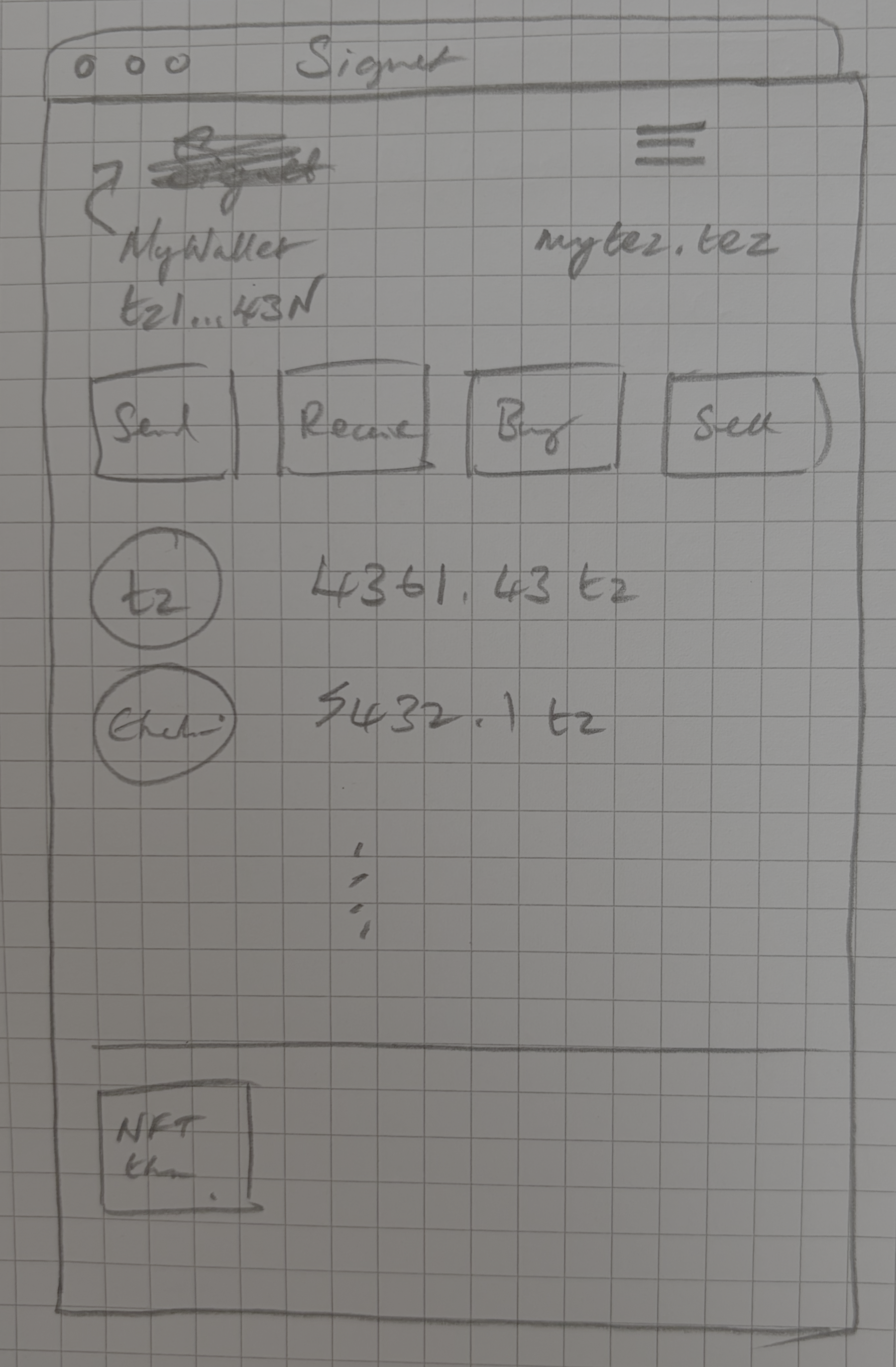
I wanted a “burger” menu for options, details about my account (an alias MyWallet, my address and my .tez name), buttons to Send, Receive, Buy and Sell, then my balances on Tezos and Etherlink. Also at the bottom would be my NFT collection. I wrote a very simple specification. You can find this in the source tree of Signet, but here it is:
- I will ask Claude to write a simple Tezos Wallet.
- It should run natively on the Mac and the source should be compilable by Xcode. Swift is preferred.
- It needs to support multiple addresses and all Tezos address types
tz1totz6 - It should use the Taquito library where possible to talk to the chain
- The default screen is in the file EXAMPLE.png (the picture above)
- Top left is the wallet alias (set by the user when the wallet is created) and the wallet tz address shortened (e.g.
tz132...4N). There should be a copy button next to the address. On the right, should be any Tezos Domain aliases. - Then four buttons: Send, Receive, Buy, Sell
- Then the key assets: The Tezos balance, then the Etherlink balance (don’t worry about the address at this stage), also other balances will appear here.
- At the bottom we should drag in NFT thumbnails.
I ran claude init and it read the specification. I set up Claude to use Fable. Claude asked a few questions, and then developed a layout resembling the diagram above. And from that point onwards, the rest was a conversation with AI about how I wanted a Tezos wallet to look. Such conversations with AI for software development are called vibe coding. Once we had the layout, I quickly added menu items for Create a wallet and Rename. Create a wallet later became Create account.
From the beginning I decided to use the same on-disk format as octez-client. On a cold start, Signet will offer to import the directory into its configuration, reusing the keys from the command-line wallet. In fact, originally I wanted Signet to share the directory with octez-client, but thought better of it. You can use the Signet wallet files with octez-client by running it with -d ~/.signet.
Also from the beginning, I got Claude to implement backups. Signet backs up the wallet files when it starts and keeps 10 generations by default. This is to avoid any catastrophes and key loss, which to be fair I haven’t had yet.
After some more vibe coding, I had the first version of Signet. It could connect to both Mainnet and Shadownet, but not do very much else. It was integrated with the TzKT block explorer’s profile service, so icons and names were taken from there if relevant. The first button I implemented was Receive.
Here is a screenshot from version 0.1 of Signet. The NFT view was done early on and has only had one refinement since. The live balance lookup was there too. I removed the Etherlink balance to begin with - this would come later on.
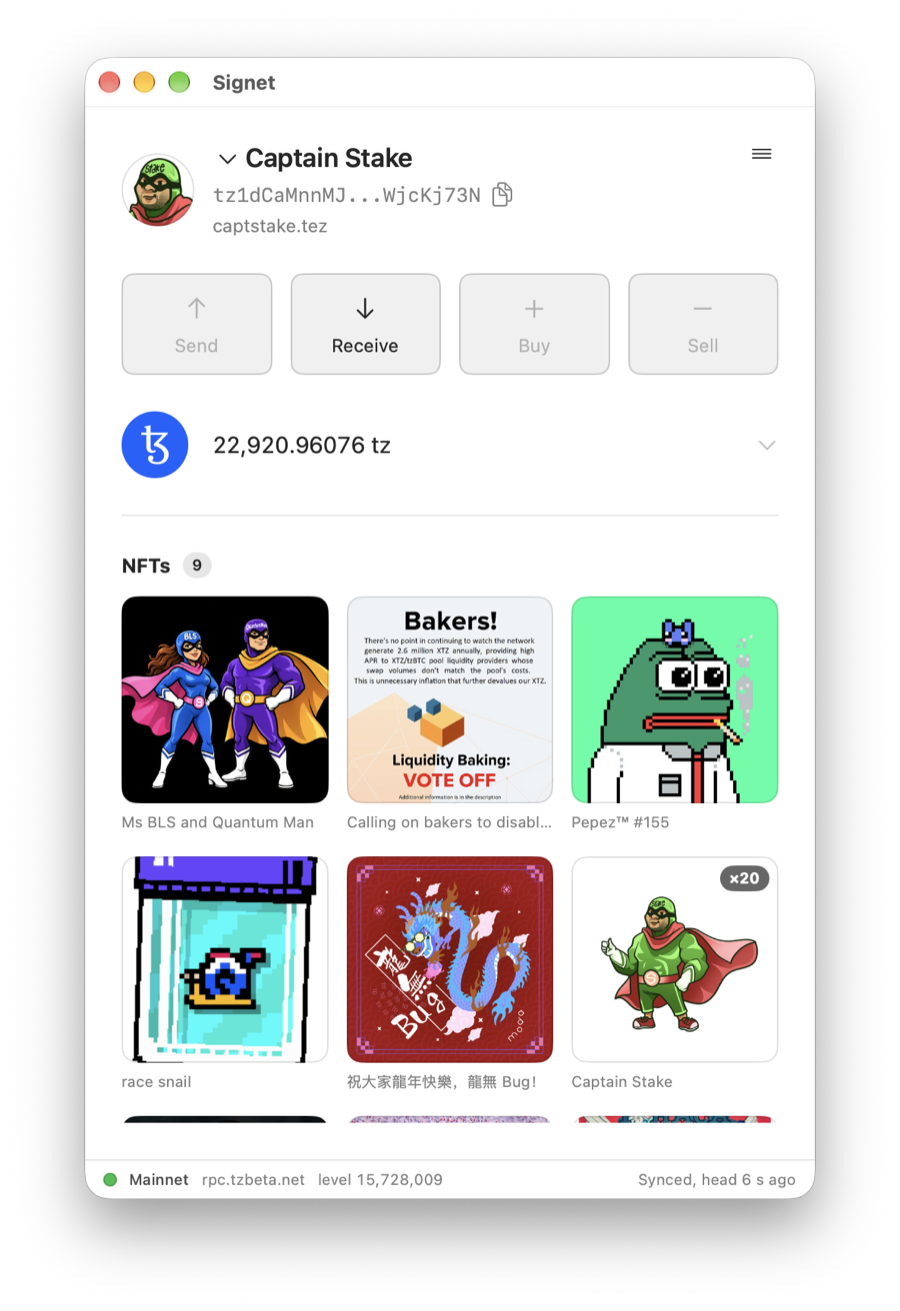
According to GitHub, I released v0.1 at 20:07 on the 5th October 2026, the same day I started the project. At 20:53 on the same day, I released v0.2 which included a basic address book and the capability to send tez.
When I started working on the Tezos chain in 2021, I used two desktop wallets on the Mac. One of my biggest frustrations with them was logging into dApps. These are applications using the blockchain. A dApp usually needs a connection from the desktop wallet to sign operations. This is done with a system called Octez Connect (formerly Beacon). A session is established through the Octez Connect infrastructure so that the dApp can request operations from the wallet. This didn’t work very well for me then, and I switched to the browser-based wallet, Temple.
I decided that Signet must have good dApp support, or there was little point in continuing with it. On Tuesday 6th October, I asked Claude to implement dApp support. Claude started work on it, but we didn’t finish it. In fact, there was an obstacle getting it to work. On Wednesday, I had other things to do.
On Thursday 8th October 2026, I logged into X to see that Taquito had added tz5 key support. These keys are based on the ML-DSA-44 signing scheme and are designed to resist classical and quantum attacks. Once we have a sufficiently capable quantum computer available, our traditional crypto keys will not be safe. This is a current topic of discussion in the tech world.
Recently, the development team at Nomadic Labs launched Quantumnet, an experimental post-quantum test network for Tezos. On that Thursday morning over coffee, I realised that I could make the first transaction on Quantumnet with a graphical wallet.
I asked Claude to use the beta version of Taquito and at 13:35 on the same day, I tweeted:
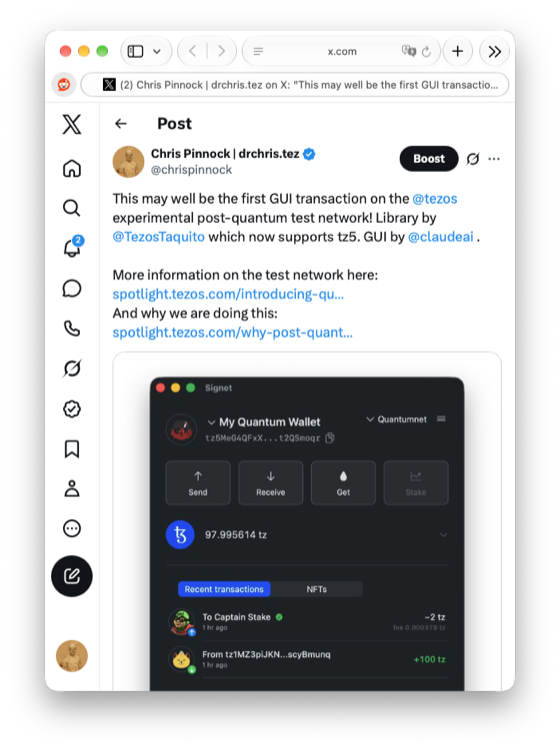
I had generated a tz5 key, used the Quantumnet faucet to get some coins and then sent them to another account. Also I’d added recent transactions to Signet as you can see in the tweet.
According to the GitHub logs, I did 7 releases on that day - versions 0.3, 0.4, 0.4.1, 0.4.2, 0.5, 0.6 and 0.7. Features that I added:
- Sync names with TzKT profiles service
- Add a tab of DeFi assets to the front screen
- Apple package signing (to avoid errors for other users wanting to run Signet)
- Ledger Support - using a key from the hardware wallet
- Buy tez from Mt Pelerin
- On a test network, Buy becomes Get, which integrates directly with the test network’s faucet.
- Baker key management and governance
- Import keys, seed phrases, export keys and forget accounts
- Fix the dApp Octez Connect work
- I got ChatGPT/Codex to audit the code and did some cleanup
- Automatic updates of the application with Sparkle
Not bad for a day’s work. Essentially the wallet was fully functional on the 8th October. And it had operations to make life for a baker easier. You can keep your master baking key in Signet (or on a Ledger of course), delegate consensus and companion keys to ones on your baker, and handle all your baking parameters in Signet.
Buying tez worked via a widget with Mt Pelerin. The only disadvantage that I could see was the wait to receive my tez. It took me seven days due to their processes. On a test network, you don’t buy tez, but why not make it easy to get tez? I integrated the test networks’ faucets into Signet so that users can easily get tez on accounts.
Then I took a day off.
On Saturday 10th October, I spent the day ferrying people around in my car, but I had a couple of hours free in the afternoon. One thing that is missing from most Tezos wallets is multisig account support. A multisig account is one where more than one account signs the operations. You can have a committee of accounts as signers and at deployment time, choose how many are needed to sign the transactions. For example, you can set up a multisig account with 5000 tez with 5 signers of which 3 are needed.
I asked Claude to get me a list of commands to use a multisig account using octez-client. It wrote me a nice “how to” document, which I tried myself. I summarised it in a text file. I decided we needed four new menu items, Create multisig... (to create a new multisig account), Add multisig... (to add an existing multisig contract to Signet), Sign multisig transaction... and Submit multisig transaction.... Claude read the Octez sources and figured out how to implement these functions.
At 16:33, I released Signet v0.8 with multisig account support. (On 12th October, I made a video demonstrating multisig and showed that the smart contracts are the same as the ones originated by octez-client for multisig accounts.)
In the evening, I ran a source code audit with Codex and got Claude to fix the issues. Codex fixed any outstanding problems. This was release v0.8.1 at 19:39.
I took a break on the Sunday and resumed on Monday 12th. The good thing about using an AI agent is it is essentially like a member of staff. You tell it what you want and you tell it when to come back to you with questions. I haven’t turned off Claude’s permission prompts yet, because I’m using a machine that I use for other things. But if I had, it would have sped things up even more.
On the same day, I carried out a further audit with Codex (v0.8.2), added support for session-only keys (which Signet forgets when it quits), added the ability to fund a multisig at creation in the UI and added Ushuaianet to the list of test networks (v0.8.3). At this point, Signet worked on the production network Mainnet and all the test networks for Tezos.
Etherlink is a smart rollup on Tezos and you can deploy an Ethereum smart contract on it. You can use Ethereum-style accounts on it too - these are addresses that start with 0x. They use the same cryptographic curve as Tezos’s tz2 addresses and so you can use your tz2 key pair on Bitcoin, on Ethereum and other EVM-based chains. I’d wondered whether this was the right starting point. But recently there was an update to Etherlink that added Michelson smart contracts. These are contracts that already run on Tezos. Also, since the update you can use tz1, tz2 and tz3 Tezos addresses on Etherlink via the Michelson interface. Then you can use a derived 0x address to communicate with the Ethereum-style contracts.
I cannot remember in the timeline when I did this, but I had a call with Thomas Letan to talk about this interface. As a result of that call, I decided this style of address was the right one to start with on Signet. There would be no need to create new addresses and the Taquito library should be able to use the Michelson interface on Etherlink as it uses a similar remote procedure call scheme (RPC) to the Tezos layer 1 RPC.
On Monday 12th at 17:25 I released 0.9 which included support to show the Etherlink balance of the account. Then about 2 hours later, I had bridge integration, so that a user could bridge tez from their layer 1 account to Etherlink. According to GitHub I did a release at 05:35 on Tuesday 13th - this is entirely possible as my sleep patterns were disturbed that week. The release included send and receive of tez between Tezos addresses on the Etherlink rollup. Also I added a switch to hide Etherlink in the wallet.
The Etherlink work was done with about 30 minutes of Thomas’s wisdom, a bit of thought on my part to design it and then Claude reading source code and documentation. (Note that this work will be redeveloped for Etherlink 8.0.)
There were several other releases that week. Features included:
- A network settings page, so that the node, block explorer, TzKT API and faucet (on a test network) could be set for each network
- Signet attempts to check that the connected node is on the correct network (except for a custom network)
- Etherlink account linking - to create the corresponding 0x address from a
tz1,tz2ortz3address. - Helper links to Coinbase, Kraken and Transak to buy tez
- Another audit and tidy up by Codex
Unfortunately for Coinbase, Kraken and Transak I needed to open links in the browser. Transak offer a widget that can be embedded into Signet, like the Mt Pelerin one, but I have to get a developer API key and I want to avoid too much administration at the moment.
On Thursday 15th, I was talking with some colleagues about other Tezos features under development. One big feature is the Tezos Encrypted Ledger (TzEL). On the Thursday, I had a quick conversation with Arthur about it and on Friday, had a 30-minute meeting with Devon Nathan, who had set up the infrastructure on Shadownet. TzEL is a rollup and you bridge tez into it, much like you do with Etherlink. On TzEL you can make private transactions using post-quantum keys and signing. Having had these conversations, I asked Claude to start researching. I decided that I needed three new functions:
- Shield tez (where you bridge tez into the rollup).
- Unshield tez (where you bridge tez out of the rollup).
- Send a shielded transaction (where you can send tez to another participant using a shielded transaction).
It wasn’t until the following week that I really got started. The Shield transaction took a day of Claude researching and me approving operations. Originally it wanted to use the command-line wallet that comes as part of the TzEL software. But I told it that it could not do this and that it must implement the feature itself. By the end of the day, I could move tez into the TzEL rollup. By Wednesday 21st, I’d released v0.9.6 with TzEL support. You can turn it on and off in Signet, and by default it is off, but it is there. As far as I know, no other graphical Tezos wallet supports TzEL. It’s still experimental and we will not cover it in this book.
Skipping back a bit in the timeline, I decided that Signet should have a manual. On the 12th October, I added a manuscript folder to the Signet source code for the book. I then added a book to Leanpub. If you are reading this, you are reading that book in some form. Since 21st October, I have focused on writing up the Signet application in this book.
The writing has been a good exercise for me and also for Signet, because I’ve found a few bugs along the way. Whenever I found a bug, I stopped and asked Claude to fix it.
Signet will continue to develop. Etherlink is very much a second-class citizen in Signet. I need to add features to it and maybe the ability to use 0x addresses directly. There is a relay service that allows a Tezos wallet to use Ethereum Virtual Machine (EVM) dApps on Etherlink, and this will probably be my next project. I suspect the TzEL implementation will change over time and so Signet will need to change with it. There will be new features as Tezos develops.
In the last weeks of October and into November, I asked Claude to port the application to Windows. It decided that C# was the best language and I agreed. It didn’t take too long to have the basic functionality working. Then I decided to port it to Linux using GTK. Claude suggested that we use Swift. It also suggested Rust to cover the BSD operating systems, but given that Swift is available on FreeBSD, I decided that Swift was the right way forward. Claude refactored parts of the Mac code to make them portable and kept the GTK code separate. I’ve been able to compile the result on FreeBSD as well as Linux.
Version 0.9.13 was the first version where the Mac, Windows and Linux versions had the same features. I ran a code audit using Codex and the fixes went into release 0.9.14 on 7th November 2026.
Signet has been developed solely by AI and the source code hasn’t been reviewed by humans. Does this matter? Maybe. I might get a human audit done in the future.
I finished the first draft of this book in November 2026 - not long after I started the project. I wanted to tell you this story because it is an example of the new AI world we live in. You can build an application on your computer rapidly using Claude or Codex or other tools. You need to be as prescriptive as possible. Tell the AI tool what you want. Draw it pictures. Tell it what you don’t like and tell it what you do like. Eventually you’ll get the application you need.
I’m typing this text into Markup, a Markdown editor that I got Claude to write. It has a formatted view and a Markdown view - you can write in both. It handles images, formatting, hyperlinks, tables, citations and crosslinks. It is the editor I’ve always needed. And Claude wrote it in hours.
But let’s get back to the main topics. We are here to show you how to use the Tezos blockchain with the Signet wallet. I hope you enjoy reading this book and learning about blockchain. But I also hope it will inspire you to look further into AI tools if you haven’t already.