Introduction to the Technical User’s Guide to RACHEL
Aims of this book
Different flavours of RACHEL
Android, Windows, Debian (on Raspberry Pi’s)
Proposed Agenda
Today’s 1-day workshop will help you to learn how to use free, open software and materials to help improve education wherever you work. We will work together for several sessions so we can learn with and from each other. We have various topics to try and cover during today, our progress will depend on you and your needs, questions, and involvement. My main role is as facilitator and coach based on my work in applying digital education in various countries, both directly and by helping other people. I hope we will manage to establish strong working relationships today and during this elearning-africa conference.
What is RACHEL?
RACHEL (Remote Areas Community Hotspots for Education and Learning) is a World Possible initiative to leverage the large volume of open and free educational courseware and libraries available online and make them available to Emerging Countries schools and communities with no Internet access or very limited bandwidth. The RACHEL Initiative has made possible that offline educational servers could be deployed by World Possible and large number of NGOs all around the world.
Why would people need a “RACHEL-Pi” (RACHEL Server on a Pi)?
- A large amount of rich educational content and open courseware is available online, in thousands of web sites, and are available for free to anyone, anywhere; as long as you have an active Internet connection.
- Unfortunately in the world there are still large number of regions and communities with no Internet access at all, or in many other cases if they have Internet connectivity the available bandwidth is unusable for most practical purposes, much less to watch videos or rich media lectures or textbooks.
- Or Internet connectivity is too expensive.
- Or a school or community has good Internet connectivity but for some reason access to many web sites is blocked, like YouTube, where video lectures of multiple colleges and organizations are hosted.
- This Raspberry Pi hardware and this RACHEL-Pi server distribution provides a very affordable, very compact, low-power server platform, which is very convenient to transport, ship, setup and maintain on on-the-ground deployments.
What type of content is on a “RACHEL-Pi” distribution?
- An offline self-contained very comprehensive and curated Wikipedia Encyclopedia.
- Thousands of Khan Academy video lectures on Math and Science from khanacademy.org .
- More than 3,000 eBooks, organized by bookshelves, from Project Gutenberg.
- Full Medical Encyclopedia, MedlinePlus, from the U.S. National Library of Medicine and the National Institutes of Health.
- The latest Medical publications and Health Guides from Hesperian.
- The OLPC Collections form the OLPC project.
- Teachers resources from the UNESCO International Institute for Capacity Building in Africa
- And much more…
An overview of RACHEL: the software and the contents.
RACHEL is a project originally created not in the technology hotspots of Silicon Valley, London, or the First World; instead it started in Central America where volunteers wanted to help improve education in their schools, even when there was little money to pay for materials, books, or even teachers. The project expanded from Spanish to English and several other languages. As we were able to collect and collate more materials specific versions became possible, for farmers, for medicine, etc. and in Kenya, for instance, demand for installation exceeds the ability of the small World Possible team.
RACHEL comprises several free software applications and lots of content that’s free to use and free to distribute. Technically there are several technical flavours, these include:
- RACHEL for Windows computers (RACHEL-on-a-stick)
- RACHEL for Android
- RACHEL for Linux computers, including Raspberry Pi’s, Ubuntu, and other Debian-based systems.
The project continues to improve and evolve. Currently releases are packaged as single massive ‘image’ files. The main distributions are packaged for USB memory, typically on a USB memory stick, or on an sd-card for either Android or Raspberry Pi computers. Technical users can tweak these distributions so they can work on Android devices, other operating systems, etc.
Blocks of software
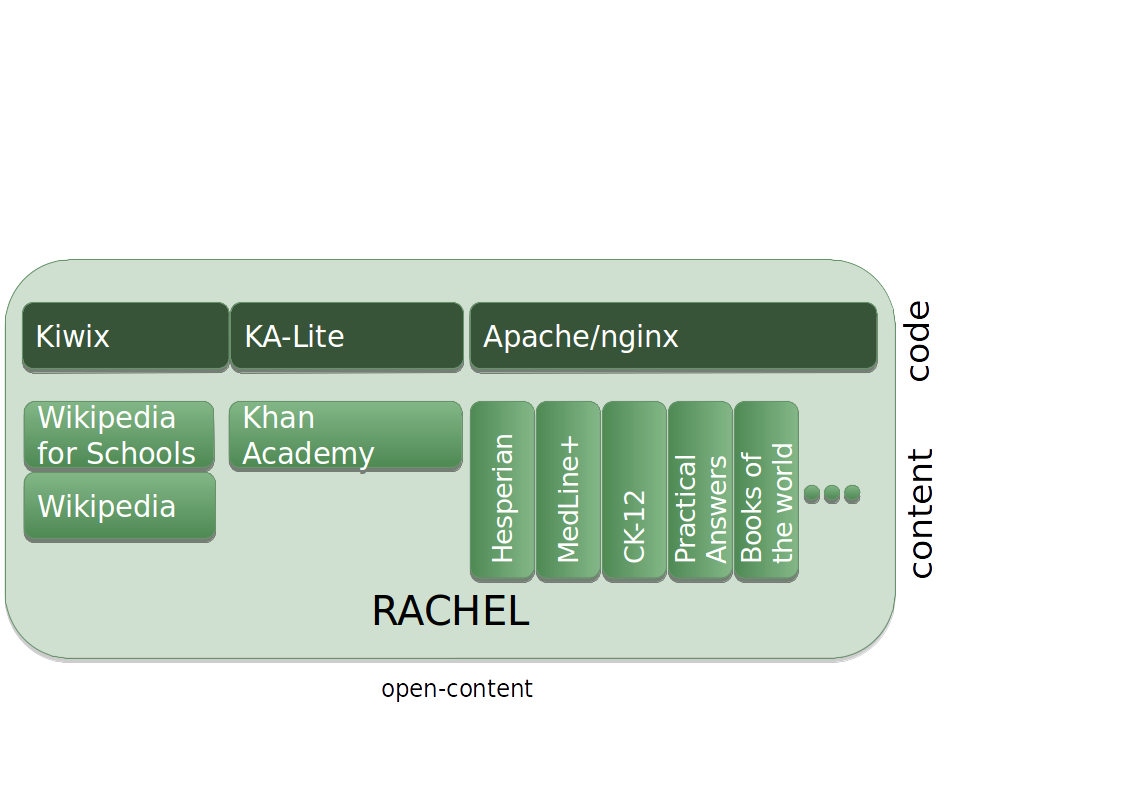
- explain the main block diagrams;
- perhaps explain why we have various servers, etc. and the opportunities to improve performance, reduce complexity, etc.
Power
Computers only run when they have sufficient good-quality power. Many portable computers include a reserve of power in a battery. How long the computer can run on a battery varies on factors such as power management software, power consumption, and the condition - or health - of the battery. Small computers, including Raspberry Pi’s can run effectively even using realtively small external batteries for up to a day. We can configure the software to use less power and thereby enable the computer to run for longer. Some batteries, including those in Laptops and Android Tablets can be charged while they are powering the rest of the computer. Some models of external battery can do likewise, and effectively behave as uninterruptable power supplies (UPS) for Raspberry Pi’s, etc. This means we can use these computers even when power is problematic, or if we have lost power for hours at a time PROVIDED we can find an effective power source to recharge the battery before it has sacrificed all it’s capacity (keeping the computer running).
In some rural areas there is little or no practical power on site, and even some areas in cities lack reliable mains power. Sometimes we can charge devices (and external batteries) nearby, for instance in an Internet cafe, or at home. Sometimes we can use suitable solar panel(s). Ideally batteries and devices should be powered while they are being used so the don’t wear out the internal chemistry of the batteries. If we have several batteries, we may be able to charge some when they are idle, or where it is impractical for the source of power to reach where the device needs to be used.
How to keep the computers running even when power is faulty or not available. Batteries, Charging, Solar Panels, Power Adapters, etc.
Good-enough quality of equipment, including chargers
There is a vast range of equipment available for virtaully every aspect of technology (apart from Raspberry Pi’s where the choices are limited to which model to use). The qualities of equipment varies massively. Some equipment is of very poor quality and has a high risk of failing or causing connected equipment to fail. Some may even electrocute us. Others may provide high-quality service for decades. Genuine & branded equipment tends to be more reliable than unbranded items or counterfeights. We can and should test new equipment. Power meters can help to show the power characteristics of the devices.
- power meters: useful to measure the voltage, current and watts generated or used by the other equipment being used.
Network : Wi-Fi, 3G, Connections and how to connect to existing computer networks or create a new network. Understanding the mysteries of TCP/IP.
Living in a fallen world: coping with viruses on your computers and existing computers.
Working with and controlling the Operating System: All computers have an Operating System, a good understanding can help us control the computer, diagnose and fix problems, and install new software.
Content (Educational Materials): Discover how contents are structured on the Raspberry Pi, how you can add additional materials so that people can use it.
Apps: discover and learn how to install software apps on Android Tablets and software on Raspberry Pi’s.
Keeping Current: Content and software ages and may become less relevant. Learn various ways content can be updated.
Wrap-up, Q&A and next steps.