RDF Data Stores and SPARQL Queries
RDF models data as triples: a subject, a predicate, and an object, like “Alice likes Bob.” A set of triples is a graph, and SPARQL is the query language for graphs. This chapter builds a small RDF store and a SPARQL-style query engine from scratch, in source-code/rdf_sparql/, and then queries the public DBpedia endpoint over HTTP, in source-code/sparql_client/. The first half needs no external library; it runs on the standard Map and List.
Modeling Triples and Queries
The file src/simple_rdf.ml starts with the data. A node is an IRI (a resource name), a literal string, or a blank node. A triple is three nodes, and a graph is a list of triples:
1 type node = IRI of string | Lit of string | BNode of int
2
3 type triple = node * node * node
4 type graph = triple list
A query is different from data because it contains variables. A query node is either a concrete term or a variable like ?x. A triple pattern is three query nodes, and a SELECT query is a list of variables to return plus a list of patterns to match:
1 type query_node = QTerm of node | QVar of string
2
3 type triple_pattern = TP of query_node * query_node * query_node
4
5 type select_query = { vars : string list; where_clause : triple_pattern list }
When the engine matches patterns, it records which node each variable stands for. That record is a binding, a map from variable names to nodes:
1 module StringMap = Map.Make (String)
2
3 type binding = node StringMap.t
Matching a Pattern
Matching one query node against one concrete node is the core step. A term matches only itself. A variable matches anything, but consistently: the first time you see ?x it binds to whatever node is there, and after that ?x must be that same node:
1 let match_node ctx qn n =
2   match qn with
3   | QTerm t -> if t = n then Some ctx else None
4   | QVar v -> (
5       match StringMap.find_opt v ctx with
6       | None -> Some (StringMap.add v n ctx)
7       | Some value -> if value = n then Some ctx else None)
The ctx is the binding so far. A match returns Some new_binding; a failure returns None. Matching a whole triple pattern threads the binding through all three positions, so a variable bound in the subject constrains the object:
1 let match_triple ctx (TP (qs, qp, qo)) (s, p, o) =
2   match match_node ctx qs s with
3   | None -> None
4   | Some ctx1 -> (
5       match match_node ctx1 qp p with
6       | None -> None
7       | Some ctx2 -> match_node ctx2 qo o)
Each step feeds its updated binding into the next. If any position fails, the whole triple fails.
The Join
A query has several patterns, and every result must satisfy all of them at once. That is a join, and it needs backtracking: for each way of matching the first pattern, try every way of matching the rest. Some languages use a list monad for this; OCaml expresses the same idea with List.concat_map and List.filter_map:
1 let rec evaluate_patterns graph = function
2   | [] -> [ StringMap.empty ]
3   | pat :: pats ->
4       List.concat_map
5         (fun ctx -> List.filter_map (fun triple -> match_triple ctx pat triple) graph)
6         (evaluate_patterns graph pats)
Read it from the base case up. With no patterns, there is one solution: the empty binding. With a pattern and a rest, first solve the rest to get a list of bindings. Then for each of those bindings ctx, try pat against every triple in the graph, keeping the matches. List.filter_map drops the failures and keeps the successful bindings; List.concat_map flattens the list-of-lists into one list of solutions. This is the whole join in five lines.
Running a query evaluates the patterns, then projects each binding down to just the requested variables, and removes duplicates:
1 let run_query graph query =
2   let all_bindings = evaluate_patterns graph (List.rev query.where_clause) in
3   let project binding =
4     List.map
5       (fun v ->
6         match StringMap.find_opt v binding with Some n -> n | None -> Lit "NULL")
7       query.vars
8   in
9   nub (List.map project all_bindings)
nub is an order-preserving duplicate remover. The engine is now complete: a store, a matcher, a join, and projection, in about 70 lines.
Running Queries as Data
The file bin/simple.ml loads a small social graph and builds queries directly as values. Here is the graph and a join query, “who likes someone who likes them back”:
 1 let my_graph =
 2   [
 3     (iri "Alice", iri "likes", iri "Bob");
 4     (iri "Alice", iri "likes", iri "Pizza");
 5     (iri "Bob", iri "likes", iri "Alice");
 6     ...
 7   ]
 8
 9 let q3 =
10   {
11     vars = [ "a"; "b" ];
12     where_clause =
13       [
14         TP (QVar "a", QTerm (iri "likes"), QVar "b");
15         TP (QVar "b", QTerm (iri "likes"), QVar "a");
16       ];
17   }
18 in
19 print_table [ "?a"; "?b" ] (run_query my_graph q3)
The two patterns share the variables ?a and ?b, so the join finds only the mutual pairs: Alice and Bob like each other, so (Alice, Bob) and (Bob, Alice) come back. Building a query as a plain record is the clearest way to see what the engine does.
The figure shows the whole graph. Each triple is an arrow from subject to object, labeled with its predicate. The join keeps a binding only when both patterns match, and only the two red arrows form such a pair. Charlie likes Bob, but Bob does not like Charlie back, so Charlie never appears in the result.
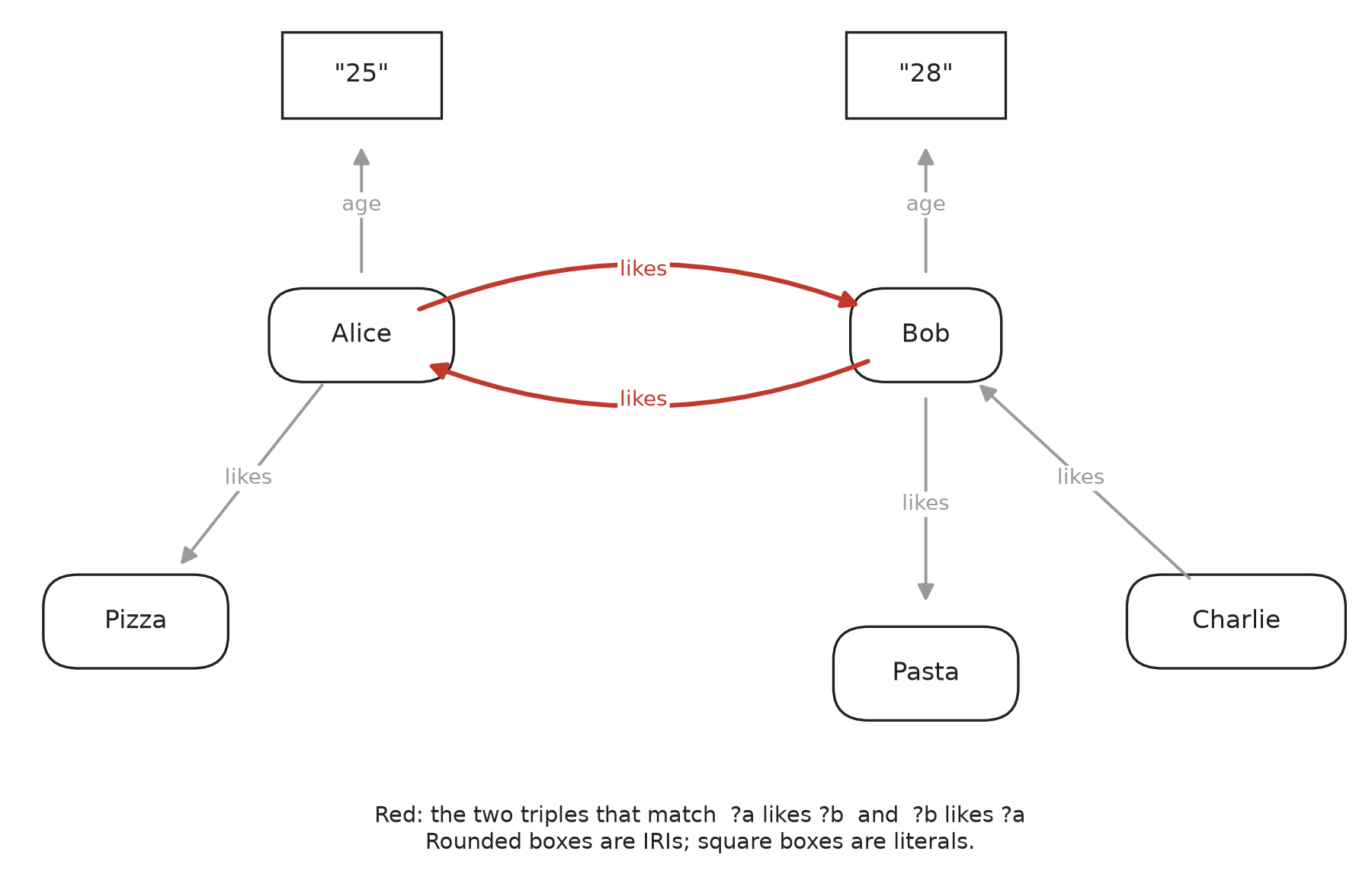
bin/simple.ml. The red arrows answer the join query.Parsing SPARQL Text
Writing queries as records is fine for a program, but a real query comes as text. The file bin/with_sparql.ml adds a small recursive descent parser that turns SPARQL text into the same select_query record. It walks the input with a cursor held in a ref:
 1 let parse_query input =
 2   let n = String.length input in
 3   let pos = ref 0 in
 4   ...
 5   let munch pred =
 6     let start = !pos in
 7     while !pos < n && pred input.[!pos] do
 8       incr pos
 9     done;
10     String.sub input start (!pos - start)
11   in
Small helpers do the work: skip_spaces advances past whitespace, expect c consumes one required character, munch pred grabs a run of characters that satisfy a test, and keyword_ci matches a keyword without regard to case. Parsing one query node dispatches on the first character:
 1 let parse_query_node () =
 2   match peek () with
 3   | Some '?' -> QVar (parse_var_name ())
 4   | Some '<' ->
 5       incr pos;
 6       let s = munch (fun c -> c <> '>') in
 7       expect '>';
 8       QTerm (IRI s)
 9   | Some '"' ->
10       incr pos;
11       let s = munch (fun c -> c <> '"') in
12       expect '"';
13       QTerm (Lit s)
14   | _ -> QTerm (IRI (munch1 is_alnum "term"))
A ? starts a variable, a < starts an IRI, a " starts a literal, and anything else is a bare term. The top level reads SELECT, then the variables, then WHERE, then the patterns inside the braces, and returns a result: Ok query on success or Error message on a parse failure. Returning a result keeps parse errors out of the exception path, so the caller handles them with a plain match.
Querying DBpedia Over HTTP
The second example, in sparql_client/, queries a real endpoint. Public SPARQL servers accept a query in the URL and return results as JSON. The file lib/sparql.ml builds the URL and decodes the JSON. Building the URL is one call, because Uri.add_query_params' URL-encodes the query for you:
1 let query_uri ?(endpoint = dbpedia) ?(format = "json") sparql =
2   Uri.add_query_params'
3     (Uri.of_string endpoint)
4     [ ("query", sparql); ("format", format) ]
The ?endpoint and ?format are optional arguments with defaults, so a caller can just pass the query. Decoding the standard SPARQL 1.1 JSON results is a short walk down the structure: results, then bindings, then each row’s named variable and its value:
1 let values_of_json var json =
2   let open Yojson.Safe.Util in
3   json |> member "results" |> member "bindings" |> to_list
4   |> List.filter_map (fun binding ->
5          match binding |> member var with
6          | `Null -> None
7          | v -> Some (v |> member "value" |> to_string))
The program in bin/main.ml asks DBpedia for IBM’s English abstract. It sends an HTTP GET with an Accept header and handles both HTTP and network errors:
 1 let run query var =
 2   let uri = Sparql.query_uri query in
 3   let headers = Cohttp.Header.of_list [ ("Accept", "application/sparql-results+json") ] in
 4   Lwt.catch
 5     (fun () ->
 6       let* resp, body = Cohttp_lwt_unix.Client.get ~headers uri in
 7       let* body_str = Cohttp_lwt.Body.to_string body in
 8       let code = Cohttp.Code.code_of_status (Cohttp.Response.status resp) in
 9       if code <> 200 then Lwt.return (Error (Printf.sprintf "HTTP error: %d" code))
10       else Lwt.return (Ok (Sparql.values_of_json var (Yojson.Safe.from_string body_str))))
11     (fun exn -> Lwt.return (Error ("Network error: " ^ Printexc.to_string exn)))
This uses the same Lwt library as the database chapter, with a nicer syntax: open Lwt.Syntax gives you let*, which binds the result of a promise, so let* resp, body = ... get ... waits for the HTTP response. Lwt.catch runs the body and routes any exception to the handler, turning a network failure into a clean Error.
Running Both
Run the in-memory engine, which needs no network:
1 cd source-code/rdf_sparql
2 dune build
3 dune exec ./bin/simple.exe        # queries built as data
4 dune exec ./bin/with_sparql.exe   # queries parsed from text
5 dune runtest
Then run the DBpedia client, which does need a connection:
1 cd source-code/sparql_client
2 dune exec ./bin/main.exe
Between the two examples you have both sides of SPARQL: an engine that matches patterns and joins them, and a client that sends a query to a public knowledge base and decodes the answer. Chapter 14 builds on the first half to generate RDF from plain text.