Getting Started
The Application
A brief description of the application we are going to build is as follows:
The aim is to produce a website, which allows users of the site to view and rate cocktail recipes submitted by other users. They can also submit their own.
Any visitors to the site can view the list of recipes sorted by rating. However, a visitor must register as a user, with a username, email and password, in order to rate or submit recipes.
A recipe consists of the cocktail name, the method and the list of measured ingredients, which consists of the ingredient and amount. The recipe must also keep track of the user who submitted it.
Ratings will be star ratings, with users being able to rate a recipe with 1 to 5 stars.
Quantities can be entered as either millilitres (ml), fluid ounces (fl oz), teaspoons (tsp) or just a number.
The cocktail ingredients available are limited to a selection which can only be added to by an administrator.
Now we’ve got a basic understanding of the application we are going to build, let’s take a quick look at the list of user stories. These are presented in order of priority.
- A visitor can view a list of recipes
- A visitor can view a recipe
- A visitor can register and become a user
- A visitor can login to become a user
- A user can rate a recipe
- A user can add a recipe
- An administrator can add an ingredient
We will proceed to implement each of these stories in order. This may seem like a very basic application, but it will provide enough functionality to give a good example of how to start building a well designed, extensible application. Also, because we will be emulating an agile process while building the application, details and requirements may change as it progresses, and extra features may be requested.
Creating the Project
Before jumping in, let’s quickly set up a project. Start by creating a directory to build the application in:
1 $ mkdir cocktail-rater
2 $ cd cocktail-rater
Then add the following composer.json
composer.json
 1 {
 2     "require": {
 3         "php": ">=5.5"
 4     },
 5     "require-dev": {
 6         "behat/behat": "3.*",
 7         "phpunit/phpunit": "4.2.*",
 8         "phpspec/phpspec": "2.*@dev"
 9     },
10     "autoload": {
11         "psr-4": {
12             "CocktailRater\\": "src/"
13         }
14     }
15 }
We’re using a PSR-4 autoloader here. Using PSR-4 means everything can exist in
a CocktailRater top level namespace, but we can avoid creating an extra
directory level for it.

|
PHPSpec VersionYou may have noticed that the PHPSpec requirement is for a development version. The reason for this is: there are some features which we will be using which are not in the stable release yet. When this changes I will update the book. |
Now run Composer to install the test tools:
1 $ composer install
We can also configure it to format its output using the pretty formatter by
default. That way we don’t need to put it on the command line every time we run
it. To do this, create a file called phpspec.yml with the following contents:
phpspec.yml
1 formatter.name: pretty
Finally, initialise Behat so we’re ready to start development:
1 $ behat --init
All done! Now we can start.
The First Story
Let’s look at the first story. Here’s the card:
A visitor can view a list of recipes
- Displays an empty list if there are no recipes
- Recipes display the name of the cocktail, the rating and the name of the user who submitted it
- The list should be presented in descending order of rating
From this information, we can add the following feature file to the project:
features/visitors-can-list-recipes.feature
1 Feature: A visitor can view a list of recipes
2 In order to view a list of recipes
3 As a visitor
4 I need to be able get a list of recipes
5
6 Scenario: View an empty list of recipes
7 Given there are no recipes
8 When I request a list of recipes
9 Then I should see an empty list
10
11 Scenario: Viewing a list with 1 recipe
12 Given there's a recipe for "Mojito" by user "tom" with 5 stars
13 When I request a list of recipes
14 Then I should see a list of recipes containing:
15 | name | rating | user |16 | Mojito | 5.0 | tom |
17
18 Scenario: Recipes are sorted by rating
19 Given there's a recipe for "Daquiri" by user "clare" with 4 stars
20 And there's a recipe for "Pina Colada" by user "jess" with 2 stars
21 And there's a recipe for "Mojito" by user "tom" with 5 stars
22 When I request a list of recipes
23 Then I should see a list of recipes containing:
24 | name | rating | user |25 | Mojito | 5.0 | tom |26 | Daquiri | 4.0 | clare |27 | Pina Colada | 2.0 | jess |
If you try to run Behat with this feature, it will say that the context has missing steps. To add the required snippets run:
1 $ behat --append-snippets
Now we can start working to get these scenarios to pass.
Application Structure
Before jumping straight into writing code, let’s just take a small moment to take a look at the structure we plan to use to build the application.
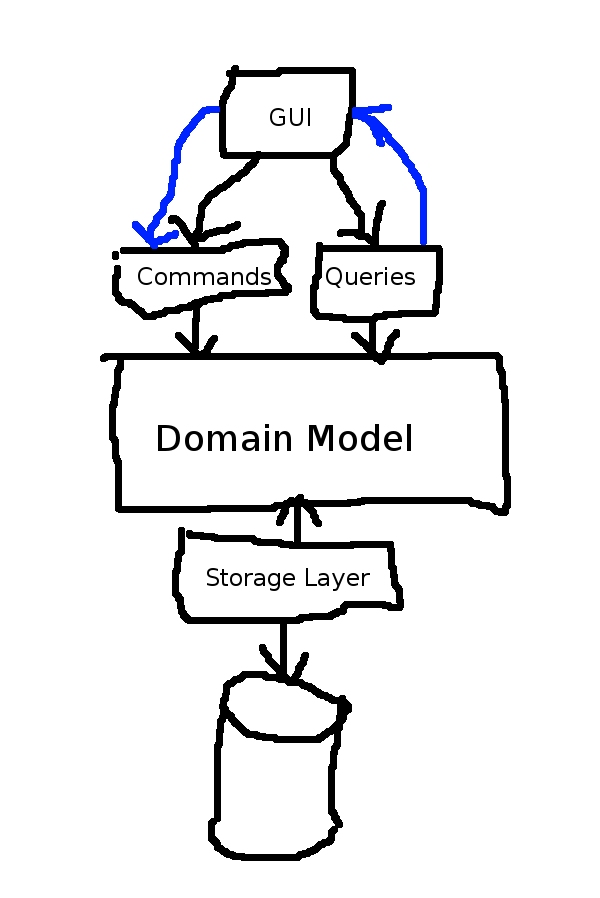
Proposed Application Structure
The core part of the application will be the domain model, this will consist of our modelled interpretation of the business rules. It will have no knowledge of how or where the data is stored, the user interface or any non-business related implementation details. To achieve this level of separation we’ll use inversion of control to let the other layers plug in to the domain layer.
Behind the domain model there will be a storage implementation layer for our chosen storage system. The storage system has not yet been decided so we’ll make use of SQLite until we have chosen which one to use. The reasons for using SQLite are that, it allows the use of a database file without needing to set up a database server, and it’s easier to use than writing our own file-based storage system.
In chapter 3 I introduced CQRS and stated that while we are not going to implement it in our application, we will make a distinction between command and query interactions within the application. Therefore, in front of the domain model we’ll have a layer of commands and queries. All interactions with the domain model from the UI will go through these.
Finally, we’ll have the UI website. We’ll start off by mocking this up with some basic HTML, but as our application becomes more complete, we can make use of a modern MVC1 framework. Again, we won’t worry about which one until later on.
Scenario: View an empty list of recipes
Let’s start off by getting the first scenario to pass. As a quick reminder here it is:
View an empty list of recipes
1     Scenario: View an empty list of recipes
2         Given there are no recipes
3         When I request a list of recipes
4         Then I should see an empty list
We’re going to use TDD to create our code from the outside in. What I mean by this is: rather than trying to build the model and then get it to do what we need it to do, we’ll start with what we want it to do and let that help create the model.
Fleshing out the FeatureContext
Behat has already added the required snippet templates to the
FeatureContext, so let’s try to pencil in what we want to happen. Take a look
at the code I have added first, then I’ll explain it:
features/bootstrap/FeatureContext.php
 1 <?php
 2
 3 use Behat\Behat\Context\SnippetAcceptingContext;
 4 use Behat\Behat\Tester\Exception\PendingException;
 5 use Behat\Gherkin\Node\PyStringNode;
 6 use Behat\Gherkin\Node\TableNode;
 7 use CocktailRater\Application\Query\ListRecipes;
 8 use CocktailRater\Application\Query\ListRecipesHandler;
 9 use CocktailRater\Application\Query\ListRecipesQuery;
10 use CocktailRater\Application\Query\ListRecipesQueryHandler;
11 use CocktailRater\Testing\Repository\TestRecipeRepository;
12 use PHPUnit_Framework_Assert as Assert;
13
14 /**
15  * Behat context class.
16  */
17 class FeatureContext implements SnippetAcceptingContext
18 {
19     /** @var RecipeRepository */
20     private $recipeRepository;
21
22     /** @var mixed */
23     private $result;
24
25     /**
26      * Initializes context.
27      *
28      * Every scenario gets its own context object.
29      * You can also pass arbitrary arguments to the context constructor through
30      * behat.yml.
31      */
32     public function __construct()
33     {
34     }
35
36     /**
37      * @BeforeScenario
38      */
39     public function beforeScenario()
40     {
41         $this->recipeRepository = new TestRecipeRepository();
42     }
43
44     /**
45      * @Given there are no recipes
46      */
47     public function thereAreNoRecipes()
48     {
49         $this->recipeRepository->clear();
50     }
51
52     /**
53      * @When I request a list of recipes
54      */
55     public function iRequestAListOfRecipes()
56     {
57         $query = new ListRecipesQuery();
58         $handler = new ListRecipesHandler($this->recipeRepository);
59
60         $this->result = $handler->handle($query);
61     }
62
63     /**
64      * @Then I should see an empty list
65      */
66     public function iShouldSeeAnEmptyList()
67     {
68         $recipes = $this->result->getRecipes();
69
70         Assert::assertInternalType('array', $recipes);
71         Assert::assertEmpty($recipes);
72     }
73
74     /**
75      * @Given there's a recipe for :arg1 by user :arg2 with :arg3 stars
76      */
77     public function theresARecipeForByUserWithStars($arg1, $arg2, $arg3)
78     {
79         throw new PendingException();
80     }
81
82     /**
83      * @Then I should see a list of recipes containing:
84      */
85     public function iShouldSeeAListOfRecipesContaining(TableNode $table)
86     {
87         throw new PendingException();
88     }
89 }
The thinking I have used here goes something like this:
In order to list recipes we’ll create a query object, then somehow we’ll process that query to get the result. This process will involve fetching all existing recipes and returning the result.
The first line of our test states: “Given there are no recipes”. We’re going
to use the Repository design pattern for the storing of objects. So, to make
this test pass, we’ve got to ensure that the Repository for storing recipes
is empty. I’ve also stated that we’re not going to worry about what storage
system we will be using until later. So in the mean time, we can create a
simple test repository, which we’ll use to emulate the repository
functionality. I’ve decided to name this
CocktailRater\Testing\Repository\TestRecipeRepository.
With this information, the first thing we need to do is create an instance of
this repository. I’ve done this in the beforeScenario method in the
FeatureContext.

|
AnnotationsYou may have noticed that I’ve added Annotation strings in the docblock start with the |
Then, in the thereAreNoRecipes method, we clear the repository to ensure
there are no recipes currently stored.
The next line of the test states: “When I request a list of recipes”. For
this we create the query object, run it and store the result. I’ve decided that
the running of the query will be done by a query handler, and therefore,
we’ll use the verb handle to run it. Also, we know that the query handler
will need to fetch recipes from the repository, so we pass this to the
handler via the constructor. All this is put into action in the
iRequestAListOfRecipes method in the FeatureContext.
Finally, the last line of the test says: “Then I should see an empty list”. To make this pass, we’ll simple check the value in the query result. In order to make a Behat snippet fail, it must throw an exception. However, rather than writing our own checking methods, we can make use of the assert methods provided by PHPUnit. For this test we’ve used 2 asserts, one to check the result is an array, and the second to check it’s empty.
At this point, if you try to run Behat you’ll see PHP error messages saying we’ve referenced classes which don’t exist. To fix this lets add the classes…
Writing the Code
The first line of the test requires the repository, and that it has a method
called clear. Let’s start by creating that:
src/Testing/Repository/TestRecipeRepository.php
 1 <?php
 2
 3 namespace CocktailRater\Testing\Repository;
 4
 5 use CocktailRater\Domain\Repository\RecipeRepository;
 6
 7 final class TestRecipeRepository
 8 {
 9     public function clear()
10     {
11     }
12 }
|
|
Final You may have noticed the use of the |
Next up let’s create the ListRecipesQuery. A query class will contain the
parameters for the query. In this case there are none, so the class simply
looks like this:
src/Application/Query/ListRecipesQuery.php
1 <?php
2
3 namespace CocktailRater\Application\Query;
4
5 final class ListRecipesQuery
6 {
7 }
Now for the interesting bit: the ListRecipesHandler. From looking at the
FeatureContext, this needs to take a repository as a constructor parameter,
the query as a parameter to the handle method, and return some object which
has a getRecipes method.
Here we don’t want to depend on our test repository, so we’ll create an
interface which will be used in its place. For the return value, we’ll create
a class called CocktailRater\Application\Query\ListRecipesResult.
Without further ado, here it is:
src/Application/Query/ListRecipesHandler.php
 1 <?php
 2
 3 namespace CocktailRater\Application\Query;
 4
 5 use CocktailRater\Domain\Repository\RecipeRepository;
 6
 7 final class ListRecipesHandler
 8 {
 9     public function __construct(RecipeRepository $repository)
10     {
11     }
12
13     /** @return ListRecipesResult */
14     public function handle(ListRecipesQuery $query)
15     {
16         return new ListRecipesResult();
17     }
18 }
At this point we’ve created all the classes that were referenced from the
FeatureContext, but this last one has just introduced 2 more: the
RecipeRepository and the ListRecipesResult. Let’s add them to the project
also (this is what I was referring to when I said we’d work from the outside
in):
src/Application/Query/ListRecipesResult.php
 1 <?php
 2
 3 namespace CocktailRater\Application\Query;
 4
 5 final class ListRecipesResult
 6 {
 7     /** @return array */
 8     public function getRecipes()
 9     {
10         return [];
11     }
12 }
src/Domain/Repository/RecipeRepository.php
1 <?php
2
3 namespace CocktailRater\Domain\Repository;
4
5 interface RecipeRepository
6 {
7 }
The ListRecipesResult class simply returns an empty list from
getRecipes. This is all it needs to do to make the test pass.
The RecipeRepository interface currently has no methods. This is because the
only method currently existing in our test repository is clear, however this
method is only relevant for the tests so there is no requirement for it in the
actual application.
Now there’s only one thing left to do. The ListRecipesHandler class requires
a RecipeRepository to be provided to the constructor, but in the
FeatureContext we’ve provided a TestRecipeRepository. To make this work we
need to make the test repository implement the interface:
src/Testing/Repository/TestRecipeRepository.php
 1 <?php
 2
 3 namespace CocktailRater\Testing\Repository;
 4
 5 use CocktailRater\Domain\Repository\RecipeRepository;
 6
 7 final class TestRecipeRepository implements RecipeRepository
 8 {
 9     public function clear()
10     {
11     }
12 }
At this point, we should be able to run Behat and see the first scenario pass:
 1 $ behat
 2 Feature: A visitor can view a list of recipes
 3     In order to view a list of recipes
 4     As a visitor
 5     I need to be able get a list of recipes
 6
 7   Scenario: View an empty list of recipes
 8     Given there are no recipes
 9     When I request a list of recipes
10     Then I should see an empty list
11
12   Scenario: Viewing a list with 1 recipe
13     Given there's a recipe for "Mojito" by user "tom" with 5 stars
14       TODO: write pending definition
15     When I request a list of recipes
16     Then I should see a list of recipes containing:
17       | name   | rating | user |
18       | Mojito | 5.0    | tom  |
19
20   Scenario: Recipes are sorted by rating
21     Given there's a recipe for "Daquiri" by user "clare" with 4 stars
22       TODO: write pending definition
23     And there's a recipe for "Pina Colada" by user "jess" with 2 stars
24     And there's a recipe for "Mojito" by user "tom" with 5 stars
25     When I request a list of recipes
26     Then I should see a list of recipes containing:
27       | name        | rating | user  |
28       | Mojito      | 5.0    | tom   |
29       | Daquiri     | 4.0    | clare |
30       | Pina Colada | 2.0    | jess  |
31
32 3 scenarios (1 passed, 2 pending)
33 11 steps (3 passed, 2 pending, 6 skipped)
34 0m0.36s (9.95Mb)
Scenario: View a list with 1 recipe
We got the first scenario to pass without adding any real logic. To get the next one to pass we need to start filling in some of the blanks that we’ve created.
Updating the FeatureContext
Just like last time, we can start by adding some content to our 2 remaining
methods in the FeatureContext. Here I’d just like to point out that you may
find it easier to work with one at a time, but for the sake of not making this
book too long, I’m condensing the processes down a bit.
features/bootstrap/FeatureContext.php
 1 <?php
 2
 3 use Behat\Behat\Context\SnippetAcceptingContext;
 4 use Behat\Behat\Tester\Exception\PendingException;
 5 use Behat\Gherkin\Node\PyStringNode;
 6 use Behat\Gherkin\Node\TableNode;
 7 use CocktailRater\Application\Query\ListRecipes;
 8 use CocktailRater\Application\Query\ListRecipesHandler;
 9 use CocktailRater\Application\Query\ListRecipesQuery;
10 use CocktailRater\Application\Query\ListRecipesQueryHandler;
11 use CocktailRater\Domain\CocktailName;
12 use CocktailRater\Domain\Rating;
13 use CocktailRater\Domain\Recipe;
14 use CocktailRater\Domain\User;
15 use CocktailRater\Domain\Username;
16 use CocktailRater\Testing\Repository\TestRecipeRepository;
17 use PHPUnit_Framework_Assert as Assert;
18
19 /**
20  * Behat context class.
21  */
22 class FeatureContext implements SnippetAcceptingContext
23 {
24     // ...
25
26     /**
27      * @Given there's a recipe for :name by user :user with :rating stars
28      */
29     public function theresARecipeForByUserWithStars($name, $user, $rating)
30     {
31         $this->recipeRepository->store(
32             new Recipe(
33                 new CocktailName($name),
34                 new Rating($rating),
35                 new User(new Username($user))
36             )
37         );
38     }
39
40     /**
41      * @Then I should see a list of recipes containing:
42      */
43     public function iShouldSeeAListOfRecipesContaining(TableNode $table)
44     {
45         $callback = function ($recipe) {
46             return [
47                 (string) $recipe['name'],
48                 (float) $recipe['rating'],
49                 (string) $recipe['user']
50             ];
51         };
52
53         Assert::assertEquals(
54             array_map($callback, $this->result->getRecipes()),
55             array_map($callback, $table->getHash())
56         );
57     }
58 }
In theresARecipeForByUserWithStars we’re creating a new Recipe object. The
Recipe needs a name, rating and user, so we can add what we think look like
sensible dependencies via the constructor. We also store this new object in
the repository.
In the iShouldSeeAListOfRecipesContaining method, we compare the results
returned from the query, with the table of expected results, using PHPUnit’s
assertEquals. I’ve also used array_map to ensure both arrays contain the
same types since all values in Behat tables are strings.
Adding new Classes to the Model
|
|
Unit TestsBefore continuing I’d just like to point out that up until this point I’ve not created any unit tests. From this point on I’ll be using them for all development in the domain model. However, I won’t be showing them or the process of creating them, as it would take up too many pages. However, they’re all available in the example code for the book if you want to study them. |
Let’s start off by adding the new classes to the model:
src/Domain/Recipe.php
 1 <?php
 2
 3 namespace CocktailRater\Domain;
 4
 5 final class Recipe
 6 {
 7     /** @param string $name */
 8     public function __construct(CocktailName $name, Rating $rating, User $user)
 9     {
10     }
11 }
src/Domain/CocktailName.php
 1 <?php
 2
 3 namespace CocktailRater\Domain;
 4
 5 final class CocktailName
 6 {
 7     /** @var string $value */
 8     public function __construct($value)
 9     {
10     }
11 }
src/Domain/Rating.php
 1 <?php
 2
 3 namespace CocktailRater\Domain;
 4
 5 final class Rating
 6 {
 7     /** @var float $value */
 8     public function __construct($value)
 9     {
10     }
11 }
src/Domain/User.php
 1 <?php
 2
 3 namespace CocktailRater\Domain;
 4
 5 final class User
 6 {
 7     /** @var string $username */
 8     public function __construct(Username $username)
 9     {
10     }
11 }
src/Domain/Username.php
 1 <?php
 2
 3 namespace CocktailRater\Domain;
 4
 5 final class Username
 6 {
 7     /** @param string $value */
 8     public function __construct($value)
 9     {
10     }
11 }
We also need to add the store method to the repository interface:
src/Domain/Repository/RecipeRepository.php
 1 <?php
 2
 3 namespace CocktailRater\Domain\Repository;
 4
 5 use CocktailRater\Domain\Recipe;
 6
 7 interface RecipeRepository
 8 {
 9     public function store(Recipe $recipe);
10 }
This also means that we need to add the method to the TestRecipeRepository:
src/Testing/Repository/TestRecipeRepository.php
 1 <?php
 2
 3 namespace CocktailRater\Testing\Repository;
 4
 5 use CocktailRater\Domain\Recipe;
 6 use CocktailRater\Domain\Repository\RecipeRepository;
 7
 8 final class TestRecipeRepository implements RecipeRepository
 9 {
10     public function store(Recipe $recipe)
11     {
12     }
13
14     public function clear()
15     {
16     }
17 }
Making the Scenario Pass
At this point, only the last line of the scenario should be failing. We’ve got the template of the model laid out, so we just need to fill in the details. To start with, let’s take a look at how the query handler will work:
src/Application/Query/ListRecipesHandler.php
 1 <?php
 2
 3 namespace CocktailRater\Application\Query;
 4
 5 use CocktailRater\Domain\Repository\RecipeRepository;
 6
 7 final class ListRecipesHandler
 8 {
 9     /** @var RecipeRepository */
10     private $repository;
11
12     public function __construct(RecipeRepository $repository)
13     {
14         $this->repository = $repository;
15     }
16
17     /** @return ListRecipesResult */
18     public function handle(ListRecipesQuery $query)
19     {
20         $result = new ListRecipesResult();
21
22         foreach ($this->repository->findAll() as $recipe) {
23             $result->addRecipe(
24                 $recipe->getName()->getValue(),
25                 $recipe->getRating()->getValue(),
26                 $recipe->getUser()->getUsername()->getValue()
27             );
28         }
29
30         return $result;
31     }
32 }
It’s quite simple really: it fetches all recipes from the repository, adds the details of each one to the result object, then returns the result. This looks good, but we’ve got a bit of work to do to get it all working. First up let’s update the classes in the domain model:
src/Domain/Recipe.php
 1 <?php
 2
 3 namespace CocktailRater\Domain;
 4
 5 final class Recipe
 6 {
 7     /** @var CocktailName */
 8     private $name;
 9
10     /** @var Rating */
11     private $rating;
12
13     /** @var User */
14     private $user;
15
16     /** @param string $name */
17     public function __construct(CocktailName $name, Rating $rating, User $user)
18     {
19         $this->name   = $name;
20         $this->rating = $rating;
21         $this->user   = $user;
22     }
23
24     /** @return CocktailName */
25     public function getName()
26     {
27         return $this->name;
28     }
29
30     /** @return Rating */
31     public function getRating()
32     {
33         return $this->rating;
34     }
35
36     /** @return User */
37     public function getUser()
38     {
39         return $this->user;
40     }
41 }
src/Domain/CocktailName.php
 1 <?php
 2
 3 namespace CocktailRater\Domain;
 4
 5 use Assert\Assertion;
 6
 7 final class CocktailName
 8 {
 9     /** @var string */
10     private $value;
11
12     /** @param string $value */
13     public function __construct($value)
14     {
15         Assertion::string($value);
16
17         $this->value = $value;
18     }
19
20     /** @return string */
21     public function getValue()
22     {
23         return $this->value;
24     }
25 }
src/Domain/Rating.php
 1 <?php
 2
 3 namespace CocktailRater\Domain;
 4
 5 use Assert\Assertion;
 6 use CocktailRater\Domain\Exception\OutOfBoundsException;
 7
 8 final class Rating
 9 {
10     /** @var float */
11     private $value;
12
13     /**
14      * @var float $value
15      *
16      * @throws OutOfBoundsException
17      */
18     public function __construct($value)
19     {
20         Assertion::numeric($value);
21
22         $this->assertValueIsWithinRange($value);
23
24         $this->value = (float) $value;
25     }
26
27     /** @return float */
28     public function getValue()
29     {
30         return $this->value;
31     }
32
33     /**
34      * @var float $value
35      *
36      * @throws OutOfBoundsException
37      */
38     private function assertValueIsWithinRange($value)
39     {
40         if ($value < 1 || $value > 5) {
41             throw OutOfBoundsException::numberIsOutOfBounds($value, 1, 5);
42         }
43     }
44 }
src/Domain/User.php
 1 <?php
 2
 3 namespace CocktailRater\Domain;
 4
 5 final class User
 6 {
 7     /** @var Username */
 8     private $username;
 9
10     /**
11      * @param string $username
12      *
13      * @return User
14      */
15     public static function fromValues($username)
16     {
17         return new self(new Username($username));
18     }
19
20     /** @var string $username */
21     public function __construct(Username $username)
22     {
23         $this->username = $username;
24     }
25
26     /** @return Username */
27     public function getUsername()
28     {
29         return $this->username;
30     }
31 }
src/Domain/Username.php
 1 <?php
 2
 3 namespace CocktailRater\Domain;
 4
 5 use Assert\Assertion;
 6
 7 final class Username
 8 {
 9     /** @var string */
10     private $value;
11
12     /** @param string $value */
13     public function __construct($value)
14     {
15         Assertion::string($value);
16
17         $this->value = $value;
18     }
19
20     /** @param */
21     public function getValue()
22     {
23         return $this->value;
24     }
25 }
In the domain model, we’ve started to make use of Benjamin Eberlei’s Assert library. For this to work we need to install the dependency with Composer by running:
1 $ composer require beberlei/assert:@stable
|
|
Using 3rd Party Libraries in the Domain ModelAdding a dependency to a 3rd party library is something that should not be done without serious consideration. A better approach is to use Inversion of Control to make the model depend on the library via a layer of abstraction. The Adapter design pattern is a very good tool for this job. So, with that said, why am I using the Assert library from within the domain model? The reason is: firstly it’s a well-used and stable library made up of utility methods which have no side effects. Secondly, and more importantly, I’m using it in a way which adds, what I think, is a missing feature in the PHP language: namely typehints for scalar types and arrays. There is an interesting discussion with Mathais Verraes on the DDDinPHP Google Group about adding dependencies to 3rd party libraries to your domain model. However, the bottom line here is: before doing this you should exercise extreme consideration of what you are about to do. |
One thing which may have caught your eye in the User class is the
fromValues static method. This is known as a named constructor. It’s a
way in which we can provide alternate constructors for classes, and is one of
the few valid uses of the static keyword. Since it maintains no state, and
works in a purely functional way, it is a safe use of static. At this point
fromValues has only been used in the unit tests, even so, I felt the neater
tests were a good enough reason to add it.
Another thing we have done here, is restricted the value allowed for a rating
to be between 1 and 5. If it falls outside of this range, we throw an
exception. The appropriate exception to be throw here is PHP SPL’s
OutOfBoundsException. However, rather than throw it directly, we’ve extended
it so that it can be tracked down as coming from our application. Let’s take a
quick look at it:
src/Domain/Exception/OutOfBoundsException.php
 1 <?php
 2
 3 namespace CocktailRater\Domain\Exception;
 4
 5 class OutOfBoundsException extends \OutOfBoundsException
 6 {
 7     /**
 8      * @param number $number
 9      * @param number $min
10      * @param number $max
11      *
12      * @return OutOfBoundsException
13      */
14     public static function numberIsOutOfBounds($number, $min, $max)
15     {
16         return new static(sprintf(
17             'The number %d is out of bounds, expected a number between %d and %d\
18 .',
19             $number,
20             $min,
21             $max
22         ));
23     }
24 }
Again you’ll notice the use of a named constructor. I think this is a really neat way to keep the exception messages neat and tidy, and in a relevant place.
Next, let’s quickly update the ListRecipesResult class:
src/Application/Query/ListRecipesResult.php
 1 <?php
 2
 3 namespace CocktailRater\Application\Query;
 4
 5 final class ListRecipesResult
 6 {
 7     /** @var array */
 8     private $recipes = [];
 9
10     /**
11      * @param string $name
12      * @param float  $rating
13      * @param string $username
14      */
15     public function addRecipe($name, $rating, $username)
16     {
17         $this->recipes[] = [
18             'name'     => $name,
19             'rating'   => $rating,
20             'user' => $username
21         ];
22     }
23
24     /** @return array */
25     public function getRecipes()
26     {
27         return $this->recipes;
28     }
29 }
Finally, we need to update the functionality of the repository to return the list of recipes stored:
src/Domain/Repository/RecipeRepository.php
 1 <?php
 2
 3 namespace CocktailRater\Domain\Repository;
 4
 5 use CocktailRater\Domain\Recipe;
 6
 7 interface RecipeRepository
 8 {
 9     public function store(Recipe $recipe);
10
11     /** @return Recipe[] */
12     public function findAll();
13 }
src/Testing/Repository/TestRecipeRepository.php
 1 <?php
 2
 3 namespace CocktailRater\Testing\Repository;
 4
 5 use CocktailRater\Domain\Recipe;
 6 use CocktailRater\Domain\Repository\RecipeRepository;
 7
 8 final class TestRecipeRepository implements RecipeRepository
 9 {
10     /** @var Recipe[] */
11     private $recipes = [];
12
13     public function store(Recipe $recipe)
14     {
15         $this->recipes[] = $recipe;
16     }
17
18     public function findAll()
19     {
20         return $this->recipes;
21     }
22
23     public function clear()
24     {
25     }
26 }
As you can see, we’ve created an in-memory test repository. This is good enough for what we need so far.
You can now run Behat and watch the second scenario pass.
 1 $ behat
 2 Feature: A visitor can view a list of recipes
 3     In order to view a list of recipes
 4     As a visitor
 5     I need to be able get a list of recipes
 6
 7   Scenario: View an empty list of recipes
 8     Given there are no recipes
 9     When I request a list of recipes
10     Then I should see an empty list
11
12   Scenario: Viewing a list with 1 recipe
13     Given there's a recipe for "Mojito" by user "tom" with 5 stars
14     When I request a list of recipes
15     Then I should see a list of recipes containing:
16       | name   | rating | user |
17       | Mojito | 5.0    | tom  |
18
19   Scenario: Recipes are sorted by rating
20     Given there's a recipe for "Daquiri" by user "clare" with 4 stars
21     And there's a recipe for "Pina Colada" by user "jess" with 2 stars
22     And there's a recipe for "Mojito" by user "tom" with 5 stars
23     When I request a list of recipes
24     Then I should see a list of recipes containing:
25       | name        | rating | user  |
26       | Mojito      | 5.0    | tom   |
27       | Daquiri     | 4.0    | clare |
28       | Pina Colada | 2.0    | jess  |
29       Failed asserting that two arrays are equal.
30       --- Expected
31       +++ Actual
32       @@ @@
33        Array (
34            0 => Array (
35       +        0 => 'Mojito'
36       +        1 => 5.0
37       +        2 => 'tom'
38       +    )
39       +    1 => Array (
40                0 => 'Daquiri'
41                1 => 4.0
42                2 => 'clare'
43            )
44       -    1 => Array (
45       +    2 => Array (
46                0 => 'Pina Colada'
47                1 => 2.0
48                2 => 'jess'
49       -    )
50       -    2 => Array (
51       -        0 => 'Mojito'
52       -        1 => 5.0
53       -        2 => 'tom'
54            )
55        )
56
57 --- Failed scenarios:
58
59     features/visitors-can-list-recipes.feature:18
60
61 3 scenarios (2 passed, 1 failed)
62 11 steps (10 passed, 1 failed)
63 0m0.05s (10.60Mb)
Scenario: Recipes are sorted by rating
You may have already noticed, that when you run Behat now most of our final
scenario already passes, The only thing which fails is the order in which
the recipes are listed. To fix this we can go straight into the
ListRecipesHandler, and sort the recipes there:
src/Application/Query/ListRecipesHandler.php
 1 <?php
 2
 3 namespace CocktailRater\Application\Query;
 4
 5 use CocktailRater\Domain\Repository\RecipeRepository;
 6 use CocktailRater\Domain\Recipe;
 7
 8 final class ListRecipesHandler
 9 {
10     /** @var RecipeRepository */
11     private $repository;
12
13     public function __construct(RecipeRepository $repository)
14     {
15         $this->repository = $repository;
16     }
17
18     /** @return ListRecipesResult */
19     public function handle(ListRecipesQuery $query)
20     {
21         $result = new ListRecipesResult();
22
23         foreach ($this->getAllRecipesSortedByRating() as $recipe) {
24             $result->addRecipe(
25                 $recipe->getName()->getValue(),
26                 $recipe->getRating()->getValue(),
27                 $recipe->getUser()->getUsername()->getValue()
28             );
29         }
30
31         return $result;
32     }
33
34     private function getAllRecipesSortedByRating()
35     {
36         $recipes = $this->repository->findAll();
37
38         usort($recipes, function (Recipe $a, Recipe $b) {
39             return $a->isHigherRatedThan($b) ? -1 : 1;
40         });
41
42         return $recipes;
43     }
44 }
We also need to add new comparison methods to both the Recipe and Rating
classes:
src/Domain/Recipe.php
 1 <?php
 2
 3 namespace CocktailRater\Domain;
 4
 5 use Assert\Assertion;
 6
 7 final class Recipe
 8 {
 9     // ...
10
11     /** @return bool */
12     public function isHigherRatedThan(Recipe $other)
13     {
14         return $this->rating->isHigherThan($other->rating);
15     }
16 }
src/Domain/Rating.php
 1 <?php
 2
 3 namespace CocktailRater\Domain;
 4
 5 use Assert\Assertion;
 6 use CocktailRater\Domain\Exception\OutOfBoundsException;
 7
 8 final class Rating
 9 {
10     // ...
11
12     /** @return bool */
13     public function isHigherThan(Rating $other)
14     {
15         return $this->value > $other->value;
16     }
17 }
That’s it, the first feature is done!
 1 $ behat
 2 Feature: A visitor can view a list of recipes
 3     In order to view a list of recipes
 4     As a visitor
 5     I need to be able get a list of recipes
 6
 7   Scenario: View an empty list of recipes
 8     Given there are no recipes
 9     When I request a list of recipes
10     Then I should see an empty list
11
12   Scenario: Viewing a list with 1 recipe
13     Given there's a recipe for "Mojito" by user "tom" with 5 stars
14     When I request a list of recipes
15     Then I should see a list of recipes containing:
16       | name   | rating | user |
17       | Mojito | 5.0    | tom  |
18
19   Scenario: Recipes are sorted by rating
20     Given there's a recipe for "Daquiri" by user "clare" with 4 stars
21     And there's a recipe for "Pina Colada" by user "jess" with 2 stars
22     And there's a recipe for "Mojito" by user "tom" with 5 stars
23     When I request a list of recipes
24     Then I should see a list of recipes containing:
25       | name        | rating | user  |
26       | Mojito      | 5.0    | tom   |
27       | Daquiri     | 4.0    | clare |
28       | Pina Colada | 2.0    | jess  |
29
30 3 scenarios (3 passed)
31 11 steps (11 passed)
32 0m0.04s (10.48Mb)
Tidying Up
Now the feature is complete, let’s take a little look and see if there’s anything we can do to make the code a bit better.
The main thing which needs to be improved here is chaining of methods in the query handler. We’ve created have ugly lines of code like this:
1 $recipe->getUser()->getUsername()->getValue()
Big chains of method calls like this violate the Law of
Demeter which states: you should
only talk to your immediate friends. This means you should only call
methods or access properties of objects which are: properties of the current
class, are parameters to the current method, or have been created inside the
method. This law is pretty much stating the same thing as the
one dot per line rule of Object Calisthenics. Note
that PHP requires the use of $this-> to call methods and access properties,
so it’s actually two arrows per line.
So, how to this issue? One approach might be to ask the top level class (aggregate) to ask the next level down to return the value, repeating down the hierarchy. Here’s an example:
 1 class Recipe
 2 {
 3     // ...
 4
 5     public function getUsername()
 6     {
 7         return $this->user->getUsernameValue();
 8     }
 9 }
10
11 class User
12 {
13     // ...
14
15     public function getUsernameValue()
16     {
17         return $this->username->getValue();
18     }
19 }
However, if you’re going to do this for more than 2 or 3 values, the interface
is going to start to get pretty bloated. Another way might be to add a method
to the Recipe class to return all its values as an array or value object.
There are other ways you could do this, but for this project let’s use a
combination of these 2 methods. If only 1 or 2 getters are required we’ll
consider using them, otherwise we’ll use a read method to return an object (I
prefer objects to arrays because, even though they require extra code, the
content is well defined and they can be immutable, However, using an array or
object with public properties, might be appropriate for your project).
Exposing Recipe Values
With this in mind, let’s expose the contents of the Recipe class via a
details value object. We do this by creating 2 new classes, one for
Recipe and one for User:
src/Domain/RecipeDetails.php
 1 <?php
 2
 3 namespace CocktailRater\Domain;
 4
 5 final class RecipeDetails
 6 {
 7     /** @var CocktailName */
 8     private $name;
 9
10     /** @var UserDetails */
11     private $user;
12
13     /** @var Rating */
14     private $rating;
15
16     public function __construct(
17         CocktailName $name,
18         UserDetails $user,
19         Rating $rating
20     ) {
21         $this->name   = $name;
22         $this->user   = $user;
23         $this->rating = $rating;
24     }
25
26     /** @return string */
27     public function getName()
28     {
29         return $this->name->getValue();
30     }
31
32     /** @return string */
33     public function getUsername()
34     {
35         return $this->user->getUsername();
36     }
37
38     /** @return float */
39     public function getRating()
40     {
41         return $this->rating->getValue();
42     }
43 }
src/Domain/UserDetails.php
 1 <?php
 2
 3 namespace CocktailRater\Domain;
 4
 5 final class UserDetails
 6 {
 7     /** @var Username */
 8     private $username;
 9
10     public function __construct(Username $username)
11     {
12         $this->username = $username;
13     }
14
15     /** @return Username */
16     public function getUsername()
17     {
18         return $this->username->getValue();
19     }
20 }
And add the following method to User and Recipe:
CocktailRater/Domain/Recipe.php
1     /** @return RecipeDetails */
2     public function getDetails()
3     {
4         return new RecipeDetails(
5             $this->name
6             $this->user->getDetails(),
7             $this->rating
8         );
9     }
CocktailRater/Domain/User.php
1     /** @return UserDetails */
2     public function getDetails()
3     {
4         return new UserDetails($this->username);
5     }
Then we can update our query handler to use these like so:
CocktailRater/Application/Query/ListRecipesHandler.php
 1     /** @return ListRecipesResult */
 2     public function handle(ListRecipesQuery $query)
 3     {
 4         $result = new ListRecipesResult();
 5
 6         foreach ($this->getAllRecipesSortedByRating() as $recipe) {
 7             $details = $recipe->getDetails();
 8
 9             $result->addRecipe(
10                 $details->getName(),
11                 $details->getRating(),
12                 $details->getUsername()
13             );
14         }
15
16         return $result;
17     }
At this point, we can also remove getUsername from the User class and
getName, getRating and getUser from the Recipe class.
Already this is looking a lot neater, but we’re still violating the law of
demeter at 2 levels in the handler. Firstly, we’re calling getDetails on a
Recipe objects which are not an immediate friends of the handler (since
they fetched from a repository). Secondly, we’re calling the get methods on
the details object returned from the Recipe objects. Considering this is
happening just at the application layer, I don’t really think this is the
biggest crime and therefore could be left as is. That said, let’s still try to
tidy it up some more.
To do this, let’s get rid of all the calls to the getters on the details objects. We can do this by simply passing in the details object to the result class constructor. The problem with this is that is adds a dependency on the domain model from anywhere that a result object is used. When using a language like Java, C++ or C#, this becomes something that really needs to be fixed, since separate packages need to be able to be compiled and deployed independently. However, PHP doesn’t work like that (maybe one day it will). Even so, it’s probably still good practice to work this way. Also, since we don’t want any other layers which talk to the application, to create result objects, let’s make the result into an interface. Then we can have a concrete result Data Transfer Object, which can know about the details class. Because the dependency from outside is now on the interface only, it’s decoupled form the domain.
Here’s the updated code:
src/Application/Query/ListRecipesResult.php
1 <?php
2
3 namespace CocktailRater\Application\Query;
4
5 interface ListRecipesResult
6 {
7     /** @return array */
8     public function getRecipes();
9 }
src/Application/Query/ListRecipesResultData.php
 1 <?php
 2
 3 namespace CocktailRater\Application\Query;
 4
 5 use Assert\Assertion;
 6 use CocktailRater\Domain\RecipeDetails;
 7
 8 final class ListRecipesResultData implements ListRecipesResult
 9 {
10     /** @var RecipeDetails[] */
11     private $recipes = [];
12
13     public function __construct(array $recipes)
14     {
15         Assertion::allIsInstanceOf($recipes, RecipeDetails::class);
16
17         $this->recipes = $recipes;
18     }
19
20     /** @return array */
21     public function getRecipes()
22     {
23         return array_map(
24             function (RecipeDetails $recipe) {
25                 return [
26                     'name'   => $recipe->getName(),
27                     'rating' => $recipe->getRating(),
28                     'user'   => $recipe->getUsername()
29                 ];
30             },
31             $this->recipes
32         );
33     }
34 }
CocktailRater/Application/Query/ListRecipesHandler.php
 1     /** @return ListRecipesResult */
 2     public function handle(ListRecipesQuery $query)
 3     {
 4         return new ListRecipesResultData(
 5             array_map(function (Recipe $recipe) {
 6                 return $recipe->getDetails();
 7             },
 8             $this->getAllRecipesSortedByRating())
 9         );
10     }
That’s almost done! The handler is much neater. But we’ve still not quite conformed to the Law of Demeter, because it still gets the recipe from the repository. In most circumstances, particularly in the domain model, I’m very diligent about obeying the Law of Demeter. However, in this circumstance, I feel we’ve done enough. A good exercise is, to consider how to obey it completely in the handler, but for now I’m going to leave it as it is.
Have we gone too far?
You might be thinking to yourself that this is all a bit excessive. That we have an aggregate, which returns a details value object, which is then copied into a results DTO, which looks almost the same as the value object, and we have an extra interface to describe the result DTO. You might also think that simply passing back the details value object from the handler would be sufficient. Or, that even that would be too much, and the details class is overkill, and a simple associative array would have done. You may even be thinking this looks far too much like Java.
If you are thinking any of these things you are right! None of this is necessary. But, depending on the scale of the project, how many people are going to be working with the code, the growth expectancy of the project, and even the budget, this level of detail may be extremely valuable. What we’ve done here is apply best practices, we’ve made the code as explicit and self documented as possible. As a result future developers (and our future selves) will thank us for this.
What Next?
So far we’ve managed to get the first feature’s tests to pass. However, we’ve done it in quite an isolated way by considering this single query on its own. In the next chapter we’ll quickly add the second feature, then we can analyse the two to find similarities. We’ll then use this knowledge to refactor what we have into a more generic form. After that we’ll try to display the application’s output on a page.
- The Model View Controller design pattern.↩