3 Micromanagement
To ensure that your whole host may withstand the brunt of the enemy’s attack and remain unshaken — this is effected by maneuvers direct and indirect.
– Sun Tzu “Art of War”
Micromanagement (micro) refers to everything that occurs within a single main screen in League of Legends. Various events are happening on it at any given moment. All of them relate to micro.
We can visualize the difference between micro and macro with the following example. You can imagine all the events on the map as a large puzzle. Each event at the micro level represents a small piece of that puzzle. Macromanagement (macro) focuses on the entire puzzle as a whole.
Every champion in League of Legends can perform three basic actions:
- Attacking
- Using abilities
- Movement.
All of these actions fall under the category of micromanagement.
In this chapter, we will explore how to execute basic actions effectively. There are several fundamental techniques for this. They allow you to maximize your champion’s potential: dealing more damage and surviving longer in teamfights. This gives you an advantage over your opponents simply through better execution.
Mastering any micromanagement technique requires regular practice and repetition. We will discuss how to do it effectively.
3.1 Basic attack animation
Every champion in League of Legends has a unique combo, which is a sequence of actions that enhances his effectiveness. For instance, an attacking combo increases a champion’s damage per second (DPS).
To execute any combo, it is essential to understand how to work with animations. When a player issues an action command, the champion performs specific movements to act. These movements are called action animation. Typically, each action has its own distinct animation.
Manipulating animation is a complex but crucial aspect of gameplay. Mastering it requires time and regular practice. Without a solid understanding of how to work with animation, a player may struggle to perform the following tasks effectively:
- Farm jungle monsters.
- Farm minions in the lane.
- Participate in teamfights.
- Win trades in lane.
- Win duels in lane or jungle.
In summary, understanding animation is vital for acquiring and utilizing resources effectively in the game. Neither is achievable without this skill.
Let us begin with the simplest animation: a champion’s basic attack.
3.1.1 Attack speed
A basic attack, also known as an auto-attack or AA, is the standard method for dealing damage to an enemy. Every champion can perform a basic attack. To issue this command, simply right-click on an enemy.
The basic attack animation depends on a champion’s stat called total attack speed (or total AS). It is calculated based on several components:
- The champion’s base attack speed (or base AS).
- Bonus attack speed (or bonus AS) per champion level.
- Bonus AS from items.
- Bonus AS from runes.
- Bonus AS from abilities.
- Bonus AS from buffs.
- Attack speed penalty from debuffs.
We will calculate total attack speed (AS) using an example. Let us take the champion Ashe, with a base AS of 0.66. The champion’s total AS equals the base AS at level 1 when she does not have any items, abilities, attack speed runes, or buffs. This means that Ashe’s total AS is currently 0.66.
Let us assume that Ashe purchases the item Berserker’s Greaves. It provides a 35% bonus to AS. We calculate the total AS using the following formula:
When we substitute the numbers here, we get the following:
We have calculated the total attack speed (total AS). It determines the duration of the animation for a single basic attack. This duration is called the attack cooldown. Here is the formula to calculate it:
We can substitute here the numbers that we got for Ashe with the Berserker’s Greaves item:
This means that at least 1.12 seconds must pass between two basic attacks. In other words, the champion will not perform the second basic attack until the cooldown has expired.
3.1.2 Phases of basic attack
We have learned how to calculate the cooldown of a basic attack. When a champion executes a basic attack, he goes through a full cycle of his attack animation. This cycle consists of three phases:
- Windup — the preparation for the attack (for example, swing for a strike).
- Firing — the execution of the strike or shot.
- Recovery — the return to the starting position.
Let us examine Ashe at level 1, without items. Her basic attack cooldown is 1.52 seconds, calculated as follows:
Figure 3-1 shows the timeline diagram for a single Ashe’s basic attack.
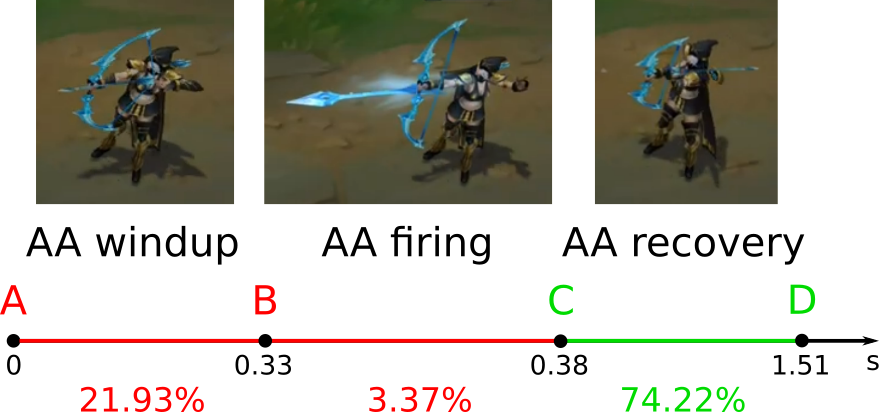
The Figure shows the time axis labeled “s” (seconds). There are three segments on the s-axis. Each segment corresponds to one of the three animation phases. There is a screenshot above each segment. It shows a frame from the corresponding champion animation.
Let us go through the timeline diagram step by step:
1. At point A, the player right-clicks the target. From this moment, the champion begins the windup animation phase: drawing the bow. This phase lasts 21.93% of the basic attack cooldown. This equals 0.33 seconds, according to the following calculation:
2. At point B, the champion begins the firing phase: fires an arrow at the target. This phase lasts only 3.37% of the basic attack cooldown. This equals 0.05 seconds:
3. At point C, the champion begins the recovery phase: draws the next arrow from the quiver. This phase lasts 74.22% of the basic attack cooldown. This equals 1.13 seconds:
4. At point D, the champion completes a full animation cycle. In total, 1.52 seconds have passed since the player issued the command at point A. If the champion does not receive a new command, he begins the next attack animation cycle at point D on the same target.
At any point during the A-D segment, a player can issue a movement command to the champion. The outcome of this command will depend on the animation phase the champion is currently in. There are three possible scenarios:
1. Segment A-B. If the command is issued during the windup phase:
- The champion cancels the basic attack.
- The attack target does not take damage.
- The basic attack cooldown timer resets to zero.
- The player can launch the next auto-attack at any time. Its animation starts with the windup phase (point A).
2. Segment B-C. If the command is issued during the firing phase:
- The move command is queued.
- The champion performs an auto-attack.
- The attack target takes damage if the attack is melee. If the attack is ranged, the target takes damage when the projectile hits it.
- The auto-attack cooldown timer continues to run.
- After the firing animation (point C) ends, the move command is removed from the queue. The champion performs it instead of the recovery animation. He moves to the designated point.
- The player cannot launch his next auto-attack until the cooldown timer finishes at point D.
3. Segment C-D. If the command is issued during the recovery phase:
- The champion has already executed the auto-attack.
- The attack target has already taken damage.
- The basic attack cooldown timer continues to run.
- The champion ends the recovery animation early and moves to the target location.
- The player cannot launch the next auto-attack until the cooldown timer finishes at point D.
From the rules concerning these interactions, we can draw the following conclusions:
- Canceling the windup phase is almost always a mistake. It reduces the champion’s damage per second (DPS). The only justification for canceling is when the player detects danger and needs to retreat immediately.
- The recovery phase always takes up the majority of the basic attack cooldown. Allowing the champion to complete it is a waste of time. He should move or use an ability instead.
- The most effective way to cancel the recovery phase is to issue a command while the champion is in the firing phase. This way, he will execute the new command immediately after the firing is complete.
3.1.3 Basic attack and move
Canceling the auto-attack recovery phase is a common gameplay practice. There are several variations of this technique. The attack move technique, which combines attacking and moving, cancels the recovery animation by issuing a move command.
Figure 3-2 shows the timeline diagram for the attack move technique.
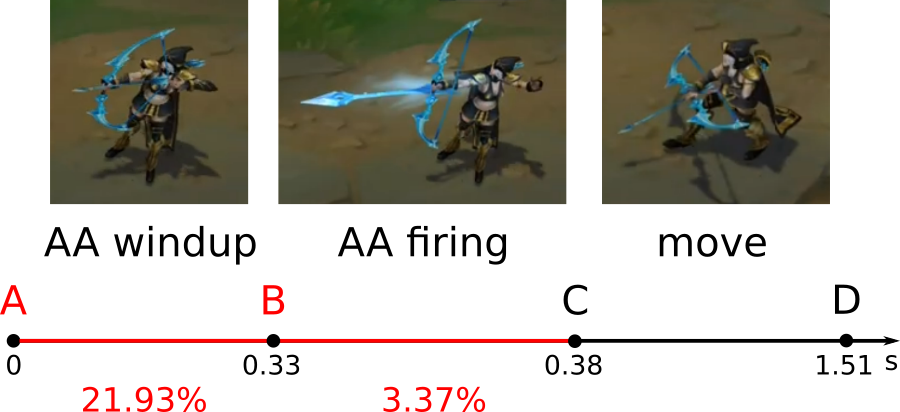
Here are the steps to perform this technique:
- At point A, the player issues the attack command. The champion plays the windup animation phase.
- At point B, the champion begins the firing phase.
- At segment B-C or at point C, the player issues a move command. The champion begins moving immediately after the firing animation completes. This occurs on segment C-D, which lasts 1.13 seconds.
- At point D, the basic attack cooldown timer finishes. From this point on, the player can issue the next attack command.
The attack move technique is useful in two scenarios:
- To pursue and damage an enemy.
- To retreat and damage an enemy.
In the first scenario, the technique increases damage to a retreating enemy. Let us compare the attack command and the attack move:
- If you issue an attack command to a champion, he stands and performs all three animation phases. When an enemy moves out of the champion’s attack range, he will only react at point D. In other words, he will begin moving after the recovery phase ends.
- If you utilize the attack move, the champion moves toward the enemy instead of playing the recovery animation. This means that the champion will react to the enemy’s movement much more quickly.
In the second scenario, the technique reduces damage to the retreating champion. Let us compare the attack move and separate commands:
- If you issue an attack command, the champion stands and performs all three animation phases. In this case, he simply trades damage with the enemy. This exchange is called a stat check. The champion with the higher stats wins it.
- If you issue a move command, the champion only retreats. In this case, he will take damage until he moves out of the enemy’s attack range. The enemy will not take any damage during this time.
- If you utilize the attack move, the champion trades damage with the enemy while maintaining distance from him. This opens up two possibilities. You can either retreat when losing the trade or go all-in when winning the trade.
When a ranged champion uses the attack move technique against a melee opponent, it is called kiting. If the champion’s movement speed exceeds that of the opponent, the latter will be unable to land attacks. This is the idea of the kiting.
3.1.4 Execution of the attack move
Let us explore how to perform the attack move in practice. To do this, you need to adjust two game settings and one system setting.
The first game setting is located in the “HOTKEYS” tab and is called “Player Attack Move Click” hotkey. Figure 3-3 shows it.
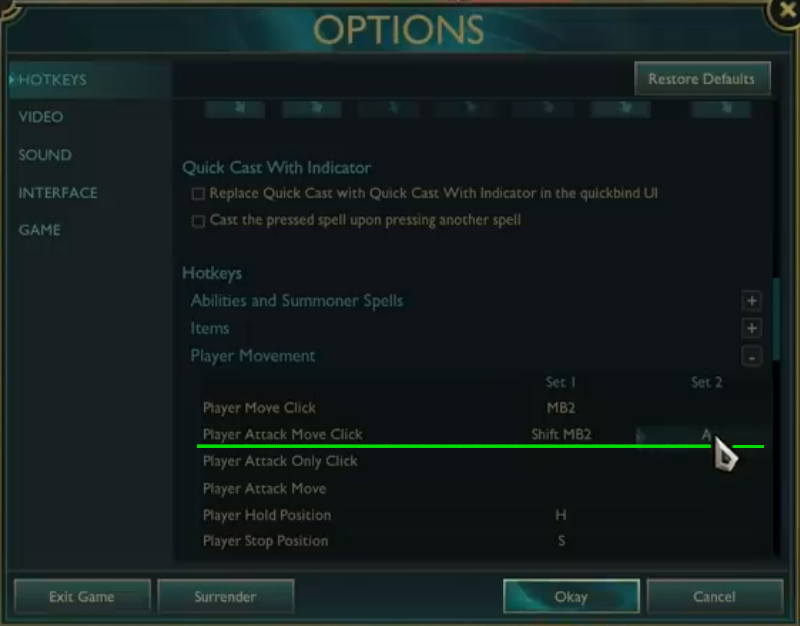
This hotkey issues a movement command to a designated point. Once an enemy comes within attack range, the champion will automatically start attacking him. You need to assign the A key to this action. When you press it, the champion will target the closest enemy within attack range.
The second game setting is located in the “GAME” tab and is called “Attack move on cursor”. Figure 3-4 shows it.
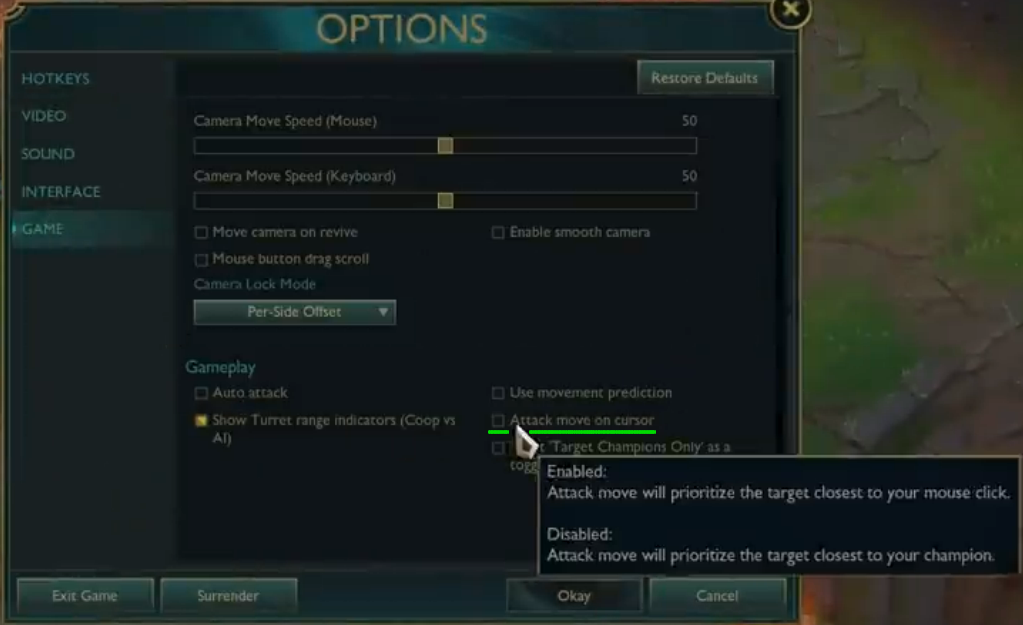
Changing this setting provides the following effect:
- Enable — the attack move command (A key) selects the target closest to the mouse cursor.
- Disable — the attack move command (A key) selects the target closest to the champion.
You need to enable this setting. Then you can select an attack target using the mouse cursor position.
The third setting is to turn off mouse acceleration in the OS settings. Here are the steps for Windows 11 users:
- Click “Start” and then select “Settings”. The “Settings” window will open.
- Select the “Bluetooth & devices” option in the left-side menu.
- Select the “Mouse” item in the right section of the window. The mouse settings menu will open.
- Disable the “Enhance pointer precision” option.
Figure 3-5 shows how to turn off mouse acceleration.
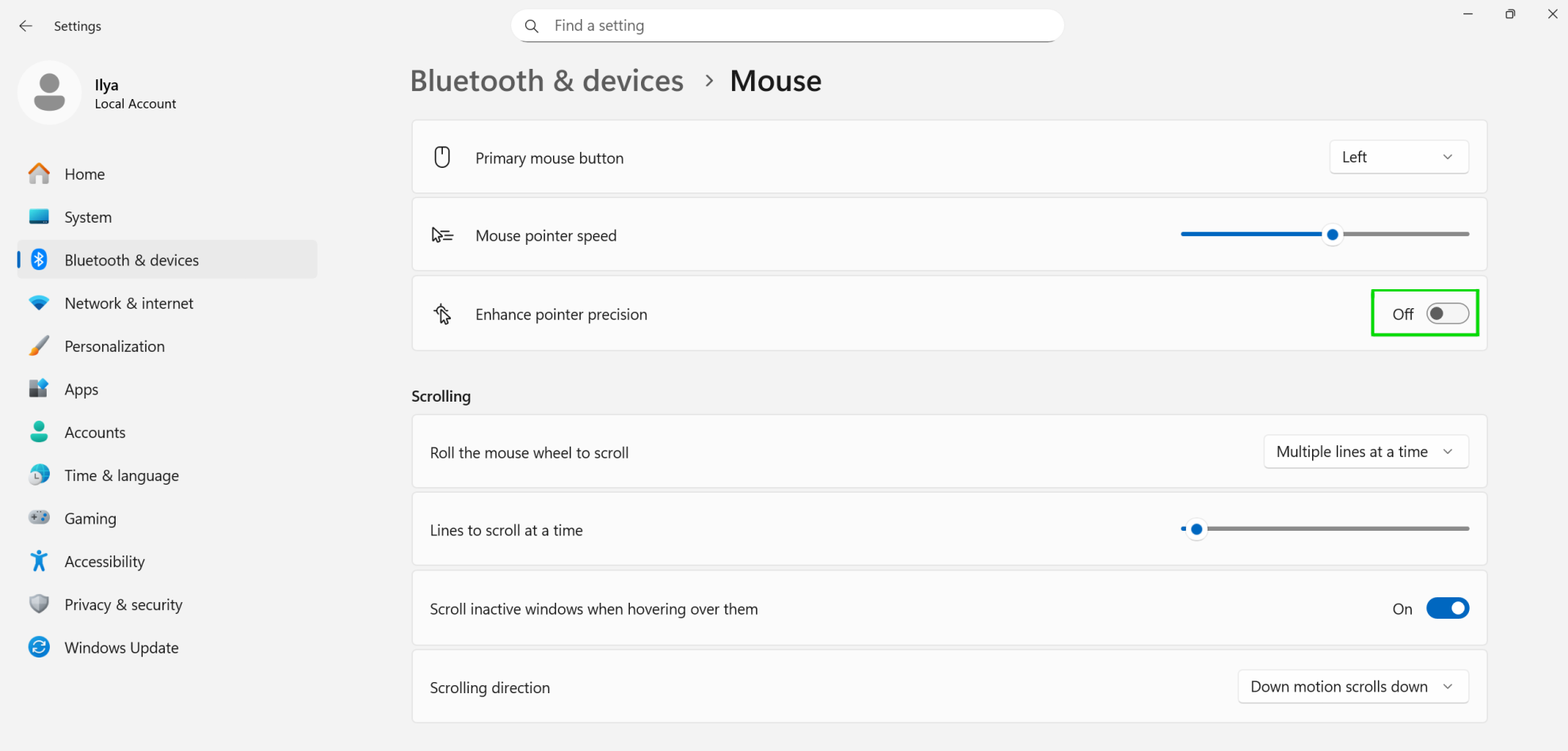
This setting controls mouse acceleration. When it is enabled, the position of the pointer depends on two factors:
- The distance you move the mouse.
- The speed at which you move the mouse.
Mouse acceleration is useful when working on large monitors. But it significantly impedes the development of muscle memory in computer games. Therefore, you should disable this option. When turned off, the pointer position depends only on the distance you move the mouse, but not on the speed.
Now, let us look at how to perform the attack move technique with the new settings. Follow these steps to execute it:
- Move the mouse cursor close to the target. It does not have to be precisely on the target.
- Press the A hotkey. The champion will begin the windup phase of the attack animation.
- Move the mouse cursor to the point where you want the champion to move. This should be either toward or away from the enemy.
- Once the champion begins the firing or recovery phase, right-click. The champion will move to the designated point.
- Track the auto-attack cooldown timer. When it expires, start the next auto-attack from step 1.
While performing the attack move technique, players commonly make the following mistakes:
- Issuing the move command too early. If it is done during the windup phase, it cancels the champion’s auto-attack. This significantly reduces his DPS.
- Allowing the champion to move longer than the attack cooldown timer. This prevents the champion from utilizing his high attack speed effectively.
You can practice the attack move technique in the “Practice Tool” mode. Get a feel for your champion’s attack rhythm at different levels and with various items. This will help you learn to attack precisely when the cooldown timer ends.
Note the relationship between attack speed and the champion’s movement pattern. With low attack speed, the champion moves with long segments. With high attack speed, these segments are shortened.
3.1.5 Basic attack and using an ability
We have explored the technique of canceling an attack animation using a movement command. This is just one of four available options. Below is a complete list of actions that can cancel the attack animation:
- Movement
- Champion ability
- Summoner spell
- Active item ability.
Let us focus on the second option: canceling an attack animation using a champion ability. We can name this technique similar to the first option — attack ability (attack and ability). The third and fourth options work in the same way.
Figure 3-6 shows the timeline diagram for the attack ability technique.
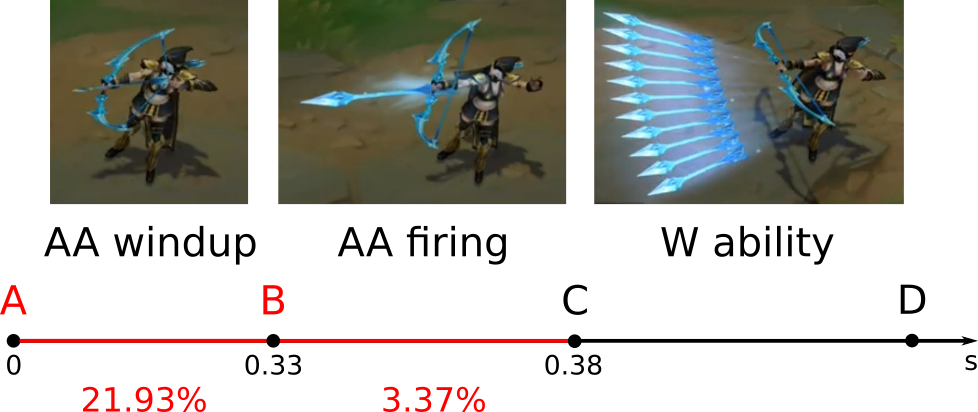
The steps for this technique are as follows:
- At point A, the player issues the attack command. The champion initiates the AA windup animation phase.
- At point B, the champion begins the AA firing phase.
- At the B-C segment or at point C, the player issues the W command. The champion begins the W ability animation immediately after the AA firing phase ends. This occurs in the C-D segment and beyond.
- At point D, the auto-attack cooldown timer finishes. From this point on, the player can issue the next attack command.
The attack ability technique is particularly useful when you need to maximize a champion’s damage per second (DPS). The target should be within both attack and ability range. This technique is especially effective against a rooted target. If the target moves out of range, you need to alternate between attack move and attack ability techniques.
3.1.6 Execution of the attack ability
You need to set all champions’ abilities to “Quick Cast to perform the attack ability technique effectively. This setting is located in the “HOTKEYS” tab. Figure 3-7 shows it.
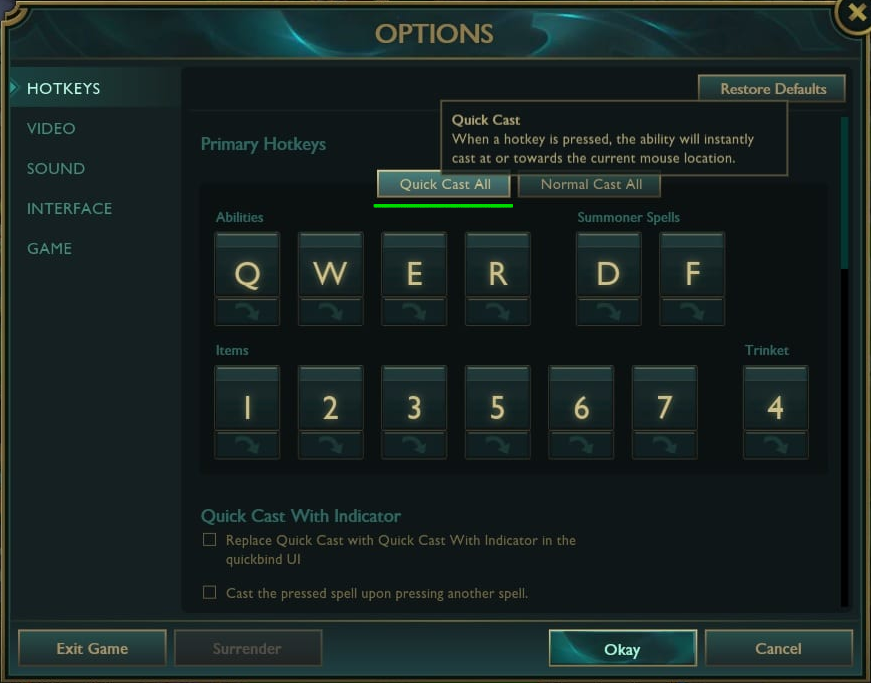
The “Quick Cast All” button in the “HOTKEYS” tab enables the corresponding setting. This causes the champion to cast the ability as soon as you release the related key (e.g., W). You no longer need to press the key twice. This significantly speeds up in-game actions, but it takes some time to get used to.
Please note that some abilities with charge or channel should not be set to Quick Cast. If a champion can move while charging, he can change his position with a summoner spell Flash. Holding down the Quick Cast key while using FFlash is inconvenient. It is easier to execute these actions when the ability is set to Normal Cast (the default). Here are some examples of abilities that do not require Quick Cast: Vi Q, Viego W.
Now, let us go over how to execute the attack ability technique with abilities that are set to Quick Cast. Follow these steps:
- Move the mouse cursor close to the target. It does not have to be exactly on the target.
- Press the A hotkey. The champion will begin the windup phase of the attack animation.
- Adjust the mouse cursor so that the ability will hit the target.
- When the champion begins the firing or recovery phase of the attack animation, press the ability hotkey. The champion will use it instead of playing the recovery phase of the animation.
A common mistake when performing this technique is issuing the ability during the windup phase of the attack animation. In this case, the champion cancels the auto-attack and uses the ability. This greatly reduces the champion’s DPS and can disrupt his combo.
You can practice the attack ability technique in the “Practice Tool.” Try to remember two things regarding your main champion:
- Frames and timings of the firing phase of the attack animation at different champions’ levels and items. Then you would not accidentally cancel it with an ability.
- The area of effect of all abilities. This knowledge will prevent you from needing to hold down buttons to check the radius of abilities. This can save seconds that can decide the outcome of the fight.
3.2 Ability animation
The basic attack pattern is consistent across all champions and consists of three phases. However, the proportions of these phases can vary. For instance, Volibear’s windup phase accounts for 30% of his attack animation, while Ashe’s windup phase is only 21.93%. Additionally, the base attack speed and its growth per level differ among champions, but these are minor details. The algorithms for executing the attack moves and attack ability techniques are the same for all champions.
In contrast, working with ability animations is more complex. Abilities are executed using different algorithms and interact in unique ways with the champion’s other actions. This complexity demands advanced micromanagement skills from the player. Let us explore some of the basic techniques involved.
3.2.1 Phases of ability animation
When a player issues an ability command, the champion executes a complete animation cycle. This cycle includes three phases, similar to an auto-attack for most abilities:
- Windup — preparation for the action.
- Firing — execution of the strike, shot, or application of an effect.
- Recovery — returning to the starting position.
Abilities that follow this sequence can be referred to as adhering to a basic scheme. Some abilities deviate from this structure. We will consider these variations as deviations from the basic scheme.
Let us start with simple abilities that fit within the basic scheme, such as the Ashe W ability. Figure 3-8 illustrates its timeline diagram.
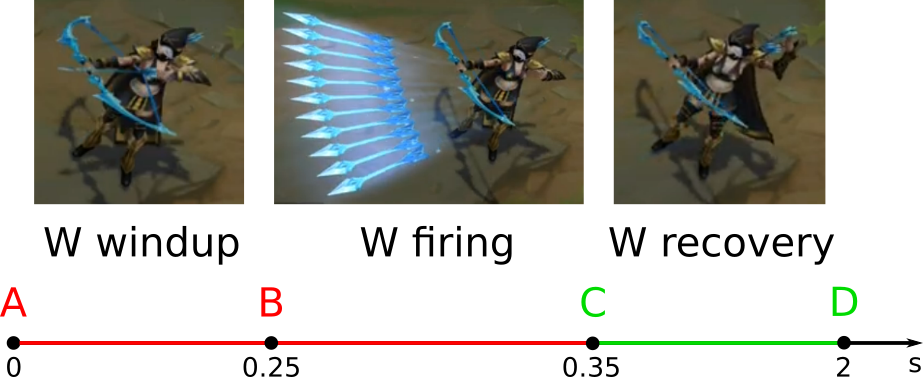
Now, let us examine the diagram step by step:
- At point A, the player issues the ability command. The champion begins the windup animation phase: drawing the bowstring. This phase always lasts 0.25 seconds for the W ability.
- At point B, the champion begins the firing phase: launching a volley of arrows. This phase lasts approximately 0.1 seconds.
- At point C, the champion begins the recovery phase: drawing the next arrow from the quiver. This phase lasts approximately 1.65 seconds.
- At point D, the champion completes the full animation cycle. A total of two seconds have passed since the player issued the command at point A.
It is important to note that the duration of all phases of the W ability animation is constant. It does not vary based on attack speed, champion level, or ability level. However, some other abilities may have their animation durations affected by these factors.
We have discussed the basic scheme of an ability animation. There are three primary deviations from it:
- Charging replaces the windup phase.
- Channeling replaces the firing phase.
- There is no windup phase, and the ability animation starts directly with firing.
When charging replaces the windup or channeling replaces the firing phase, the intention of the corresponding phase remains unchanged. However, the duration of this phase becomes longer. The rules for replacements are as follows:
- If a charging replaces a windup, the champion prepares to cast the ability during this phase. After this, he performs the firing animation.
- If a channeling replaces a firing animation, this phase begins after windup. During the channeling, the champion deals damage or applies the ability effect.
You can cancel or change the animation of any of the ability phases: windup, firing, or recovery. There are no general rules for this. It depends on the specific ability and the champion.
3.2.2 Ability classification
Let us focus only on the abilities animation. Their effects are not so important at the moment. We can categorize all abilities into five types. Each type has its own specific animation pattern.
If two abilities follow the same animation pattern, you can apply the same techniques to both. Therefore, classification is crucial. By using this system, you do not need to remember the rules for every ability in the game. Instead, it suffices to understand how animation works for each ability type.
Table 3-1 lists all ability types classified by their animation patterns.
| Ability type | Moves Champion | Animation Phases | Examples |
|---|---|---|---|
| Auto-attack modifier | No | Windup, firing, recovery | Vi - E, Volibear - Q, Jax - W |
| Static slow ability | No | Windup, firing, recovery | Ashe - W, Ezreal - Q, Lucian - Q, Darius - Q, Kennen - R |
| Static fast ability | No | Firing, recovery | Garen - W, Katarina - R, Master Yi - W |
| Dynamic slow ability | Yes | Windup, firing, recovery | Vi - Q, Viego - W, Fiddlestick - R, Caitlyn - E |
| Dynamic fast ability | Yes | Firing, recovery | Kayn - Q, Vayne - Q, Riven - E |
This classification is based on two key features.
The first feature is the deviation from the basic animation scheme. For simplicity, we consider only one possible deviation: the absence of a windup phase. Another possible deviation is replacing some animation phase with charging or channeling. We can ignore this deviation for now.
Three types of abilities in Table 3-1 follow the basic animation scheme:
- Basic attack modifier
- Static slow ability
- Dynamic slow ability.
For these abilities, the champion performs all three phases of the animation. We call them slow because their firing phase begins with a delay. This delay occurs due to preparations during the windup phase.
The remaining two types of abilities deviate from the basic scheme. They do not have the windup phase. Therefore, we call them fast. Their firing phase begins immediately after using the ability.
The second classification feature is the champion movement. If the firing phase of the ability animation results in moving the champion, the ability is categorized as dynamic. If the champion stays at the same position, the ability is classified as static.
It is important to note that a champion can move during the firing animation phase of some static abilities. A good example is the Darius Q ability. In this case, the movement occurs because the player issues a move command. If the player does not issue the move command, the champion performs the entire animation of the ability, staying in one place.
The following player commands can change the phases of an ability’s animation:
- Auto-attack
- Using another ability
- Moving
- Casting a summoner spell
- Using a dynamic ability towards the wall
- Activating an item’s effect.
Let us examine each ability type and consider which actions may change their animations.
3.2.3 Auto-attack modifiers
The ability of the auto-attack modifier type empowers a champion’s next basic attack. When a player uses this ability, the champion performs a special windup animation that cannot be canceled. During this animation, the champion can carry out extra actions. Auto-attack modifier animation is the animation of an empowered auto-attack that applies the ability effect.
Most auto-attack modifier abilities have two key properties:
When you work with auto-attack modifier animation, you rely on these properties. The first property allows you to increase the DPS of the champion. The second property allows you to change the champion’s position before the firing phase of the empowered auto-attack.
Here are the goals when working with the auto-attack modifier animation:
- Increase the champion’s damage per second (DPS)
- Change the champion’s position before the firing phase of the ability.
3.2.3.1 Auto-attack reset
A combo that resets the auto-attack cooldown timer allows a champion to deal burst damage. This technique is useful in various scenarios, including ganks, tower dives, lane trading, teamfight initiation, and flanking.
The mechanics of resetting the auto-attack cooldown timer work as follows. When a player issues an ability command, the current AA timer is reset. This reset means the champion can perform his next attack. If the AA timer is not running when the ability is issued, the timer reset has no effect. Therefore, you need to perform an AA and start the reset timer every time before issuing the ability.
Let us look at how to build a combo around resetting the auto-attack cooldown timer. We take the Vi AA-E combo as an example. Vi E ability has both an attack reset and an uncancellable windup effect.
Figure 3-9 shows the timeline diagram of the Vi AA-E combo.
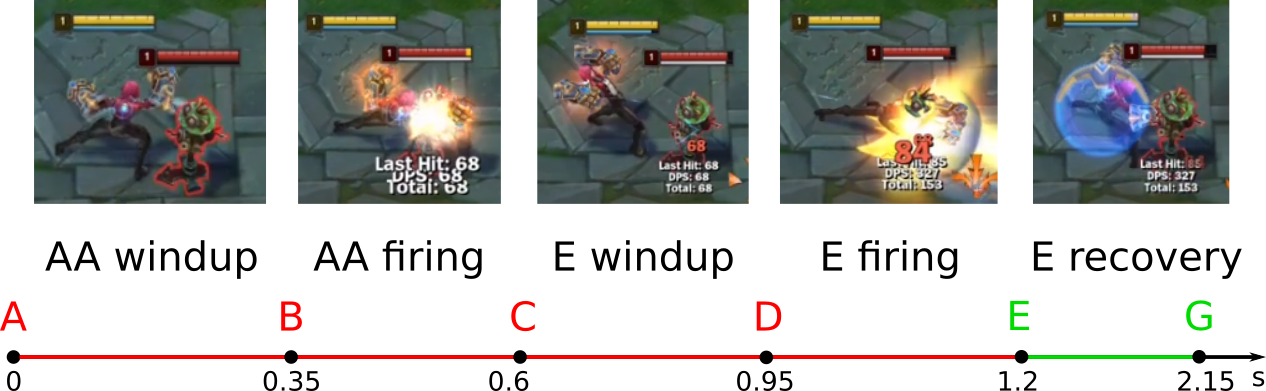
The steps to execute this combo are as follows:
1. At point A, the player right-clicks the target. From this moment, the champion begins the windup animation phase: swinging her fist back to strike. This phase lasts 22.5% of the auto-attack cooldown, which equals 1.55 seconds. This duration is approximately 0.35 seconds, according to the following calculation:
- At point B, the AA firing animation phase begins: the champion punches the target. This phase lasts approximately 0.25 seconds.
- At point C, the player presses the E button and issues the next attack on the target. The E ability cancels the AA recovery animation and resets the attack cooldown, which allows the champion to perform the next attack. Its windup phase lasts 0.35 seconds as usual.
- At point D, the E firing animation begins. It lasts 0.25 seconds, the same duration as a regular auto-attack.
- At point E, the champion begins the E recovery phase. It lasts 0.95 seconds, similar to a regular auto-attack.
You can cancel the E recovery animation during the E-G segment by the following actions:
- Using another ability
- Moving
- Using a summoner spell
- Activating an item effect.
The auto-attack cannot cancel the E recovery animation. The cooldown timer for the auto-attack begins at point C when the player issues the E ability. The AA cooldown is 1.55 seconds. The C-E segment is only 0.6 seconds. Therefore, the champion can only perform his next auto-attack at point G.
You can issue an attacking ability after a combo with an attack modifier. This way, the champion deals a maximum burst damage. After the attacking ability, you can issue another AA. Here are examples of burst combos that rely on the attack reset property:
- Jax A-W-Q-A
- Fiora A-E-Q-A
- Volibear A-Q-W-A.
3.2.3.2 Position change and auto-attack
The uncancellable windup property of the attack modifier ability allows a champion to change position before the firing phase. This technique is useful for retreating. It allows you to increase the distance from opponents after diving, initiating a teamfight, or flanking.
We can categorize position-changing combos into two types:
- Defensive combos, which reposition the champion for retreating
- Offensive combos, which reposition the champion for attacking.
Changing a champion’s position before the firing phase applies not only to attack modifiers but also to basic attack. We will begin with the AA case because it is simpler.
Let us consider the defensive combo Vi AA-F. Figure 3-10 shows its timeline diagram.
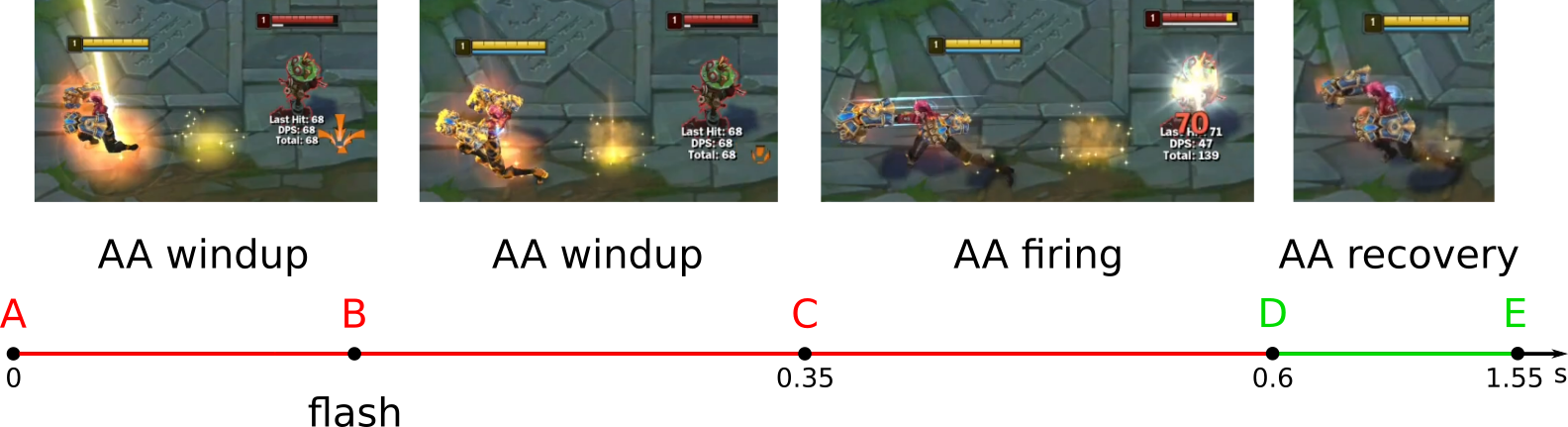
The steps to execute this combo are as follows:
- At point A, the player right-clicks the target. The champion begins the AA windup animation phase. This phase lasts 0.35 seconds and ends at point C.
- At point B, the player presses Flash immediately after the AA windup animation begins. The champion moves away from the target. At the new position, she completes the remaining windup animation. This movement matches segment B-C in the diagram.
- At point C, the AA firing animation begins. At this point, the target takes damage. The damage occurs even if the distance to the target exceeds Vi’s attack range.
- At point D, the champion begins the AA recovery phase. It can be canceled by movement, a summoner spell, an active item effect, or another champion’s ability.
Players make two common mistakes when executing this combo:
- A player begins the combo when the target is outside the champion’s attack range. As a result, when he issues the attack command, the champion moves toward the target. In this case, the player could press Flash before the AA windup animation begins by mistake. Then, the champion skips an auto-attack and just performs Flash.
- A player cancels the AA windup animation after using Flash. For example, a player may accidentally issue the move command. Then, the champion stops the AA windup phase and skips an auto-attack.
The uncancellable windup property of the attack modifier ability solves the second problem. It prevents the player from canceling the windup phase with a move command.
3.2.3.3 Position change and auto-attack modifier
Now we will consider combos that involve Flash and the attack modifier ability. Our example is the defensive combo Vi E-F. Figure 3-11 shows its timeline diagram.
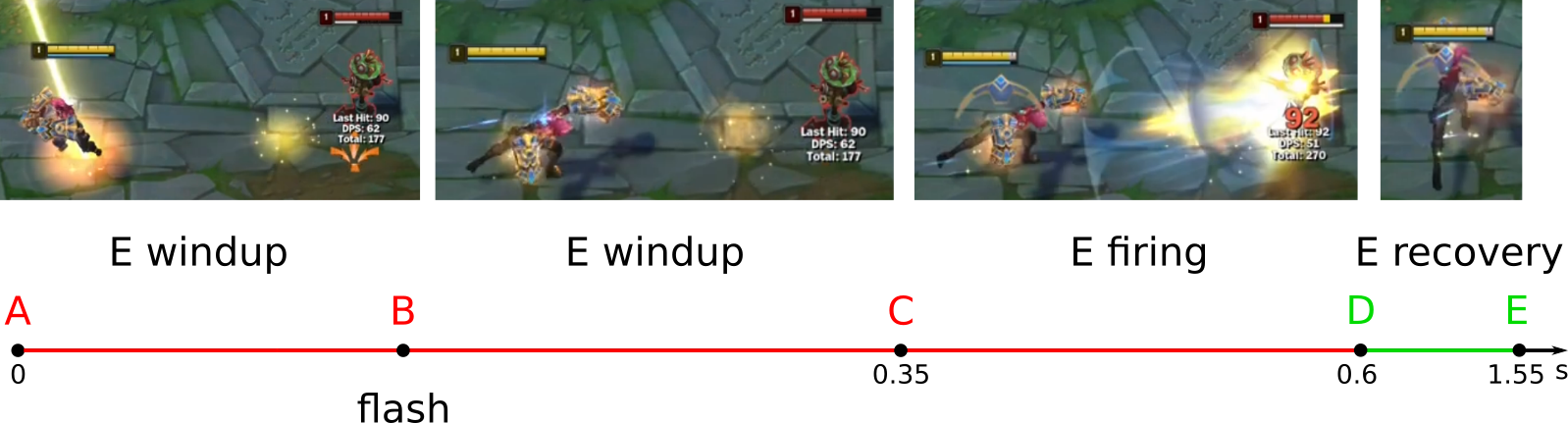
The steps to execute this combo are as follows:
- At point A, the player presses the E button and right-clicks the target. The champion uses the ability and begins the E windup animation.
- At point B, immediately after the E windup animation begins, the player presses Flash. The champion increases the distance to the target. At the new position, she completes the remaining E windup animation. This corresponds to segment B-C in the diagram.
- At point C, the E firing animation begins. At this moment, the target takes damage.
- At point D, the champion begins the E recovery phase. This phase can be canceled by movement, a summoner spell, an active item effect, or another champion’s ability.
A player could make only one mistake when executing this combo. He can start it when the target is outside of the champion’s attack range. In this case, the player could press Flash before the E windup animation begins.
Several similar defensive combos involve an attack modifier ability and Flash. Here are a few examples:
- Darius W-F — it slows the enemy and increases the distance from him.
- Garen Q-F — it silences the enemy and increases the distance from him.
3.2.4 Static abilities
Now let us consider the static abilities. Most abilities in the game are of this type. They can have various effects: dealing extra damage, crowd control, healing, buffs, and shields.
Most static abilities adhere to the basic animation scheme shown in Figure 3-8. However, some static abilities may deviate from this scheme in the following ways:
- Replacing one of the animation phases with charging or channeling
- Omitting the windup phase entirely.
You can achieve the following purposes when working with the animations of a static ability:
- Changing the champion’s position before the firing phase of an ability.
- Masking the animation of one ability with the animation of another.
- Canceling the recovery animation of an auto-attack or ability.
The first purpose applies only to slow, static abilities with a windup phase. The animation of fast static abilities begins with the firing phase, without windup.
3.2.4.1 Position Change in attacking Darius combo
You can change the champion’s position while using static abilities, whether for attacking or retreating. Offensive combos are effective in two cases:
- When the ability has a long windup phase.
- When the ability has a long range.
The concept behind an offensive combo is to perform the ability’s windup phase in one location and then shift its firing phase to another. This technique makes it more difficult for the enemy to dodge the ability.
There are two ways to change a champion’s position during the windup animation phase of a certain static ability:
- Flash. Examples of combos: Darius Q-F, Ezreal Q-F, Ezreal R-F.
- Dynamic champion ability. Examples of combos: Caitlyn E-Q, Caitlyn E-W.
Now, we will focus on changing the champion’s position using Flash. Let us examine the offensive combo Darius Q-F. The following video demonstrates this combo.
The main drawback of Darius Q ability is its long windup animation phase. The strike area is highlighted, giving opponents ample time to dodge it. If Darius uses the ability from a short distance, the enemy can move into the inner area of the strike, resulting in less damage taken. The offensive Q-F combo solves this issue.
Figure 3-12 shows the timeline diagram of the Darius Q-F combo.
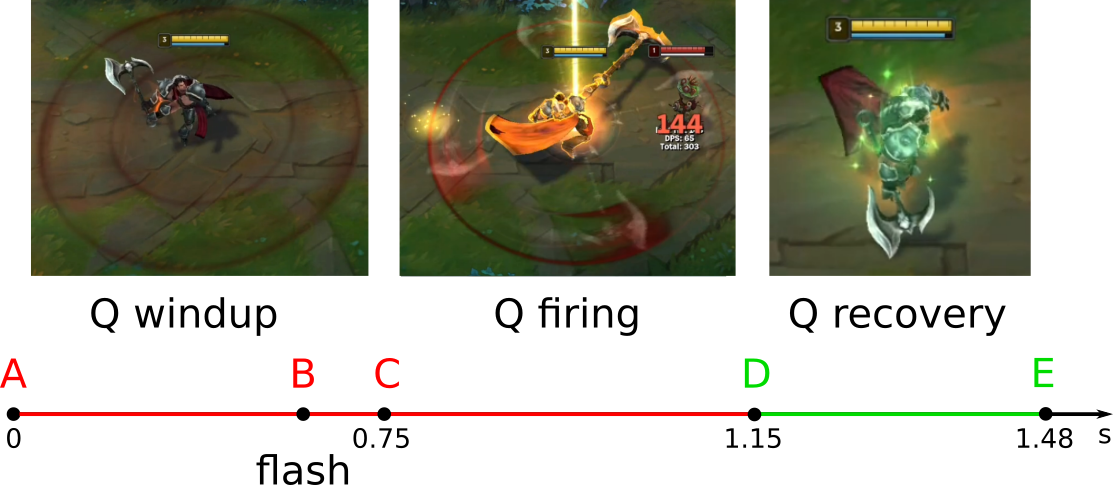
The steps to execute this combo are as follows:
- At point A, the player presses the Q button. From this moment, the champion begins the Q windup animation phase: swinging the axe. This phase lasts 0.75 seconds.
- At point B, when the Q windup animation concludes, the player presses Flash. The champion should reposition to where the enemy is within the outer area of the strike. After this movement, the champion completes the remainder of the Q windup animation. The segment B-C in the diagram represents this phase.
- At point C, the Q firing animation begins. At this point, all enemies within the strike area take damage. This phase lasts approximately 0.4 seconds.
- At point D, the champion begins the Q recovery phase. It lasts approximately 0.33 seconds. This phase can be canceled by an attack, movement, a summoner spell, an active item effect, or another champion ability.
When executed properly, the Darius Q-F combo allows an opponent to see the ability’s animation in advance. However, the enemy has little time to react. If he flashes too early during the A-B segment, the Darius player will not follow up with a Flash. This trade gives the player a resource advantage. The opponent can only dodge the Q strike by using Flash in the B-C segment. Therefore, the shorter this segment is, the better the combo execution.
Here are the general rules for using Flash in combos that involve changing a champion’s position:
In offensive combos, use Flash as late as possible. This minimizes the time the opponent has to react.
In defensive combos, use Flash as early as possible. This allows the champion to reach a safe distance more quickly.
3.2.4.2 Position Change in attacking Ezreal combo
The second example of a position change using Flash is the offensive combo Ezreal Q-F. It is also known as the “Ghost Q” combo. The following video demonstrates it.
Ezreal’s Q ability has a long range and a clearly visible windup animation. At high Elo ranks, players often watch this animation and dodge the projectile. The Q-F combo solves this issue by increasing the ability’s range while masking its animation. This masking makes it harder for opponents to predict the projectile’s trajectory.
Figure 3-13 shows the timeline diagram for the Ezreal Q-F combo.
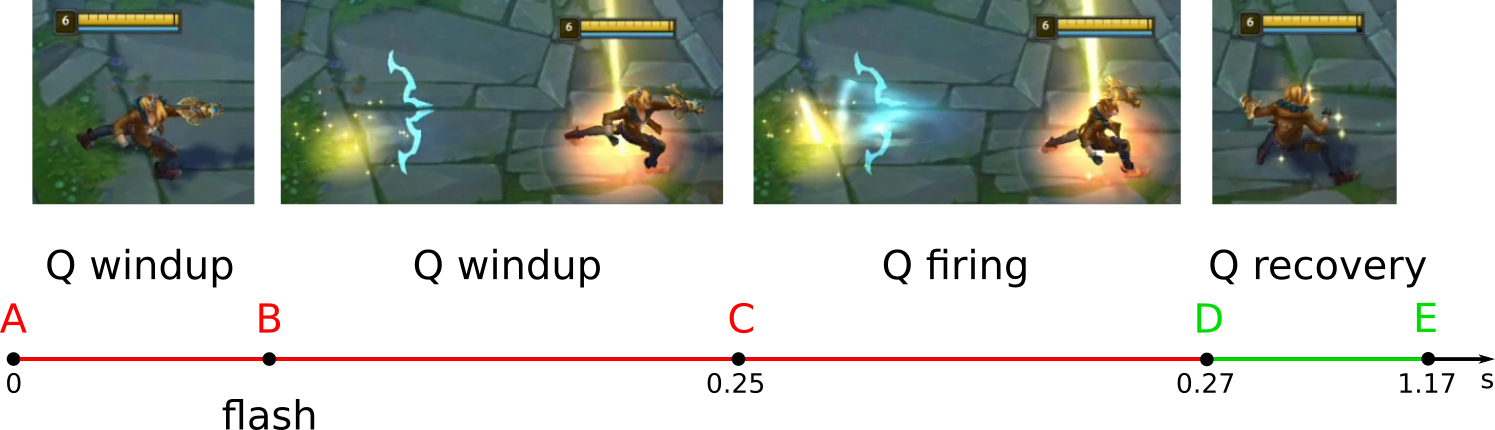
The steps to execute this combo are as follows:
- At point A, the player presses the Q button. The champion performs the Q windup animation phase: he extends his gauntlet forward. This phase always lasts 0.25 seconds.
- At point B, the player presses Flash. The champion closes the distance to the target. Flash should be activated so that its firing animation ends simultaneously with the Q windup phase at point C. This timing not only extends the ability’s range but also masks the windup animation during the B-C segment.
- At point C, the champion performs the Q firing animation phase. This phase is masked similarly to the Q windup phase: the projectile animation begins from Ezreal’s initial position. However, its actual trajectory starts from the champion’s new location. The firing phase lasts approximately 0.02 seconds.
- At point D, the champion begins the Q recovery phase. This phase lasts approximately 0.9 seconds. It can be canceled by an attack, movement, a summoner spell, an active item effect, or another champion ability.
Figure 3-14 shows the projectile flight animation when the Ezreal Q-F combo is executed correctly.
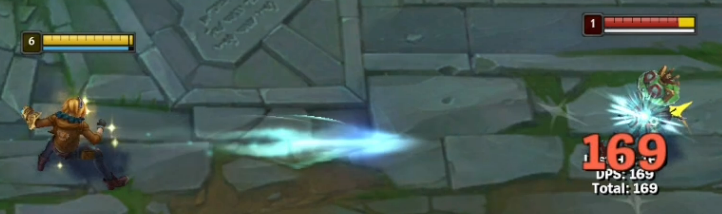
You can see that the projectile only travels halfway before striking the target. This effect occurs because the projectile’s animation differs from its actual trajectory.
During the Ezreal Q-F combo, the champion can flash away from the direction of the projectile. The following video demonstrates this variation of the combo. It allows you to hit a target that might be obscured by minions or another champion.
Many static slow abilities are combined with Flash in a manner similar to the Ezreal Q ability. For example, the Ashe W ability can be executed this way. If you press Flash during the Ashe W windup phase, the champion flashes and fires a volley of arrows from a new position. This combo increases the range of the ability.
3.2.4.3 Position Change in defensive Ezreal combo
The third example of position change using Flash is the defensive combo Ezreal R-F. The following video demonstrates this combo.
Ezreal’s R ability has two problems. First, the windup phase lasts one second. During this time, the champion cannot move, making him an easy target in a teamfight. Second, the trajectory of the projectile is predictable. The windup animation clearly shows where the projectile will go.
The R-F defensive combo solves both problems. The idea of the combo is to mask the R windup animation with Flash while simultaneously increasing the distance from the opponent. This move provides extra time and hides the projectile’s intended direction.
Figure 3-15 shows the timeline diagram for the Ezreal R-F combo.
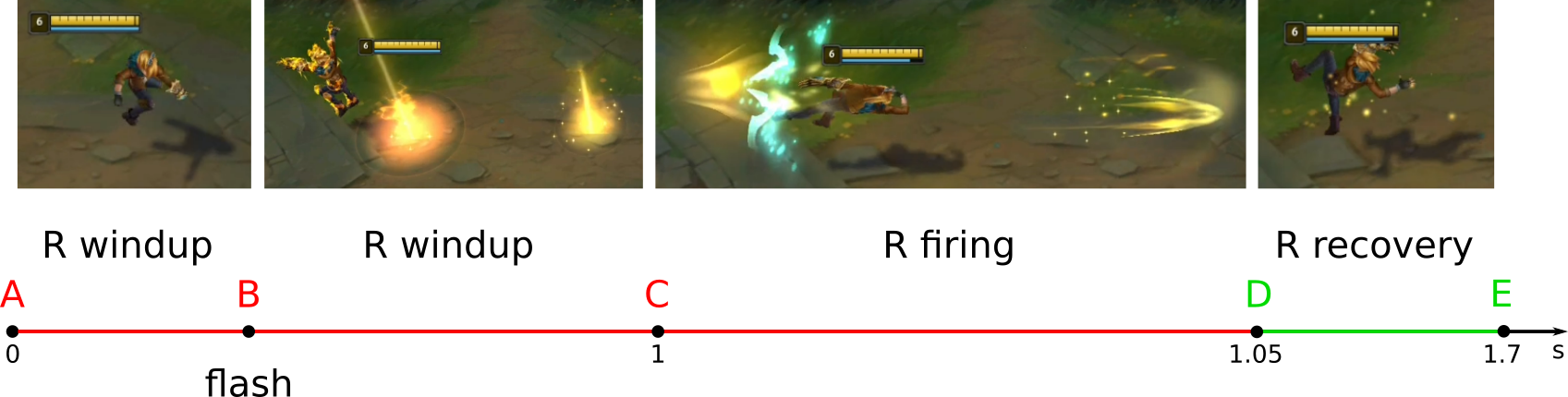
The steps to execute this combo are as follows:
- At point A, the player presses the R button. The champion begins the R windup animation phase: he flies up and extends his gauntlet forward. This phase always lasts 1 second.
- At point B, the player presses Flash immediately after the R windup animation begins. The champion increases the distance from the target. At the new position, he continues the remaining windup animation. The segment B-C in the diagram represents this phase.
- At point C, the champion performs the R firing animation. This phase lasts approximately 0.02 seconds.
- At point D, the champion begins the R recovery phase. This phase lasts approximately 0.65 seconds. It can be canceled by an attack, movement, a summoner spell, an active item effect, or another champion ability.
When performing the R-F combo, it is crucial to press Flash as early as possible. Otherwise, the R windup animation will be partially masked. The champion will perform part of the animation in the starting position and the other part in the final position. This mistake can reveal the projectile’s direction to the opponent.
Note that after using Flash, the champion will aim in the wrong direction. This feature distorts the animation. However, the projectile will still travel in the direction that the player has pointed when casting the R ability.
During a teamfight, it is better to Flash through a wall or into bushes. This move places the champion in a safer position and provides time to complete the R windup animation.
3.2.4.4 Hiding animation in Jinx combo
Using Flash is not the only way to mask ability animations. Some static abilities of a champion can also serve this purpose.
When overlaying animations of two static abilities, you gain the following benefits:
- Increased damage per second (DPS) in teamfights.
- Hide a strike or projectile direction.
Let us look at the Jinx E-R combo. The following video demonstrates it. First, we will consider animation of the E and R abilities.
The Jinx R static slow ability is quite similar to Ezreal R. It has the same two drawbacks: a long windup phase and a predictable projectile trajectory. Figure 3-16 shows the timeline diagram of this ability.
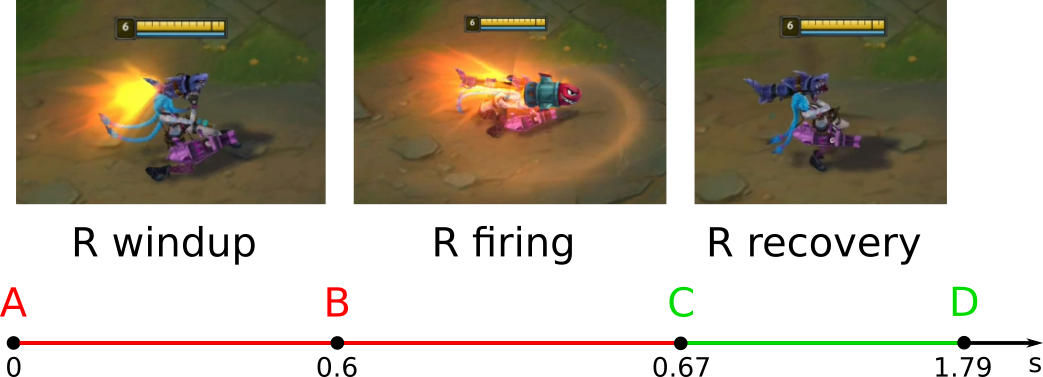
The R windup animation phase lasts 0.6 seconds, which is relatively long.
The Jinx E static fast ability does not have a windup phase. When the player presses the E button, the champion immediately begins the firing animation phase: Jinx throws traps in front of her. Figure 3-17 shows the timeline diagram of this ability.
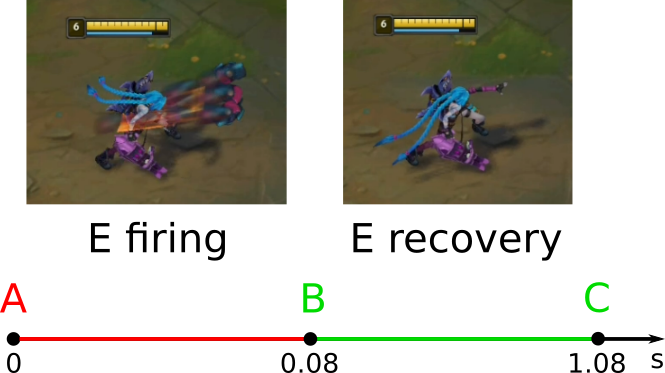
The Jinx E-R combo solves both problems of the R ability. The E ability animation hides the R windup phase. Because of this, the enemy does not realize that the champion is immobilized and vulnerable. The projectile direction is also hidden.
Figure 3-18 shows the timeline diagram of the Jinx E-R combo.
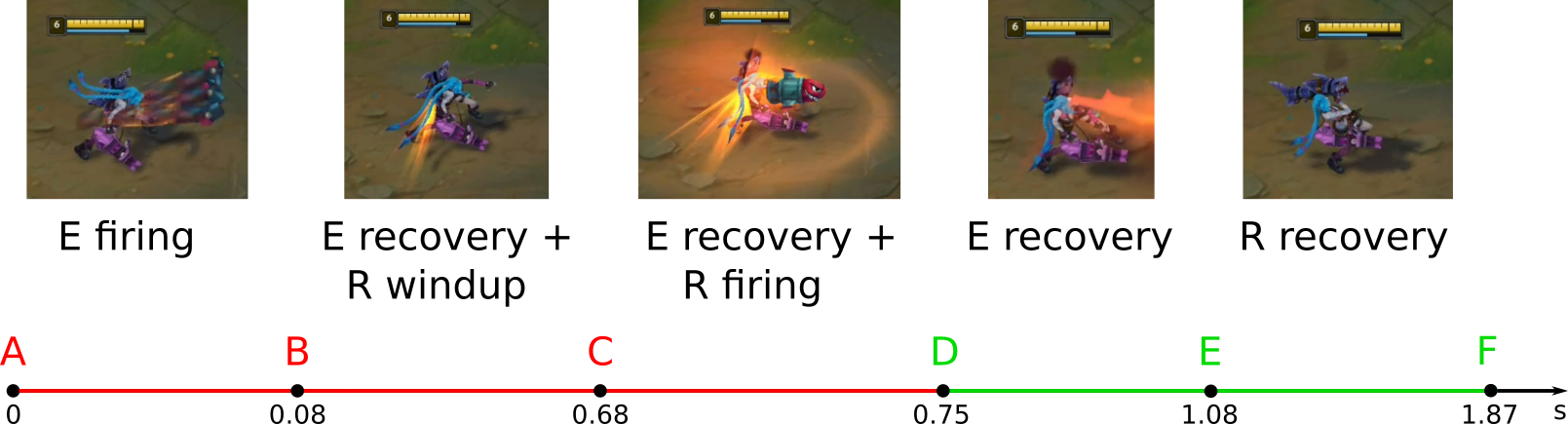
The steps for executing this combo are as follows:
- At point A, the player presses the E button. The champion begins the E firing animation phase. It lasts 0.08 seconds.
- At point B, the E recovery animation phase starts. The player presses the R button. The R windup phase then begins, but its animation is partially hidden.
- At point C, the R firing animation phase begins. It lasts 0.07 seconds. It is also masked by the E recovery animation.
- At point D, the R firing phase ends. Starting from this point, the champion continues only the remainder of the E recovery animation. It hides the R recovery phase.
- At point E, the E recovery phase ends. Then the champion completes the remaining R recovery animation.
You can cancel both E and R recovery animations at point D. This can be done by an attack, movement, a summoner spell, an active item effect, or another champion ability.
In this example, the recovery animation of one static ability masks the windup phase of another. The following combos function in the same manner:
3.2.4.5 Hiding animation in Darius combo
The second example of animation masking is the Darius W-Q combo. The following video demonstrates it
The idea behind the combo is to use the W and Q abilities simultaneously. The W attack modifier has the uncancellable windup property. This technique allows you to start the W windup phase and immediately use the Q ability. This results in the Q animation overlaying the W animation.
Figure 3-19 shows the timeline diagram of the Darius W-Q combo.
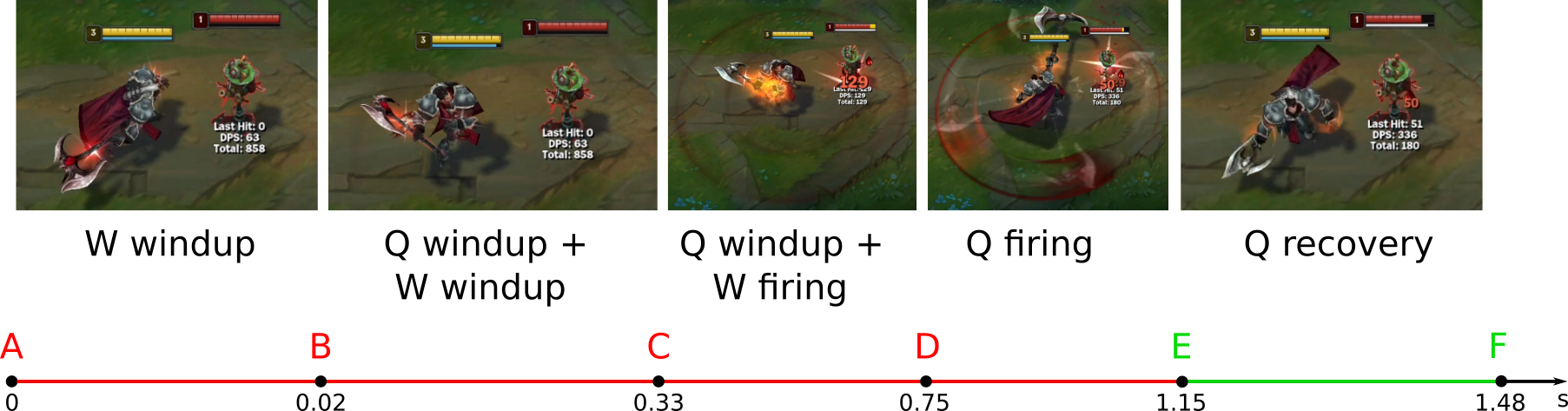
The steps of this combo are as follows:
- At point A, the player presses W and issues an auto-attack. The champion begins the W windup animation phase, swinging the axe from below.
- At point B, the player presses Q immediately after the W windup animation starts. The champion begins the Q windup animation, swinging the axe from above. This Q animation hides the W windup animation, which continues in parallel.
- At point C, the W firing phase begins. The champion deals damage to the enemy with the attack modifier. The Q windup phase hides the strike animation.
- At point D, the Q firing phase begins. All enemies within the strike area take damage.
- At point E, the champion begins the Q recovery phase. This phase can be canceled by an attack, movement, a summoner spell, an active item effect, or another champion ability.
There are several similar combos with an attack modifier and a static ability. Here are a few examples:
- Dr. Mundo E-W
- Garen Q-E
3.2.5 Dynamic abilities
Now, let us explore dynamic abilities. These abilities can be categorized as offensive, which increase damage, or defensive, which enhance survivability. Both types of abilities change the champion’s position in some way.
Working with the animation of a dynamic ability serves several purposes:
- Change the champion’s position before or during the firing phase of an ability.
- End the firing animation phase prematurely.
- Mask the animation of one ability with the animation of another ability.
- Cancel the recovery animation of an auto-attack or ability.
We will look at an example combo for each of these purposes.
3.2.5.1 Position Change in attacking Vi combo
The player can change the champion’s position for attack and defense when using dynamic abilities. This technique works well for both slow and fast abilities.
When a champion performs a static ability, he can change position during the windup and recovery phases. In contrast, most dynamic abilities allow changing position during the firing phase. Flash summoner spell is the only option to do it.
Let us examine changing a champion’s position using the Vi Q-F combo as an example. This combo has two variants: offensive and defensive. First, we will consider the animation of the Vi Q ability. Figure 3-20 shows its timeline diagram.
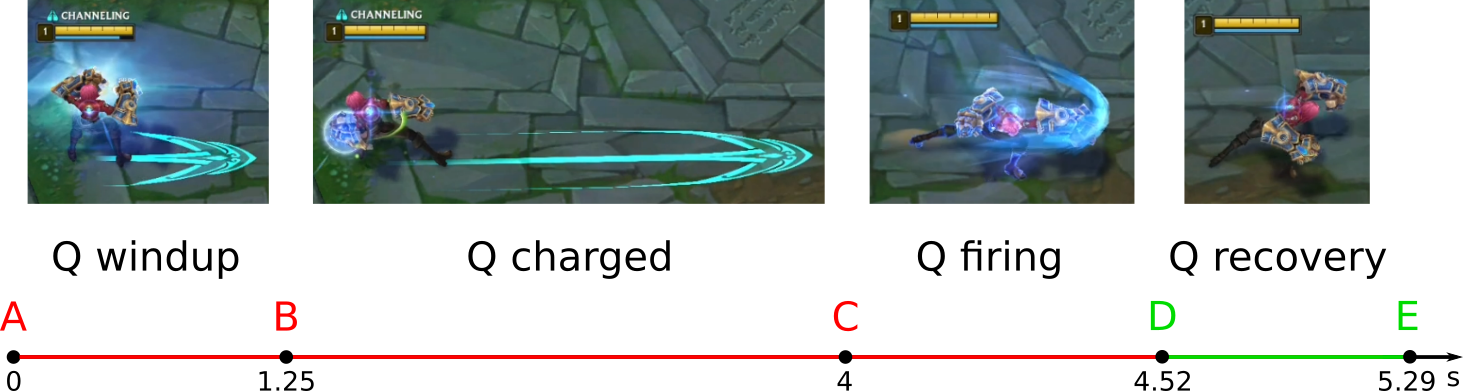
In this ability, the windup phase is replaced with charging. There are four animation phases in total: windup (charging), charged, firing, and recovery. The charged phase occurs when the ability is fully charged. You can skip it by issuing a firing command before full charge is reached.
The Vi Q ability does not have a lockout move property. Lockout prevents the champion from performing certain actions during the ability’s windup phase. Lockout move prevents the champion from moving.
Now let us consider the offensive combo Vi Q-F. Figure 3-21 shows its timeline diagram.
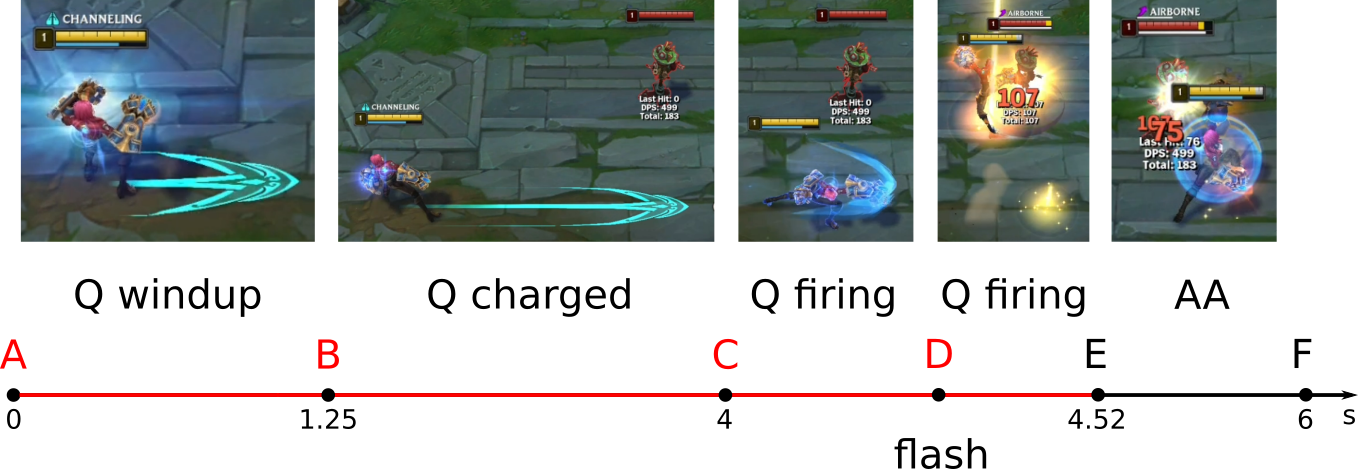
The steps of this combo are as follows:
- At point A, the player presses the Q button. The champion begins the Q windup animation phase: charging her fist. This phase lasts a maximum of 1.25 seconds, during which the champion can move.
- At point B, the champion completes the Q windup phase and enters a Q-charged state. This state lasts up to 2.75 seconds. The champion can move during this time.
- At point C, the player presses the Q button again. The champion performs the Q firing phase: a dash in the specified direction. When fully charged and without any impact, this phase lasts approximately 0.52 seconds.
- At point D, which is near the end of the Q firing animation, the player presses Flash toward the target’s location. This action causes the champion to flash and concludes the Q firing animation at a new position. Using flash guarantees to hit the target, dealing damage, and knocking him back.
- At point E, the firing phase ends. Immediately after that, the champion performs a basic attack on the target. This action can be canceled with a movement command.
The offensive combo with a dynamic ability and Flash serves the following purposes:
- Increase the ability’s range.
- Prevent the enemy from reacting.
Here are some examples of attack combos that function similarly to the Vi Q-F combo:
3.2.5.2 Position Change in defensive Vi combo
Now let us consider the defensive combo Vi Q-F. Figure 3-22 shows its timeline diagram.
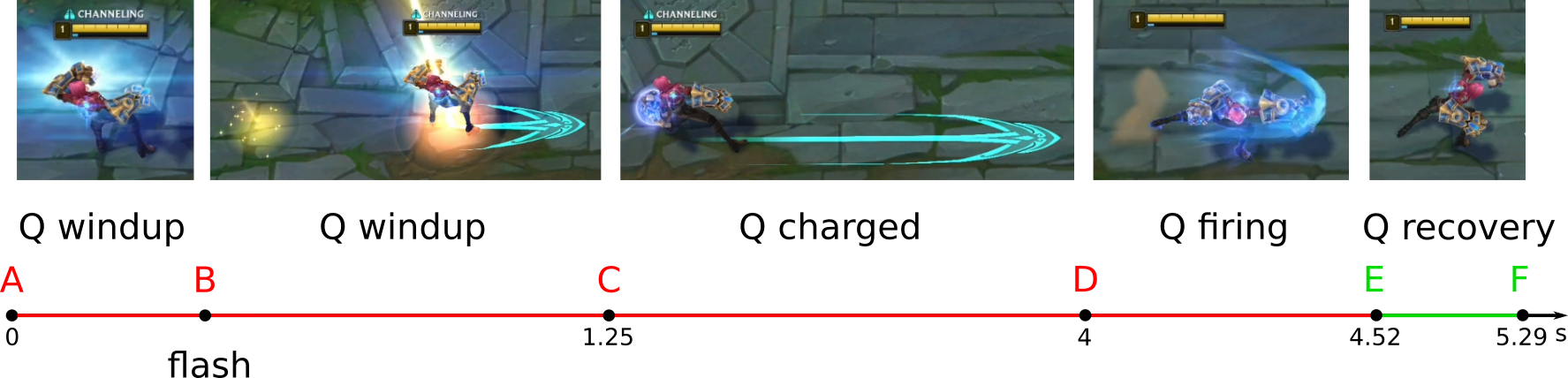
The steps of this combo are as follows:
- At point A, the player presses the Q button. The champion begins the Q windup animation phase.
- At point B, the player presses Flash immediately after the Q windup animation begins. This technique allows the champion to increase the distance from the opponent or dodge the incoming projectile.
- At point C, the champion completes the Q windup phase. Then, she enters the Q-charged state.
- At point D, the player presses the Q button again. The champion executes the Q firing phase: dashing in the specified direction. This move can be a retreat or a counterattack.
- At point E, the champion begins the Q recovery phase. This phase can be canceled by an attack, movement, a summoner spell, an active item effect, or another champion ability.
The defensive combo with a dynamic ability and Flash serves the following purposes:
- Dodge enemy abilities and execute a counterattack.
- Create distance between the champion and the enemy.
Here are some examples of defensive combos that function similarly to Vi Q-F:
3.2.5.3 Premature end of the firing phase
Some dynamic abilities provide an additional effect after being cast. In certain situations, this effect can be more useful than repositioning the champion. You can activate the effect more quickly by shortening the firing animation of the ability.
Let us consider the premature end of the firing phase using the Vayne Q dynamic fast ability as an example. Figure 3-23 shows its timeline diagram.
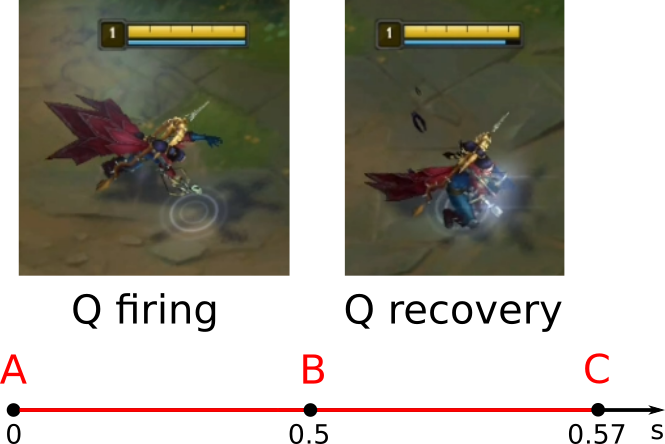
The Q ability has no windup phase. Immediately after casting it, the champion begins the Q firing animation. When this animation ends, the champion gains three effects:
- The next basic attack deals bonus damage.
- The next basic attack gains an uncancellable windup.
- The basic attack timer is reset.
These buffs increase the champion’s DPS. If repositioning is not necessary during a fight, obtaining the buffs quickly becomes more important than movement. Therefore, it is beneficial to activate them as soon as possible.
Note that you cannot cancel the Q recovery phase in usual ways: attacking, moving, using another ability, or using an active item effect.
You need to aim the Q ability at a wall to prematurely end its firing phase. The champion should already stand close to the wall before doing this. The following video demonstrates this technique. It halves the delay before the empowered basic attack.
Figure 3-24 shows the timing diagram for the Vayne Q ability with a shortened firing phase.
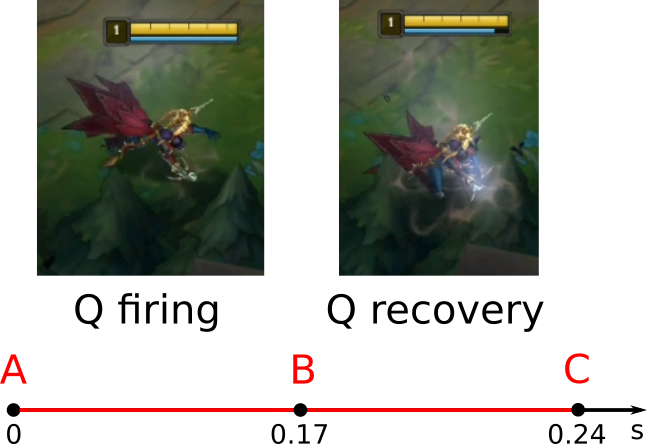
The steps of this technique are as follows:
- At point A, the player moves the mouse cursor over a wall and presses Q. The champion begins the Q firing animation phase: she tumbles.
- At point B, the champion interrupts the Q firing phase because the wall blocks her movement. The Q recovery phase begins: the champion rises to her feet.
- At point C, the Q recovery phase ends, allowing the champion to perform a charged basic attack.
Here are some examples of dynamic abilities where you can reduce the firing animation phase:
- Kayn Q — reducing the firing phase decreases the delay between the first and second strikes.
- Fiora Q — reducing the firing phase allows the champion to strike the enemy faster.
- Graves E — reducing the firing phase allows the champion to gain an additional ammo for his basic attack faster.
- Ekko E — reducing the firing phase allows the champion to empower his next basic attack faster.
3.2.5.4 Hiding animation
We have already discussed two methods of animation masking:
- Combining two static abilities
- Combining a static ability with Flash.
Now, let us consider the third method of animation masking: combining a static and a dynamic ability. The goals of this technique are as follows:
- Reposition the champion for attack or retreat.
- Increase the champion’s DPS during the fight.
- Hide a strike or projectile’s direction.
We will consider the defensive combo Caitlyn E-Q. The following video demonstrates this technique. First, we will look at the abilities it consists of.
The static slow ability Caitlyn Q is similar to Ezreal Q. Caitlyn Q has a slightly longer range, but its windup phase is nearly three times longer. This timing makes the projectile’s direction easy to predict. During the windup phase, the champion also becomes vulnerable in a teamfight.
Figure 3-25 shows the timeline diagram of the Caitlyn Q ability.
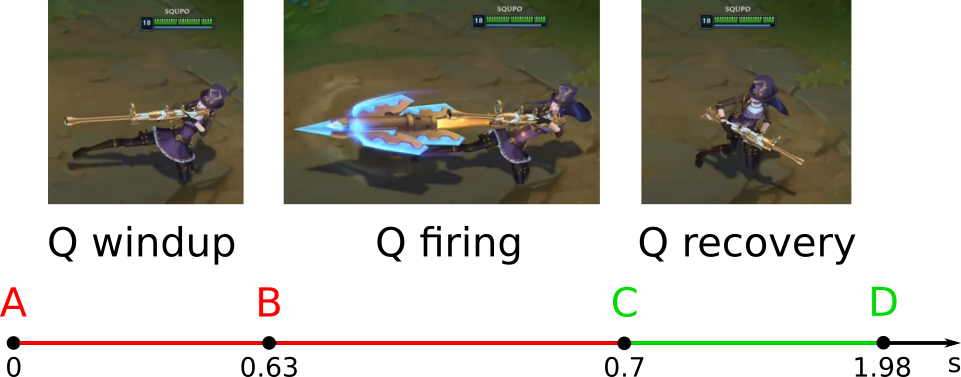
The Q windup animation phase lasts 0.63 seconds. During this time, the enemy can easily dodge the ability.
The dynamic slow ability Caitlyn E has a windup animation phase. When this phase finishes, the champion fires a projectile and dashes back. Figure 3-26 shows the timeline diagram of the ability.
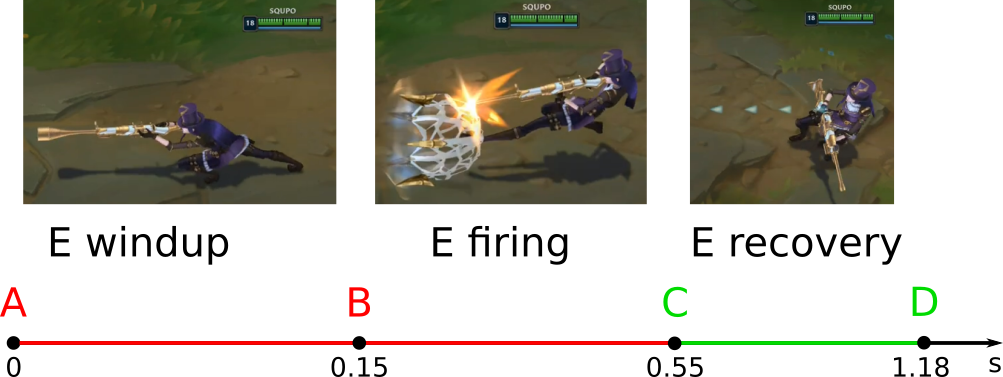
The defensive combo Caitlyn E-Q solves the issue of the long windup phase of her Q ability. The champion moves during this phase when executing the combo. This move creates distance between Caitlyn and the enemy and hides the direction of the Q projectile.
Figure 3-27 shows the timeline diagram of the Caitlyn E-Q combo.
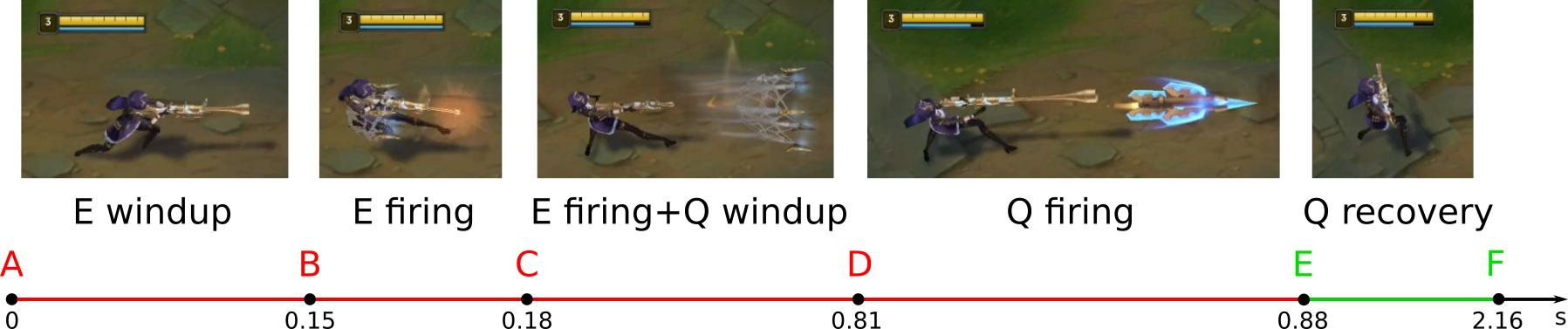
The steps of this combo are as follows:
- At point A, the player presses the E button. The champion begins the E windup animation phase. It lasts 0.15 seconds.
- At point B, the E firing animation phase begins. It lasts approximately 0.4 seconds.
- At point C, the player presses the Q button immediately after the E firing animation starts. The champion begins the Q windup phase. Its animation overlaps with the E firing animation.
- At point D, Caitlyn begins the Q firing phase. If the combo is executed correctly, the projectile launches from her starting position at point C.
- At point E, the champion begins the Q recovery phase, which lasts approximately 1.28 seconds. This phase can be canceled by an attack, movement, a summoner spell, an active item effect, or another champion ability.
Here are several examples of other combos that function similarly to Caitlyn E-Q:
- Caitlyn E-W
- Riven E-W-Q
- Riven E-R
- Yasuo E-Q
- Samira E-Q
In the last two combos, combining two abilities triggers a special animation. Despite this, they are executed in the same manner as typical animation masking combos.
3.2.6 Complex combos
We have covered the basic techniques for working with ability animations. For each technique, we examined a simple combo consisting of two actions. However, some champions have much more complex combos that involve four or more actions. You cannot perform them properly without knowing the basic techniques.
Let us look at an example of a complex combo: Samira fastest S combo. This combo deals six hits to the enemy in just one second: two basic attacks and four strikes by abilities. Each hit is distinct from the previous one. This way, Samira gets six stacks on her passive ability and can cast her ultimate.
The following video demonstrates the Samira fastest S combo. The esports player Jackspektra explains the combo step by step in the following video.
The sequence of commands needed to perform the combo is as follows:
At first glance, this sequence seems simple. However, it does not account for a series of actions related to ability animations.
Take a moment to watch the video demonstrating the combo in slow motion. You will notice that each hyphen in the sequence corresponds to a specific animation technique. There are five of these techniques involved in this combo:
- AA-W — the W ability cancels the recovery animation of the basic attack (AA).
- W-E — the E ability masks the W ability animation.
- E-Q — the E ability masks the Q ability animation.
- Q-AA — AA cancels the Q recovery animation.
- AA-R — the R ability cancels the AA recovery animation.
A player must understand each of these techniques and apply them effectively. Only with this knowledge can he execute the combo effectively in the shortest possible time.
3.2.7 Training of combos
3.2.7.1 Search for information
The best source of information on combos for a specific champion is YouTube video guides. For example, here is a good guide for Darius.
The second best source of information is mobafire.com. Many champion guides there provide commonly used combos. For instance, you can check out this guide for Ezreal.
Basic combos for each champion are also available on mobalytics.gg. You can view combo descriptions for free. However, you need a paid subscription to watch the videos. Here is an example of a page with Ezreal combos.
If you still have not found the information you need, you can check possible combos yourself in the “Practice Tool”. Follow these steps to do it:
- Determine the type of each champion’s ability using Table 3-1.
- For each ability, create a list of combos that should work for its type.
- Go through the list to check whether each combo actually works.
Note that game mechanics often have exceptions to the general rules. For example, while some abilities should theoretically combine with Flash, the game may not allow this.
To illustrate how to check combos in “Practice tool”, let us assume our champion has a dynamic slow ability. The following techniques typically work well with this type of ability:
- Changing the champion’s position before or during the firing phase of the ability.
- Ending the firing animation phase prematurely.
- Masking the animation of one ability with the animation of another ability.
- Canceling the recovery animation of an auto-attack or ability.
Try each option and make a list of the techniques that worked. Estimate the advantages that each combo could provide you in a fight. Try combining the techniques you discovered into more complex combos to enhance their effectiveness.
3.2.7.2 Player skills development
Performing combos well requires regular practice. A typical ranked game often does not provide enough opportunities for this practice. Therefore, it can be highly beneficial to use the “Practice Tool” to repeat your champion’s basic combos before each gaming session.
The intensity of practicing combos can vary significantly depending on the champion. For mechanical champions, mastering their combos can take much longer — sometimes weeks or even months. It is important to learn to execute your champion’s basic combos automatically.
To execute combos successfully, it is not enough just to press the buttons in the right order. If your champion has long-range abilities, you must also be able to land those abilities. You can train this skill using the following tools:
- The Skill Gap program offers a variety of training modes. Some modes are free, and others are paid.
- The loldodgegame.com website, where all modes are free.
Both programs simulate simplified League of Legends mechanics.
In addition to these tools, general speed and accuracy trainers can be helpful:
- The Don’t Tap game for improving mouse click accuracy.
- The APM Trainer for enhancing actions per minute skills.
- The Mouse Accuracy Trainer for practicing mouse accuracy.
Use these tools to warm up before your gaming sessions to enhance your performance.