Served by the Pot: Collections

Iteration and Iterables

Many objects in JavaScript can model collections of things. A collection is like a box containing stuff. Sometimes you just want to move the box around. But sometimes you want to open it up and do things with its contents.
Things like “put a label on every bag of coffee in this box,” Or, “Open the box, take out the bags of decaf, and make a new box with just the decaf.” Or, “go through the bags in this box, and take out the first one marked ‘Espresso’ that contains at least 454 grams of beans.”
All of these actions involve going through the contents one by one. Acting on the elements of a collection one at a time is called iterating over the contents, and JavaScript has a standard way to iterate over the contents of collections.
a look back at functional iterators
When discussing functions, we looked at the benefits of writing Functional Iterators. We can do the same thing for objects. Here’s a stack that has its own functional iterator method:
const Stack1 = () =>
  ({
    array:[],
    index: -1,
    push (value) {
      return this.array[this.index += 1] = value;
    },
    pop () {
      const value = this.array[this.index];

      this.array[this.index] = undefined;
      if (this.index >= 0) {
        this.index -= 1
      }
      return value
    },
    isEmpty () {
      return this.index < 0
    },
    iterator () {
      let iterationIndex = this.index;

      return () => {
        if (iterationIndex > this.index) {
          iterationIndex = this.index;
        }
        if (iterationIndex < 0) {
          return {done: true};
        }
        else {
          return {done: false, value: this.array[iterationIndex--]}
        }
      }
    }
  });

const stack = Stack1();

stack.push("Greetings");
stack.push("to");
stack.push("you!")

const iter = stack.iterator();
iter().value
  //=> "you!"
iter().value
  //=> "to"
The way we’ve written .iterator as a method, each object knows how to return an iterator for itself.
And here’s a sum function implemented as a fold over a functional iterator:
const iteratorSum = (iterator) => {
  let eachIteration,
      sum = 0;

  while ((eachIteration = iterator(), !eachIteration.done)) {
    sum += eachIteration.value;
  }
  return sum
}
We can use it with our stack:
const stack = Stack1();

stack.push(1);
stack.push(2);
stack.push(3);

iteratorSum(stack.iterator())
  //=> 6
We could save a step and write collectionSum, a function that folds over any object, provided that the object implements an .iterator method:
const collectionSum = (collection) => {
  const iterator = collection.iterator();

  let eachIteration,
      sum = 0;

  while ((eachIteration = iterator(), !eachIteration.done)) {
    sum += eachIteration.value;
  }
  return sum
}

collectionSum(stack)
  //=> 6
If we write a program with the presumption that “everything is an object,” we can write maps, folds, and filters that work on objects. We just ask the object for an iterator, and work on the iterator. Our functions don’t need to know anything about how an object implements iteration, and we get the benefit of lazily traversing our objects.
This is a good thing.
iterator objects
Iteration for functions and objects has been around for many, many decades. For simple linear collections like arrays, linked lists, stacks, and queues, functional iterators are the simplest and easiest way to implement iterators.
In programs involving large collections of objects, it can be handy to implement iterators as objects, rather than functions. The mechanics of iterating can then be factored using the same tools that are used to factor the mechanics of all other objects in the system.
Fortunately, an iterator object is almost as simple as an iterator function. Instead of having a function that you call to get the next element, you have an object with a .next() method.
Like this:
const Stack2 = () =>
  ({
    array: [],
    index: -1,
    push (value) {
      return this.array[this.index += 1] = value;
    },
    pop () {
      const value = this.array[this.index];

      this.array[this.index] = undefined;
      if (this.index >= 0) {
        this.index -= 1
      }
      return value
    },
    isEmpty () {
      return this.index < 0
    },
    iterator () {
      let iterationIndex = this.index;

      return {
        next () {
          if (iterationIndex > this.index) {
            iterationIndex = this.index;
          }
          if (iterationIndex < 0) {
            return {done: true};
          }
          else {
            return {done: false, value: this.array[iterationIndex--]}
          }
        }
      }
    }
  });

const stack = Stack2();

stack.push(2000);
stack.push(10);
stack.push(5)

const collectionSum = (collection) => {
  const iterator = collection.iterator();

  let eachIteration,
      sum = 0;

  while ((eachIteration = iterator.next(), !eachIteration.done)) {
    sum += eachIteration.value;
  }
  return sum
}

collectionSum(stack)
  //=> 2015
Now our .iterator() method is returning an iterator object. When working with objects, we do things the object way. But having started by building functional iterators, we understand what is happening underneath the object’s scaffolding.
iterables
People have been writing iterators since JavaScript was first released in the late 1990s. Since there was no particular standard way to do it, people used all sorts of methods, and their methods returned all sorts of things: Objects with various interfaces, functional iterators, you name it.
So, when a standard way to write iterators was added to the JavaScript language, it didn’t make sense to use a method like .iterator() for it: That would conflict with existing code. Instead, the language encourages new code to be written with a different name for the method that a collection object uses to return its iterator.
To ensure that the method would not conflict with any existing code, JavaScript provides a symbol. Symbols are unique constants that are guaranteed not to conflict with existing strings. Symbols are a longstanding technique in programming going back to Lisp, where the GENSYM function generated… You guessed it… Symbols.48
The expression Symbol.iterator evaluates to a special symbol representing the name of the method that objects should use if they return an iterator object.
Our stack does, so instead of binding the existing iterator method to the name iterator, we bind it to the Symbol.iterator. We’ll do that using the [ ] syntax for using an expression as an object literal key:
const Stack3 = () =>
  ({
    array: [],
    index: -1,
    push (value) {
      return this.array[this.index += 1] = value;
    },
    pop () {
      const value = this.array[this.index];

      this.array[this.index] = undefined;
      if (this.index >= 0) {
        this.index -= 1
      }
      return value
    },
    isEmpty () {
      return this.index < 0
    },
    [Symbol.iterator] () {
      let iterationIndex = this.index;

      return {
        next () {
          if (iterationIndex > this.index) {
            iterationIndex = this.index;
          }
          if (iterationIndex < 0) {
            return {done: true};
          }
          else {
            return {done: false, value: this.array[iterationIndex--]}
          }
        }
      }
    }
  });

const stack = Stack3();

stack.push(2000);
stack.push(10);
stack.push(5)

const collectionSum = (collection) => {
  const iterator = collection[Symbol.iterator]();

  let eachIteration,
      sum = 0;

  while ((eachIteration = iterator.next(), !eachIteration.done)) {
    sum += eachIteration.value;
  }
  return sum
}

collectionSum(stack)
  //=> 2015
Using [Symbol.iterator] instead of .iterator seems like adding an extra moving part for nothing. Do we get anything in return?
Indeed we do. Behold the for...of loop:
const iterableSum = (iterable) => {
  let sum = 0;

  for (const num of iterable) {
    sum += num;
  }
  return sum
}

iterableSum(stack)
  //=> 2015
The for...of loop works directly with any object that is iterable, meaning it works with any object that has a Symbol.iterator method that returns an object iterator. Here’s another linked list, this one is iterable:
const EMPTY = {
  isEmpty: () => true
};

const isEmpty = (node) => node === EMPTY;

const Pair1 = (first, rest = EMPTY) =>
  ({
    first,
    rest,
    isEmpty () { return false },
    [Symbol.iterator] () {
      let currentPair = this;

      return {
        next () {
          if (currentPair.isEmpty()) {
            return {done: true}
          }
          else {
            const value = currentPair.first;

            currentPair = currentPair.rest;
            return {done: false, value}
          }
        }
      }
    }
  });

const list = (...elements) => {
  const [first, ...rest] = elements;

  return elements.length === 0
    ? EMPTY
    : Pair1(first, list(...rest))
}

const someSquares = list(1, 4, 9, 16, 25);

iterableSum(someSquares)
  //=> 55
As we can see, we can use for...of with linked lists just as easily as with stacks. And there’s one more thing: You recall that the spread operator (...) can spread the elements of an array in an array literal or as parameters in a function invocation.
Now is the time to note that we can spread any iterable. So we can spread the elements of an iterable into an array literal:
['some squares', ...someSquares]
  //=> ["some squares", 1, 4, 9, 16, 25]
And we can also spread the elements of an array literal into parameters:
const firstAndSecondElement = (first, second) =>
  ({first, second})

firstAndSecondElement(...stack)
  //=> {"first":5,"second":10}
This can be extremely useful.
One caveat of spreading iterables: JavaScript creates an array out of the elements of the iterable. That might be very wasteful for extremely large collections. For example, if we spread a large collection just to find an element in the collection, it might have been wiser to iterate over the element using its iterator directly.
And if we have an infinite collection, spreading is going to fail outright as we’re about to see.
iterables out to infinity
Iterables needn’t represent finite collections:
const Numbers = {
  [Symbol.iterator] () {
    let n = 0;

    return {
      next: () =>
        ({done: false, value: n++})
    }
  }
}
There are useful things we can do with iterables representing an infinitely large collection. But let’s point out what we can’t do with them:
['all the numbers', ...Numbers]
  //=> infinite loop!

firstAndSecondElement(...Numbers)
  //=> infinite loop!
Attempting to spread an infinite iterable into an array is always going to fail.
ordered collections
The iterables we’re discussing represent ordered collections. One of the semantic properties of an ordered collection is that every time you iterate over it, you get its elements in order, from the beginning. For example:
const abc = ["a", "b", "c"];

for (const i of abc) {
  console.log(i)
}
  //=>
    a
    b
    c

for (const i of abc) {
  console.log(i)
}
  //=>
    a
    b
    c
This is accomplished with our own collections by returning a brand new iterator every time we call [Symbol.iterator], and ensuring that our iterators start at the beginning and work forward.
Iterables needn’t represent ordered collections. We could make an infinite iterable representing random numbers:
const RandomNumbers = {
  [Symbol.iterator]: () =>
    ({
      next () {
        return {value: Math.random()};
      }
    })
}

for (const i of RandomNumbers) {
  console.log(i)
}
  //=>
    0.494052127469331
    0.835459444206208
    0.1408337657339871
    ...

for (const i of RandomNumbers) {
  console.log(i)
}
  //=>
    0.7845381607767195
    0.4956772483419627
    0.20259276474826038
    ...
Whether you work with the same iterator over and over, or get a fresh iterable every time, you are always going to get fresh random numbers. Therefore, RandomNumbers is not an ordered collection.
Right now, we’re just looking at ordered collections. To reiterate (hah), an ordered collection represents a (possibly infinite) collection of elements that are in some order. Every time we get an iterator from an ordered collection, we start iterating from the beginning.
operations on ordered collections
Let’s define some operations on ordered collections. Here’s mapWith, it takes an ordered collection, and returns another ordered collection representing a mapping over the original:49
const mapWith = (fn, collection) =>
  ({
    [Symbol.iterator] () {
      const iterator = collection[Symbol.iterator]();

      return {
        next () {
          const {done, value} = iterator.next();

          return ({done, value: done ? undefined : fn(value)});
        }
      }
    }
  });
This illustrates the general pattern of working with ordered collections: We make them iterables, meaning that they have a [Symbol.iterator] method, that returns an iterator. An iterator is also an object, but with a .next() method that is invoked repeatedly to obtain the elements in order.
Many operations on ordered collections return another ordered collection. They do so by taking care to iterate over a result freshly every time we get an iterator for them. Consider this example for mapWith:
const Evens = mapWith((x) => 2 * x, Numbers);

for (const i of Evens) {
  console.log(i)
}
  //=>
    0
    2
    4
    ...

for (const i of Evens) {
  console.log(i)
}
  //=>
    0
    2
    4
    ...
Numbers is an ordered collection. We invoke mapWith((x) => 2 * x, Numbers) and get Evens. Evens works just as if we’d written this:
const Evens =  {
  [Symbol.iterator] () {
    const iterator = Numbers[Symbol.iterator]();

    return {
      next () {
        const {done, value} = iterator.next();

        return ({done, value: done ? undefined : 2 *value});
      }
    }
  }
};
Every time we write for (const i of Evens), JavaScript calls Evens[Symbol.iterator](). That in turns means it executes const iterator = Numbers[Symbol.iterator](); every time we write for (const i of Evens), and that means that iterator starts at the beginning of Numbers.
So, Evens is also an ordered collection, because it starts at the beginning each time we get a fresh iterator over it. Thus, mapWith has the property of preserving the collection semantics of the iterable we give it. So we call it a collection operation.
Mind you, we can also map non-collection iterables, like RandomNumbers:
const ZeroesToNines = mapWith((n) => Math.floor(10 * limit), RandomNumbers);

for (const i of ZeroesToNines) {
  console.log(i)
}
  //=>
    5
    1
    9
    ...

for (const i of ZeroesToNines) {
  console.log(i)
}
  //=>
    3
    6
    1
    ...
mapWith can get a new iterator from RandomNumbers each time we iterate over ZeroesToNines, but if RandomNumbers doesn’t behave like an ordered collection, that’s not mapWith’s fault. RandomNumbers is a stream, not an ordered collection, and thus mapWith returns another iterable behaving like a stream.
Here are two more operations on ordered collections, filterWith and untilWith:
const filterWith = (fn, iterable) =>
  ({
    [Symbol.iterator] () {
      const iterator = iterable[Symbol.iterator]();

      return {
        next () {
          do {
            const {done, value} = iterator.next();
          } while (!done && !fn(value));
          return {done, value};
        }
      }
    }
  });

const untilWith = (fn, iterable) =>
  ({
    [Symbol.iterator] () {
      const iterator = iterable[Symbol.iterator]();

      return {
        next () {
          let {done, value} = iterator.next();

          done = done || fn(value);

          return ({done, value: done ? undefined : value});
        }
      }
    }
  });
Like mapWith, they preserve the ordered collection semantics of whatever you give them.
And here’s a computation performed using operations on ordered collections: We’ll create an ordered collection of square numbers that end in one and are less than 1,000:
const Squares = mapWith((x) => x * x, Numbers);
const EndWithOne = filterWith((x) => x % 10 === 1, Squares);
const UpTo1000 = untilWith((x) => (x > 1000), EndWithOne);

[...UpTo1000]
  //=>
    [1,81,121,361,441,841,961]

[...UpTo1000]
  //=>
    [1,81,121,361,441,841,961]
As we expect from an ordered collection, each time we iterate over UpTo1000, we begin at the beginning.
For completeness, here are two more handy iterable functions. first returns the first element of an iterable (if it has one), and rest returns an iterable that iterates over all but the first element of an iterable. They are equivalent to destructuring arrays with [first, ...rest]:
const first = (iterable) =>
  iterable[Symbol.iterator]().next().value;

const rest = (iterable) =>
  ({
    [Symbol.iterator] () {
      const iterator = iterable[Symbol.iterator]();

      iterator.next();
      return iterator;
    }
  });
like our other operations, rest preserves the ordered collection semantics of its argument.
from
Having iterated over a collection, are we limited to for..do and/or gathering the elements in an array literal and/or gathering the elements into the parameters of a function? No, of course not, we can do anything we like with them.
One useful thing is to write a .from function that gathers an iterable into a particular collection type. JavaScript’s built-in Array class already has one:
Array.from(UpTo1000)
  //=> [1,81,121,361,441,841,961]
We can do the same with our own collections. As you recall, functions are mutable objects. And we can assign properties to functions with a . or even [ and ]. And if we assign a function to a property, we’ve created a method.
So let’s do that:
Stack3.from = function (iterable) {
  const stack = this();

  for (let element of iterable) {
    stack.push(element);
  }
  return stack;
}

Pair1.from = (iterable) =>
  (function iterationToList (iteration) {
    const {done, value} = iteration.next();

    return done ? EMPTY : Pair1(value, iterationToList(iteration));
  })(iterable[Symbol.iterator]())
Now we can go “end to end,” If we want to map a linked list of numbers to a linked list of the squares of some numbers, we can do that:
const numberList = Pair1.from(untilWith((x) => x > 10, Numbers));

Pair1.from(Squares)
  //=> {"first":0,
        "rest":{"first":1,
                "rest":{"first":4,
                        "rest":{ ...
summary
Iterators are a JavaScript feature that allow us to separate the concerns of how to iterate over a collection from what we want to do with the elements of a collection. Iterable ordered collections can be iterated over or gathered into another collection.
Separating concerns with iterators speaks to JavaScript’s fundamental nature: It’s a language that wants to compose functionality out of small, singe-responsibility pieces, whether those pieces are functions or objects built out of functions.
Generating Iterables

Iterables look cool, but then again, everything looks amazing when you’re given cherry-picked examples. What is there they don’t do well?
Let’s consider how they work. Whether it’s a simple functional iterator, or an iterable object with a .next() method, an iterator is something we call repeatedly until it tells us that it’s done.
Iterators have to arrange its own state such that when you call them, they compute and return the next item. This seems blindingly obvious and simple. If, for example, you want numbers, you write:
const Numbers = {
  [Symbol.iterator]: () => {
    let n = 0;

    return {
      next: () =>
        ({done: false, value: n++})
    }
  }
};
The Numbers iterable returns an object that updates a mutable variable, n, to deliver number after number. How hard can this be?
Well, we’ve written our iterator as a server. It waits until given a request, and then it returns exactly one item. Then it waits for the next request. There is no concept of pushing numbers out from the iterator, just waiting until a number is pulled out of the iterator by whatever code consumes numbers.
Of course, when we have some code that makes a bunch of something, we don’t usually write it like that. We usually just write something like:
let n = 0;

while (true) {
  console.log(n++)
}
And magically, the numbers would pour forth. We would generate numbers. Let’s put that beside the code for the iterator, minus the iterable scaffolding:
// Iteration
let n = 0;

() =>
  ({done: false, value: n++})

// Generation
let n = 0;

while (true) {
  console.log(n++)
}
They’re of approximately equal complexity. So why bring up generation? Well, there are some collections that are much easier to generate than to iterate over. Let’s look at one:
recursive iterators
Iterators maintain state, that’s what they do. Generators have to manage the exact same amount of state, but sometimes, it’s much easier to manage that state in a generator. One of those cases is when we have to recursively enumerate something.
For example, iterating over a tree. Given an array that might contain arrays, let’s say we want to generate all the “leaf” elements, i.e. elements that are not, themselves, iterable.
// Generation
const isIterable = (something) =>
  !!something[Symbol.iterator];

const generate = (iterable) => {
  for (let element of iterable) {
    if (isIterable(element)) {
      generate(element)
    }
    else {
      console.log(element)
    }
  }
}

generate([1, [2, [3, 4], 5]])
//=>
  1
  2
  3
  4
  5
Very simple. Now for the iteration version. We’ll write a functional iterator to keep things simple, but it’s easy to see the shape of the basic problem:
// Iteration
const isIterable = (something) =>
  !!something[Symbol.iterator];

const treeIterator = (iterable) => {
  const iterators = [ iterable[Symbol.iterator]() ];

  return () => {
    while (!!iterators[0]) {
      const iterationResult = iterators[0].next();

      if (iterationResult.done) {
        iterators.shift();
      }
      else if (isIterable(iterationResult.value)) {
        iterators.unshift(iterationResult.value[Symbol.iterator]());
      }
      else {
        return iterationResult.value;
      }
    }
    return;
  }
}

const i = treeIterator([1, [2, [3, 4], 5]]);
let n;

while (n = i()) {
  console.log(n)
}
//=>
  1
  2
  3
  4
  5
If you peel off isIterable and ignore the way that the iteration version uses [Symbol.iterator] and .next, we’re left with the fact that the generating version calls itself recursively, and the iteration version maintains an explicit stack. In essence, both the generation and iteration implementations have stacks, but the generation version’s stack is implicit, while the iteration version’s stack is explicit.
A less kind way to put it is that the iteration version is greenspunning something built into our programming language: We’re reinventing the use of a stack to manage recursion, because writing our code to respond to a function call makes us turn a simple recursive algorithm inside-out.
state machines
Some iterables can be modelled as state machines. Let’s revisit the Fibonacci sequence. Again. One way to define it is:
- The first element of the fibonacci sequence is zero.
- The second element of the fibonacci sequence is one.
- Every subsequent element of the fibonacci sequence is the sum of the previous two elements.
Let’s write a generator:
// Generation
const fibonacci = () => {
  let a, b;

  console.log(a = 0);

  console.log(b = 1);

  while (true) {
    [a, b] = [b, a + b];
    console.log(b);
  }
}

fibonacci()
//=>
  0
  1
  1
  2
  3
  5
  8
  13
  21
  34
  55
  89
  144
  ...
The thing to note here is that our fibonacci generator has three states: generating 0, generating 1, and generating everything after that. This isn’t a good fit for an iterator, because iterators have one functional entry point and therefore, we’d have to represent our three states explicitly, perhaps using a state pattern:
We’ll keep it simple:
// Iteration
let a, b, state = 0;

const fibonacci = () => {
  switch (state) {
    case 0:
      state = 1;
      return a = 0;
    case 1:
      state = 2;
      return b = 1;
    case 2:
      [a, b] = [b, a + b];
      return b
  }
};

while (true) {
  console.log(fibonacci());
}
//=>
  0
  1
  1
  2
  3
  5
  8
  13
  21
  34
  55
  89
  144
  ...
Again, this is not particularly horrendous, but like the recursive example, we’re explicitly greenspunning the natural linear state. In a generator, we write “do this, then this, then this.” In an iterator, we have to wrap that up and explicitly keep track of what step we’re on.
So we see the same thing: The generation version has state, but it’s implicit in JavaScript’s linear control flow. Whereas the iteration version must make that state explicit.
javascript’s generators
It would be very nice if we could sometimes write iterators as a .next() method that gets called, and sometimes write out a generator. Given the title of this chapter, it is not a surprise that JavaScript makes this possible.
We can write an iterator, but use a generation style of programming. An iterator written in a generation style is called a generator. To write a generator, we write a function, but we make two changes:
- We declare the function using the
function *syntax. Not a fat arrow. Not a plainfunction. - We don’t
returnvalues or output them toconsole.log. We “yield” values using theyieldkeyword.
When we invoke the function, we get an iterator object back. Let’s start with the degenerate example, the empty iterator:50
function * empty () {};

empty().next()
  //=>
    {"done":true}
When we invoke empty, we get an iterator with no elements. This makes sense, because empty never yields anything. We call its .next() method, but it’s done immediately.
Generator functions can take an argument. Let’s use that to illustrate yield:
function * only (something) {
  yield something;
};

only("you").next()
  //=>
    {"done":false, value: "you"}
Invoking only("you") returns an iterator that we can call with .next(), and it yields "you". Invoking only more than once gives us fresh iterators each time:
only("you").next()
  //=>
    {"done":false, value: "you"}

only("the lonely").next()
  //=>
    {"done":false, value: "the lonely"}
We can invoke the same iterator twice:
const sixteen = only("sixteen");

sixteen.next()
  //=>
    {"done":false, value: "sixteen"}

sixteen.next()
  //=>
    {"done":true}
It yields the value of something, and then it’s done.
generators are coroutines
Here’s a generator that yields three numbers:
const oneTwoThree = function * () {
  yield 1;
  yield 2;
  yield 3;
};

oneTwoThree().next()
  //=>
    {"done":false, value: 1}

oneTwoThree().next()
  //=>
    {"done":false, value: 1}

oneTwoThree().next()
  //=>
    {"done":false, value: 1}

const iterator = oneTwoThree();

iterator.next()
  //=>
    {"done":false, value: 1}

iterator.next()
  //=>
    {"done":false, value: 2}

iterator.next()
  //=>
    {"done":false, value: 3}

iterator.next()
  //=>
    {"done":true}
This is where generators behave very, very differently from ordinary functions. What happens semantically?
- We call
oneTwoThree()and get an iterator. - The iterator is in a nascent or “newborn” state.
- When we call
interator.next(), the body of our generator begins to be evaluated. - The body of our generator runs until it returns, ends, or encounters a
yieldstatement, which isyield 1;.- The iterator suspends its execution.
- The iterator wraps
1in{done: false, value: 1}and returns that from the call to.next(). - The rest of the program continues along its way until it makes another call to
iterator.next(). - The iterator resumes execution from the point where it yielded the last value.
- The body of our generator runs until it returns, ends, or encounters the next
yieldstatement, which isyield 2;.- The iterator suspends its execution.
- The iterator wraps
2in{done: false, value: 2}and returns that from the call to.next(). - The rest of the program continues along its way until it makes another call to
iterator.next(). - The iterator resumes execution from the point where it yielded the last value.
- The body of our generator runs until it returns, ends, or encounters the next
yieldstatement, which isyield 3;.- The iterator suspends its execution.
- The iterator wraps
3in{done: false, value: 3}and returns that from the call to.next(). - The rest of the program continues along its way until it makes another call to
iterator.next(). - The iterator resumes execution from the point where it yielded the last value.
- The body of our generator runs until it returns, ends, or encounters the next
yieldstatement. There are no more lines of code, so it ends.- The iterator returns
{done: true}from the call to.next(), and every call to this iterator’s.next()method will return{done: true}from now on.
- The iterator returns
This behaviour is not unique to JavaScript, generators are called coroutines in other languages:
Coroutines are computer program components that generalize subroutines for nonpreemptive multitasking, by allowing multiple entry points for suspending and resuming execution at certain locations. Coroutines are well-suited for implementing more familiar program components such as cooperative tasks, exceptions, event loop, iterators, infinite lists and pipes.
Instead of thinking of there being on execution context, we can imagine that there are two execution contexts. With an iterator, we can call them the producer and the consumer. The iterator is the producer, and the code that iterates over it is the consumer. When the consumer calls .next(), it “suspends” and the producer starts running. When the producer yields a value, the producer suspends and the consumer starts running, taking the value from the result of calling .next().
Of course, generators need not be implemented exactly as coroutines. For example, a “transpiler” might implement oneTwoThree as a state machine, a little like this (there is more to generators, but we’ll see that later):
const oneTwoThree = function () {
  let state = 'newborn';

  return {
    next () {
      switch (state) {
        case 'newborn':
          state = 1;
          return {value: 1};
        case 1:
          state = 2;
          return {value: 2}
        case 2:
          state = 3;
          return {value: 3}
        case 3:
          return {done: true};
      }
    }
  }
};
But no matter how JavaScript implements it, our mental model is that a generator function returns an iterator, and that when we call .next(), it runs until it returns, ends, or yields. If it yields, it suspends its own execution and the consuming code resumes execution, until .next() is called again, at which point the iterator resumes its own execution from the point where it yielded.
generators and iterables
Our generator function oneTwoThree is not an iterator. It’s a function that returns an iterator when we invoke it. We write the function to yield values instead of return a single value, and JavaScript takes care of turning this into an object with a .next() function we can call.
If we call our generator function more than once, we get new iterators. As we saw above, we called oneTwoThree three times, and each time we got an iterator that begins at 1 and counts to 3. Recalling the way we wrote ordered collections, we could make a collection that uses a generator function:
 const ThreeNumbers = {
   [Symbol.iterator]: function * () {
     yield 1;
     yield 2;
     yield 3
   }
 }

 for (const i of ThreeNumbers) {
   console.log(i);
 }
   //=>
     1
     2
     3

 [...ThreeNumbers]
   //=>
     [1,2,3]

 const iterator = ThreeNumbers[Symbol.iterator]();

 iterator.next()
   //=>
     {"done":false, value: 1}

 iterator.next()
   //=>
     {"done":false, value: 2}

 iterator.next()
   //=>
     {"done":false, value: 3}

 iterator.next()
   //=>
     {"done":true}
Now we can use it in a for...of loop, spread it into an array literal, or spread it into a function invocation, because we have written an iterable that uses a generator to return an iterator from its [Symbol.iterator] method.
This pattern is encouraged, so much so that JavaScript provides a concise syntax for writing generator methods for objects:
 const ThreeNumbers = {
   *[Symbol.iterator] () {
     yield 1;
     yield 2;
     yield 3
   }
 }
This object declares a [Symbol.iterator] function that makes it iterable. Because it’s declared *[Symbol.iterator], it’s a generator instead of an iterator.
So to summarize, ThreeNumbers is an object that we’ve made iterable, by way of writing a generator method for [Symbol.iterator].
more generators
Generators can produce infinite streams of values:
const Numbers = {
  *[Symbol.iterator] () {
    let i = 0;

    while (true) {
      yield i++;
    }
  }
};

for (const i of Numbers) {
  console.log(i);
}
//=>
  0
  1
  2
  3
  4
  5
  6
  7
  8
  9
  10
  ...
Our OneTwoThree example used implicit state to output the numbers in sequence. Recall that we wrote Fibonacci using explicit state:
const Fibonacci = {
  [Symbol.iterator]: () => {
    let a = 0, b = 1, state = 0;

    return {
      next: () => {
        switch (state) {
          case 0:
            state = 1;
            return {value: a};
          case 1:
            state = 2;
            return {value: b};
          case 2:
            [a, b] = [b, a + b];
            return {value: b};
        }
      }
    }
  }
};

for (let n of Fibonacci) {
  console.log(n)
}
//=>
  0
  1
  1
  2
  3
  5
  8
  13
  21
  34
  55
  89
  144
  ...
And here is the Fibonacci ordered collection, implemented with a generator method:
const Fibonacci = {
  *[Symbol.iterator] () {
    let a, b;

    yield a = 0;

    yield b = 1;

    while (true) {
      [a, b] = [b, a + b]
      yield b;
    }
  }
}

for (const i of Fibonacci) {
  console.log(i);
}
//=>
  0
  1
  1
  2
  3
  5
  8
  13
  21
  34
  55
  89
  144
  ...
We’ve writing a function that returns an iterator, but we used a generator to do it. And the generator’s syntax allows us to use JavaScript’s natural management of state instead of constantly rolling our own.
Of course, we could just as easily write a generator function for Fibonacci numbers:
function * fibonacci () {
  let a, b;

  yield a = 0;

  yield b = 1;

  while (true) {
    [a, b] = [b, a + b]
    yield b;
  }
}

for (const i of fibonacci()) {
  console.log(i);
}
//=>
  0
  1
  1
  2
  3
  5
  8
  13
  21
  34
  55
  89
  144
  ...
yielding iterables
Here’s a first crack at a function that returns an iterable object for iterating over trees:
const isIterable = (something) =>
  !!something[Symbol.iterator];

const TreeIterable = (iterable) =>
  ({
    [Symbol.iterator]: function * () {
      for (const e of iterable) {
        if (isIterable(e)) {
          for (const ee of TreeIterable(e)) {
            yield ee;
          }
        }
        else {
          yield e;
        }
      }
    }
  })

for (const i of TreeIterable([1, [2, [3, 4], 5]])) {
  console.log(i);
}
//=>
  1
  2
  3
  4
  5
We’ve gone with the full iterable here, a TreeIterable(iterable) returns an iterable that treats iterable as a tree. It works, but as we’ve just seen, a function that returns an iterable can often be written much more simply as a generator, rather than a function that returns an iterable object:51
function * tree (iterable) {
  for (const e of iterable) {
    if (isIterable(e)) {
      for (const ee of tree(e)) {
        yield ee;
      }
    }
    else {
      yield e;
    }
  }
};

for (const i of tree([1, [2, [3, 4], 5]])) {
  console.log(i);
}
//=>
  1
  2
  3
  4
  5
We take advantage of the for...of loop in a plain and direct way: For each element e, if it is iterable, treat it as a tree and iterate over it, yielding each of its elements. If e is not an iterable, yield e.
JavaScript handles the recursion for us using its own execution stack. This is clearly simpler than trying to maintain our own stack and remembering whether we are shifting and unshifting, or pushing and popping.
But while we’re here, let’s look at one bit of this code:
for (const ee of tree(e)) {
  yield ee;
}
These three lines say, in essence, “yield all the elements of TreeIterable(e), in order.” This comes up quite often when we have collections that are compounds, collections made from other collections.
Consider this operation on iterables:
function * append (...iterables) {
  for (const iterable of iterables) {
    for (const element of iterable) {
      yield element;
    }
  }
}

const lyrics = append(["a", "b", "c"], ["one", "two", "three"], ["do", "re", "me\
"]);

for (const word of lyrics) {
  console.log(word);
}
  //=>
    a
    b
    c
    one
    two
    three
    do
    re
    me
append iterates over a collection of iterables, one element at a time. Things like arrays can be easily catenated, but append iterates lazily, so there’s no need to construct intermediary results.
Tucked inside of it is the same three-line idiom for yielding each element of an iterable. There is an abbreviation for this, we can use yield * to yield all the elements of an iterable:
function * append (...iterables) {
  for (const iterable of iterables) {
    yield * iterable;
  }
}

const lyrics = append(["a", "b", "c"], ["one", "two", "three"], ["do", "re", "me\
"]);

for (const word of lyrics) {
  console.log(word);
}
  //=>
    a
    b
    c
    one
    two
    three
    do
    re
    me
yield * yields all of the elements of an iterable, in order. We can use it in tree, too:
const isIterable = (something) =>
  !!something[Symbol.iterator];

function * tree (iterable) {
  for (const e of iterable) {
    if (isIterable(e)) {
      yield * tree(e);
    }
    else {
      yield e;
    }
  }
};


for (const i of tree([1, [2, [3, 4], 5]])) {
  console.log(i);
}
//=>
  1
  2
  3
  4
  5
yield* is handy when writing generator functions that operate on or create iterables.
rewriting iterable operations
Now that we know about iterables, we can rewrite our iterable operations as generators. Instead of:
const mapWith = (fn, iterable) =>
  ({
    [Symbol.iterator]: () => {
      const iterator = iterable[Symbol.iterator]();

      return {
        next: () => {
          const {done, value} = iterator.next();

          return ({done, value: done ? undefined : fn(value)});
        }
      }
    }
  });
We can write:
function * mapWith (fn, iterable) {
  for (const element of iterable) {
    yield fn(element);
  }
}
No need to explicitly construct an object that has a [Symbol.iterator] method. No need to return an object with a .next() method. No need to fool around with {done} or {value}, just yield values until we’re done.
We can do the same thing with our other operations like filterWith and untilWith. Here’re our iterable methods rewritten as generators:
function * mapWith(fn, iterable) {
  for (const element of iterable) {
    yield fn(element);
  }
}

function * filterWith (fn, iterable) {
  for (const element of iterable) {
    if (!!fn(element)) yield element;
  }
}

function * untilWith (fn, iterable) {
  for (const element of iterable) {
    if (fn(element)) break;
    yield fn(element);
  }
}
first works directly with iterators and remains unchanged, but rest can be rewritten as a generator:
const first = (iterable) =>
  iterable[Symbol.iterator]().next().value;

function * rest (iterable) {
  const iterator = iterable[Symbol.iterator]();

  iterator.next();
  yield * iterator;
}
Summary
A generator is a function that is defined with function * and uses yield (or yield *) to generate values. Using a generator instead of writing an iterator object that has a .next() method allows us to write code that can be much simpler for cases like recursive iterations or state patterns. And we don’t need to worry about wrapping our values in an object with .done and .value properties.
This is especially useful for making iterables.
Lazy and Eager Collections
The operations on iterables are tremendously valuable, but let’s reiterate why we care: In JavaScript, we build single-responsibility objects, and single-responsibility functions, and we compose these together to build more full-featured objects and algorithms.
Composing an iterable with a
mapIterablemethod cleaves the responsibility for knowing how to map from the fiddly bits of how a linked list differs from a stack
in the older style of object-oriented programming, we built “fat” objects. Each collection knew how to map itself (.map), how to fold itself (.reduce), how to filter itself (.filter) and how to find one element within itself (.find). If we wanted to flatten collections to arrays, we wrote a .toArray method for each type of collection.
Over time, this informal “interface” for collections grows by accretion. Some methods are only added to a few collections, some are added to all. But our objects grow fatter and fatter. We tell ourselves that, well, a collection ought to know how to map itself.
But we end up recreating the same bits of code in each .map method we create, in each .reduce method we create, in each .filter method we create, and in each .find method. Each one has its own variation, but the overall form is identical. That’s a sign that we should work at a higher level of abstraction, and working with iterables is that higher level of abstraction.
This “fat object” style springs from a misunderstanding: When we say a collection should know how to perform a map over itself, we don’t need for the collection to handle every single detail. That would be like saying that when we ask a bank teller for some cash, they personally print every bank note.
implementing methods with iteration
Object-oriented collections should definitely have methods for mapping, reducing, filtering, and finding. And they should know how to accomplish the desired result, but they should do so by delegating as much of the work as possible to operations like mapWith.
Composing an iterable with a mapIterable method cleaves the responsibility for knowing how to map from the fiddly bits of how a linked list differs from a stack. And if we want to create convenience methods, we can reuse common pieces.
Here is LazyCollection, a mixin we can use with any ordered collection that is also an iterable:
const extend = function (consumer, ...providers) {
  for (let i = 0; i < providers.length; ++i) {
    const provider = providers[i];
    for (let key in provider) {
      if (provider.hasOwnProperty(key)) {
        consumer[key] = provider[key]
      }
    }
  }
  return consumer
};

const LazyCollection = {
  map(fn) {
    return Object.assign({
      [Symbol.iterator]: () => {
        const iterator = this[Symbol.iterator]();

        return {
          next: () => {
            const {
              done, value
            } = iterator.next();

            return ({
              done, value: done ? undefined : fn(value)
            });
          }
        }
      }
    }, LazyCollection);
  },

  reduce(fn, seed) {
    const iterator = this[Symbol.iterator]();
    let iterationResult,
    accumulator = seed;

    while ((iterationResult = iterator.next(), !iterationResult.done)) {
      accumulator = fn(accumulator, iterationResult.value);
    }
    return accumulator;
  },

  filter(fn) {
    return Object.assign({
      [Symbol.iterator]: () => {
        const iterator = this[Symbol.iterator]();

        return {
          next: () => {
            do {
              const {
                done, value
              } = iterator.next();
            } while (!done && !fn(value));
            return {
              done, value
            };
          }
        }
      }
    }, LazyCollection)
  },

  find(fn) {
    return Object.assign({
      [Symbol.iterator]: () => {
        const iterator = this[Symbol.iterator]();

        return {
          next: () => {
            let {
              done, value
            } = iterator.next();

            done = done || fn(value);

            return ({
              done, value: done ? undefined : value
            });
          }
        }
      }
    }, LazyCollection)
  },

  until(fn) {
    return Object.assign({
      [Symbol.iterator]: () => {
        const iterator = this[Symbol.iterator]();

        return {
          next: () => {
            let {
              done, value
            } = iterator.next();

            done = done || fn(value);

            return ({
              done, value: done ? undefined : value
            });
          }
        }
      }
    }, LazyCollection)
  },

  first() {
    return this[Symbol.iterator]().next().value;
  },

  rest() {
    return Object.assign({
      [Symbol.iterator]: () => {
        const iterator = this[Symbol.iterator]();

        iterator.next();
        return iterator;
      }
    }, LazyCollection);
  },

  take(numberToTake) {
    return Object.assign({
      [Symbol.iterator]: () => {
        const iterator = this[Symbol.iterator]();
        let remainingElements = numberToTake;

        return {
          next: () => {
            let {
              done, value
            } = iterator.next();

            done = done || remainingElements-- <= 0;

            return ({
              done, value: done ? undefined : value
            });
          }
        }
      }
    }, LazyCollection);
  }
}
To use LazyCollection, we mix it into an any iterable object. For simplicity, we’ll show how to mix it into Numbers and Pair. But it can also be mixed into prototypes (a/k/a “classes”), traits, or other OO constructs:
const Numbers = Object.assign({
  [Symbol.iterator]: () => {
    let n = 0;

    return {
      next: () =>
        ({done: false, value: n++})
    }
  }
}, LazyCollection);


// Pair, a/k/a linked lists

const EMPTY = {
  isEmpty: () => true
};

const isEmpty = (node) => node === EMPTY;

const Pair = (car, cdr = EMPTY) =>
  Object.assign({
    car,
    cdr,
    isEmpty: () => false,
    [Symbol.iterator]: function () {
      let currentPair = this;

      return {
        next: () => {
          if (currentPair.isEmpty()) {
            return {done: true}
          }
          else {
            const value = currentPair.car;

            currentPair = currentPair.cdr;
            return {done: false, value}
          }
        }
      }
    }
  }, LazyCollection);

Pair.from = (iterable) =>
  (function iterationToList (iteration) {
    const {done, value} = iteration.next();

    return done ? EMPTY : Pair(value, iterationToList(iteration));
  })(iterable[Symbol.iterator]());

// Stack

const Stack = () =>
  Object.assign({
    array: [],
    index: -1,
    push: function (value) {
      return this.array[this.index += 1] = value;
    },
    pop: function () {
      const value = this.array[this.index];

      this.array[this.index] = undefined;
      if (this.index >= 0) {
        this.index -= 1
      }
      return value
    },
    isEmpty: function () {
      return this.index < 0
    },
    [Symbol.iterator]: function () {
      let iterationIndex = this.index;

      return {
        next: () => {
          if (iterationIndex > this.index) {
            iterationIndex = this.index;
          }
          if (iterationIndex < 0) {
            return {done: true};
          }
          else {
            return {done: false, value: this.array[iterationIndex--]}
          }
        }
      }
    }
  }, LazyCollection);

Stack.from = function (iterable) {
  const stack = this();

  for (let element of iterable) {
    stack.push(element);
  }
  return stack;
}

// Pair and Stack in action

Stack.from([1, 2, 3, 4, 5, 6, 7, 8, 9, 10])
  .map((x) => x * x)
  .filter((x) => x % 2 == 0)
  .first()

//=> 100

Pair.from([1, 2, 3, 4, 5, 6, 7, 8, 9, 10])
  .map((x) => x * x)
  .filter((x) => x % 2 == 0)
  .reduce((seed, element) => seed + element, 0)

//=> 220
lazy collection operations
“Laziness” is a very pejorative word when applied to people. But it can be an excellent strategy for efficiency in algorithms. Let’s be precise: Laziness is the characteristic of not doing any work until you know you need the result of the work.
Here’s an example. Compare these two:
[1, 2, 3, 4, 5, 6, 7, 8, 9, 10]
  .map((x) => x * x)
  .filter((x) => x % 2 == 0)
  .reduce((seed, element) => seed + element, 0)

Pair.from([1, 2, 3, 4, 5, 6, 7, 8, 9, 10])
  .map((x) => x * x)
  .filter((x) => x % 2 == 0)
  .reduce((seed, element) => seed + element, 0)
Both expressions evaluate to 220. And the array is faster in practice, because it is a built-in data type that performs its work in the engine, while the linked list does its work in JavaScript.
But it’s still illustrative to dissect something important: Array’s .map and .filter methods gather their results into new arrays. Thus, calling .map.filter.reduce produces two temporary arrays that are discarded when .reduce performs its final computation.
Whereas the .map and .filter methods on Pair work with iterators. They produce small iterable objects that refer back to the original iteration. This reduces the memory footprint. When working with very large collections and many operations, this can be important.
The effect is even more pronounced when we use methods like first, until, or take:
Stack.from([ 0,  1,  2,  3,  4,  5,  6,  7,  8,  9,
            10, 11, 12, 13, 14, 15, 16, 17, 18, 19,
            20, 21, 22, 23, 24, 25, 26, 27, 28, 29])
  .map((x) => x * x)
  .filter((x) => x % 2 == 0)
  .first()
This expression begins with a stack containing 30 elements. The top two are 29 and 28. It maps to the squares of all 30 numbers, but our code for mapping an iteration returns an iterable that can iterate over the squares of our numbers, not an array or stack of the squares. Same with .filter, we get an iterable that can iterate over the even squares, but not an actual stack or array.
Finally, we take the first element of that filtered, squared iterable and now JavaScript actually iterates over the stack’s elements, and it only needs to square two of those elements, 29 and 28, to return the answer.
We can confirm this:
Stack.from([ 0,  1,  2,  3,  4,  5,  6,  7,  8,  9,
            10, 11, 12, 13, 14, 15, 16, 17, 18, 19,
            20, 21, 22, 23, 24, 25, 26, 27, 28, 29])
  .map((x) => {
    console.log(`squaring ${x}`);
    return x * x
  })
  .filter((x) => {
    console.log(`filtering ${x}`);
    return x % 2 == 0
  })
  .first()

//=>
  squaring 29
  filtering 841
  squaring 28
  filtering 784
  784
If we write the almost identical thing with an array, we get a different behaviour:
[ 0,  1,  2,  3,  4,  5,  6,  7,  8,  9,
 10, 11, 12, 13, 14, 15, 16, 17, 18, 19,
 20, 21, 22, 23, 24, 25, 26, 27, 28, 29]
  .reverse()
  .map((x) => {
    console.log(`squaring ${x}`);
    return x * x
  })
  .filter((x) => {
    console.log(`filtering ${x}`);
    return x % 2 == 0
  })[0]

//=>
  squaring 0
  squaring 1
  squaring 2
  squaring 3
  ...
  squaring 28
  squaring 29
  filtering 0
  filtering 1
  filtering 4
  ...
  filtering 784
  filtering 841
  784
Arrays copy-on-read, so every time we perform a map or filter, we get a new array and perform all the computations. This might be expensive.
You recall we briefly touched on the idea of infinite collections? Let’s make iterable numbers. They have to be lazy, otherwise we couldn’t write things like:
const Numbers = Object.assign({
  [Symbol.iterator]: () => {
    let n = 0;

    return {
      next: () =>
        ({done: false, value: n++})
    }
  }
}, LazyCollection);

const firstCubeOver1234 =
  Numbers
    .map((x) => x * x * x)
    .filter((x) => x > 1234)
    .first()

//=> 1331
Balanced against their flexibility, our “lazy collections” use structure sharing. If we mutate a collection after taking an iterable, we might get an unexpected result. This is why “pure” functional languages like Haskell combine lazy semantics with immutable collections, and why even “impure” languages like Clojure emphasize the use of immutable collections.
eager collections
An eager collection, like an array, returns a collection of its own type from each of the methods. We can make an eager collection out of any collection that is gatherable, meaning it has a .from method:
const extend = function (consumer, ...providers) {
  for (let i = 0; i < providers.length; ++i) {
    const provider = providers[i];
    for (let key in provider) {
      if (provider.hasOwnProperty(key)) {
        consumer[key] = provider[key]
      }
    }
  }
  return consumer
};

const EagerCollection = (gatherable) =>
  ({
    map(fn) {
      const  original = this;

      return gatherable.from(
        (function* () {
          for (let element of original) {
            yield fn(element);
          }
        })()
      );
    },

    reduce(fn, seed) {
      let accumulator = seed;

      for(let element of this) {
        accumulator = fn(accumulator, element);
      }
      return accumulator;
    },

    filter(fn) {
      const original = this;

      return gatherable.from(
        (function* () {
          for (let element of original) {
            if (fn(element)) yield element;
          }
        })()
      );
    },

    find(fn) {
      for (let element of this) {
        if (fn(element)) return element;
      }
    },

    until(fn) {
      const original = this;

      return gatherable.from(
        (function* () {
          for (let element of original) {
            if (fn(element)) break;
            yield element;
          }
        })()
      );
    },

    first() {
      return this[Symbol.iterator]().next().value;
    },

    rest() {
      const iteration = this[Symbol.iterator]();

      iteration.next();
      return gatherable.from(
        (function* () {
          yield * iteration;
        })()
      );
      return gatherable.from(iterable);
    },

    take(numberToTake) {
      const original = this;
      let numberRemaining = numberToTake;

      return gatherable.from(
        (function* () {
          for (let element of original) {
            if (numberRemaining-- <= 0) break;
            yield element;
          }
        })()
      );
    }
  });
Here is our Pair implementation. Pair is gatherable, because it implements .from(). We mix EagerCollection(Pair) into it, and this gives it all of our collection methods, which each method returning a new list of pairs:
const EMPTY = {
  isEmpty: () => true
};

const isEmpty = (node) => node === EMPTY;

const Pair = (car, cdr = EMPTY) =>
  Object.assign({
    car,
    cdr,
    isEmpty: () => false,
    [Symbol.iterator]: function () {
      let currentPair = this;

      return {
        next: () => {
          if (currentPair.isEmpty()) {
            return {done: true}
          }
          else {
            const value = currentPair.car;

            currentPair = currentPair.cdr;
            return {done: false, value}
          }
        }
      }
    }
  }, EagerCollection(Pair));

Pair.from = (iterable) =>
  (function iterationToList (iteration) {
    const {done, value} = iteration.next();

    return done ? EMPTY : Pair(value, iterationToList(iteration));
  })(iterable[Symbol.iterator]());

Pair.from([1, 2, 3, 4, 5]).map(x => x * 2)
  //=>
    {"car": 2,
     "cdr": {"car": 4,
             "cdr": {"car": 6,
                     "cdr": {"car": 8,
                             "cdr": {"car": 10,
                                     "cdr": {}
                                    }
                            }
                    }
            }
    }
Interlude: The Carpenter Interviews for a Job
“The Carpenter” was a JavaScript programmer, well-known for a meticulous attention to detail and love for hand-crafted, exquisitely joined code. The Carpenter normally worked through personal referrals, but from time to time a recruiter would slip through his screen. One such recruiter was Bob Plissken. Bob was well-known in the Python community, but his clients often needed experience with other languages.
Plissken lined up a technical interview with a well-funded startup in San Francisco. The Carpenter arrived early for his meeting with “Thing Software,” and was shown to conference room 13. A few minutes later, he was joined by one of the company’s developers, Christine.
the problem
After some small talk, Christine explained that they liked to ask candidates to whiteboard some code. Despite his experience and industry longevity, the Carpenter did not mind being asked to demonstrate that he was, in fact, the person described on the resumé.
Many companies use white-boarding code as an excuse to have a technical conversation with a candidate, and The Carpenter felt that being asked to whiteboard code was an excuse to have a technical conversation with a future colleague. “Win, win” he thought to himself.

Christine intoned the question, as if by rote:
Consider a finite checkerboard of unknown size. On each square, we randomly place an arrow pointing to one of its four sides. A chequer is placed randomly on the checkerboard. Each move consists of moving the chequer one square in the direction of the arrow in the square it occupies. If the arrow should cause the chequer to move off the edge of the board, the game halts.
The problem is this: The game board is hidden from us. A player moves the chequer, following the rules. As the player moves the chequer, they calls out the direction of movement, e.g. “↑, →, ↑, ↓, ↑, →…” Write an algorithm that will determine whether the game halts, strictly from the called out directions, in finite time and space.
“So,” The Carpenter asked, “I am to write an algorithm that takes a possibly infinite stream of…”
Christine interrupted. “To save time, we have written a template of the solution for you in ECMASCript 2015 notation. Fill in the blanks. Your code should not presume anything about the game-board’s size or contents, only that it is given an arrow every time though the while loop. You may use babeljs.io, or ES6Fiddle to check your work. “
Christine quickly scribbled on the whiteboard:
const Game = (size = 8) => {

  // initialize the board
  const board = [];
  for (let i = 0; i < size; ++i) {
    board[i] = [];
    for (let j = 0; j < size; ++j) {
      board[i][j] = '←→↓↑'[Math.floor(Math.random() * 4)];
    }
  }

  // initialize the position
  let initialPosition = [
    2 + Math.floor(Math.random() * (size - 4)),
    2 + Math.floor(Math.random() * (size - 4))
  ];

  // ???
  let [x, y] = initialPosition;

  const MOVE = {
    "←": ([x, y]) => [x - 1, y],
    "→": ([x, y]) => [x + 1, y],
    "↓": ([x, y]) => [x, y - 1],
    "↑": ([x, y]) => [x, y + 1]
  };
  while (x >= 0 && y >=0 && x < size && y < size) {
    const arrow = board[x][y];

    // ???

    [x, y] = MOVE[arrow]([x, y]);
  }
  // ???
};
“What,” Christine asked, “Do you write in place of the three // ??? placeholders to determine whether the game halts?”
the carpenter’s solution
The Carpenter was not surprised at the problem. Bob Plissken was a crafty, almost reptilian recruiter that traded in information and secrets. Whenever Bob sent a candidate to a job interview, he debriefed them afterwards and got them to disclose what questions were asked in the interview. He then coached subsequent candidates to give polished answers to the company’s pet technical questions.
And just as companies often pick a problem that gives them broad latitude for discussing alternate approaches and determining that depth of a candidate’s experience, The Carpenter liked to sketch out solutions that provided an opportunity to judge the interviewer’s experience and provide an easy excuse to discuss the company’s approach to software design.
Bob had, in fact, warned The Carpenter that “Thing” liked to ask either or both of two questions: Determine how to detect a loop in a linked list, and determine whether the chequerboard game would halt. To save time, The Carpenter had prepared the same answer for both questions.
The Carpenter coughed softly, then began. “To begin with, I’ll transform a game into an iterable that generates arrows, using the ‘Starman’ notation for generators. I’ll refactor a touch to make things clearer, for example I’ll extract the board to make it easier to test:”
const MOVE = {
  "←": ([x, y]) => [x - 1, y],
  "→": ([x, y]) => [x + 1, y],
  "↓": ([x, y]) => [x, y + 1],
  "↑": ([x, y]) => [x, y - 1]
};

const Board = (size = 8) => {

  // initialize the board
  const board = [];
  for (let i = 0; i < size; ++i) {
    board[i] = [];
    for (let j = 0; j < size; ++j) {
      board[i][j] = '←→↓↑'[Math.floor(Math.random() * 4)];
    }
  }

  // initialize the position
  const position = [
    Math.floor(Math.random() * size),
    Math.floor(Math.random() * size)
  ];

  return {board, position};
};

const Game = ({board, position}) => {

  const size = board[0].length;

  return ({
    *[Symbol.iterator] () {
      let [x, y] = position;

      while (x >= 0 && y >=0 && x < size && y < size) {
        const direction = board[y][x];

        yield direction;
        [x, y] = MOVE[direction]([x, y]);
      }
    }
  });
};
“Now that we have an iterable, we can transform the iterable of arrows into an iterable of positions.” The Carpenter sketched quickly. “We want to take the arrows and convert them to positions. For that, we’ll map the Game iterable to positions. A statefulMap is a lazy map that preserves state from iteration to iteration. That’s what we need, because we need to know the current position to map each move to the next position.”
“This is a standard idiom we can obtain from libraries, we don’t reinvent the wheel. I’ll show it here for clarity:”
const statefulMapWith = (fn, seed, iterable) =>
  ({
    *[Symbol.iterator] () {
      let value,
          state = seed;

      for (let element of iterable) {
        [state, value] = fn(state, element);
        yield value;
      }
    }
  });
“Armed with this, it’s straightforward to map an iterable of directions to an iterable of strings representing positions:”
const positionsOf = (game) =>
  statefulMapWith(
    (position, direction) => {
      const [x, y] =  MOVE[direction](position);
      position = [x, y];
      return [position, `x: ${x}, y: ${y}`];
    },
    [0, 0],
    game);
The Carpenter reflected. “Having turned our game loop into an iterable, we can now see that our problem of whether the game terminates is isomorphic to the problem of detecting whether the positions given ever repeat themselves: If the chequer ever returns to a position it has previously visited, it will cycle endlessly.”
“We could draw positions as nodes in a graph, connected by arcs representing the arrows. Detecting whether the game terminates is equivalent to detecting whether the graph contains a cycle.”
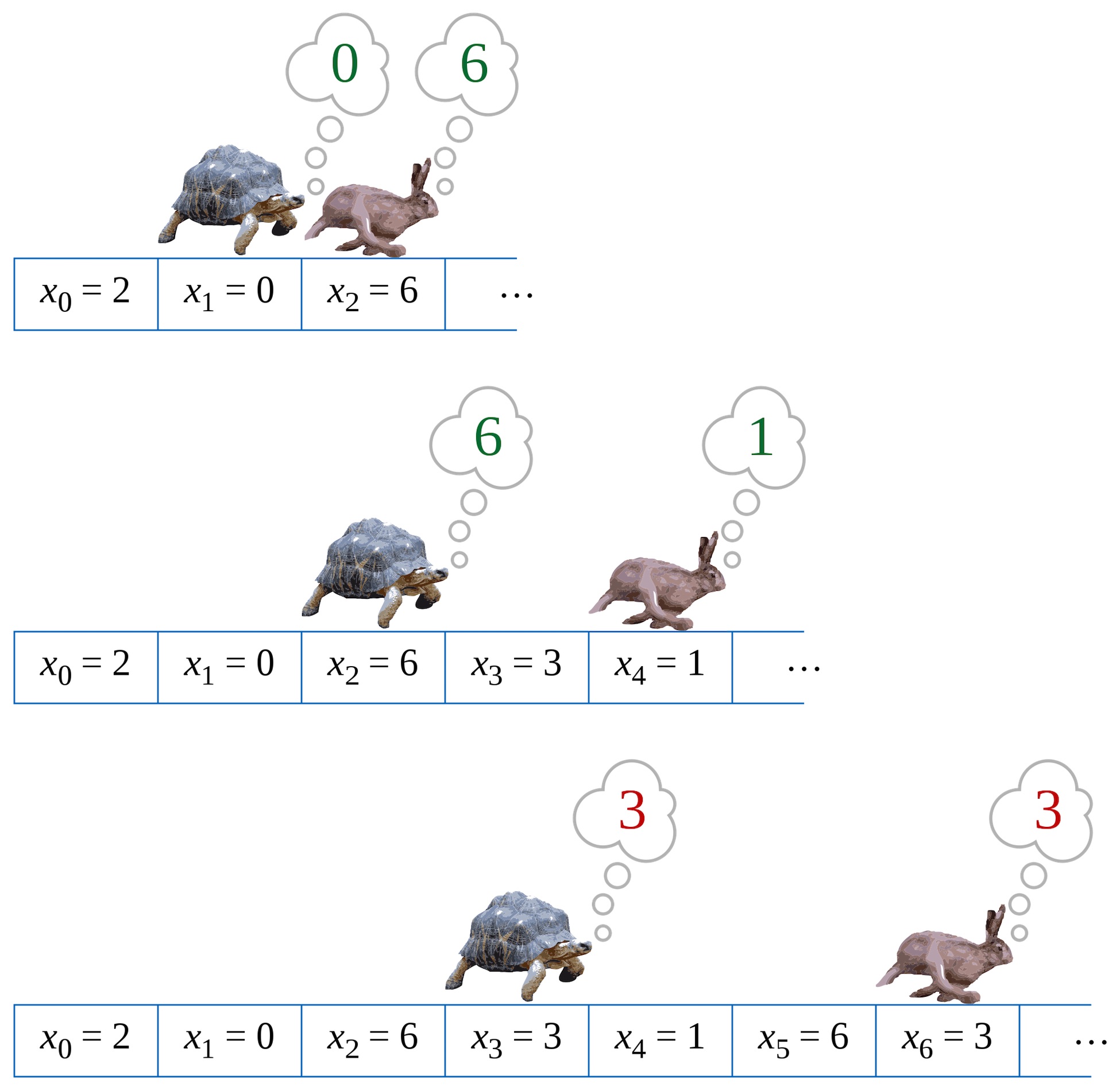
“There’s an old joke that a mathematician is someone who will take a five-minute problem, then spend an hour proving it is equivalent to another problem they have already solved. I approached this question in that spirit. Now that we have created an iterable of values that can be compared with ===, I can show you this function:”
const tortoiseAndHare = (iterable) => {
  const hare = iterable[Symbol.iterator]();
  let hareResult = (hare.next(), hare.next());

  for (let tortoiseValue of iterable) {

    hareResult = hare.next();

    if (hareResult.done) {
      return false;
    }
    if (tortoiseValue === hareResult.value) {
      return true;
    }

    hareResult = hare.next();

    if (hareResult.done) {
      return false;
    }
    if (tortoiseValue === hareResult.value) {
      return true;
    }
  }
  return false;
};
“A long time ago,” The Carpenter explained, “Someone asked me a question in an interview. I have never forgotten the question, or the general form of the solution. The question was, Given a linked list, detect whether it contains a cycle. Use constant space.”
“This is, of course, the most common solution, it is Floyd’s cycle-finding algorithm, although there is some academic dispute as to whether Robert Floyd actually discovered it or was misattributed by Knuth.”
“Thus, the solution to the game problem is:”
const terminates = (game) =>
  tortoiseAndHare(positionsOf(game))

const test = [
  ["↓","←","↑","→"],
  ["↓","→","↓","↓"],
  ["↓","→","→","←"],
  ["↑","→","←","↑"]
];

terminates(Game({board: test, position: [0, 0]}))
  //=> false
terminates(Game({board: test, position: [3, 0]}))
  //=> true
terminates(Game({board: test, position: [0, 3]}))
  //=> false
terminates(Game({board: test, position: [3, 3]}))
  //=> false
“This solution makes use of iterables and a single utility function, statefulMapWith. It also cleanly separates the mechanics of the game from the algorithm for detecting cycles in a graph.”
the aftermath
The Carpenter sat down and waited. This type of solution provided an excellent opportunity to explore lazy versus eager evaluation, the performance of iterators versus native iteration, single responsibility design, and many other rich topics.
The Carpenter was confident that although nobody would write this exact code in production, prospective employers would also recognize that nobody would try to detect whether a chequer game terminates in production, either. It’s all just a pretext for kicking off an interesting conversation, right?
Christine looked at the solution on the board, frowned, and glanced at the clock on the wall. “Well, where has the time gone?”
“We at the Thing Software company are very grateful you made some time to visit with us, but alas, that is all the time we have today. If we wish to talk to you further, we’ll be in touch.”
The Carpenter never did hear back from them, but the next day there was an email containing a generous contract from Friends of Ghosts (“FOG”), a codename for a stealth startup doing interesting work, and the Thing interview was forgotten.
Some time later, The Carpenter ran into Bob Plissken at a local technology meet-up. “John! What happened at Thing?” Bob wanted to know, “I asked them what they thought of you, and all they would say was, Writes unreadable code. I thought it was a lock! I thought you’d finally make your escape from New York.”
The Carpenter smiled. “I forgot about them, it’s been a while. So, do They Live?”

after another drink
A few drinks later, The Carpenter was telling his Thing story and an engineer named Kidu introduced themself.
“I worked at Thing, and Christine told us about your solution. I had a look at the code you left on the whiteboard. Of course, white-boarding in an interview situation is notoriously unreliable, so small defects are not important. But I couldn’t help but notice that your solution doesn’t actually meet the stated requirements for a different reason:”
“The hasCycle function, a/k/a Tortoise and Hare, requires two separate iterators to do its job. Whereas the problem as stated involves a single stream of directions. You’re essentially calling for the player to clone themselves and call out the directions in parallel.”
The Carpenter thought about this for a moment. “Kidu, you’re right, that’s a fantastic observation. I should have used a Teleporting Tortoise!”
// implements Teleporting Tortoise
// cycle detection algorithm.
const hasCycle = (iterable) => {
  let iterator = iterable[Symbol.iterator](),
      teleportDistance = 1;

  while (true) {
    let {value, done} = iterator.next(),
        tortoise = value;
    if (done) return false;

    for (let i = 0; i < teleportDistance; ++i) {
      let {value, done} = iterator.next(),
          hare = value;
      if (done) return false;

      if (tortoise === hare) return true;
    }
    teleportDistance *= 2;
  }
  return false;
};
Kidu shrugged. “You know, the requirement asked for a finite space algorithm, not a constant state algorithm. Doesn’t it make sense to go with a faster finite space algorithm? There’s no benefit to constant space if finite space is sufficient.”
const hasCycle = (orderedCollection) => {
  const visited = new Set();

  for (let element of orderedCollection) {
    if (visited.has(element)) {
      return true;
    }
    visited.add(element);
  }
  return false;
};
The Carpenter stared at Kidu’s solution. “I guess,” he allowed, “It isn’t always necessary to make a solution so awesome it would please the Ghosts of Mars.”
Interactive Generators
We used generators to build iterators that maintain implicit state. We saw how to use them for recursive unfolds and state machines. But there are other times we want to build functions that maintain implicit state. Let’s start by looking at a very simple example of a function that can be written statefully.

Consider, for example, the moves in a game. The moves a player makes are a stream of values, just like the contents of an array can be consider a stream of values. But of course, iterating over a stream of moves requires us to wait for the game to be over so we know what moves were made.
Let’s take a look at a very simple example, naughts and crosses (We really ought to do something like Chess, but that might be a little out of scope for this chapter). To save space, we’ll ignore rotations and reflections, and we’ll model the first player’s moves as a stream.
The first player will always be o, and they will always place their chequer in the top-left corner, coincidentally numbered o:
 o |   |
---+---+---
   |   |
---+---+---
   |   |
The second player has five possible moves if we ignore reflections:
 o | 1 | 2
---+---+---
   | 4 | 5
---+---+---
   |   | 8
Let’s consider move 1. That produces this board:
 o | x |
---+---+---
   |   |
---+---+---
   |   |
We will always play into position 6:
 o | x |
---+---+---
   |   |
---+---+---
 o |   |
x has six possible moves, but they are really just two choices: 3 and anything else:
 o | x | 2
---+---+---
 3 | 4 | 5
---+---+---
 o | 7 | 8
For 2, 4, 5, 7, or 8, we play 3 and win. But if x moves 3, we play 8:
 o | x |
---+---+---
 x |   |
---+---+---
 o |   | o
x now has three significant moves: 4, 7, and anything else:
 o | x | 2
---+---+---
 x | 4 | 5
---+---+---
 x | 7 | 8
If x plays 4, we play 7 and win. If x plays anything else, including 7, we play 4 and win.
representing naughts and crosses as a stateless function
We could plays naughts and crosses as a stateless function. We encode each position of the board in some fashion, and then we build a dictionary from positions to moves. For example, the entry for:
 o | x |
---+---+---
 x |   |
---+---+---
 o |   |
Would be 8, producing:
 o | x |
---+---+---
 x |   |
---+---+---
 o |   | o
And the entry for:
 o | x |
---+---+---
   | x |
---+---+---
 o |   |
Would be 3, producing:
 o | x |
---+---+---
 o | x |
---+---+---
 o |   |
We can encode the board in several different ways. We could use multiline strings with formatting just as we’ve written it here, but it is a design smell to couple presentation with modelling. Our function should be just as useful on a teletype as it would be backing a DOM game that uses a table, or a browser game that draws on Canvas.
Let’s use an array. So this:
 o | x |
---+---+---
   |   |
---+---+---
   |   |
Will be represented as:
[
  'o', 'x', ' ',
  ' ', ' ', ' ',
  ' ', ' ', ' '
]
And this:
 o | x |
---+---+---
 x |   |
---+---+---
 o |   |
Will be represented as:
[
  'o', 'x', ' ',
  'x', ' ', ' ',
  'o', ' ', ' '
]
We can use a POJO to make a map from positions to moves. We’ll use the [] notation for keys, it allows us to use any expression as a key, and JavaScript will convert it to a string. So if we write:
const moveLookupTable = {
  [[
    ' ', ' ', ' ',
    ' ', ' ', ' ',
    ' ', ' ', ' '
  ]]: 0,
  [[
    'o', 'x', ' ',
    ' ', ' ', ' ',
    ' ', ' ', ' '
  ]]: 6,
  [[
    'o', 'x', 'x',
    ' ', ' ', ' ',
    'o', ' ', ' '
  ]]: 3,
  [[
    'o', 'x', ' ',
    'x', ' ', ' ',
    'o', ' ', ' '
  ]]: 8,
  [[
    'o', 'x', ' ',
    ' ', 'x', ' ',
    'o', ' ', ' '
  ]]: 3,
  [[
    'o', 'x', ' ',
    ' ', ' ', 'x',
    'o', ' ', ' '
  ]]: 3,
  [[
    'o', 'x', ' ',
    ' ', ' ', ' ',
    'o', 'x', ' '
  ]]: 3,
  [[
    'o', 'x', ' ',
    ' ', ' ', ' ',
    'o', ' ', 'x'
  ]]: 3

  // ...
};
We get:
{
  "o,x, , , , , , , ":6,
  "o,x,x, , , ,o, , ":3,
  "o,x, ,x, , ,o, , ":8,
  "o,x, , ,x, ,o, , ":3,
  "o,x, , , ,x,o, , ":3,
  "o,x, , , , ,o,x, ":3,
  "o,x, , , , ,o, ,x":3
}
And if we want to look up what move to make, we can write:
moveLookupTable[[
  'o', 'x', ' ',
  ' ', ' ', ' ',
  'o', 'x', ' '
]]
  //=> 3
And from there, a stateless function to play naughts-and-crosses is trivial:
statelessNaughtsAndCrosses([
  'o', 'x', ' ',
  ' ', ' ', ' ',
  'o', 'x', ' '
])
  //=> 3
representing naughts and crosses as a stateful function
Our statelessNaughtsAndCrosses function pushes the work of tracking the game’s state onto us, the player. What if we want to exchange moves with the function? In that case, we need a stateful function. Our “API” will work like this: When we want a new game, we’ll call a function that will return a game function, We’ll call the game function repeatedly, passing our moves, and get the opponent’s moves from it.
Something like this:
const aNaughtsAndCrossesGame = statefulNaughtsAndCrosses();

// our opponent makes the first move
aNaughtsAndCrossesGame()
  //=> 0

// then we move, and get its next move back
aNaughtsAndCrossesGame(1)
  //=> 6

// then we move, and get its next move back
aNaughtsAndCrossesGame(4)
  //=> 3
We can build this out of our statelessNaughtsAndCrosses function:
const statefulNaughtsAndCrosses = () => {
  const state = [
    ' ', ' ', ' ',
    ' ', ' ', ' ',
    ' ', ' ', ' '
  ];

  return (x = false) => {
    if (x) {
      if (state[x] === ' ') {
        state[x] = 'x';
      }
      else throw "occupied!"
    }
    let o = moveLookupTable[state];
    state[o] = 'o';
    return o;
  }
};

const aNaughtsAndCrossesGame = statefulNaughtsAndCrosses();

// our opponent makes the first move
aNaughtsAndCrossesGame()
  //=> 0

// then we move, and get its next move back
aNaughtsAndCrossesGame(1)
  //=> 6

// then we move, and get its next move back
aNaughtsAndCrossesGame(4)
  //=> 3
Let’s recap what we have: We have a stateful function, but we built it by wrapping a stateless function in a function that updates state based on the moves we provide. The state is encoded entirely in data.
this seems familiar
When we looked at generators, we saw that some iterators are inherently stateful, but sometimes it is awkward to represent them in a fully stateless fashion. Sometimes there is a state machine that is naturally represented implicitly in JavaScript’s control flow rather than explicitly in data.
We’ve done almost the exact same thing here with our naughts and crosses game. A game like this is absolutely a state machine, and we’ve explicitly coded those states into the lookup table. Which leads us to wonder: Is there a way to encode those states implicitly, in JavaScript control flow?
If we were in full control of the interaction, it would be easy to encode the game play as a decision tree instead of as a lookup table. For example, we could do this in a browser:
function browserNaughtsAndCrosses () {
  const x1 = parseInt(prompt('o plays 0, where does x play?'));
  switch (x1) {

    case 1:
      const x2 = parseInt(prompt('o plays 6, where does x play?'));
      switch (x2) {

        case 2:
        case 4:
        case 5:
        case 7:
        case 8:
          alert('o plays 3');
          break;

        case 3:
          const x3 = parseInt(prompt('o plays 8, where does x play?'));
          switch (x3) {

            case 2:
            case 5:
            case 7:
              alert('o plays 4');
              break;

            case 4:
              alert('o plays 7');
              break;
          }
      }
      break;

    // ...
  }
}
Naughts and crosses is simple enough that the lookup function seems substantially simpler, in part because linear code doesn’t represent trees particularly well. But we can clearly see that if we wanted to, we could represent the state of the program implicitly in a decision tree.
However, our solution inverts the control. We aren’t calling our function with moves, it’s calling us. With iterators, we wrote a generator function using function *, and then used yield to yield values while maintaining the implicit state of the generator’s control flow.
Can we do the same thing here? At first glance, no. How do we get the player’s moves to the generator function? But the first glance is deceptive, because we only see what we’ve seen so far. Let’s see how it would actually work.
interactive generators
So far, we have called iterators (and generators) with .next(). But what if we pass a value to .next()? If we could do that, a generator function that played naughts and crosses would look like this:
If it was possible, how would it work?
function* generatorNaughtsAndCrosses () {
  const x1 = yield 0;
  switch (x1) {

    case 1:
      const x2 = yield 6;
      switch (x2) {

        case 2:
        case 4:
        case 5:
        case 7:
        case 8:
          yield 3;
          break;

        case 3:
          const x3 = yield 8;
          switch (x3) {

            case 2:
            case 5:
            case 7:
              yield 4;
              break;

            case 4:
              yield 7;
              break;
          }
      }
      break;

    // ...
  }
}

const aNaughtsAndCrossesGame = generatorNaughtsAndCrosses();
We can then get the first move by calling .next(). Thereafter, we call .next(...) and pass in our moves (The very first call has to be .next() without any arguments, because the generator hasn’t started yet. If we wanted to pass some state to the generator before it begins, we’d do that with parameters.):
aNaughtsAndCrossesGame.next().value
  //=> 0

aNaughtsAndCrossesGame.next(1).value
  //=> 6

aNaughtsAndCrossesGame.next(3).value
  //=> 8

aNaughtsAndCrossesGame.next(7).value
  //=> 4
Our generator function maintains state implicitly in its control flow, but returns an iterator that we call, it doesn’t call us. It isn’t a collection, it has no meaning if we try to spread it into parameters or as the subject of a for...of block.
But the generator function allows us to maintain state implicitly. And sometimes, we want to use implicit state instead of explicitly storing state in our data.
summary
We have looked at generators as ways of making iterators over static collections, where state is modelled implicitly in control flow. But as we see here, it’s also possible to use a generator interactively, passing values in and receiving a value in return, just like an ordinary function.
Again, the salient difference is that an “interactive” generator is stateful, and it embodies its state in its control flow.
Basic Operations on Iterables
Here are the operations we’ve defined on Iterables. As discussed, they preserve the collection semantics of the iterable they are given:
operations that transform one iterable into another
function * mapWith(fn, iterable) {
  for (const element of iterable) {
    yield fn(element);
  }
}

function * mapAllWith (fn, iterable) {
  for (const element of iterable) {
    yield * fn(element);
  }
}

function * filterWith (fn, iterable) {
  for (const element of iterable) {
    if (!!fn(element)) yield element;
  }
}

function * compact (iterable) {
  for (const element of iterable) {
    if (element != null) yield element;
  }
}

function * untilWith (fn, iterable) {
  for (const element of iterable) {
    if (fn(element)) break;
    yield fn(element);
  }
}

function * rest (iterable) {
  const iterator = iterable[Symbol.iterator]();

  iterator.next();
  yield * iterator;
}

function * take (numberToTake, iterable) {
  const iterator = iterable[Symbol.iterator]();

  for (let i = 0; i < numberToTake; ++i) {
    const { done, value } = iterator.next();
    if (!done) yield value;
  }
}
operations that compose two or more iterables into an iterable
function * zip (...iterables) {
  const iterators = iterables.map(i => i[Symbol.iterator]());

  while (true) {
    const pairs = iterators.map(j => j.next()),
          dones = pairs.map(p => p.done),
          values = pairs.map(p => p.value);

    if (dones.indexOf(true) >= 0) break;
    yield values;
  }
};

function * zipWith (zipper, ...iterables) {
  const iterators = iterables.map(i => i[Symbol.iterator]());

  while (true) {
    const pairs = iterators.map(j => j.next()),
          dones = pairs.map(p => p.done),
          values = pairs.map(p => p.value);

    if (dones.indexOf(true) >= 0) break;
    yield zipper(...values);
  }
};
Note: zip is also the following special case of zipWith:
const zip = callFirst(zipWith, (...values) => values);
operations that transform an iterable into a value
const reduceWith = (fn, seed, iterable) => {
  let accumulator = seed;

  for (const element of iterable) {
    accumulator = fn(accumulator, element);
  }
  return accumulator;
};

const first = (iterable) =>
  iterable[Symbol.iterator]().next().value;
memoizing an iterable
function memoize (generator) {
  const memos = {},
        iterators = {};

  return function * (...args) {
    const key = JSON.stringify(args);
    let i = 0;

    if (memos[key] == null) {
      memos[key] = [];
      iterators[key] = generator(...args);
    }

    while (true) {
      if (i < memos[key].length) {
        yield memos[key][i++];
      }
      else {
        const { done, value } = iterators[key].next();

        if (done) {
          return;
        } else {
          yield memos[key][i++] = value;
        }
      }
    }
  }
}