1. TeleMed Case
1.1 Learning Objectives
To ground the discussion on distributed computing, I will present a simple case study—similar to how the Pay Station evolved in the beginning of my previous book Flexible, Reliable Software. Our case study is monitoring patients in their homes through a system called TeleMed.
1.2 TeleMed Stories
The context for our case study is tele medicine or patient monitoring in the home. Consider a person who has suffered a serious heart attack or have some other serious condition that requires the blood pressure to be monitored at regular intervals. One possible solution is to let the patient go to an outpatient clinic, let a nurse measure the blood pressure, and enter the measured values for systolic and diastolic blood pressure into an electronic patient record. However, this is obviously rather disruptive for the patient if daily measurements are required, and costly in terms of hospital staffing. Thus, an alternative solution, which I will unfold here, is to provide the patient with a blood pressure meter, let the patient make the measurement daily, and let the meter upload the measurement automatically to a centralized electronic patient record. As an alternative, the patient may enter the readings from the meter into an app on a smart phone or tablet for upload.
To rephrase, I come up with the following two stories:
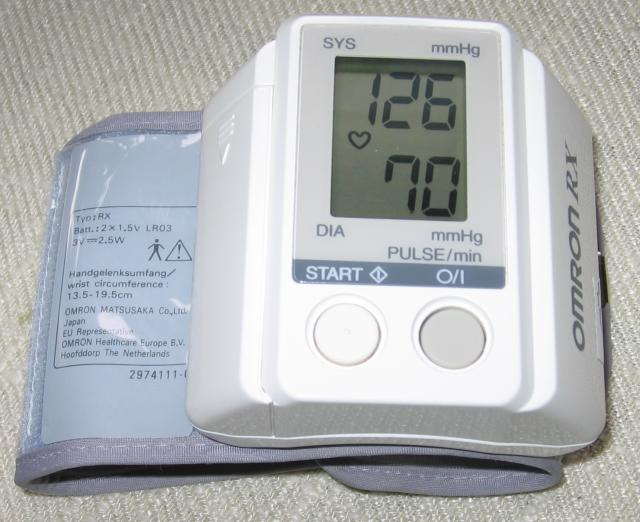
Story 1: Upload a blood pressure measurement. A patient starts her daily routine of monitoring her blood pressure by starting the blood pressure meter. Once it is ready, she puts the inflatable cuff, as seen in the figure below, on her arm and presses the start button on the meter. After a short while, the meter displays the measured values: 126 mmHg systolic pressure, and 70 mmHg diastolic pressure. The patient then enters these values in the HomeClient application, which starts the upload of the measured values to the TeleMed server. A short while later the application reports that the upload have been successful.
Story 2: Review blood pressure. The patient starts her HomeClient application, and requests to review her measured blood pressures. She choose to review measurements for the last week, and is presented with a graph showing how systolic and diastolic blood pressure have evolved during the last week.
This entails a small but obviously distributed system: A tele medicine server on one hand that processes, stores, and supports queries on blood pressure measurements for a large set of patients; and a (large) set of clients, each allowing a single patient to measure and upload his or her blood pressure.
1.3 A Role Based Design
I initially identify three main roles in our TeleMed system: We need an object to represent the measured blood pressure, we need an object that is responsible for sending (and querying about) the patient’s blood pressure, and finally, we need a (remote) object that is responsible for processing, storing, and analysis of all patients’ measurements.
I can express these three roles in the UML diagram in the figure below.
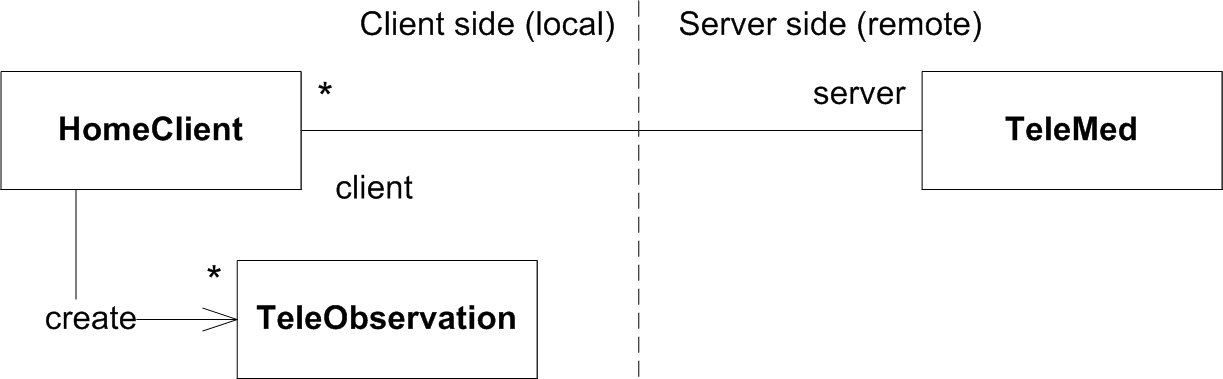
The TeleObservation represents an observation of the patient — in
our case study it is a blood pressure which again is represented by
two quantities: systolic and diastolic blood pressure. A
quantity[^fowler1997] is a measurement of some value associated with a
unit. The measuring unit is essential: 10 does not tell us much, until
we know if it is 10 kilometers or 10 grams. In our case, the value is
126 and the unit mmHg for the systolic quantity.
Creating a tele observation is exemplified by the following instantiation:
1   TeleObservation teleObs =
2     new TeleObservation("251248-1234", 126.0, 70.0);
This code creates an observation for a specific patient identified by “251248-1234” (Danish social security number format, which is six digits indicating birth date (ddmmyy) followed by a serial number), and the quantities for systolic and diastolic blood pressure (126 mmHg, 70 mmHg).
The HomeClient role is responsible for creating tele observation
objects and sending them to the the TeleMed server; as well as
retrieving sets of tele observations from the TeleMed server and
present them for the patient in one way or another.
Finally, the central server side role is TeleMed that is responsible
for the safe storage of measurements for a large set of patients, and
respond to uploads and queries by the HomeClients.
We can express the responsibilities of the role TeleMed by the
following interface:
 1 /**
 2  * The central role in the TeleMed medical system, the application
 3  * server that supports storing for all the tele observations made
 4  * by all patients as well as queries
 5  */
 6 public interface TeleMed {
 7
 8   /**
 9    * Process a tele observation and store it in an electronic
10    * patient record database.
11    *
12    * @param teleObs
13    *          the tele observation to process and store
14    * @return the id of the stored observation
15    */
16   String processAndStore(TeleObservation teleObs);
17
18   /**
19    * Retrieve all observations for the given time interval for
20    * the given patient.
21    *
22    * @param patientId the ID of the patient to retrieve
23    *        observations for
24    * @param interval define the time interval that
25    *        measurements are wanted for
26    * @return list of all observations
27    */
28   List<TeleObservation> getObservationsFor(String patientId,
29                                            TimeInterval interval);
30 }
The main challenge is that the TeleObservation object is obviously
created by the HomeClient but the TeleMed object with its
processAndStore method is a remote object on some distant server.
That is, the method call
1 remoteTeleMed.processAndStore(teleObs);
will entail the method processAndStore being called on some object
that represent an instance of interface TeleMed on a remote server.
1.4 A Server side Role based Design
The TeleMed application server is responsible for communication with the home clients, and for storing the measurements in some reliable database system.
The former responsibility is the main focus of the next chapters on distribution. The latter responsibility, storage, is not a central issue in the context of this book, however as the associated code base implements it, I will shortly outline the design below.
Persisting data in a database requires decisions to be made in a number of areas. As our domain is clinical systems, and I have worked for some years in this domain, I have chosen to mimic1 two clinical standards in widespread use in hospital systems.
The first is IHE Cross Enterprise Document Sharing Profile or XDS for short. XDS defines a database system for sharing large amounts of clinical data in a decentralized way. The central role is the Document Registry which acts like a searchable index of all documents stored in XDS. Think it like a Google search engine — it does not store the documents itself, it is just a database that indexes all documents and knows which actual database they are stored in. The other role is Document Repository which is the actual database in which documents are stored. Again, think of it as the actual servers where web pages are stored. A registry typically index a lot of repositories: this way each hospital or clinic can have its own repository of documents (for instance, an X-Ray clinic can store images for a lot of patients in its repository), while there is only one central registry for, say, a small country or a state. This way a clinician can search for all x-ray images for a given patient at any hospital, and retrieve them from the respective repository.
Our simplified XDS interface, XDSBackend, in the TeleMed system
looks like this (some methods skipped):
 1 public interface XDSBackend {
 2   /**
 3    * Store observation in XMLformat (HL7) in a XDS repository and
 4    * ensure that the metadata for it is stored in the registry.
 5    *
 6    * @param metaData
 7    *          the meta data to store in registry to allow queries
 8    *          to be made
 9    *
10    * @param observationAsHL7
11    *          the clinical document in HL7 format that
12    *          is to be stored in the repository
13    *
14    * @return uniqueId a unique id generated for the document, allows
15    *         operations to be applied to that particular document
16    *         in the repository, see correctDocument
17    */
18   public String provideAndRegisterDocument(MetaData metaData,
19     Document observationAsHL7);
20
21   /**
22    * Query the XDS for all documents whose metadata fulfill criteria:
23    * A) the id of the person equals personID B) the time interval
24    * [start;end]
25    *
26    * @param personID
27    *          id of the person searched for
28    * @param start
29    *          begin of time interval
30    * @param end
31    *          end of time interval
32    * @return list of all documents that fulfil criteria
33    */
34   public List<Document> retriveDocumentSet(String personID,
35      LocalDateTime start, LocalDateTime end);
36 }
When storing a document, you first have to generate meta data for it. In our case, this is the identity of the patient and the time for the measurement. These meta data are stored in the registry along with a reference to the actual document, so a clinician can formulate queries for specific patients and time intervals without the registry having to contact any repositories.
XDS does not care about the contents of the documents it stores—it does not specify any particular document format. Therefore we need to agree on some format to use for storing, say, blood pressure measurements. The Health Level 7 (HL7) standard[^boone2011] is such a standard. It is basically an XML format though a rather complex one. It consists of a header section, which describes the patient and time, and then a data section, where actual data is stored—in our case blood pressure measurements. HL7 is a very verbose XML format, so I have taken the liberty to remove most of the required sections of proper HL7 for the sake of simplicity.
Below is an example of our truncated HL7.
 1 <?xml version="1.0" encoding="UTF-8" standalone="no"?>
 2 <ClinicalDocument>
 3   <effectiveTime value="20170510145014"/>
 4   <patient>
 5     <id extension="251248-1234"/>
 6   </patient>
 7   <component>
 8     <observation>
 9       <code code="MSC88019" displayName="Systolic BP"/>
10       <value unit="mm(Hg)" value="126.0"/>
11     </observation>
12     <observation>
13       <code code="MSC88020" displayName="Diastolic BP"/>
14       <value unit="mm(Hg)" value="70.0"/>
15     </observation>
16   </component>
17 </ClinicalDocument>
You can see that the first sections are the time stamp of the document and the identity of the patient. The “component” section then contains the observed quantities (126 mmHg, 70 mmHg). Now, which is which? Well any clinical quantity needs to tell what clinical measurement it is, and code systems are such classifications. In Denmark, there is a code system that has assigned the specific code “MSC88019” to a measurement of systolic blood pressure. Thus a computer will know exactly what clinical aspect the quantity represents.
Method processAndStore
The TeleMed server’s central responsibility is to store incoming measurements in the database. Using the two standards mentioned above, XDS and HL7, this entails first constructing the HL7 XML document and the metadata for it to store in the XDS registry, and next tell XDS to store the document. The actual code in the server, that does this, is shown below:
 1   public String processAndStore(TeleObservation teleObs) {
 2     // Generate the XML document representing the
 3     // observation in HL7 (HealthLevel7) format.
 4     HL7Builder builder = new HL7Builder();
 5     Director.construct(teleObs, builder);
 6     Document hl7Document = builder.getResult();
 7
 8     // Generate the metadata for the observation
 9     MetadataBuilder metaDataBuilder = new MetadataBuilder();
10     Director.construct(teleObs, metaDataBuilder);
11     MetaData metadata = metaDataBuilder.getResult();
12
13     // Finally store the document in the XDS storage system
14     String uniqueId = null;
15     uniqueId = xds.provideAndRegisterDocument(metadata, hl7Document);
16
17     return uniqueId;
18   }
Note that the Builder[^christensen2010] pattern is a good choice for generating meta data and XML document, and is thus used here.
1.5 Related Work
The TeleMed case is inspired by work in the Net4Care project, see (Christensen, 2012)[^christensen2012].