Chapter 1: Getting Started with DelphiMVCFramework
What you’ll learn
DelphiMVCFramework, or DMVCFramework (or even just DMVC as many users like to say) is a Delphi framework which allows to create powerful RESTful and JSON-RPC servers without effort. At the time of writing DMVCFramework is the most popular open source Delphi project on Github with the biggest community. Many users reported that they switched from a commercial product to DMVCFramework and got a simple development cycle, higher performance and more flexibility.
You can create a full-flagged RESTful server in a couple of clicks, that’s it. As you guess to create a full-flagged web solution you have to work on it to implement your own logic and rules, but having a framework easy to understand and fast to customize and “hack” is a really big advantage. DMVCFramework has been designed to have a double soul (speed and simplicity) and in its 3rd version I think that we have almost reached the goal. I suggest to subscribe to the dedicated Facebook group which, at the time of writing, has more than 3400 active users.
DMVCFramework is “batteries included”
DMVCFramework is composed by a number of units and sub frameworks that work together. This collection of modules makes some set of tasks within a particular problem domain simpler to implement. However some parts of DMVC are not tied with the framework itself and can also operate in an application (or an app) different from a DMVCFramework project.
In this handbook you will learn about the following DMVCFramework sub-projects:
- MVCActiveRecord
- LoggerPro (which is also released as separate project)
- The serialization/deserialization framework
- The Authentication/Authorization subsystem
- The RQL compilers
- The multi threaded cache
Another good news for the new DMVCFramework users is related to one of the most powerful available feature: the middleware. As you will learn, middleware allows to extend and customize the default DMVCFramework behavior.
Installation of DelphiMVCFramework 3.2.1-carbon
DMVCFramework is released as Github release, which is a plain zip file so that you can use and update each version in a very simple way.
The installation procedure is the following:
- Navigate to https://github.com/danieleteti/delphimvcframework/releases and click on
Latest release. - Scroll the What’s New section till the end, open the Asset group.
- Here you will find 4 downloadable files:
- DMVCFramework-[version].zip (contains the actual DMVCFramework release source code - this is the file to download)
- DMVCFramework-[version]_samples.zip (contains all the samples - download it as reference)
- Source code (zip) (automatically generated by Github, don’t download)
- Source code (tar.gz) (automatically generated by Github, don’t download)
- Unzip the file
DMVCFramework-[version].zipin a folder namedC:\DelphiLibs\DMVCFramework(or wherever you prefer). From now on we will indicate this folder as$(dmvchome); - Launch RAD Studio and open
$(dmvchome)\packages\d104\DMVCFramework_group.groupprojor the project that suits your IDE version;-
d104stands for “Delphi 10.4 Sydney” -
d103stands for “Delphi 10.3 Rio” -
d102stands for “Delphi 10.2 Tokyo” -
d101stands for “Delphi 10.1 Berlin” -
d100stands for “Delphi 10.0 Seattle”
-
- Build all the projects;
- Install
DMVCFrameworkDT104selecting the project in the Project Manager and usingRight Click->Installmenu as shown in the next image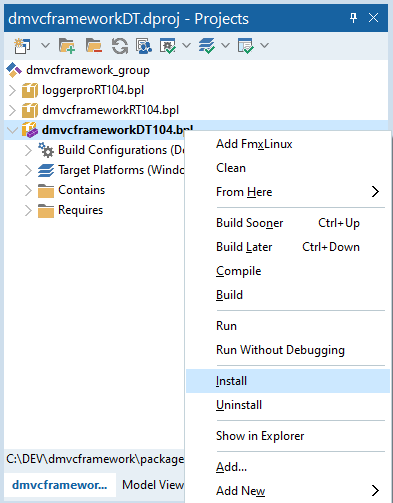
Installing DMVCFramework - That’s it, close all;
DMVCFramework even works on Delphi Professional and the free Delphi Community (which is aligned to the Professional one).
WARNING! In case you have Delphi Professional or Community you cannot install the IDE expert because of a lack of a required package, but you can still use the framework. It only happens for some Delphi versions but in such cases you can learn how to create a DelphiMVCFramework by hand or just copying a sample project and starting to change it.
Now, DMVCFramework is installed and the next step before creating your first project is to configure the library paths.
Go to Tools->Options->Language->Delphi->Library->Library Path and add the following paths:
1 $(dmvchome)\sources
2 $(dmvchome)\lib\dmustache
3 $(dmvchome)\lib\loggerpro
4 $(dmvchome)\lib\swagdoc\Source
Click OK and close the dialog. Now, we are ready to create our first amazing RESTful service!
Your first RESTful server with DelphiMVCFramework
Creating the first RESTful service with DelphiMVCFramework is straightforward.
- Go to menu
File->New->Other; - From the resultant dialog select
Delphi->DMVCFramework->Delphi MVC Framework Projectas shown below;
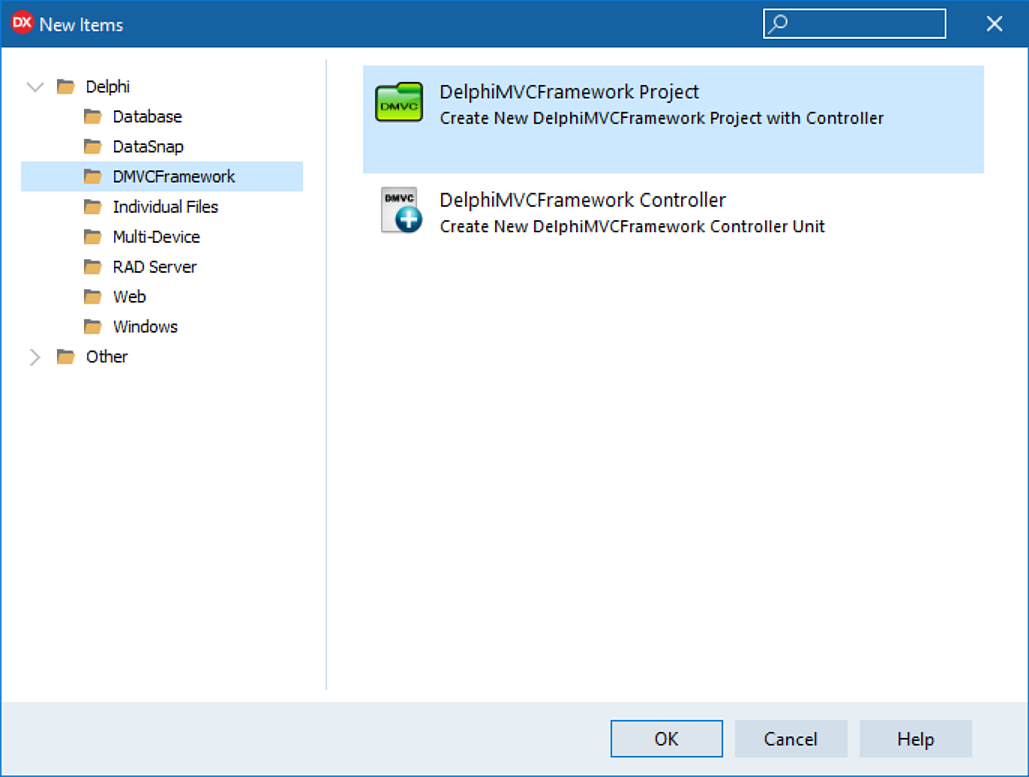
- Click
OKand you will get the following (your version might be different from the one reported in the image)
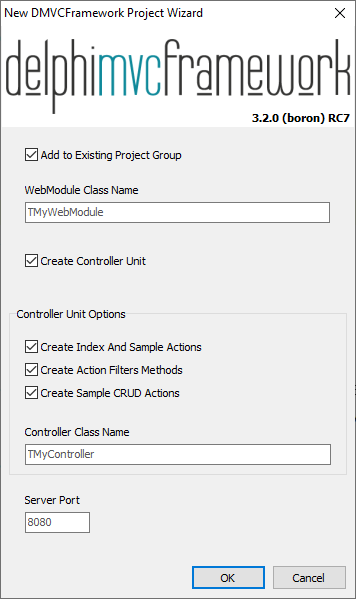
- Leave all the default settings and click
OK. - As you can see, an “empty” DMVCFramework project is composed by:
- a web module unit (which contains the
TMVCEngineinstance) - a controller unit (which contains the first controller of our application)
- a web module unit (which contains the
- Save the web module unit as
WebModuleU.pas, the controller asMyControllerU.pasand the project asMyFirstDMVCService.dproj. - Compiling the project you will get some errors because the wizard used the default unit name for the controller, that we changed in the previous step. In the implementation section replace the wrong name (e.g.
Unit2) withMyControllerU(or what you choose before) which defines the controller. Save it and recompile. - Run the project using the
Runbutton or hittingF9and you will get the following:
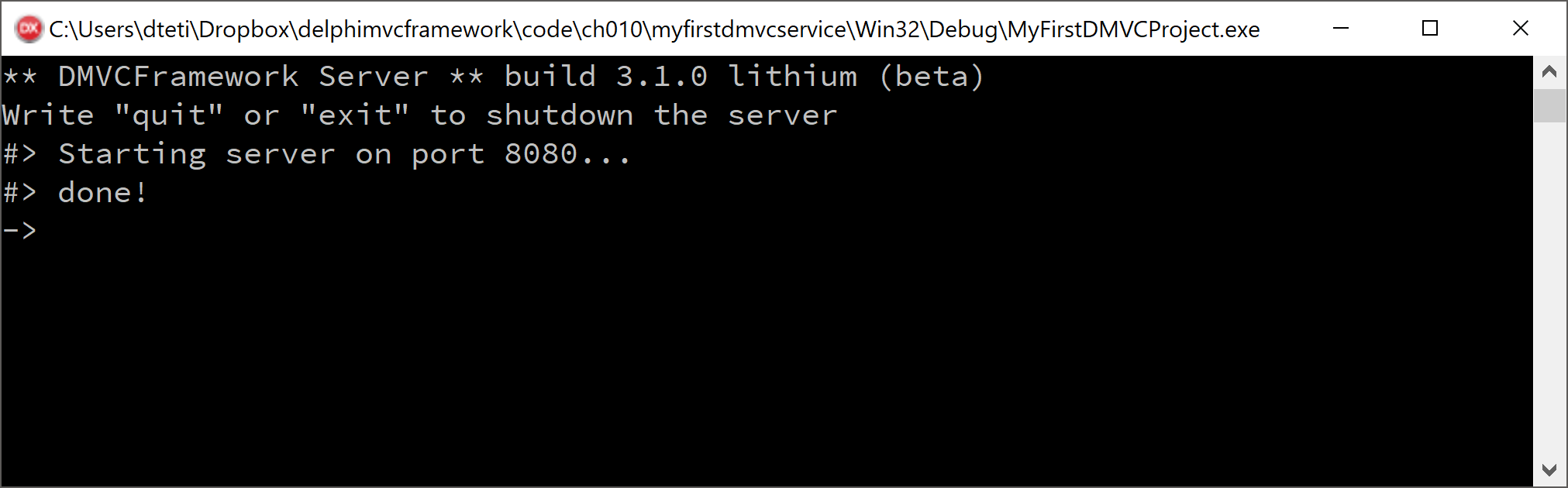
- Yes! The DMVCFramework default console application is running serving you first DMVCFramework server. Simple, isn’t it?
Now, let’s give honor to the “Hello World Tradition” with…
Your first DMVCFramework-style “Hello World”
- Launch the DMVCFramework new project wizard dialog, remove all the checks in the group
Controller Unit Optionsas shown below.
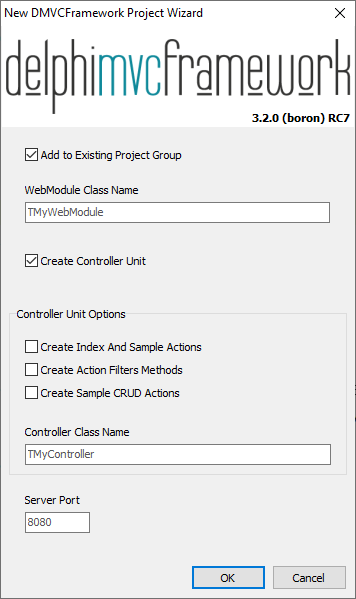
- Hit
OKand save the project asMyDMVCHelloWorld.dproj, the WebModule asWebModuleU.pasand the controller asMyControllerU.pas. - Open the controller unit
- As you can see, now the unit doesn’t contain all the wizard generated code of the first project we did. It is a very good opportunity to add just only what we really need.
- In the controller class declaration add a procedure method named
Index(only procedure methods can be called by DMVCFramework router, so you don’t have to use functions as method) hitCtrl+Shift+Cto autocomplete your class with theIndexmethod implementation. - In the
Indexmethod write the following code
1 procedure TMyController.Index;
2 begin
3   Render('Hello DMVCFramework World! It''s ' + TimeToStr(Now) +
4   	' in DMVCFramework-Land');
5 end;
OK, we defined the method and its implementation. However the engine doesn’t still know how to call it because Index is just a method, and not a proper DMVCFramework action. To transform a plain method to an action we have to instrument it with the MVCPath attribute (we’ll see MVCPath and all the other attributes in the next chapter). So, go in the class declaration and change the method declaration as shown below.
1 type
2   [MVCPath('/api')]
3   TMyController = class(TMVCController)
4   public
5     [MVCPath('/hello')]
6     procedure Index;
7   end;
- Run the program and open a web browser (We’ll use Google Chrome in ours example)
- In the browser address bar write
http://localhost:8080/api/helloand hit return. You should get something like the following.
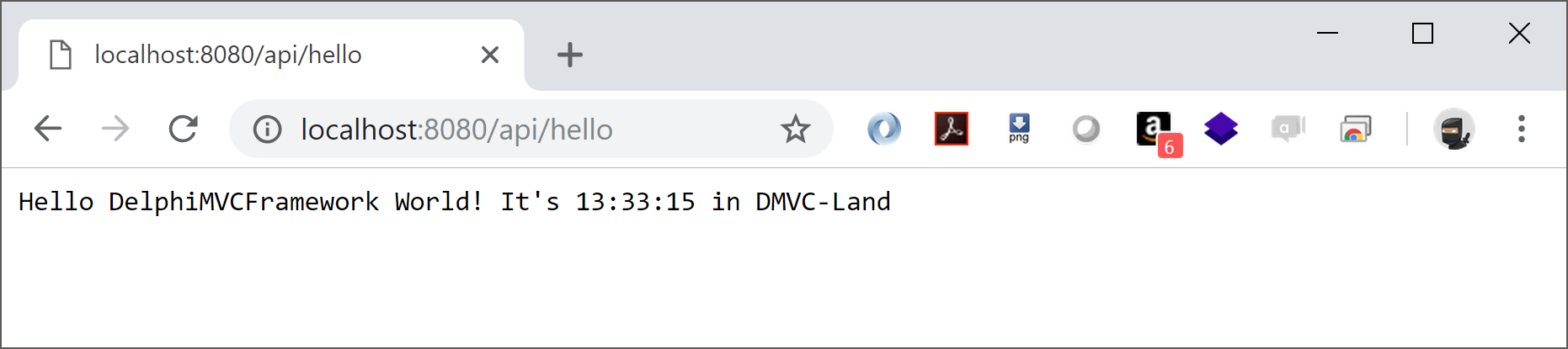
Congratulations! You have just written your DMVCFramework Hello World!
Built-in System Actions
Our small Hello World already contains some interesting features called System Actions. That’s it, every DMVCFramework project always contains an automatic registered TMVCSystemController . This controller provides some useful information. All the system actions are invokable only by localhost and you can also decide to completely remove the system controller (check Chapter 16: Tips and Tricks). All the System Actions provide only JSON responses - no other formats are supported at this time.
System Actions: describeplatform
Launch the hello world server and open a browser.
If you write http://localhost:8080/system/describeplatform.info you get the following
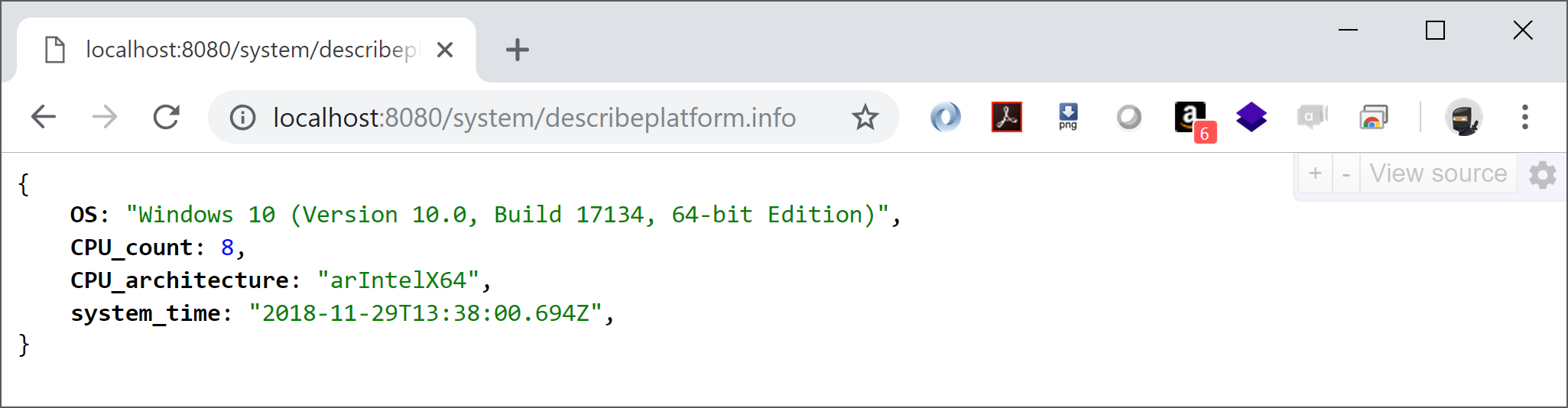
This action provides information about the server machine. It can be useful to get some information of just to check if the service is up and running.
System Actions: serverconfig
Launch the hello world server and open a browser.
If you write http://localhost:8080/system/serverconfig.info you get the following
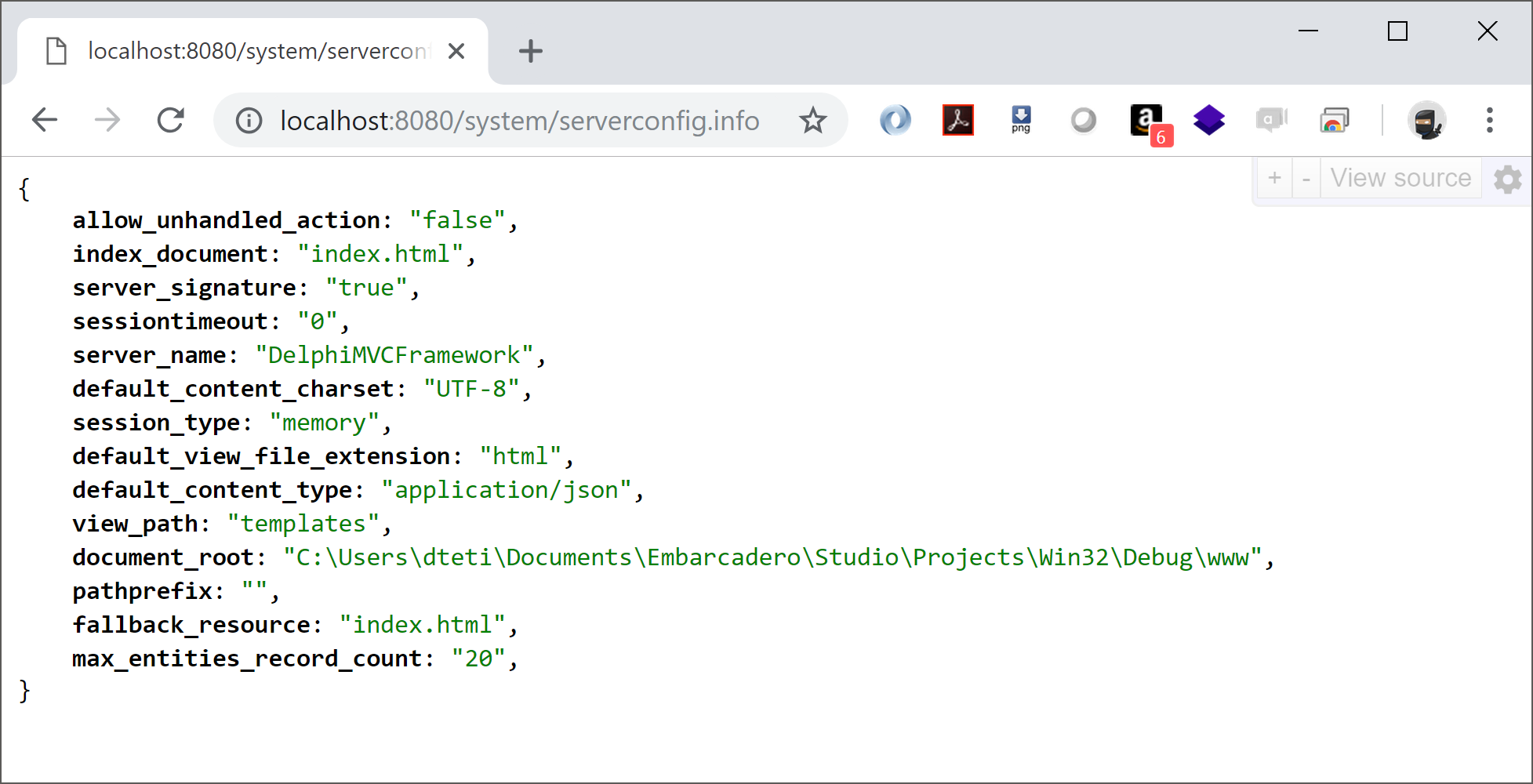
This action provides information about the DMVCFramework engine and its configuration. Can be useful to get all the current configuration of the TMVCEngine instance which run inside the server.
Take care of these information because an attacker could get important insights from them. Check the tips in the “How To” chapter to know how to disable the System Controllers registration in your production servers.
System Actions: describeserver
This is the most important System Action. Launch the “hello world” server and open a browser.
If you write http://localhost:8080/system/describeserver.info you get the following
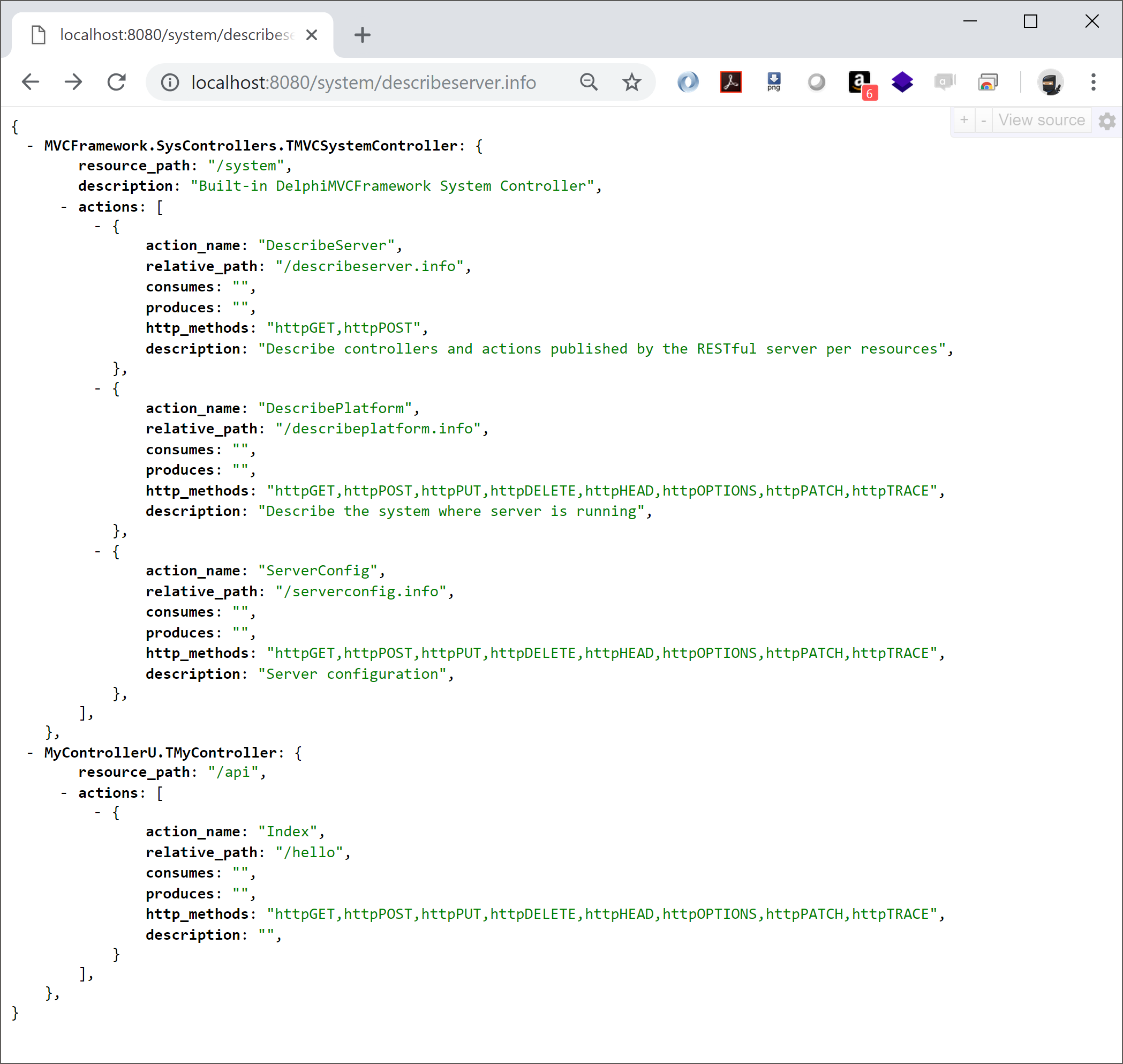
This action provides all the information about the controllers and the actions provided by each controllers. As you can see, there is our Hello World controller called TMyController declared in MyControllerU.pas. Moreover, the /system/describeserver.info action shows all the information needed to call the APIs, so it is a very valuable tool to understand what your server is able to do. If you need to provide documentation about your APIs, the document can be generated by reading the output of this action, which is standard JSON.
DMVCFramework support the OpenAPI Specification too (former Swagger) through a middleware. The specification creates a RESTful interface for easily developing and consuming an API by effectively mapping all the resources and operations associated with it.
What’s Next
In this chapter we saw how to create a DMVCFramework project and how to generate some kinds of output. Moreover, we saw what the System Actions are and when they can be useful. Even the simplest DMVCFramework application contains a lot of functionalities ready to be used. We’ll explore each of them in the next chapters. Now you can follow the rest of the handbook to learn all the nice things about DMVCFramework.