Unit tests
Up until now we have been very much focused on setting up our build pipeline and writing a high level feature tests. And while I promised that it was time to write some code, we do have do a few more setup steps to carry out before we can get stuck in. To get confidence in our code we will be writing JavaScript modules using tests and we want those tests to run all the time (i.e. with each save). To that end we need to set up some more tasks to run those tests for us and add them to our build process.
Setting up our unit test runner using karma
I have chosen Karma as our Unit test runner, if you are new to Karma I suggest you take a peak at some of the videos on the site. It comes with a variety of plugins and supports basically all of the popular unit test frameworks. As our testing framework we will use Jasmine.
Before going to far, let’s quickly create a few folders in the root of our project. You should already have anode_modules/weatherly/src/js, which is where we will store all of our JavaScript source code. We already have a task to concatenate/minify and move it to our app folder. Now we just need to create a unit folder for our unit tests. So the structure of our code and tests will look as follows:
1 -> tests
2 	-> unit
3 -> node_modules
4 	-> weatherly
5 		->js
As with all tasks, let’s create a new branch:
1 > git checkout -b test-runner
And then let’s install the package and add it to our package.json file:
1 > npm install karma --save-dev
Ok time to create our Karma configuration file, typically you would type in the root of your project:
1 > karma init karma.conf.js
This would guide you through the process of setting up your test runner, here’s how I answered the setup questions:
 1 Which testing framework do you want to use ?
 2 Press tab to list possible options. Enter to move to the next question.
 3 > jasmine
 4
 5 Do you want to use Require.js ?
 6 This will add Require.js plugin.
 7 Press tab to list possible options. Enter to move to the next question.
 8 > no
 9
10 Do you want to capture any browsers automatically ?
11 Press tab to list possible options. Enter empty string to move to the next quest\
12 ion.
13 > PhantomJS
14 >
15
16 What is the location of your source and test files ?
17 You can use glob patterns, eg. "js/*.js" or "test/**/*Spec.js".
18 Enter empty string to move to the next question.
19 > node_modules/weatherly/js/**/*.js,
20 > tests/unit/**/*.js
21 >
22
23 Should any of the files included by the previous patterns be excluded ?
24 You can use glob patterns, eg. "**/*.swp".
25 Enter empty string to move to the next question.
26 >
27
28 Do you want Karma to watch all the files and run the tests on change ?
29 Press tab to list possible options.
30 > no
31
32 Config file generated at "/Users/writer/Projects/github/weatherly/karma.conf.js".
And here’s the corresponding configuration that was generated:
 1 // Karma configuration
 2 // Generated on Sun Jul 20 2014 16:18:54 GMT+0100 (BST)
 3
 4 module.exports = function (config) {
 5     config.set({
 6
 7         // base path that will be used to resolve all patterns (eg. files, exclu\
 8 de)
 9         basePath: '',
10
11
12         // frameworks to use
13         // available frameworks: https://npmjs.org/browse/keyword/karma-adapter
14         frameworks: ['jasmine'],
15
16
17         // list of files / patterns to load in the browser
18         files: [
19             'node_modules/weatherly/js/**/*.js',
20             'tests/unit/**/*.js'
21         ],
22
23
24         // list of files to exclude
25         exclude: [
26         ],
27
28
29         // preprocess matching files before serving them to the browser
30         // available preprocessors: https://npmjs.org/browse/keyword/karma-prepr\
31 ocessor
32         preprocessors: {
33         },
34
35
36         // test results reporter to use
37         // possible values: 'dots', 'progress'
38         // available reporters: https://npmjs.org/browse/keyword/karma-reporter
39         reporters: ['progress'],
40
41
42         // web server port
43         port: 9876,
44
45
46         // enable / disable colors in the output (reporters and logs)
47         colors: true,
48
49
50         // level of logging
51         // possible values: config.LOG_DISABLE || config.LOG_ERROR || config.LOG\
52 _WARN || config.LOG_INFO || config.LOG_DEBUG
53         logLevel: config.LOG_INFO,
54
55
56         // enable / disable watching file and executing tests whenever any file \
57 changes
58         autoWatch: false,
59
60
61         // start these browsers
62         // available browser launchers: https://npmjs.org/browse/keyword/karma-l\
63 auncher
64         browsers: ['PhantomJS'],
65
66
67         // Continuous Integration mode
68         // if true, Karma captures browsers, runs the tests and exits
69         singleRun: false
70     });
71 };
Let’s take it for a spin:
1 > karma start
2 > INFO [karma]: Karma v0.12.17 server started at http://localhost:9876/
3 > INFO [launcher]: Starting browser PhantomJS
4 > WARN [watcher]: Pattern "/Users/writer/Projects/github/weatherly/tests/unit/**\
5 /*.js" does not match any file.
6 > INFO [PhantomJS 1.9.7 (Mac OS X)]: Connected on socket iqriF61DkEH0qp-sXlwR wi\
7 th id 10962078
8 > PhantomJS 1.9.7 (Mac OS X): Executed 0 of 0 ERROR (0.003 secs / 0 secs)
So we got an error, but that is because we have no tests. Let’s wrap this into a grunt task:
1 > npm install grunt-karma --save-dev
And update our Gruntfile to load the task:
1 module.exports = function (grunt) {
2 grunt.initConfig({
3 express: {
4 test: {
5 options: {
6 script: './server.js'
7 }
8 }
9 },
10 cucumberjs: {
11 src: 'tests/e2e/features/',
12 options: {
13 steps: 'tests/e2e/steps/'
14 }
15 },
16 less: {
17 production: {
18 options: {
19 paths: ['app/css/'],
20 cleancss: true
21 },
22 files: {
23 'app/css/main.css': 'src/less/main.less'
24 }
25 }
26 },
27 copy: {
28 fonts: {
29 expand: true,
30 src: ['bower_components/bootstrap-sass-official/vendor/assets/fo\31 nts/bootstrap/*'],
32 dest: 'app/css/bootstrap/',
33 filter: 'isFile',
34 flatten: true
35 }
36 },
37 bower: {
38 install: {
39 options: {
40 cleanTargetDir:false,
41 targetDir: './bower_components'
42 }
43 }
44 },
45 browserify: {
46 code: {
47 dest: 'app/js/main.min.js',
48 src: 'node_modules/weatherly/js/**/*.js',
49 options: {
50 transform: ['uglifyify']
51 }
52 }
53 },
54 karma: {
55 unit: {
56 configFile: 'karma.conf.js'
57 }
58 }
59 });
60
61 grunt.loadNpmTasks('grunt-express-server');
62 grunt.loadNpmTasks('grunt-selenium-webdriver');
63 grunt.loadNpmTasks('grunt-cucumber');
64 grunt.loadNpmTasks('grunt-contrib-less');
65 grunt.loadNpmTasks('grunt-contrib-copy');
66 grunt.loadNpmTasks('grunt-bower-task');
67 grunt.loadNpmTasks('grunt-browserify');
68
69 grunt.registerTask('generate', ['less:production', 'copy:fonts', 'browserify\70 ']);
71 grunt.registerTask('build', ['bower:install', 'generate']);
72
73 grunt.registerTask('e2e', [
74 'selenium_start',
75 'express:test',
76 'cucumberjs',
77 'selenium_stop',
78 'express:test:stop'
79 ]);
80
81 grunt.registerTask('heroku:production', 'build');
82 };
Let’s try this out our new grunt task:
 1 > grunt karma:unit
 2
 3 > Running "karma:unit" (karma) task
 4 > INFO [karma]: Karma v0.12.17 server started at http://localhost:9876/
 5 > INFO [launcher]: Starting browser PhantomJS
 6 > WARN [watcher]: Pattern "/Users/gregstewart/Projects/github/weatherly/src/js/*\
 7 */*.js" does not match any file.
 8 > WARN [watcher]: Pattern "/Users/gregstewart/Projects/github/weatherly/tests/un\
 9 it/**/*.js" does not match any file.
10 > INFO [PhantomJS 1.9.7 (Mac OS X)]: Connected on socket QO4qLCSO-4DZVO7eaRky wi\
11 th id 9893379
12 > PhantomJS 1.9.7 (Mac OS X): Executed 0 of 0 ERROR (0.003 secs / 0 secs)
13 > Warning: Task "karma:unit" failed. Use --force to continue.
14
15 > Aborted due to warnings.
Similar output, with the difference that our process terminated this time because of the warnings about no files macthing our pattern. We’ll fix this issue by writing our very first unit test!
Writing and running our first unit test
In the previous chapter we created a source folder and added a sample module, to confirm our build process for our JavaScript assets worked. Let’s go ahead and create one test file, as well as some of the folder structure for our project:
1 > mkdir tests/unit/
2 > mkdir tests/unit/model/
3 > touch tests/unit/model/TodaysWeather-spec.js
What we want to do know is validate our Karma configuration before we starting our real tests, so let’s add a sample test to our TodaysWeather-spec.js:
1 describe('Today \'s weather', function () {
2 	it('should return 2', function () {
3    		expect(1+1).toBe(2);
4 	});
5 });
We could try and run our Karma task again, but this would only result in an error, because we are using the CommonJS module approach and we would see an error stating that module is not defined, because our module under tests uses:
1 module.exports = TodaysWeather;
We need to somehow tell our test runner that we use the CommonJS module type and resolve module and require. Once again we will resort to a npm module: karma-commonjs:
1 > npm install karma-commonjs --save-dev
Next we need to update our karma.conf.js file:
 1 // Karma configuration
 2 // Generated on Sun Jul 20 2014 16:18:54 GMT+0100 (BST)
 3
 4 module.exports = function (config) {
 5     config.set({
 6
 7         // base path that will be used to resolve all patterns (eg. files, exclu\
 8 de)
 9         basePath: '',
10
11
12         // frameworks to use
13         // available frameworks: https://npmjs.org/browse/keyword/karma-adapter
14         frameworks: ['jasmine', 'commonjs'],
15
16
17         // list of files / patterns to load in the browser
18         files: [
19             'node_modules/weatherly/js/**/*.js',
20             'tests/unit/**/*.js'
21         ],
22
23
24         // list of files to exclude
25         exclude: [
26         ],
27
28
29         // preprocess matching files before serving them to the browser
30         // available preprocessors: https://npmjs.org/browse/keyword/karma-prepr\
31 ocessor
32         preprocessors: {
33             'node_modules/weatherly/js/**/*.js': ['commonjs'],
34             'tests/unit/**/*.js': ['commonjs']
35         },
36
37
38         // test results reporter to use
39         // possible values: 'dots', 'progress'
40         // available reporters: https://npmjs.org/browse/keyword/karma-reporter
41         reporters: ['progress'],
42
43
44         // web server port
45         port: 9876,
46
47
48         // enable / disable colors in the output (reporters and logs)
49         colors: true,
50
51
52         // level of logging
53         // possible values: config.LOG_DISABLE || config.LOG_ERROR || config.LOG\
54 _WARN || config.LOG_INFO || config.LOG_DEBUG
55         logLevel: config.LOG_INFO,
56
57
58         // enable / disable watching file and executing tests whenever any file \
59 changes
60         autoWatch: false,
61
62
63         // start these browsers
64         // available browser launchers: https://npmjs.org/browse/keyword/karma-l\
65 auncher
66         browsers: ['PhantomJS'],
67
68
69         // Continuous Integration mode
70         // if true, Karma captures browsers, runs the tests and exits
71         singleRun: true
72     });
73 };
We added commonjs to the frameworks block and then configured the preprocessor block to process our source and test files using our chosen module type. Let’s try this again:
1 > grunt karma:unit
2 > Running "karma:unit" (karma) task
3 > INFO [karma]: Karma v0.12.17 server started at http://localhost:9876/
4 > INFO [launcher]: Starting browser PhantomJS
5 > INFO [PhantomJS 1.9.7 (Mac OS X)]: Connected on socket 3i335x4S_5GG88E7TsOM wi\
6 th id 58512369
7 > PhantomJS 1.9.7 (Mac OS X): Executed 1 of 1 SUCCESS (0.005 secs / 0.002 secs)
8
9 > Done, without errors.
Perfect!
Running our tests as part of the build
Now that we have our test runner set up’ let’s add it to our build process. This is going to require us to register a new task as we will need to do a few things:
- build our assets
- run our unit tests
- run our end to end tests
Let’s go ahead and create a task called test in our Gruntfile and configure it to execute these tasks:
1 module.exports = function (grunt) {
2 grunt.initConfig({
3 express: {
4 test: {
5 options: {
6 script: './server.js'
7 }
8 }
9 },
10 cucumberjs: {
11 src: 'tests/e2e/features/',
12 options: {
13 steps: 'tests/e2e/steps/'
14 }
15 },
16 less: {
17 production: {
18 options: {
19 paths: ['app/css/'],
20 cleancss: true
21 },
22 files: {
23 'app/css/main.css': 'src/less/main.less'
24 }
25 }
26 },
27 copy: {
28 fonts: {
29 expand: true,
30 src: ['bower_components/bootstrap-sass-official/vendor/assets/fo\31 nts/bootstrap/*'],
32 dest: 'app/css/bootstrap/',
33 filter: 'isFile',
34 flatten: true
35 }
36 },
37 bower: {
38 install: {
39 options: {
40 cleanTargetDir:false,
41 targetDir: './bower_components'
42 }
43 }
44 },
45 browserify: {
46 code: {
47 dest: 'app/js/main.min.js',
48 src: 'node_modules/weatherly/js/**/*.js',
49 options: {
50 transform: ['uglifyify']
51 }
52 }
53 },
54 karma: {
55 unit: {
56 configFile: 'karma.conf.js'
57 }
58 }
59 });
60
61 grunt.loadNpmTasks('grunt-express-server');
62 grunt.loadNpmTasks('grunt-selenium-webdriver');
63 grunt.loadNpmTasks('grunt-cucumber');
64 grunt.loadNpmTasks('grunt-contrib-less');
65 grunt.loadNpmTasks('grunt-contrib-copy');
66 grunt.loadNpmTasks('grunt-browserify');
67 grunt.loadNpmTasks('grunt-bower-task');
68 grunt.loadNpmTasks('grunt-karma');
69
70 grunt.registerTask('generate', ['less:production', 'copy:fonts', 'browserify\71 :code']);
72 grunt.registerTask('build', ['bower:install', 'generate']);
73
74 grunt.registerTask('e2e', [
75 'selenium_start',
76 'express:test',
77 'cucumberjs',
78 'selenium_stop',
79 'express:test:stop'
80 ]);
81
82 grunt.registerTask('test', ['build', 'karma:unit', 'e2e']);
83
84 grunt.registerTask('heroku:production', 'build');
85 };
And let’s make sure everything runs as intended:
 1 > grunt test
 2 > Running "less:production" (less) task
 3 > File app/css/main.css created: 131.45 kB → 108.43 kB
 4
 5 > Running "copy:fonts" (copy) task
 6 > Copied 4 files
 7
 8 > Running "browserify:dist" (browserify) task
 9
10 > Running "karma:unit" (karma) task
11 > INFO [karma]: Karma v0.12.17 server started at http://localhost:9876/
12 > INFO [launcher]: Starting browser PhantomJS
13 > INFO [PhantomJS 1.9.7 (Mac OS X)]: Connected on socket 1kikUD-UC4_Gd6Qh9T49 wi\
14 th id 53180162
15 > PhantomJS 1.9.7 (Mac OS X): Executed 1 of 1 SUCCESS (0.002 secs / 0.002 secs)
16
17 > Running "selenium_start" task
18 > seleniumrc webdriver ready on 127.0.0.1:4444
19
20 > Running "express:test" (express) task
21 > Starting background Express server
22 > Listening on port 3000
23
24 > Running "cucumberjs:src" (cucumberjs) task
25 > ...
26
27 > 1 scenario (1 passed)
28 > 3 steps (3 passed)
29
30 > Running "selenium_stop" task
31
32 > Running "express:test:stop" (express) task
33 > Stopping Express server
34
35 > Done, without errors.
If you recall we configured our build to execute grunt e2e, we need to update this now to execute grunt test. Log into to your Codeship dashboard and edit the test configuration:
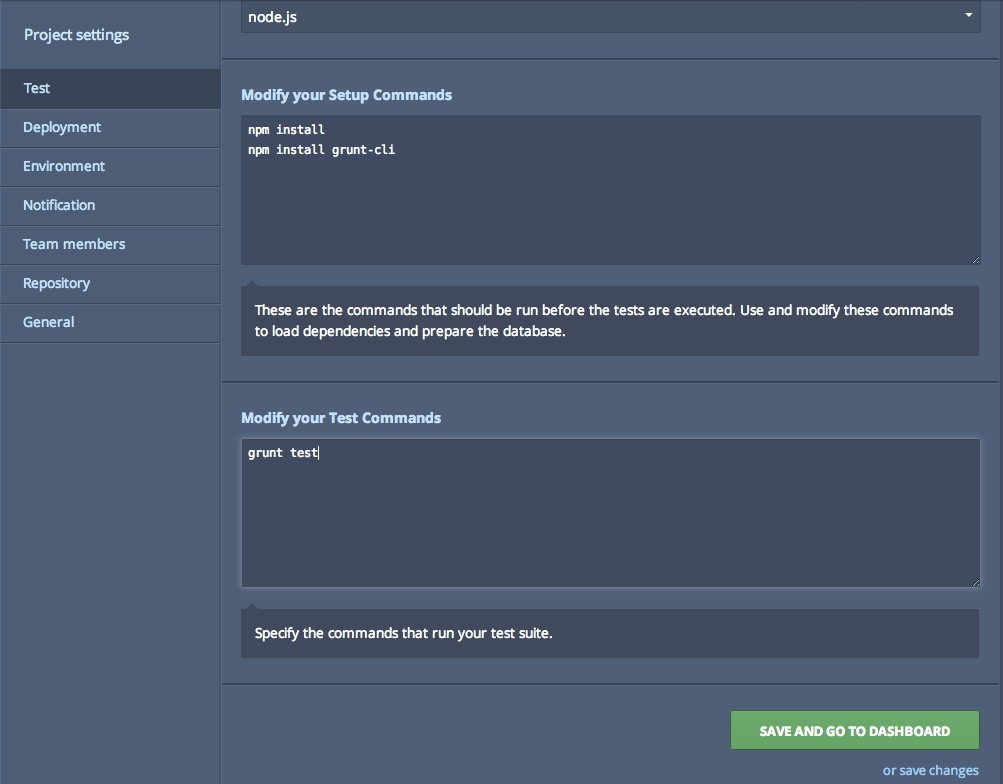
Codeship dashboard with updating test configuration
Ready to give this is a spin?
If we keep an eye on our dashboard we should see a build kicked-off and test task being executed:
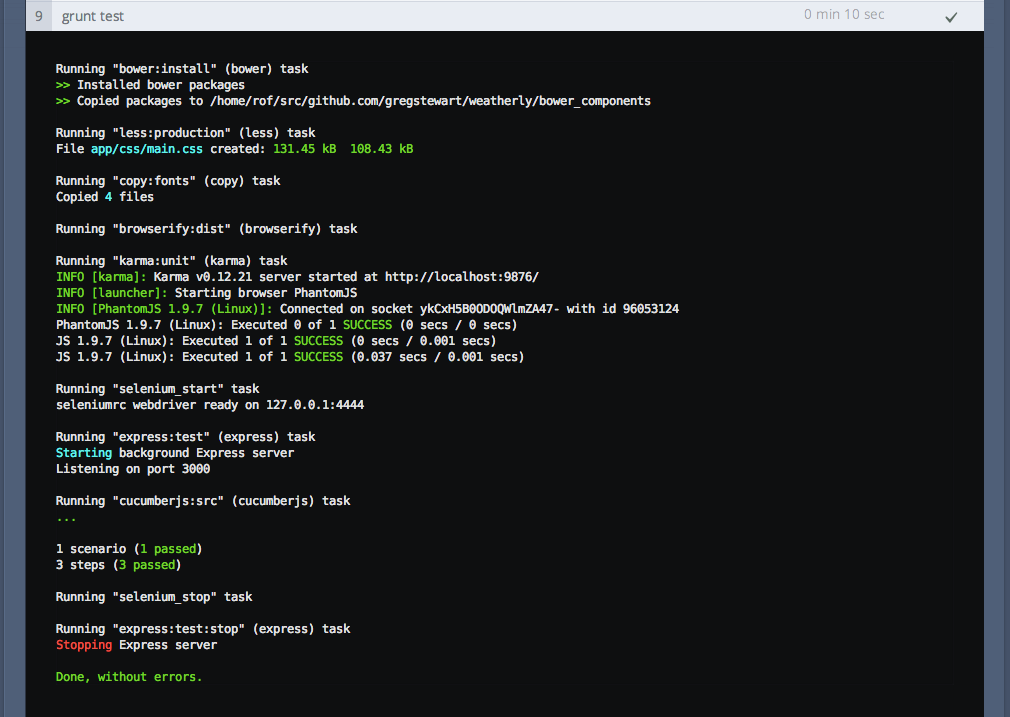
Codeship dashboard with updating test configuration
Continuously running our tests
So far so good. While it’s it’s nice to have our tests execute manually, let’s automate this. Could it be as simple as setting the karma.conf.js setting singleRun to false and autoWatch to true, well kind of. When running things on our build server we still want the single run to be true, however for local development purposes it should always run. So let’s tackle this:
1 > git checkout -b run-tests-continuously
Let’start by modifying our karma.conf.js file to run tests continuously:
 1     // Karma configuration
 2 // Generated on Sun Jul 20 2014 16:18:54 GMT+0100 (BST)
 3
 4 module.exports = function (config) {
 5     config.set({
 6
 7         // base path that will be used to resolve all patterns (eg. files, exclu\
 8 de)
 9         basePath: '',
10
11
12         // frameworks to use
13         // available frameworks: https://npmjs.org/browse/keyword/karma-adapter
14         frameworks: ['jasmine', 'commonjs'],
15
16
17         // list of files / patterns to load in the browser
18         files: [
19             'node_modules/weatherly/js/**/*.js',
20             'tests/unit/**/*.js'
21         ],
22
23
24         // list of files to exclude
25         exclude: [
26         ],
27
28
29         // preprocess matching files before serving them to the browser
30         // available preprocessors: https://npmjs.org/browse/keyword/karma-prepr\
31 ocessor
32         preprocessors: {
33             'node_modules/weatherly/js/**/*.js': ['commonjs'],
34             'tests/unit/**/*.js': ['commonjs']
35         },
36
37
38         // test results reporter to use
39         // possible values: 'dots', 'progress'
40         // available reporters: https://npmjs.org/browse/keyword/karma-reporter
41         reporters: ['progress'],
42
43
44         // web server port
45         port: 9876,
46
47
48         // enable / disable colors in the output (reporters and logs)
49         colors: true,
50
51
52         // level of logging
53         // possible values: config.LOG_DISABLE || config.LOG_ERROR || config.LOG\
54 _WARN || config.LOG_INFO || config.LOG_DEBUG
55         logLevel: config.LOG_INFO,
56
57
58         // enable / disable watching file and executing tests whenever any file \
59 changes
60         autoWatch: true,
61
62
63         // start these browsers
64         // available browser launchers: https://npmjs.org/browse/keyword/karma-l\
65 auncher
66         browsers: ['PhantomJS'],
67
68
69         // Continuous Integration mode
70         // if true, Karma captures browsers, runs the tests and exits
71         singleRun: false
72     });
73 };
Try this out by running grunt karma:unit and after the first run has completed making a change to our source TodaysWeather file:
 1 > grunt karma:unit
 2 > Running "karma:unit" (karma) task
 3 > INFO [karma]: Karma v0.12.17 server started at http://localhost:9876/
 4 > INFO [launcher]: Starting browser PhantomJS
 5 > INFO [PhantomJS 1.9.7 (Mac OS X)]: Connected on socket 9k2m2-j9Ets37p7sWD2Y wi\
 6 th id 21051890
 7 > PhantomJS 1.9.7 (Mac OS X): Executed 1 of 1 SUCCESS (0.007 secs / 0.003 secs)
 8 > INFO [watcher]: Changed file "/Users/gregstewart/Projects/github/weatherly/nod\
 9 e_modules/weatherly/js/model/TodaysWeather.js".
10 > PhantomJS 1.9.7 (Mac OS X): Executed 1 of 1 SUCCESS (0.005 secs / 0.002 secs)
Exactly what we wanted. Let’s now tackle our build versus development problem. We will just create a seperate build task that uses the same configuration file but overrides the properties we need for our build environment:
1 module.exports = function (grunt) {
2 grunt.initConfig({
3 express: {
4 test: {
5 options: {
6 script: './server.js'
7 }
8 }
9 },
10 cucumberjs: {
11 src: 'tests/e2e/features/',
12 options: {
13 steps: 'tests/e2e/steps/'
14 }
15 },
16 less: {
17 production: {
18 options: {
19 paths: ['app/css/'],
20 cleancss: true
21 },
22 files: {
23 'app/css/main.css': 'src/less/main.less'
24 }
25 }
26 },
27 copy: {
28 fonts: {
29 expand: true,
30 src: ['bower_components/bootstrap-sass-official/vendor/assets/fo\31 nts/bootstrap/*'],
32 dest: 'app/css/bootstrap/',
33 filter: 'isFile',
34 flatten: true
35 }
36 },
37 bower: {
38 install: {
39 options: {
40 cleanTargetDir:false,
41 targetDir: './bower_components'
42 }
43 }
44 },
45 browserify: {
46 code: {
47 dest: 'app/js/main.min.js',
48 src: 'node_modules/weatherly/js/**/*.js',
49 options: {
50 transform: ['uglifyify']
51 }
52 }
53 },
54 karma: {
55 dev: {
56 configFile: 'karma.conf.js'
57 },
58 ci: {
59 configFile: 'karma.conf.js',
60 singleRun: true,
61 autoWatch: false
62 }
63 }
64 });
65
66 grunt.loadNpmTasks('grunt-express-server');
67 grunt.loadNpmTasks('grunt-selenium-webdriver');
68 grunt.loadNpmTasks('grunt-cucumber');
69 grunt.loadNpmTasks('grunt-contrib-less');
70 grunt.loadNpmTasks('grunt-contrib-copy');
71 grunt.loadNpmTasks('grunt-browserify');
72 grunt.loadNpmTasks('grunt-bower-task');
73 grunt.loadNpmTasks('grunt-karma');
74
75 grunt.registerTask('generate', ['less:production', 'copy:fonts', 'browserify\76 :code']);
77 grunt.registerTask('build', ['bower:install', 'generate']);
78
79 grunt.registerTask('e2e', [
80 'selenium_start',
81 'express:test',
82 'cucumberjs',
83 'selenium_stop',
84 'express:test:stop'
85 ]);
86
87 grunt.registerTask('test', ['build', 'karma:ci', 'e2e']);
88
89 grunt.registerTask('heroku:production', 'build');
90 };
I took the chance to rename the karma:unit task to karma:dev and create a karma:ci task. The next thing was update the test task to also execute karma:ci instead of karma:unit.
Let’s test all those changes:
 1 > grunt test
 2 > Running "bower:install" (bower) task
 3 > >> Installed bower packages
 4 > >> Copied packages to /Users/gregstewart/Projects/github/weatherly/bower_compo\
 5 nents
 6
 7 > Running "less:production" (less) task
 8 > File app/css/main.css created: 131.45 kB → 108.43 kB
 9
10 > Running "copy:fonts" (copy) task
11 > Copied 4 files
12
13 > Running "browserify:code" (browserify) task
14
15 > Running "karma:ci" (karma) task
16 > INFO [karma]: Karma v0.12.17 server started at http://localhost:9876/
17 > INFO [launcher]: Starting browser PhantomJS
18 > INFO [PhantomJS 1.9.7 (Mac OS X)]: Connected on socket 67MYRP0HFPzhHE9wY3vt wi\
19 th id 58848767
20 > PhantomJS 1.9.7 (Mac OS X): Executed 1 of 1 SUCCESS (0.002 secs / 0.002 secs)
21
22 > Running "selenium_start" task
23 > seleniumrc webdriver ready on 127.0.0.1:4444
24
25 > Running "express:test" (express) task
26 > Starting background Express server
27 > Listening on port 3000
28
29 > Running "cucumberjs:src" (cucumberjs) task
30 > ...
31
32 > 1 scenario (1 passed)
33 > 3 steps (3 passed)
34
35 > Running "selenium_stop" task
36
37 > Running "express:test:stop" (express) task
38 > Stopping Express server
39
40 > Done, without errors.
Time to commit our changes back to master and push to origin and see the whole thing go through our build pipeline:
1 > git add .
2 > git commit -m "Run tests continuously in dev and single run on CI"
3 > git checkout master
4 > git merge run-tests-continuously
5 > git push
Now check your CI server and you should see the following if it all went to plan:
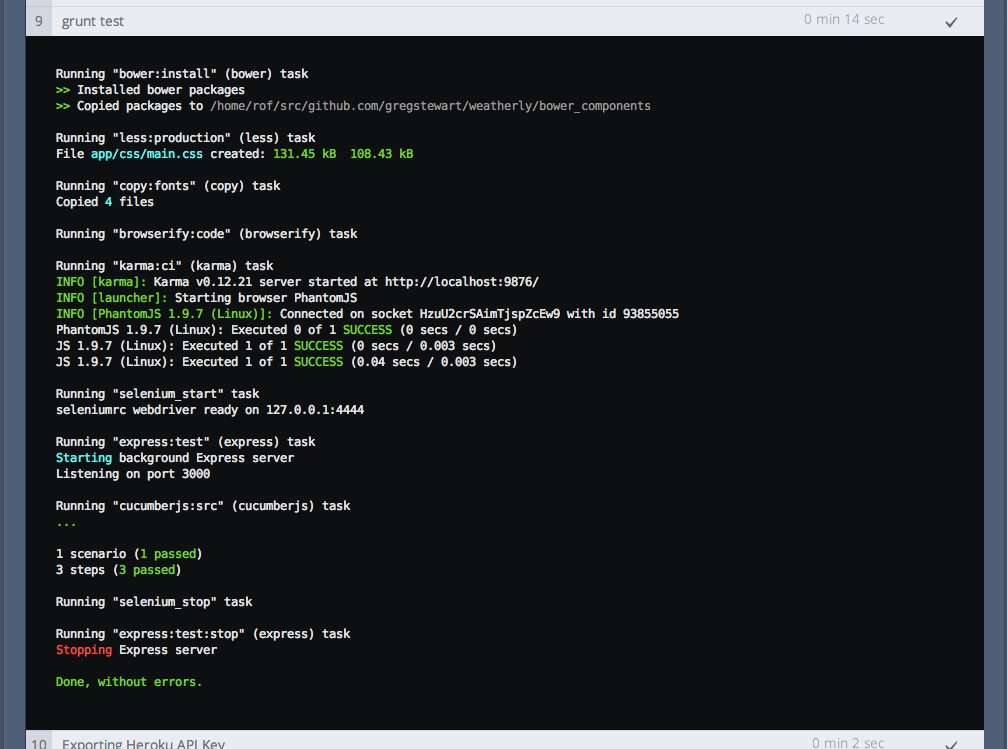
Codeship dashboard with updated ci test configuration
Adding code coverage
A little bonus while we are setting up test infrastructure, code coverage. Now code coverage is one of these topics that sparks almost fanatical discussions, however I find a useful tool to make sure I have covered all of the important parts of my code. Lucky for us, it’s easy to add support to Karma all we need is a plugin:
1 > git checkout -b code-coverage
2 > npm install karma-coverage --save-dev
And modify our karma.conf.js file:
 1 // Karma configuration
 2 // Generated on Sun Jul 20 2014 16:18:54 GMT+0100 (BST)
 3
 4 module.exports = function (config) {
 5     config.set({
 6
 7         // base path that will be used to resolve all patterns (eg. files, exclu\
 8 de)
 9         basePath: '',
10
11
12         // frameworks to use
13         // available frameworks: https://npmjs.org/browse/keyword/karma-adapter
14         frameworks: ['jasmine', 'commonjs'],
15
16
17         // list of files / patterns to load in the browser
18         files: [
19             'node_modules/weatherly/js/**/*.js',
20             'tests/unit/**/*.js'
21         ],
22
23
24         // list of files to exclude
25         exclude: [
26         ],
27
28
29         // preprocess matching files before serving them to the browser
30         // available preprocessors: https://npmjs.org/browse/keyword/karma-prepr\
31 ocessor
32         preprocessors: {
33             'node_modules/weatherly/js/**/*.js': ['commonjs', 'coverage'],
34             'tests/unit/**/*.js': ['commonjs'],
35         },
36
37
38         // test results reporter to use
39         // possible values: 'dots', 'progress'
40         // available reporters: https://npmjs.org/browse/keyword/karma-reporter
41         reporters: ['progress', 'coverage'],
42
43         coverageReporter: {
44             reporters: [
45                 { type: 'html'},
46                 { type: 'text-summary' }
47             ],
48             dir: 'reports/coverage'
49         },
50
51         // web server port
52         port: 9876,
53
54
55         // enable / disable colors in the output (reporters and logs)
56         colors: true,
57
58
59         // level of logging
60         // possible values: config.LOG_DISABLE || config.LOG_ERROR || config.LOG\
61 _WARN || config.LOG_INFO || config.LOG_DEBUG
62         logLevel: config.LOG_INFO,
63
64
65         // enable / disable watching file and executing tests whenever any file \
66 changes
67         autoWatch: true,
68
69
70         // start these browsers
71         // available browser launchers: https://npmjs.org/browse/keyword/karma-l\
72 auncher
73         browsers: ['PhantomJS'],
74
75
76         // Continuous Integration mode
77         // if true, Karma captures browsers, runs the tests and exits
78         singleRun: false
79     });
80 };
Running our grunt karma:dev task yields the following output:
 1 > Running "karma:dev" (karma) task
 2 > INFO [karma]: Karma v0.12.17 server started at http://localhost:9876/
 3 > INFO [launcher]: Starting browser PhantomJS
 4 > INFO [PhantomJS 1.9.7 (Mac OS X)]: Connected on socket OVbmSp9OmFMK23l5jA2J wi\
 5 th id 80988698
 6 > PhantomJS 1.9.7 (Mac OS X): Executed 1 of 1 SUCCESS (0.005 secs / 0.002 secs)
 7
 8 > =============================== Coverage summary =============================\
 9 ==
10 > Statements   : 83.33% ( 5/6 )
11 > Branches     : 100% ( 2/2 )
12 > Functions    : 50% ( 1/2 )
13 > Lines        : 66.67% ( 2/3 )
14 > ==============================================================================\
15 ==
16 > ^C
17 > Done, without errors.
There’s more information in the shape of an HTML report to be found under reports/coverage/. Here’s a what that looks like
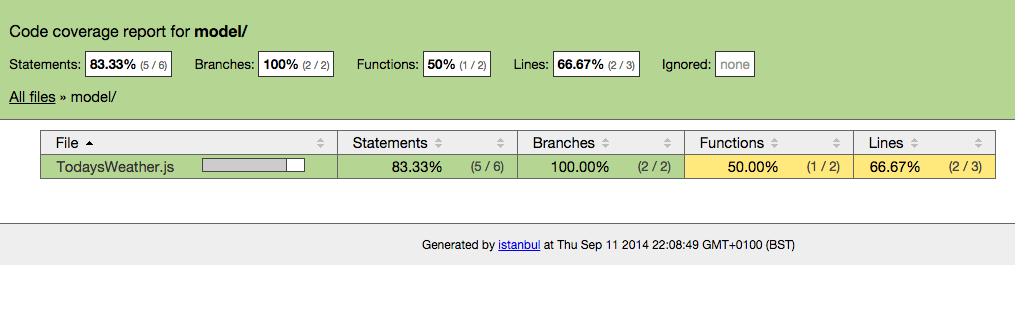
Istanbule code coverage report
One final thing before we close off this section. You may not want to run your coverage report as part the CI process. If you do then ignore this part. By editing our Gruntfile and for our karma:ci task overriding the reporter step with reporters: ['progress'] we can skip this step for our build.
1 module.exports = function (grunt) {
2 grunt.initConfig({
3 express: {
4 test: {
5 options: {
6 script: './server.js'
7 }
8 }
9 },
10 cucumberjs: {
11 src: 'tests/e2e/features/',
12 options: {
13 steps: 'tests/e2e/steps/'
14 }
15 },
16 less: {
17 production: {
18 options: {
19 paths: ['app/css/'],
20 cleancss: true
21 },
22 files: {
23 'app/css/main.css': 'src/less/main.less'
24 }
25 }
26 },
27 copy: {
28 fonts: {
29 expand: true,
30 src: ['bower_components/bootstrap-sass-official/vendor/assets/fo\31 nts/bootstrap/*'],
32 dest: 'app/css/bootstrap/',
33 filter: 'isFile',
34 flatten: true
35 }
36 },
37 bower: {
38 install: {
39 options: {
40 cleanTargetDir:false,
41 targetDir: './bower_components'
42 }
43 }
44 },
45 browserify: {
46 code: {
47 dest: 'app/js/main.min.js',
48 src: 'node_modules/weatherly/js/**/*.js',
49 options: {
50 transform: ['uglifyify']
51 }
52 }
53 },
54 karma: {
55 dev: {
56 configFile: 'karma.conf.js'
57 },
58 ci: {
59 configFile: 'karma.conf.js',
60 singleRun: true,
61 autoWatch: false,
62 reporters: ['progress']
63 }
64 }
65 });
66
67 grunt.loadNpmTasks('grunt-express-server');
68 grunt.loadNpmTasks('grunt-selenium-webdriver');
69 grunt.loadNpmTasks('grunt-cucumber');
70 grunt.loadNpmTasks('grunt-contrib-less');
71 grunt.loadNpmTasks('grunt-contrib-copy');
72 grunt.loadNpmTasks('grunt-browserify');
73 grunt.loadNpmTasks('grunt-bower-task');
74 grunt.loadNpmTasks('grunt-karma');
75
76 grunt.registerTask('generate', ['less:production', 'copy:fonts', 'browserify\77 :code']);
78 grunt.registerTask('build', ['bower:install', 'generate']);
79
80 grunt.registerTask('e2e', [
81 'selenium_start',
82 'express:test',
83 'cucumberjs',
84 'selenium_stop',
85 'express:test:stop'
86 ]);
87
88 grunt.registerTask('test', ['build', 'karma:ci', 'e2e']);
89
90 grunt.registerTask('heroku:production', 'build');
91 };
We also do not want to commit our reports to our repos, so another .gitignore tweak is needed:
1 .idea
2 bower_components
3 reports
4 phantomjsdriver.log
5 app/css
6 app/fonts
7 app/js
8 node_modules/*
9 !node_modules/weatherly
Time to commit and merge our changes:
1 > git add .
2 > git commit -m "added coverage to dev process"
3 > git checkout master
4 > git merge code-coverage
5 > git push
Recap
We covered quite a bit of ground here:
- we set up Karma
- wrote a very basic unit test to validate the test runner was working
- configured the tests for local continuous testing and single run during the build
- added code coverage to our tooling
With that onwards to development guided by tests!