An introduction to Advanced Python
What is Advanced Python?
… is it an awesome notebook?
… or knowing every function?
… and writing faster code?
It’s about higher levels
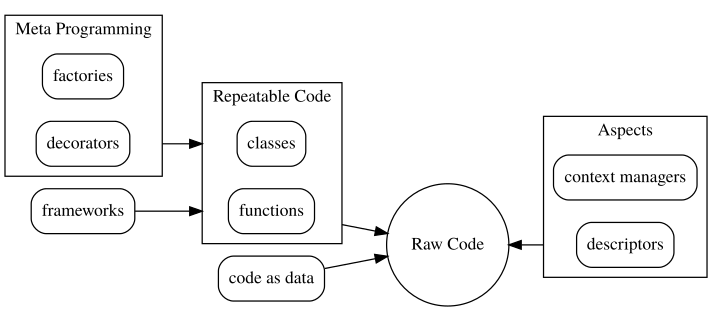
It’s about the science
Columnar & Sparse Representations
Probabilistic Data Structures
Parallel & Distributed Algorithms
It’s about repeatability
A manual install
- No env
- No data flow
Minimally repeatable
in.csv
- Minimal reqs
- Implicit flow
A fully repeatable process
- Frozen env
- Explicit flow
… and standards/enforcement
Why learn “best practices” if you can build them?
Each of these examples represents a design decision - and best practice - wrapped up in code
with atomic_write('output.csv') as f:
    df.to_csv(f)
mlflow.sklearn.save_model(model, "my_model")
with submit_pset('Pset 0') as quiz_submission:
    quiz_submission.answer_submission_questions(...)
It’s about collaboration
- Workflows that facilitate development
- Code that is consistent and self-documenting
- Units of work that build on each other seamlessly
It’s about the ecosystem
The modern Data Scientist leverages a broader ecosystem of tools than anyone else in the history of man
Python is a glue language, and is popular because it is the best interface to all of these tools
We will embrace the ecosystem, rather than have you work in a sandbox
It’s about the deliverable
Your output is not enough; show your work.
It’s about you
You are the most valuable asset, and usually the bottleneck. Python gives you wings.
Tech Requirements
Prerequisites
You should already know Python! This book assumes fluency in basic to intermediate python syntax.
You should know how to use libraries, functions, classes, and basics of python packaging!
You should be familiar with numpy, scipy, and pandas
Students have the most difficulty understanding python packages vs modules vs scripts, how to build and configure their environments, and set up repositories and cloud accounts. Make sure you are comfortable with the basic daily tools (the things used in real life that they don’t teach you in Python 101) and can debug and communicate problems effectively.
Python 3.8
This book will target 3.8.
The focus of this book is python. New versions bring new features, but we are focused on a much bigger picture - what makes python python, not what you can do with any new feature.
The vast majority of things you can and should do as an advanced Python programmer are achievable in any version, pending library support, perhaps with minor syntax variations. We are chasing the forest here, not the trees.
IDE
Pick one that helps with:
- Debugging!
- Source code/doc lookups
- Syntax checks, autocomplete, runtime config…
If you have never line-by-line debugged a program before, this is the place to start!
This is your chance to learn to debug!
Debugging provides most of what you want from Jupyter, but much, much better experience:
- Jump to source
- Line-by-line stepping
- Stack inspection
- …
… not Jupyter!
You should not be using Jupyter Notebooks for this course!
You will get the impression that I hate Jupyter. That is not true.
It’s great for EDA, but lacks repeatability, composeability, and cooperativity.
Use the right tool for the right job. Jupyter is not the right tool for Advanced Python!
Documentation
You need to document and comment your code!
Pick one of:
def fetch_bigtable_rows(big_table):
    """Fetches rows from a Bigtable

    More notes...

    Args:
        big_table: A Bigtable Table
        ...

    Returns:
        A dict...

    """
Black
https://black.readthedocs.io/en/stable/
Why spend time formatting code?
Code format is about more than just style. Everyone has different aesthetics, but we would not spend much time discussing it if it were merely preferences.
When code is merged or committed, we see deltas regardless if the change is functional or stylistic. Adopting an automatic, strict style minimizes the latter. If your code is always formatted consistently, you can easily merge work from another branch without seeing or dealing with distracting stylistic deltas. It helps you collaborate.
Plus, it removes the mental energy of learning or conforming to a style. Just auto format all the time!
This is an example of how we don’t learn or set a ‘best practice;’ rather, we pick a framework that automates or enforces the practice for us.
Helpful Themes
Typing
Python doesn’t require types, but you shouldn’t forget them!
The following all ‘safely’ handle a basic lookup, but make different decisions about the type and content of the default value
ENCODING = {
    1: 'one',
    2: 'two',
}

def encode(x: int) -> str:
    # Preserves type, but is a new 'magic' value
    return ENCODING.get(x, 'none')
def encode(x: int) -> Union[str, None]:
    # Standard tombstone value, but
    # may cause problems eg encode(9).upper()
    return ENCODING.get(x, None)
def encode(x: int) -> str:
    # Preserve type and boolean eg 'if encode(x)'
    return ENCODING.get(x, '')
Functions should operate on an expected data type, and return an expected type.
If this changes depending on the arguments, mass confusion will follow.
Strive for consistent, self-explanatory argument and return types
Never ever ever:
def sqrt(x: float) -> Union[float, str]:
    if x < 0:
        return 'invalid'
    return x**0.5
Typing (Overkill): Let your IDE and common sense do the heavy lifting
Good practices in the past are not as necessary today; see: Hungarian Notation.
def float_square_root(float_x: float) -> float:
    assert isinstance(float_x, float)
    return x**0.5
Encoding the type of a function into the name … is brain damaged - the compiler knows the types anyway … and it only confuses the programmer.
– Linus Torvalds
Cardinality & Ownership
Try to isolate and shrink the responsibility of your code
Smaller, isolated functions are easier to test and easier to reuse in new situations.
def process(df: DataFrame) -> DataFrame:
    # Hard codes column name and iteration method
    for i, x in enumerate(df['col']):
        df['col'].iloc[i] = x + 1
    return df

>>> df = process(df)
def process(vec: List) -> List:
    # Hard codes iteration method
    return [x + 1 for x in vec]

>>> df['col'] = process(df['col'])
def process(x: float) -> float:
    # Operates on a unit
    return x + 1

>>> df['col'].apply(process)
>>> process(df['col']) # If vectorizable
>>> process(3)
One cognitive burden when reading or designing DS code is the cardinality of your data - are you processing a single element, or a bunch of them?
Strive to make it clear whether your function is designed to work on elemental data (eg, a single primitive) or a collection (eg, an iterable, a series/dataframe, numpy array, etc).
In general, write code to operate on data primitives - this is much easier to test, a better assumption for how a function should work, and more likely that you can plug it in to other parts of your code. It also allows you to use other mechanisms for applying the same thing to the container, eg using pandas .apply, or map objects.
The big exception to this is if you need numpy vectorization for speed, and your function cannot be naively applied to a scalar vs a numpy array in the same way (eg, you need to access properties of the vector to perform the calculation).
Code as Data
Try to write every program as an operation on data.
Here is ‘good’ code:
print('one')
print('two')
But this code is ‘better’:
for arg in ['one', 'two']:
    print(arg)
And this is better still:
def map(func, seq):
    for el in seq:
        func(el)

map(print, ['one', 'two'])
Code-as-data, flow-based, object-oriented, and other higher-level programming concepts will be major focus areas in this book.
Readings
Now
- Code Climate Workflow
- Continuous Integration
- A Successful Git Branching Model
- GitHub Flow vs Git Flow
- Test Driven Dev for Data Science
- CI for Data Science
- I Don’t Like Notebooks