3 - Book content
In this chapter, one will get an overview of what will be developed throughout the book, utilizing the features AWS offers, as well the technologies that will be used for such applications.
To cover all of the content planned in this book, more than one system or context of applications will be developed for teaching purposes to cover the AWS services that will be explained in this book.
Chapter 4 gives an overview of some concepts, such as accounts, regions, users, and roles.
Chapter 5 gives an introduction to building Java applications using Spring Boot. Throughout the book, two applications will be developed using this foundation, so it is important to present such concepts to leave the reader with a minimum level of preparation.
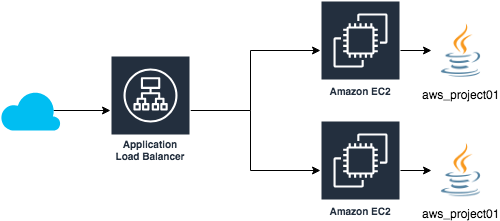
Chapter 6 will introduce some Elastic Compute Cloud concepts for creating machine instances to run applications. In the example to be shown, a simple Java application will run on two EC2 instances, with an application load balancer controlling requests outside the application, as shown in the following figure:
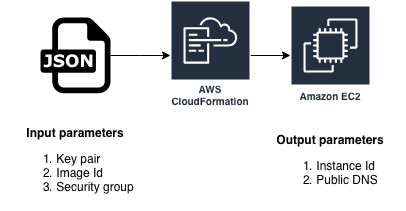
Chapter 7 will introduce an exciting feature of AWS, CloudFormation, which can create resources from YAML or JSON format files. In this chapter, EC2 instances will be created and configured from a JSON format file, which will be processed and executed by AWS CloudFormation:
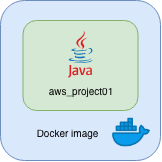
Chapter 8 will show how to run a Java-based Spring Boot application in Docker containers:
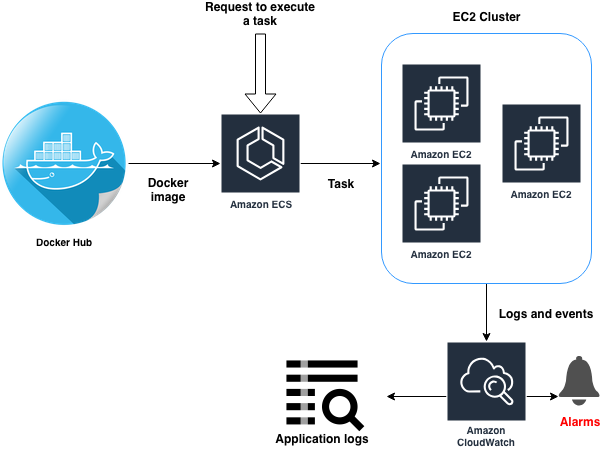
This will be essential for the introduction to Chapter 9, where the concept of the Amazon Elastic Container Service will be introduced, responsible to create clusters for Docker container-based application tasks:
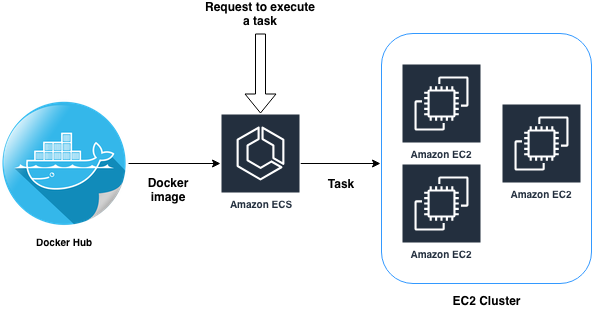
This chapter will present the concepts of task and service definitions used by ECS, through clusters of EC2 instances, capable of running more than one service at a time, sharing the resources offered by the cluster.
Chapter 10 will introduce a powerful AWS monitoring service, CloudWatch, which enables application logging, event configuration, and service metrics visualization through graphs.
Chapter 11 will show how to create, use, and manage database instances in AWS Relational Database Service.
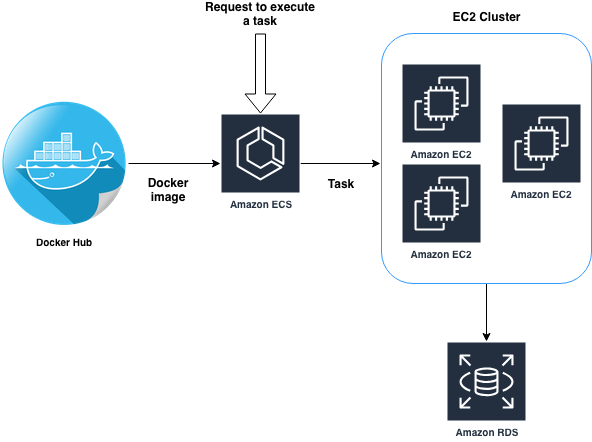
This will make it possible for applications to persist their data in an instance of a database such as MySQL.
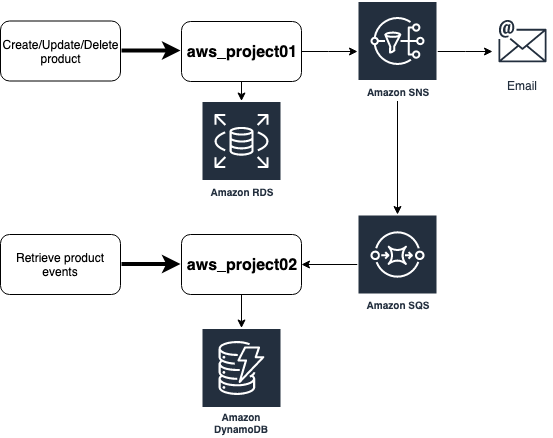
Chapter 12 explains how to use AWS Simple Notification Service, a service that lets applications publish notifications on topics.
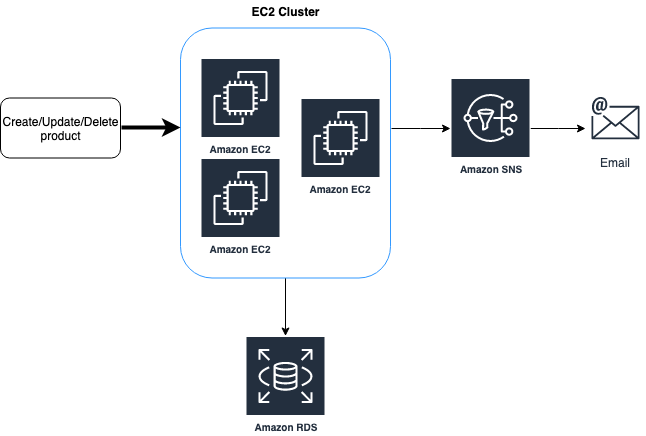
These topics can deliver messages to email addresses or can be used to post messages in queues, such as AWS Simple Queue Service, as will be presented in chapter 13:
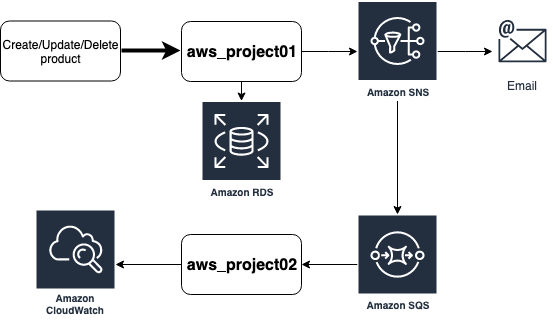
This way, communication can be created asynchronously between two applications.
Chapter 14 will detail basic concepts for AWS DynamoDB, a nonrelational database service, that allows applications to create items that can be stored in key-value as well as in documents.
Chapter 15 will show how to use AWS Simple Storage Service for file storage, which can be managed through applications running in clusters:
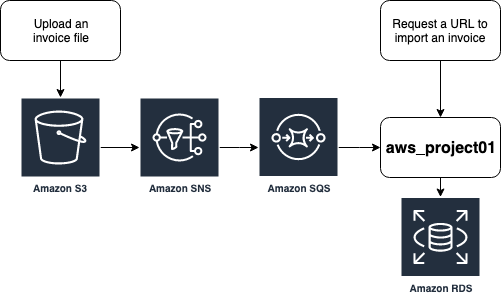
The example to be developed is the integration between S3, SNS, SQS, ECS and RDS services, showing how an application can be notified of the insertion of a new file in an S3 bucket.
Finally, Chapter 16 will introduce concepts of how to build serverless applications with AWS Lambda.
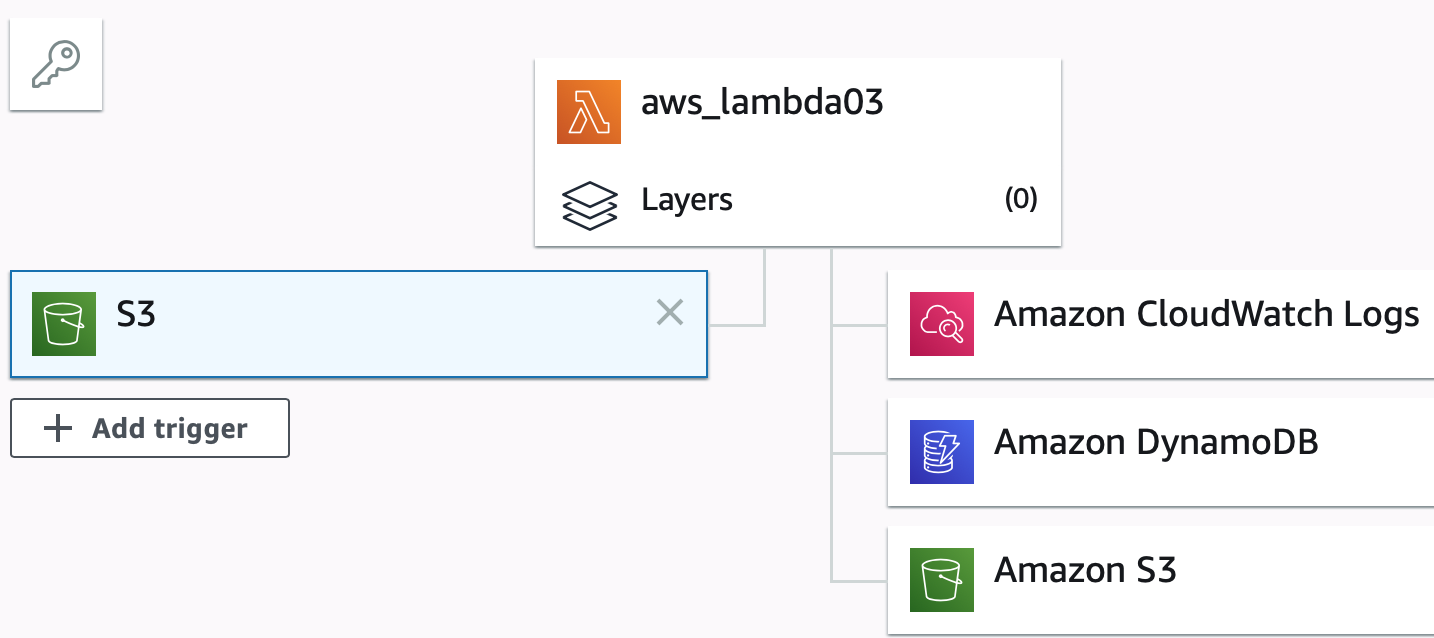
Some examples will be developed to teach how Lambdas functions can be used for a wide range of applications. The previous figure shows a diagram of a Lambda function accessing an S3 bucket and persisting the file content to a DynamoDB table, as well as generating logs of its execution in CloudWatch Logs.
Enjoy this journey of knowledge and, if you need help, do not hesitate to call the author: siecola@gmail.com
Have fun!