3. Use Run Book collaboration to increase operability and prevent operational issues


3.1 Operational aspects are very similar across many software systems
It’s quite common for software teams to think that the systems they work on are unique or somehow special and that there is little they can learn from other systems. The reality is that the vast majority of business systems on which you might work as a software team have almost identical operational needs; the technologies and details change, certainly, but the make-or-break operational requirements are remarkably similar across most systems.
For example, all software systems have service level requirements, even if these are not identified or articulated. By extension, these systems also have an implicit or explicit SLA, even if it’s just a (physics-defying) agreement that “the system needs to work all the time without failure”. Interestingly, non-trivial systems generally have several run-time dependencies (not all of which might be known), and these systems all need to be monitored for healthy operation (especially when one or more of those dependencies fail). Thankfully, this means we can reuse existing approaches across different systems!
At a high level, to make typical software systems work in Production, we need to consider things like:
- The purpose and remit of the system - who ‘owns’ the system?
- The characteristics of the system (data flows, network topology, etc.)
- Required resources (CPU, storage, etc.)
- Security (access, encryption, etc.)
- System configuration
- Backup and restore of data
- Monitoring & alerting
- Regular operational tasks (including troubleshooting)
- Patching and cleardown
- Failover and recovery
Some systems have smaller requirements in some areas compared to other systems, but we need to consider all of these things (and more), whether the system is a cloud-based flight-booking system, an on-premise industrial control unit, or an array of IoT devices forming part of a Smart City deployment. Many software teams find this list of operational aspects quite daunting, but don’t worry - the techniques in this chapter will help you to understand and deal with all these operational concerns.
In modern software systems, we expect almost all operational tasks to be automated. Old-style run books with step-by-step instructions for a low-skilled IT support person to follow have no place in today’s software systems (see Goldschrafe2011). When we say ‘Run Book’ here, we mean a set of common checks and prompts based on sound industry experience - plus high-level answers - that help teams to discover operational features of their software systems and thereby improve operability, not a giant document which might replace or even prevent automation and monitoring. We explore some examples of such common checks and prompts in the next section and in the Appendix (Run Book template).
3.2 Use a Run Book template as a common baseline for operational aspects
A good way to start improving operability is by collaborating on filling out a Run Book template. A Run Book template is a set of headings and questions that together cover the operational concerns that will need to be addressed in most business software systems. For instance, there are typically headings like these:
The point of this Run Book collaboration is not to produce a document but to explore and understand the expected runtime behaviour of the system.
You can use the Run Book template like this:
- Start by an overview of the service or system, then clarify with the team what each section in the template means.
- Fill in some details for sections that you know about.
- If you don’t know the details for a section, mark it as “not defined” - these areas of the system are likely to have operability gaps. Discuss these sections with people outside the team.
- If any section is simply not relevant for your system, mark it as “not relevant”.
Be suspicious of too many sections marked as “not relevant”, because there is probably some need for that operational task or feature, even if it is handled by a third party supplier. Check with members of the operations team before you assume that something is not relevant!
Software developers and testers complete the first draft of the Run Book
You’ll probably get the best outcomes from having the software development team own and drive the activities around the Run Book information, seeking input from IT Ops people (and others in the organization with operational awareness) to fill in gaps in knowledge.
Because the software development team needs to collaborate with the operations team in order to define and complete the various Run Book details, the operations team also gains early insight into the software. This helps to set up channels and patterns of communication, trust, and collaboration, which help to improve the quality and operability of the software system early on in the process.
In practice, after filling in the Run Book template, you’ll want to automate many of the checks and procedures (rather than leaving them in a wiki or document) using techniques such as Deployment Verification Tests or DVTs - see Chapter 2. The Run Book collaboration activities should help you and your team discover things about how the system will work, along with any gaps in knowledge, implementation, or operational readiness that need to be addressed.
This work on operational aspects should be a regular team activity - see Chapter 7 for more details on how to make operational features a normal part of your team’s work. By working on operational aspects of the software every sprint/iteration/week, we keep ourselves ‘tuned in’ to the practical consequences of product decisions, avoiding a build-up of poor design for the future, and so reducing runtime risk and ‘feature friction’.
Run Book template example
During our work with many different organisations and teams over the years, we have gathered a set of common operational concerns that span many different kinds of software systems across many industry sectors. This Run Book template is available on Github or via the shortlink runbooktemplate.info:
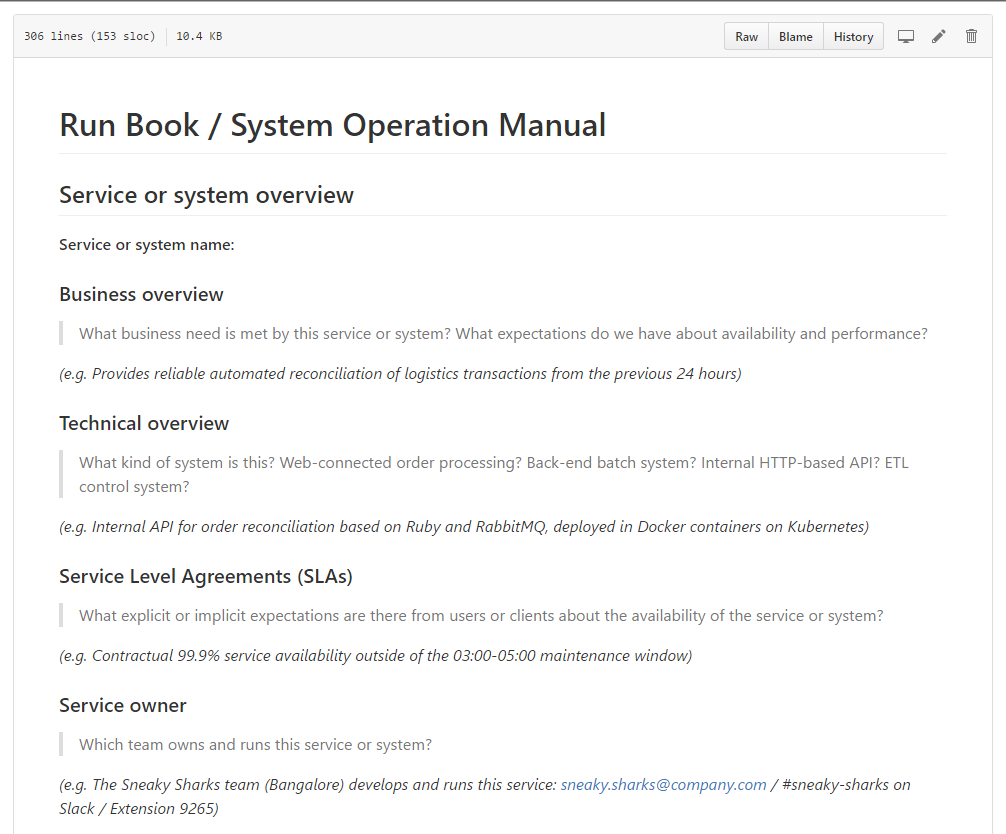
The template contains more than 50 headings that relate to the operation of modern software systems, along with some sample responses. You can print the template directly from Github, fork the repository to modify it for your own organisation, or use a Run Book Dialogue Sheet. However you use the template, treat the resulting information as a starting point for discussions about operational readiness, not as a finished document.
In our experience, you will need to address the majority of the points in the Run Book template, if only to confirm that “this section definitely does not apply here” - a valuable realisation. Each section has a description to set the context and explain why it’s needed.
3.3 Use a Run Book Dialogue Sheet to facilitate discovery and avoid ‘documentation fallacy’
We have found that a very effective way of discovering the operational aspects of a software system is to use a Run Book dialogue sheet1. These are large (A1 size) sheets of paper that cover a good-sized table and show all the headings from the Run Book template, enabling the whole team to interact with the sheet around the table:
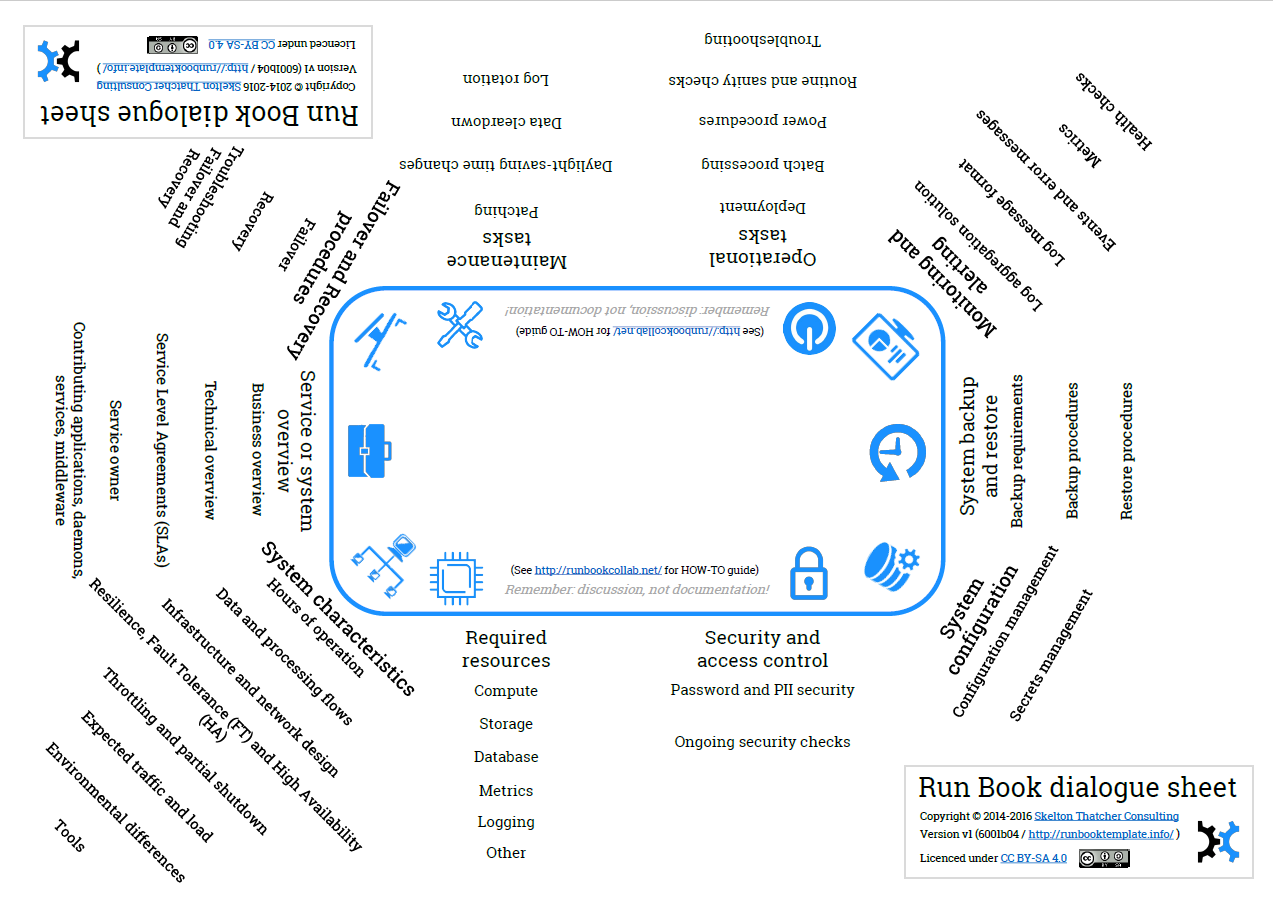
This particular example is based on the Run Book template hosted at runbooktemplate.info - we’ve used a Creative Commons SA license on the dialogue sheet so you can modify it and create your own version if you like.
You can use the Run Book dialogue sheet like this:
- Find the most recent version of the A1-size PDF at runbooktemplate.info.
- Save and print the PDF at A1 size.
- Bring together the whole team (Product Owner, UX, Developers, Testers, Build & Release, and Operations people) in the same room.
- Talk through each heading on the sheet, capturing useful details using a marker pen on the dialogue sheet. We find that it’s best to start with the Service or system overview section so that the purpose of the system is well-understood by everyone.
- Continue with other headings on the sheet until all sections have been either:
- Completed
- or Marked as “Not relevant”
- or Marked as “Not defined”
- Take a photograph of the finished dialogue sheet for reference - you will want to return to the details at a later date!
- (Optional, but recommended) Place the dialogue sheet on the wall next to your team area so it can stimulate discussions with people who walk past it or when new team members join the team.
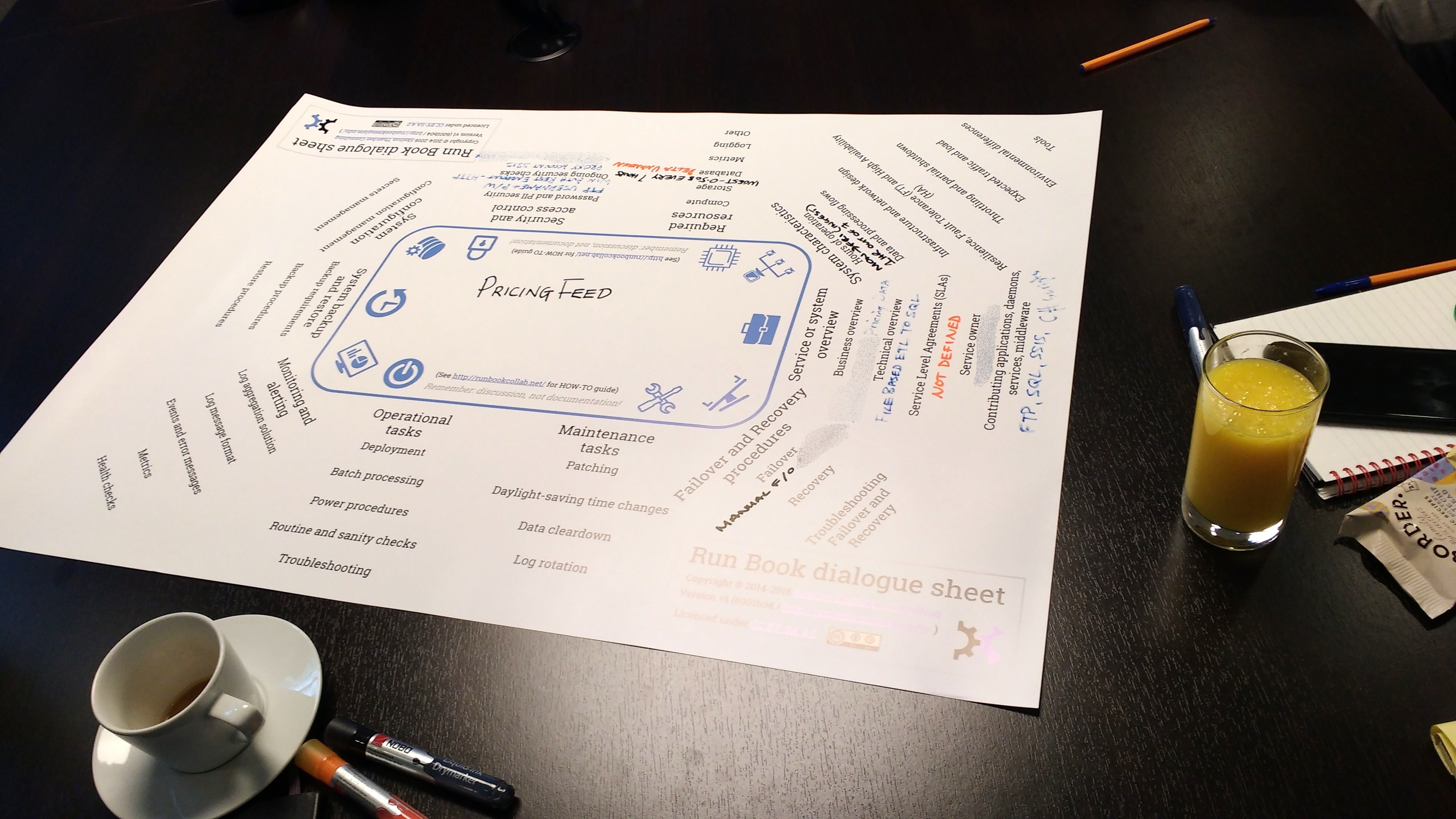
We recommend spending between 4 hours and 2 days on the Run Book dialogue sheet per system to begin with; some systems may need even more time. One very valuable output from these sessions is to discover the headings in the dialogue sheet that end up being not defined (rather than not relevant). You likely have gaps in operability if an operational aspect of the system is not defined, so there is a good chance that errors or bugs will arise around this aspect. Use this as a ‘signal’ that more clarity is needed (by asking someone external to the team, for example).
Using Run Book dialogue sheets helps to emphasise the importance of discovering (and rediscovering) operational aspects of the system in a collaborative way. If the whole team has helped shape the operability of the system, there is less need to begin ‘documenting’ operational requirements in a static wiki or Word document that will quickly become outdated (while providing a false sense of security). The ‘documentation fallacy’ happens when people rely on those static documents as a safety net, only to find out in the worst moment (during an incident) that those documents have long drifted from the reality of our ever evolving systems.
3.4 Assess operability on a regular basis: every sprint, iteration, or week
To maintain a high state of operational readiness in our software, we need to assess operability on a regular basis within the team. A straightforward way to do this is to include a brief exercise in every sprint/iteration planning meeting or retrospective:
- Place the most recently-completed Run Book dialogue sheet on the table (or print out a blank Run Book template)
- Assign one person to each of the 10 or so areas of focus on the dialogue sheet:
- Service or system overview
- System characteristics
- Required resources
- etc.
- Give each person a different coloured sticky note (or combination of sticky note and letter/shape drawn on the sticky note)
- For each story card completed (or planned), give everyone (say) 1 minute to assess whether the feature described by the story might affect their area of focus.
- If someone thinks that their area might be affected, they place a sticky note (plus annotation if needed) onto the story card.
Any story cards with sticky notes are then discussed and (if necessary) taken to other teams to discuss operability concerns:
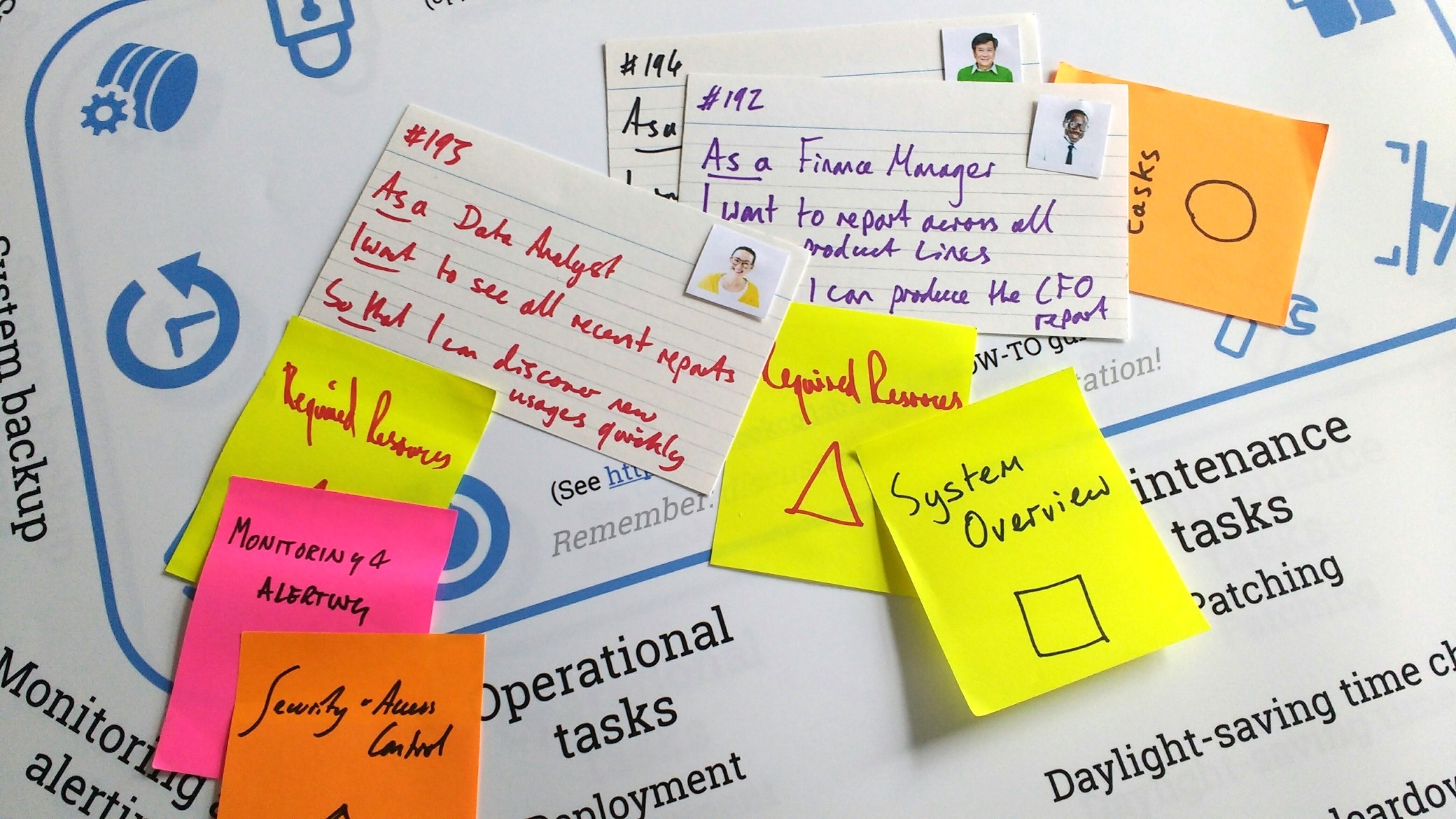
Doing this operability assessment exercise should take around 5-10 mins each time once team members are familiar with the criteria and motivations for doing it. If you run the exercise during planning sessions you will get leading indicators of possible operability problems (but with uncertainty), whereas if you run this during a retrospective, you will get lagging indicators, although with more detail. Running the exercise during both retrospectives and planning sessions gives the best outcomes; you can compare expected effects on operability with the actual!
You can also run the exercise on a weekly or bi-weekly basis using Kanban approaches; just take the cards representing ‘done’ or ‘waiting’ (or both!) and assess operability against these tasks.
3.5 Summary
The operability of a software system should be the responsibility of the team building the software. Usually, this means that the team needs to collaborate with operations people (or with operational experience) in order to explore and define the operational characteristics of the system. Proven techniques like Run Book collaboration can really help to bring together all the people needed to identify these operational criteria, as well as build trust between teams. Practical tools like Run Book templates and Run Book dialogue sheets provide a light framework for teams to discover and assess operability in their software on an ongoing basis.