Lean Publishing Tip of the Day: Your Book Release History
Since Leanpub books can be updated any time, we thought it would be a good idea to give authors a way to track their publication history.

We recently released a book Release History feature for Leanpub authors.
Since Leanpub books can be updated any time, we thought it would be a good idea to give authors a way to track their publication history.
In this livestream, watch Leanpub co-founder Len Epp show you where to find the Release History page, how to understand it, and how you can use it.
What The Release History Page Looks Like
Here's an example of a release history page for a Leanpub book:
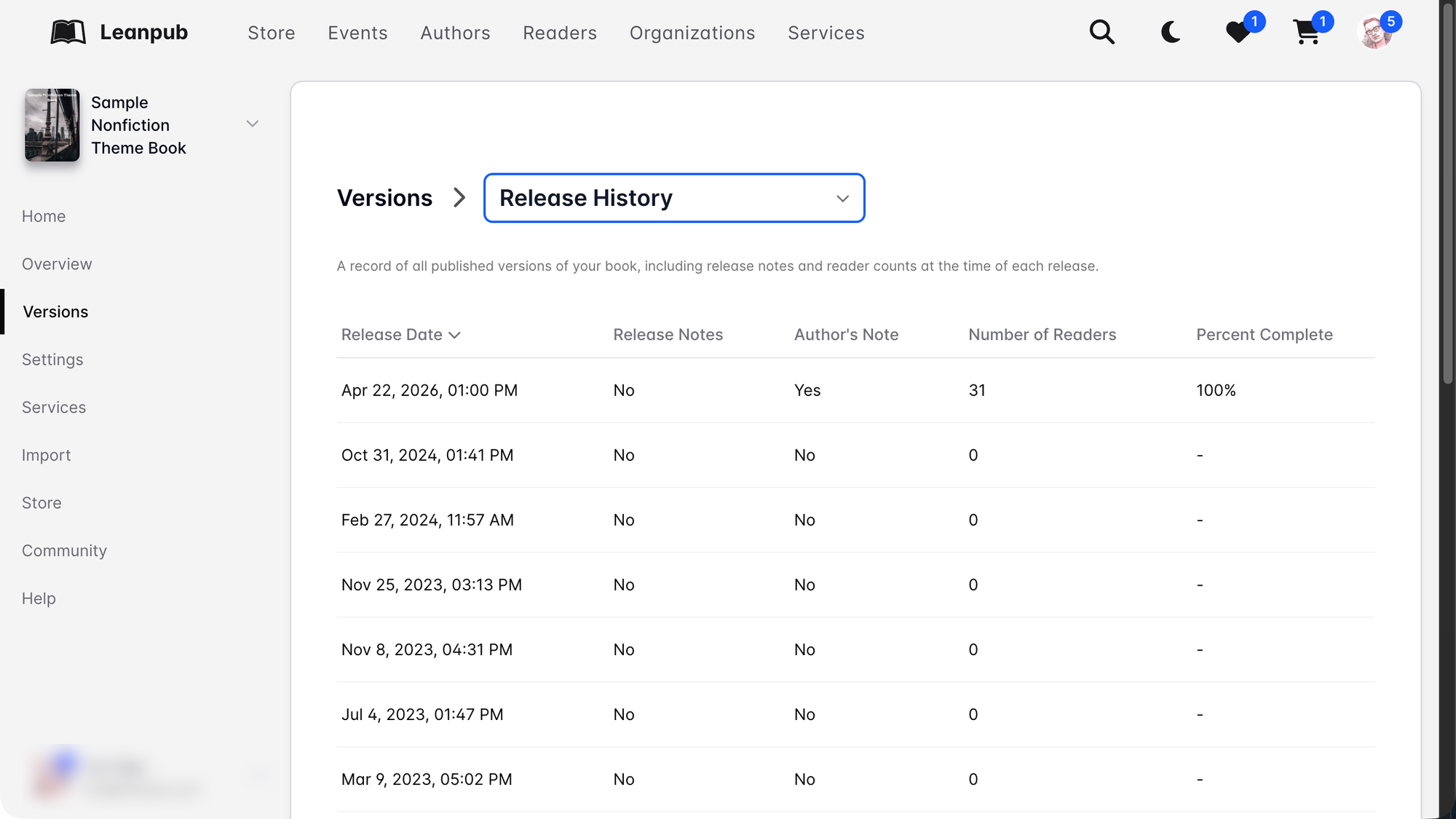
Hopefully the columns are pretty self-explanatory!
Probably the coolest two new features are the preservation of Release Notes in the history (see the recorded livestream for this Lean Publishing Tip of the Day for an example of how this works) and the Author's Note, where you can save a "note to self" when you publish a new version of your book.
Why Have A Release History Page?
There are lots of reasons to have a publication release history page, especially on Leanpub.
The Release History details let you record the timing of your new versions, as well as various details, like how many readers you had at the time you published the new version, and how complete you said your book was at the time.
Since Leanpub encourages authors to "Publish Early, Publish Often", the Release History page makes sure all your efforts aren't just lost to memory, but are systematically tracked.
Watch Clips From The Livestream!