The Implementation Breakthrough: Continuous Deployment, Microservices, and Containers
On the first look continuous deployment (CD), microservices (MS) and containers might seem like three unrelated subjects. After all, DevOps movement does not stipulate that microservices are necessary for continuous deployment, nor microservices need to be packaged into containers. However, when those three are combined, new doors open waiting for us to step through. Recent developments in the area of containers and the concept of immutable deployments enable us to overcome many of the problems microservices had before. They, on the other hand, allow us to gain flexibility and speed without which CD is not possible or cost effective.
Before we move forward with this line of thinking, we’ll try to define correctly each of those terms.
Continuous Integration
To understand continuous deployment we should first define its predecessors; continuous integration and continuous delivery.
Integration phase of a project development tended to be one of the most painful stages in software development life-cycle. We would spend weeks, months or even years working in separate teams dedicated to separate applications and services. Each of those teams would have their set of requirements and tried their best to meet them. While it wasn’t hard to periodically verify each of those applications and services in isolation, we all dreaded the moment when team leads would decide that the time has come to integrate them into a unique delivery. Armed with the experience from previous projects, we knew that integration will be problematic. We knew that we will discover problems, unmet dependencies, interfaces that do not communicate with each others correctly and that managers will get disappointed, frustrated, and nervous. It was not uncommon to spend weeks or even months in this phase. The worse part of all that was that a bug found during the integration phase could mean going back and redoing days or weeks worth of work. If someone asked me how a feel about integration I’d say that it was closest I could get to becoming permanently depressed. Those were different times. We thought that was the “right” way to develop applications.
A lot changed since then. Extreme Programming (XP) and other agile methodologies become familiar, automated testing become frequent, and continuous integration started to take ground. Today we know that the way we developed software back then was wrong. The industry moved a long way since then.
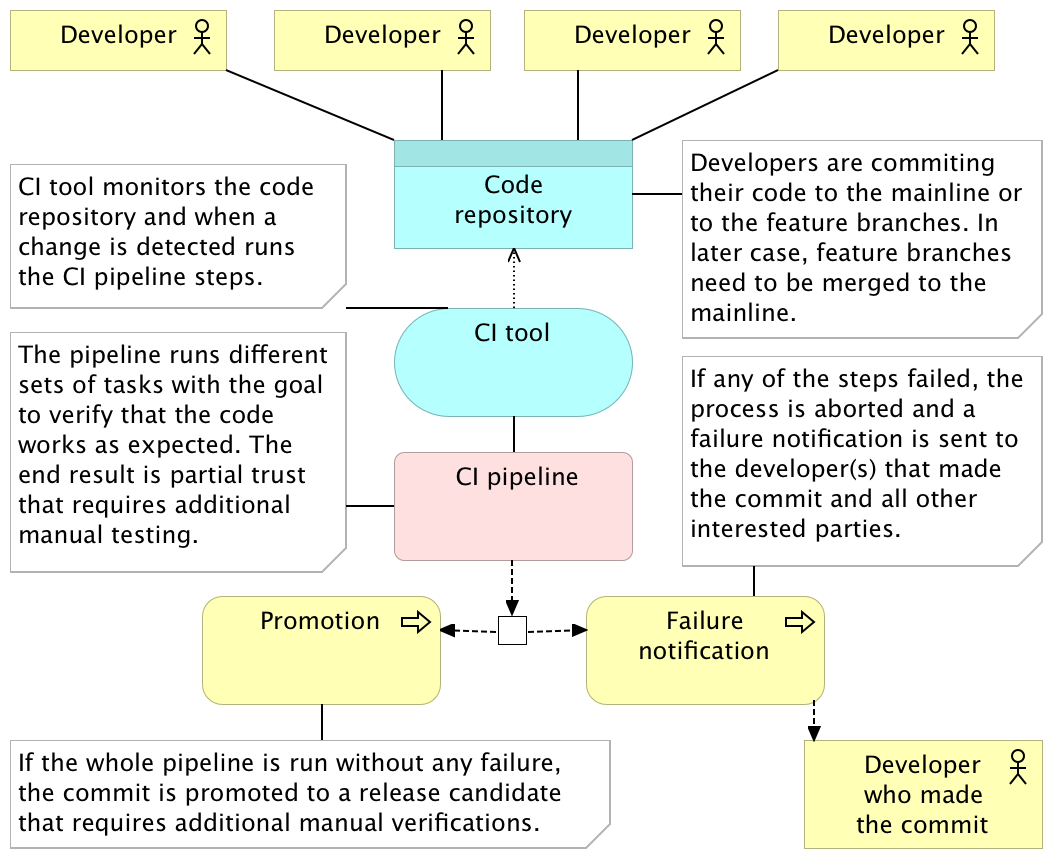
Continuous integration (CI) usually refers to integrating, building, and testing code within the development environment. It requires developers to integrate code into a shared repository often. How often is often can be interpreted in many ways and it depends on the size of the team, the size of the project and the number of hours we dedicate to coding. In most cases it means that coders either push directly to the shared repository or merge their code with it. No matter whether we’re pushing or merging, those actions should, in most cases, be done at least a couple of times a day. Getting code to the shared repository is not enough and we need to have a pipeline that, as a minimum, checks out the code and runs all the tests related, directly or indirectly, to the code corresponding to the repository. The result of the execution of the pipeline can be either red or green. Something failed, or everything was run without any problems. In the former case, minimum action would be to notify the person who committed the code.
The continuous integration pipeline should run on every commit or push. Unlike continuous delivery, continuous integration does not have a clearly defined goal of that pipeline. Saying that one application integrates with others does not tell us a lot about its production readiness. We do not know how much more work is required to get to the stage when the code can be delivered to production. All we are truly striving for is the knowledge that a commit did not break any of the existing tests. Never the less, CI is a huge improvement when done right. In many cases, it is a very hard practice to implement, but once everyone is comfortable with it, the results are often very impressive.
Integration tests need to be committed together with the implementation code, if not before. To gain maximum benefits, we should write tests in test-driven development (TDD) fashion. That way, not only that tests are ready for commit together with implementation, but we know that they are not faulty and would not pass no matter what we do. There are many other benefits TDD brings to the table and, if you haven’t already, I strongly recommend to adopt it. You might want to consult the Test-Driven Development section of the Technology Conversations blog.
Tests are not the only CI prerequisite. One of the most important rules is that when the pipeline fails, fixing the problem has higher priority than any other task. If this action is postponed, next executions of the pipeline will fail as well. People will start ignoring the failure notifications and, slowly, CI process will begin losing its purpose. The sooner we fix the problem discovered during the execution of the CI pipeline, the better we are. If corrective action is taken immediately, knowledge about the potential cause of the problem is still fresh (after all, it’s been only a few minutes between the commit and the failure notification) and fixing it should be trivial.
So how does it work? Details depend on tools, programming language, project, and many other factors. The most common flow is the following.
- Pushing to the code repository
- Static analysis
- Pre-deployment testing
- Packaging and deployment to the test environment
- Post-deployment testing
Pushing to the Code Repository
Developers work on features in separate branches. Once they feel comfortable that their work is stable, the branch they’ve been working on is merged with the mainline (or trunk). More advanced teams may skip feature branches altogether and commit directly to the mainline. The crucial point is that the mainline branch (or trunk) needs to receive commits often (either through merges or direct pushes). If days or weeks pass, changes accumulate and benefits of using continuous integration diminish. In that case, there is no fast feedback since the integration with other people’s code is postponed. On the other hand, CI tools (we’ll talk about them later) are monitoring the code repository, and whenever a commit is detected, the code is checked out (or cloned) and the CI pipeline is run. The pipeline itself consists of a set of automated tasks run in parallel or sequentially. The result of the pipeline is either a failure in one of its steps or a promotion. As a minimum, failure should result in some form of a notification sent to the developer that pushed the commit that resulted in a failed pipeline. It should be his responsibility to fix the problem (after all, he knows best how to fix a problem created by him only minutes ago) and do another commit to the repository that, in turn, will trigger another execution of the pipeline. This developer should consider fixing the problem his highest priority task so that the pipeline continues being “green” and avoid failures that would be produced by commits from other developers. Try to keep a number of people who receive the failure notification to a minimum. The whole process from detecting a problem until it is fixed should be as fast as possible. The more people are involved, the more administrative work tends to happen and the more time is spent until the fix is committed. If, on the other hand, the pipeline runs successfully throughout all its tasks, the package produced throughout the process is promoted to the next stage and, in most cases, given to testers for manual verifications. Due to the difference in speed between the pipeline (minutes) and manual testing (hours or days), not every pipeline execution is taken by QAs.
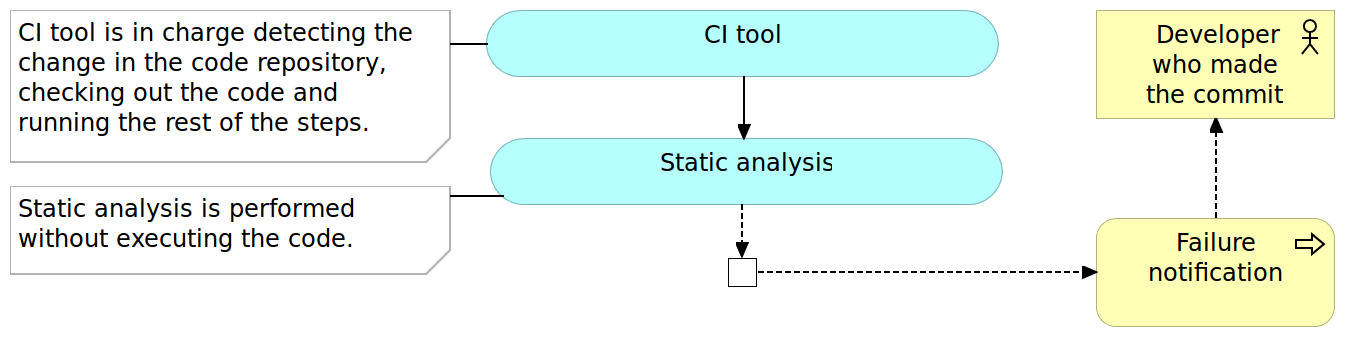
The first step in the continuous integration pipeline is often static analysis.
Static Analysis
Static analysis is the analysis of computer software that is performed without actually executing programs. Like its opposite, the analysis performed while executing programs is known as dynamic analysis.
The static analysis goals vary from highlighting possible coding errors to making sure that agreed formatting is followed. While benefits of using static analysis are questionable, the effort required to implement it is so small that there is no real reason not to use it.
I won’t provide a comprehensive list of tools since they vary from one programming language to another. CheckStyle and FindBugs for Java, JSLint and JSHint for JavaScript, and PMD for a variety of languages, are only a few examples.
Static analysis is often the first step in the pipeline for the simple reason that its execution tends to be very fast and in most cases faster than any other step we have in the pipeline. All we have to do is choose the tools and often spend a little up-front time in setting up the rules we want them to use. From there on, the cost of the maintenance effort is close to nothing. Since it should not take more than few seconds to run this step, the cost in time is also negligible.
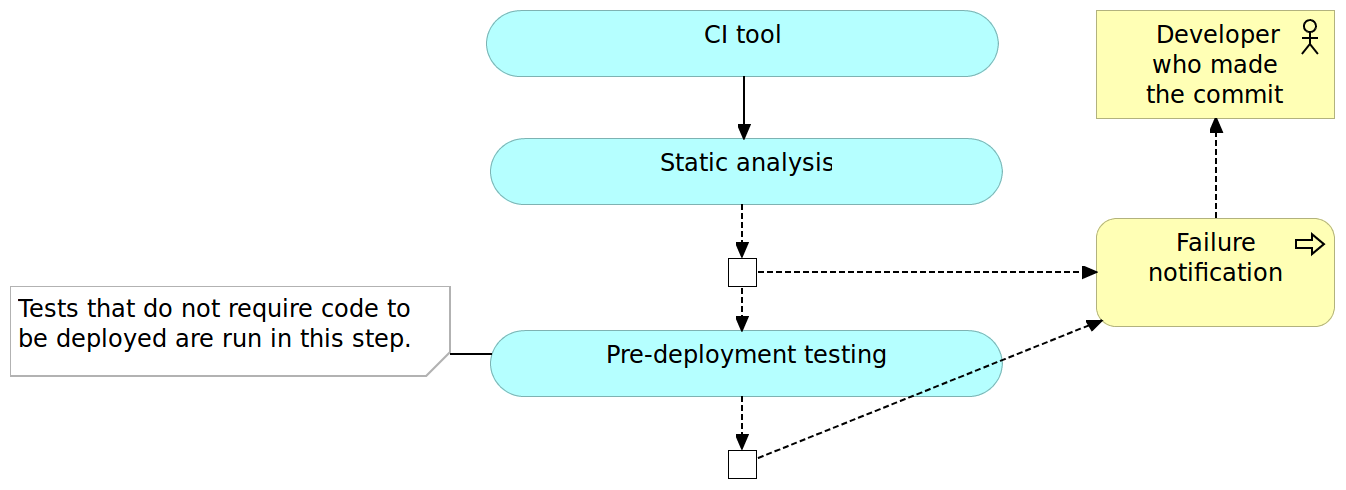
With the static analysis set up, our pipeline just started, and we can move to pre-deployment testing.
Pre-Deployment Testing
Unlike (optional) static analysis, pre-deployment tests should be mandatory. I intentionally avoided more specific name for those tests because it depends on the architecture, programming language, and frameworks. As a rule of thumb, all types of tests that do not require code to be deployed to a server should be run in this phase. Unit tests always fall into this category and with few others that might be run as well. If, for example, you can execute functional tests without deploying the code, run them now.
Pre-deployment testing is probably the most critical phase in continuous integration pipeline. While it does not provide all the certainty that we need, and it does not substitute post-deployment testing, tests run in this phase are relatively easy to write, should be very fast to execute and they tend to provide much bigger code coverage than other types of tests (for example integration and performance).
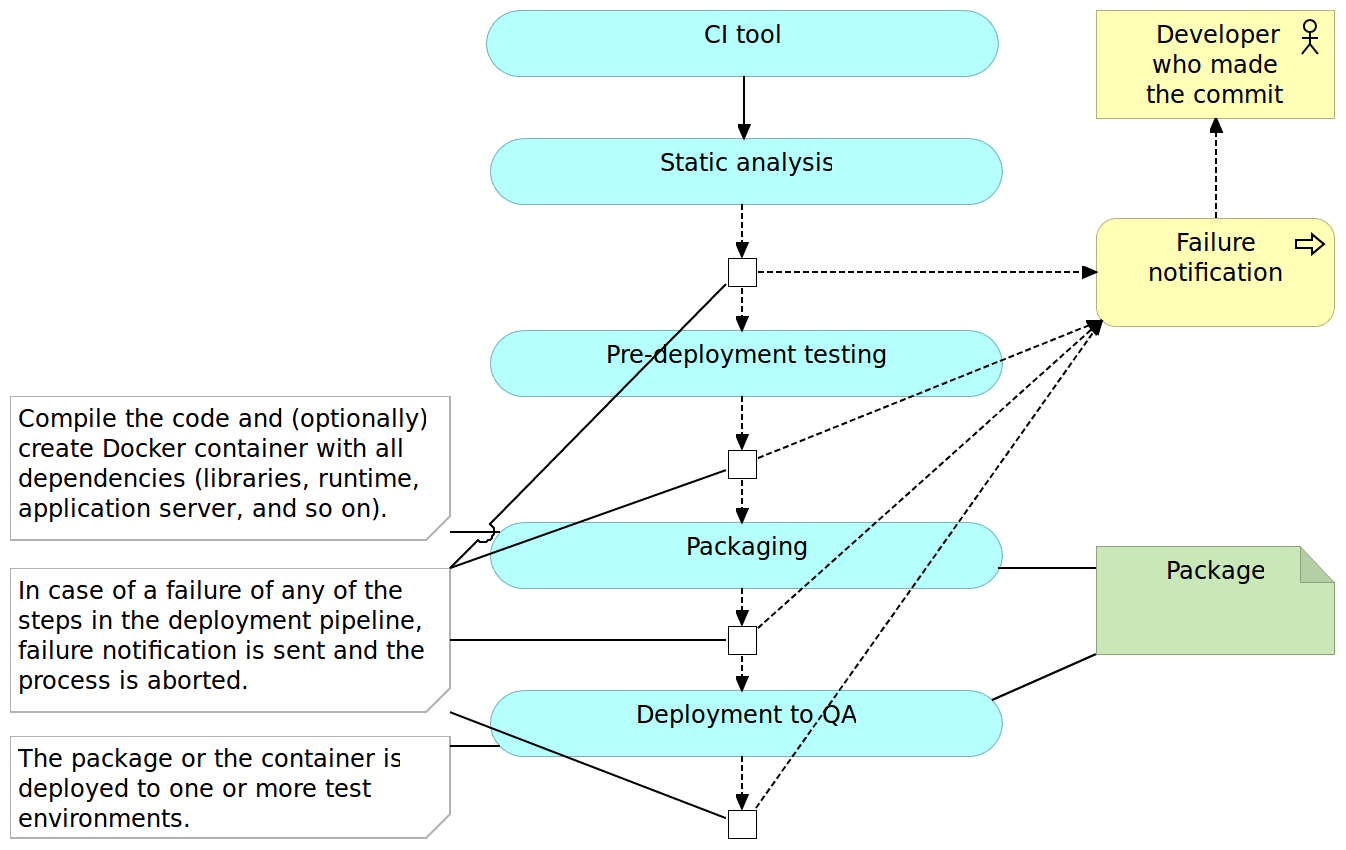
Packaging and Deployment to the Test Environment
Once we did all types of verifications that could be done without actually deploying the application, it is time to package it. The method to do it would depend on framework and programming language. In the Java world we would create JAR or WAR files, for JavaScript we would minimize the code and maybe send it to the CDN server, and so on and so forth. Some programming languages do not require us to do anything in this phase except possibly compress all the files into a ZIP or TAR a file for easier transfer to servers. An optional, but in the case of this book mandatory, step is to create a container that contains not only the package but also all other dependencies our application might need like libraries, runtime environment, application server, and so on.
Once the deployment package is created, we can proceed to deploy it to a test environment. Depending on the capacity of the servers you might need to deploy to multiple boxes with, for example, one being dedicated to performance testing and the other for all the rest of tests that require deployment.
Post-Deployment Testing
Once deployed to a test environment, we can execute the rest of the tests; those that could not be run without deploying the application or a service as well as those that prove that the integration was successful. Again, types of tests that can be run in this phase depend on frameworks and programming language but, as a general rule, they include functional, integration and performance tests.
Exact tools and technologies used to write and run those tests will depend on many aspects. My personal preference is to use behavior-driven development for all functional tests that, at the same time, act as acceptance criteria and Gatling for performance tests.
Once the execution of post-deployment tests is finished successfully, the continuous integration pipeline is typically completed as well. Packages or artifacts we generated during the packaging and deployment to test environment are waiting for further, usually manual, verifications. Later on, one of the builds of the pipeline will be elected to be deployed to production. Means and details of additional checks and deployment to production are not part of continuous integration. Every build that passed the whole pipeline is considered integrated and ready for whatever comes next.
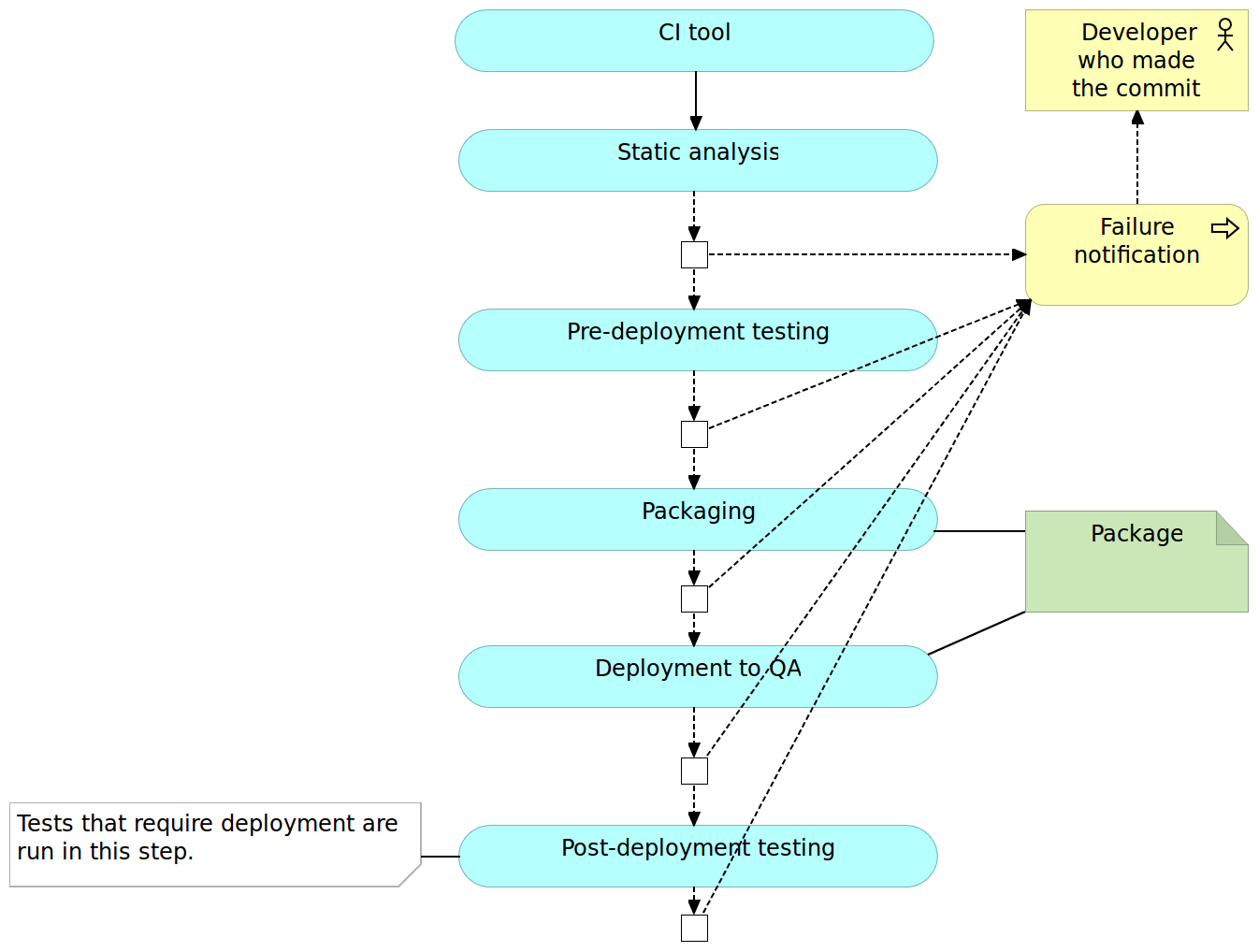
Many other things could be done in the pipeline. The pipeline presented here is a very general one and often varies from case to case. For example, you might choose to measure code coverage and fail when a certain percentage is not reached.
We’re not going into details right now but trying to get a general overview of the process so let us move into continuous delivery and deployment.
Continuous Delivery and Deployment
The continuous delivery pipeline is in most cases the same as the one we would use for CI. The major difference is in the confidence we have in the process and lack of actions to be taken after the execution of the pipeline. While CI assumes that there are (mostly manual) validations to be performed afterward, successful implementation of the CD pipeline results in packages or artifacts being ready to be deployed to production. In other words, every successful run of the pipeline can be deployed to production, no questions asked. Whether it will be deployed or not depends more on political than technical decisions. The marketing department might want to wait until a certain date, or they might want to go live with a group of features deployed together. No matter the decision which build to deploy and when, from the technical perspective, the code of every successful build is fully finished. The only difference between the continuous integration and continuous delivery processes is that the latter does not have the manual testing phase that is performed after the package is promoted through the pipeline. Simply put, the pipeline itself provides enough confidence that there is no need for manual actions. With it, we are technically capable of deploying every promoted build. Which one of those will be deployed to production is a decision often based on business or marketing criteria where the company decides the right time to release a set of features.
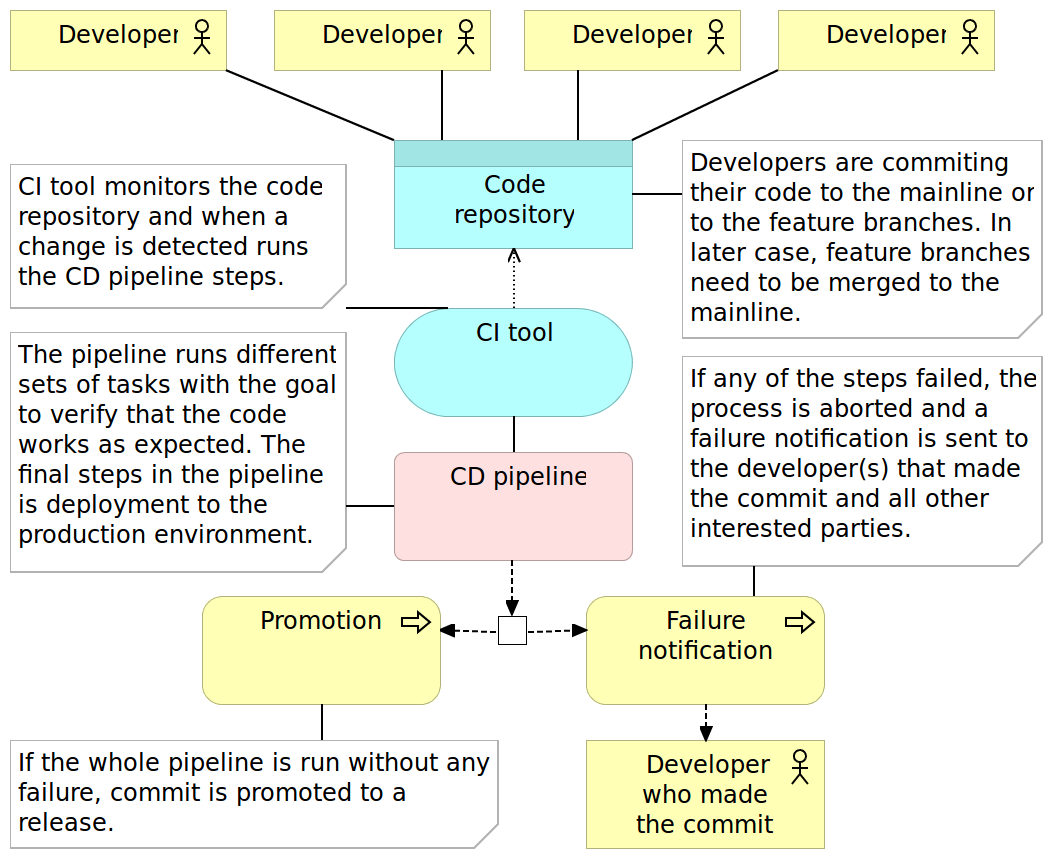
Keep in mind that we continued using CI tool in the continuous delivery process diagram. The reason for this is a lack of any substantial difference between CI and CD tools. This does not mean that there are no products being marketed as CD tools - there are many. However, in my experience, this is more of a marketing stunt as both processes are almost the same assuming that processes rely on a high level of automation.
Regarding the pipeline process, there is also no substantial difference between continuous integration and continuous delivery. Both go through the same phases. The real difference is in the confidence we have in the process. As a result, the continuous delivery process does not have the manual QA phase. It’s up to us to make a decision which one of the promoted packages will be deployed to production.
The Continuous deployment pipeline goes a step further and automatically deploys every build that passed all verifications. It is a fully automated process that starts with a commit to the code repository and ends with the application or the service being deployed to production. There is no human intervention, nothing to decide and nothing to do but to start coding the next feature while results of your work are finding their way to the users. In cases when packages are deployed to QA server before being deployed to production, post-deployment testing is done twice (or as many times are the number of servers we deploy to). In such a case, we might choose to run different subsets of post-deployment tests. For example, we might run all of them on the software deployed to QA server and only integration tests after deploying to production. Depending on the result of post-deployment tests, we might choose to roll-back or enable the release to the general public. When a proxy service is used to make a new release visible to the public, there is usually no need to roll-back since the newly released application was not made visible before the problem was detected.
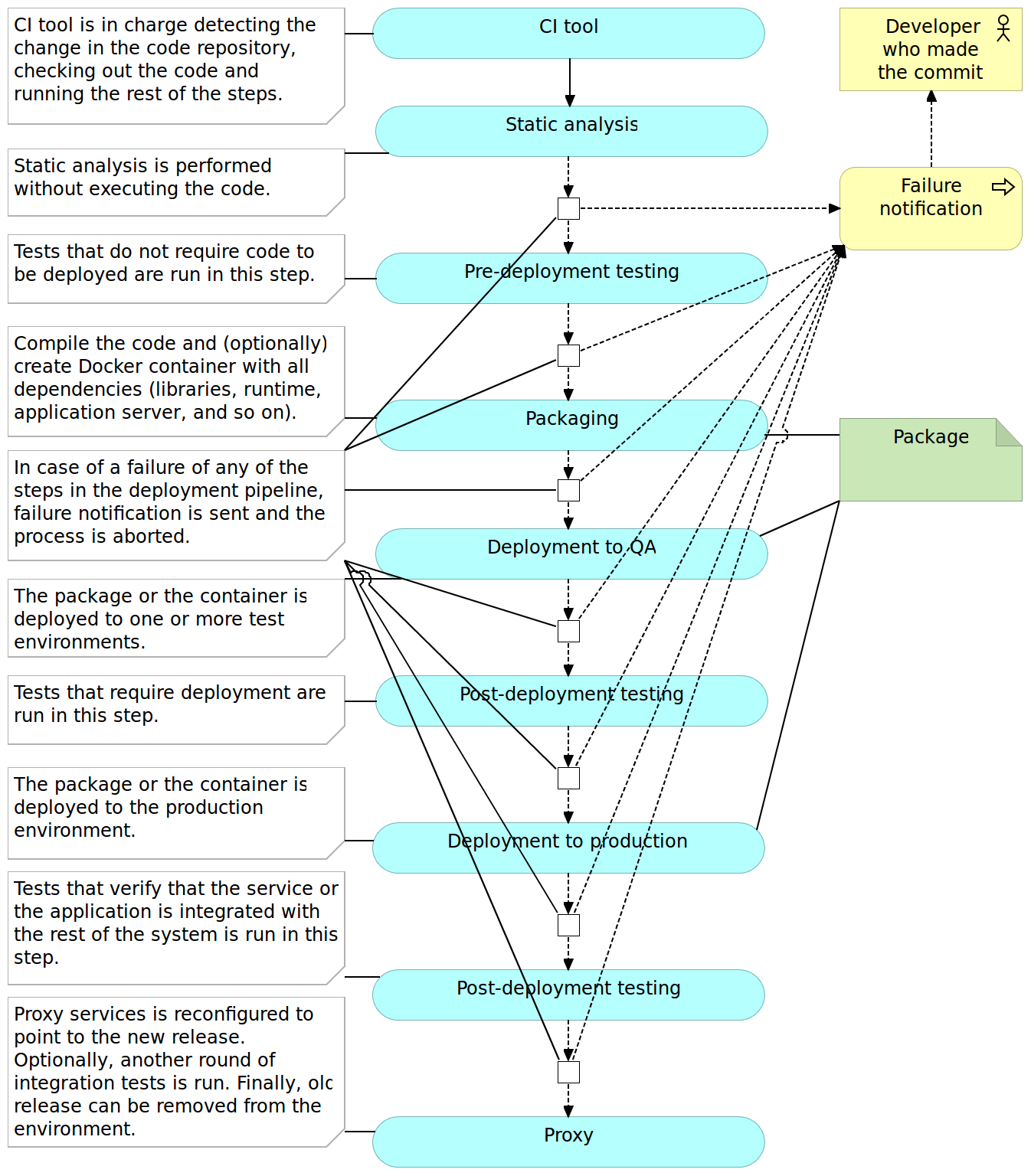
We need to pay particular attention to databases (especially when they are relational) and ensure that changes we are making from one release to another are backward compatible and can work with both releases (at least for some time).
While continuous integration welcomes, but does not necessarily require, deployed software to be tested in production, continuous delivery and deployment have production (mostly integration) testing as an absolute necessity and, in the case of continuous deployment, part of the fully automated pipeline. Since there are no manual verifications, we need to be as sure as possible that whatever was deployed to production is working as expected. That does not mean that all the automated tests need to be repeated. It means that we need to run tests that prove that the deployed software is integrated with the rest of the system. The fact that we run, possibly same, integration tests in other environments does not mean that due to some differences, software deployed to production continues to “play nicely” with the rest of the system.
Another very useful technique in the context of continuous deployment is feature toggles. Since every build is deployed to production, we can use them to disable some features temporarily. For example, we might have the login screen fully developed but without the registration. It would not make sense to let the visitors know about a feature that requires another still not deployed feature. Continuous delivery solves that problem by manually approving which build is deployed to production and would choose to wait. Since, in the case of continuous deployment that decision-making it not available, feature toggles are a must or we would need to delay merging with the mainline until all related features are finished. However, we already discussed the importance of constant merging with the mainline and such delays are against the logic behind CI/CD. While there are other ways to solve this problem, I find feature toggles to be indispensable to all those who choose to apply continuous deployment. We won’t go into feature toggles details. For those interested obtaining more info, please visit the Feature Toggles (Feature Switches or Feature Flags) vs Feature Branches article.
Most teams start with continuous integration and slowly move towards delivery and deployment since former are prerequisites for later. In this book, we’ll practice continuous deployment. Don’t be scared. Everything we’ll do can be easily modified so that there are pauses and manual interventions. For example, we will be deploying containers directly to production (actually to VMs that imitate production) without passing through test environments. When applying techniques from this book, you can easily choose to add a testing environment in between.
The important thing to note is that the pipeline phases that we discussed are performed in particular order. That order is not only logical (for example, we cannot deploy before compiling) but also in order of the execution time. Things that take less to run are run first. For example, as a general rule, pre-deployment tests tend to run much faster than those we’ll run as post-deployment. The same rule should be followed within each phase. If, for example, you have different types of tests within the pre-deployment phase, run those that are faster first. The reason for this quest for speed is time until we get feedback. The sooner we find out that there is something wrong with the commit, the better. Ideally, we should get that feedback before we move to the next development task. Do the commit, have a quick coffee, check your inbox and if there is no angry email stating that something failed, move to the next task.
Later on, throughout this book, you’ll see that some of the phases and details of the presented pipeline are a bit different due to advantages brought by microservices and containers. For example, packaging will finish with immutable (unchangeable) containers, deployment to a test environment might not be required at all, we might choose to perform testing directly to the production environment using the blue/green technique, and so on. However, I am ahead of myself. Everything will come in due time.
With CI/CD out of the way (for now), it is time to discuss microservices.
Microservices
We already spoke about speed in the context of continuous deployment. This speed refers to the time from conception of the idea for new functionality until it is fully operational and deployed to production. We want to be able to move fast and provide the shortest possible time to market. If a new functionality can be delivered in a matter of hours or days, business will start seeing benefits much faster than if it takes weeks or months.
Speed can be accomplished in multiple ways. For example, we want the pipeline to be as fast as possible both in order to provide quick feedback in case of a failure as well as to liberate resources for other queued jobs. We should aim at spending minutes instead of hours from checking out the code to having it deployed to production. Microservices can help accomplishing this timing. Running the whole pipeline for a huge monolithic application is often slow. Same applies to testing, packaging, and deployment. On the other hand, microservices are much faster for the simple reason that they are far smaller. There is less code to test, less code to package and less code to deploy.
We would not be switching to microservices if that were be the only reason. Later on, there will be a whole chapter dedicated to a much deeper examination of microservices. For now, the important thing to note is that due to the goals today’s competition sets in front of us (flexibility, speed, and so on), microservices are probably the best type of architecture we can apply.
Containers
Before containers became common, microservices were painful to deploy. In comparison, monolithic applications are relatively simple to handle. We would, for example, create a single artifact (JAR, WAR, DLL, and so on), deploy it to the server and make sure that all required executables and libraries (for example JDKs) are present. This process was most of the time standardized, and had relatively few things to think about. One microservice is equally simple, but when their number multiplies with ten, hundred or even thousand, things start getting complicated. They might use different versions of dependencies, different frameworks, various application servers, and so on. The number of stuff we have to think about starts rising exponentially. After all, one of the reasons behind microservices is the ability to choose the best tool for the job. One might be better off if it’s written in GoLang while the other would be a better fit for NodeJS. One could use JDK 7, while the other might need JDK 8. Installing and maintaining all that might quickly turn servers into garbage cans and make people in charge of them go crazy. The most common solution applied back then was standardizing as much as possible. Everyone must use only JDK 7 for the back-end. All front-end has to be done with JSP. The common code should be placed in shared libraries. In other words, people tried to solve problems related to microservices deployment applying the same logic they learned during years of development, maintenance, and deployment of monolithic applications. Kill the innovation for the sake of standardization. And we could not blame them. The only alternative were immutable VMs and that only changed one set of problems for another. That is, until containers become popular and, more importantly, accessible to masses.
Docker made it possible to work with containers without suffering in the process. They made containers accessible and easy to use to everyone.
What are containers? The definition of the word container is “an object for holding or transporting something”. Most people associate containers with shipping containers. They should have strength suitable to withstand shipment, storage, and handling. You can see them being transported in a variety of ways, most common one of them being by ship. In big shipyards, you can find hundreds or even thousands of them stacked one besides the other and one on top of the other. Almost all merchandise is shipped through containers for a reason. They are standardized, easy to stack and hard to damage. Most involved with shipping do not know what’s inside them. Nobody cares (except customs) because what is inside is irrelevant. The only important thing is to know where to pick them and where to deliver them. It is a clear separation of concerns. We know how to handle them from outside while their content is known only to those who packed them in the first place.
The idea behind “software” containers is similar. They are isolated and immutable images that provide designed functionality in most cases accessible only through their APIs. They are a solution to make our software run reliably and on (almost) any environment. No matter where they are running (developer’s laptop, testing or production server, data center, and so on), the result should always be the same. Finally, we can avoid conversations like the following.
QA: There is a problem with the login screen.
Developer: It works on my computer!
The reason such a conversation is obsolete with containers is that they behave in the same way no matter the environment they’re running on.
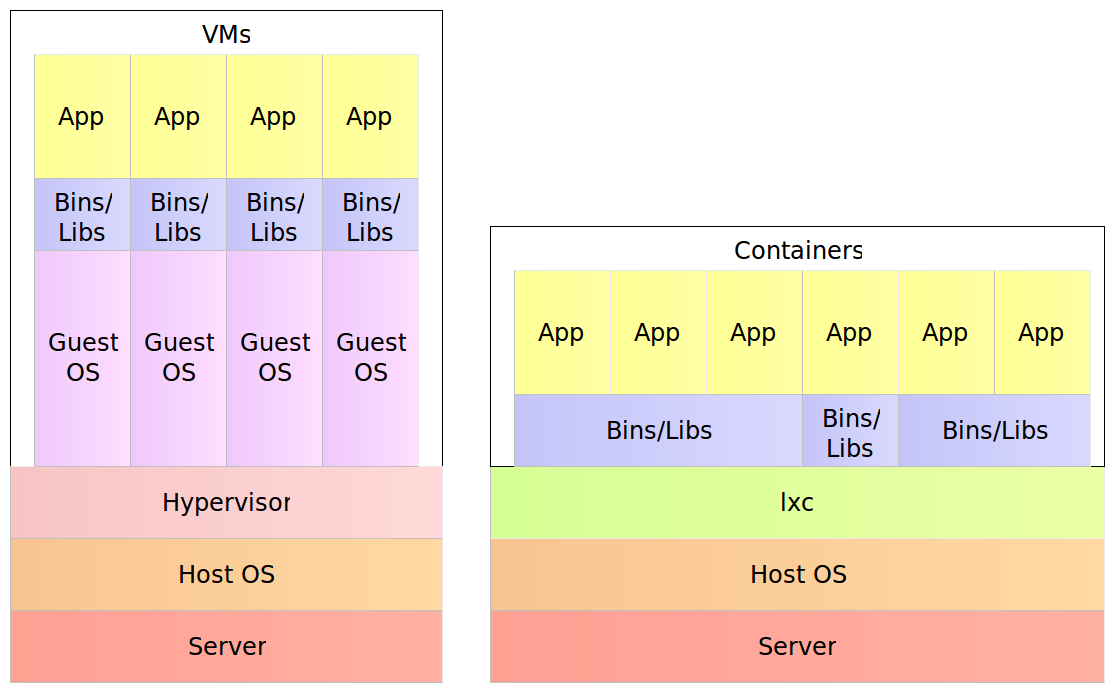
The way for containers to accomplish this feat is through self-sufficiency and immutability. Traditional deployments would put an artifact into an existing node expecting that everything else is in place; the application server, configuration files, dependencies, and so on. Containers, on the other hand, contain everything our software needs. The result is a set of images stacked into a container that contains everything from binaries, application server and configurations all the way down to runtime dependencies and OS packages. This description leads to the question about differences between a container and a VM. After all, all that we described by now is equally valid for both.
For example, a physical server running five virtual machines would have five operating systems in addition to a hypervisor that is more resource demanding than lxc. Five containers, on the other hand, share the operating system of the physical server and, where appropriate, binaries and libraries. As a result, containers are much more lightweight than VMs. With monolithic applications this is not so big of a difference, especially in cases when a single one would occupy the whole server. With microservices however, this gain in resource utilization is critical considering that we might have tens or hundreds of them on a single physical server. Put in other words, a single physical server can host more containers than virtual machines.
The Three Musketeers: Synergy of Continuous Deployment, Microservices, and Containers
Continuous deployment, microservices, and containers are a match made in heaven. They are like the three musketeers, each capable of great deeds but when joined, capable of so much more.
With continuous deployment, we can provide continuous and automatic feedback of our applications readiness and deployment to production, thus increasing the quality of what we deliver and decreasing the time to reach the market.
Microservices provide us with more freedom to make better decisions, faster development and, as we’ll see very soon, easier scaling of our services.
Finally, containers provide the solution to many of deployment problems; in general and especially when working with microservices. They also increase reliability due to their immutability.
Together, they can combine all that and do so much more. Throughout this book, we’ll be on a quest to deploy often and fast, be fully automatic, accomplish zero-downtime, have the ability to rollback, provide constant reliability across environments, be able to scale effortlessly, and create self-healing systems able to recuperate from failures. Any of those goals is worth a lot. Can we accomplish all of them? Yes! Practices and tools we have at our disposal can provide all that, and we just need to combine them correctly. The journey ahead is long but exciting. There are a lot of things to cover and explore and we need to start from the beginning; we’ll discuss the architecture of the system we are about to start building.
Knowing is not enough; we must apply. Willing is not enough; we must do.
– Johann Wolfgang von Goethe