6. Adopt testability mapping to expose hard-to-test architectures


This chapter covers techniques for detecting low testability in software architectures.
6.1 Poor architectural testability causes slow feedback and flawed decisions
In order to make changes to your architecture which will have the biggest positive impact on your testability, we need to understand what symptoms are present, their roots and how to judge progress on an ongoing basis. Without gathering data first and regularly, we are at risk of:
- Prematurely optimizing our architecture based on a single point in time rather than allowing the picture to evolve as we discover more.
- Changing our architecture with a bias to local optimization, rather than removing the overall constraints of the system.
- Focusing on our own architecture when some of our biggest testability challenges might lie within our dependencies.
Over the course of a system’s life, many decisions are made along the way based on needs of stakeholders, available technologies, contributors’ knowledge, and even the problems that occur during development. Often, these decisions can fundamentally influence the testability of an architecture.
We knew we had a fundamental, structural risk within our architecture. How does a team protect the system from future impacts of such a change?
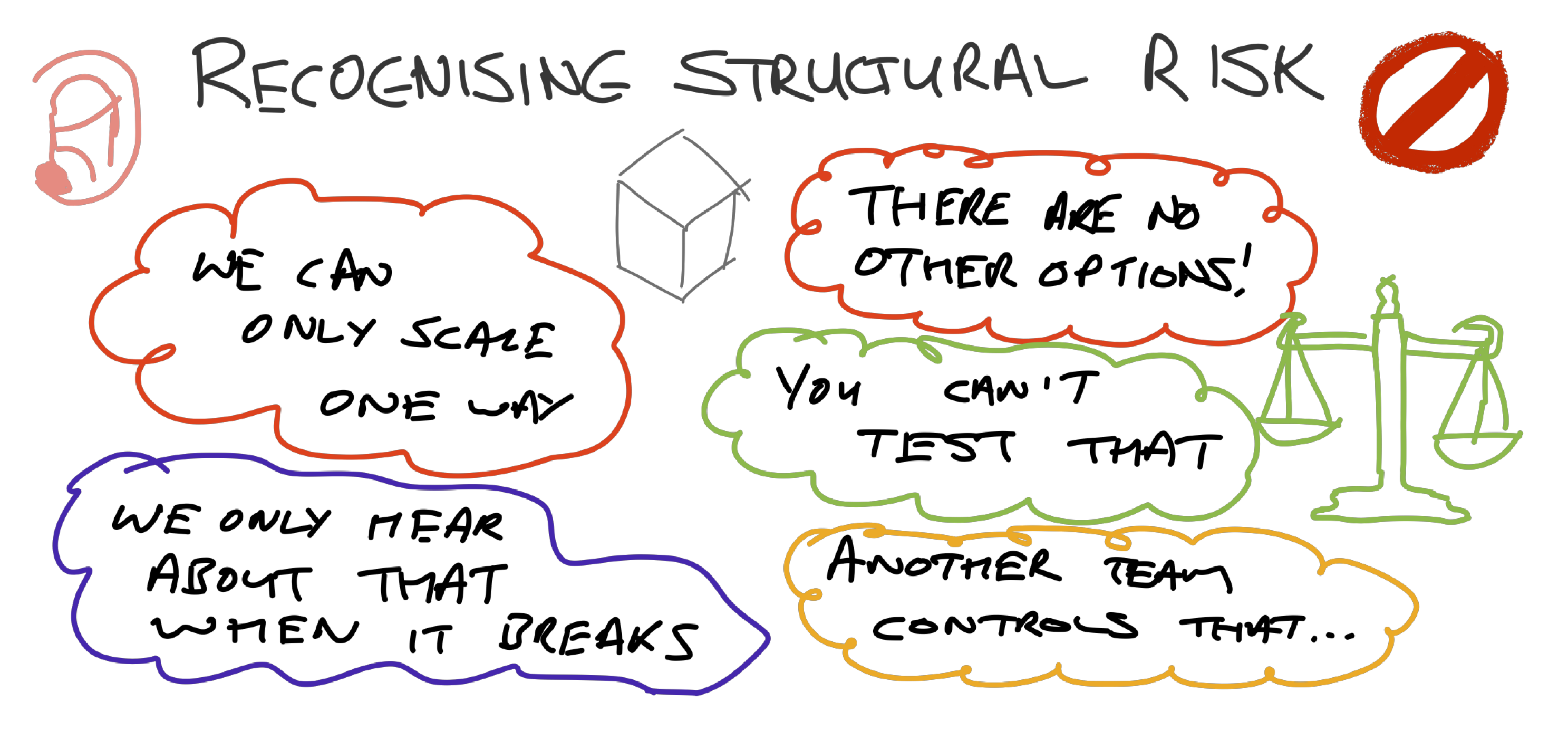
You will likely have examples like this within your own history. We will go into recognizing the symptoms of poor testability in more detail later in the chapter. When faced with decisions about the architectural testability, consider the following risks:
| Risk | Impact |
|---|---|
| If it’s hard to test, it won’t get tested | If your architecture is hard to configure, operate and analyze, testing will be too. Moreover, tests likely won’t be run, or at least they will uncover less useful information |
| Important problems are hard to find | We want to find the problems that have the greatest impact on our stakeholders. High complexity and low observability can hide problems during testing and in operation. Production problems that are hard to reproduce in earlier environments occur often. |
| If it requires I/O it’s going to be slow | If your tests rely on network or disk I/O then they are going to be slow and unreliable without test doubles. |
| Feedback slows when complexity grows | A tightly coupled architecture pushes testing into the higher layers of the system, which can lead to slow feedback and many combinations of tests to run without knowing which components are covered. |
| Test as close to the change as possible | When designing your system architecture provide mechanisms that allow the team to test the logic as close to source as possible. This allows for faster, more accurate defect isolation. |
6.2 Identify the symptoms of poor architectural testability
The testability of your architecture is not always obvious. In our experience, you are more likely to notice the symptoms in your daily work. This can lead to a number of frustrations for the team and the stakeholders interested in the delivery of product. An architecture with poor testability limits the team in many ways.
The symptom here was that it took a long time to begin testing, which had a direct impact on the team:
- Poor quality of exploratory testing - everyone was exhausted by the time testing began! This led to a lot of limited, shallow testing, more akin to demonstrations.
- Long queues of ready to test work - team boards had long queues of tickets, waiting to be tested, in a mobile environment where time to device is critical.
- Limited test automation - writing automated tests for customer journeys that didn’t yield false positives or false negatives was difficult. They fell behind the cadence of delivery, became regarded as unreliable and were removed from the build pipeline to stop them blocking releases.
It took a while to shrink the time taken to get from “ready to test” to “testing”. However, once we did, the team and product stakeholders were much happier.
- Whole-team testing: since it now took less time to get our development environment onto a real device, the whole team started doing it more often, developers got feedback on real devices quickly, and key user journeys were protected with automation.
- Less context switching: shorter queues in testing columns meant developers and testers were synchronized, and were delivering as a team again.
We want to help you to recognize these symptoms so you can begin to act on them to discover your own root causes.
6.3 Exercise: Use testing smells to diagnose poor architectural testability
A testing “smell” is a symptom of a testability problem. We believe each of the smells listed below can be tamed by establishing a more testable architecture. This exercise aims to determine which testability smells impact your team and the extent of the impact on both the team as a whole and each of the individuals. The findings of this exercise will allow your team to make informed decisions about which testability smells to tackle first.
What does the exercise involve?
In this exercise we will first ask each individual in the team to rate 15 common testing smells in terms of the impact the smell has on their ability to do their job effectively. The 15 smells are listed below.
| # | Testing Smell | Example Impacts |
|---|---|---|
| 1 | Too many production issues | Does your team feel that too many issues are escaping into production? Is your team’s planned work frequently interrupted and delayed as a result of dealing with production issues? |
| 2 | Pre-release regression cycles | Does your team have to execute a lengthy regression test cycle before releasing? Does your team often find important issues during this regression cycle? |
| 3 | Lack of automation & exploratory testing | Does your team frequently check and confirm things that should be done using automation? Does your team overlook exploratory testing? |
| 4 | Hesitance to change code | Is your team hesitant to make small, regular code improvements for fear it will introduce undetected issues? Does your team feel uncomfortable refactoring the code even when they believe it’s necessary? |
| 5 | Testing not considered during architectural design | Does your team neglect to involve testers in the architectural design discussions? Does your team neglect the impact on testing when making design decisions? |
| 6 | Team constantly seeking more testers | Does your team feel like they need to add more testers as a result of mounting workload and complexity? |
| 7 | Too many slow user interface tests | Does your team waste a lot of time preparing, executing and waiting for feedback from slow GUI tests, either manual or automated? |
| 8 | Important scenarios not tested | Does your team release the system without testing important scenarios because they are either impossible or impractical to test? Are there areas of significant risk that are not being tested? |
| 9 | Ineffective unit and integration tests | Does your team write unit tests and integration tests that often miss important problems? Does your team endeavor to continuously improve your unit and integration tests? |
| 10 | Cluttered, ineffective logging | Do your logs contain lots of errors and warnings even when the system is considered to be behaving as normal? Can team members quickly and easily isolate and debug issues using the logs? |
| 11 | Flaky nondeterministic automation | Does your team spend a large proportion of their time investigating failures, debugging and maintaining automation? Does your team re-run automation when it fails expecting it to pass the second time? |
| 12 | Tests that contain duplication & irrelevant detail | Does your team have tests that contain a lot of duplicate steps (usually setup) in order to get it in a state to perform the essential part of the test? Does your team have tests that contain lots of details that have nothing specifically to do with what you’re actually trying to test? |
| 13 | Issues are difficult to reproduce | Does your team often encounter issues that are difficult, time consuming or impractical to reproduce either in your test environments or production? |
| 14 | Issues are difficult to isolate & debug | Does your team struggle to isolate and debug issues when they occur either in your test environments or production? Does it take days of investigation to find the root cause of a problem? |
| 15 | Too much effort spent writing, maintaining and debugging automation | Does your team rely too heavily on automation written at the UI level? Does your team test business logic through the UI? |
When we talk about the impact of each of the testing smells consider the effects in terms of time, effort, your ability to deliver value and the satisfaction of the team in their work. The ratings are simple:
- No impact on team effectiveness
- Small impact on team effectiveness
- Moderate impact but rarely impacts team effectiveness
- Moderate impact but often impacts team effectiveness
- Large impact, almost always impacts team effectiveness
Follow this facilitator’s checklist to help you run the exercise:
Who do we need?
We suggest involving architects, developers, testers, ops and analysts.
Preparation
- Time - One hour
- Type of Space - An open space with a whiteboard
- Attendee Preparation
- Distribute testing smells sheet & explanations before the exercise.
- Physical Materials
- Hard copies of the testing smells sheet for every member of the team
- A whiteboard or flipchart
- Sticky notes and pens (one color)
- Digital Materials - None
Sample agenda for pre-communication
- Set the Stage (5 mins)
- Explain goals and FAQ
- Introduction to the testing smells.
- Introduction to scale of impact on team effectiveness.
- Gather Data (10 mins)
- Create a matrix of the 15 testing smells and allow team members to vote using post its or some other indicator.
- Generate Insights (40 mins)
- Explore the obvious differences in rating, particularly any outliers from the general consensus by encouraging individual contributions.
- Capture insights from the discussion and a team consensus on the rating for each smell.
- Agree actions (5 mins)
- The team discusses and agrees the top 3 smells they would like to address first.
Facilitation
- Change the wording of the questions for common terminology at your organization if you need to.
- The gather data step is better done anonymously, we want to learn about individual perceptions and the differences/similarities between them.
- Actively seek to drive discussion to attain shared understanding.
- If discussions about outliers result in deeper understanding of a smell, allow team members to adjust their rating.
Frequently Asked Questions
- What if someone wants to add a smell?
- Check if it’s covered already, but mostly say yes!
- What if the team can’t find consensus on a rating?
- If the team can’t agree then go with the lower proposed rating. Most likely if there’s a lack of consensus it’s not the most important issue.
Goals
- Cultivate a shared understanding of the impact of not having a testable architecture, on individuals and also on the team as a whole.
- Create an appetite within the team to establish a testable architecture.
- Capture insights that other people within the team may not have previously considered.
- Reach consensus within the team about which testing smells need to be acted upon.
Outputs
- A matrix of smells, team consensus and interesting points.
- A list of the top 3 testing smells that the team is committed to trying to address.
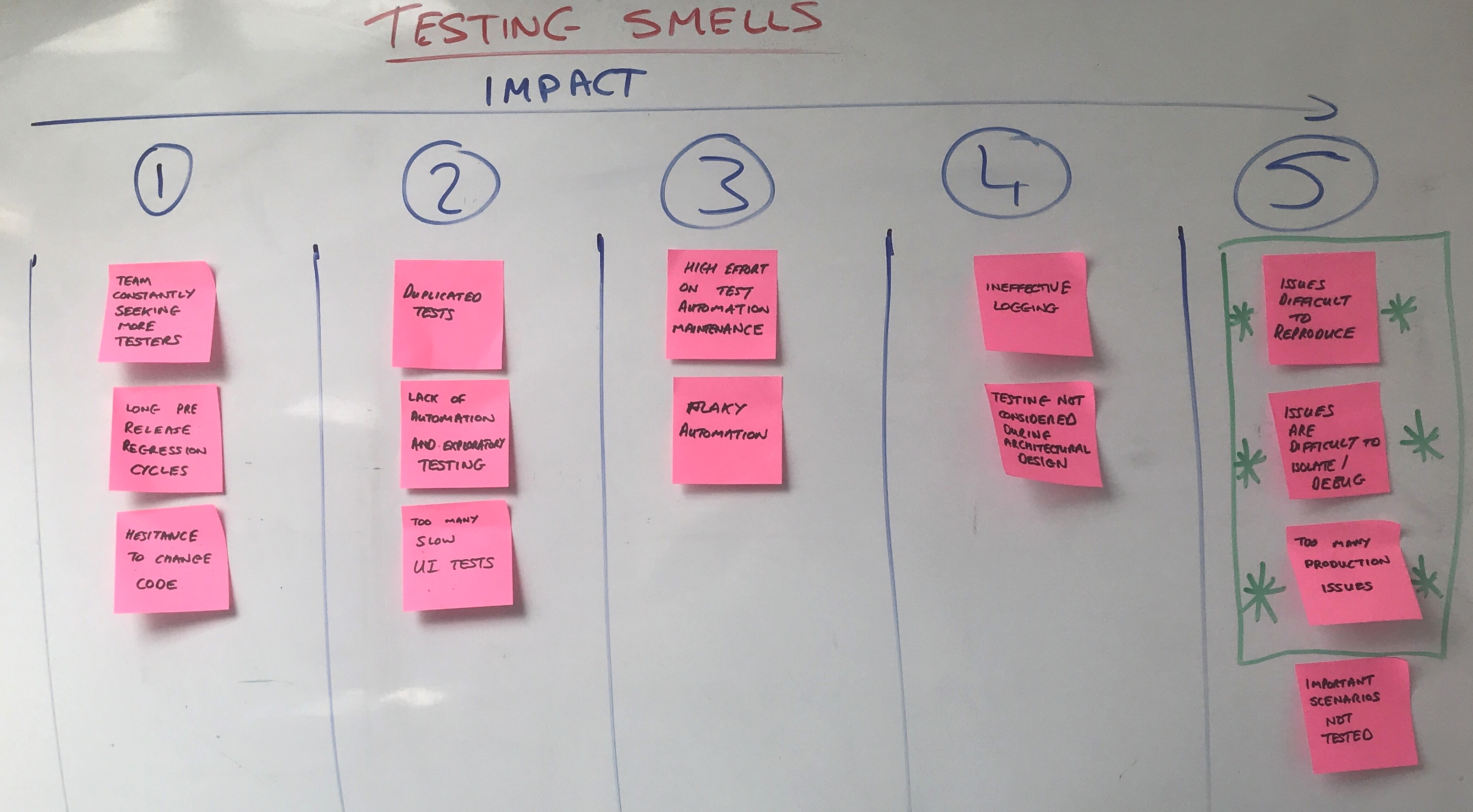
After the exercise you should have something like this:
What do the results mean?
As you can see each of the smells has been allocated to an impact level based on the team consensus. One could infer from the results that this team believes the following:
- They have a reasonably balanced test strategy without any significant problems in the effectiveness of their test automation, aside from a high maintenance cost of their automation due to flaky tests.
- By far their biggest concern is when issues during development are hard to reproduce, isolate and debug, which may contribute to the incidence of issues leaking into production.
The next step is to determine what this might mean for architectural testability. The team agreed to tackle three areas highlighted with asterisks in the photo above (issues difficult to reproduce, issues are difficult to isolate/debug, and too many production issues). We hope this inspires a few ideas for tackling poor architectural testability that can be refined in the subsequent exercises of the chapter, such as:
- Difficulty in reproducing issues might be mitigated by implementing controllable log levels by request or a unique ID which is attributed to a transaction throughout its journey through the system.
- Issues that are difficult to debug and isolate might be assisted by “stubbing” dependent services in order to fix the response type or response time to limit variance and narrow down possible causes.
6.4 Exercise: adopt testability mapping to measure testing feedback and waste
Typically, when we encounter hard-to-test systems there is a distinct separation between the testing performed by the developers and testers in a team. Often, the developers invest their efforts in writing unit and integration tests while the testers write UI tests and perform the vast majority of exploratory testing. Typically, the tester has little visibility or involvement in the testing performed by the developer and vice versa. As a result, the unit and integration tests (performed by the developers) rarely find important problems, while the UI automation requires constant attention (from the dedicated testers), which reduces the amount of exploratory testing done.
A testable architecture helps break this “silo culture” and promotes whole-team involvement in design discussions. By involving testers in design you bring a wealth of testing knowledge and context to the discussion. Team members work together to understand the important quality attributes, critical paths, core components and associated risks and agree on a design that allows the team to mitigate those risks in the most effective manner.
A testable architecture allows the team to build effective automation that’s easy to write, fast to run and whose results can be trusted. From a developer’s perspective, it provides the confidence to make small changes continuously, knowing that regressions will be detected almost immediately.
There’s also the added benefit of making defect isolation easier by encouraging the creation of isolatable components which allow for pinpointing defects; this defect isolation is further helped by greater observability which allows us to determine the defective components internal state from metrics, logs and alerting (Waterhouse).
What does this exercise involve?
As a team you will identify the different types of testing needed to deliver a product increment. This could be within whatever planning sessions you use as a team. This might be release or sprint planning, for example, or a story planning session (often known as a “Three Amigos” session (Dinwiddie)).
The key to this exercise is collaboration between product, development and test stakeholders. For each type of testing that is meaningful to you, create what we have called a ‘testability map.’
You might run this exercise when you have a major decision to make regarding your system architecture such as:
- Larger new features that represent a departure from current architectural patterns, such as adding a new service as a microservice.
- The introduction of a new technology, such as a container orchestration engine or resource-intensive operations into cloud services.
- A new project or product would benefit from this thinking too. Adding functionality which uses File Input and Output for example will present testing challenges which are best anticipated and mitigated earlier.
What is a testability map?
A testability map looks like this:
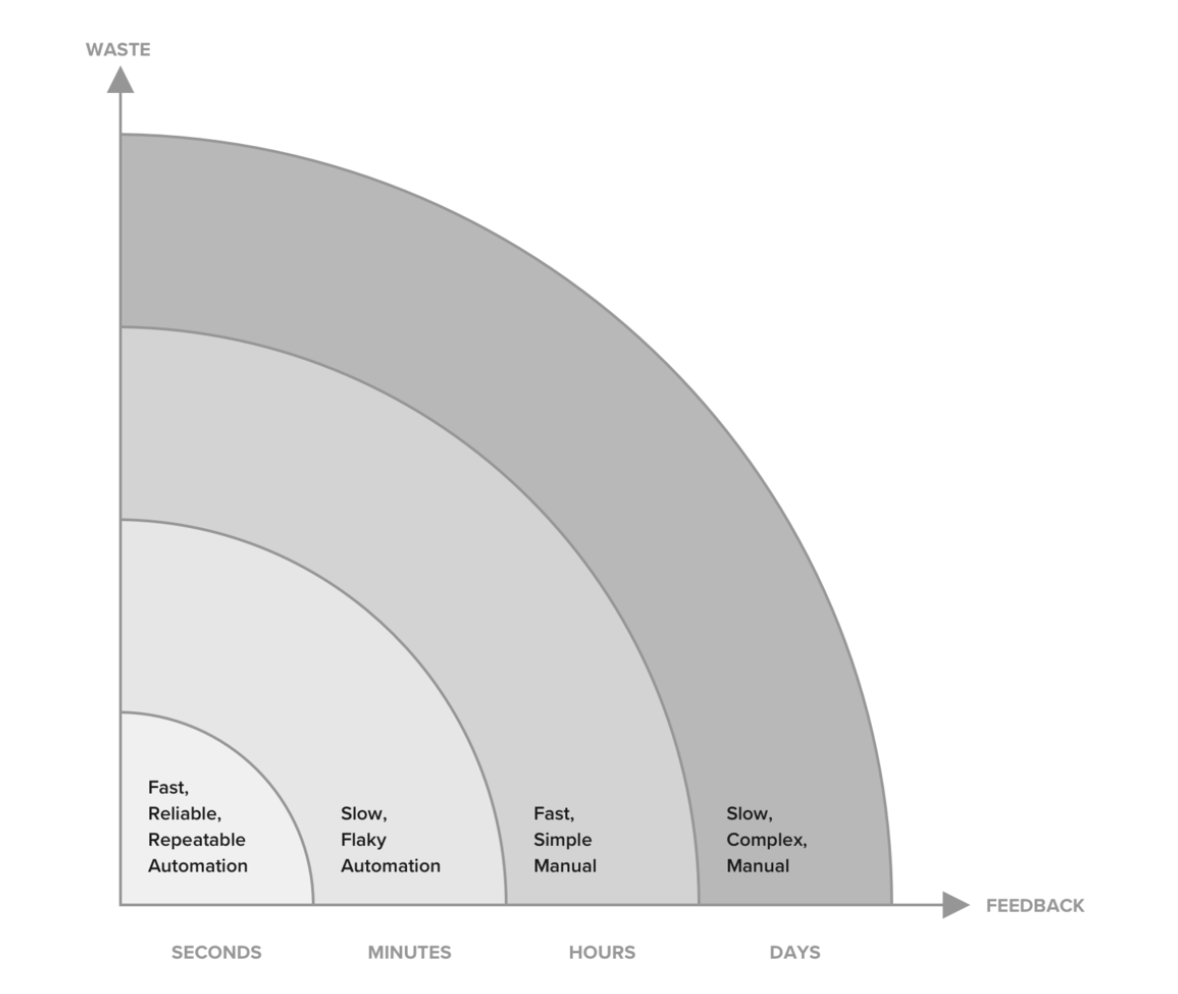
- The Y axis of the maps concern the amount of waste that occurs when attempting to test. If you have dependencies which are unreliable and suffer from significant downtime then testing may take longer or you might do more testing to gain confidence.
- The X axis concerns feedback over time, the longer it takes to receive feedback on a deployment the more risk is accumulated. For example, if you have a system with limited test automation and data dependent manual tests which require a lot of setup, then it may take days to get meaningful feedback.
- Each segment (for example - Slow, Complex, Manual) is a representation of the amount of waste you will incur in order to get the feedback you need.
You need to run the exercise for these 4 types at a minimum. if you don’t perform one or more of them, then your testing lacks balance. For example, too much focus on automated acceptance testing at the expense of exploratory testing could increase your exposure to unexpected problems later in a feature’s development cycle, when you could have applied variance earlier on to avoid them. You can of course add more testing types that are important/challenging for you:
| Testing Type | Description | Examples |
|---|---|---|
| Acceptance Testing | Demonstrates that the system can successfully provide the capability that it was designed to provide. These tests are often derived from user story acceptance criteria or BDD scenarios and aim to confirm the feature works as designed | Basic flows, sunny day scenarios, business logic, validation, functional tests, contract tests. |
| Exploratory Testing | Exploring, experimenting and interacting with the system in varied ways in order to unearth the unknown and unexpected. This type of testing is focused on finding problems and developing a deeper understanding of the system. | User journeys driven by personas, resilience, error handling, failure scenarios, usability, rainy-day scenarios, risk-based tests, stress tests. |
| Regression Testing | Detects unintended behavioral changes in the existing functionality that have been introduced as a result of adding new functionality. Typically, acceptance tests become a part of your regression test suite once a feature has been released. | Basic flows, sunny day scenarios, business logic, validation, functional tests, contract tests. |
| Operability Testing | Detects and isolates issues when the code is deployed in a fully functional pre-production or production environment. These typically focus on ensuring that business critical functionality is working when deployed in a given environment. | End to End Synthetics, User journey tests, monitoring, alerting, logging, analytics, instrumentation, performance testing. |
How does the exercise work?
Follow this facilitator’s checklist below to help you run the exercise.
Who do we need?
We suggest involving architects, developers, testers, ops and analysts.
Preparation
- Time
- 1 hour - as part of planning a product increment or architectural change.
- Type of Space
- An open space with a large whiteboard
- Attendee Preparation
- Familiarity with the current system architecture and the proposed changes.
- Familiarity with the four testing types:, acceptance, regression, exploratory and operability.
- Physical Materials
- A whiteboard or flipchart
- Sticky notes and pens
- Digital Materials - None
Sample agenda for pre-communication
- Set the Stage (5 mins)
- Goals, Outputs, FAQ
- Draw the architecture (20 mins)
- A member of the team draws the system architecture with assistance and feedback from the team.
- The facilitator needs to timebox this exercise and ensure that the discussion stays focused on the topic.
- Associate Test Ideas with the System Architecture (20 mins)
- Get the team to brainstorm test ideas, adding a sticky note for each test idea they believe is necessary in order to release the product increment with confidence.
- Position stickies on the testability maps (20 mins)
- The team works through each of the segments placing each of the stickies in the appropriate area.
Facilitation
- Ask for a volunteer from the team to draw the system architecture with assistance & feedback from all members.
- Run through each question & seek clarity on each of the answers until you feel the team is happy to move on.
- Take a picture of the system architecture (in case you have to remove it).
- Draw four testability maps on the whiteboard labelled acceptance, regression, exploratory and operability.
- Explain which test ideas belong in each of the segments.
- Prompt the whole team to add stickies to the appropriate segment for each testing idea or task they believe is necessary to deliver the feature with confidence.
- In order to help generate test ideas, consider using a testing mnemonic as a framework (McKee). This will help the test idea generation to flow, or at least get started.
Frequently Asked Questions
- What if the team can’t agree on the architecture?
- Allow each member of the team express their views; if the team can’t agree, the team lead decides.
Goals
- Create a shared understanding in the team of how the current design may inhibit efficient testing.
Outputs
- A set of testability maps which express the types of testing most meaningful to your team for that feature, product increment or architectural change.
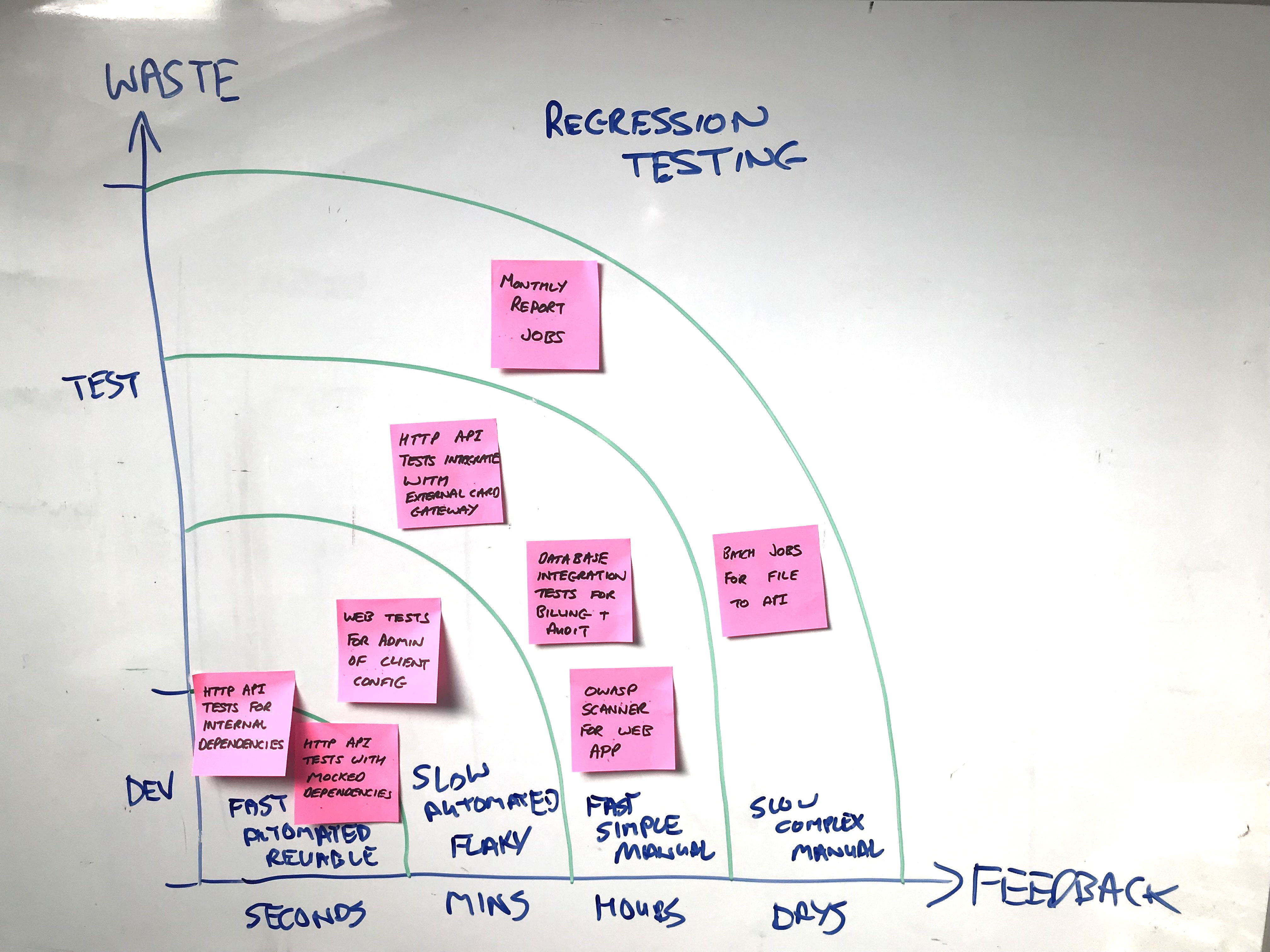
After the exercise you should have something like this:
What do the results mean?
This team were focused on regression testing testability map, as they were looking to upgrade a number of their dependencies, specifically their versions of PHP using to build their HTTP API, Website and Batch File Processing system, plus MySQL for data storage.
- Seconds - The team recognized that they had a number of tests for their HTTP API, which used real internal dependencies and mocked external dependencies. These would be very useful for fast feedback on PHP version changes in their API, but they had no fast mechanism for getting feedback on their website.
- Minutes - The team’s automated user interface tests sat in this segment, and the website received less attention as API traffic increased so the risk of upgrading versions felt greater. As the PHP version changes and the code changes for deprecated methods were made, these would be better (at least partially) be run in their development environment.
- Hours - the team felt that database integration tests for crucial information for billing customers and audit information for compliance purposes would be needed. In addition, the team wanted to do some testing of their API with the real version of the payment gateway, rather than the mocked version in their development environment. They decided to bring these external card gateway tests into the ‘Minutes’ segment, but run them on a more infrequent basis in their pipeline.
- Days - The pattern you can see in the testability map for regression testing is fairly common, and the team that completed the exercise knew their major problems lay in the less frequently run monthly reporting and batch jobs. Although they run less frequently, they are still critical functionality but have very slow feedback; plus, they are only set up in test environments closer to Production. The team agreed that testing these in earlier test environments would be prudent.
6.5 Summary
This chapter covered:
- The risks of low architectural testability, which we believe not only compromises your ability to test effectively but also your overall ability to deliver.
- Listing the common smells of low architectural testability and which ones matter the most to the team currently. This shows where your pain lies in the team’s perception. Problems oftem get underrated as time goes by and familiarity increases.
- Diagnosing how your current architecture and future changes affect the effectiveness of your acceptance, exploratory, regression and operability testing.
Low architectural testability is a real source of pain for teams. We often inherit systems we don’t understand from previous teams, then we do our best to deliver with a hard-to-test system. This chapter has expressed that the key is to detect and diagnose architectural challenges to effective testing.
