On Principles
What Happened to Separation of Concerns in Frontend Development
 |
Original release: October 5, 2023 Frameworks, blessing and curse of our field. |
Nicole Sullivan recently asked the community whether separation of concerns (SOC) was still serving us. 58% responded that it “still works,” but the topic looked more complex and interesting than that.
My own feeling and response was that there was a “great irony”—that “separation started to work well once many stopped focusing on it, about 10 years ago,” because then, “we got ever better CSS selectors and support for them, and JavaScript was being significantly improved,” but “it was also the dawn of the frameworks time […] that accelerated and eventually undid most focus on things like SOC.” I submitted that “separation may have never done better—and also never worse.”
Is this what happened with separation of concerns, in our field? Could I substantiate this feeling? Let’s have a look.
What Enables and What Prevents SOC
First, what actually helps or prevents separation of concerns?
The answer appears to be both easy and difficult.
It’s easy when we go by “everything related to document content and structure is done in HTML, everything related to presentation in CSS, everything related to behavior in JavaScript, and the touchpoints of the three are limited to the absolute minimum necessary.”
It’s difficult when we go by the specific steps that enable and prevent separation, because separation depends on specific features of each HTML, CSS, and JavaScript (i.e., the different ways they intersect with the other languages), but also on engineering principles and culture. Separation of concerns stands and falls with being sought and practiced.
That is, it was hard to accomplish good separation of concerns in the 2000s, and it’s easy to do now, but we had a few websites where it was actually done in the 2000s, and many where it’s not respected today. That’s on engineering principles and culture, not on web standards or browser support.
SOC Improvements Through Web Standards
The easiest way to gauge improvements, now, may be by looking at CSS selectors and their support. This is because all websites use HTML, and more websites also use CSS than they rely on JavaScript; and it’s because the less need there is for classes and IDs (the prevalent selection options), the higher the probability that HTML and CSS (and therefore concerns) are being kept separate.
In other words, the hypothesis is that in frontend development, we observe the least separation of concerns, and most mingling of them, around presentational markup—and that one way to limit the amount of presentational markup is by providing more effective selectors.
Gauging, however, how the situation with respect to selectors developed is finicky, time-consuming, and error-prone, as it would require going by each selector; and then looking at not when it was specified, but when it was first supported; in each user agent; then researching and taking into account their respective market shares.
Perhaps we can do with something more rough, but still telling:
| CSS Spec | Number of Selectors | Year of First Spec Draft | Year of Spec Release |
|---|---|---|---|
| CSS 1 | 10+ | ? | 1996 |
| CSS 2.1 | 22+ | ? | 2011 |
| CSS Selectors Level 3 | 41? | 2009? | 2018 |
| CSS Selectors Level 4 | 70+ | 2011 | ? |
Important: I was very quick with this, looking more for ballpark numbers than anything. I’ll be more than happy to accept corrections and additions, if you’d like to provide feedback!
So this is all rough, but there is some interesting clustering around 2010: Around that time, CSS 2.1 matured, and work on CSS Selectors Level 3 and 4 commenced. Very roughly, too, we can suspect improved selector support during these and the following years.
That is, there are some indicators that separation of concerns, between HTML and CSS, may have become much easier starting at around 2010.
SOC Regressions in Frameworks
Let’s now look at frameworks, to check if there’s something to the idea that their emergence worked counter the options to separate concerns that we received from CSS.
For this reason I reviewed around 60 frameworks (including the ones I covered in The Little Book of HTML/CSS Frameworks, and later extended):
- Base was released in 2012 and uses presentational class names
- Basscss was released in 2013 and uses presentational class names
- Beard was released in 2014 and used presentational class names
- Blueprint was released in 2008 and used presentational class names
- Columnal was released in 2011 and used presentational class names
- Foundation was released in 2012 and uses presentational class names
- Groundwork was released in 2013 and used presentational class names
- HTML KickStart was released in 2012 and used presentational class names
- IVORY Framework was released in 2013 and used presentational class names
- KNACSS was released in 2013 and uses presentational class names
- kouto swiss was released in 2014 and used presentational class names
- Materialize was released in 2014 and uses presentational class names
- MetroUI was released in 2012 and uses presentational class names
- Picnic CSS was released in 2014 and uses presentational class names
- Responsee was released in 2014 and uses presentational class names
- Skeleton was released in 2011 and uses presentational class names
- Tachyons was released in 2014 and uses presentational class names
- Titan Framework was released in 2013 and used presentational class names
- Tuktuk was released in 2013 and used presentational class names
There have been many more frameworks released around 2010 (±4 years) so this isn’t a complete list, but let’s stop here.
We do have some indicators, then, that since around that time we had a number of frameworks that did not separate concerns, but mingled them instead.
The Great SOC Irony
So what happened, and can we speak of irony, then, around separation of concerns in frontend development?
It does seem so. Separation of concerns used to be quite hard, and one of the most limiting factors had been selector variety and support.
But just when that changed, and more CSS selectors were introduced and supported, we observed a large number of frameworks tie presentation to structure, specifically by use of presentational class names.
Instead of using the new selectors (or, to be clear, fewer, functional, or generic class names) to make the markup lighter and optimize it for future CSS-only redesigns, the frameworks gave that opportunity away and guaranteed redesigns to require HTML updates. Their tight coupling meant the opposite of separation of concerns.
_ Before I conclude, I need to call out again that more data would help. I worked with ballpark numbers for CSS selectors, and couldn’t analyze “all” frameworks. More data could support the hypothesis, or demand a different one. (Furthermore, one could gather a selection of instances where separation of concerns has actually improved.)
In the end, I’d like to underscore what the majority expressed in Nicole’s poll—separation of concerns “works.” It could work even better if we had broader support for ancient but awesome features like style sheet references in HTTP headers (example and context), but:
Separation of concerns works better than it ever has. We—and our tooling—may just not be making good use of it.
Many thanks to Lars Knudsen for reviewing this post.
Principles of Web Development
|
Original release: February 16, 2017 I’d phrase and group these principles differently today, but overall, they hold. |
The predecessor to this article appeared in iX (German).
Web development, at more than 20 years of age, is becoming an increasingly mature profession. Web development is yet also subject to constant change, and the field produces more of that change, out of itself. More technological standards, possibilities, and practices; standards, possibilities, and practices that have attracted, but also frustrated us, the people in the field. But as many have observed, more recently perhaps Jeremy Keith in his Design Principles, there are principles for us to hold on to.
As a veteran developer who has worked on small to large-scale projects, and who has contributed to standards (W3C) and written about best practices (O’Reilly), I like to offer an updated, more tangible view on these principles. The principles that follow have guided some of our work in the past, and they are likely to serve us well going forward.
Focus on the User
No matter how deep we are in the trenches, we must first of all focus on the user. That is a Google principle for very good reasons, and may make doctrine for us as developers, too.
Yet—do we, as developers, even have users? Who are our users? Are our peers users? That leads us to two answers, and two user groups. Our peers, other developers, likely our team mates, are indeed users of our code. But everyone using the systems of whatever our code is part of, are also our users. And so for websites and web apps, different as they are, those sites’ and apps’ users are also our users, and those we need to focus on.

Many of us will nod, and we soon see the link more clearly. Accessibility, for example, is for end users, and much depends on developers. Code performance is measured from the end user’s end. And some functionality, even (or especially) around trivia like functioning links, also connects developers and users. One can say, indeed, that only design-related questions can create obscurity here—usability tests are about end users, but don’t necessarily affect us developers.
How do we focus on the user? By two means:
Setting up and enforcing coding standards. (For a start, see styleguides.io, cssguidelin.es, or perhaps my own book on coding standards, The Little Book of HTML/CSS Coding Guidelines.)
Focusing on quality:
Focus on Quality
This principle is what distinguishes the expert from the amateur, the professional from the hobbyist. Everyone can hack together a website—and we all know what that has done to our field—, but few can create a high quality one.
Focus on quality is abstract for it doesn’t come with clear directives. What we end up with is the need to cultivate a mindset of quality, set goals around quality, and implement (or develop) tools to measure and improve quality. That is easier said than done, hence the problems we face here, the need to raise awareness, and the necessity to make use of quality-related tools.

The takeaway here is best phrased as a double-question, to ask ourselves regularly: How can we tell how good our work is, and how can we make it better?
(Bonus: The quality-conscious, ambitious developer may wish to aim for excellence, somehow one-upping the quality principle. I want to call out the idea of excellence explicitly because at times our field has a tendency to sloppiness, a tendency we might be able to overcome if we pushed harder on excellence.)
Keep It Simple
There’s barely a better principle to adhere to than simplicity. It’s followed by the observation that less is, indeed, more. But why? Doesn’t “keep it simple” have a rather cheap ring to it, the ring of a catch-all phrase, tossed at us anytime someone aches to be witty?

Far from that. True, few people may really understand the power of and how to best utilize “keep it simple.” But when understood, that power is one to be reckoned with. It comes from knowledge of what matters and what doesn’t. Not keeping things simple is saying that everything matters; while that may occasionally be true, most of the time it’s not.
Similar to our focus on quality, keeping things simple is abstract. We can’t generally list everything that matters, for that depends on the context as well as the goals. Keeping things simple requires focus and experience. From that follows, however, that our growing focus and experience, and our knowledge of context and goals help us adhering to this important principle.
Think Long-Term (and Beware of Fads)
Next on our list of proven principles is long-term focus. This one isn’t easy to grab, either—we might well suspect that our principles work so well precisely because they’re a little broad and fluffy, and that they don’t absolve us from thinking and working. Long-term focus demands from us to go about our projects in a planned, sustainable fashion. That’s a good prompt to start listing what long-term thinking does and does not entail:
- looking into high quality content and service (and looking beyond campaign and landing pages);
- creating designs that are usable and appealing (and improving them through iterative processes);
- writing code to last (and making it maintainable, starting with avoiding code with a high chance of short- and mid-term changes);
- certainly, passionately rejecting “fire and forget.”

What else exemplifies long-term focus? How do we acquire, how do we instill it? Probably starting by noting how the opposite, short-term thinking, is costlier through all the extra work it causes—which, incidentally, brings us to the next principle:
Don’t Repeat Yourself (aka One Cannot Not Maintain)
This probably most important maintainability principle is so important because it significantly reduces the number of places as well as the amount of code that needs to be maintained. In the realm of style sheets, for example, we early observe a reduction of 20–40%, and with that a drastically decreased need for CSS variables (which, alas, has led to nothing). These savings don’t just materialize as less code–they also mean less time spent on maintenance.

Repetition can be avoided from two angles. One consists of avoiding actual code to be duplicated; the other in avoiding files to be duplicated. Both can be approached the same way: If it already exists, there should be a way not to produce and store (and maintain) it again. How do we go about this? Through awareness and diligence, and through automation. The former can’t be helped effectively here, and there seem to be no dedicated tools to prevent repetition.
The principle to be violated here: Don’t repeat yourself.
Code Responsibly
What the Code Responsibly campaign (disclaimer: I had initiated the project) has been promoting for many years, represents an important mantra: Web development means responsibility.

That responsibility concerns both ourselves and others, where others are again colleagues, shareholders, as well as users. The Code Responsibly initiative propagates learning, accessibility, performance, semantics, validation, maintainability, collaboration, documentation, quality, and teaching as key parameters; responsible web development, however, simply starts with a commitment to quality and professionalism.
What quality means we have discussed; for professionalism, this begins with common attributes like knowledge and skill, judgment and competency, as well as integrity and manners, and leads us back to the principles here, notably focusing on the user, thinking long-term, and knowing the field:
Know Your Field
The last important principle is to know our field, its neighbors, and its boundaries. At this point we all learned to do without specifics, that we need to do this work by ourselves.
Our field should be pretty clearly marked by web standards and related best practices.
The neighbors are everything that serves the usefulness and quality of the websites and apps we code—this begins with design (information design, interaction design, typography), involves usability and user experience, passes over accessibility, touches on psychology and human-computer interaction, and really kisses everything our sites and apps are about, for a technically healthy website is independent of its contents, but a great website blurs that line.
Non-blurred lines, and boundaries, we must be aware of, too, most notably when it comes to user agents. Our field has made some unnecessary and because of that silly ventures into that realm, with people trying to take on distant accessibility as well as user experience concerns. We need to know when something truly is our problem: Just because we can, doesn’t mean we should.
_ Although we’ve seen that our principles are abstract, we better be careful with absolutes and truths. Web development is much about probabilities, and mileage may vary even for comparable projects. The principles we’ve looked at here—from user focus to knowledge of the field—give us direction and help making better decisions. What direction we go, and what decisions we make, is still something that’s up to each of us. Web development is meaningful.
48 Laws, Rules, and Principles of Web Development
|
Original release: June 7, 2023 Speaking of principles, there are so many more, and even this collection does not cover them all. |
In anticipation of the upcoming release of The Web Development Glossary 3K (the new edition of The Web Development Glossary), here are four dozen laws, rules, and principles related to web and software development.
How many do you know?
- Amdahl’s Law
-
A formula which gives the theoretical speed-up in latency of the execution of a task at fixed workload that can be expected of a system whose resources are improved. Amdahl’s Law states that “the overall performance improvement gained by optimizing a single part of a system is limited by the fraction of time that the improved part is actually used.” It is named after computer scientist Gene Amdahl, and was first presented in 1967.
- Boy Scout Rule
-
The idea to “always leave code better than you found it,” which may be attributable to Robert C. Martin.
- Bushnell’s Law (also: Nolan’s Law)
-
An aphorism attributed to Atari founder Nolan Bushnell, on the subject of video game design: “All the best games are easy to learn and difficult to master. They should reward the first quarter and the hundredth.” This is also referred to with the sentence “easy to learn, hard to master.”
- Command-Query Separation
-
A principle of imperative computer programming. CQS was devised by Bertrand Meyer as part of his pioneering work on the Eiffel programming language. The principle states that every method should either be a command that performs an action, or a query that returns data to the caller, but not both. In other words, “Asking a question should not change the answer.” More formally, methods should return a value only if they are referentially transparent and hence possess no side effects.
- Conway’s Law
-
The adage that organizations design systems that mirror their own communication structure. Conway’s Law is named after computer programmer Melvin Conway, who introduced the idea in 1967. His original wording was: “Any organization that designs a system (defined broadly) will produce a design whose structure is a copy of the organization’s communication structure.”
- Don’t Repeat Yourself
-
A principle of software development aimed at reducing repetition of software patterns, replacing it with abstractions or using data normalization to avoid redundancy. The DRY principle is stated as “Every piece of knowledge must have a single, unambiguous, authoritative representation within a system.” The principle has been introduced by Andy Hunt and Dave Thomas in their book The Pragmatic Programmer.
- Curly’s Law
-
“Just one thing,” a film character’s advice from the movie City Slickers. Curly’s Law is sometimes used instead of, or as a corollary to, the Single Responsibility Principle.
- Dependency Inversion Principle
-
A specific form of decoupling software modules. When following this principle, the conventional dependency relationships established from high-level policy-setting modules to low-level dependency modules are reversed, thus rendering high-level modules independent of the low-level module implementation details. The principle states 1) that high-level modules should not depend on low-level modules, but that both should depend on abstractions (e.g., interfaces), and 2) that abstractions should not depend on details, but that details (concrete implementations) should depend on abstractions.
- Even-Odd Rule
-
An algorithm implemented in vector-based graphic software, like the PostScript language and Scalable Vector Graphics (SVG), which determines how a graphical shape with more than one closed outline will be filled. Unlike the non-zero rule algorithm, this algorithm will alternatively color and leave uncolored shapes defined by nested closed paths irrespective of their winding.
- Fifth Rule of ARIA
-
“All interactive elements must have an accessible name.” w3.org/TR/using-aria
- First Rule of ARIA
-
“If you can use a native HTML element or attribute with the semantics and behavior you require already built in, instead of re-purposing an element and adding an ARIA role, state or property to make it accessible, then do so.” w3.org/TR/using-aria
- Fitts’s Law
-
A predictive model of human movement primarily used in human-computer interaction and ergonomics. This scientific law predicts that the time required to rapidly move to a target area is a function of the ratio between the distance to the target and the width of the target. Fitts’s Law is used to model the act of pointing, either by physically touching an object with a hand or finger, or virtually, by pointing to an object on a computer monitor using a pointing device. Fitts’s Law has been shown to apply under a variety of conditions.
- Fourth Rule of ARIA
- Goodhart’s Law
-
An adage often stated as, “When a measure becomes a target, it ceases to be a good measure.” It is named after British economist Charles Goodhart, who is credited with expressing the core idea in a 1975 article on monetary policy in the United Kingdom: “Any observed statistical regularity will tend to collapse once pressure is placed upon it for control purposes.”
- Hick’s Law (also: Hick-Hyman Law)
-
A model describing the time it takes for a person to make a decision as a result of the possible choices they have, asserting that increasing the number of choices will increase decision time logarithmically. Hick’s Law assesses cognitive information capacity in choice reaction experiments. The amount of time taken to process a certain amount of bits in the Hick-Hyman law is known as the rate of gain of information.
- Interface Segregation Principle
-
The principle that no client should be forced to depend on methods it does not use. ISP splits interfaces that are very large into smaller and more specific ones so that clients will only have to know about the methods that are of interest to them. Such shrunken interfaces are also called role interfaces. ISP is intended to keep a system decoupled and thus easier to refactor, change, and redeploy.
- Inversion of Control
-
A programming principle that inverts the flow of control as compared to traditional control flow. In IoC, custom-written portions of a computer program receive the flow of control from a generic framework. A software architecture with this design inverts control as compared to traditional procedural programming, where the custom code that expresses the purpose of the program calls into reusable libraries to take care of generic tasks. With inversion of control, it is the framework that calls into the custom, or task-specific, code.
- Jakob’s Law
-
“Users spend most of their time on other sites. This means that users prefer your site to work the same way as all the other sites they already know.”
- Law of Conservation of Complexity (also: Tesler’s Law)
-
An adage in human-computer interaction stating that every application has an inherent amount of complexity that cannot be removed or hidden. Instead, it must be dealt with, either in product development or in user interaction, which poses the question of who should be exposed to the complexity. For example, should a software developer add complexity to the software code to make the interaction simpler for the user, or should a user deal with a complex interface so that the software code can be simple?
- Law of Demeter (also: Principle of Least Knowledge)
-
A design guideline for developing software. In its general form, the Law of Demeter is a case of loose coupling. The guideline was proposed in 1987 by Ian Holland at Northeastern University. It can be summarized through three recommendations: 1) Each unit should only have limited knowledge about other units. 2) Each unit should only talk to its friends; don’t talk to strangers. 3) Only talk to your immediate friends.
- Law of Leaky Abstractions
-
An abstraction that reveals details that it is supposed to abstract away. As stated in 2002 by Joel Spolsky in the “Law of Leaky Abstractions”: “All non-trivial abstractions, to some degree, are leaky.” The statement highlights a particularly problematic cause of software defects, namely the reliance of the software developer on an abstraction’s infallibility. While abstractions try to hide complexity, the law claims that developers of reliable software must learn the abstraction’s underlying details anyway.
- Liskov Substitution Principle
-
A particular definition of a subtyping relation, called (strong) behavioral subtyping, that was initially introduced in 1987 by Barbara Liskov. The Liskov Substitution Principle is a semantic rather than merely syntactic relation, because it intends to guarantee semantic interoperability of types in a hierarchy, particularly of object types. Liskov’s notion of a behavioral subtype defines a notion of substitutability for objects; that is, if S is a subtype of T, then objects of type T in a program may be replaced with objects of type S without altering any of the desirable properties of that program (e.g., correctness).
- Little’s Law
-
A theorem by John Little which states that the long-term average number L of customers in a stationary system is equal to the long-term average effective arrival rate λ multiplied by the average time W that a customer spends in the system: L = λ/W. The result applies to any system, and particularly, it applies to systems within systems.
- Muphry’s Law
-
An adage that states: “If you write anything criticizing editing or proofreading, there will be a fault of some kind in what you have written.” The name is a deliberate misspelling of “Murphy’s Law.”
- Murphy’s Law
-
An adage or epigram that is typically stated as: “Anything that can go wrong, will go wrong.”
- Ninety-Ninety Rule
-
A humorous aphorism attributed to Tom Cargill that states: “The first 90% of the code accounts for the first 90% of the development time. The remaining 10% of the code accounts for the other 90% of the development time.” This adds up to 180%, making an allusion to the notoriety of software development projects significantly over-running their schedules.
- Non-Zero Rule (also: Non-Zero Winding Rule)
-
A means of determining whether a given point falls within an enclosed curve. Unlike the similar even-odd rule, it relies on knowing the direction of stroke for each part of the curve. The SVG computer graphics vector standard uses the non-zero rule by default when drawing polygons.
- Open-Closed Principle
-
The idea that “software entities (classes, modules, functions, etc.) should be open for extension, but closed for modification,” that is, that such an entity can allow its behavior to be extended without modifying its source code.
- Orthogonality
-
A software design principle meaning that change of one piece of software does not affect other pieces, or that operations do not have side effects. Orthogonality in a programming language means that a relatively small set of primitive constructs can be combined in a relatively small number of ways to build the control and data structures of the language. It is associated with simplicity; the more orthogonal the design, the fewer exceptions. This makes it easier to learn, read and write programs in a programming language. The meaning of an orthogonal feature is independent of context; the key parameters are symmetry and consistency (for example, a pointer is an orthogonal concept).
- Pareto Principle
-
The observation that for many events, roughly 80% of the effects come from 20% of the causes. It is named after Italian economist Vilfredo Pareto, who noted the 80/20 connection in 1896, as published in his first work, Cours d’économie politique. In it, Pareto showed that approximately 80% of the land in Italy was owned by 20% of the population. It is a similar axiom of business management that “80% of sales come from 20% of clients.”
- Parkinson’s Law
-
The idea that work expands so as to fill the time available for its completion. Parkinson’s Law is sometimes applied to the growth of bureaucracy in an organization. It was stated in 1955 by Cyril Northcote Parkinson in an essay published in The Economist. A popular corollary is that “Work contracts to fit in the time we give it.”
- Pave the Cowpaths
-
The idea to build on and formalize existing practices. “Pave the Cowpaths” was one of the design principles used to revisit and extend the HTML standard. webglossary.info/x/ptc
- Perceivable, Operable, Understandable, and Robust [counted as four principles]
-
The four major principles of WCAG 2.0. Information and user interface components must be presentable to users in ways they can perceive; user interface components and navigation must be operable; information and the operation of user interface must be understandable; and content must be robust enough that it can be interpreted reliably by a wide variety of user agents, including assistive technologies.
- Peter Principle
-
A management concept developed by Laurence J. Peter, which observes that people in a hierarchy tend to rise to “a level of respective incompetence”: Employees are promoted based on their success in previous jobs until they reach a level at which they are no longer competent, as skills in one job do not necessarily translate to another. The concept was explained in the 1969 book The Peter Principle by Laurence Peter and Raymond Hull.
- Postel’s Law (also: Robustness Principle)
-
“Be conservative in what you send, be liberal in what you accept.” Also known as the Robustness Principle, it is named after Jon Postel, who wrote in an early specification of TCP that “TCP implementations should follow a general principle of robustness: Be conservative in what you do, be liberal in what you accept from others.”
- Principle of Least Astonishment (also: Principle of Least Surprise)
-
The idea that a component of a system should behave in a way that most users expect it to behave. A formal statement of the principle is, “If a necessary feature has a high astonishment factor, it may be necessary to redesign the feature.” The principle has been in use since at least the 1970s.
- Principle of Least Authority (also: Principle of Least Privilege, Principle of Minimal Privilege)
-
The requirement that in a particular abstraction layer of a computing environment, every module (such as a process, a user, or a program, depending on the subject) must be able to access only the information and resources that are necessary for its legitimate purpose. The principle means giving a user account or process only those privileges which are essential to perform its intended function.
- Second Rule of ARIA
-
“Do not change native semantics, unless you really have to.” w3.org/TR/using-aria
Separation of Concerns -
A design principle for separating a computer program into distinct sections such that each section addresses a separate concern. A concern is a set of information that affects the code of a computer program. A concern can be as general as the details of the hardware for an application, or as specific as the name of which class to instantiate. A program that embodies SoC well is called a modular program. Modularity, and hence separation of concerns, is achieved by encapsulating information inside a section of code that has a well-defined interface. Layered designs in information systems are another embodiment of separation of concerns (e.g., presentation layer, business logic layer, data access layer, persistence layer). Separation of concerns results in more degrees of freedom for some aspect of the program’s design, deployment, or usage.
- Service Statelessness Principle
-
A design principle that is applied within the service-orientation design paradigm, in order to design scalable services by separating them from their state data whenever possible. This results in reduction of the resources consumed by a service, as the actual state data management is delegated to an external component or to an architectural extension. By reducing resource consumption, the service can handle more requests in a reliable manner. The correct application of service statelessness requires an understanding of the various types of state information that need to be managed, like context, business, or session data.
- Single Responsibility Principle
-
A computer programming principle that states that every module, class, or function should have responsibility over a single part of the functionality provided by the software, and that responsibility should be entirely encapsulated by the module, class, or function. All its services should be narrowly aligned with that responsibility.
- SOLID [mentioned, but not counted given that the individual principles have been covered]
-
A mnemonic acronym for five design principles intended to make software designs more understandable, flexible, and maintainable. SOLID refers to 1) the Single Responsibility Principle, 2) the Open-Closed Principle, 3) the Liskov Substitution Principle, 4) the Interface Segregation Principle, and 5) the Dependency Inversion Principle. SOLID represents a subset of software development principles promoted by Robert C. Martin.
- Ten-Second Rule
-
A rough limit for user attention. After ten seconds, the probability is deemed to increase that users start to engage in other activities, or abandon a process or site.
- Third Rule of ARIA
-
“All interactive ARIA controls must be usable with the keyboard.” w3.org/TR/using-aria
- Three-Click Rule
-
An unofficial, debunked web design rule concerning the design of website navigation. The Three-Click Rule suggests that a user of a website should be able to find information with no more than three mouse clicks. It is based on the belief that users of a site will become frustrated and often leave if they cannot find the information within three clicks. The rule has explicitly been called out as false by usability specialists Nielsen Norman Group.
- You Aren’t Gonna Need It
-
A principle of Extreme Programming (XP) that states that a programmer should not add functionality until deemed necessary. Quoting XP co-founder Ron Jeffries, “Always implement things when you actually need them, never when you just foresee that you need them.” Other forms of the phrase include “You aren’t going to need it” and “You ain’t gonna need it.”
Most explanations are based on Wikipedia. Sources as linked, but also listed in the Appendix of The Web Development Glossary (PDF) as well as The Web Development Glossary 3K. This post is licensed under a CC BY-SA 4.0 (Attribution-ShareAlike 4.0 International) license.
The Web Development Glossary 3K is scheduled to be published in July [and is now available]—not only on Leanpub, but also on Apple Books, Kobo, Google Play Books, and other platforms. You can get notified about the release at Leanpub, by subscribing to the meiert.com feed, or by following my updates on networks like Mastodon.
Boy Scout Code
|
Original release: July 20, 2017 In love of the principle, I just liked to call it out. |
[…and girl scout code and any scout code:]
Still evaluating and normalizing feedback for the great maintainability survey I’ve so far worked through a ton of excellent comments. All of it will, in a comprehensive fashion, make for a new, updated web maintainability guide, and yet one particular aspect resonated so well with me that I wish to call it out again specifically: the boy scout approach to code.
This approach resurfaced after one of our peers commented the following on “What techniques do you find useful to keep websites maintainable?”: “Refactoring every time you touch something and see potential for improvement.”
We’ve probably all been there at some point, when we saw something and fixed it (a googley principle), and so I instantly nodded, “yes, that’s a great habit.” It reminded of the boy scout credo, attributed to Robert Baden-Powell, to
Leave this world a little better than you found it.
or, more specifically,
Always leave the campground cleaner than you found it.
This does work so well for code that—formerly (though certainly not unsurprisingly) unbeknownst to me—it had long been quoted by Robert Martin in, exactly, The Boy Scout Rule:
Always check a module in cleaner than when you checked it out.
…which we could, and I’ve included this in my errata for The Little Book of Website Quality Control (updated), rephrase to simply say:
Always leave code better than you found it.
This is not new, either, but it’s how I’d prefer to spell out the boy scout rule. Always leave code better than you found it.
As I said, there’s progress with the new, survey-inspired maintainability guide; stay tuned on Twitter on Mastodon or through one of this site’s feeds.
Update (August 21, 2021)
I like John Ousterhout here, writing the following in A Philosophy of Software Design:
Whenever you modify any code, try to find a way to improve the system design at least a little bit in the process. If you’re not making the design better, you are probably making it worse.
This makes the boy scout rule imperative rather than “nice to have.” (It also asks for strategic and not tactical programming, but this is best explained in the book.)
Performance Rule #1: Do What You Need to Do—But Not More
|
Original release: November 13, 2018 This was an early way of cautioning against one-dimensional optimization. |
Web Performance has over the age of the Web not only turned into a discipline by itself, but also a complex one at that (and one that can but shouldn’t be seen in isolation).
While important much less so for revenue (higher speed correlates with higher conversions) but for user experience (a fast site or app feels instantaneous, whereas a slow one may get abandoned) and accessibility reasons (hundreds of millions of people access the Internet on slow mobile connections), there’s a particular angle at performance that makes the matter very simple: the pragmatic one.
This angle says: Just do what you need to do. But not more.
Which means: Publish the content you need to publish. Write the code you need to write. Use the assets you need to use. Embed the third party styles and scripts you need to embed. But don’t do anything more than that.
It’s a simple and effective rule addressing all our performance aspirations—as long as we know what we need.
That, then, seems to be our true performance challenge. Very often, we do not know exactly what we need.
We may not know what contents should really go on each page (though that one, for many of us, is a decision made by the content owners we’re working with). We may not know what code we need, and truly need *. We may not know what assets, multimedia that is, are really crucial and which ones aren’t, or how they’re all delivered most effectively. We may not know that we don’t need a reset or what part of jQuery we feel we require is long part of native ECMAScript. We may not know.
This translates to an interesting situation, then: Performance can be a very simple matter once we understand what we actually, really, truly need †. For content, and for code. Because once we understand that, we can stop right there, and refuse to add more contents, write more code, and embed more resources. Because on the other end, performance has never been about leaving out what one truly needed. It’s always been about what more one could leave out—what one can omit, defer, cache, and compress. And only there, with rules #2 and up, things get more complicated.
* The unpopularity of omitting optional tags, a by now ancient markup optimization concept that hooks up on actual HTML necessities, may be a good example for this. Other ones are JavaScript support and favicons.
† Not surprisingly, external frameworks come with a performance tax for precisely this reason, which I elaborated on in detail in The Little Book of HTML/CSS Frameworks (updated) and its school of tailoring.
The Law of Maintainability
|
Original release: January 6, 2016 I believe we keep forgetting this. Or, I need to see much more awareness of it. (And yet, it doesn’t imply we’re good at maintaining.) |
One cannot not maintain.
This is an important axiom, critical even when we recognize how little understanding and prioritization this topic enjoys in our industry, that is, web and software development.
One cannot not maintain because all code must be updated or deleted one day, and that is why everything we do has more than the initial setup and launch cost, and why that little that we have about web maintainability best practices is not enough.
This is a simple reminder, now, that we must stop making and permitting excuses for the disregard and ignorance maintainability gets in our field. One cannot not maintain.
That should be enough with laws for the moment. I refrained from naming this law “Meiert’s Law of Maintainability.” Call it “Franz Hubert’s Law of Maintainability” if you must, as long as we as web professionals become a bit more mindful about maintenance.
The Law of User-Generated Code
|
Original release: August 4, 2015 I believe running a platform and allowing users to edit code is a bad idea. Or one that needs extreme caution (and with that, effort). |
Whenever you allow users to edit code of your website, you’re doomed. It’s only a matter of time until you need to give up and redo the entire website—and, adding insult to injury, alienate your users.
Technically this has been the fate of MySpace, and it will be the destiny of Tumblr.
The reason is that user-generated and user-edited code jams the whole idea of constantly maintaining and improving our websites (web design is a process), and that users, left with HTML and CSS reign, write poor code (no one can blame them).
Yet! This is all cool. Just as MySpace and Tumblr will have been aware of this problematique for their platforms, others will have consciously accepted this challenge, too. Sometimes what already helps is awareness, and once we are aware, we can do a little even about doom.
This is the first technical “law” I dare to coin (the only useful non-technical one is probably The Law of Travel). But, I’ve written much about web development and design over the years, and just published a little collection with many things as good as laws: principles. Have a look.
Analytics: Only When We Actually Use It
|
Original release: July 27, 2015 This should be a matter of course, and yet how many websites are there that collect data without anyone ever looking at it? |
Here’s something so obvious, it isn’t anymore. Which is: We should only use analytics software when we actually use it. Not when we think we could might want to need it. And not when we only glance at it, every now and then.
That’s what I recently pushed myself to conclude, culminating in removing Google Analytics from seven of my web projects, including traffic-rich UITest.com and World’s Highest Website, outreach efforts such as Code Responsibly, and campaigns like Have We Stopped Killing Yet. (meiert.com is one of a couple of sites where I keep Google Analytics for another moment.)
There are three good reasons to question our use of analytics software.
Analytics software is only useful when actually needed and used. This makes sense! Yet when we don’t need nor use analytics software, it even turns into a liability.
Analytics software is collecting data. Data can be abused. We may trust our analytics provider (Google, for example), but we may not trust, or be able to trust, our administrations (the U.S. government, for example). Would something as insanely popular like Google Analytics not lend itself to an extremely useful data source? I’m not a statistician, and so I’d say, yes.
Analytics tracking code means a performance hit. There are other hits we incur when using analytics software (like maintenance or documentation cost), and they’re all unnecessary when we don’t actually need and use respective software—per 1.—, but performance is what pulls our users into the picture. Analytics code makes our sites slower (even, or perhaps especially, with Google Analytics), and so we have an incentive to make sure we really need that code.
There’s this nice term Datensparsamkeit, “data frugality,” that floats around in the German language space. We should always be frugal when it comes to sharing potentially sensitive information—like PII (personally identifiable information) we enter on websites and apps. But that also applies to data we gather, or help to gather. Like analytics software. Let’s use it only when we use it.
The 4 Pillars of Good Embed Code
|
Original release: April 23, 2020 This one is likely one of my favorite articles, because following its advice makes everyone’s life so much easier. |
Embed code is third-party code to be integrated on websites and apps, like social media widgets. There have been many problems with embed code for a very long time, beginning, perhaps, with the poor markup of advertising code.
With the advent of stricter privacy regulations in Europe (GDPR), embed code is increasingly suffering from another problem: lack of transparency around the use of data, and lack of privacy provisions. U.S. embed code, for example, convenient and useful as it often is given their technological and creative advance, usually comes “as is,” with no notes on what data are being collected, or how it’s being used. This may underscore American tech supremacy, but for others it’s well behind in terms of people’s rights.
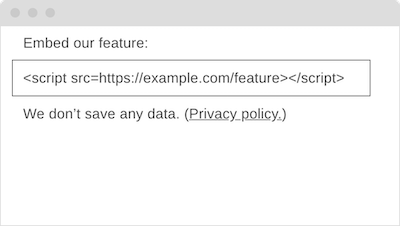
The following represents a few thoughts around what makes for good embed code. Thoughts, then, not legal advice: For a bulletproof perspective specifically regarding the GDPR you may need to get legal counsel, and this article may require amendment.
From an end user and a professional technical perspective one may argue that embed code must be
- easy to use (easy to embed and easy to configure);
- of good quality (like secure, accessible, fast, and valid);
- frugal (as with focus on the minimum to get the task done, access to as few hosts as possible, no use of cookies);
- transparent (and helpful) about the use of data, for embedders as well as end users.
Let’s look at each of these areas and discuss bad and better examples.
1. Ease of Use
Basic idea: The less you need to do and understand, the easier to use.
Not easy to use, Google Tag Manager with simply too much code (at Google’s Webmaster Team we once wrote a wrapper for Analytics to only call a script together with an account ID—that was ease of use):
1 <script async src="https://www.googletagmanager.com/gtag/js?id=UA-209576-1"></script>
2 <script>
3   window.dataLayer = window.dataLayer || [];
4   function gtag(){dataLayer.push(arguments);}
5   gtag('js', new Date());
6   gtag('config', 'UA-209576-1');
7 </script>
Easier to use, Add This:
1 <script type="text/javascript" src="//s7.addthis.com/js/300/addthis_widget.js#pubid=ra-533484d9341006e1"></script>
As easy to use but with less code and ensured use of https, modified Add This:
1 <script src="https://s7.addthis.com/js/300/addthis_widget.js#pubid=ra-533484d9341006e1"></script>
2. Quality
Embed code should meet common web development quality standards, like using the appropriate elements (the ground rules for HTML apply) in a valid fashion (validation is professional). Why “should”? Because we’re not talking about hobby development, and we’re doing a really poor job when making other websites worse.
Not of great quality, Embedly with their semantically disputable blockquote element, the random h4 heading, and unnecessary encoding information for their own script:
1 <blockquote class="embedly-card"><h4><a href="https://meiert.com/en/">Jens Oliver Meiert · Web Developer and Author · HTML and CSS Optimization</a></h4><p>I’m Jens Oliver Meiert, and I’m a web developer and author. I’ve worked for a variety of companies, but one of my most important stations has been Google; I’ve written 14 books and booklets; and I’ve at some point traveled the world solo for one and a half years. Get to know me on meiert.com.</p></blockquote>
2 <script async src="//cdn.embedly.com/widgets/platform.js" charset="UTF-8"></script>
Also not of remarkable quality, CodePen with somewhat chatty (styling, markup) and inconsistent (attribute order) code:
1 <p class="codepen" data-height="265" data-theme-id="light" data-default-tab="html,result" data-user="j9t" data-slug-hash="gOpBYye" style="height: 265px; box-sizing: border-box; display: flex; align-items: center; justify-content: center; border: 2px solid; margin: 1em 0; padding: 1em;" data-pen-title="Minimum valid HTML">
2   <span>See the Pen <a href="https://codepen.io/j9t/pen/gOpBYye">Minimum valid HTML</a> by Jens Oliver Meiert (<a href="https://codepen.io/j9t">@j9t</a>) on <a href="https://codepen.io">CodePen</a>.</span>
3 </p>
4 <script async src="https://static.codepen.io/assets/embed/ei.js"></script>
Of better quality, Powr:
1 <div class="powr-social-feed" id="c1e552d9_1584885046"></div>
2 <script src="https://www.powr.io/powr.js?platform=html"></script>
3. Frugality
Frugal embed code is focused. It doesn’t leak referrer and other information to more than the one domain necessary. It also avoids setting cookies.
Not frugal, YouTube with its cookie-setting default and explicitly enabling perhaps quite optional device features:
1 <iframe width="560" height="315" src="https://www.youtube.com/embed/Ls20ELK7Cck" frameborder="0" allow="accelerometer; autoplay; encrypted-media; gyroscope; picture-in-picture" allowfullscreen></iframe>
Not frugal, either, Glitch setting cookies and likewise calling device features:
1 <div class="glitch-embed-wrap" style="height: 420px; width: 100%;">
2   <iframe src="https://glitch.com/embed/#!/embed/acoustic-torpid-closet?path=README.md&previewSize=100" title="acoustic-torpid-closet on Glitch" allow="geolocation; microphone; camera; midi; vr; encrypted-media" style="height: 100%; width: 100%; border: 0;"> </iframe>
3 </div>
More frugal, YouTube not setting cookies:
1 <iframe width="560" height="315" src="https://www.youtube-nocookie.com/embed/Ls20ELK7Cck" frameborder="0" allow="accelerometer; autoplay; encrypted-media; gyroscope; picture-in-picture" allowfullscreen></iframe>
And most frugal, perhaps, a version of YouTube that was just something like this:
1 <video src="https://www.youtube-nocookie.com/embed/Ls20ELK7Cck"></video>
Much related to data frugality happens behind the scenes. The idea (and assumption here) is that each embed tries to do with as little data as possible.
4. Transparency
Transparency means that it’s clear what data are processed how, and that clarity relates to both embedders and users. Even if you live in a country that doesn’t cherish and protect privacy, privacy is important, and one key piece around privacy is transparency around the use of data. In Europe, despite some challenges we face here, it’s a growing expectation that we get information about the use of our data, and extensive control over it.
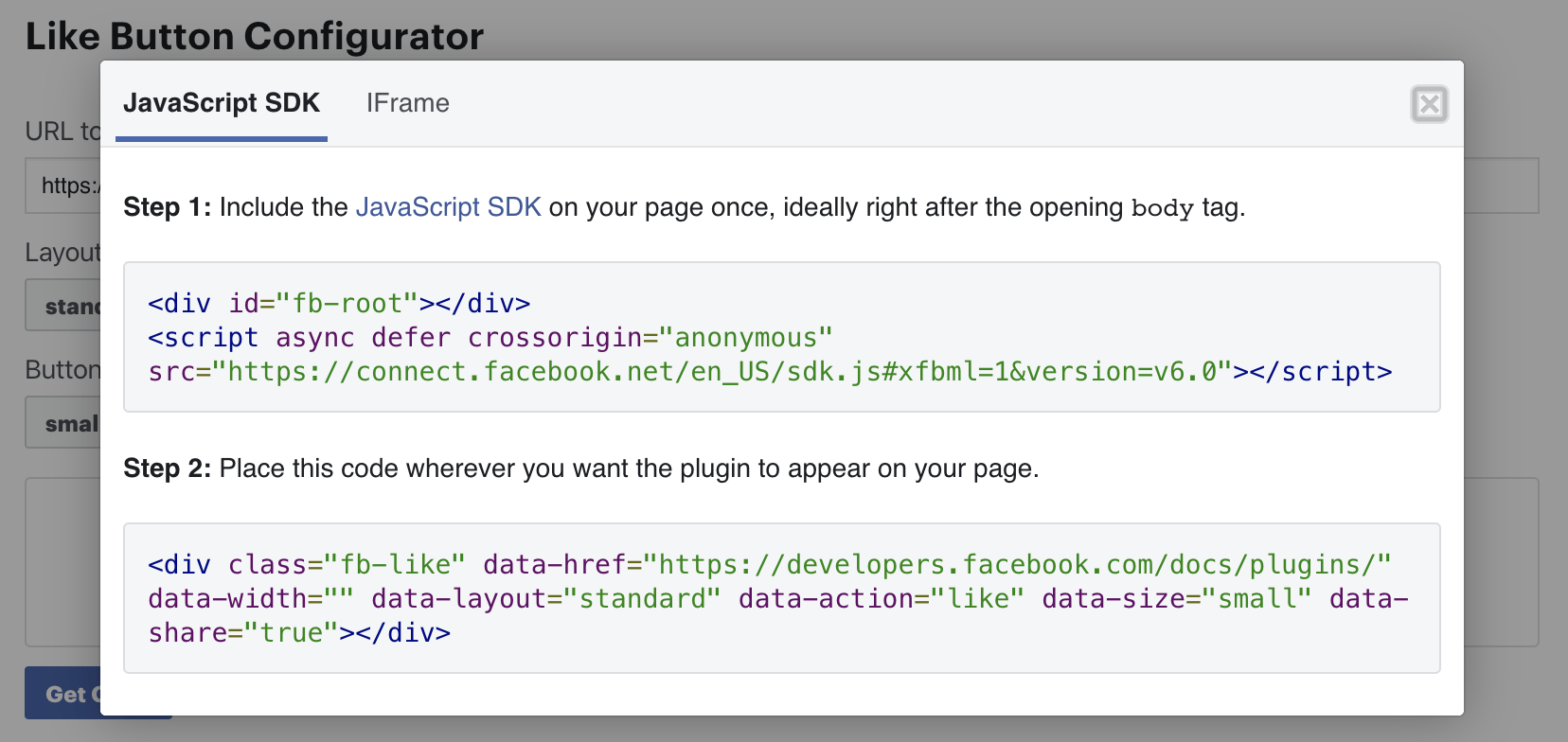
Not transparent, Facebook not talking about what their “Like” button code and related scripts do:
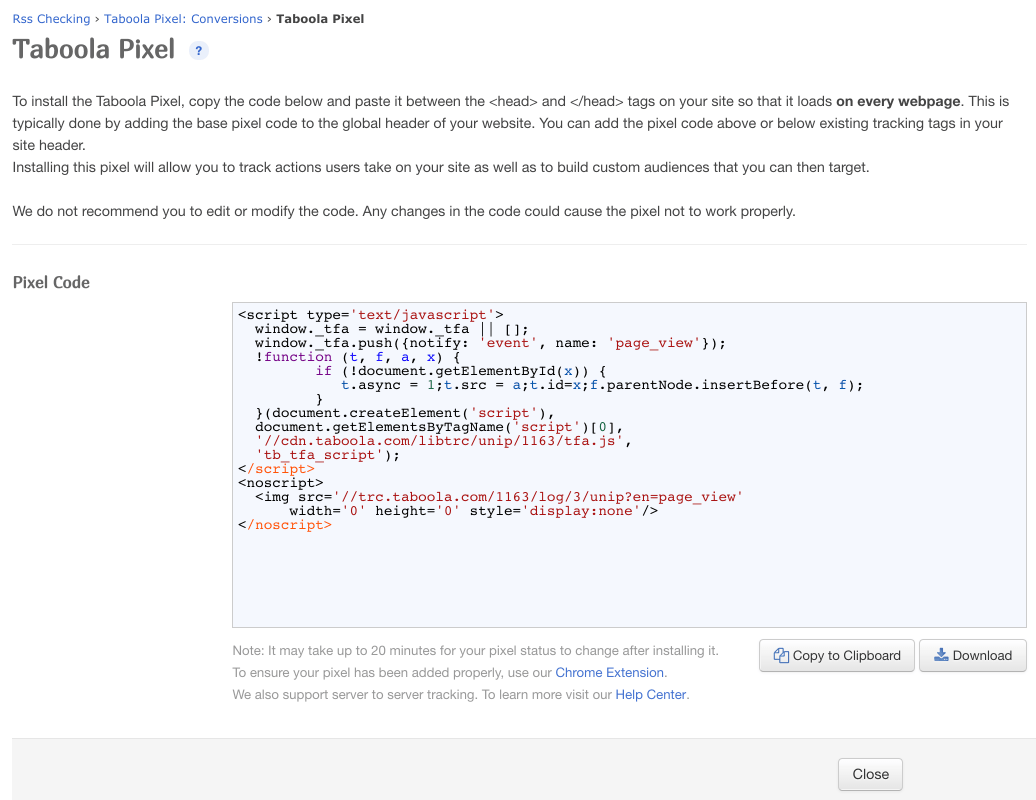
Per public documentation not transparent, either, Taboola with their Taboola Pixel code (note how Taboola’s code doesn’t meet other standards, either):
Truth be told, now, I’ve not so far seen any really transparent embed code page. Maybe this was just bad luck, but after 20 years embedding code on my employers’, my clients’, or my own websites I get the suspicion there may just not be much transparency yet. (Hence this post.)
Now, how could an embed code interface be made transparent?
Tying it all together, here’s one option:
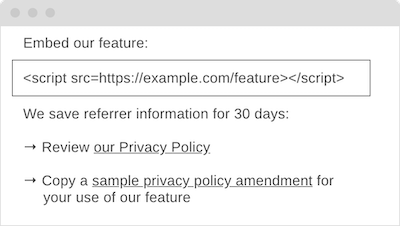
Code provided through a UI like this would—on the surface—meet the criteria:
- It’s easy to use—copy and place a
scriptelement. - It’s of good quality.
- It’s frugal.
- It makes clear what data is used, how, and makes it easy to get details and update one’s own privacy notes.
Obviously, and that’s why I say “on the surface,” there are many assumptions, and so the example is simplified. We assume that this code can handle everything it promises to handle for the “feature”; we assume that the script contents are, indeed, of good technical quality, and that they are, indeed, frugal, not talking to many hosts and gathering information that’s not strictly necessary; and we also assume that the privacy information is accurate and, for a privacy policy amendment, legally compliant, too.
_ What I personally prefer, then, is seeing embed code more like this:
Just give the code. Little code. Good code. And code that stores nothing. Because the point is this: With embed code, we can do so much better. So much.
Web Development: How Making Our Own Lives Difficult Is More Important Than We Think
|
Original release: August 1, 2017 I’m still not sure how to best argue this case, but comfort is a miserable north star. |
Many moons ago I wrote that web developers wouldn’t need debugging tools. I was half joking and half serious. We were just coming out of the dark ages of web development, so to speak, undernourished of useful tools, frameworks, libraries; we were nowhere near this opposite of tool obesity we’re facing now.
Some people picked up on the intent and the usefulness of the idea. There is, and I’m dialing down on philosophical-ness, a delicate tension here. On the one hand, having good tools makes our work (and life) more efficient, more productive, a lot easier. But on the other hand, and this is what I was aiming at back then, and what we observe these days as well, does lack of tools make us set better priorities, make us more focused, and make us better craftspeople.
As in other situations in life, we cannot simply compare life with tools to life without tools. These lives are just too different, and the simplification rather naive. With tools it’s not all roses. It may be quite nice to imagine what we’d do if we, say, were the heads of our states or such, but we wouldn’t just wake up with more power.
What this should mean, now, is first more awareness. Tech life with tools is great, but it changes our lives, and these changes are not all positive. In my mind it’s certain that the issue of training (that many web developers these days aren’t as experienced with core technologies anymore) as well as the issue of quality (from the size of our sites and apps going out of hand to a general lack of focus on code quality) are both attributable to a lack of this awareness. Our dev tools, in a way, are like addictive sugar drinks. They make our websites fat.
What it also means, second, is choice. Not as “either/or,” but as it’s not required to use tools everywhere. I, for example, run several sites of low complexity where I intentionally avoid using a CMS. UITest.com is such a site. Sometimes that hurts, for I have some extra pain maintaining these sites. But overall it keeps me at the edge, for that pain makes me more aware of maintenance problems and helps me become better at web maintainability. Beware of that sugar. If we always take escalators and lifts, how fit are we ever taking the stairs?
At the end of the day, each of us does make these choices, whether they be informed or uninformed. More awareness of this problematique will lead us to choices that are more conscious, and hopefully get us to better discussions, because the different choices make for quite unique developer profiles—with each their particular strengths.
 |
Spotted a mistake in this chapter? Please let me know! |