2 The Tools and Process
Emacs and Org-mode
The basic tools in our setup will be Emacs and Org-mode. I assume you have at least a basic knowledge of Emacs, but if you don’t: don’t worry! It takes very little to get started. If you want a gentle introduction, check out the Guided Tour of Emacs. If you have already installed Emacs, you can start an interactive tutorial within Emacs itself by pressing C-h followed by t (if you are using a graphical version of Emacs, this is likely also available from within the Help menu). If you currently use vi or vim, check out Spacemacs, which will allow you to start using Emacs without having to relearn any new keybindings.
Org-mode is included with all recent versions of Emacs, so chances are you already have it installed. Emacs 26.3 (the one I use as oft his writing) includes org-mode 9.1.9, which is quite recent and more than enough for the uses I describe here. If you want to upgrade to the latest version, see the Org-mode Installation Instructions.
How it works
In general, the process of generating config files from Org files can be illustrated as follows:
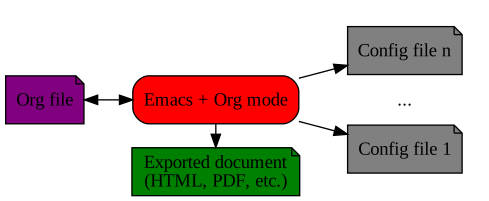
Org mode is very flexible, so you can decide how to structure and organize both your source (Org) and destination (config) files in the way that suits you best. Here are some options:
- Org file stored in the same directory as the resulting config file. Usually one org file corresponds to one config file, but multiple related config files (e.g. for the same program or application) could be combined in the same Org file, from which all of them are generated. The advantage of this method is that the source Org files and the configuration files they produce are stored in the same location, which makes it easier to relate them for your own use, and to share them if you put them, for example, in a Github repository. The disadvantage is that the config directory gets “polluted” by the source files, and some applications might even produce errors or complain about having extraneous files in their configuration directories. However, this is very uncommon. This is the setup I use and recommend, and which is described in this booklet.
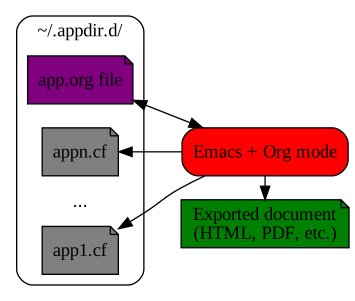
- All the org files stored in a single directory (or directory tree, or even in a single file), separate from the final destinations of the config files they contain. This has the advantage of giving you a central location for all your org files, regardless of the config files they produce. The drawback is that it makes it harder to selectively share the configuration files for a single program.
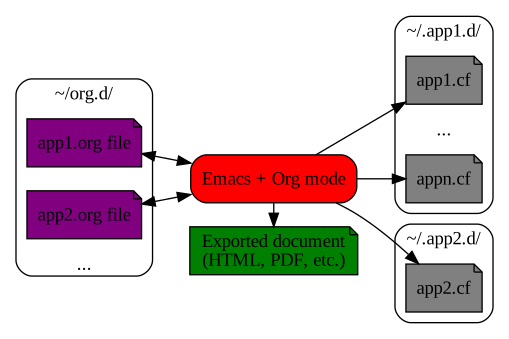
- Of course, you can combine the two approaches if it makes sense for you. For example, you might choose to have all your shell’s config files produced from a single Org file, while having separate Org files for other, individual config files.
Ultimately it is up to you to decide which scheme to use. The basic techniques are the same, and the point of literate config is to make things easier for you to understand and maintain.
Configuring Emacs and org-mode for literate programming
To get started with literate config, the only really indispensable package is org, which can be loaded without prior installation since it is included with Emacs:possible use of literate config:
(require 'org)
As you write your config file, you can use the org-babel-tangle command (bound by default to C-c C-v t) to extract the code from the current file into the corresponding code files. Conversely, you can use org-export-dispatch (C-c C-e) to export your file to any of Org’s supported output formats.
There are other optional configurations which you can use to make the experience more efficient and pleasant. You can find these below.
Automatic tangle on save
After some time, it can get tedious to press C-c C-v t to tangle your files, and you run the risk of forgetting to do it after a change, resulting in a discrepancy between your Org file and your config files. To avoid this, you can configure a hook that automatically runs org-babel-tangle upon saving any org-mode buffer, which means the resulting files will be automatically kept up to date.
(org-mode . (lambda () (add-hook 'after-save-hook 'org-babel-tangle
                                 'run-at-end 'only-in-org-mode)))
Language-specific org-babel support
You can load and enable org-babel language-specific packages. Many are included in org-mode, while others can be found online. Most org-babel support packages are named ob-<language>. For example, these are some of the ones I use:
- CFEngine, used extensively for my book Learning CFEngine.
(use-packageob-cfengine3:afterorg) - Elvish, my favorite shell.
(use-packageob-elvish:afterorg)
After you load any necessary packages, you should configure the languages for which to load org-babel support. Note that this does not affect the ability to export/tangle code, but allows you to execute snippets of code from within the Org buffer by pressing C-c C-c on them, and have the results automatically inserted into the buffer.
(org-babel-do-load-languages
 'org-babel-load-languages
 '((cfengine3 . t)
   (ruby      . t)
   (latex     . t)
   (plantuml  . t)
   (python    . t)
   (shell     . t)
   (elvish    . t)
   (calc      . t)
   (dot       . t)
   (ditaa     . t)))
Beautifying org-mode
Org-mode allows extensive configuration of its fonts and colors, and doing so can significantly improve the experience of editing literate code with Emacs. In the end, you can have an Emacs setup for editing org documents which looks very nice, with proportional fonts for text and monospaced fonts for code blocks, examples and other elements. For example, here is what a fragment of my Emacs config file looks like:
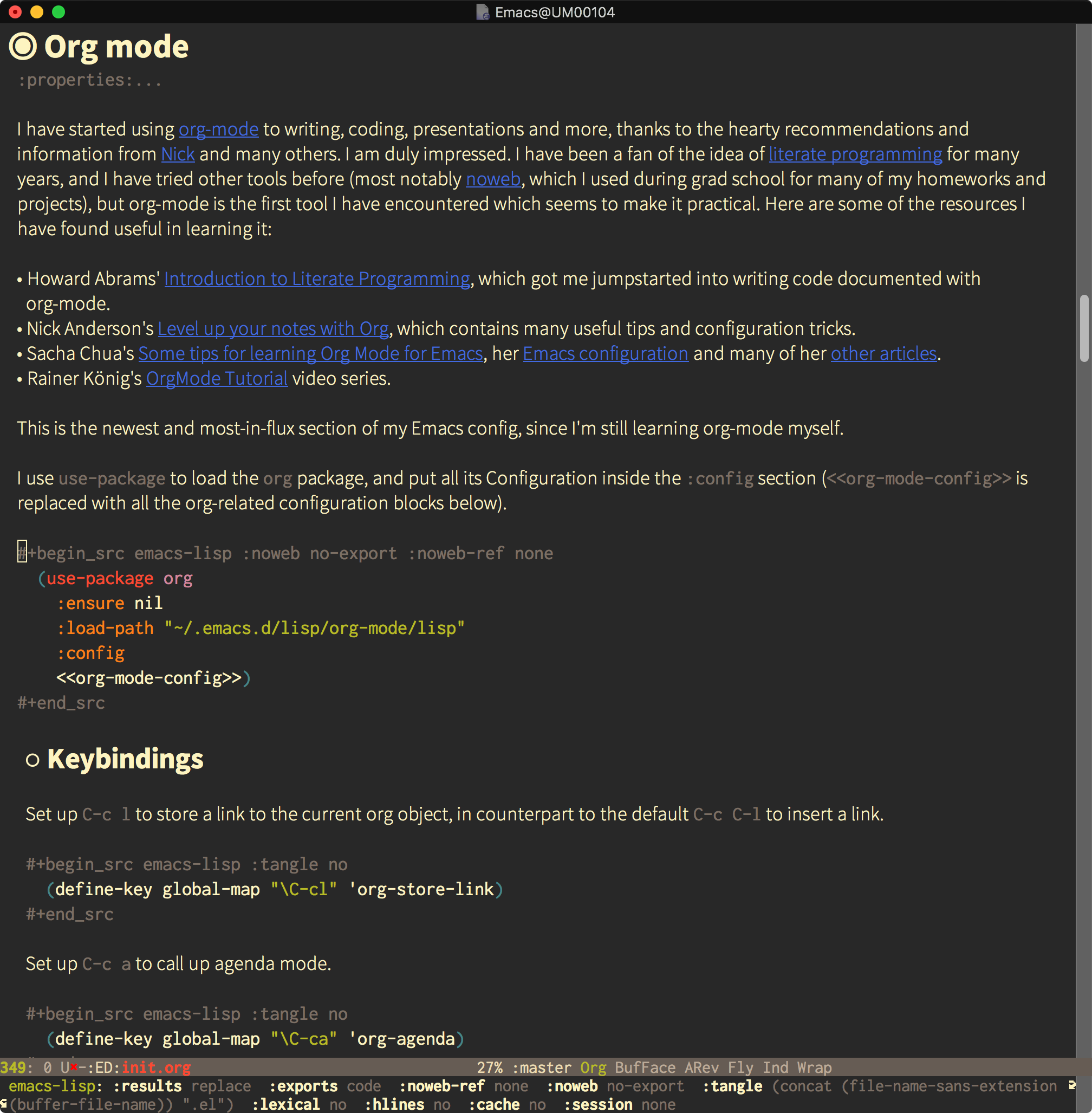
Instead of describing the configuration here, I’ll just point you to the Beautifying org-mode section of my Emacs config - you can find all the details there.
Structure of a literate config file
A literate config file is simply an org file which has source code blocks in it with the :tangle option to specify the file to which they should be extracted. If more than one source block specifies the same file, they will be appended in the order they appear. For example, a very simple bash config file can be produced as follows:
bash literate config fileIf your whole org file gets tangled to a single config file, you can specify the :tangle header globally to avoid having to specify it for every code block. To do this, you specify a header-args global property corresponding to the language of the source blocks you want to export. For example, I have the following line at the top my init.org Hammerspoon config source file:
If the basename of your org file is the same as the exported source file (for example, init.org produces init.lua), you can even use a bit of Emacs Lisp magic to avoid having to specify the output filename by hand, just the extension (shown here in two lines, make sure you type everything in a single line):
Even if you specify the tangle filename globally, you can still change its value for individual code blocks. For example, you can prevent a code block from being tangled by specifying :tangle no, or specify a different filename to write it to a file different from the global one.