3. String Conversions
string_view is not the only feature that we get in C++17 that relates to strings. While views can reduce the number of temporary copies, there’s also another convenient feature: conversion utilities. In the new C++ Standard, you have two sets of functions from_chars and to_chars that are low level and promises impressive performance improvements.
In this chapter, you’ll learn:
- Why do we need low-level string conversion routines?
- Why the current options in the Standard Library might not be enough?
- How to use C++17’s conversion routines
- What performance gains you can expect from the new routines
Elementary String Conversions
The growing number of data formats like JSON or XML require efficient string processing and manipulation. The maximum performance is especially crucial when such data formats are used to communicate over the network, where high throughput is the critical factor.
For example, you get the characters in a network packet, you deserialise it (convert strings into numbers), then process the data, and finally, it’s serialised back to the same file format (numbers into strings) and sent over the network as a response.
The Standard Library had bad luck in those areas. It’s usually perceived to be too slow for such advanced string processing. Often developers prefer custom solutions or third-party libraries.
The situation might change as with C++17 we get two sets of functions: from_chars and to_chars that allow for low-level string conversions.
In the original paper (P0067) there’s a useful table that summarises all the current solutions:
| Facility | Shortcomings |
|---|---|
sprintf |
format string, locale, buffer overrun |
snprintf |
format string, locale |
sscanf |
format string, locale |
atol |
locale, does not signal errors |
strtol |
locale, ignores whitespace and 0x prefix |
strstream |
locale, ignores whitespace |
stringstream |
locale, ignores whitespace, memory allocation |
num_put / num_get facets |
locale, virtual function |
to_string |
locale, memory allocation |
stoi etc. |
locale, memory allocation, ignores whitespace and 0x prefix, exceptions |
As you can see from the table above, sometimes converting functions do too much work, which makes the whole processing slower. Often, there’s no need for the extra features.
First of all, all of them use “locale”. Even if you work with language-independent strings, you have to pay a small price for localisation support. For example, if you parse numbers from XML or JSON, there’s no need to apply current system language, as those formats are interchangeable.
The next issue is error reporting. Some functions might throw an exception while others return just a converted value. Exceptions might not only be costly (as throwing might involve extra memory allocations) but often a parsing error is not an exceptional situation. Returning a simple value, for example, 0 for atoi, 0.0 for atof is also not satisfactory, as in that case you don’t know if the parsing was successful or not.
The third topic, especially related to C-style API, is that you have to provide some form of the “format string”. Parsing such string might involve some additional cost.
Another thing is “empty space” support. Functions like strtol or stringstream might skip empty spaces at the beginning of the string. That might be handy, but sometimes you don’t want to pay for that extra feature.
There’s also another critical factor: safety. Simple functions don’t offer any buffer overrun solutions, and also they work only on null-terminated strings. In that case, you cannot use string_view to pass the data.
The new C++17 API addresses all of the above issues. Rather than providing many functionalities, they focus on giving very low-level support. That way, you can have the maximum speed and tailor them to your needs.
The new functions are guaranteed to be:
- non-throwing - in case of some error they won’t throw exceptions (as opposed to
stoi) - non-allocating - the entire processing is done in place, without any extra memory allocation
- no locale support - the string is parsed as if used with default (“C”) locale
- memory safety - input and output range are specified to allow for buffer overrun checks
- no need to pass string formats of the numbers
- error reporting - you’ll get information about the conversion outcome
All in all, with C++17, you have two sets of functions:
-
from_chars- for conversion from strings into numbers, integer and floating points. -
to_chars- for converting numbers into string.
Let’s have a look at the functions in a bit more detail.
Converting From Characters to Numbers: from_chars
from_chars is a set of overloaded functions: for integral types and floating-point types.
For integral types we have the following functions:
std::from_chars_result from_chars(const char* first,
                                  const char* last,
                                  TYPE &value,
                                  int base = 10);
Where TYPE expands to all available signed and unsigned integer types and char.
base can be a number ranging from 2 to 36.
Then there’s the floating point version:
std::from_chars_result from_chars(const char* first,
                   const char* last,
                   FLOAT_TYPE& value,
                   std::chars_format fmt = std::chars_format::general);
FLOAT_TYPE expands to float, double or long double.
chars_format is an enum with the following values:
enum class chars_format {
    scientific = /*unspecified*/,
    fixed = /*unspecified*/,
    hex = /*unspecified*/,
    general = fixed | scientific
};
It’s a bit-mask type, that’s why the values for enums are implementation-specific. By default, the format is set to be general so the input string can use “normal” floating-point format with scientific form as well.
The return value in all of those functions (for integers and floats) is from_chars_result:
struct from_chars_result {
    const char* ptr;
    std::errc ec;
};
from_chars_result holds valuable information about the conversion process.
Here’s the summary:
- On Success
from_chars_result::ptrpoints at the first character not matching the pattern, or has the value equal tolastif all characters match andfrom_chars_result::ecis value-initialized. - On Invalid conversion
from_chars_result::ptrequalsfirstandfrom_chars_result::ecequalsstd::errc::invalid_argument.valueis unmodified. - On Out of range - The number is too large to fit into the value type.
from_chars_result::ecequalsstd::errc::result_out_of_rangeandfrom_chars_result::ptrpoints at the first character not matching the pattern.valueis unmodified.
Examples
To sum up this section, here are two examples of how to convert a string into a number using from_chars. The first one will convert into int and the second one converts into a floating-point number.
1) Integral types
#include <charconv> // from_char, to_char#include <iostream>#include <string>int main() {
const std::string str { "12345678901234" };
int value = 0;
const auto res = std::from_chars(str.data(),
str.data() + str.size(),
value);
if (res.ec == std::errc()) {
std::cout << "value: " << value
<< ", distance: " << res.ptr - str.data() << '\n';
}
else if (res.ec == std::errc::invalid_argument) {
std::cout << "invalid argument!\n";
}
else if (res.ec == std::errc::result_out_of_range) {
std::cout << "out of range! res.ptr distance: "
<< res.ptr - str.data() << '\n';
}
}
The example is straightforward. It passes a string str into from_chars and then displays the result with additional information if possible.
Below you can find an output for various str value.
str value |
output |
|---|---|
12345 |
value: 12345, distance 5 |
-123456 |
value: -123456, distance: 7 |
12345678901234 |
out of range! res.ptr distance: 14 |
hfhfyt |
invalid argument! |
In the case of 12345678901234, the conversion routine could parse the number (all 14 characters were checked), but it’s too large to fit in int thus we got out_of_range.
2) Floating Point
To get the floating point test, we can replace the top lines of the previous example with:
const std::string str { "16.78" };
double value = 0;
const auto format = std::chars_format::general;
const auto res = std::from_chars(str.data(),
                                 str.data() + str.size(),
                                 value,
                                 format);
The main difference is the last parameter: format.
Here’s the example output that we get:
str value |
format value |
output |
|---|---|---|
1.01 |
fixed |
value: 1.01, distance 4 |
-67.90000 |
fixed |
value: -67.9, distance: 9 |
1e+10 |
fixed |
value: 1, distance: 1 - scientific notation not supported |
1e+10 |
fixed |
value: 1, distance: 1 - scientific notation not supported |
20.9 |
scientific |
invalid argument!, res.p distance: 0 |
20.9e+0 |
scientific |
value: 20.9, distance: 7 |
-20.9e+1 |
scientific |
value: -209, distance: 8 |
F.F |
hex |
value: 15.9375, distance: 3 |
-10.1 |
hex |
value: -16.0625, distance: 5 |
The general format is a combination of fixed and scientific so it handles regular floating-point string with the additional support for e+num syntax.
You have a basic understanding of converting from strings to numbers, so let’s have a look at how to do it the opposite way.
Parsing a Command Line
In the std::variant chapter, there’s an example with parsing command line parameters. The example uses from_chars to match the best type: int, float or std::string and then stores it in a std::variant.
You can find the example here: Parsing a Command Line, the Variant Chapter
Converting Numbers into Characters: to_chars
to_chars is a set of overloaded functions for integral and floating-point types.
For integral types there’s one declaration:
std::to_chars_result to_chars(char* first, char* last,
                              TYPE value, int base = 10);
Where TYPE expands to all available signed and unsigned integer types and char.
Since base might range from 2 to 36, the output digits that are greater than 9 are represented as lowercase letters: a...z.
For floating-point numbers, there are more options.
Firstly there’s a basic function:
std::to_chars_result to_chars(char* first, char* last, FLOAT_TYPE value);
FLOAT_TYPE expands to float, double or long double.
The conversion works the same as with printf and in default (“C”) locale. It uses %f or %e format specifier favouring the representation that is the shortest.
The next function adds std::chars_format fmt that let’s you specify the output format:
std::to_chars_result to_chars(char* first, char* last,
                              FLOAT_TYPE value,
                              std::chars_format fmt);
Then there’s the “full” version that allows also to specify precision:
std::to_chars_result to_chars(char* first, char* last,
                              FLOAT_TYPE value,
                              std::chars_format fmt,
                              int precision);
When the conversion is successful, the range [first, last) is filled with the converted string.
The returned value for all functions (for integer and floating-point support) is to_chars_result, it’s defined as follows:
struct to_chars_result {
    char* ptr;
    std::errc ec;
};
The type holds information about the conversion process:
- On Success -
ecequals value-initializedstd::errcandptris the one-past-the-end pointer of the characters written. Note that the string is not NULL-terminated. - On Error -
ptrequalsfirstandecequalsstd::errc::invalid_argument.valueis unmodified. - On Out of range -
ecequalsstd::errc::value_too_largethe range[first, last)in unspecified state.
An Example
To sum up, here’s a basic demo of to_chars.
#include <iostream>#include <charconv> // from_chars, to_chars#include <string>int main() {
std::string str { "xxxxxxxx" };
const int value = 1986;
const auto res = std::to_chars(str.data(),
str.data() + str.size(),
value);
if (res.ec == std::errc()) {
std::cout << str << ", filled: "
<< res.ptr - str.data() << " characters\n";
}
else {
std::cout << "value too large!\n";
}
}
Below you can find a sample output for a set of numbers:
value |
output |
|---|---|
1986 |
1986xxxx, filled: 4 characters |
-1986 |
-1986xxx, filled: 5 characters |
19861986 |
19861986, filled: 8 characters |
-19861986 |
value too large! (the buffer is only 8 characters) |
The Benchmark
So far, the chapter has mentioned the huge performance potential of the new routines. It would be best to see some real numbers then!
This section introduces a benchmark that measures the performance of from_chars and to_chars against other conversion methods.
How does the benchmark work:
- Generates vector of random integers of the size
VECSIZE. - Each pair of conversion methods will transform the input vector of integers into a vector of strings and then back to another vector of integers. This round-trip will be verified so that the output vector is the same as the input vector.
- The conversion is performed
ITERtimes. - Errors from the conversion functions are not checked.
- The code tests:
-
from_char/to_chars -
to_string/stoi -
sprintf/atoi -
ostringstream/istringstream
-
You can find the full benchmark code in:
“Chapter String Conversions/conversion_benchmark.cpp”
Here’s the code for from_chars/to_chars:
const auto numIntVec = GenRandVecOfNumbers(vecSize);
std::vector<std::string> numStrVec(numIntVec.size());
std::vector<int> numBackIntVec(numIntVec.size());

std::string strTmp(15, ' ');

RunAndMeasure("to_chars", [&]() {
    for (size_t iter = 0; iter < ITERS; ++iter) {
        for (size_t i = 0; i < numIntVec.size(); ++i) {
            const auto res = std::to_chars(strTmp.data(),
                                           strTmp.data() + strTmp.size(),
                                           numIntVec[i]);
            numStrVec[i] = std::string_view(strTmp.data(),
                                            res.ptr - strTmp.data());
        }
    }
    return numStrVec.size();
});

RunAndMeasure("from_chars", [&]() {
    for (size_t iter = 0; iter < ITERS; ++iter) {
        for (size_t i = 0; i < numStrVec.size(); ++i) {
            std::from_chars(numStrVec[i].data(),
                            numStrVec[i].data() + numStrVec[i].size(),
                            numBackIntVec[i]);
        }
    }
    return numBackIntVec.size();
});

CheckVectors(numIntVec, numBackIntVec);
CheckVectors - checks if the two input vectors of integers contain the same values and prints mismatches on error.
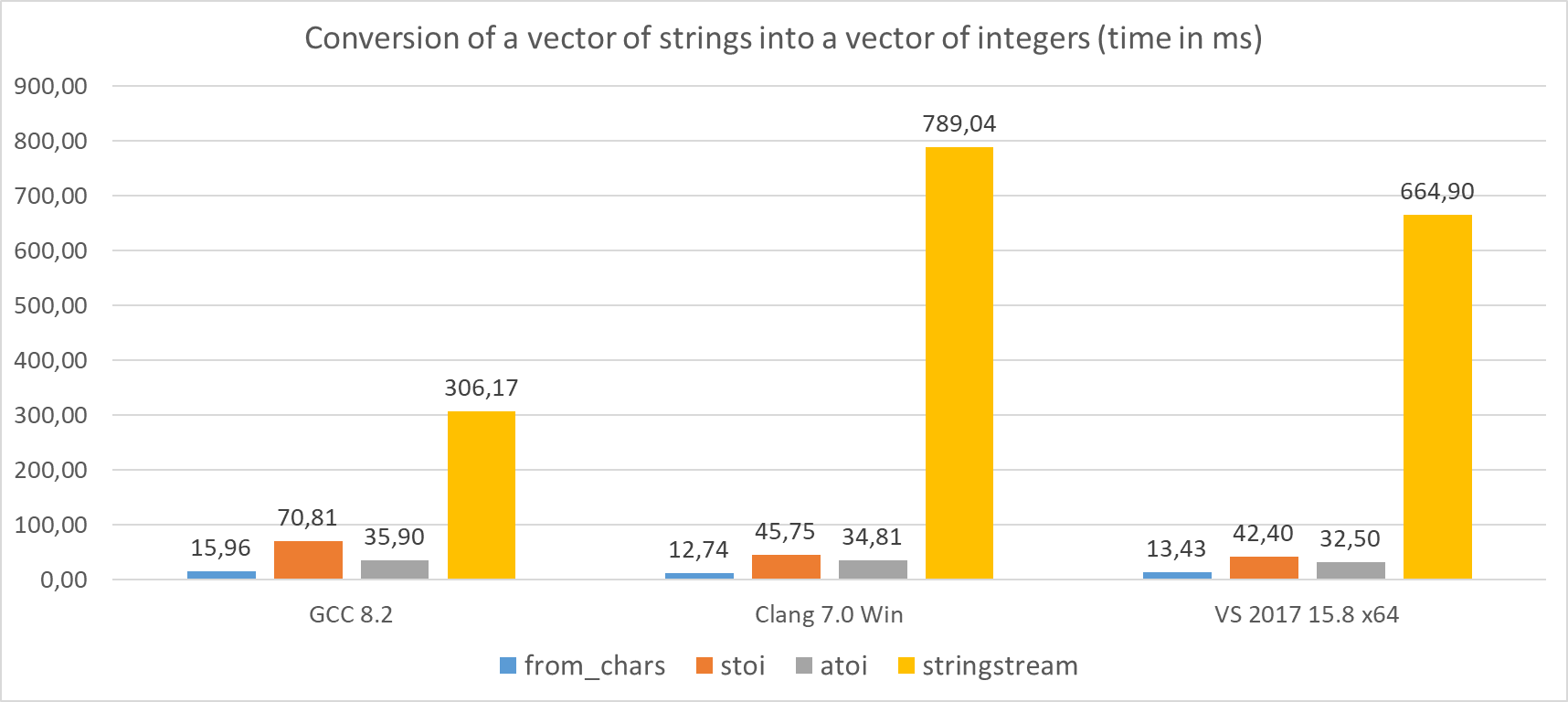
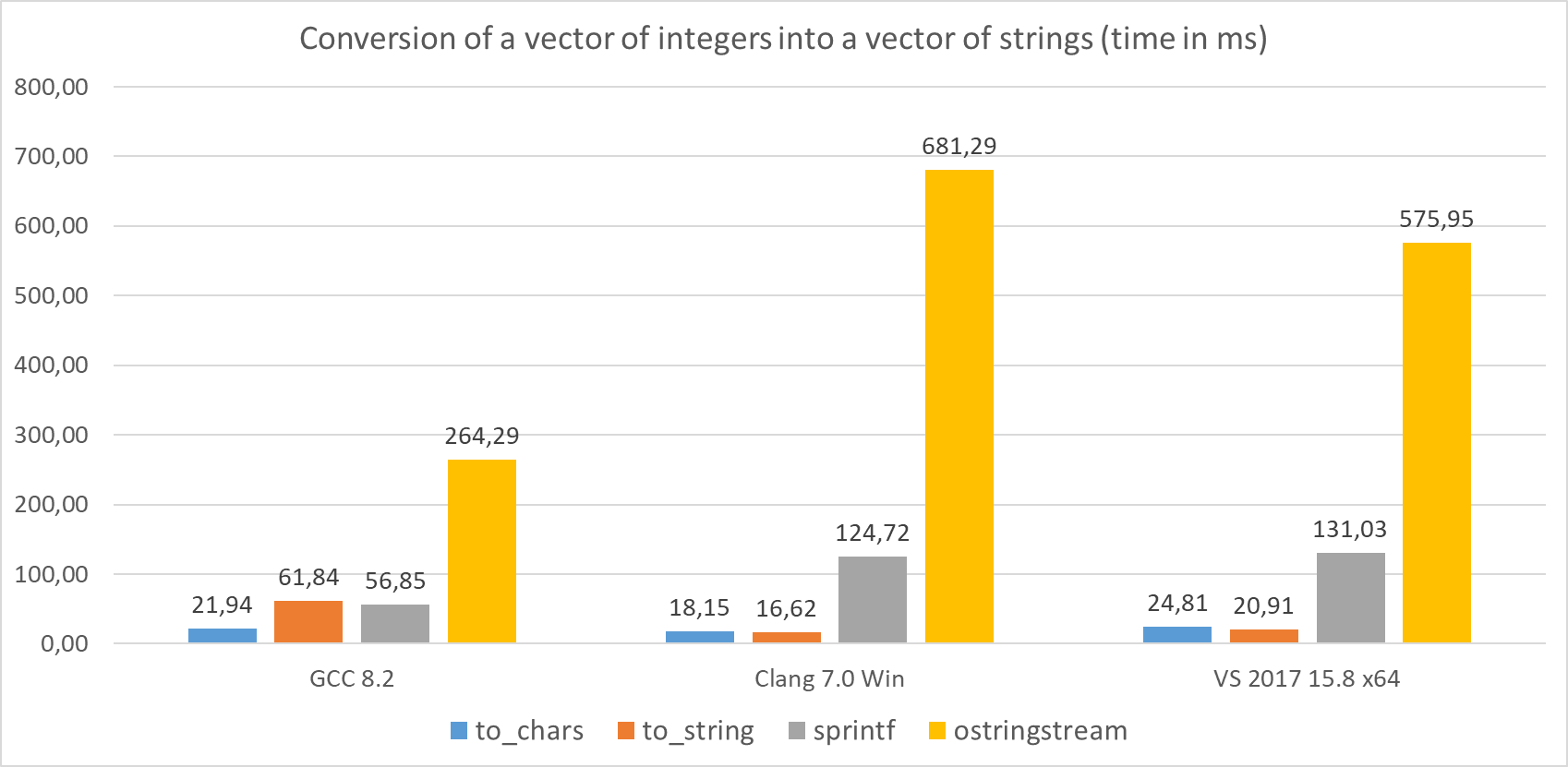
Here are the results (time in milliseconds) of running 1000 iterations on a vector with 1000 elements:
| Method | GCC 8.2 | Clang 7.0 Win | VS 2017 15.8 x64 |
|---|---|---|---|
to_chars |
21.94 | 18.15 | 24.81 |
from_chars |
15.96 | 12.74 | 13.43 |
to_string |
61.84 | 16.62 | 20.91 |
stoi |
70.81 | 45.75 | 42.40 |
sprintf |
56.85 | 124.72 | 131.03 |
atoi |
35.90 | 34.81 | 32.50 |
ostringstream |
264.29 | 681.29 | 575.95 |
stringstream |
306.17 | 789.04 | 664.90 |
The machine: Windows 10 x64, i7 8700 3.2 GHz base frequency, 6 cores/12 threads (although the benchmark uses only one thread for processing).
- GCC 8.2 - compiled with
-O2 -Wall -pedantic, MinGW Distro - Clang 7.0 - compiled with
-O2 -Wall -pedantic, Clang For Windows - Visual Studio 2017 15.8 - Release mode, x64
Some notes:
- On GCC
to_charsis almost 3x faster thanto_string, 2.6x faster thansprintfand 12x faster thanostringstream! - On Clang
to_charsis a bit slower thanto_string, but ~7x faster thansprintfand surprisingly almost 40x faster thanostringstream! - MSVC also has slower performance in comparison with
to_string, but thento_charsis ~5x faster thansprintfand ~23x faster thanostringstream.
Looking now at from_chars :
- On GCC it’s ~4,5x faster than
stoi, 2,2x faster thanatoiand almost 20x faster thanistringstream. - On Clang it’s ~3,5x faster than
stoi, 2.7x faster thanatoiand 60x faster thanistringstream! - MSVC performs ~3x faster than
stoi, ~2,5x faster thanatoiand almost 50x faster thanistringstream!
As mentioned earlier, the benchmark also includes the cost of string object creation. That’s why to_string (optimised for strings) might perform a bit better than to_chars. If you already have a char buffer, and you don’t need to create a string object, then to_chars should be faster.
Here are the two charts built from the table above.
Summary
This chapter showed how to use two sets of functions from_chars - to convert strings into numbers, and from_chars that converts numbers into their textual representations.
The functions might look very raw and even C-style. This is a “price” you have to pay for having such low-level support, performance, safety and flexibility. The advantage is that you can provide a simple wrapper that exposes only the needed parts that you want.
Compiler support
| Feature | GCC | Clang | MSVC |
|---|---|---|---|
| Elementary String Conversions | 8.02 | 7.03 | VS 2017 15.7/15.84 |