II. HTML Sanity Checking
By Gernot Starke.

The system documented here is a small open source tool hosted on Github.
The full sourcecode is available - you might even configure your Gradle build to use this software. Just in case you’re writing documentation based on Asciidoctor, that would be a great idea!
But enough preamble. Let’s get started…
II.1. Introduction and Goals
HtmlSC supports authors creating digital formats by checking hyperlinks, images and similar resources.
1.1 Requirements Overview
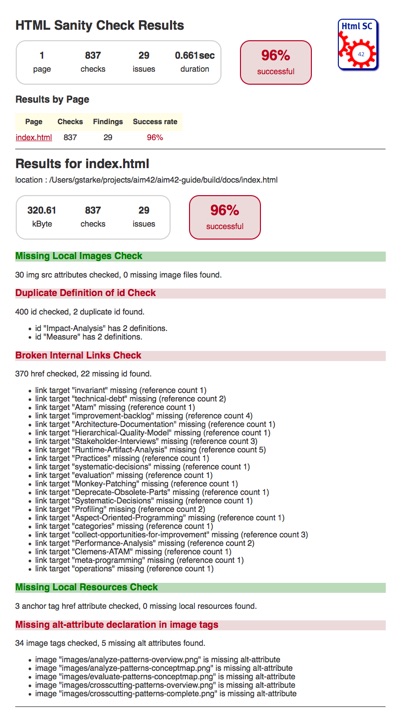
The overall goal of HtmlSC is to create neat and clear reports, showing errors within HTML files. Below you find a sample report.
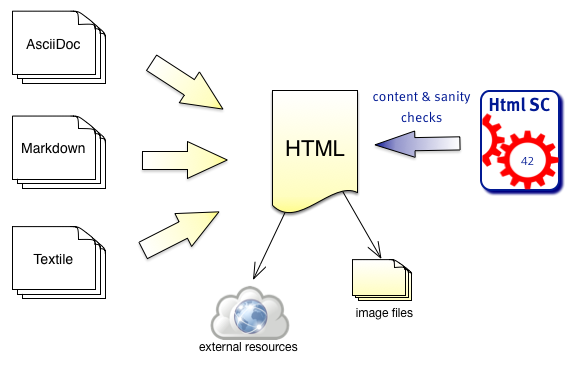
HtmlSanityCheck (HtmlSC) checks HTML for semantic errors, like broken links and missing images. It has been created to support authors who create HTML as output format.
- Authors write in formats like AsciiDoc, Markdown or other formats, which are transformed to HTML by the corresponding generators.
- HtmlSC checks the generated HTML for broken links, missing images and other semantic issues.
- HtmlSC creates a test report, similar to the well-known unit test report.
Basic Usage
- A user configures the location (directory and filename) of one or several HTML file(s), and the corresponding images directory.
- HtmlSC performs various checks on the HTML and
- reports its results either on the console or as HTML report.
HtmlSC can run from the command line or as Gradle plugin.
Basic Requirements
| ID | Requirement | Explanation |
|---|---|---|
| G-1 | Check HTML for semantic errors | HtmlSC checks HTML files for semantic errors, like broken links. |
| G-2 | Gradle and Maven Plugin | HtmlSC can be run/used as Gradle and Maven plugin. |
| G-3 | Multiple input files | Configurable for a set of files, processed in a single run, HtmlSC produces a joint report. |
| G-4 | Suggestions | When HtmlSC detects errors, it shall identify suggestions or alternatives that might repair the error. |
| G-5 | Configurable | Several features of checks shall be configurable, especially input files/location, output directory, timeouts and status-code behavior for checking external links etc. |
Required Checks
HtmlSC shall provide the following checks in HTML files:
| Check | Explanation |
|---|---|
| Missing images | Check all image tags if the referenced image files exist. |
| Broken internal links | Check all internal links from anchor-tags (`href=”#XYZ”) if the link targets “XYZ” are defined. |
| Missing local resources | Check if referenced files (e.g. css, js, pdf) are missing. |
| Duplicate link targets | Check all link targets (… id=”XYZ”) if the id’s (“XYZ”)are unique. |
| Malformed links | Check all links for syntactical correctness. |
| Illegal link targets | Check for malformed or illegal anchors (link targets). |
| Broken external links | Check external links for both syntax and availability. |
| Broken ImageMaps | Though ImageMaps are a rarely used HTML construct, HtmlSC shall identify the most common errors in their usage. |
1.2 Quality Goals
| Priority | Quality Goal | Scenario |
|---|---|---|
| 1 | Correctness | Every broken internal link (cross reference) is found. |
| 1 | Correctness | Every potential semantic error is found and reported. In case of doubt2, report and let the user decide. |
| 1 | Safety | Content of the files to be checked is never altered. |
| 2 | Flexibility | Multiple checking algorithms, report formats and clients. At least Gradle and command-line have to be supported. |
| 2 | Correctness | Correctness of every checker is automatically tested for positive AND negative cases. |
| 3 | Performance | Check of 100kB html file performed under 10 secs (excluding Gradle startup) |
1.3 Stakeholders
Remark: For our simple HtmlSC example we have an extremely limited number of stakeholders, in real-life you will most likely have many more stakeholders!
| Role | Description | Goal, Intention |
|---|---|---|
| Documentation author | writes documentation with HTML output | wants to check that the resulting document contains good links, image references. |
| arc42 user | uses arc42 for architecture documentation | wants a small but practical example of how to apply arc42. |
| software developer | wants an example of pragmatic architecture documentation |
II.2 Constraints
HtmlSC shall be:
- platform-independent and should run on the major operating systems (Windows(TM), Linux, and Mac-OS(TM))
- implemented in Java or Groovy
- integrated with the Gradle build tool
- runnable from the command line
- have minimal runtime and installation dependencies (a Java(TM) runtime may be required to run HtmlSC)
- developed under a liberal open-source license. In addition, all required dependencies/libraries shall be compatible with a CreativeCommons license. |
II.3 System Scope and Context
3.1 Business Context
| Neighbor | Description |
|---|---|
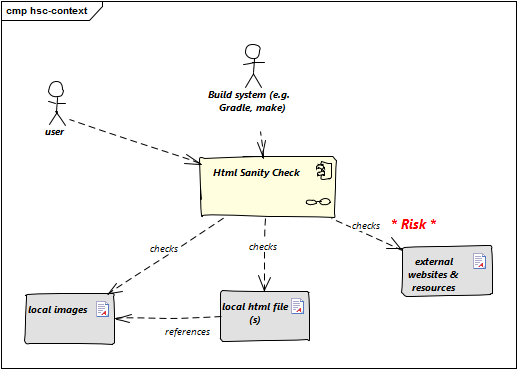
| user | documents software with toolchain that generates html. Wants to ensure that links within this HTML are valid. |
| build system | mostly Gradle |
| local HTML files | HtmlSC reads and parses local HTML files and performs sanity checks within those. |
| local image files | HtmlSC checks if linked images exist as (local) files. |
| external web resources | HtmlSC can be configured to optionally check for the existence of external web resources. Risk: Due to the nature of web systems and the involved remote network operations, this check might need significant time and might yield invalid results due to network and latency issues. |
3.2 Deployment Context
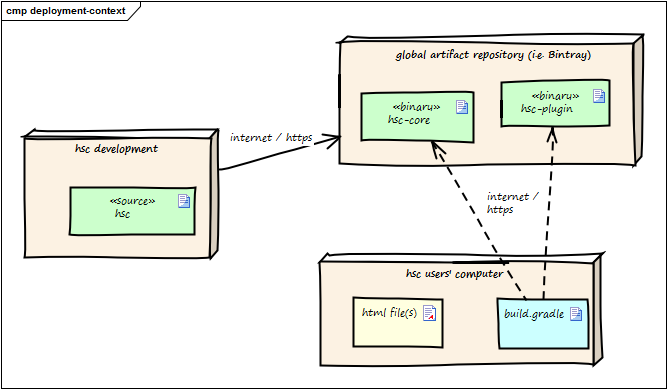
The following diagram shows the participating computers (nodes) with their technical connections plus the major artifacts of HtmlSC, the hsc-plugin-binary.
| Node / Artifact | Description |
|---|---|
| hsc-development | where development of HtmlSC takes place |
| hsc-plugin-binary | compiled and packaged version of HtmlSC including required dependencies. |
| artifact repository | A global public cloud repository for binary artifacts, similar to MavenCentral, the Gradle Plugin Portal or similar. HtmlSC binaries are uploaded to this server. |
| hsc user computer | where arbitrary documentation takes place with html as output formats. |
| build.gradle | Gradle build script configuring (among other things) the HtmlSC plugin to perform the HTML checking. |
For details see the deployment-view.
II.4 Solution Strategy
- Implement HtmlSC mostly in the Groovy programming language and partially in Java with minimal external dependencies.
- We wrap this implementation into a Gradle plugin, so it can be used within automated builds. Details are given in the Gradle userguide. (The Maven plugin is still under development).
- Apply the template-method-pattern
to enable:
- multiple checking algorithms. See the concept for checking algorithms,
- both HTML (file) and text (console) output. See the reporting-concept.
- Rely on standard Gradle and Groovy conventions for configuration, having a single configuration file.
- For the Maven plugin, this might lead to problems.
II.5 Building Block View
5.1 Whitebox HtmlSanityChecker
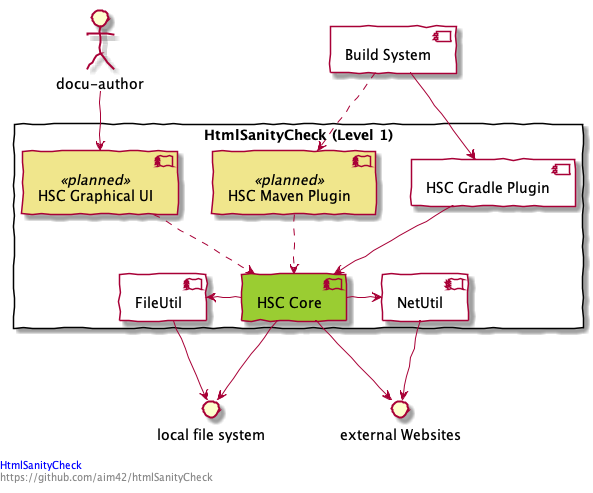
Rationale: We used functional decomposition to separate responsibilities:
-
HSC Coreshall encapsulate checking logic and HTML parsing/processing. -
PluginsandGraphicalUIencapsulate all usage aspects
Contained Blackboxes:
| Building block | Description |
|---|---|
HSC Core |
HTML parsing and sanity checking |
HSC Gradle Plugin |
Exposes HtmlSC via a standard Gradle plugin, as described in the Gradle user guide. Source: Package org.aim42.htmlsanitycheck, classes: HtmlSanityCheckPlugin and HtmlSanityCheckTask
|
NetUtil |
package org.aim42.inet, checks for internet connectivity, configuration of http status codes |
FileUtil |
package org.aim42.filesystem, file extensions etc. |
| HSC Graphical UI | (planned, not implemented) |
II.6 Runtime View
II.6.1 Execute all checks
A typical scenario within HtmlSC is the execution of all available checking algorithms on a set of HTML pages.
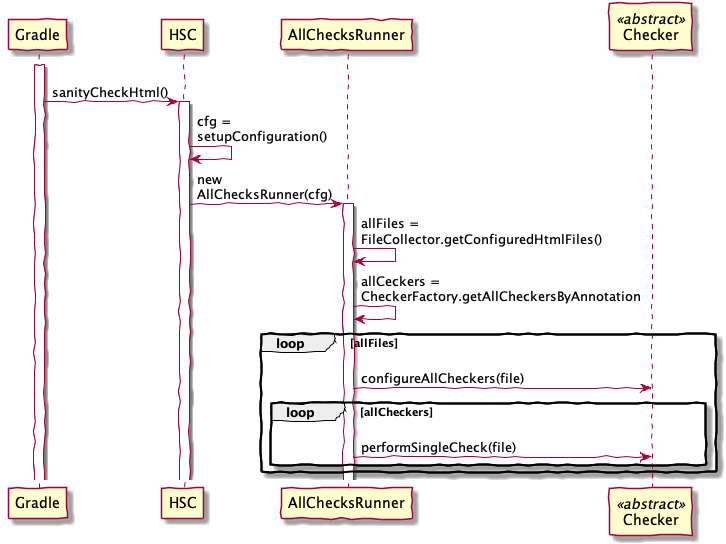
Explanation:
- User or build calls
htmlSanityCheckbuild target. - Gradle (from within build) calls
sanityCheckHtml - HSC configures input files and output directory
- HSC creates an
AllChecksRunnerinstance - gets all configured files into
allFiles - (planned) get all available Checker classes based upon annotation
- perform the checks, collecting the results
II.6.2 Report checking results
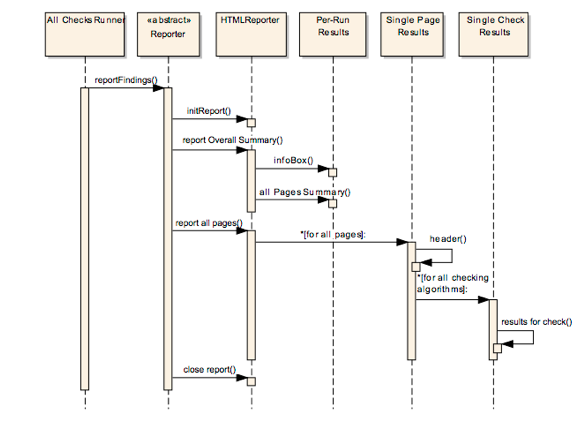
Reporting is done in the natural hierarchy of results (see the corresponding concept in section 8.2.1 for an example report).
- per “run” (
PerRunResults): date/time of this run, files checked, some configuration info, summary of results - per “page” (
SinglePageResults): - create page result header with summary of page name and results
- for each check performed on this page create a section with
SingleCheckResults - per “single check on this page” report the results for this particular check
II.7 Deployment view
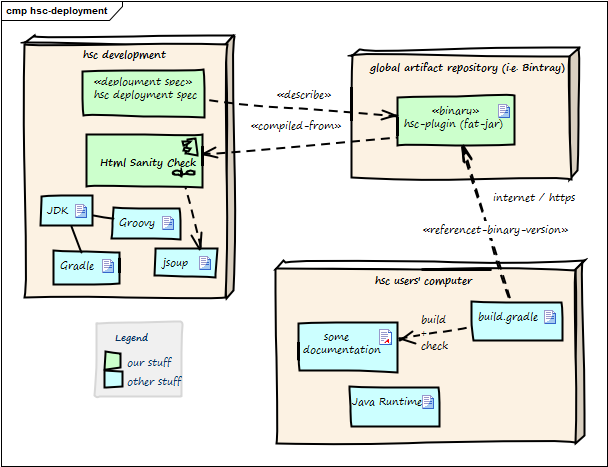
| Node / Artifact | Description |
|---|---|
| hsc plugin binary | Compiled version of HtmlSC, including required dependencies. |
| hsc-development | Development environment |
| artifact repository | Global public cloud repository for binary artifacts, similar to mavenCentral HtmlSC binaries are uploaded to this server. |
| hsc user computer | Where documentation is created and compiled to HTML. |
| build.gradle | Gradle build script configuring (among other things) the HtmlSC plugin. |
The three nodes (computers) shown in the diagram above are connected via Internet.
Prerequisites:
- HtmlSC developers need a Java development kit, Groovy, Gradle plus the JSoup HTML parser.
- HtmlSC users need a Java runtime (> 1.6) plus a build file named
build.gradle. See below for a complete example.
build.gradle 1 buildscript {
2 repositories {
3 mavenLocal()
4 maven {
5 url "https://plugins.gradle.org/m2/"
6 }
7 }
8 dependencies {
9 // in case of mavenLocal(), the following line is valid:
10 classpath(group: 'org.aim42',
11
12 // in case of using the official Gradle plugin repository:
13 //classpath (group: 'gradle.plugin.org.aim42',
14 name: 'htmlSanityCheck', version: '1.0.0-RC-3')
15 }
16 }
17
18 plugins {
19 id 'org.asciidoctor.convert' version '1.5.8'
20 }
21
22
23 // ==== path definitions =====
24 ext {
25 srcDir = "$projectDir/src/docs/asciidoc"
26
27 // location of images used in AsciiDoc documentation
28 srcImagesPath = "$srcDir/images"
29
30 // (input for htmlSanityCheck)
31 htmlOutputPath = "$buildDir"
32
33 targetImagesPath = "$buildDir/images"
34 }
35
36 // ==== asciidoctor ==========
37 apply plugin: 'org.asciidoctor.convert'
38
39 asciidoctor {
40 outputDir = file(buildDir)
41 sourceDir = file(srcDir)
42
43 sources {
44 include "many-errors.adoc", "no-errors.adoc" }
45
46 attributes = [
47 doctype : 'book',
48 icons : 'font',
49 sectlink : true,
50 sectanchors: true ]
51
52 resources {
53 from(srcImagesPath) { include '**' }
54 into "./images" }
55 }
56
57 // ========================================================
58 apply plugin: 'org.aim42.htmlSanityCheck'
59
60 htmlSanityCheck {
61 // ensure asciidoctor->html runs first
62 // and images are copied to build directory
63
64 dependsOn asciidoctor
65
66 sourceDir = new File("${buildDir}/html5")
67
68 // files to check, in Set-notation
69 sourceDocuments = ["many-errors.html", "no-errors.html"]
70
71 // fail the build if any error is encountered
72 failOnErrors = false
73
74 // set the http connection timeout to 2 secs
75 httpConnectionTimeout = 2000
76
77 ignoreLocalHost = false
78 ignoreIPAddresses = false
79 }
80
81 defaultTasks 'htmlSanityCheck'