Struct
Basics of Struct
Struct can be used to define custom data types in Go. Often times, we can not handle the real world information using the standard data types which come with languages. While it is not impossible, it is highly inefficient. For example, in an eCommerce application, we have the ShoppingCart in which we put products for checkout.
1 type Product struct {
2 	name          string
3 	itemID        int
4 	cost          float32
5 	isAvailable   bool
6 	inventoryLeft int
7 }
There are a lot of attributes of Product, its name, the ID used internally, the cost, number of the products in stock, etc.
-
nameis astringused to store a product’s name. -
itemIDis anintused to store for reference. -
costis afloat32of the item. -
isAvailableis aboolwhich is true if the item is in stock, false otherwise. -
inventoryLeftis anintof the number of products left in stock.
Initializing
1 // define goBook as a Product type
2 var goBook Product
3 // assign "Webapps in Go" to the field 'name' of goBook
4 goBook.name = "Webapps in Go"
5 // assign 10025 to field 'itemID' of goBook
6 goBook.itemID = 10025
7 // access field 'name' of goBook
8 fmt.Printf("The product's name is %s\n", goBook.name)
There are three more ways to define a struct.
- Assign initial values by order
goBook := Product{"Webapps in Go", 10025}
- Use the format
field:valueto initialize the struct without order
goBook := Product{name:"Webapps in Go", itemID:10025, cost:100}
- Define an anonymous struct, then initialize it
p := struct{name string; age int}{"Amy",18}
Let’s see a complete example.
file: code/Struct/Book/struct.go
 1 package main
 2
 3 import "fmt"
 4
 5 // Product will denote a physical object
 6 // which we will sell online to be rich
 7 type Product struct {
 8 	name          string
 9 	itemID        int
10 	cost          float32
11 	isAvailable   bool
12 	inventoryLeft int
13 }
14
15 func main() {
16 	var goBook Product
17
18 	// initialization
19 	goBook.name, goBook.itemID, goBook.isAvailable, goBook.inventoryLeft = "Webapps in \
20 Go", 10025, true, 25
21
22 	// initialize four values by format "field:value"
23 	pythonBook := Product{itemID: 10026, name: "Learn Python", inventoryLeft: 0, isAvai\
24 lable: false}
25
26 	// initialize all five values in order
27 	rubyBook := Product{"Learn Ruby", 10043, 100, true, 12}
28
29 	if goBook.isAvailable {
30 		fmt.Printf("%d copies of %s are available\n",
31 		goBook.inventoryLeft, goBook.name)
32 	}
33
34 	if pythonBook.isAvailable {
35 		fmt.Printf("%d copies of %s are available\n",
36 		pythonBook.inventoryLeft, pythonBook.name)
37 	}
38
39 	if rubyBook.isAvailable {
40 		fmt.Printf("%d copies of %s are available\n",
41 		rubyBook.inventoryLeft, rubyBook.name)
42 	}
43
44 }
Embedded fields in struct
In the earlier chapter, we saw how to define a struct with field names and type. Embedded fields can be thought of as subclass and superclass in Object oriented programming.
When the embedded field is a struct, all the fields in that struct will implicitly be the fields in the struct in which it has been embedded.
Let’s see one example.
file: code/Struct/Human/human.go
 1 package main
 2 import "fmt"
 3
 4 type Human struct {
 5 	name string
 6 	age int
 7 	weight int
 8 }
 9
10 type Student struct {
11 	Human  // embedded field, it means Student struct
12 	// includes all fields that Human has.
13 	specialty string
14 }
15
16 func main() {
17 	// initialize a student
18 	mark := Student{Human{"Mark", 25, 120}, "Computer Science"}
19
20 	// access fields
21 	fmt.Println("His name is ", mark.name)
22 	fmt.Println("His age is ", mark.age)
23 	fmt.Println("His weight is ", mark.weight)
24 	fmt.Println("His specialty is ", mark.specialty)
25 	// modify notes
26 	mark.specialty = "AI"
27 	fmt.Println("Mark changed his specialty")
28 	fmt.Println("His specialty is ", mark.specialty)
29 	// modify age
30 	fmt.Println("Mark become old")
31 	mark.age = 46
32 	fmt.Println("His age is", mark.age)
33 	// modify weight
34 	fmt.Println("Mark is not an athlete anymore")
35 	mark.weight += 60
36 	fmt.Println("His weight is", mark.weight)
37 }
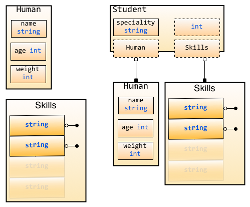
We see that we can access the age and name fields in Student just like we can in Human. This is how embedded fields work. We can even use Student to access Human in this embedded field!
1 mark.Human = Human{"Marcus", 55, 220}
2 mark.Human.age -= 1
All the types in Go can be used as embedded fields.
file: code/Struct/Skills/skills.go
 1 package main
 2
 3 import "fmt"
 4
 5 type Skills []string
 6
 7 type Human struct {
 8 	name   string
 9 	age    int
10 	weight int
11 }
12
13 type Student struct {
14 	Human     // struct as embedded field
15 	Skills    // string slice as embedded field
16 	int       // built-in type as embedded field
17 	specialty string
18 }
19
20 func main() {
21 	// initialize Student Jane
22 	jane := Student{Human: Human{"Jane", 35, 100}, specialty: "Biology"}
23 	// access fields
24 	fmt.Println("Her name is ", jane.name)
25 	fmt.Println("Her age is ", jane.age)
26 	fmt.Println("Her weight is ", jane.weight)
27 	fmt.Println("Her specialty is ", jane.specialty)
28 	// modify value of skill field
29 	jane.Skills = []string{"anatomy"}
30 	fmt.Println("Her skills are ", jane.Skills)
31 	fmt.Println("She acquired two new ones ")
32 	jane.Skills = append(jane.Skills, "physics", "golang")
33 	fmt.Println("Her skills now are ", jane.Skills)
34 	// modify embedded field
35 	jane.int = 3
36 	fmt.Println("Her preferred number is ", jane.int)
37 }
In the above example, we can see that all types can be embedded fields and we can use functions to operate on them.
When we embed Human inside Employee, if Human and Employee have the phone field, then it isn’t a problem. Because we access Employee’s phone as Employee.Phone, but since Human is an embedded field inside Employee, we access Human’s phone as Employee.Human.Phone
file: code/Struct/Employee/employee.go
 1 package main
 2
 3 import "fmt"
 4
 5 type Human struct {
 6 	name  string
 7 	age   int
 8 	phone string // Human has phone field
 9 }
10
11 type Employee struct {
12 	Human     // embedded field Human
13 	specialty string
14 	phone     string // phone in employee
15 }
16
17 func main() {
18 	Bob := Employee{Human{"Bob", 34, "777-444-XXXX"},
19 		"Designer", "333-222"}
20 	fmt.Println("Bob's work phone is:", Bob.phone)
21 	// access phone field in Human
22 	fmt.Println("Bob's personal phone is:", Bob.Human.phone)
23 }