Membuat Aplikasi Kontak Sederhana
I. Pengantar
Setelah kita belajar tentang apa Controller, Routing, Entity, Form serta View, maka sekarang saatnya untuk mengintegrasikan semuanya menjadi sebuah aplikasi sederhana yang bermanfaat. Sebagai studi kasus, kita akan membuat sebuah aplikasi Kontak sederhana. Pada aplikasi ini kita hanya punya satu tabel saja yaitu tabel kontak tanpa ada relasi dengan tabel lain sama sekali. Hal ini bertujuan agar kita lebih memahami apa yang telah kita pelajar terlebih dahulu.
II. Pembuatan Entity
Pada aplikasi Kontak Sederhana ini, kita akan membuat sebuah entity bernama Contact dengan fields id, name, phoneNumber dan email sebagai berikut:
 1 <?php
 2
 3 //filename: AppBundle/Entity/Contact.php
 4
 5 namespace AppBundle\Entity;
 6
 7 use Doctrine\ORM\Mapping as ORM;
 8
 9 /**
10  * @ORM\Entity
11  * @ORM\Table(name="contacts")
12  */
13 class Contact
14 {
15     /**
16      * @ORM\Id
17      * @ORM\Column(name="id", type="integer")
18      * @ORM\GeneratedValue(strategy="AUTO")
19      */
20     private $id;
21
22     /**
23      * @ORM\Column(name="name", type="string", length=7\
24 7)
25      */
26     private $name;
27
28     /**
29      * @ORM\Column(name="phone_number", type="string", \
30 length=17)
31      */
32     private $phoneNumber;
33
34     /**
35      * @ORM\Column(name="email", type="string", length=\
36 255)
37      */
38     private $email;
39 }
Selanjutnya kita akan membuat setter dan getter method dengan menjalankan perintah php bin/console doctrine:generate:entities AppBundle:Contact sehingga hasilnya akan menjadi seperti ini:
  1 <?php
  2
  3 //filename: AppBundle/Entity/Contact.php
  4
  5 namespace AppBundle\Entity;
  6
  7 use Doctrine\ORM\Mapping as ORM;
  8
  9 /**
 10  * @ORM\Entity
 11  * @ORM\Table(name="contacts")
 12  */
 13 class Contact
 14 {
 15     /**
 16      * @ORM\Id
 17      * @ORM\Column(name="id", type="integer")
 18      * @ORM\GeneratedValue(strategy="AUTO")
 19      */
 20     private $id;
 21
 22     /**
 23      * @ORM\Column(name="name", type="string", length=7\
 24 7)
 25      */
 26     private $name;
 27
 28     /**
 29      * @ORM\Column(name="phone_number", type="string", \
 30 length=17)
 31      */
 32     private $phoneNumber;
 33
 34     /**
 35      * @ORM\Column(name="email", type="string", length=\
 36 255)
 37      */
 38     private $email;
 39
 40     /**
 41      * Get id
 42      *
 43      * @return integer
 44      */
 45     public function getId()
 46     {
 47         return $this->id;
 48     }
 49
 50     /**
 51      * Set name
 52      *
 53      * @param string $name
 54      *
 55      * @return Contact
 56      */
 57     public function setName($name)
 58     {
 59         $this->name = $name;
 60
 61         return $this;
 62     }
 63
 64     /**
 65      * Get name
 66      *
 67      * @return string
 68      */
 69     public function getName()
 70     {
 71         return $this->name;
 72     }
 73
 74     /**
 75      * Set phoneNumber
 76      *
 77      * @param string $phoneNumber
 78      *
 79      * @return Contact
 80      */
 81     public function setPhoneNumber($phoneNumber)
 82     {
 83         $this->phoneNumber = $phoneNumber;
 84
 85         return $this;
 86     }
 87
 88     /**
 89      * Get phoneNumber
 90      *
 91      * @return string
 92      */
 93     public function getPhoneNumber()
 94     {
 95         return $this->phoneNumber;
 96     }
 97
 98     /**
 99      * Set email
100      *
101      * @param string $email
102      *
103      * @return Contact
104      */
105     public function setEmail($email)
106     {
107         $this->email = $email;
108
109         return $this;
110     }
111
112     /**
113      * Get email
114      *
115      * @return string
116      */
117     public function getEmail()
118     {
119         return $this->email;
120     }
121 }
Setelah men-generate setter dan getter method, kita akan membuat tabel pada database dengan menjalankan perintah php bin/console doctrine:schema:update --force.
Sampai disini, kita telah selesai untuk membuat entity lengkap dengan tabel database-nya.
III. Pembuatan Form
Untuk form yang akan kita gunakan untuk memanipulasi entity Contact, kita akan membuatnya seperti berikut:
 1 <?php
 2
 3 //filename: AppBundle/Form/Type/ContactType.php
 4
 5 namespace AppBundle\Form\Type;
 6
 7 use AppBundle\Entity\Contact;
 8 use Symfony\Component\Form\AbstractType;
 9 use Symfony\Component\Form\Extension\Core\Type\EmailTyp\
10 e;
11 use Symfony\Component\Form\Extension\Core\Type\TextType;
12 use Symfony\Component\Form\FormBuilderInterface;
13 use Symfony\Component\OptionsResolver\OptionsResolver;
14
15 class ContactType extends AbstractType
16 {
17     /**
18      * @param FormBuilderInterface $builder
19      * @param array $options
20      */
21     public function buildForm(FormBuilderInterface $bui\
22 lder, array $options)
23     {
24         $builder
25             ->add('name', TextType::class)
26             ->add('phoneNumber', TextType::class)
27             ->add('email', EmailType::class)
28         ;
29     }
30
31     /**
32      * @param OptionsResolver $resolver
33      */
34     public function configureOptions(OptionsResolver $r\
35 esolver)
36     {
37         $resolver->setDefaults(array(
38             'data_class' => Contact::class
39         ));
40     }
41 }
Pada pembahasan kali ini, kita menggunakan satu form type baru yaitu EmailType. EmailType adalah form type untuk didalamnya telah di-built-in HTML5 email validator, sehingga untuk penggunaan normal, kita tidak perlu melakukan pengecekan input-an sama sekali.
IV. Pembuatan Controller
Controller yang akan kita gunakan untuk memanipulasi entity Contact adalah sebagai berikut:
  1 <?php
  2
  3 //filename: AppBundle/Controller/ContactController.php
  4
  5 namespace AppBundle\Controller;
  6
  7 use Symfony\Component\HttpFoundation\Request;
  8 use Symfony\Bundle\FrameworkBundle\Controller\Controlle\
  9 r;
 10 use Sensio\Bundle\FrameworkExtraBundle\Configuration\Me\
 11 thod;
 12 use Sensio\Bundle\FrameworkExtraBundle\Configuration\Ro\
 13 ute;
 14 use AppBundle\Entity\Contact;
 15 use AppBundle\Form\Type\ContactType;
 16 use Symfony\Component\HttpKernel\Exception\NotFoundHttp\
 17 Exception;
 18
 19 /**
 20  * Contact controller.
 21  *
 22  * @Route("/contact")
 23  */
 24 class ContactController extends Controller
 25 {
 26     /**
 27      * Lists all Contact entities.
 28      *
 29      * @Route("/", name="contact_index")
 30      * @Method("GET")
 31      */
 32     public function indexAction()
 33     {
 34         $em = $this->getDoctrine()->getManager();
 35
 36         $contacts = $em->getRepository('AppBundle:Conta\
 37 ct')->findAll();
 38
 39         return $this->render('AppBundle:contact:index.h\
 40 tml.twig', array(
 41             'contacts' => $contacts,
 42         ));
 43     }
 44
 45     /**
 46      * Creates a new Contact entity.
 47      *
 48      * @Route("/new", name="contact_new")
 49      * @Method({"GET", "POST"})
 50      */
 51     public function newAction(Request $request)
 52     {
 53         $contact = new Contact();
 54         $form = $this->createForm(ContactType::class, $\
 55 contact);
 56         $form->handleRequest($request);
 57
 58         if ($form->isSubmitted() && $form->isValid()) {
 59             $em = $this->getDoctrine()->getManager();
 60             $em->persist($contact);
 61             $em->flush();
 62
 63             return $this->redirectToRoute('contact_show\
 64 ', array('id' => $contact->getId()));
 65         }
 66
 67         return $this->render('AppBundle:contact:new.htm\
 68 l.twig', array(
 69             'form' => $form->createView(),
 70         ));
 71     }
 72
 73     /**
 74      * Finds and displays a Contact entity.
 75      *
 76      * @Route("/{id}", name="contact_show")
 77      * @Method("GET")
 78      */
 79     public function showAction($id)
 80     {
 81         $contact = $this->getDoctrine()->getRepository(\
 82 'AppBundle:Contact')->find($id);
 83         if (!$contact) {
 84             throw new NotFoundHttpException(sprintf('Ko\
 85 ntak dengan id %d tidak ditemukan', $id));
 86         }
 87
 88         $deleteForm = $this->createDeleteForm($contact);
 89
 90         return $this->render('AppBundle:contact:show.ht\
 91 ml.twig', array(
 92             'contact' => $contact,
 93             'delete_form' => $deleteForm->createView(),
 94         ));
 95     }
 96
 97     /**
 98      * Displays a form to edit an existing Contact enti\
 99 ty.
100      *
101      * @Route("/{id}/edit", name="contact_edit")
102      * @Method({"GET", "POST"})
103      */
104     public function editAction(Request $request, $id)
105     {
106         $contact = $this->getDoctrine()->getRepository(\
107 'AppBundle:Contact')->find($id);
108         if (!$contact) {
109             throw new NotFoundHttpException(sprintf('Ko\
110 ntak dengan id %d tidak ditemukan', $id));
111         }
112
113         $deleteForm = $this->createDeleteForm($contact);
114         $editForm = $this->createForm(ContactType::clas\
115 s, $contact);
116         $editForm->handleRequest($request);
117
118         if ($editForm->isSubmitted() && $editForm->isVa\
119 lid()) {
120             $em = $this->getDoctrine()->getManager();
121             $em->persist($contact);
122             $em->flush();
123
124             return $this->redirectToRoute('contact_edit\
125 ', array('id' => $contact->getId()));
126         }
127
128         return $this->render('AppBundle:contact:edit.ht\
129 ml.twig', array(
130             'edit_form' => $editForm->createView(),
131             'delete_form' => $deleteForm->createView(),
132         ));
133     }
134
135     /**
136      * Deletes a Contact entity.
137      *
138      * @Route("/{id}", name="contact_delete")
139      * @Method("DELETE")
140      */
141     public function deleteAction(Request $request, $id)
142     {
143         $contact = $this->getDoctrine()->getRepository(\
144 'AppBundle:Contact')->find($id);
145         if (!$contact) {
146             throw new NotFoundHttpException(sprintf('Ko\
147 ntak dengan id %d tidak ditemukan', $id));
148         }
149
150         $form = $this->createDeleteForm($contact);
151         $form->handleRequest($request);
152
153         if ($form->isSubmitted() && $form->isValid()) {
154             $em = $this->getDoctrine()->getManager();
155             $em->remove($contact);
156             $em->flush();
157         }
158
159         return $this->redirectToRoute('contact_index');
160     }
161
162     /**
163      * Creates a form to delete a Contact entity.
164      *
165      * @param Contact $contact The Contact entity
166      *
167      * @return \Symfony\Component\Form\Form The form
168      */
169     private function createDeleteForm(Contact $contact)
170     {
171         return $this->createFormBuilder()
172             ->setAction($this->generateUrl('contact_del\
173 ete', array('id' => $contact->getId())))
174             ->setMethod('DELETE')
175             ->getForm()
176         ;
177     }
178 }
Penjelasan dari setiap method dalam controller adalah sebagai berikut:
a. indexAction
 1     public function indexAction()
 2     {
 3         $em = $this->getDoctrine()->getManager();
 4
 5         $contacts = $em->getRepository('AppBundle:Conta\
 6 ct')->findAll();
 7
 8         return $this->render('AppBundle:contact:index.h\
 9 tml.twig', array(
10             'contacts' => $contacts,
11         ));
12     }
- Pada baris
$em = $this->getDoctrine()->getManager(), kita memanggilEntityManager. - Pada baris
$contacts = $em->getRepository('AppBundle:Contact')->findAll(), kita mengambil semua data kontak dariContactrepository. - Pada baris selanjutnya, kita me-render view
AppBundle:contact:index.html.twigdan memasukkan$contactsdalam view sebagaicontacts.
** b. newAction**
 1     public function newAction(Request $request)
 2     {
 3         $contact = new Contact();
 4         $form = $this->createForm(ContactType::class, $\
 5 contact);
 6         $form->handleRequest($request);
 7
 8         if ($form->isSubmitted() && $form->isValid()) {
 9             $em = $this->getDoctrine()->getManager();
10             $em->persist($contact);
11             $em->flush();
12
13             return $this->redirectToRoute('contact_show\
14 ', array('id' => $contact->getId()));
15         }
16
17         return $this->render('AppBundle:contact:new.htm\
18 l.twig', array(
19             'form' => $form->createView(),
20         ));
21     }
- Pada baris
$contact = new Contact(), kita membuat object baru untuk kontak. - Pada baris
$form = $this->createForm(ContactType::class, $contact), kita membuat object form dan memasukkan$contactsebagai default data-nya - Pada baris
$form->handleRequest($request), form meng-handle request yang masuk dari client. Disini, request yang masuk dari client di-mapping sesuaidata_classpada formContactType. - Pada baris
if ($form->isSubmitted() && $form->isValid()), kita mengecek apakah form tersebut di-submit (client mengirim menggunakan methodPOST) dan apakah form tersebut valid inputannya. - Tiga baris selanjutnya, saya anggap Anda sudah paham. Jika belum, silahkan baca kembali bab sebelumnya tentang
Doctrine - Pada baris
return $this->redirectToRoute('contact_show', array('id' => $contact->getId())), jika proses insert ke database berhasil maka client akan di-redirect ke route dengan namacontact_show - Baris terakhir, secara default (client tidak melakukan submit data atau data yang di-input tidak valid), maka akan menampilkan view
AppBundle:contact:new.html.twigyang berisi form.
c. showAction
 1     public function showAction($id)
 2     {
 3         $contact = $this->getDoctrine()->getRepository(\
 4 'AppBundle:Contact')->find($id);
 5         if (!$contact) {
 6             throw new NotFoundHttpException(sprintf('Ko\
 7 ntak dengan id %d tidak ditemukan', $id));
 8         }
 9
10         $deleteForm = $this->createDeleteForm($contact);
11
12         return $this->render('AppBundle:contact:show.ht\
13 ml.twig', array(
14             'contact' => $contact,
15             'delete_form' => $deleteForm->createView(),
16         ));
17     }
- Pada baris
$contact = $this->getDoctrine()->getRepository('AppBundle:Contact')->find($id), kita mencoba mengambil data kontak berdasarkan$id - Pada baris
throw new NotFoundHttpException(sprintf('Kontak dengan id %d tidak ditemukan', $id)), akan menampilkan pesan error jika kontak dengan id$idtidak ditemukan. - Pada baris
$deleteForm = $this->createDeleteForm($contact), kita membuatformuntuk keperluan operasidelete. Sebuah form sederhana yang berisi route untuk operasi delete.
d. editAction
 1     public function editAction(Request $request, $id)
 2     {
 3         $contact = $this->getDoctrine()->getRepository(\
 4 'AppBundle:Contact')->find($id);
 5         if (!$contact) {
 6             throw new NotFoundHttpException(sprintf('Ko\
 7 ntak dengan id %d tidak ditemukan', $id));
 8         }
 9
10         $deleteForm = $this->createDeleteForm($contact);
11         $editForm = $this->createForm(ContactType::clas\
12 s, $contact);
13         $editForm->handleRequest($request);
14
15         if ($editForm->isSubmitted() && $editForm->isVa\
16 lid()) {
17             $em = $this->getDoctrine()->getManager();
18             $em->persist($contact);
19             $em->flush();
20
21             return $this->redirectToRoute('contact_edit\
22 ', array('id' => $contact->getId()));
23         }
24
25         return $this->render('AppBundle:contact:edit.ht\
26 ml.twig', array(
27             'edit_form' => $editForm->createView(),
28             'delete_form' => $deleteForm->createView(),
29         ));
30     }
Saya anggap Anda sudah mengerti maksud dari baris code diatas. Karena semua penjelasannya sudah ada pada penjelasan sebelumnya.
** e. deleteAction**
 1     public function deleteAction(Request $request, $id)
 2     {
 3         $contact = $this->getDoctrine()->getRepository(\
 4 'AppBundle:Contact')->find($id);
 5         if (!$contact) {
 6             throw new NotFoundHttpException(sprintf('Ko\
 7 ntak dengan id %d tidak ditemukan', $id));
 8         }
 9
10         $form = $this->createDeleteForm($contact);
11         $form->handleRequest($request);
12
13         if ($form->isSubmitted() && $form->isValid()) {
14             $em = $this->getDoctrine()->getManager();
15             $em->remove($contact);
16             $em->flush();
17         }
18
19         return $this->redirectToRoute('contact_index');
20     }
Pada code diatas pun sama, saya anggap Anda sudah paham.
V. Pembuatan View
a . new.html.twig
 1 {% extends 'base.html.twig' %}
 2
 3 {% block body %}
 4     <h1>Contact creation</h1>
 5
 6     {{ form_start(form) }}
 7         {{ form_widget(form) }}
 8         <input type="submit" value="Create" />
 9     {{ form_end(form) }}
10
11     <ul>
12         <li>
13             <a href="{{ path('contact_index') }}">Back \
14 to the list</a>
15         </li>
16     </ul>
17 {% endblock %}
- Pada baris
{% extends 'base.html.twig' %}, kita meng-extends templatebase.html.twigyang ada diapp/Resources/views. - Pada baris
{% block body %}hingga{% endblock %}, kita mendefinisikan ulangblockbody yang ada dibase.html.twig. - Pada baris
{{ path('contact_index') }}, kita men-generate url untuk route dengan namacontact_index
b. edit.html.twig
 1 {% extends 'base.html.twig' %}
 2
 3 {% block body %}
 4     <h1>Contact edit</h1>
 5
 6     {{ form_start(edit_form) }}
 7         {{ form_widget(edit_form) }}
 8         <input type="submit" value="Edit" />
 9     {{ form_end(edit_form) }}
10
11     <ul>
12         <li>
13             <a href="{{ path('contact_index') }}">Back \
14 to the list</a>
15         </li>
16         <li>
17             {{ form_start(delete_form) }}
18                 <input type="submit" value="Delete">
19             {{ form_end(delete_form) }}
20         </li>
21     </ul>
22 {% endblock %}
Saya anggap Anda sudah paham.
c. show.html.twig
 1 {% extends 'base.html.twig' %}
 2
 3 {% block body %}
 4     <h1>Contact</h1>
 5
 6     <table>
 7         <tbody>
 8             <tr>
 9                 <th>Id</th>
10                 <td>{{ contact.id }}</td>
11             </tr>
12             <tr>
13                 <th>Name</th>
14                 <td>{{ contact.name }}</td>
15             </tr>
16             <tr>
17                 <th>Phonenumber</th>
18                 <td>{{ contact.phoneNumber }}</td>
19             </tr>
20             <tr>
21                 <th>Email</th>
22                 <td>{{ contact.email }}</td>
23             </tr>
24         </tbody>
25     </table>
26
27     <ul>
28         <li>
29             <a href="{{ path('contact_index') }}">Back \
30 to the list</a>
31         </li>
32         <li>
33             <a href="{{ path('contact_edit', { 'id': co\
34 ntact.id }) }}">Edit</a>
35         </li>
36         <li>
37             {{ form_start(delete_form) }}
38                 <input type="submit" value="Delete">
39             {{ form_end(delete_form) }}
40         </li>
41     </ul>
42 {% endblock %}
- Pada baris
{{ contact.id }}, sama saja dengan$contact->getId()karena pada twig notasi dot (.) dapat bermakna array key atau method calling. Namun agar tidak terjadi kebingungan, sebaiknya untuk pemanggilan array menggunakan cara seperti pada PHP yaitu dengan$array['index']atau jika dalam twig menjadi{{ array['index'] }}. - Pada baris
{{ path('contact_edit', { 'id': contact.id }) }}, terutama pada{ 'id': contact.id }. Ini adalah cara mem-passing route param pada twig, tidak jauh berbeda dengan mem-passing route param pada controller.
**d. index.html.twig``
 1 {% extends 'base.html.twig' %}
 2
 3 {% block body %}
 4     <h1>Contact list</h1>
 5
 6     <table>
 7         <thead>
 8             <tr>
 9                 <th>Id</th>
10                 <th>Name</th>
11                 <th>Phonenumber</th>
12                 <th>Email</th>
13                 <th>Actions</th>
14             </tr>
15         </thead>
16         <tbody>
17         {% for contact in contacts %}
18             <tr>
19                 <td><a href="{{ path('contact_show', { \
20 'id': contact.id }) }}">{{ contact.id }}</a></td>
21                 <td>{{ contact.name }}</td>
22                 <td>{{ contact.phoneNumber }}</td>
23                 <td>{{ contact.email }}</td>
24                 <td>
25                     <ul>
26                         <li>
27                             <a href="{{ path('contact_s\
28 how', { 'id': contact.id }) }}">show</a>
29                         </li>
30                         <li>
31                             <a href="{{ path('contact_e\
32 dit', { 'id': contact.id }) }}">edit</a>
33                         </li>
34                     </ul>
35                 </td>
36             </tr>
37         {% endfor %}
38         </tbody>
39     </table>
40
41     <ul>
42         <li>
43             <a href="{{ path('contact_new') }}">Create \
44 a new entry</a>
45         </li>
46     </ul>
47 {% endblock %}
- Pada baris
{% for contact in contacts %}hingga{% endfor %}, ini adalah cara looping di twig.
VI. Menjalankan Aplikasi
Setelah semuanya selesai, maka sekarang saatnya kita mencoba untuk menjalankan aplikasi kita. Setelah kita menjalankan web server dengan mengetikan perintah php bin/console server:run, selanjutnya kita mengetikan di browser alamat localhost:8000/contact.
Bila tidak ada error, Anda akan medapati halaman sebagai berikut:
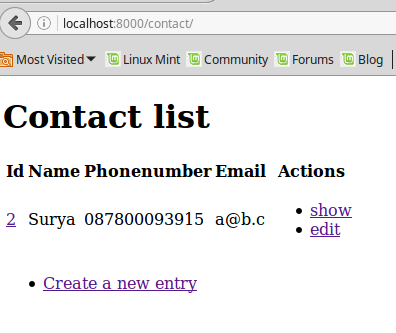
Kemudian jika kita mengeklik link Create a new entry maka akan tampil sebagai berikut:
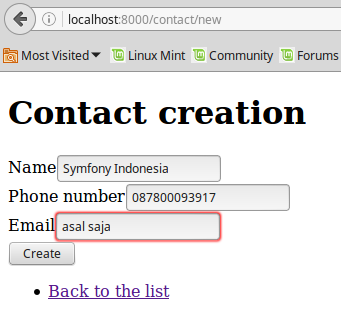
Pada gambar terlihat jika saya memasukkan alamat email tidak sesuai dengan format email yang benar maka akan muncul error dan form tidak dapat di submit.
Setelah kita input data dengan benar, dan kita submit, maka akan muncul tampilan berikut:
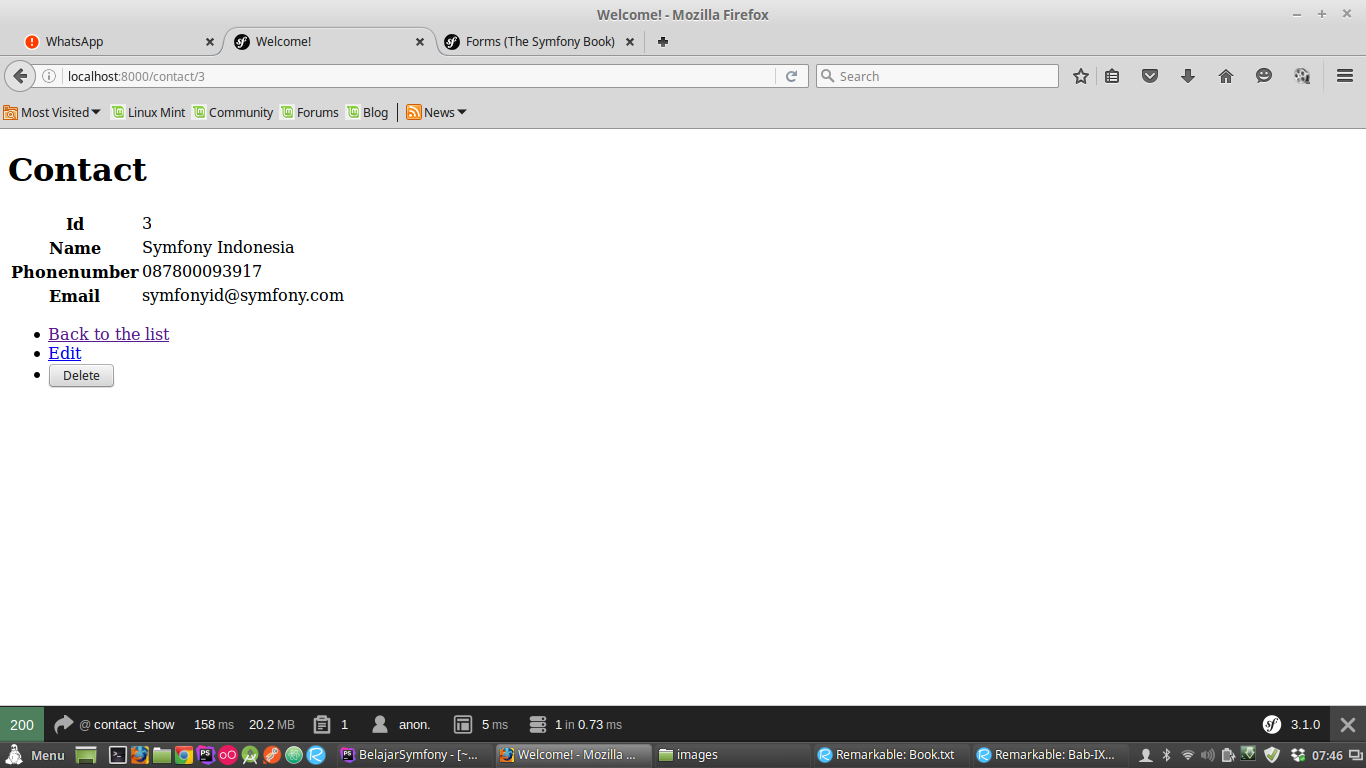
Kita bisa meneruskan percobaan tersebut dan mengetes semua fungsi yang telah kita buat.
VII. Kesimpulan
Untuk membuat operasi CRUD sederhana dengan Symfony sangatlah mudah dan cepat. Di Symfony kita diajarkan untuk fokus pada code yang kita bangun, sedangkan database diserahkan management-nya kepada Doctrine sehingga kita tidak perlu membuat database dan merancang tabel seperti yang biasa kita lakukan.
Untuk membuat operasi CRUD sederhana diatas, Doctrine sebenarnya dapat membuatnya dengan sangat mudah. Anda cukup menjalankan perintah php bin/console doctrine:generate:crud AppBundle:Contact maka Anda akan dibuatkan Form, Controller dan View lengkap dengan Unit Testing-nya oleh Doctrine.
Saya tidak memperkenalkan perintah diatas, agar Anda lebih memahami code yang Anda tulis terlebih dahulu.