Guest Post By Author Max Guernsey, III: How to Automate Publishing Chapters in a Serial Novel
Some weeks, I write three chapters. Some I write none. So, my solution has been to have a "hopper" of additional chapters and drip them out once a week.


How to Automate Publishing a Serial Novel on Leanpub
In this post, I’ll show you how to have scheduled automatic publications of individual chapters in a Leanpub book.
This is a description of how I got:
- A CI job that automatically triggers previews
- A daily job that publishes scheduled releases
- A manually triggered job that forces release of the next chapter and reschedules all successors
What is Assumed
This article assumes the following:
- You are using the GitHub writing mode
- You are comfortable with GitHub workflows
- You are using the Leanpub Pro plan that allows access to the API
- You either will use the proposed branch names or change the supplied scripts to match your preferences
Why Automate?
I’m writing a series of novels on Leanpub. The first book in the series is No Direction.
This is not a small book. It’s looking like it will be around 60+ chapters and 800 pages long, so this book is a great candidate for the Leanpub equivalent of a serial novel—a book that is released one chapter at a time.
The schedule I’ve chosen is one chapter a week. Some people do one a month, but I don’t think very many people want to wait five years to see how a novel will end, and I don’t want to wait five years to be done with it. So I’m publishing weekly.
However, my schedule prevents me from writing consistently. Some weeks, I write three chapters. Some I write none. So, my solution has been to have a “hopper” of additional chapters and drip them out once a week. This allows the book to present smooth, consistent progress to readers, even though my writing schedule is anything but smooth or consistent.
Now add in the fact that I’m lazy, paranoid about preventable errors, and a developer, and it’s almost a foregone conclusion that I would want to automate how I publish.
Continuous Preview
The first thing I wanted was to not have to push the generate preview button on the Leanpub previews page. This was easily accomplished with a simple GitHub workflow:
name: Automatic Preview on Leanpub

on:
  push:
    branches: [master]

jobs:
  notify:
    runs-on: ubuntu-latest
    steps:
      - name: Post to Leanpub
        run: |
          curl -sS --fail-with-body -w "\n%{http_code}" \
            -X POST https://leanpub.com/no-direction/preview.json \
            -H "Content-Type: application/x-www-form-urlencoded" \
            --data-urlencode "api_key=${{ secrets.LEANPUB_API_KEY }}"
This basically works as is. You will need to replace the slug no-direction with your own book’s slug, of course, and set up a GitHub Secret with your Leanpub API Key. But, otherwise, it’s pretty straightforward.
Scheduled Releases, the Manual Way
Once I really got going on No Direction, I started wanting to write ahead.
I accomplished this by splitting each chapter into its own Markua file as shown below:
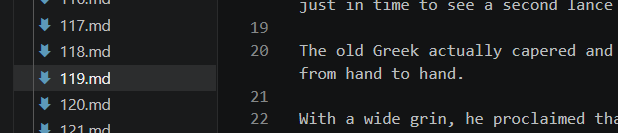
I then make sure only the actually published chapters are referenced in my book.txt:
000.txt
099-end-of-frontmatter.md
100-prologue.md
101.md
102.md
103.md
104.md
105.md
106.md
107.md
108.md
109.md
110.md
111.md
112.md
113.md
114.md
115.md
116.md
On the day of a release, I could just add a new chapter to book.txt, push the commit, and manually publish a new chapter. After the chapter is released, I could then safely schedule social media posts promoting it.
It allowed me to write ahead of publication, but the process requires light labor and heavy coordination with other tasks. Worse: it’s error-prone. What if I accidentally publish with the full book.txt list? What if I fail to publish the chapter after I’ve already scheduled a tweet?
Even for a small project, those kinds of risks and dependencies put an itch between my shoulder blades that I just can’t reach.
Automating Releases
So, I reorganized how I do things.
To schedule a release, I add a subfolder with a name like 2026.08.28 to a folder named scheduled. The name of the subfolder matters: it must be the target publication date in the specific format YYYY.MM.DD.
The folder contains an updated book.txt that will be applied at the moment of publication. It also contains metadata to send to Leanpub: the estimated percent complete and the content of the release email.
I have a workflow that runs daily, looking for a folder under scheduled with a name that matches the current date. If it finds one, it:
- Applies the
book.txtfile tomaster - Makes
publishpoint to the same commit asmaster - Requests a publication based on the found metadata
- Waits for the publication to complete
- Deletes the folder with the scheduling information
The reason it waits until the end to consume the scheduling folder is to allow for a retry if something goes wrong.
This provides a dependable release pipeline that is resilient to potential disruptions of Leanpub’s API.
Example Publication Folder
What goes into a scheduled folder is pretty straightforward.
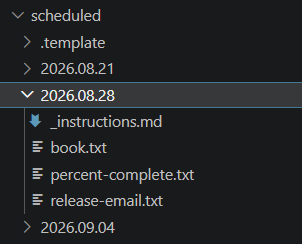
It contains:
- An updated
book.txtwith the complete list of chapters that should be published - A
percent-complete.txtfile that contains my estimation of the book’s completion - A
release-email.txtfile that contains the content to be emailed to existing readers
I admit. My publication workflow is not pretty. I’ve attached it here.
You will need to update it to replace no-direction with your own slug.
Also, if you use Visual Studio Code, you may find this _instructions.md file to be useful:
To schedule a new publication, start by copying this folder to a folder with a name that indicates the date. You must use the following format:

```
YYYY.MM.DD
```

Then, create the following files:

| File                                         | Need     | Purpose                                                               |
| -------------------------------------------- | -------- | --------------------------------------------------------------------- |
| [book.txt](book.txt)                         | Required | Will update the [authoritative book.txt](../../manuscript/book.txt)   |
| [percent-complete.txt](percent-complete.txt) | Required | Sets the percentage complete                                          |
| [release-email.txt](release-email.txt)       | Optional | If this exists, an email will be sent to the readers with its content |
I keep it in the .template folder that I copy whenever I want to schedule a new publication. I can then Ctrl+Click on each of those links and have vscode automatically create the file I need.
Forcing Publication
I do not write consistently, but I do write a lot. My hopper of chapters filled up, and then I was suddenly faced with a new challenge: I want to release an extra chapter when the queue of chapters to release is overflowing.
I solved this by adding a “release valve” workflow. This workflow reschedules the next publication to the current day and then moves all following scheduled publications up one “slot”.
For example, assume I had the following publication schedule (intentionally not shown as a weekly drip):
| Chapter | Date |
|---|---|
| N | 3 days from today |
| N+1 | 9 days from today |
| N+2 | 11 days from today |
When I run the force publication workflow, the schedule will become:
| Chapter | Date |
|---|---|
| N | today |
| N+1 | 3 days from today |
| N+2 | 9 days from today |
The scheduled publication job is then triggered, which publishes the chapter that has been rescheduled for today, leaving the rest of the schedule intact.
While I only use a weekly schedule now, it seemed wise to have the scripts be schedule-agnostic like that.
Changes to Workflows
The workflow for this is a little bit nicer-looking than the core release workflow:
name: Force Release

on:
  workflow_dispatch:

permissions:
  contents: write

env:
  RELEASE_DIRECTORY: scheduled
  TZ: America/Los_Angeles

jobs:
  force-release:
    runs-on: ubuntu-latest

    steps:
      - uses: actions/checkout@v7
        with:
          ref: ${{ github.ref_name }}

      - name: Validate release
        run: ./scripts/validate-force-release.sh "$RELEASE_DIRECTORY"

      - name: Shift release schedule
        run: ./scripts/shift-release-schedule.sh "$RELEASE_DIRECTORY"

      - name: Commit new schedule
        shell: bash
        run: |
          git config user.name "github-actions[bot]"
          git config user.email "41898282+github-actions[bot]@users.noreply.github.com"

          git commit -am "Force release $(date +%F)"
          git push
But it requires two scripts:
validate-force-release.sh
shift-release-schedule.sh
Once the rescheduling has been completed, the normal scheduled publication job will push out the next chapter when it runs. To ensure it runs, I updated its trigger as follows:
  workflow_run:
    workflows: ["Force Release"]
    types: [completed]
Conclusion
To make this work, you have to write your book in a modular way, if you’re not already doing that. Once you’ve adjusted your process, installing these workflows into your repo will make it so that you:
- Get a preview whenever you push
- Get scheduled releases published automatically
- Can easily force the next chapter to publish if your queue begins to overflow
It works for me, and I hope it helps you too.
By Max Guernsey, III, Author of the Novel No Direction